By Yahai
After UGC game platforms integrate Coding Agents into the creation pipeline, they typically experience the same phase: the demo is stunning, but the online experience is frustrating. A user says, "Make me a 100-day survival shooting game," and the Agent writes thousands of lines of Lua, calls dozens of tools, and finally replies, "All done." But when the player enters, they find the gun is spawned, the monsters are generated, and the HUD is there, but there is no ground—the Agent didn't build the scene at all, and its description made no mention of this.
The commonality of such issues is: the Agent's "description" is untrustworthy, only the "trajectory" is trustworthy. The reason why most teams get stuck here is also very consistent—there is no verifiable trajectory, no evaluation standards aligned with business goals, and no regression-verifiable datasets. Consequently, optimization relies entirely on manual trials; after changes, no one knows if it improved, or why it improved if it did.
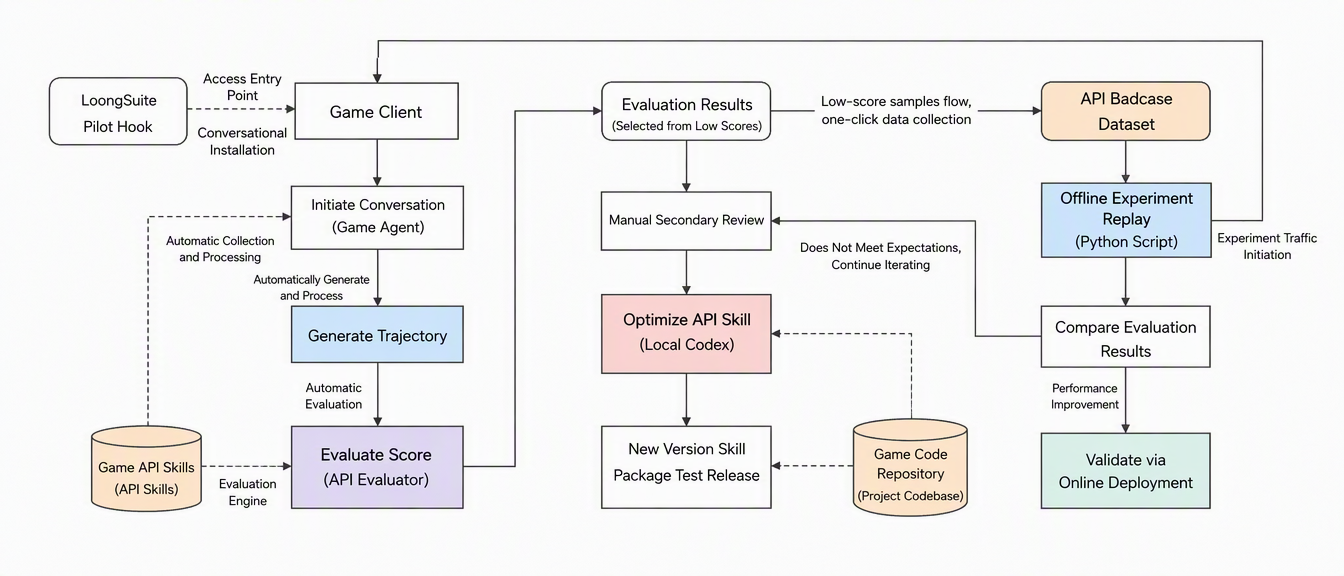
This guide offers a proven path: Observation & Evidence Gathering → Layered Evaluation → Root Cause Location → Optimization Writeback → Dataset Regression → Normalized Monitoring. In practice, this path completed its first closed loop in 3 days, catching more than 5 code generation bugs and API documentation defects in the production environment. Below, we break it down step-by-step, providing acceptance criteria and pitfalls for each step.
This is the most easily skipped—and most fatal—step. The quality issues of UGC game Agents are not unidimensional; evaluating them all together yields a total score that can neither be explained nor optimized. In the landing stage, it is recommended to start with two layers, capturing the parts with the highest certainty and most direct returns.
| Layer | Concerns | Typical Failure Example | Suitable Evaluation Form |
|---|---|---|---|
| General Layer | Whether the Agent finished the job, whether the tools were used smoothly, and whether the trajectory is reasonable | Reading non-existent reference docs, tool errors due to incorrect parameter formats, invalid retries, giving up halfway | Built-in general evaluators on the AgentLoop platform, such as tool call success rate, task completion, etc., ready to use out-of-the-box |
| Fact Layer | Whether the generated code conforms to the actual definitions of the platform API | Reversing parameter order, calling module functions as instance methods, calling non-existent methods | Custom Agent Judge + Game API Skill as the single source of truth |
My suggestion: Go live with the general layer first (results can be obtained on day one), followed closely by the fact layer (highest return). In practice, on the first day, we relied on the built-in "tool call success rate" evaluator to catch tool call failure issues in both test and production environments simultaneously, which was then confirmed by expert secondary review—this was the first lever to make the business side believe in the efficacy of this method. The API factuality evaluator launched on the second day dug out over 5 code generation bugs and API doc defects directly in the production environment.
There is another layer called the "Gameplay Layer"—determining whether the created content is indeed what the user wanted. This layer is highly valuable, but equally risky: the gameplay on UGC platforms is dreamed up by players, not listed by us. If the evaluation criteria are hardcoded, they will become the ceiling of creativity. Therefore, we place this layer after the general and fact layers have stabilized, and we will briefly expand on this idea at the end of this article.
The Agent architecture in UGC game scenarios is typically divided into Game Client - Go Gateway - Agent Runtime (e.g., Claude Code) - External Dependencies (Models, Tools, Knowledge Base, etc.). There are two paths for integration:
| Method | Applicability | Advantages | Cost |
|---|---|---|---|
| Hook Method (LoongSuite Pilot Hook) | Quick validation, paving the pipeline | Minimal changes, integrates and displays data within 1 hour, complete LLM / Tool / RAG data, aligns with OTel semantic specifications | Difficult to achieve cross-process tag transmission |
| Agent Method (Auto-instrumentation via Language Agent) | Deep usage, personalized customization | Supports deep customization, expanding business instrumentation and tags, and connecting cross-process traces | Requires integrating agents by language and configuring environment variables |
Both methods support using natural language to let the Agent automatically complete the integration—simply tell the integration instructions to the Agent, and let it perform the installation and parameter configuration, avoiding manual commands.
The practical rhythm is: Day 1, use the Hook to quickly establish the pipeline and validate value; Day 2, switch to Agent integration as needed. After switching, the integration of the Coding Agent was completed using the Node.js agent, and the three categories of data—LLM calls, Tool calls, and RAG retrieval—were verified without issue.
Complete installation and configuration with a single command, without modifying the Agent code:
curl -fsSL https://aliyun-observability-release-cn-shanghai.oss-cn-shanghai.aliyuncs.com/loongsuite-pilot/installer.sh -o /tmp/loongsuite-pilot-installer.sh && bash /tmp/loongsuite-pilot-installer.sh install \
  --collect-log "true" \
  --collect-trace "true" \
  --sls-project "agentloop-xxx" \
  --sls-logstore "agent-event-webtracking" \
  --sls-endpoint "cn-hongkong.log.aliyuncs.com" \
  --cms-license-key "xxx" \
  --cms-endpoint "https://proj-xtrace-xxx-cn-hongkong.cn-hongkong.log.aliyuncs.com/apm/trace/opentelemetry" \
  --cms-workspace "default-cms-xxx-cn-hongkong" \
  --service-name-prefix "ai-coding-agent"
Parameter values can be obtained from the corresponding cards in the integration center. For complete instructions, refer to the official documentation: https://www.alibabacloud.com/help/en/agentloop/latest/ai-application-access-ai-coding-agent
Just to emphasize one parameter: --service-name-prefix determines how easy it will be to write filtering conditions for evaluation tasks later. Encoding the environment and role into the prefix from the start (e.g., ai-coding-agent-dev / ai-coding-agent-prod) is much less troublesome than changing it after going live.
Taking the Node.js runtime as an example, complete in two steps.
Step 1, install dependencies:
npm install @loongsuite/cms_node_sdkStep 2, configure environment variables and start the application with the agent:
export ARMS_LICENSE=<License obtained from Integration Center>
export CMS_SERVICE_NAME=ugc-agent-dev        # Service name, recommended to distinguish dev / prod
export ARMS_REGION_ID=cn-hongkong            # Same region as workspace
# If using the default workspace, no need to set
export ARMS_WORKSPACE=default-cms-xxx-cn-hongkong

node -r @loongsuite/cms_node_sdk/register app.js
This path must be followed when business properties (level ID, gameplay type, creation session source, etc.) need to be added to the Span. The cross-process tag transmission mentioned earlier can also only be thoroughly resolved via the agent method.
Multi-environment support is a rigid demand. Since this project integrated both the testing and overseas production environments simultaneously, it is recommended to separate agent workspaces or application names by environment from the start; otherwise, the filtering conditions for subsequent evaluation tasks will be quite tedious.
Open AI Agent Observability → Tracing, click on any Trace, and verify that the following items are complete:
[tool_call].Here is a real example for reference: A session for "replicating a disaster simulator" took 2 minutes and 1 second, Agent count of 1, total Tokens of 1,367,194 (input 1,360,361 / output 6,833), cache hit rate of 82%, 11 LLM calls, and 14 tool calls. Input Tokens accounted for 99.5%, with an 82% cache hit rate—this data itself is a vital input for cost optimization, showing that there is still huge room for context engineering.
The evaluator is the core asset of the entire methodology. AgentLoop supports pre-configured evaluators and custom evaluators. Custom evaluators are divided into two forms: pure LLM Judge (a prompt for scoring), and Agent Judge (a scoring prompt + mounted Skills / MCP, where the judge can gather evidence step-by-step before scoring).
Rule of thumb: Use LLM Judge for things where right or wrong can be seen at a glance; use Agent Judge for things where you need to "manually search the manual" to draw a conclusion. UGC game API fact-layer evaluations must use Agent Judge.
The core value of this layer is "zero cost to start"—no need to write any prompts; simply check the built-in evaluators when creating an evaluation task, and you can get the first evaluation report with evidence on the very same day. For UGC game scenarios, it is recommended to prioritize them as follows:
| Built-in Evaluator | What to Evaluate | How to Use in UGC Game Scenarios | Priority |
|---|---|---|---|
| Tool Call Success Rate | Proportion of failed tool calls | Catching tool errors, parameter format errors, and invalid retries; this is the fastest way to see results | Mandatory |
| Agent Tool Selection Rationality | Whether the correct tool was used when needed | Catching wrong tool selections such as "using world drop API to answer putting item in inventory" | Mandatory |
| Task Completion | Whether the task assigned by the user was actually completed | Catching "declaring completion when only half done" or "giving up halfway but replying with 'All done'" | Recommended |
| Agent Execution Efficiency | Whether the entire execution trajectory is reasonable and efficient | Catching back-and-forth trials, repetitive labor, and detours; provides input for cost optimization | Recommended |
| Safety / Toxicity | Whether the output is compliant and free of inappropriate content | A hard red line when UGC platforms face minor users | Mandatory for C-end users |
My experience is: Do not greedily go for too many in this layer; start with "tool call success rate + tool selection rationality" to understand the execution health of the Agent. If these two metrics drop, it indicates issues are at the tool and Skill layers, unrelated to gameplay design, making them the fastest to fix with the most direct returns.
Example of actual output (anonymized), giving a tool call success rate of 0.9:
The Agent performed approximately 45 tool calls. 3 calls failed: 1 attempt to read non-existent reference documentation; 2 attempts to set properties failed due to parameter format errors (incorrect JSON string wrapping), which the Agent subsequently corrected and executed successfully; 1 attempt to inject Lua code directly via command line failed, which was resolved by switching to run-lua. All other Skills, CLI commands, API queries, and file operations successfully returned expected results. The success rate is approximately 42/45, with a score of 0.9.
The value of this explanation lies in: it doesn't just give a 0.9, but tells you three failure modes—missing document indexing, missing parameter serialization specs, and inappropriate tool selection. All three of these can be turned into error-prevention guardrails in Skills later.
This is the most valuable evaluator in the entire project. The script APIs of UGC platforms contain hundreds of modules, and the place where Agent hallucinations are most concentrated is during API calls: forgetting parameter order, calling service module functions as instance methods, or directly inventing non-existent method names.
The key design point is to lock down the "single source of truth." The evaluator prompt must clearly state at the beginning:
You are an objective and strict UGC script API factuality evaluation expert. Your task is to evaluate whether the code generated, modified, explained, or executed by the Agent in the trajectory strictly complies with the API definitions recorded in the ugc-api-reference-skill based on the user's original instructions and the Agent's complete execution trajectory.
Single Source of Truth: The available API query Skill is ugc-api-reference-skill. During evaluation, you must read the SKILL.md of this Skill in its entirety, and then, following the lookup discipline therein, read only the reference file corresponding to the API to be inspected.
The ugc-api-reference-skill and its references are the sole API factual basis for this evaluation. It is forbidden to use model memory, function name similarities, experiences from other game engines, common sense inferences, or the Agent's own statements to substitute for Skill evidence. Facts not explicitly supported in the Skill must not be judged as correct; facts clearly defined in the Skill must not be overturned by external claims.
The configuration corresponds to three things:
input (user input content), output (final content), and agent_trajectory (Agent tool call trajectory) as required.ugc-api-reference-skill in the "Capability Mounting" section of the evaluator. This is the dividing line between Agent Judge and LLM Judge—the judge will actually read the Skill manual when scoring.score = correct items / (correct items + incorrect items), where "unverifiable" items are excluded from the denominator, keeping one decimal place.Practical Output: For a request to "replicate a disaster simulator gameplay referencing a certain platform for me," the evaluation score was 0.4. The judge checked 16 items in total: 5 correct, 9 incorrect, and 2 unverifiable. The details of the errors were all listed with evidence file locations (not shown here as the original text involves code details).
Note those last two "unverifiable" items: self:xxx / DoXXX belong to framework methods mentioned in the Skill bindings but not independently defined in the API reference. These "unverifiable" items are precisely the gaps in the API documentation system; it is not the Agent's fault but the documentation's fault—this is an additional benefit of this evaluator: it evaluates the Agent while checking the health of your API documentation.
Whether it is tuning a built-in evaluator or a custom evaluator, the Prompt is recommended to be assembled in a six-part structure in a fixed order:
score as float + explanation as string), prohibiting Markdown code blocks and greetingsA few rigid constraints; violating them will directly ruin the evaluator:
{{reference}} or {{ground_truth}} out of thin air, otherwise field mapping cannot be performed. If there is a missing baseline, use "Pre-extraction Steps" to extract it on the spot from {{agent_trajectory}}.{{output}} to judge "result achievement" and {{agent_trajectory}} to judge "compliance with process and constraints," writing down the evidence source for each dimension clearly in the Prompt.The AgentLoop platform has a built-in template library (currently 18 templates). During the cold start phase, it is recommended to apply templates first and then modify them rather than writing from scratch.
Once the evaluator is built, go to "Evaluation → Evaluation Tasks → New Evaluation Task" to configure it. Four parameters directly determine cost and effectiveness:
| Configuration Item | Recommendation | Reason |
|---|---|---|
| Data Source | Use Trace for factuality evaluations, Span can be used for tool calls | Factuality evaluations require the complete execution process, and the full picture cannot be seen at the Span granularity |
| Filter Conditions | Precisely lock down via serviceName / environment / scenario tags | Avoid sending small talk or document requests into the game code evaluator |
| Sampling Ratio | 100% full evaluation during cold start, sampling can be enabled (e.g., 10%) once stable | Initially quickly validates business value; after scaling up, cost-performance ratio must be weighed comprehensively |
| Running Strategy | Dual-run continuous evaluation (new data) + historical data back-tracing | The former monitors online performance, while the latter performs version regression |
Here are a few efficiency tips for viewing results:
When getting a score of 0.4, you cannot directly go and change the Prompt. In UGC game scenarios, we strictly follow a three-level evidence gathering process:
First Level: Read the evaluation reasons and locate the problem type. The explanation and evaluation process provided by the evaluator have already listed the incorrect items, evidence files, and error types clearly. Classify them first: is it parameter order error, non-existent method, wrong call form (module function vs instance method vs component method), or missing parameters.
Second Level: Go back to the trajectory to inspect the scene. Click traceId to jump to the call chain, switch to the "Inference Trajectory" tab, search by keywords to locate the specific [toolcall], and confirm what context the Agent had at the time and what the tool returned. This step is to distinguish whether "the Agent made a wrong judgment" or "the information the Agent received was wrong to begin with."
Third Level: Double-check with the official API documentation. Open the platform's script API Wiki, and double-check the event parameter table and function signatures. There are often unexpected gains in this step—in practice, issues with the API documentation itself were found at this level; the "unverifiable" items marked by the evaluator were confirmed after back-tracing to be due to missing independent definitions in the documentation rather than Agent hallucinations.
After completing the three levels, every low-score sample will be classified into one of three root causes:
| Root Cause Type | Handling Method |
|---|---|
| Missing or vague expression of Skill / Knowledge | Write back Skill guardrails (Step 5) |
| API doc itself is incorrect or missing | Submit to the API doc maintenance team for correction, and sync-update references |
| Agent decision / flow issue | Adjust Prompt, tool description, or routing strategy |
Do not skip this step to directly change the Prompt. In practice, the vast majority of the root causes for the 9 incorrect items lay in Skills and documentation; changing the Prompt is just treating the symptoms.
This is where the "Agent Loop" truly closes, and is also the step most easily neglected. The approach is: Write back the root causes of low-score samples as minimal error-prevention rules in the API Skill.
In practice, the first pilot module chosen was "granting items/guns at runtime," because this module had a sample with a score of 0: "Spawn a gun for me at the start, and then put it in my backpack." The Agent used the world drop item API to answer "putting into backpack," so no gun would ever appear in the player's backpack.
The guardrail written back into SKILL.md looks like this (for reference, code functions have been anonymized):
## Evaluation Writeback: Granting Items/Guns at Runtime

Applicable to runtime requests such as "give me a gun in script at start" and "grant items to player's backpack/shortcut bar."
Fill in the following three slots first; if any slot is empty, no call shall be written: Player UIN, Item ID, Drop Type
(Backpack Instance / Ground Drop / Player Template Initial Backpack).

1. "Spawned by default / Initial backpack" is not a runtime API: forward to ....,
   do not pretend it has been configured using script APIs.
2. "Put into backpack during run" reads api-xxx.md; for normal item instances or gun instances, read api-yyy.md.
   When the player ID source is unclear, read player-id-xx.md first.
3. "Drop on ground / Pickable next to player" is a world drop, read api-yyy.md;
   must not use XXX to answer "put into backpack."
4. For guns, "create gun" related APIs must be chosen, and the returned instId must be kept;
   the return count of AddItem is not the gun instance ID.
5. Acceptance can only declare success under running mode or actual player UIN; when unable to enter running mode,
   explicitly write "Only source code/API configuration completed, actual backpack not verified."

### Known Trap (Evaluation Sample Score 0)
-- Wrong: Spawns a world drop, the gun will not appear in the player's backpack
XXX(x, y, z)
-- Right: Runtime backpack gun instance, playerUin must be a numeric player UIN
local instId = XXX(x, y, z)
-- Then use the read API of api-zzz.md to confirm instId is in that player's backpack
This set of guardrail design logic has four characteristics worth reusing:
Writeback Discipline: Only modify the guardrails portion of the Skill, do not modify auto-generated references; run a Skill library verification after each writeback to ensure 0 errors / 0 warnings; API facts must be checked item-by-item against the corresponding reference before writing.
The recommended pacing is to sort modules by "low-score density," and let each module walk the same path: low-score sample → verifiable root cause → minimal error-prevention rule → next evaluation regression. In practice, after the first round of pilots, the modules lined up next were special effects resource searching, creature prefab creation, and running mode fault troubleshooting—all areas where low scores were concentrated.
Guardrails must undergo regression after being written, otherwise you only "feel" they got better.
The dataset is the carrier of regression. AgentLoop's data center supports custom Schema, complete CRUD, SQL queries, batch uploading, and annotation management. For UGC game scenarios, it is recommended that the BadCase dataset contains at least these fields:
| Field | Type | Use |
|---|---|---|
id |
text | System primary key, update/delete relies on it |
input |
text | User's original instructions (including context), enable Chinese tokenization |
output |
text | Agent output before optimization |
score_value |
double | Historical score of this sample under the corresponding evaluator |
explanation |
text | Evaluation reason, keeping incorrect items and evidence locations |
_time_ |
long | Write timestamp, used for paging and incremental consumption |
tag / module
|
text | Semantic annotation, such as "special effects/backpack/UI/creature prefab" |
There are two collection entries: first, filtering low-score samples from evaluation results to flow back directly; second, clicking "Add to Dataset" on the call chain details page to settle representative Traces directly.
It is strongly recommended to add the tag field for semantic annotation. The reason is practical: without annotations, regression will send all samples into all evaluators indiscriminately, generating a large number of invalid evaluations (using an API factuality evaluator to evaluate a pure advisory Q&A is a pure waste of money). Routing to different datasets according to semantic annotations is the key action to control costs.
The first version of the dataset doesn't need to be large; in practice, the first batch had only 3 items (scores were 0, 0.4, 0.5, respectively), yet we still ran through the closed loop. The value of the BadCase dataset lies in representativeness, not scale.
SDK Offline Experiment: Suitable for scenarios where you need to connect your own Agent service and run grayscale regression.
pip install agentloop-sdkfrom agentloop_sdk import (
AgentLoopBenchmark, AgentLoopConfig,
AgentLoopEvaluatorStorage, GeneralEvaluator,
SolutionOutput, Task,
)
config = AgentLoopConfig(
workspace="<your workspace>",
dataset="api_badcase", # replace with your BadCase dataset
region_id="cn-hangzhou",
)
async def agent_solution(task: Task, pre_hook) -> SolutionOutput:
# task.input is the full content of a dataset record row
output = await call_your_agent(task.input)
return SolutionOutput(
success=True,
output=output,
trajectory=[], # return trajectory if any, evaluator relies on it to gather evidence
meta={"task": task.input},
)
storage = AgentLoopEvaluatorStorage(
save_dir="./results",
config=config,
experiment_name="api-skill-guardrail-v2",
experiment_type="agent",
experiment_config={"agent_name": "ugc-coding-agent"},
)
evaluator = GeneralEvaluator(
name="BadCase Regression",
benchmark=AgentLoopBenchmark(config=config, name="badcase"),
n_repeat=1,
storage=storage,
n_workers=4, # parallel, use RayEvaluator when samples are many
)
await evaluator.run(agent_solution)After running, the terminal will print Experiment exp-run-xxxx completed, and experiment records will sync back to the platform.
This is a step many teams miss when doing experiments for the first time. When launching an experiment, the **experiment_id** must be transparently transmitted into the Agent's trajectory via Context, and then extracted from the trajectory context during the evaluation phase to be recorded into the evaluation results. This is the only way to:
experiment_id on the evaluation results page to view the complete performance of a specific experimentAnother practical suggestion: Create an independent session for each task before the experiment starts, to avoid context pollution and distorted evaluation results caused by sharing sessions across multiple samples.
Doing the first six steps is a successful breakthrough; adding this step establishes a sustainable mechanism.
Dashboard: Build custom dashboards for evaluation and experimentation based on business needs. It is recommended to configure at least three:
Alerts: Configure business alerting rules to actively warn of performance and effectiveness degradation. For UGC game scenarios, it is recommended to at least configure: tool call success rate dropping below threshold, weekly average score of API factuality evaluation sliding, abnormal increase in single-session Tokens, etc.
| Time | Action | Deliverable | Acceptance Criteria |
|---|---|---|---|
| Day 1 AM | LoongSuite Pilot Hook single-command integration for observation, covering test + production environments | Online Traces streaming back in real-time | Can drill down to Span, seeing LLM / Tool calls and Tokens |
| Day 1 PM | Select built-in general evaluators (tool call success rate, task completion, etc.) and create the first evaluation task | First evaluation report | Caught actual tool call failures, validated by expert review |
| Day 2 AM | Switch observation to agent integration | Complete LLM / MCP / Tool data | Inference trajectory can be completely replayed |
| Day 2 PM | Construct API factuality evaluator (mounting API Skill) | Production-ready Agent Judge | Can locate specific incorrect APIs and evidence files |
| Day 2 Night | Create base dataset, run through dataset-launched experiments, trajectory reporting, and transparent experiment_id transmission | First experiment record | Experiment records can be reviewed on the platform |
| Day 3 AM | Three-level evidence gathering for low-score samples, outputting root cause list | Root cause classification table | Every low score has a verifiable root cause |
| Day 3 PM | Skill guardrail writeback + BadCase dataset construction | Updated Skill (verified with 0 errors) + BadCase dataset | Guardrails checked item-by-item against references successfully |
| Day 3 Night | Launch regression experiments based on BadCase dataset, comparing before-and-after scores | Regression report | Validated by expert secondary review |
Speaking with actual data, listed faithfully after anonymization:
Quality Gains
Efficiency Gains
Mechanism Gains (The most long-term one)
The general layer solves "whether the Agent works smoothly," and the fact layer solves "whether the code is written correctly," but one question remains uncovered: is the content created indeed what the player wanted? This is our planned gameplay layer.
The pilot validation mentioned earlier has already proven its value—in that "survive 100 days" request, guns, monsters, scoring, and atmosphere were all made, except there was no standable scene; players would fall into the void upon entering, while the Agent's description made no mention of this. Such issues cannot be caught by either the general or fact layers: tool calls were all successful, and the APIs were written correctly, yet the output was wrong.
What truly requires caution is how to evaluate. The most intuitive way is to list a roster of the platform's mainstream gameplay styles (parkour, tower defense, survival, puzzle...) and configure a set of fixed Rubrics for each. We judge this direction to be wrong: gameplay on UGC platforms is dreamed up by players, not listed by us. Once the roster is hardcoded, new gameplays invented by players will be systematically given low scores, and the Agent will also gradually converge to those standard forms to cater to the scoring, making the evaluator the ceiling of creativity.
Therefore, the design principles of the gameplay layer can be changed to: the evaluator does not preset any gameplay, and the requirement list is extracted dynamically from the user input each time, judging only "whether what the user wanted was correctly created." Along this principle, we tentatively consider a set of gameplay-agnostic dimensions: requirement coverage (whether any was missed), runnable and enterable (whether players can play it), correctness of requested features (whether what was built matches what the user described), feedback visibility (whether the player can see the requested states, in any form), expression achievement (whether the atmosphere and style direction are consistent). These dimensions hold true whether for shooting, management, puzzle, or player-invented new categories.
In addition, a few disciplines must be locked down in the design phase: score only what is explicitly requested by the user, do not deduct points for missing independent gameplay items not mentioned by the user, and do not deduct points for the Agent's active innovations; all conclusions must be based on trajectory evidence, and anything claimed in output but absent in trajectory shall be treated as uncompleted; do not evaluate aesthetics or fun level—"this level is not fun" is not an optimizable signal for the Agent, whereas "the teleportation gate requested by the user was not built" is; if gameplay-specific criteria are to be settled, they can only serve as optional plugins to refine "how a certain requirement is considered correctly done," must not introduce new mandatory items, and must not lower scores or reject evaluation just because there is no matching Rubric.
Regarding the pacing, it is recommended to launch the gameplay layer after the evaluation results of the general and fact layers are recognized by the business side and the Bad Case dataset has accumulated to a certain scale. The gameplay layer is the most subjective, requiring a batch of manually annotated samples to calibrate the judges first; otherwise, score fluctuations are highly likely to occur, causing the business side to dispute the results.
You are an objective and strict UGC script API factuality evaluation expert. Your task is to evaluate whether the code generated, modified, explained, or executed by the Agent in the trajectory strictly complies with the API definitions recorded in {API_SKILL_NAME} based on the user's original instructions and the Agent's complete execution trajectory.

【Single Source of Truth】
The available API query Skill is {API_SKILL_NAME}. During evaluation, you must read the SKILL.md of this Skill in its entirety, and then, following the lookup discipline therein, read only the reference file corresponding to the API to be inspected.
It is forbidden to use model memory, function name similarities, experiences from other engines, common sense inferences, or the Agent's own statements to substitute for Skill evidence. Facts not explicitly supported in the Skill must not be judged as correct; facts clearly defined in the Skill must not be overturned by external claims.

【Evaluation Objective】
Strictly check whether the Agent trajectory follows API definitions, including:
1. Whether the function exists
2. Whether the call form is correct (global module function / object instance method / component method)
3. Whether the parameter order, count, and type are consistent with the signature
4. Whether the return value is used correctly
Only count call points that were ultimately written into the project and not revoked.

【Scoring Standard】
score = correct items / (correct items + incorrect items), keeping one decimal place.
"Unverifiable" items are excluded from the denominator, but must be listed in the explanation with reasons stated.
If there is no API call in the trajectory and the instruction does not require a call → score = 1.0.
If the trajectory is empty or interrupted due to platform errors → score based on the completed portion and annotate.

【Evaluation Content】
User Instruction: {{input}}
Final Output: {{outputput}}
Execution Trajectory: {{agent_trajectory}}

【Output Requirements】
Only output valid JSON, do not use Markdown code blocks, do not include greetings. Fields:
score (float, one decimal place), explanation (string, must state: total items checked, correct items, incorrect items, unverifiable items; provide the incorrect call, correct signature, and evidence file location for each incorrect item; finally, provide the calculation formula).--collect-trace is enabled, and --service-name-prefix has distinguished environment and roleSay Goodbye to Complex Onboarding: AI Agent Skills Drive Cloud Monitor's Observability Integration

774 posts | 60 followers
FollowAlibaba Cloud Native Community - July 20, 2026
Alibaba Cloud Native Community - May 26, 2026
Alibaba Cloud Native Community - July 1, 2026
Alibaba Cloud Native Community - June 25, 2026
Alibaba Cloud Native Community - July 14, 2026
Alibaba Cloud Native Community - May 25, 2026
774 posts | 60 followers
Follow Token Plan
Build more, spend less. One plan, every modality.
Learn More QwenWork
QwenWork is dedicated to helping employees strengthen their professional competitiveness in the AI era and to enabling enterprises to improve organizational effectiveness.
Learn More
Alibaba Cloud Model Studio
A one-stop generative AI platform to build intelligent applications that understand your business, based on Qwen model series such as Qwen-Max and other popular models
Learn More Managed Service for Prometheus
Multi-source metrics are aggregated to monitor the status of your business and services in real time.
Learn MoreMore Posts by Alibaba Cloud Native Community

