Before we begin: If you already use Alibaba Cloud DevOps to manage requirements, code, and pipelines, this update is worth a few minutes of your time to get reacquainted with your "new colleague." It requires no separate login or switching between tools. Instead, it is embedded directly in the pages you open every day, covering key stages of development collaboration, from requirement entry, test case generation, and code review to pipeline troubleshooting and release decisions.
Alibaba Cloud DevOps AI Assistant requires no separate login; its capabilities are built into the various pages of Alibaba Cloud DevOps. It runs through the core development collaboration workflow:
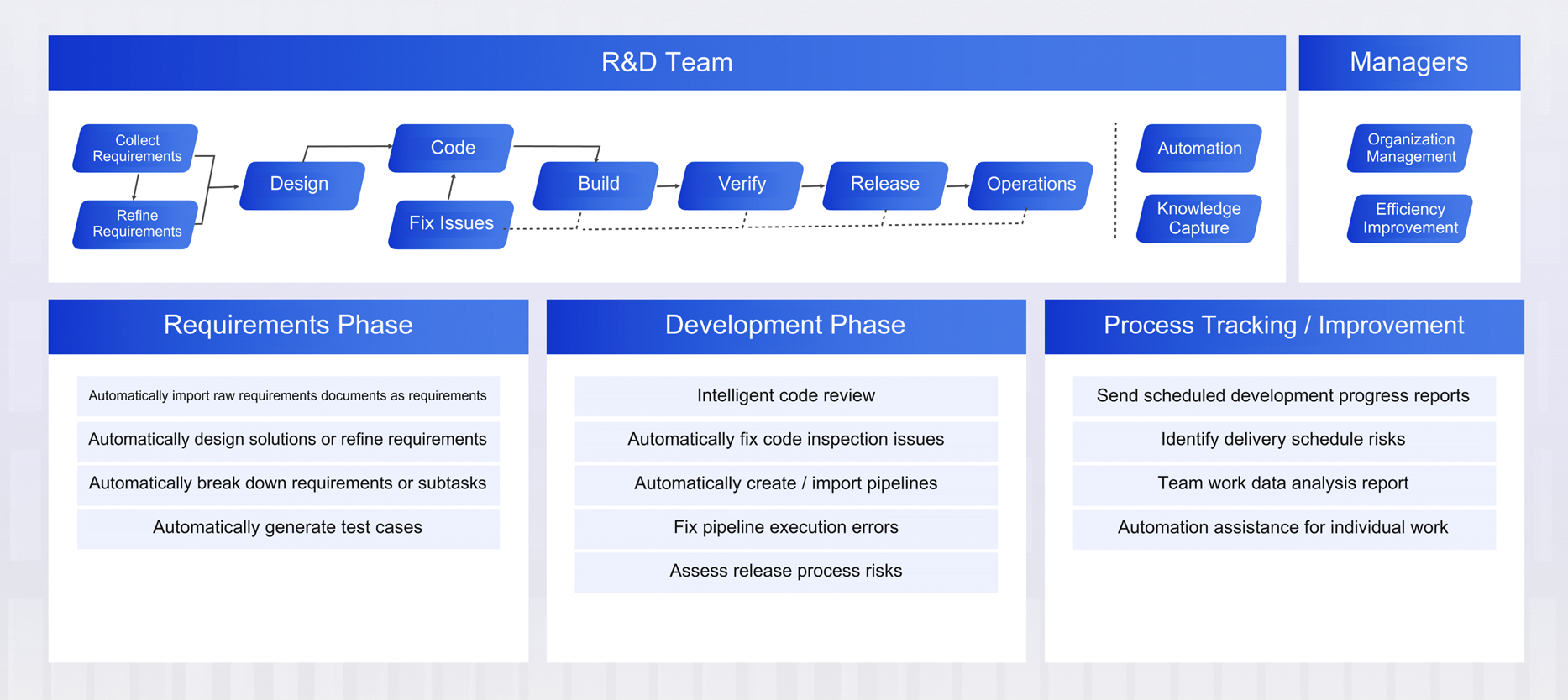
When you write requirements, it can break a PRD or meeting minutes down into clearly structured work items. Before testing, it can automatically generate test cases based on requirements. After you submit code, it can perform an initial Merge Request review. When you get stuck configuring a pipeline, it can identify the cause of errors and optimize the YAML. During a release, it can compare runtime data from the new and previous versions and provide a risk assessment. In your day-to-day work, it can also automatically compile daily or weekly summaries of project progress and work hours, delivering reports on schedule via email and IM.
In a nutshell: tell it what you want to achieve in natural language, and it gets the work done in the pages you already know.
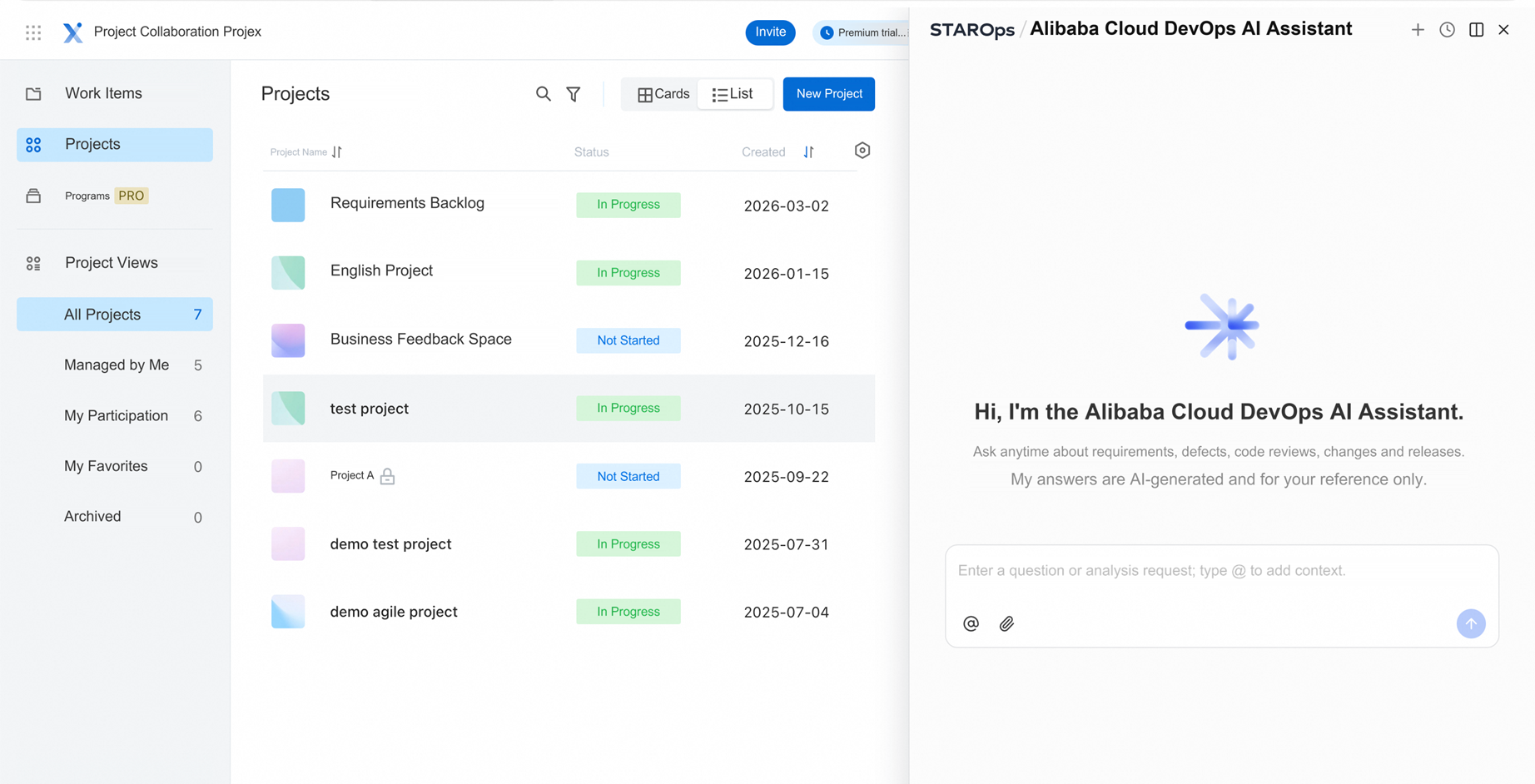
Alibaba Cloud DevOps AI Assistant currently has three entry points, serving three types of needs: asking questions directly, using features with one click in context, and running tasks automatically in the background.
An "AI Assistant" icon appears at the top of Alibaba Cloud DevOps pages. Click it to open the chat dialog. Whatever page you are on, you can ask questions directly in natural language and have it help you complete your work.
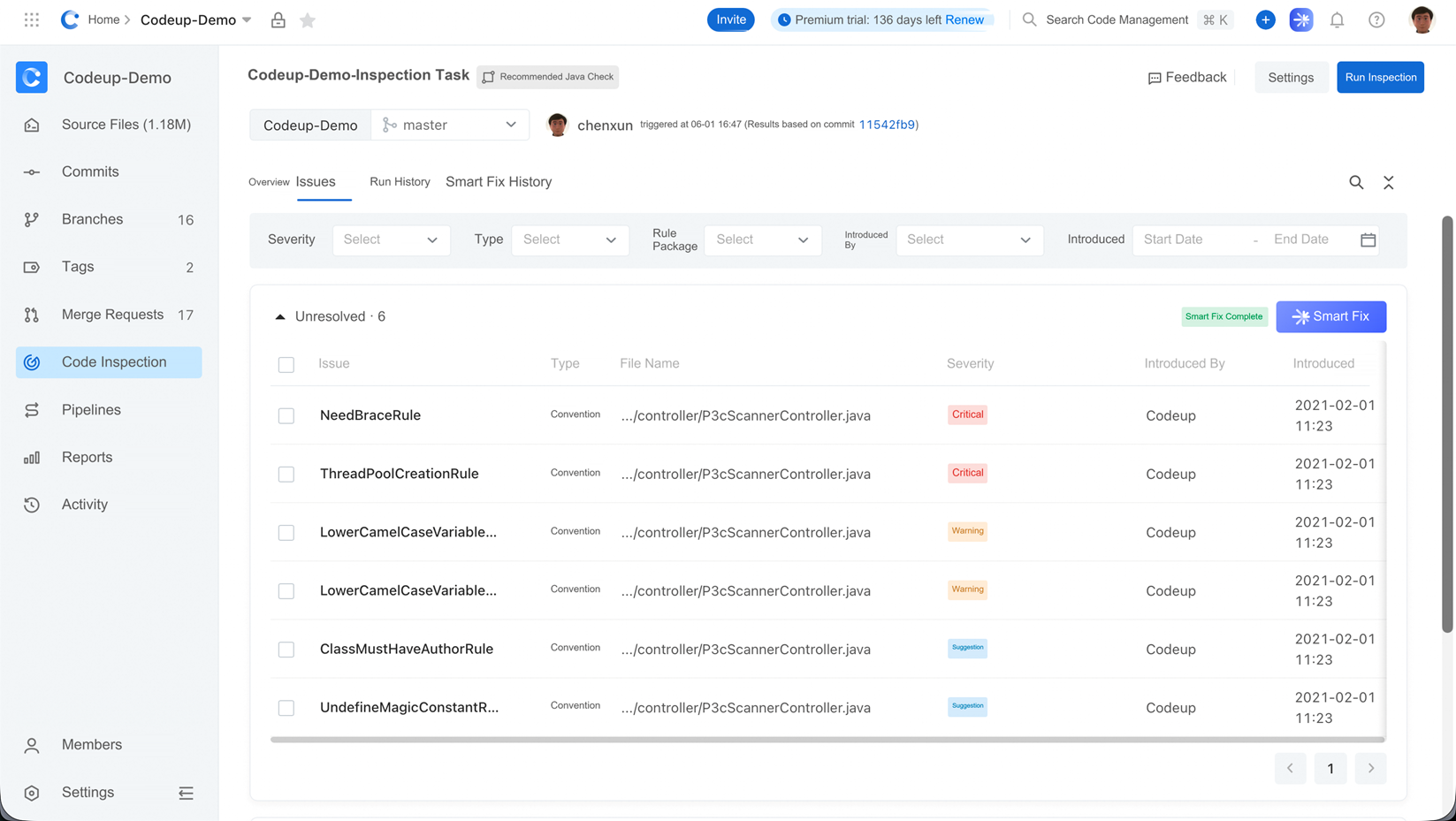
In addition to the entry point at the top of the page, Alibaba Cloud DevOps embeds AI buttons directly in many feature-specific scenarios, such as improving requirement content on the requirement details page, troubleshooting errors on the pipeline page, and fixing issues with one click on the code scan results page. Clicking a button automatically supplies the current context and prompt, so you do not have to formulate your request from scratch.
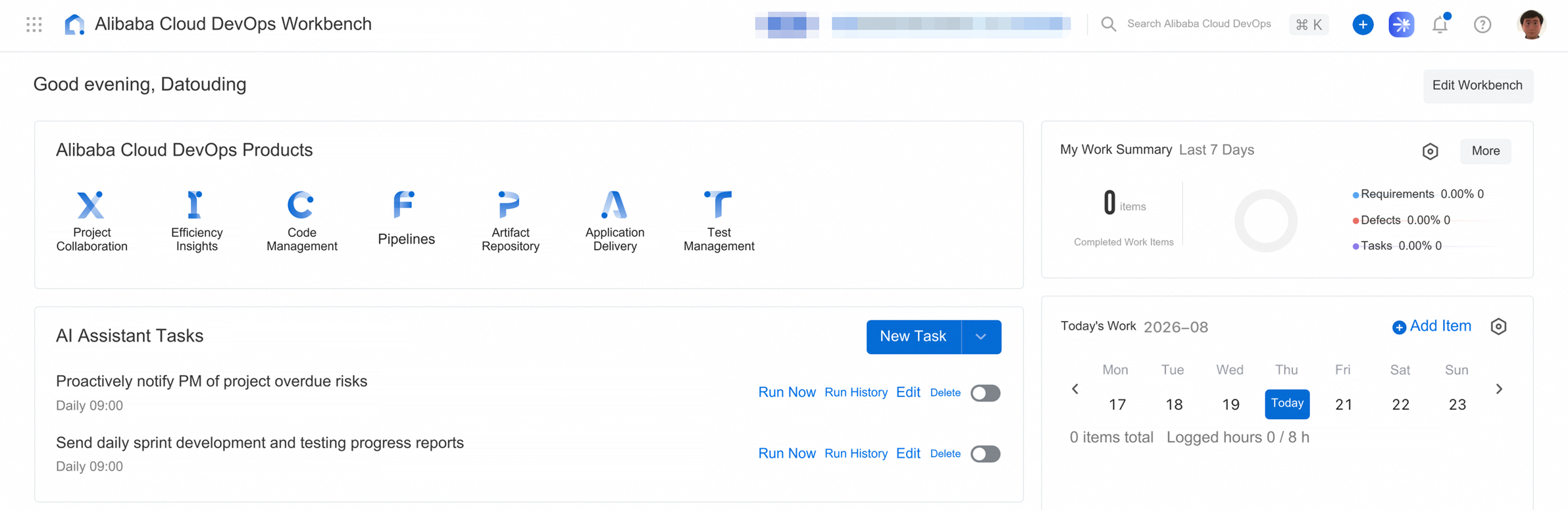
Under "AI Assistant Tasks" in your Alibaba Cloud DevOps personal workbench, you can turn frequently repeated work into automated tasks. For example, you can automatically generate a summary of the previous day's progress before each morning meeting, summarize work hours every Friday, or automatically trigger content optimization when a requirement's status changes. There are two execution modes:
Once configured, AI Assistant runs in the background as planned and delivers the results directly to your chosen destination: email, DingTalk, or Feishu.
Alibaba Cloud DevOps AI Assistant covers the entire workflow, from requirements to release. The following sections walk through the development process in order, explaining the work it can take off your hands at each stage.
Here is a scenario every product manager knows well: you have written a dozen or more pages of a PRD and a long list of meeting notes, but still have to enter everything into the system one item at a time. Now, click "Smart Requirement Entry" in the project's requirement list and give the document to AI Assistant. It automatically breaks down feature points and generates requirement titles and descriptions. You only need to confirm the fields, assignees, and iteration before importing the requirements in bulk.
Try saying: "@Project name Please help me break down the requirements intelligently."
Many requirements consist of just one sentence, leaving developers confused and testers unsure where to start. Click "Smart Content Optimization" on the requirement details page, and AI Assistant adds background, objectives, and acceptance criteria while clarifying the structure. You do not have to rewrite everything from scratch; simply review and accept the changes.
Try saying: "@Requirement ID Please use smart content optimization."
Based on existing requirements, AI Assistant can automatically generate test cases, assign priorities, and provide preconditions, test steps, and expected results.
For testers, this means spending more time on complex scenarios and test strategy design instead of repeatedly writing basic test cases.
Try saying: "@Requirement ID Please use smart test case generation."
After submitting a merge request, click "Request AI Review." AI Assistant provides risks, optimization suggestions, and severity levels directly in the comments. Instead of going through every line of code, you can first read its summary and then decide where to focus your review. You can also ask follow-up questions in the comments, such as "Could you elaborate on this suggestion?" or "Is there a safer way to write this?"
Code scan results pages are often full of security issues, sensitive information leaks, and potential vulnerabilities. Previously, developers had to inspect each issue, make changes manually, and run validation again, a time-consuming process in which issues could easily be missed. Now, click "AI Smart Fix" on the scan results page. Based on the findings, AI Assistant analyzes issues in bulk, automatically creates a new branch, and fixes them together. It then runs basic self-tests to confirm that no new issues have been introduced before directly opening a merge request. All you need to do is review the fix summary, confirm that everything is correct, and merge the changes.
Unfamiliar with Alibaba Cloud DevOps pipeline YAML? Click "Smart Pipeline Creation" and describe what you want to do in natural language. AI Assistant generates a runnable YAML draft and explains each step. If you are migrating from Jenkins or GitLab CI, you can also describe the logic of your existing configuration and have it translate that into Alibaba Cloud DevOps pipeline syntax. If you encounter errors after running the pipeline, click "Smart Troubleshooting." AI analyzes the causes and suggests fixes; some issues can even be fixed automatically with one click.
Try saying: "Please help me create a pipeline."
Standard K8s releases roll out the entire application using rolling updates, whereas staged releases in Alibaba Cloud DevOps AppStack let you divide an application into multiple batches for a gradual rollout. After each batch is released, the process automatically pauses and waits for your confirmation before continuing. This pause used to be the most stressful point in the release process: you had to manually check the new pods' CPU and memory usage, request success rates, error logs, and exception stack traces. With this information scattered across multiple pages, even a small oversight could mean missing a critical signal.
Now, AI Assistant can handle observation and analysis for you at this stage. It automatically retrieves runtime data for the new pods in the current batch and compares it side by side with data from the previous version's pods. It checks key metrics such as resource consumption, logged errors, and API success rates, then provides a clear risk assessment: whether to continue the release, roll back first, or observe for a while longer. You do not have to open separate monitoring, logging, and release platform pages at the same time. By reading its conclusions and supporting evidence, you can make a more informed decision.
This may be the most "hassle-free" feature in this update. Under "AI Assistant Tasks" in the Alibaba Cloud DevOps workbench, you can create scheduled tasks. For example, you can automatically generate a project iteration progress report every morning at 9, or summarize work-hour data once a week and send it by email. There are two ways to create these tasks:
In addition to scheduled tasks, AI Assistant can respond to specific events. For example, when a requirement's status changes from "To Be Developed" to "In Development," it can automatically add key technical implementation points. When a requirement is assigned to you, it can automatically optimize the description, update related data, and even prefill work hours.
You do not have to manually open the requirement page and repeat the same actions each time. AI Assistant follows the predefined rules when the event is triggered. These tasks are also configured under "AI Assistant Tasks" in your personal workbench, where you can select trigger conditions as needed.
Try saying: "Please create an event-triggered task that automatically optimizes a requirement's description when the requirement is assigned to me."
A good AI Assistant should not act as though it is on its "first day on the job" every time you interact. It should remember your team's preferences, standards, and business context, becoming easier to work with over time. That is exactly what Alibaba Cloud DevOps AI Assistant does: it automatically captures knowledge during collaboration and associates that knowledge with the team.
Its knowledge base is stored in a repository and managed at the team level. There are two ways to capture knowledge:
One is passive, automatic recording. When you work with AI Assistant to handle requirements, review code, troubleshoot pipelines, or fix scan findings, it automatically extracts valuable information from your interactions, organizes it, and saves it. For example, if you once told it, "Our team uses Result as the standard API response format; do not throw exceptions directly," it will proactively refer to that standard the next time it writes or reviews code.
The other is explicit input. You can tell it about your team's experience, constraints, or best practices directly in the chat dialog, or upload documents. It will understand the information, structure it, and write it to the team's knowledge base.
In other words, Alibaba Cloud DevOps AI Assistant does more than help you complete a single task. Through repeated collaboration, it learns how your team works.
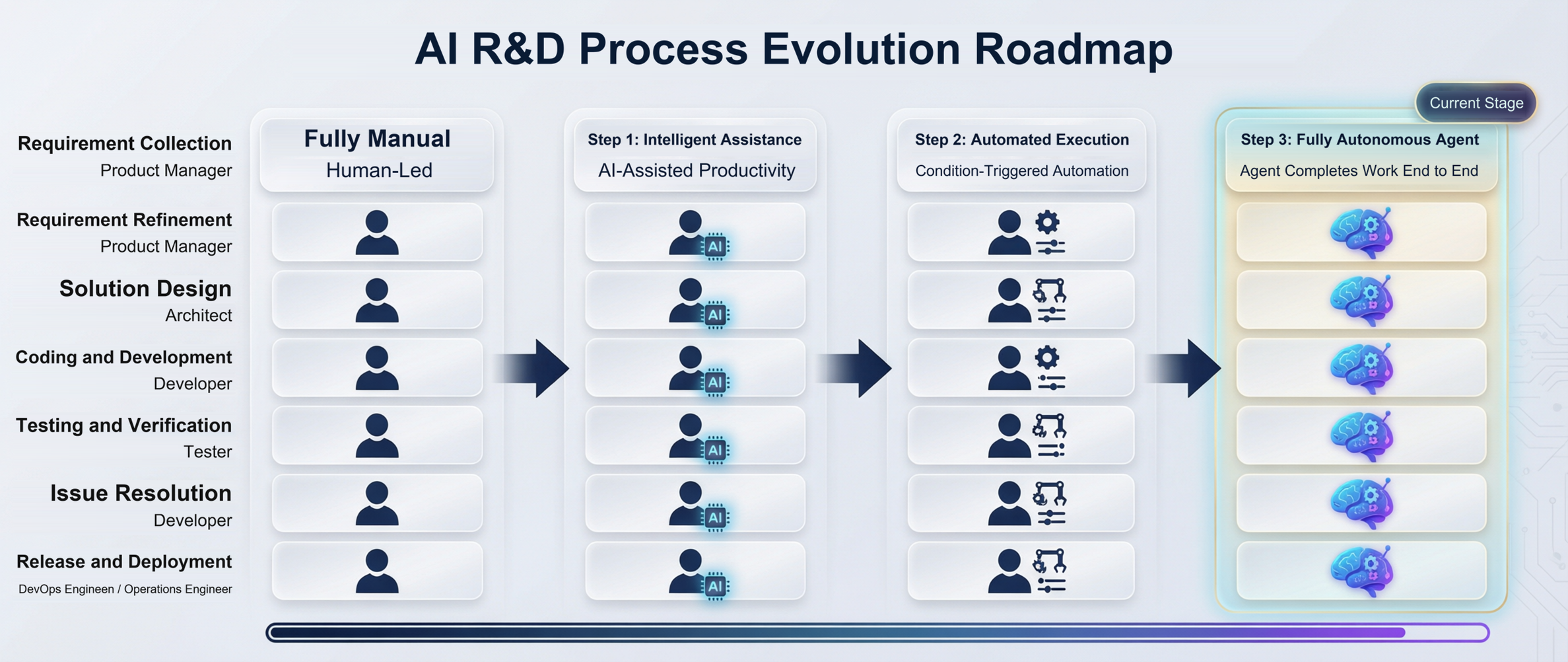
Alibaba Cloud DevOps AI Assistant is designed to gradually move the stages of the development process from "human-driven" to "intelligence-driven." It is not about replacing anyone overnight. Instead, it follows a clear path, gradually taking over repetitive, tedious work governed by well-defined rules.
This is the "human + AI" collaboration stage. AI Assistant provides capabilities such as smart requirement breakdown, content optimization, code review, test case generation, and pipeline creation, but every invocation must be initiated by a person: you give it an instruction, and it completes that part of the work. This stage primarily improves individual productivity.
Once repetitive tasks have been identified, they can be executed according to rules. "AI Assistant Tasks" in the personal workbench puts this stage into practice: you can set up scheduled tasks, such as generating a daily report every day, or event-triggered tasks, such as automatically optimizing the description and recording work hours when a requirement is assigned to you. AI begins to intervene proactively in the workflow, but people still define and control the rules.
As automation rules accumulate and are linked together, AI Assistant will become involved in an increasing share of the work. Ultimately, it will evolve from a tool for individual tasks into an AI workflow spanning the entire chain of requirements, development, testing, and release. From a requirement's creation to its launch, an AI Agent will be able to provide end-to-end assistance or even automatically complete most execution steps, while people focus on decisions, judgment, and creative work. Alibaba Cloud DevOps is currently developing and validating this stage of the product, with the aim of making it available to more users as soon as possible.
The value of Alibaba Cloud DevOps AI Assistant lies not in replacing judgment in the development process, but in taking a first pass at repetitive, tedious tasks where things can easily be missed, allowing engineers to focus on architecture design, weighing solution trade-offs, and tackling complex problems. Starting with a single code review or an automatically generated daily report, the time saved will keep adding up in day-to-day development collaboration, improving the team's overall efficiency.
As discussed above, Alibaba Cloud DevOps AI Assistant is gradually evolving along the path of "intelligent assistance—automated execution—AI workflows." Its current capabilities already cover every stage of requirements, code, testing, and release, so you can start benefiting now without waiting for a more advanced form.
Try it now: log in to Alibaba Cloud DevOps and click the "AI Assistant" icon at the top of the page, or use the corresponding AI feature buttons on the requirements, code, pipeline, and other pages.
Learn more: https://www.alibabacloud.com/help/yunxiao/getting-started/cloudeffect-ai-assistant-user-guide
From Agent Framework to Agent Harness: A New Positioning for the Open-Source AgentScope Project

816 posts | 61 followers
FollowAlibaba Cloud Native Community - November 9, 2026
Neel_Shah - June 24, 2025
Alibaba Cloud Native Community - November 9, 2026
Alibaba Cloud Community - March 2, 2022
Alibaba Clouder - April 20, 2017
Alibaba Cloud Native Community - September 29, 2025
816 posts | 61 followers
Follow Qoder
From Assisted to Autonomous — Adapting to Every Programming Need
Learn More DevOps Solution
Accelerate software development and delivery by integrating DevOps with the cloud
Learn More AgentCore
 unifies agent construction, governance, and execution capabilities so enterprises can deploy diverse agents with confidence.
Learn More GoChina ICP Filing Assistant
An ICP filing best practices solution for websites and apps hosted in the Chinese mainland, helping you navigate the requirements to effortlessly obtain an ICP filing.
Learn MoreMore Posts by Alibaba Cloud Native Community

