By Liu Jun
The AgentScope Java community has released the AgentScope Service component as open source. Its design positioning is broadly aligned with the open-source Python version. Targeting enterprise-grade distributed Agent scenarios, its control-plane components provide multi-tenancy, visual debugging, and multi-Agent orchestration for Agents on the AgentScope data plane.
AgentScope Service also supports integrating Agents in various forms, including Claude, DeepSeek Harness, and Langchain.
AgentScope Service provides an open-source solution for Agent debugging and distributed deployment. If you need enterprise-grade Agent orchestration, Teams orchestration, observability, evaluation, and other capabilities, visit the Alibaba Cloud AgentTeams and AgentLoop product pages.
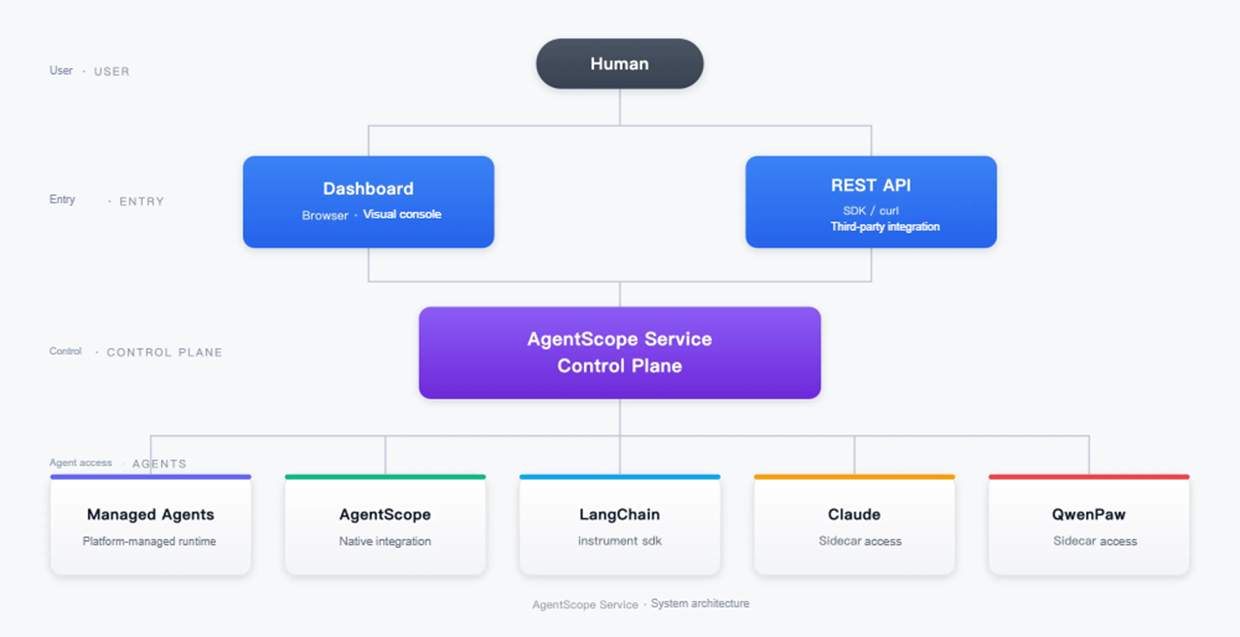
AgentScope Service does not aim to replace your existing Agent framework. Instead, it provides a unified control plane for centrally managing Agents built with different frameworks and technology stacks, such as Claude, OpenClaw, and QwenPaw.
Today, there are many options for building enterprise-grade Agents. As an excellent Agent Framework, AgentScope offers enterprises a complete solution for building Agents. However, a traditional Agent Framework is no longer the only way to build Agents. Coding Agent products are expanding into more domains, and using tools such as Claude SDK and Qoder CLI to build enterprise-grade Agents is becoming a choice for many enterprise users.
These approaches are not mutually exclusive. Within one company, R&D may use Coding Agents, the business middle platform may use AgentScope, and new projects may prefer a managed Harness from the outset. This is common. AgentScope Service is not tied to any Agent framework or platform; it provides unified management and control for all Agent runtimes.
Control Plane is the core component of AgentScope Service. All Agent applications register centrally through the control plane. SDK or Sidecar integration supports registration and connectivity for mainstream Agent Frameworks (AgentScope, LangChain, ADK), as well as Claude, Qoder, and others.
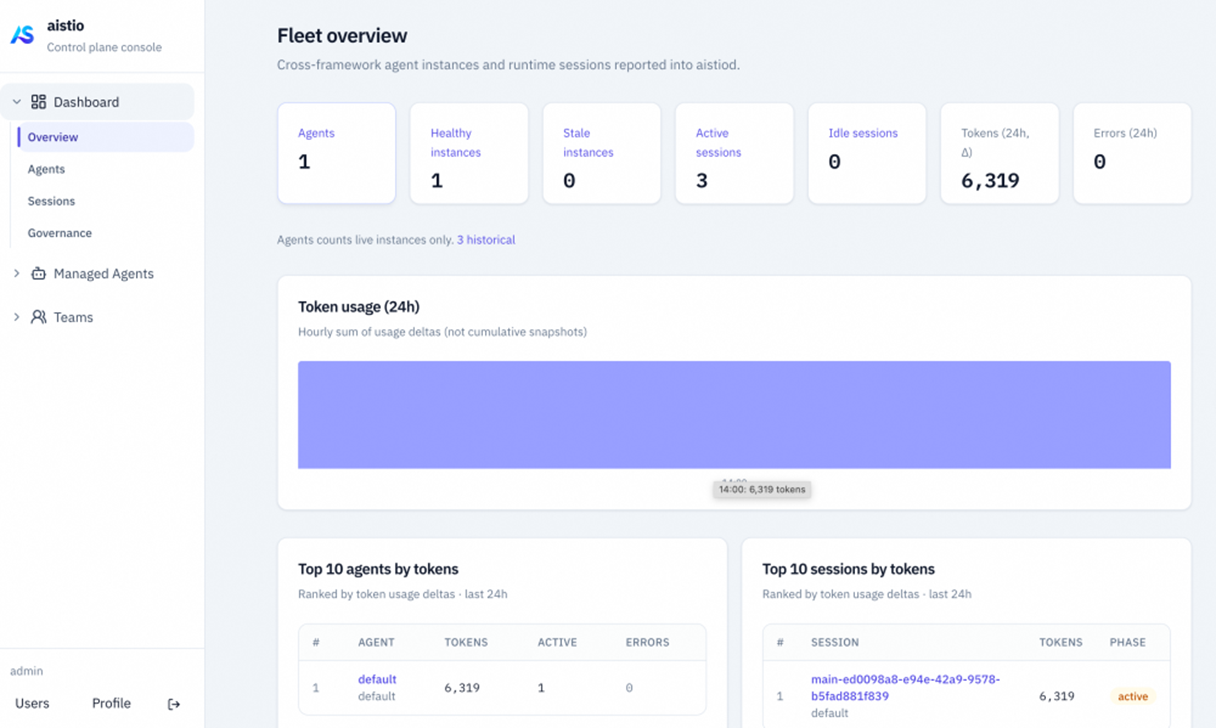
Dashboard is the control plane's visual UI console. It provides cluster-wide observability information, including online agent lists, deployment instance details, active session information, and token consumption, making it easy to understand how the cluster is operating.
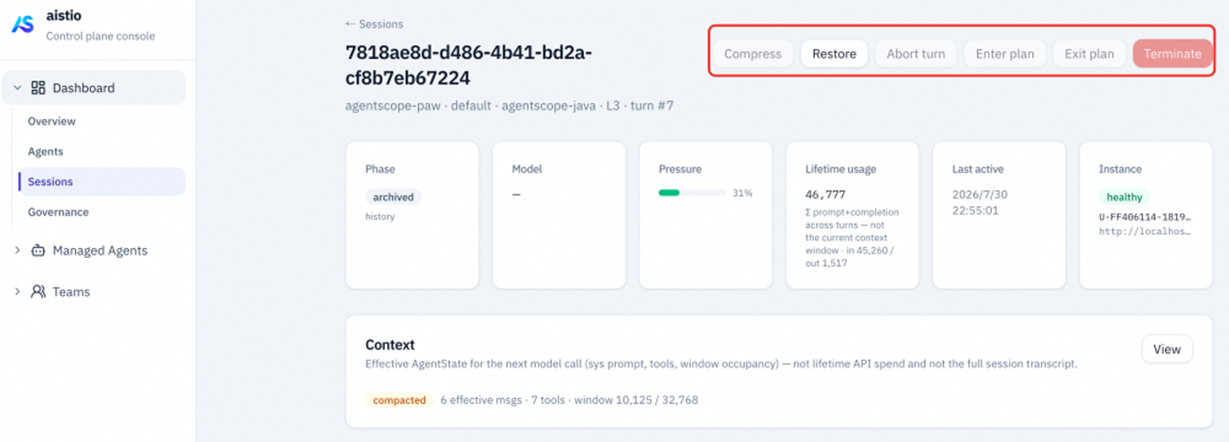
You can also view session information in the dashboard, inspect the real-time context state of active sessions (the proportions of data in each section), dynamically adjust or compact session context, intervene in sessions, and more.
Managed Agents is an upgrade of the open-source agentscope-builder platform, and its positioning remains a low-code Agent platform, providing developers with SaaS-style platform capabilities for Agent definition and managed Agent execution. It also places greater emphasis on separating inference from tool execution: inference harness capabilities are more fully managed, while users have greater control over tool execution.
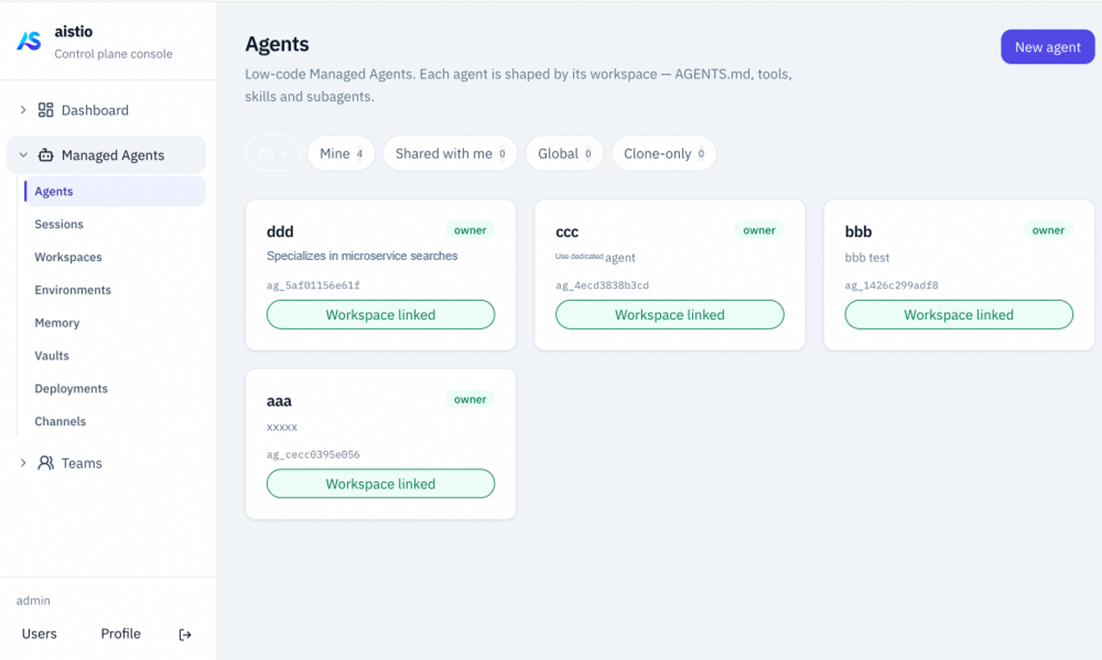
Agent definitions are designed around the core principles of AgentScope Harness. First define basic concepts such as Workspace and Memory; then associate workspace and memory with an agent to create an Agent.
Define Workspace:
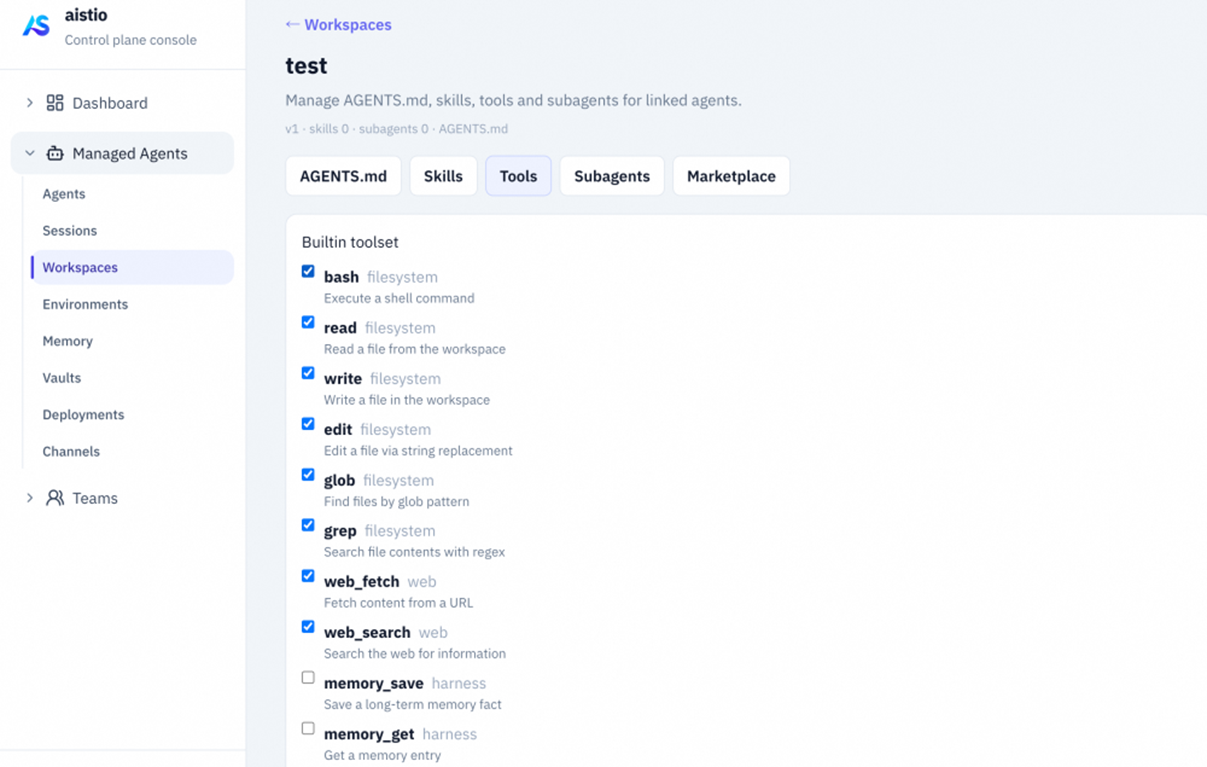
Define an Agent:
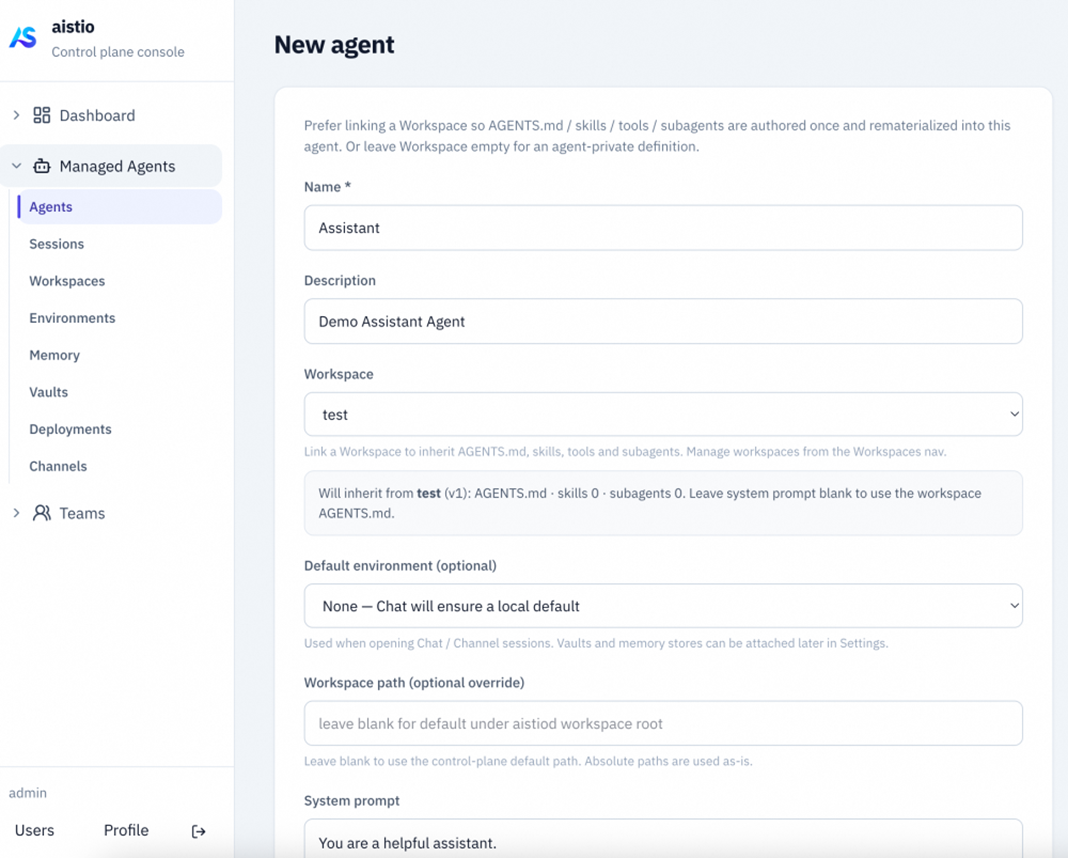
The biggest change in this upgrade is the underlying managed runtime logic and architecture -- Managed Agents. The platform separates static definitions (Agent, Workspace) from dynamic execution (Environment, Session), using Environment, Session, and related concepts to orchestrate Agent runtime behavior.
Create a session and bind it to a self_hosted sandbox runtime environment:
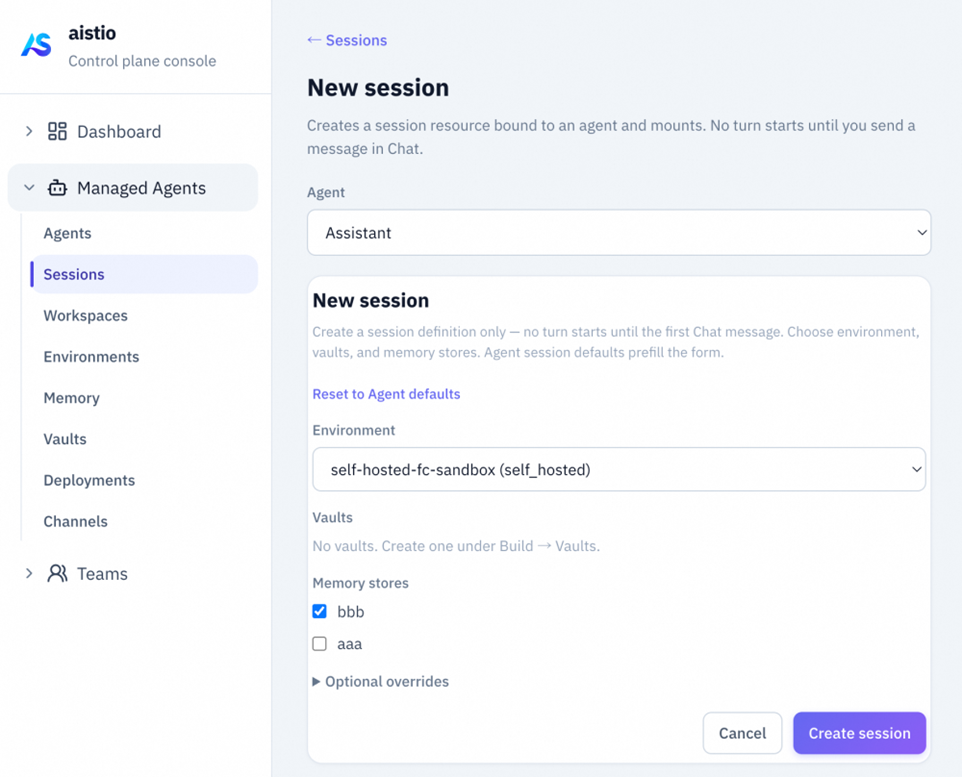
Creating a Session does not itself start the SSE Event stream. The session starts and the full inference process runs only when the user actively sends a user message. As shown below, you can send a user message on the console's chat page:
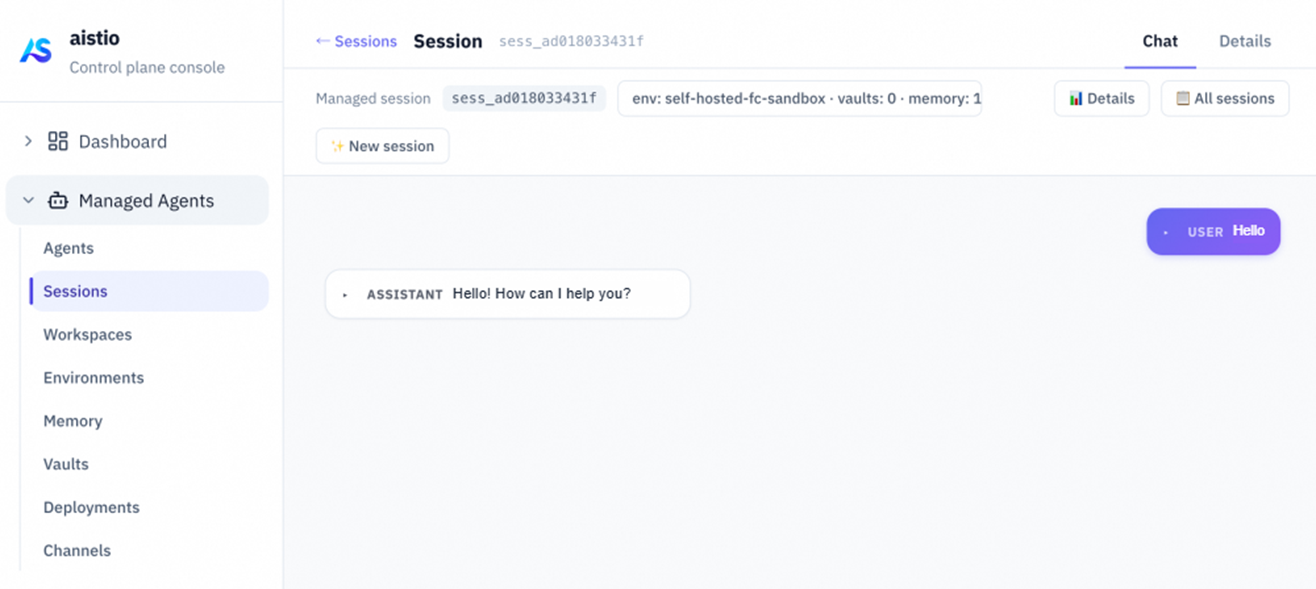
Create Agent → Create Environment → Create Session → Send the first message → Observe the event stream in Dashboard. Creating a Session does not immediately run the Agent. For long-running tasks, the particularly important feature of Managed Agents is recoverability: events are persisted, state can be reconstructed, and HITL can pause and resume execution. Refreshing the frontend or switching service replicas should not mean restarting the task from scratch.
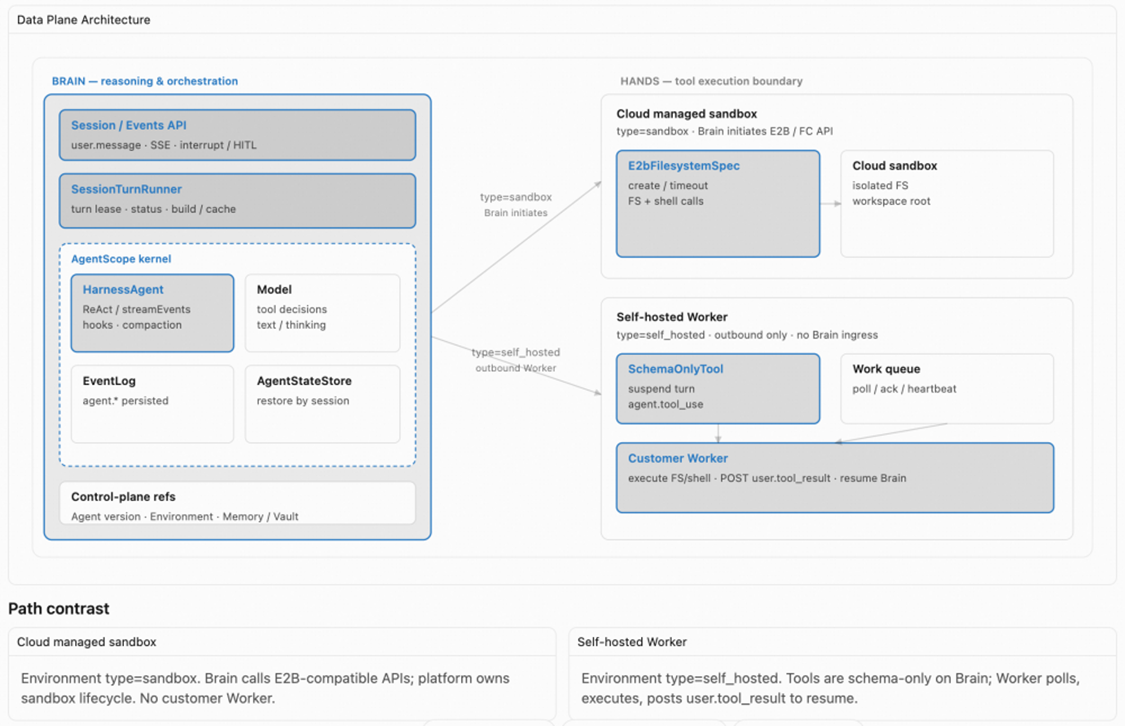
The execution architecture is very similar to that of Claude Managed Agents. Harness infrastructure and the runtime are fully managed, relying on AgentScope Harness Runtime underneath. The Brain/Hands separation architecture gives users greater control over the tool execution environment. The deployment architecture has two major components: the control plane and the managed data plane. See the deployment architecture section below for details.
All Agents registered with the AgentScope Service control plane, whether developed and deployed with a framework and independently registered with the control plane (Langchain, AgentScope, ADK, Claude SDK, and others), or created directly as managed Agents through the low-code Managed Agents approach, can be orchestrated together as you wish to form collaborative Agent Teams that work together to handle complexity.
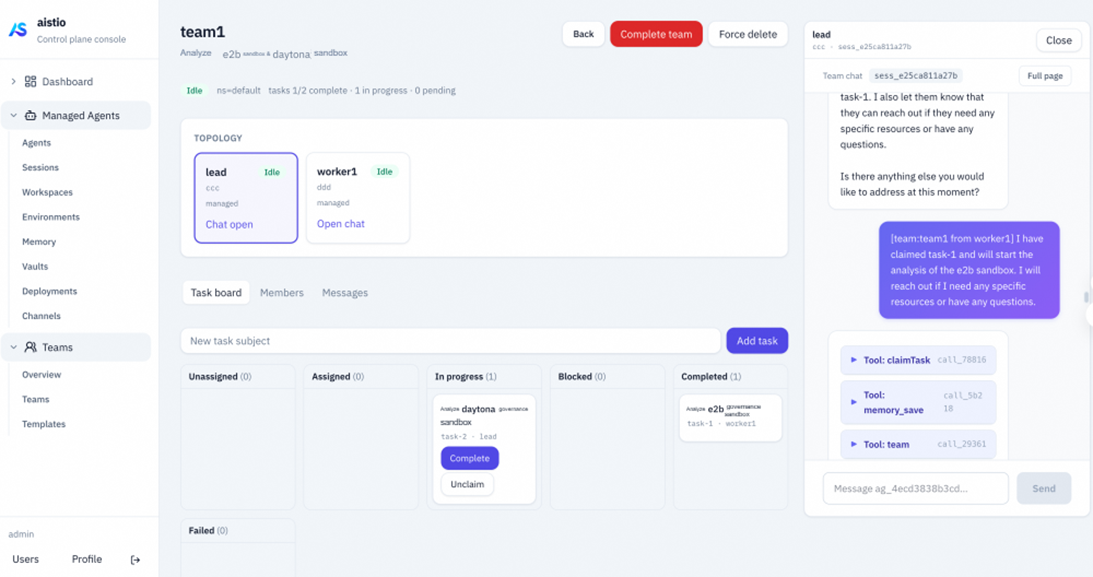
In AgentScope Service's design, Teams are not chat rooms but operational collaboration units: tasks can be claimed, plans can be approved, and members can be awakened. Their state does not disappear entirely when a particular Session ends. A common pattern is for the Lead to handle task decomposition and acceptance, while Members claim subtasks such as research, coding, and verification according to their capabilities. The platform handles message routing, the task board, and lifecycle management, rather than requiring business code to implement ad hoc multi-process communication.
It is worth highlighting that the AgentScope framework natively supports Agent Teams. This mechanism uses the AgentScope Service control plane for distributed task management and scheduling. You can therefore use the native Teams capabilities of AgentScope Framework to implement multi-agent orchestration while coding the main agent, or dynamically orchestrate multiple independent agents in the console to complete a complex task as needed. The choice depends on your use case.
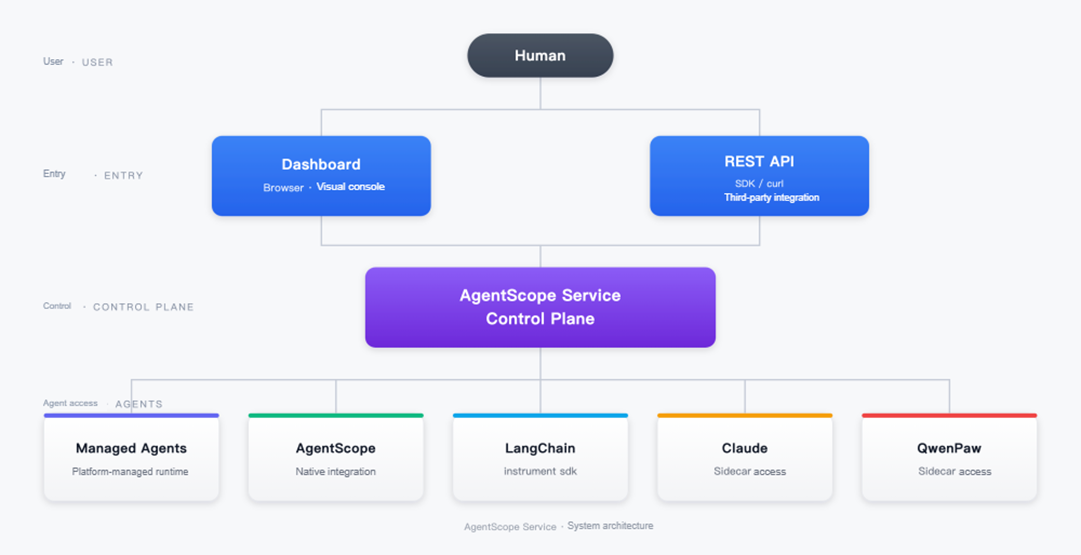
Human users enter AgentScope Service Control Plane through either Dashboard (browser operations) or REST API (SDK / curl / third-party system integration). The control plane centrally manages four forms of Agent integration: native AgentScope integration, LangChain integration through instrument(), and out-of-band Sidecar integration for Claude and QwenPaw.
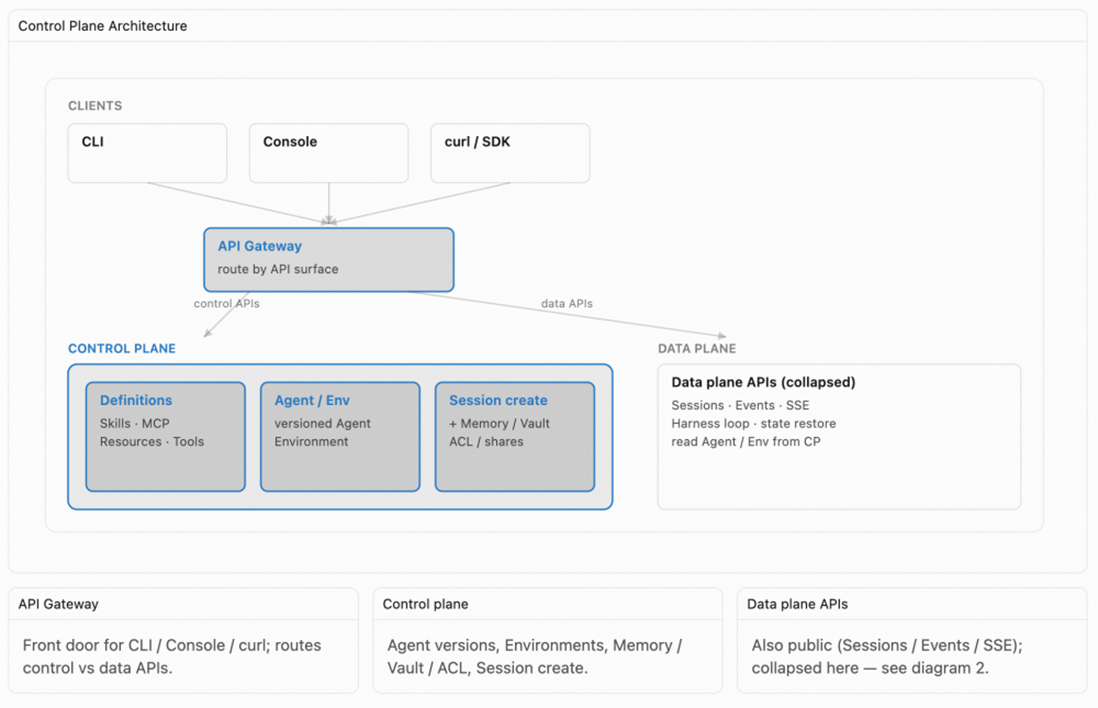
Members of a Team do not have to come from the same framework or use the same hosting approach. In the console, users select several Agents already registered with the control plane and specify who is the Lead and who is a Worker. This completes the orchestration: the Lead creates and assigns tasks, Workers claim and execute them, and the control plane centrally maintains the collaboration state:
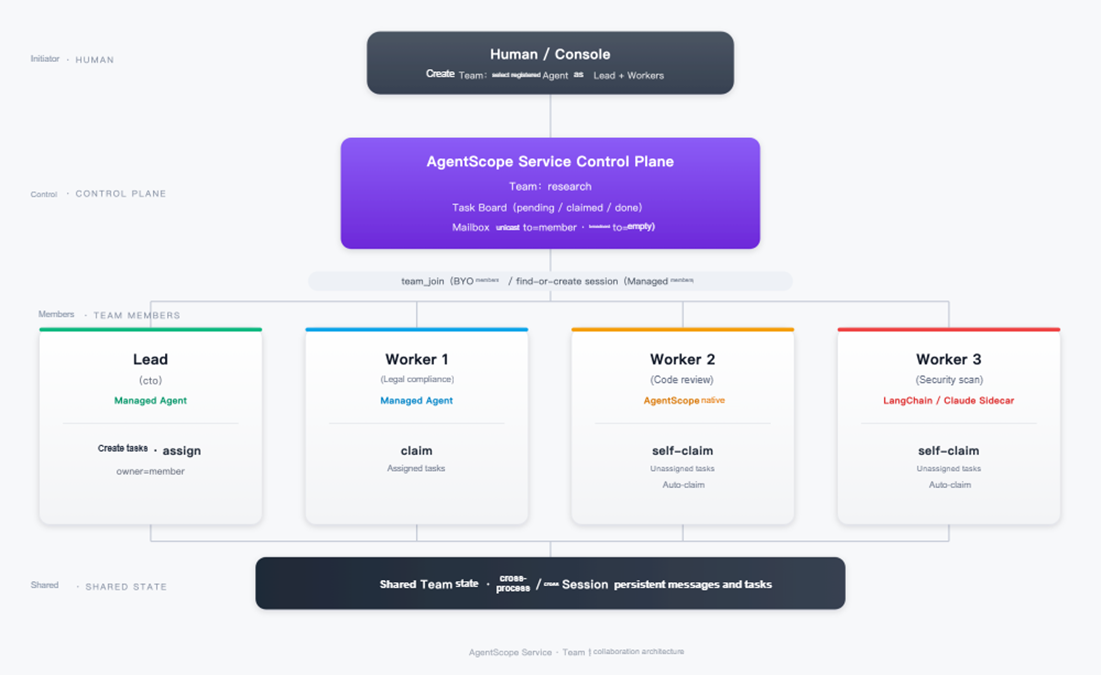
Key points in the diagram:
teamContext for them and directly delivers user.message to start execution), Worker 2 is a self-deployed native AgentScope runtime, and Worker 3 is LangChain (or Claude integrated through a Sidecar). The control plane uses different join methods for different members (Managed uses find-or-create session, while BYO uses the team_join command), but the collaboration model exposed to the Lead is consistent: all are Team members that can be assigned tasks and can send and receive messages.claim → start → complete after receiving it. The Lead can also create a task without specifying an owner and place it on the Task Board, where an idle Worker can use POST .../claim to self-claim it. Both modes coexist on the same Task Board, without requiring the Lead to constantly track who is busy.to=member (such as the Lead reminding a specific Worker privately), as well as broadcasts that omit to (visible to all members). Both use the same persistent channel.The AgentScope framework itself provides a comprehensive enterprise-grade Agent solution, supporting Harness, Agent Teams, Multi-agent collaboration, Sandbox isolation, and more. In a true enterprise deployment architecture, many capabilities depend on coordination among distributed components. The AgentScope Service control plane provides native distributed coordination for AgentScope.
Once AgentScope HarnessAgent moves from a single instance to a multi-replica deployment, session state, workspace files, sandbox snapshots and concurrency locks, cross-replica messages, asynchronous tools, subtasks, and Turn concurrency control can no longer assume that "process memory contains the authoritative data."
The diagram below shows the runtime topology: how multiple HarnessAgent replicas interact individually with Control Plane and the AgentStateStore backend, rather than the interface definition of DistributedStore.
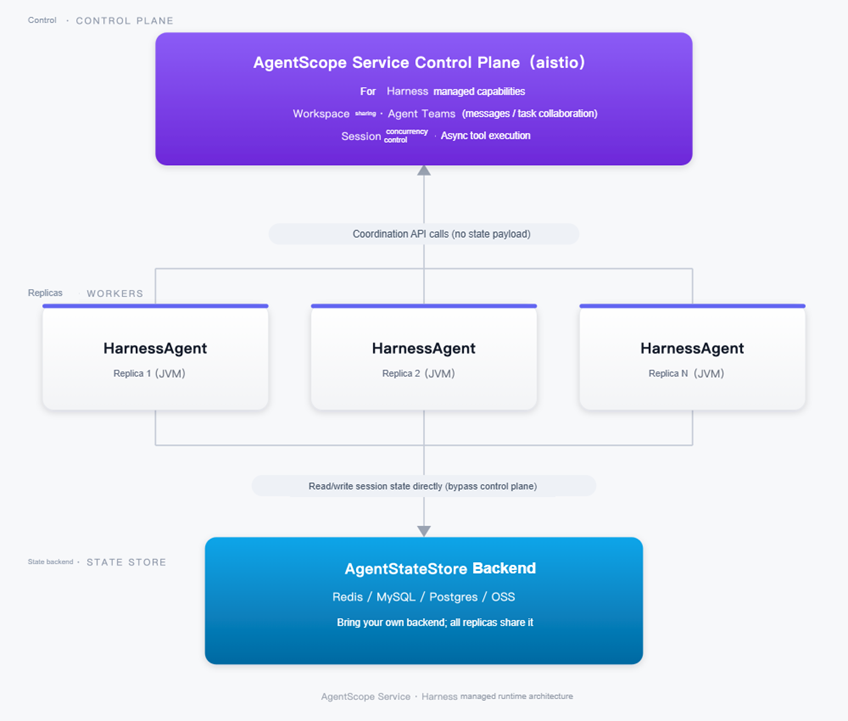
The diagram contains two independent paths that do not pass through one another. This is a crucial point:
Upward: Coordination API Calls. Each HarnessAgent replica calls Control Plane through the SDK. It hosts the four categories of Harness capabilities that developers actually work with, backed by interfaces including BaseStore, SandboxSnapshotSpec / SandboxExecutionGuard, MessageBus, TaskRepository, SessionTurnGate, AsyncToolRegistry, and others. Coordination state is stored in the control plane's own Postgres, so business teams do not need to set up a separate infrastructure stack.
MEMORY.md, skills/, sessions/, and others), together with sandbox snapshots and concurrency locks, allow any replica to read, write, and restore the same workspace;AgentStateStore (conversation context, compaction summaries, permission rules, Plan Mode state, and so on) does not pass through the control plane; instead, each replica connects directly to the business team's own Redis / MySQL / Postgres / OSS. The control plane may optionally use Session concurrency control (SessionTurnGate) together with AgentStateStore's own getVersioned / saveIfVersion optimistic concurrency (CAS) to reduce duplicate triggering of the same LLM Turn across replicas. What it coordinates is "who can run this turn," not the state data itself.For developers, this means that configuring HarnessAgent.builder() with a distributedStore (coordination components use ControlPlaneStores.fromEnv(); AgentStateStore is assigned a shared backend separately) is enough to give an Agent true horizontal scalability, without having to develop session recovery, file sharing, sandbox snapshots, and task queues individually.
The AgentScope framework itself provides a closed-loop set of Agent Teams capabilities. The trigger for team formation differs from direct control-plane orchestration. During development, you do not need to arrange members into a fixed Team structure beforehand. As in Subagent mode, you only need to preregister a pool of callable Subagents with the Main Agent (agentRef). At runtime, when a message from a Human (or an upstream system) to the Main Agent contains a task description indicating "teamwork is needed," the Main Agent determines whether to form a team and which preregistered Subagents to select as Workers, dynamically creating a Team:
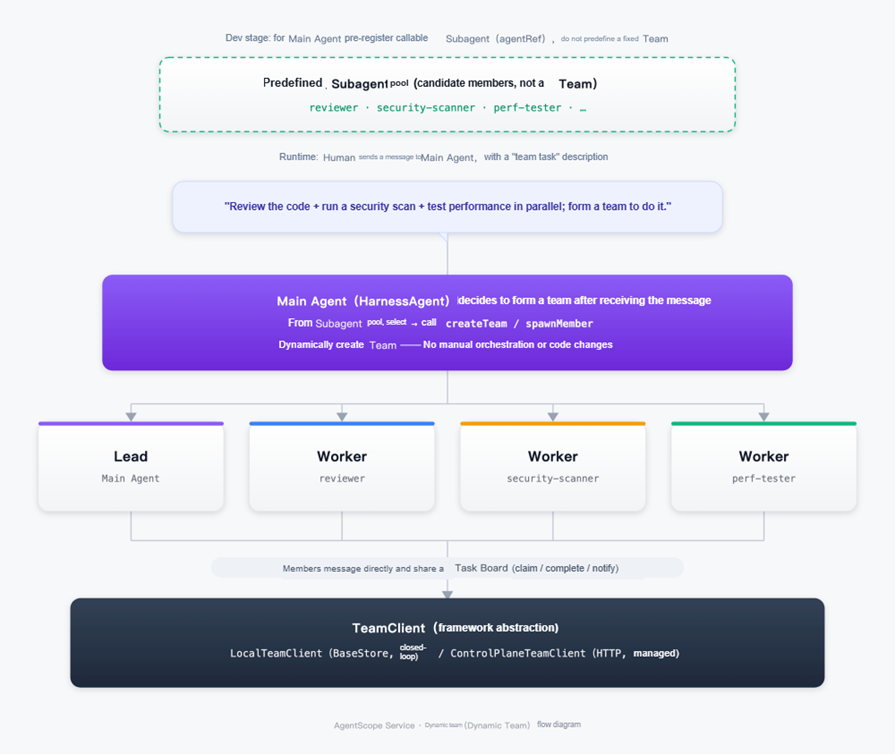
Key points in the diagram above:
reviewer, security-scanner, perf-tester (using the same agentRef registration mechanism as Subagent mode) are simply attached to the Main Agent. Who teams up with whom, and when, is not decided at this stage at all, nor is it necessary to design the Lead / Worker structure in advance.createTeam (and use spawnMember to add members when needed), designate itself as Lead, and instantiate the selected Subagents as Workers. This decision occurs within a single LLM inference, requiring neither manual orchestration beforehand nor a single line of code to be changed.TeamClient (Task Board + Mailbox). This can be a LocalTeamClient independent of Control Plane (a closed loop using BaseStore directly for optimistic concurrency), or a connection to ControlPlaneTeamClient for cross-replica coordination and Dashboard observability. This is exactly the same as in the preceding console-based dynamic orchestration diagram; the only difference is "how the team is formed."This capability and the previously mentioned Subagents mode use the same Subagent definitions, but their collaboration methods are entirely different and can easily be confused, so a dedicated comparison is worthwhile:
Subagent Mode (One-way delegation, mutual isolation)
    Main Agent ──task()──▶ Subagent A ──result──▶ Main Agent
    Main Agent ──task()──▶ Subagent B ──result──▶ Main Agent
    No communication path between Subagent A and Subagent B, and they do not share task lists

Agent Team Mode (Peer collaboration, shared state)
    Lead ──createTask / assignTask──▶ Worker A
    Worker A ◀── sendMessage / broadcastMessage ──▶ Worker B
Both Worker A and Worker B can claim unassigned tasks on the shared Task BoardassignTask to specify what a Worker should do, while Workers can use sendMessage / broadcastMessage to communicate directly, and any idle Worker can use claimTask to claim unassigned tasks. Collaboration state is no longer held solely by the initiator; it is shared data maintained jointly by team members.In short, Subagent is hierarchical delegation: "send instructions and wait for results." Agent Team is peer collaboration: "share a board, claim tasks, and communicate directly." This diagram illustrates that native AgentScope Agent Teams let the Main Agent trigger "forming a peer-collaborating Team from a Subagent pool" on demand at runtime, without planning the team structure beforehand. This and the preceding console-based dynamic orchestration diagram, where a Human selects members and forms a team in the console, represent two complementary approaches. Both share the same TeamTool / TeamClient programming model and can be selected as needed.
The target of Agent Teams or AgentScope Subagent delegation does not necessarily run in the same process. It may be a local Subagent within the same HarnessAgent, another Managed Agent running on Dataplane, or even a LangChain Agent integrated through instrument().
For remote targets, the role of AgentScope Service Control Plane is to let Agent A initiate a delegate call without needing to know where the target actually resides or which framework it uses:
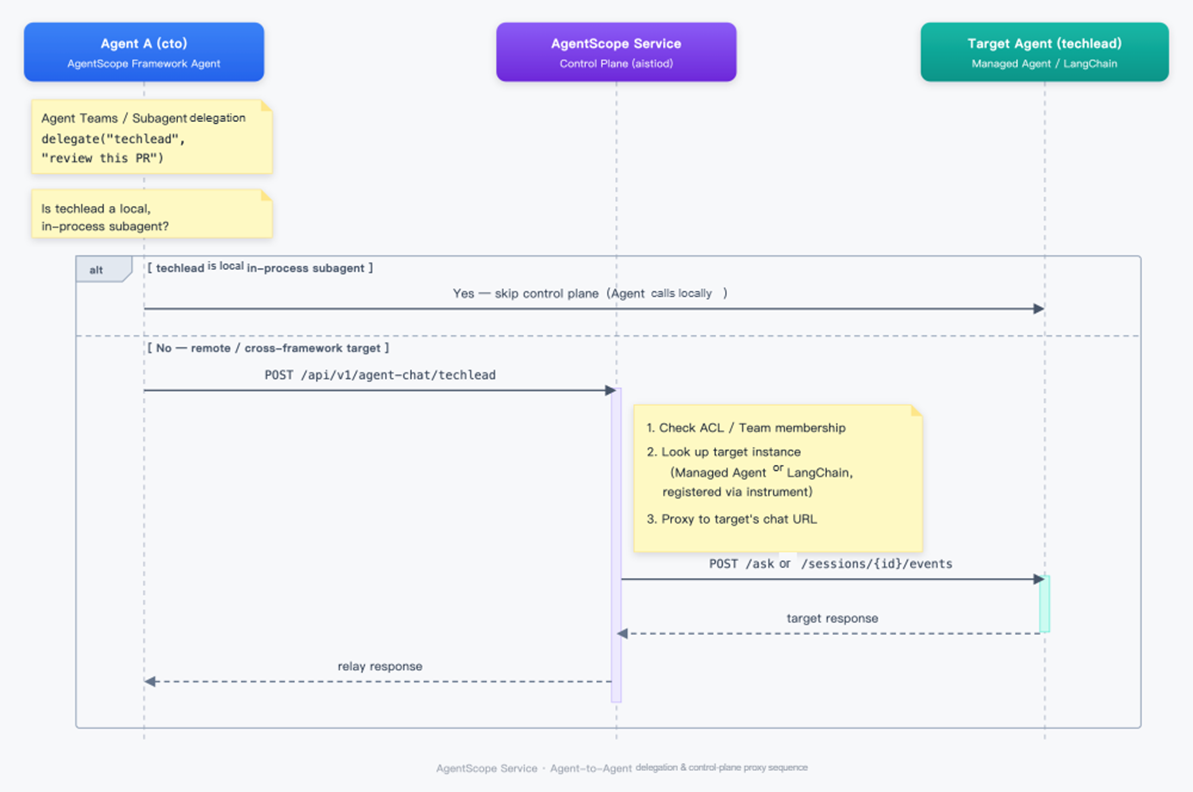
The diagram above illustrates the control plane's traffic-proxy capability for remote subagent calls, rather than a specific API design:
techlead happens to be a local Subagent declared in the same HarnessAgent process as Agent A, delegation proceeds directly through an in-process call, with no control-plane involvement. This is the lowest-latency and most common path.techlead have a valid collaboration relationship (the same Team or an allowlist ACL), then looks up the target instance in the fleet registry by Agent ID. The target may be a Managed Agent, with requests forwarded to Dataplane's Session Turn interface, or a LangChain Agent registered through aistio.instrument(), with requests forwarded to its reported chat endpoint. Finally, the control plane proxies the request to the target and passes the response back to Agent A unchanged.delegate("techlead", ...) does not change depending on whether the target is a local Subagent, a Managed Agent, or a LangChain Agent. Framework differences are absorbed by the control plane's routing layer.This is also why the "How to Integrate" discussion emphasizes that AgentScope, LangChain, and Claude can connect to the same control plane in different ways. Once integrated, all can be discovered by other Agents, receive delegated tasks, and return results, without needing a separate integration between every pair of frameworks.
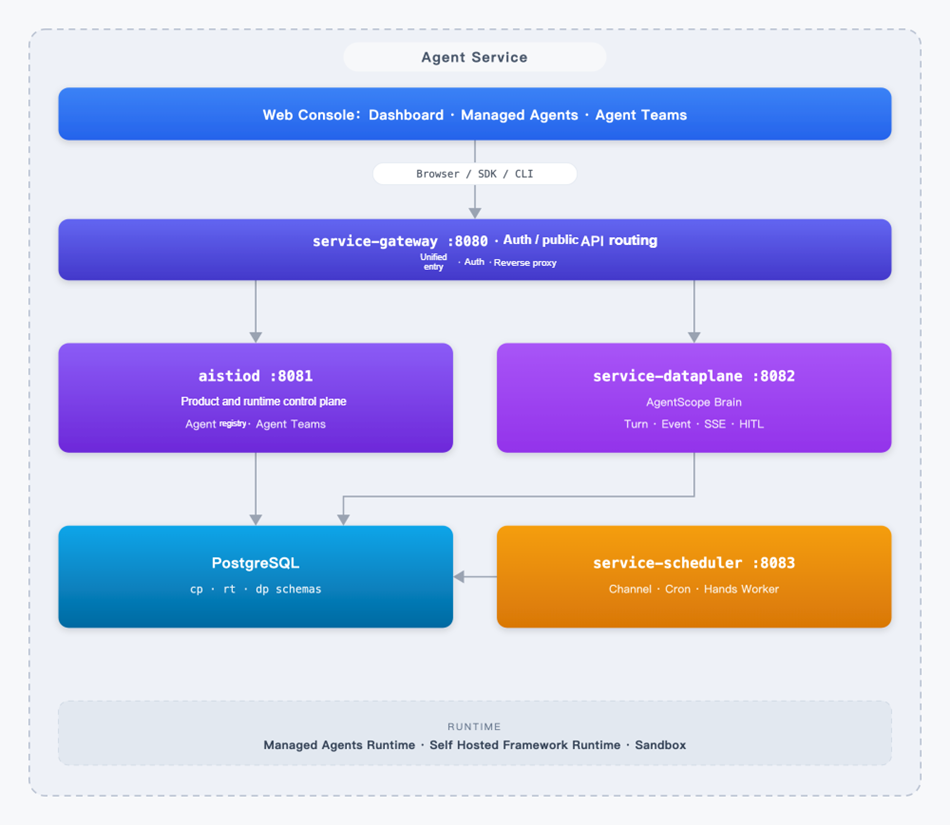
The responsibilities of the four planes can be understood as follows:
| Plane | Responsible For | Not Responsible For |
|---|---|---|
| Gateway | Public entry point, authentication, and API routing | Business state and Agent execution |
| Control Plane (aistiod) | Product resources, console, Agent state, Session, Team, and runtime commands | Harness inference and Session streaming |
| Dataplane | Managed Harness Runtime, event logs, SSE, Turn Lease, HITL, and Work Queue | Directly reading product Catalog tables |
| Scheduler | Channel, Cron, outbound tasks, and Self-hosted Hands Worker | Inference loop |
The product has another key separation: Brain and Hands.
This allows enterprises to answer three questions separately: What context can the model see? Which networks and files can tools access? Which parts of tool results may be returned to Brain? Separating trust boundaries makes permission reviews and fault diagnosis much clearer.
This also explains why "managed" does not mean "all data must leave the customer's environment." A managed sandbox can be used when data can be desensitized for cloud-side inference. When access to internal systems or sensitive file systems is required, Hands can be placed in the customer's VPC, where an outbound Worker executes tools and returns results. Brain still handles orchestration and state recovery; only the execution plane is replaced.
For readers who want to better understand Turn paths, event contracts, and schema boundaries, we have a separate technical article: AgentScope Service Technical Overview.
AgentScope Service serves two types of users:
Both paths can coexist. Many teams first get new products working with Managed Agents, then gradually bring their existing self-developed Agents (BYO) into Dashboard.
Next, we examine mode 2: how self-developed and self-deployed Agents connect to the AgentScope Service control plane. Broadly, there are two integration methods, SDK and Sidecar. Agent Framework applications can register with the control plane by adding an SDK; this can be done through...
AgentScope Java currently supports native Agent application integration. By adding the agentscope-extensions-aistio dependency, existing AgentScope Runtimes can automatically register with the control plane and appear alongside Managed Agents in Dashboard. Session state, health information, and runtime observations are reported under the same contract.
The control plane can also natively support the capabilities required for distributed AgentScope deployments, including Agent Teams cross-replica message delivery and subtask delegation, cross-node asynchronous task state tracking, Session concurrency control, and Workspace state synchronization.
We currently provide a python sdk in the community. Users can integrate through the aistio.instrument() wrapper. For LangChain / LangGraph applications, the control plane collects Session snapshots, context, and runtime metrics out of band. The main business path succeeds first; reporting failures do not affect inference itself.
This allows Agents developed with LangChain to participate in AgentScope Service's fleet management and Session observability without rewriting business workflows.
AgentScope Service supports registering Agents developed with DeepSeek Harness with the control plane. Integration is implemented as a DSH plugin, while DSH continues to use its own loop and Web UI.
Without changing DSH source code, you only need to install the extension package provided by AgentScope Service into the profile (dsh plugin add writes the profile's bundle list and dependencies).
# This directory:agentscope-java/agentscope-service/aistio/sdk/dsh
cd /path/to/agentscope-java/agentscope-service/aistio/sdk/dsh
npm install
npm run build

dsh plugin --profile web add "$(pwd)"
When starting DSH from source, replace dsh with pnpm dsh. After installation, use the following command to confirm that the configuration tree contains layer # == @agentscope/dsh-aistio or id: aistio:.
dsh --profile web --dump-configNow start the DSH Agent process with the following commands:
export BUILDER_INTERNAL_TOKEN=local-dev-internal-token-at-least-32chars
export AISTIO_CONTROL_HTTP=http://localhost:8081
export AISTIO_AGENT_NAME=deepseek-harness

dsh --profile web
The startup logs should contain something like:
[aistio] instrumented DeepSeek Harness as 'deepseek-harness' (contract :18091, control http://localhost:8081, team-coordination=true)
[aistio] registered <instanceId> at http://127.0.0.1:18091 with http://localhost:8081
First, you can check the contract port's health locally:
curl -s http://127.0.0.1:18091/agentscope/health
# {"status":"ok"}
Without BUILDER_INTERNAL_TOKEN, the plugin still starts /agentscope/*, but does not register with aistiod, and the instance does not appear in Dashboard.
Support for more frameworks, such as Claude Agent SDK and Google ADK, will be provided gradually. See the roadmap for details.
For Coding Agents such as Claude Code and Qoder CLI whose binaries are difficult to modify directly, integration can use a Sidecar bridge: it observes local Session directories and execution state out of band, reports to the control plane, and handles operational commands such as compaction and termination.
The value of this approach is that enterprises do not have to choose between "using the most powerful Coding Agent" and "bringing it under unified governance." Development productivity tools can continue running in developer environments, while the platform can still observe them, manage them, and intervene when necessary.
Personal workspace assistants such as QwenPaw can theoretically also integrate through a sidecar. See the roadmap for details.
AgentScope Service is evolving rapidly. To try the full product experience first, you can download the repository source code and start it in a local environment.
1. Start all components, including the control plane and Managed Agents data plane, as shown in the production deployment architecture diagram above:
git clone https://github.com/agentscope-ai/agentscope-java.git
cd agentscope-java
export DASHSCOPE_API_KEY=sk-xxx
cd agentscope-service
scripts/dev-down.sh && BUILDER_REBUILD=1 scripts/dev-up.sh2. Open http://localhost:8080 and enter the username/password (admin / admin).
You can then try creating Agents quickly with Managed Agents:
3. To try BYO Agent registration, use the example agentscope-samples/agents/agentscope-paw in the source repository. After startup, you can see in the dashboard that the Agent has registered successfully.
AgentScope Service brings Agents built using different approaches (Framework, Coding Agent, Managed Agents, and others) into a unified control plane, providing a unified view of Agent collaboration. Whether you create your first Agent in Console and let the AgentScope Service platform host Harness execution, or connect existing AgentScope / LangChain / Claude applications to the control plane, the goal is the same: give enterprises a one-stop Agent management and governance center.
Next, AgentScope Service will continue evolving toward "more open integration, more complete automation, and stronger event-driven capabilities." Near-term priorities include:
Alibaba Cloud provides a full-lifecycle platform for Agent building, Teams orchestration, observability, and evaluation. If you need enterprise-grade platform capabilities, explore:
[1] python sdk / Agent Integration SDK: https://github.com/agentscope-ai/agentscope-java/tree/main/agentscope-service/aistio/sdk/
[2] AgentScope Service: https://github.com/agentscope-ai/agentscope-java/tree/main/agentscope-service
Seamless AI Safety: Integrating Qwen3Guard into Higress with Zero Code Changes

824 posts | 61 followers
FollowAlibaba Cloud Native Community - October 27, 2026
Alibaba Cloud Native Community - June 8, 2026
Alibaba Cloud Community - July 6, 2026
Alibaba Cloud Native Community - November 11, 2026
Alibaba Cloud Native Community - April 3, 2026
Alibaba Cloud Native Community - June 23, 2026
824 posts | 61 followers
Follow DeepSeek
-V4.1-Flash is the lightweight flagship of DeepSeek's new architecture family, packing 552B total MoE parameters to deliver flagship-surpassing intelligence across key benchmarks.
Learn More Token Plan
Build more, spend less. One plan, every modality.
Learn More Wan3.0
Unleash Your Creativity Try Wan 3.0 now — longer narratives, greater control, endless creativity.
Learn More Qoder
From Assisted to Autonomous — Adapting to Every Programming Need
Learn MoreMore Posts by Alibaba Cloud Native Community

