By Wang Jianwei (Zhengji)
Generative AI is moving beyond the question of "whether it can be used" toward "how to use it safely at scale."
The Higress project has now integrated Qwen3Guard-Gen as a Wasm plugin. Here is what it does in three points:
This belongs at the gateway because risks flow in both directions: they may originate in user input or appear in model output. If each application maintains its own moderation SDK, risk thresholds, and refusal logic, safety policies will soon be scattered across multiple code repositories. Every model change or policy upgrade then requires another round of application modifications.
Start with a diagram to understand this integration:
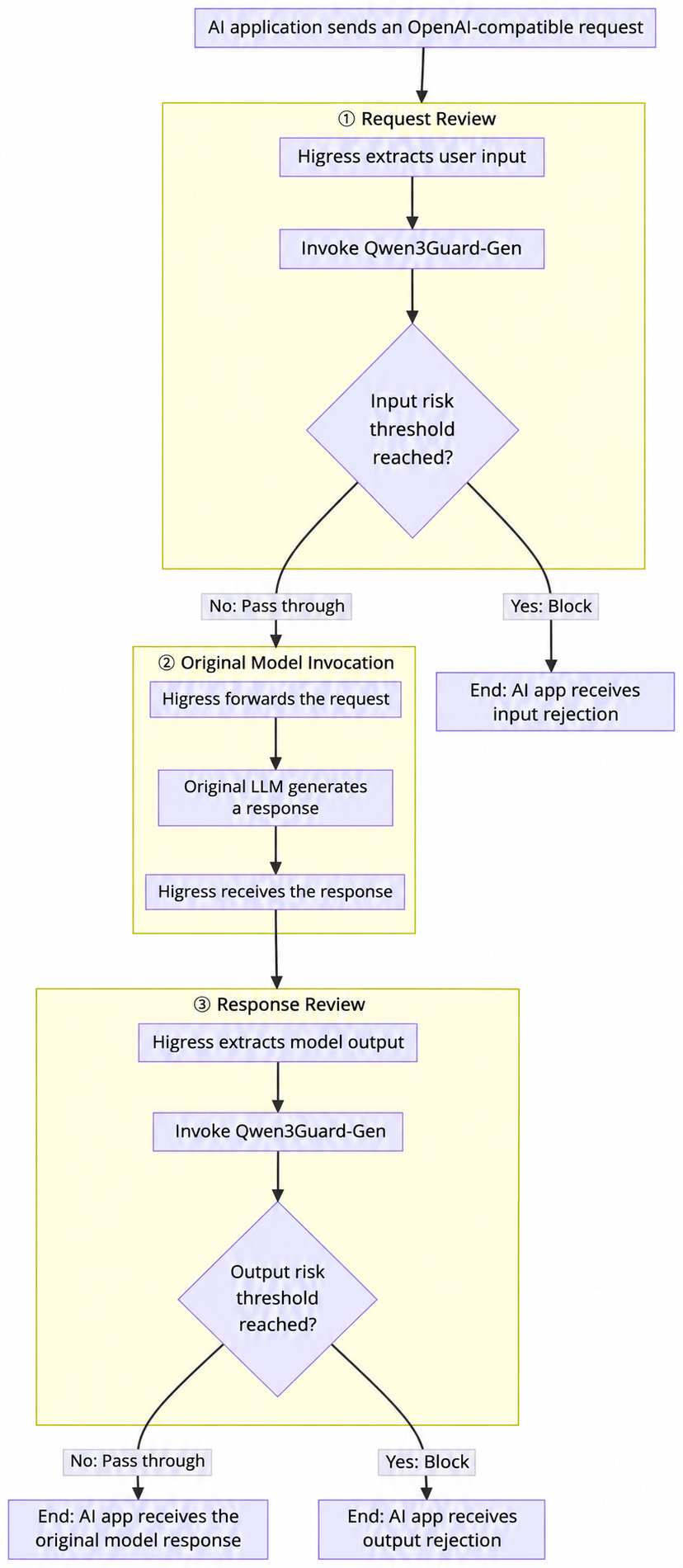
This is not a safety demo attached to the side of the gateway and disconnected from traffic. Instead, content extraction, outbound safety calls, risk decisions, streaming buffering, and refusal response shaping are placed in the actual data-plane path traversed by requests and responses. Higress translates model judgments into gateway actions.
According to the official Qwen3Guard repository, official model cards, and technical report, Qwen3Guard is a family of safety moderation models built on Qwen3, trained on over 119 × 10,000 safety-annotated prompts and responses. It comes in three sizes, 0.6B, 4B, and 8B, and follows two technical approaches:
| Official Model | How It Works | Directly Integrated by This Plugin? |
|---|---|---|
| Qwen3Guard-Gen | Receives complete user input or "input + response" and generates structured safety judgments | Yes |
| Qwen3Guard-Stream | Monitors safety token by token using dedicated classification heads and streaming state | No |
By default, the plugin calls Qwen/Qwen3Guard-Gen-4B, for a straightforward reason: Qwen3Guard-Gen can use vLLM or SGLang to expose an OpenAI-compatible POST /v1/chat/completions endpoint, fitting naturally into existing AI gateway protocols.
Qwen3Guard reports three risk levels:
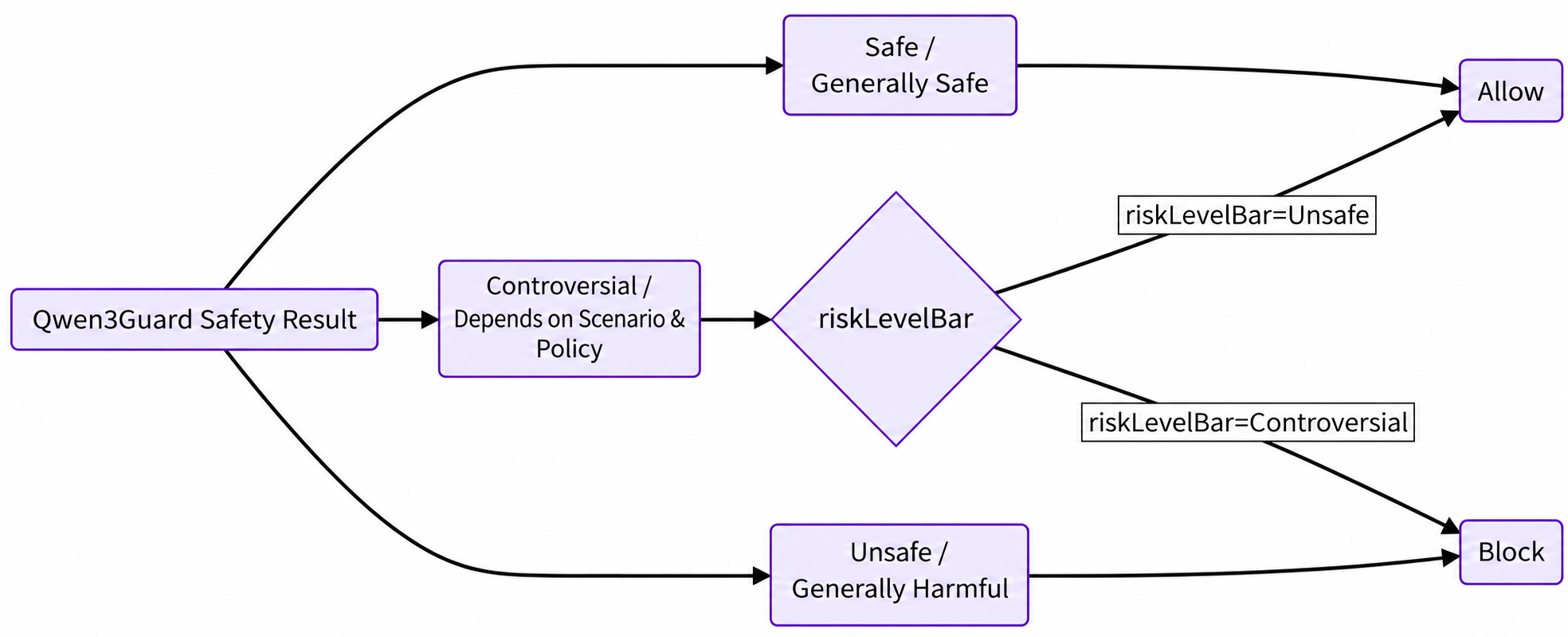
The plugin maps the three official result levels to two gateway policy settings:
riskLevelBar |
Blocking Scope | Policy Meaning |
|---|---|---|
Unsafe, the default |
Block only Unsafe
|
Controversial is allowed under a permissive policy |
Controversial |
Block Controversial and Unsafe
|
Apply a strict policy to controversial content as well |
Qwen3Guard's official safety policy covers categories including violence, non-violent illegal acts, sexual content, personally identifiable information, suicide and self-harm, unethical acts, politically sensitive topics, and copyright infringement. Input moderation also includes Jailbreak detection. The current plugin can parse Safety, Categories, and, in response moderation, Refusal, but the only fields that actually determine whether traffic is allowed are Safety and riskLevelBar. The current version does not yet support configuring different actions by category, and this article does not present that as an existing capability.
The official materials also state support for 119 languages and dialects and report results on English, Chinese, and multilingual safety benchmarks. These describe the Qwen3Guard model's publicly stated capabilities, not a guarantee of production results for any particular business. Production integration still requires evaluation against your own language distribution, real risk samples, and the cost of false positives.
The gateway is an unavoidable point on the path between callers and model services. Placing safety controls in Higress lets multiple applications reuse the same moderation integration and thresholds without copying the logic into every application.
The following sequence diagram reflects the actual call order in the current code:
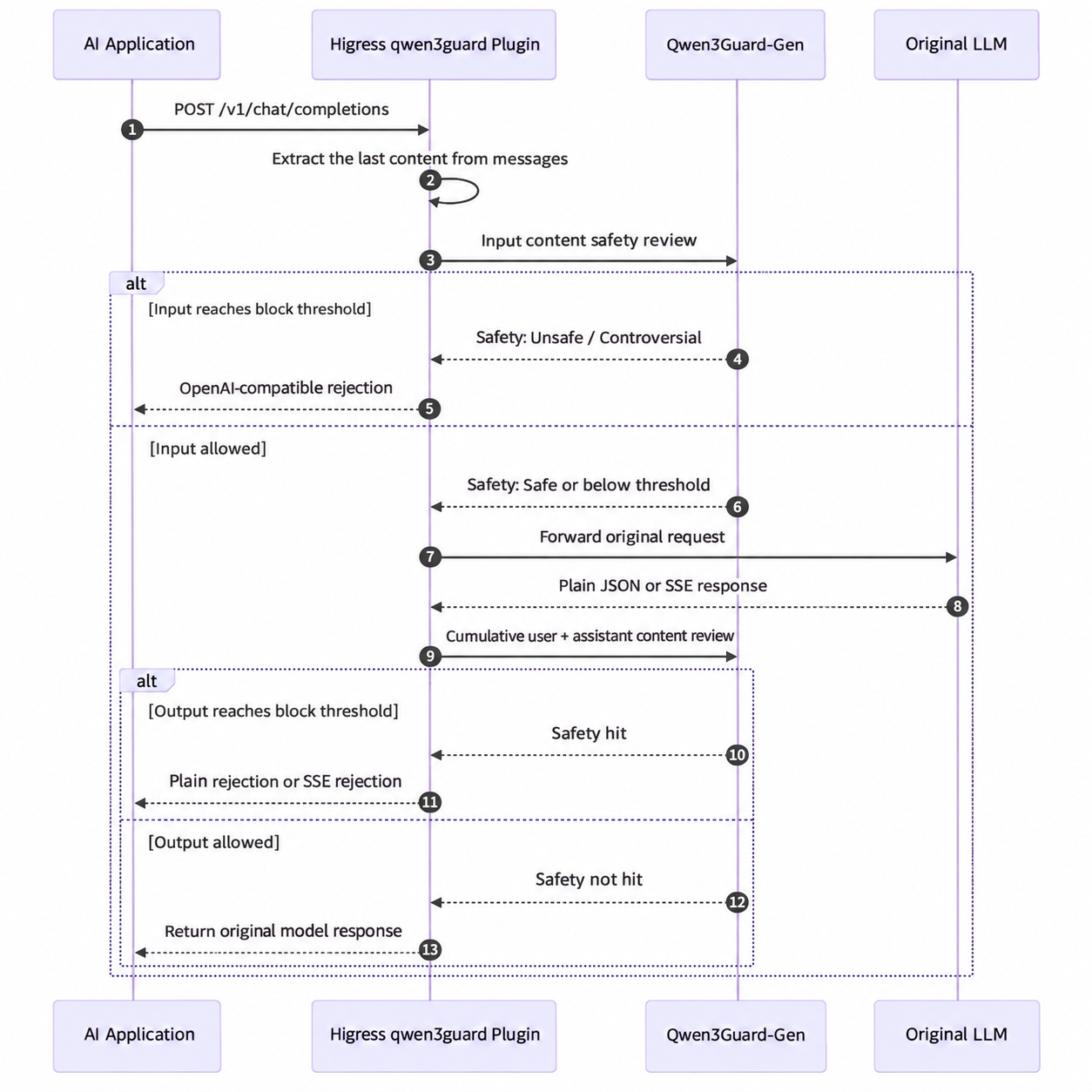
The plugin enables checkRequest by default. Once the request body arrives, it uses maxBodyBytes to set the buffer limit and the default GJSON Path messages.@reverse.0.content to retrieve the last message's content.
After successfully extracting the text, the plugin constructs a request using Qwen3Guard-Gen's official Prompt Moderation format:
{
  "model": "Qwen/Qwen3Guard-Gen-4B",
  "messages": [
    {
      "role": "user",
      "content": "<Pending Input>"
    }
  ],
  "max_tokens": 128
}
When the risk reaches the threshold, the plugin returns a refusal directly without calling the original large language model. Only when the threshold is not reached does it resume the request and continue forwarding it. This both centralizes safety enforcement and prevents blocked requests from consuming inference resources on the original model.
The plugin also enables checkResponse by default. For non-streaming responses with HTTP 200, it buffers the complete JSON, extracts the response through choices[0].message.content, and submits it using the official Response Moderation structure:
{
  "model": "Qwen/Qwen3Guard-Gen-4B",
  "messages": [
    {
      "role": "user",
      "content": "<Original User Input>"
    },
    {
      "role": "assistant",
      "content": "<Model Response>"
    }
  ],
  "max_tokens": 128
}
As long as the user text is successfully retrieved during the request phase, response moderation preserves the conversational relationship between the "question + answer." If request text extraction fails, the plugin does not invent context; it moderates only the assistant response. Response checking handles only HTTP 200; other status codes are passed through directly. When response checking is enabled, the plugin also removes Accept-Encoding from the request to prevent compressed responses from making direct text extraction impossible.
AI conversations commonly use streaming output. The current plugin recognizes Content-Type: text/event-stream, parses SSE event boundaries and data: payloads, and collects newly added text through choices[0].delta.content.
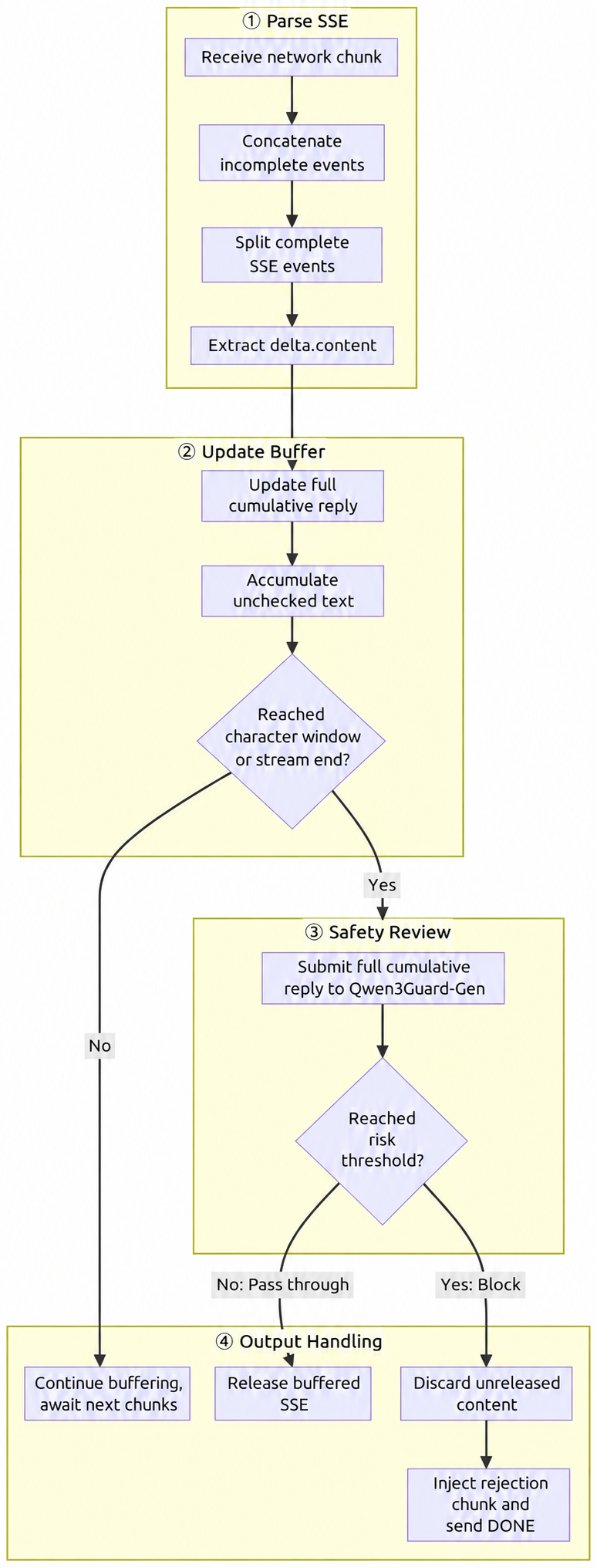
The plugin maintains two states:
streamBufferChars.By default, a check is triggered for every 1000 new Unicode characters, counted as UTF-8 runes rather than bytes. A smaller window means more frequent checks and less content awaiting moderation, but also more Qwen3Guard calls and repeated computation. A larger window reduces the number of calls, but keeps more content buffered before each check. The specific value must be determined through testing with real traffic, time to first token, and inference resources.
Once a risk is detected, the plugin can only discard data that has not yet been released and append a refusal SSE. Status codes and earlier chunks already sent to the client cannot be retracted, so denyCode has no effect when blocking a streaming response.
This point bears repeating:
The current implementation is "gateway-side segmented buffering of SSE, with repeated calls to Qwen3Guard-Gen to moderate accumulated text," not Qwen3Guard-Stream's native token-by-token classification.
The official technical report notes that repeatedly processing accumulated text with the Gen model creates redundant computation, whereas the Stream model uses dedicated classification heads and streaming state to avoid reprocessing historical tokens. These must not be conflated as the same performance capability.
The Qwen3Guard inference service is not embedded in the gateway process. The plugin builds Envoy clusters for outbound calls through the Higress Wasm Go SDK and currently supports four values for serviceSource:
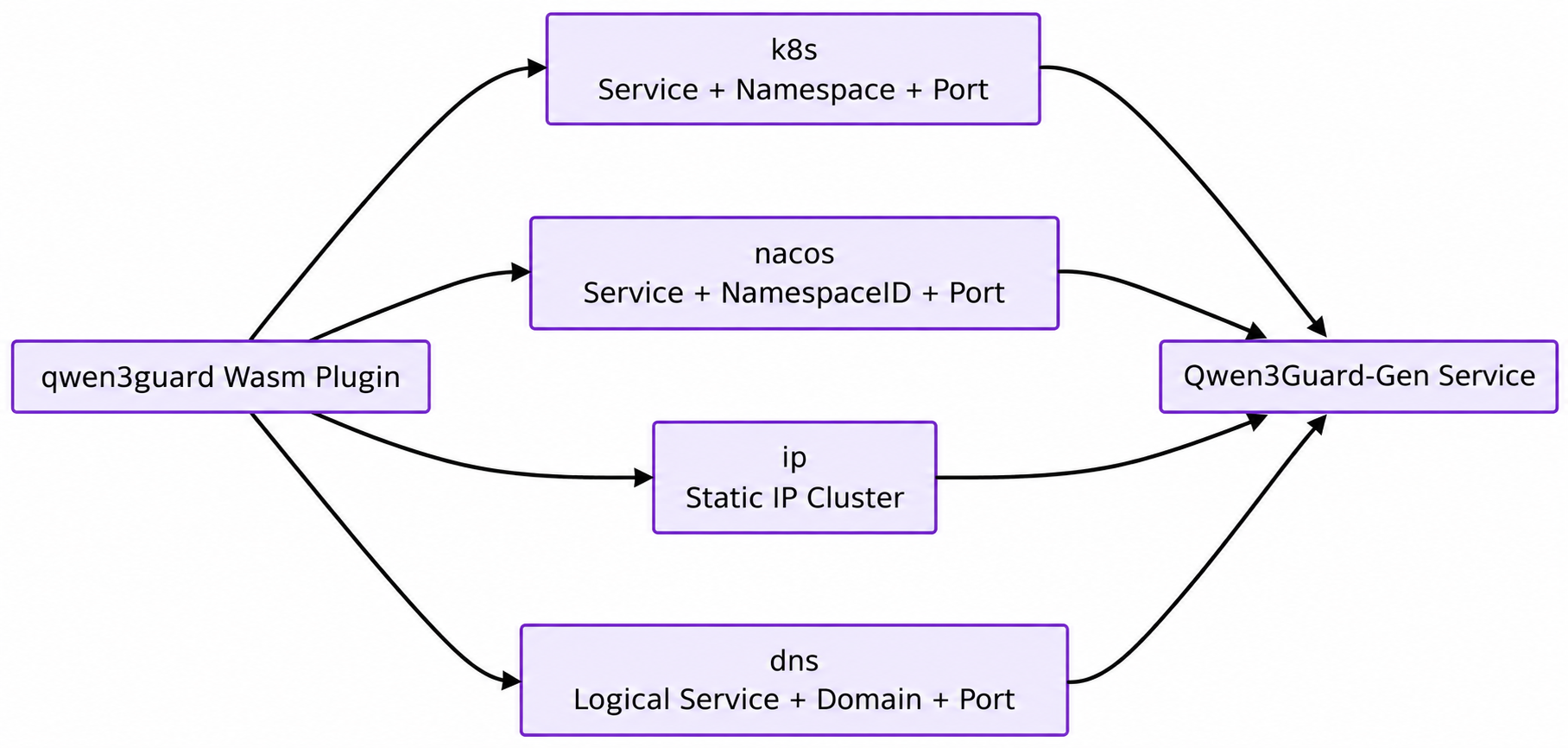
serviceSource |
Required Information | Code Behavior |
|---|---|---|
k8s |
serviceName, servicePort; namespace defaults to default
|
Build a Kubernetes service cluster |
nacos |
serviceName, servicePort, namespace
|
Build a Nacos service cluster |
ip |
serviceName, servicePort
|
Build a Static IP cluster |
dns |
serviceName, servicePort, domain |
Build a DNS cluster |
This means Qwen3Guard can be deployed and scaled independently; the gateway depends only on a reachable OpenAI-compatible HTTP service. Note, however, that "the service has started" does not mean "the gateway data plane can reach it." DNS, cluster names, Kubernetes namespaces, outbound networking, allowlists, and authentication still need to be verified from the network where Envoy runs.
Users must compile and mount Higress's open-source Wasm plugins themselves; the project does not provide a prebuilt qwen3guard plugin image. The process has three steps: Compile the Wasm artifact → Make the artifact accessible to the data plane → Distribute configuration through WasmPlugin.

The simplest option is to compile locally, producing main.wasm:
cd plugins/wasm-go
PLUGIN_NAME=qwen3guard make local-build
# Produce:plugins/wasm-go/extensions/qwen3guard/main.wasm
The equivalent manual commands are:
cd plugins/wasm-go/extensions/qwen3guard
go test ./...
GOOS=wasip1 GOARCH=wasm go build -buildmode=c-shared -o main.wasm .
To pin down the build environment, use the container build provided by the repository, which produces plugin.wasm:
cd plugins/wasm-go
PLUGIN_NAME=qwen3guard make build
# Produce:plugins/wasm-go/extensions/qwen3guard/plugin.wasm
For production, build your own OCI image and push it to your own registry:
cd plugins/wasm-go
PLUGIN_NAME=qwen3guard \
REGISTRY=<your-registry>/ \
PLUGIN_VERSION=1.0.0 \
make build-push
Note that REGISTRY must end with /; the final image address is ${REGISTRY}${PLUGIN_NAME}:${PLUGIN_VERSION}. If PLUGIN_VERSION is not specified, the tag falls back to "build-time-commit," which makes rollback and canary deployment harder. Specify it explicitly in production.
Choose one of two approaches to suit your scenario:
| Approach | url Format |
Applicable Scenarios | Prerequisites |
|---|---|---|---|
| File mount | file:///opt/plugins/wasm-go/extensions/qwen3guard/plugin.wasm |
Local development and self-managed testing | Enable global.volumeWasmPlugins=true during Helm installation and place the artifact at the corresponding path in the gateway container |
| OCI image | oci://<your-registry>/qwen3guard:1.0.0 |
Production deployment | Run make build-push first and ensure the data plane can pull from that registry |
The repository's make install-dev-wasmplugin uses the file-mount approach: it sets the Helm variable global.volumeWasmPlugins=true and mounts the locally compiled artifact into the gateway container, making it suitable for rapid iteration during development.
Enable globally:
apiVersion: extensions.higress.io/v1alpha1
kind: WasmPlugin
metadata:
  name: qwen3guard
  namespace: higress-system
spec:
  phase: UNSPECIFIED_PHASE
  priority: 300
  url: oci://<your-registry>/qwen3guard:1.0.0
  defaultConfig:
    serviceSource: k8s
    serviceName: qwen3guard
    servicePort: 8000
    namespace: ai-security
    requestPath: /v1/chat/completions
    model: Qwen/Qwen3Guard-Gen-4B
    timeoutMs: 3000
    checkRequest: true
    checkResponse: true
    riskLevelBar: Unsafe
To apply the plugin only to specific AI routes, disable the default configuration and use matchRules instead, so that non-AI traffic is not buffered and moderated as well:
spec:
  phase: UNSPECIFIED_PHASE
  priority: 300
  url: oci://<your-registry>/qwen3guard:1.0.0
  defaultConfigDisable: true
  matchRules:
    - configDisable: false
      ingress:
        - default/my-ai-route
      config:
        serviceSource: k8s
        serviceName: qwen3guard
        servicePort: 8000
        namespace: ai-security
riskLevelBar: Unsafephase and priority are determined by the WasmPlugin resource, not declared in the plugin code itself, so they must be specified explicitly in the CR; do not rely on defaults.
The rule is simple: phases are ordered first; within the same phase, a higher priority value means earlier execution. The repository's e2e tests include a comment that relies on this rule: custom-response uses priority: 200 to ensure it runs before basic-auth at priority: 100.
For reference, existing AI plugins use the following values:
| Plugin | Phase | Priority |
|---|---|---|
ai-proxy |
Default phase | 100 |
ai-statistics |
Default phase | 200 |
ai-security-guard |
Default phase | 300 |
We therefore recommend configuring qwen3guard with the default phase + priority: 300, maintaining the same relative order as similar safety plugins. This setting addresses content extraction on both sides:
messages.@reverse.0.content matches directly;choices[0].message.content and choices[0].delta.content also match directly.If you change the relative order—for example, by having qwen3guard process requests after ai-proxy—you must also adjust the three GJSON Paths to match the message structure actually visible at that layer.
serviceSource: k8s
serviceName: qwen3guard
servicePort: 8000
namespace: ai-security

requestPath: /v1/chat/completions
apiKey: EMPTY
model: Qwen/Qwen3Guard-Gen-4B
timeoutMs: 3000

checkRequest: true
checkResponse: true

requestContentJsonPath: messages.@reverse.0.content
responseContentJsonPath: choices.0.message.content
streamingResponseContentJsonPath: choices.0.delta.content
streamBufferChars: 1000

riskLevelBar: Unsafe
denyCode: 200
denyMessage: Sorry, I cannot answer your question
maxBodyBytes: 10485760
A few points to note: the three fields whose names contain JsonPath actually use GJSON Path syntax; do not add a $ prefix. apiKey should contain only the raw value; the plugin automatically adds the Bearer prefix. In the current implementation, an unconfigured key still uses the default value EMPTY and sends Authorization: Bearer EMPTY; omitting the Authorization request header entirely is not yet supported.
In addition, the plugin artifact exports Proxy-Wasm ABI 0.2.100, so a Higress data-plane image supporting that ABI is required. A standard Envoy build supporting only other ABI versions cannot load it.
The official model card provides the following OpenAI-compatible deployment method:
pip install "vllm>=0.9.0"

vllm serve Qwen/Qwen3Guard-Gen-4B \
  --port 8000 \
  --max-model-len 32768
First verify the safety service directly, rather than attributing every issue to the gateway from the outset:
curl -sS http://127.0.0.1:8000/v1/chat/completions \
  -H 'Content-Type: application/json' \
  -d '{
    "model": "Qwen/Qwen3Guard-Gen-4B",
    "messages": [
      {
        "role": "user",
        "content": "Please introduce Hangzhou West Lake."
      }
    ],
    "max_tokens": 128
  }'
The officially defined generated content uses a structure similar to the following:
Safety: Safe
Categories: None
If the service is actually deployed in Kubernetes, a container, or on another machine, 127.0.0.1:8000 refers only to the host running the current command. It does not establish that the Higress gateway can reach the service.
curl -i 'http://<YOUR_GATEWAY>/v1/chat/completions' \
  -H 'Content-Type: application/json' \
  -d '{
    "model": "your-upstream-model",
    "messages": [
      {
        "role": "user",
        "content": "Please introduce Hangzhou West Lake."
      }
    ],
    "stream": false
  }'
Expected request path:
Client
  → Higress extracts user input
  → Qwen3Guard returns below threshold
  → Request proceeds to base LLM
  → Response re-audited
  → Returns original model result
This article does not assume what content the original model will return. What the code confirms is that the plugin continues forwarding when the threshold is not reached.
Send the same request using a risk sample that complies with your organization's safety testing standards. If Qwen3Guard returns Safety: Unsafe and the threshold is Unsafe, the original large language model is not called, and the client receives a Chat Completions-style refusal generated by the plugin:
{
  "object": "chat.completion",
  "model": "from-security-guard",
  "choices": [
    {
      "index": 0,
      "message": {
        "role": "assistant",
        "content": "很抱歉,我无法回答您的问题"
      },
      "finish_reason": "stop"
    }
  ]
}
The actual response also includes dynamic id, created, usage, and logprobs fields. The default denyCode is 200, so clients cannot identify refusals solely through HTTP error codes.
curl -N 'http://<YOUR_GATEWAY>/v1/chat/completions' \
  -H 'Content-Type: application/json' \
  -d '{
    "model": "your-upstream-model",
    "messages": [
      {
        "role": "user",
        "content": "<Streaming audit samples compliant with testing specifications
>"
      }
    ],
    "stream": true
  }'
When risk is detected in streaming output, the plugin appends a refusal in the following form:
data: {"object":"chat.completion.chunk","choices":[{"delta":{"role":"assistant","content":"Sorry, I cannot answer your question"}}]}

data: {"object":"chat.completion.chunk","choices":[{"delta":{},"finish_reason":"stop"}]}

data: [DONE]
Only the key fields are shown above for readability; actual events also include dynamic id, created, model, index, and logprobs fields.
If the safety service is not in the same Kubernetes cluster as Higress, you can use serviceSource: dns. The current SDK generates an Envoy cluster name in this format:
outbound|<servicePort>||<serviceName>.dnsFor example, if the logical service name is qwen3guard-api, the corresponding ServiceEntry host should be qwen3guard-api.dns. Note that serviceName must not include another .dns suffix, or the cluster name will end in .dns.dns.
apiVersion: networking.istio.io/v1alpha3
kind: ServiceEntry
metadata:
  name: qwen3guard-api
  namespace: higress-system
spec:
  hosts:
    - qwen3guard-api.dns
  ports:
    - name: http
      number: 80
      protocol: HTTP
  resolution: DNS
  endpoints:
    - address: qwen3guard.example.com
      ports:
        http: 80
On the plugin side, change the settings to serviceSource: dns, serviceName: qwen3guard-api, servicePort: 80, and domain: qwen3guard.example.com. Both objects must be correct: ServiceEntry ensures that Envoy has the target cluster, while the plugin configuration selects the cluster of the same name and sets the actual HTTP Host. A domain resolving on a development machine does not prove that it can also be resolved and accessed from the network where the gateway Pod runs.
The safety model's judgment of a specific sample must be based on its actual response; this article does not predict which label a particular sentence will receive. Use a reviewed test set or a controllable Qwen3Guard response stub in a test environment to verify gateway logic against "model return value → plugin action":
| Request Type | Qwen3Guard Condition | Plugin Configuration | Expected Action |
|---|---|---|---|
| Non-streaming request | Safety: Controversial |
riskLevelBar: Unsafe |
The request proceeds to the original model |
| Non-streaming request | Safety: Controversial |
riskLevelBar: Controversial |
The original model is not called; a non-streaming refusal is returned |
| Non-streaming request | Safety: Unsafe |
Any valid threshold | The original model is not called; a non-streaming refusal is returned |
| Non-streaming response | Safety: Unsafe |
checkResponse: true |
The original response is replaced with a non-streaming refusal |
| SSE response | Moderation of accumulated text returns Unsafe | checkResponse: true |
Discard unreleased data and append refusal SSE events and [DONE] |
| Non-streaming or SSE | The safety service times out or returns a status other than 200 | Currently fail-open | Log a warning and allow traffic through |
Three further boundary cases deserve separate coverage: when Safety is an unknown string, parsing should fail and the plugin should fail open, rather than guessing a risk result from an unknown label; when the accumulated stream exceeds maxBodyBytes, the buffer should be released and processing should switch to passthrough; when the upstream returns a status other than 200, output moderation should be skipped and traffic passed through directly. See the plugin README for the full list of test cases.
During acceptance testing, observe the client response, whether the original model receives the request, the number of Qwen3Guard calls, and Wasm warning logs together. A client response of 200 alone does not prove the request went through the original model, because the default refusal status code is also 200.
The code provides defaults but does not claim that they suit every business. The table below lists the direct engineering effects of changes to each key parameter. Final values should be determined jointly by actual response lengths, concurrency, safety-service latency, and risk tolerance:
| Parameter | Current Default | Effect of Decreasing or Disabling | Effect of Increasing |
|---|---|---|---|
| timeoutMs | 2000 | Fail-open occurs sooner, leaving a shorter time window for the safety service | Tolerates slower inference, but requests or streaming releases wait longer |
| streamBufferChars | 1000 | More frequent moderation and more repeated inference over accumulated text | Fewer checks, but more text buffered before each check |
| maxBodyBytes | 10485760 | Streaming passthrough starts earlier, making full moderation of very long requests or responses harder | Allows longer content while increasing the potential buffer size per request |
| checkRequest | true | Disabling stops user-input blocking, but request context may still be read for output moderation | Boolean field; "increasing" does not apply |
| checkResponse | true | Disabling stops buffering or checking the original model's response | Boolean field; "increasing" does not apply |
| riskLevelBar | Unsafe | Changing to Controversial applies a stricter policy | Only the two settings Unsafe and Controversial are supported |
| denyCode | 200 | Can be changed to another positive-integer status code agreed upon by the application; applies only to request blocking and non-streaming response blocking | Has no effect after SSE has already sent the status code |
| denyMessage | Default refusal message in Chinese | Can be replaced with the application's own safety message | Changes only the returned wording, not the risk judgment |
The recommended tuning order is to first verify content paths and network connectivity, then confirm the threshold policy, test streamBufferChars and maxBodyBytes against real length distributions, and finally adjust timeoutMs in line with availability targets. Changing all parameters at once from the outset makes it hard to identify the responsible layer when unexpected passthrough or latency occurs.
Check the four layers sequentially—"safety service → outbound gateway calls → plugin policy → application protocol"—rather than trying to diagnose every issue with the final business request from the outset.

/v1/chat/completions returns HTTP 200, choices[0].message.content contains a parsable Safety: field, and both Prompt and Response messages structures can be handled.serviceSource, serviceName, and servicePort match the actual service; the namespace or DNS domain is correct; and reachability is verified from the gateway's network, not the development machine. If the target service has an IP allowlist, add the gateway's actual outbound IP. Receiving 401 or 403 at least establishes connectivity; for connection timeouts, check networking and allowlists first.riskLevelBar matches the application's required strictness; checkRequest and checkResponse have not been disabled accidentally; and timeoutMs, streamBufferChars, and maxBodyBytes have been evaluated against real traffic.[DONE]; and clients can identify safety responses through refusal content or model: from-security-guard. Do not rely on HTTP status codes other than 200 to identify blocking, because the default denyCode is 200.| Symptom | Possible Cause Consistent with the Current Implementation | Check First |
|---|---|---|
| All requests quickly reach the original model | Fail-open after outbound dispatch failure, or failure to extract request text | Wasm warning logs, GJSON Path, Envoy cluster |
The plugin's outbound call returns 503
|
The target cluster does not exist or the backend is unreachable | Cluster name, ServiceEntry, Service, endpoint |
Qwen3Guard returns 401
|
apiKey is missing or incorrect, or includes a duplicate Bearer
|
Configure only the raw key and check server-side authentication |
| SSE data is never released to the client | The character window has not been reached, or the outbound safety call is still in progress |
streamBufferChars, Qwen3Guard latency, plugin logs |
Controversial is not blocked |
The threshold is still the default Unsafe
|
Set riskLevelBar to Controversial and retest |
HTTP 200 is returned, but the response is a refusal |
The default denyCode is 200
|
Check the response model and assistant content |
| Standalone Envoy cannot load the plugin | The data plane does not support the Proxy-Wasm ABI required by the plugin | Use a data-plane image matching the current Higress version |
For more failure scenarios—such as unmoderated non-streaming responses, moderation stopping after SSE becomes too long, or test routes not receiving request-body callbacks—see the FAQ section of the plugin README.
Safety configuration may contain apiKey. Do not commit real keys to the repository. The current README also warns that the underlying HTTP wrapper may print outbound headers at certain log levels. In production, configure log redaction or keep the relevant components' log level at warn to prevent Authorization information from entering logs.
The safety service may time out, become unreachable, or return an unexpected format. The current plugin chooses fail-open: it logs a warning and allows the current request or response through, preventing a Qwen3Guard failure from directly blocking all AI applications.
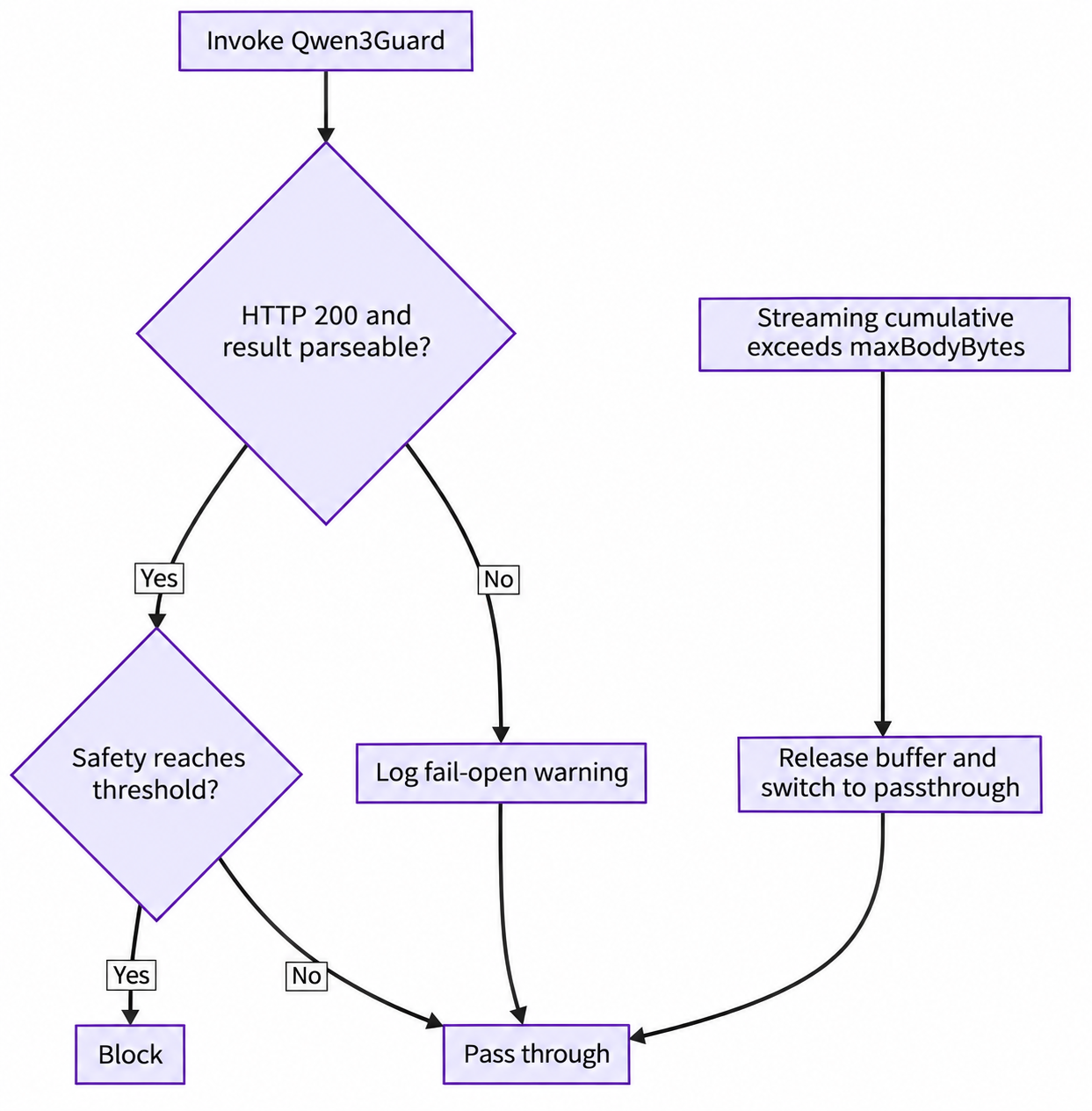
The following situations trigger fail-open:
| Scenario | Current Action |
|---|---|
Network connection failure or exceeding timeoutMs
|
Log and allow traffic through |
Qwen3Guard returns a status other than 200
|
Log and allow traffic through |
Unexpected JSON, empty choices, or missing Safety
|
Log and allow traffic through |
| The GJSON Path extracts no content | Skip the corresponding moderation check |
Accumulated streaming content exceeds maxBodyBytes
|
Release the buffer and switch subsequent processing to passthrough |
The default maxBodyBytes is 10 MiB. fail-open reduces the safety service's impact on application availability, but no blocking occurs during the failure window. Production must therefore monitor Qwen3Guard availability, call latency, responses other than 200, and plugin warning logs. The current version cannot be described as already satisfying compliance scenarios that require mandatory fail-close.
Qwen3Guard provides a publicly available, deployable safety judgment capability: three risk levels, prompt and response moderation, structured results, multilingual coverage, and the Gen and Stream technical approaches. The Higress Qwen3Guard Wasm plugin handles the other half: extracting content from real OpenAI-compatible traffic, calling Qwen3Guard-Gen, mapping results to gateway actions, and handling protocol details in non-streaming and SSE streaming responses.
The result is not a moderation function exclusive to one application, but a reusable safety path:
User Input
  → Gateway Pre-audit
  → Base LLM
  → Gateway Output Audit
  → Safe Response or Protocol-compliant Refusal
It does not require applications to change protocols, duplicate safety logic in every application, or repackage Qwen3Guard-Gen's capabilities as Qwen3Guard-Stream. It connects model judgments, business policies, and traffic enforcement, bringing AI safety into the gateway's main request path.
AgentScope Service: Open-Source Agent Control Plane with DeepSeek Harness Support

824 posts | 61 followers
FollowAlibaba Cloud Community - October 14, 2025
Alibaba Cloud Native Community - October 22, 2025
Alibaba Cloud Native Community - July 8, 2025
Alibaba Cloud Native Community - February 4, 2026
Alibaba Cloud Native Community - April 9, 2025
Johnny Mai - November 9, 2026
824 posts | 61 followers
Follow API Gateway
 provides you with high-performance and high-availability API hosting services to deploy and release your APIs on Alibaba Cloud products.
Learn More Database Gateway
A tool product specially designed for remote access to private network databases
Learn More China Gateway Solution
Power your progress in China by working with the NO.1 cloud provider of this dynamic market.
Learn More Smart Access Gateway
SmartAG provides an end-to-end cloud deployment solution for connecting hardware and software to Alibaba Cloud.
Learn MoreMore Posts by Alibaba Cloud Native Community

