Untuk memulai streaming langsung, Anda memerlukan URL ingest untuk menyiarkan dan URL streaming untuk menonton. Topik ini menjelaskan cara menghasilkan URL ingest dan streaming yang ditandatangani dengan ApsaraVideo Live guna mengamankan distribusi aliran Anda.
Prasyarat
Sebelum menghasilkan URL ingest atau URL streaming, Anda harus menambahkan domain ingest dan domain streaming, lalu mengaitkan keduanya. Untuk informasi selengkapnya, lihat Tambahkan domain.
Setiap domain mendukung beberapa URL ingest dan streaming untuk aliran bersamaan. Untuk domain ingest, batasnya adalah 300 aliran bersamaan di wilayah China (Beijing), China (Shanghai), dan China (Shenzhen), serta 50 di semua wilayah lainnya. Untuk informasi selengkapnya, lihat Batas.
Struktur URL
URL streaming terdiri dari protocol, domain ingest/streaming, AppName, StreamName, dan sebuah Token.
Tabel berikut menjelaskan komponen-komponen URL streaming langsung.
Parameter | Deskripsi | Contoh |
Protocol | Protokol yang digunakan untuk streaming langsung. |
|
Ingest/Streaming domain | Domain yang telah Anda tambahkan. Gunakan domain ingest untuk menghasilkan URL ingest, dan domain streaming untuk menghasilkan URL streaming. |
|
AppName | Nama kustom untuk aplikasi streaming langsung Anda, digunakan untuk membedakan antar aplikasi atau skenario bisnis. |
|
StreamName | Pengenal unik kustom untuk aliran streaming langsung. |
|
access token | String terenkripsi yang dihasilkan menggunakan algoritma MD5 dan kunci otentikasi domain. Token ini mengamankan aliran streaming langsung. Untuk detail aturan pembuatannya, lihat URL signing. |
|
Hasilkan URL
Anda dapat menghasilkan URL ingest dan streaming menggunakan salah satu metode berikut:
Hasilkan di Konsol: Direkomendasikan untuk uji coba awal dan pengujian. Konsol menghasilkan URL dengan Token terenkripsi hanya dengan satu klik.
Hasilkan secara terprogram: Direkomendasikan untuk lingkungan produksi. Mengotomatiskan pembuatan URL di server Anda memungkinkan manajemen dan distribusi yang fleksibel.
Hasilkan di Konsol
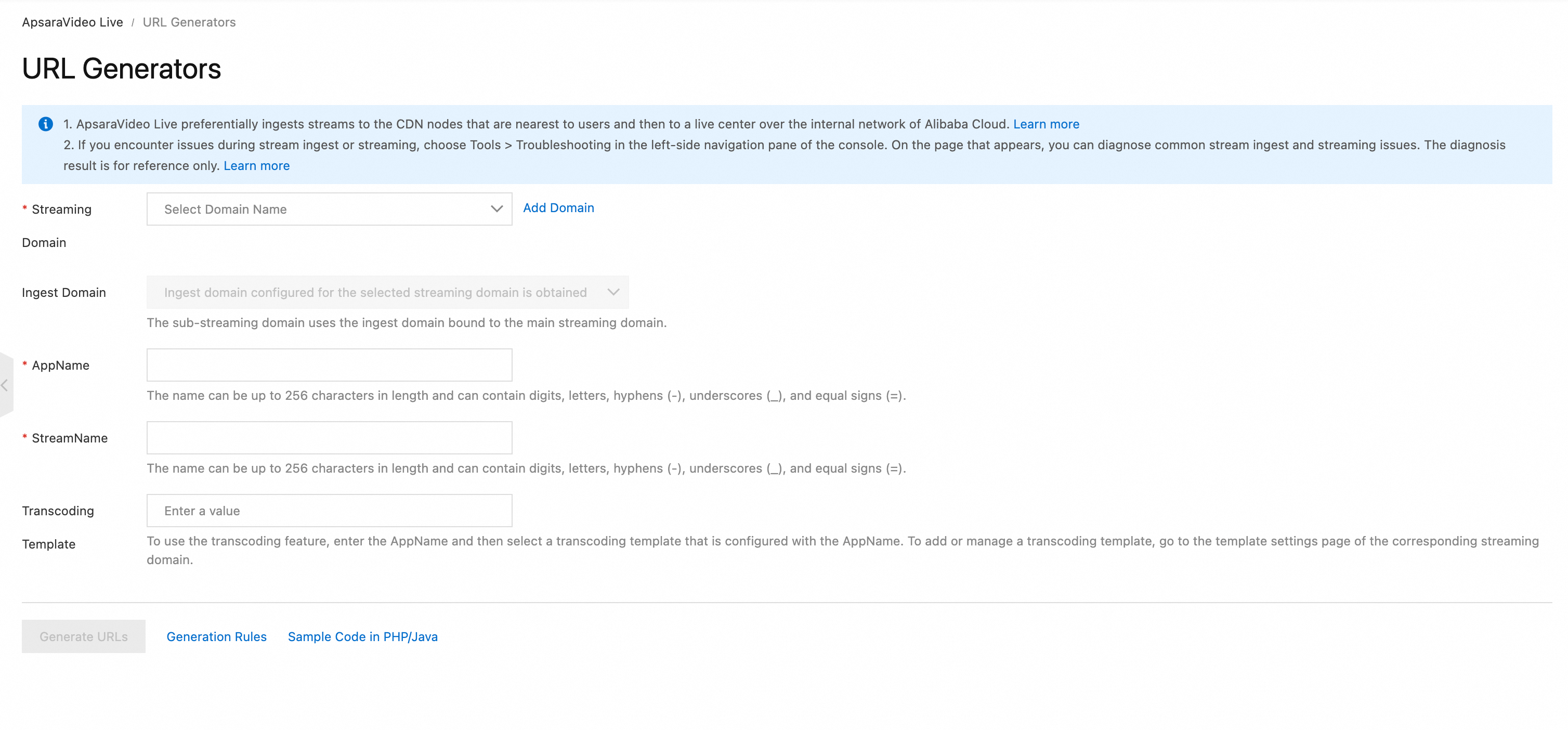
Buka halaman URL Generators.
Lengkapi konfigurasi berikut dan klik Generate URLs untuk mendapatkan URL ingest dan streaming.
 Catatan
Pembuat URL tidak mendukung pembuatan URL streaming untuk live subtitles.
Hasilkan secara terprogram
Langkah 1: Susun URI
Susun URI dasar dalam format berikut: {protocol}://{domain}/{AppName}/{streamName}. Untuk contoh protokol berbeda, lihat Contoh URL ingest atau Contoh URL streaming.
// Pseudocode
protocol = "rtmp"
domain = "example.aliyundoc.com"
appName = "liveApp"
streamName = "liveStream"
uri = protocol + "://" + domain + "/" + appName + "/" + streamName
// Hasil: rtmp://example.aliyundoc.com/liveApp/liveStream
Langkah 2: Dapatkan kunci otentikasi
Kunci otentikasi digunakan untuk menghasilkan access token. Dapatkan kunci otentikasi dari halaman URL signing di Konsol atau dengan memanggil API DescribeLiveDomainConfigs.
Gunakan kunci otentikasi domain ingest untuk URL ingest dan kunci domain streaming untuk URL streaming.
Langkah 3: Susun URL yang ditandatangani
Kode contoh berikut untuk protokol RTMP pertama-tama menghasilkan {Token}, lalu menyusun URL streaming langsung lengkap:
Java
import java.math.BigInteger;
import java.nio.charset.StandardCharsets;
import java.security.MessageDigest;
import java.security.NoSuchAlgorithmException;
import java.util.regex.Matcher;
import java.util.regex.Pattern;

public class AuthDemo {
    private static String md5Sum(String src) {
        MessageDigest md5 = null;
        try {
            md5 = MessageDigest.getInstance("MD5");
        } catch (NoSuchAlgorithmException e) {
            e.printStackTrace();
        }
        md5.update(StandardCharsets.UTF_8.encode(src));
        return String.format("%032x", new BigInteger(1, md5.digest()));
    }

private static String aAuth(String uri, String key, long exp) {
    String pattern = "^(rtmp://)?([^/?]+)(/[^?]*)?(\\\\?.*)?$";
    Pattern r = Pattern.compile(pattern);
    Matcher m = r.matcher(uri);
    String scheme = "", host = "", path = "", args = "";
    if (m.find()) {
        scheme = m.group(1) == null ? "rtmp://" : m.group(1);
        host = m.group(2) == null ? "" : m.group(2);
        path = m.group(3) == null ? "/" : m.group(3);
        args = m.group(4) == null ? "" : m.group(4);
    } else {
        System.out.println("NO MATCH");
    }

    String rand = "0";  // "0" by default, other value is ok
    String uid = "0";   // "0" by default, other value is ok
    String sString = String.format("%s-%s-%s-%s-%s", path, exp, rand, uid, key);
    String hashValue = md5Sum(sString);
    String authKey = String.format("%s-%s-%s-%s", exp, rand, uid, hashValue);
    if (args.isEmpty()) {
        return String.format("%s%s%s%s?auth_key=%s", scheme, host, path, args, authKey);
    } else {
        return String.format("%s%s%s%s&auth_key=%s", scheme, host, path, args, authKey);
    }
}

public static void main(String[] args) {
    // The ingest or streaming URL to be signed. example.aliyundoc.com is the ingest or streaming domain, liveApp is the AppName, and liveStream is the StreamName.
    // The same signing method is used for both ingest and streaming URLs.
    // The AppName and StreamName can be up to 256 characters long and can contain digits, uppercase and lowercase letters, hyphens (-), underscores (_), and equal signs (=).
    String uri = "rtmp://example.aliyundoc.com/liveApp/liveStream";
    // The authentication key. Use the key of the ingest domain for ingest URLs and the key of the streaming domain for streaming URLs.
    String key = "<input private key>";
    // The URL's final expiration time is the `exp` timestamp plus the validity period configured for the domain's URL signing. For example, if `exp` is `now + 3600`, the URL expires at `now + 3600 + validity_period`.
    long exp = System.currentTimeMillis() / 1000 + 1 * 3600;
    String authUri = aAuth(uri, key, exp);
    System.out.printf("URL : %s\nAuth: %s", uri, authUri);
}
}
Python
import re
import time
import hashlib
import datetime
def md5sum(src):
    m = hashlib.md5()
    if isinstance(src, str):
        src = src.encode('utf-8')
    m.update(src)
    return m.hexdigest()

def a_auth(uri, key, exp):
    p = re.compile("^(rtmp://)?([^/?]+)(/[^?]*)?(\\?.*)?$")
    if not p:
        return None
    m = p.match(uri)
    scheme, host, path, args = m.groups()
    if not scheme: scheme = "rtmp://"
    if not path: path = "/"
    if not args: args = ""
    rand = "0"      # "0" secara default, nilai lain boleh
    uid = "0"       # "0" secara default, nilai lain boleh
    sstring = "%s-%s-%s-%s-%s" %(path, exp, rand, uid, key)
    hashvalue = md5sum(sstring.encode('utf-8'))
    auth_key = "%s-%s-%s-%s" %(exp, rand, uid, hashvalue)
    if args:
        return "%s%s%s%s&auth_key=%s" %(scheme, host, path, args, auth_key)
    else:
        return "%s%s%s%s?auth_key=%s" %(scheme, host, path, args, auth_key)
def main():
    # URL ingest atau streaming yang akan ditandatangani. example.aliyundoc.com adalah domain ingest atau streaming, liveApp adalah AppName, dan liveStream adalah StreamName.
    # Metode penandatanganan yang sama digunakan untuk URL ingest dan URL streaming.
    # AppName dan StreamName dapat memiliki panjang hingga 256 karakter dan dapat berisi digit, huruf besar dan kecil, tanda hubung (-), garis bawah (_), dan tanda sama dengan (=).
    uri = "rtmp://example.aliyundoc.com/liveApp/liveStream"
    # Kunci otentikasi. Gunakan kunci domain ingest untuk URL ingest dan kunci domain streaming untuk URL streaming.
    key = "<input private key>"
    # Waktu kedaluwarsa akhir URL adalah timestamp `exp` ditambah periode validitas yang dikonfigurasi untuk Penandatanganan URL domain. Misalnya, jika `exp` adalah `now + 3600`, URL akan kedaluwarsa pada `now + 3600 + validity_period`.
    exp = int(time.time()) + 1 * 3600
    authuri = a_auth(uri, key, exp)
    print("URL : %s\nAUTH: %s" %(uri, authuri))
if __name__ == "__main__":
    main()
Go
package main
import (
    "crypto/md5"
    "encoding/hex"
    "fmt"
    "regexp"
    "time"
)

func md5sum(src string) string {
    h := md5.New()
    h.Write([]byte(src))
    return hex.EncodeToString(h.Sum(nil))
}

func a_auth(uri, key string, exp int64) string {
    p, err := regexp.Compile("^(rtmp://)?([^/?]+)(/[^?]*)?(\\?.*)?$")
    if err != nil {
        fmt.Println(err)
        return ""
    }
    m := p.FindStringSubmatch(uri)
    var scheme, host, path, args string
    if len(m) == 5 {
        scheme, host, path, args = m[1], m[2], m[3], m[4]
    } else {
        scheme, host, path, args = "rtmp://", "", "/", ""
    }
    rand := "0" // "0" by default, other value is ok
    uid := "0"  // "0" by default, other value is ok
    sstring := fmt.Sprintf("%s-%d-%s-%s-%s", path, exp, rand, uid, key)
    hashvalue := md5sum(sstring)
    auth_key := fmt.Sprintf("%d-%s-%s-%s", exp, rand, uid, hashvalue)
    if len(args) != 0 {
        return fmt.Sprintf("%s%s%s%s&auth_key=%s", scheme, host, path, args, auth_key)
    } else {
        return fmt.Sprintf("%s%s%s%s?auth_key=%s", scheme, host, path, args, auth_key)
    }
}

func main() {
    // The ingest or streaming URL to be signed. example.aliyundoc.com is the ingest or streaming domain, liveApp is the AppName, and liveStream is the StreamName.
    // The same signing method is used for both ingest and streaming URLs.
    // The AppName and StreamName can be up to 256 characters long and can contain digits, uppercase and lowercase letters, hyphens (-), underscores (_), and equal signs (=).
    uri := "rtmp://example.aliyundoc.com/liveApp/liveStream"
    // The authentication key. Use the key of the ingest domain for ingest URLs and the key of the streaming domain for streaming URLs.
    key := "<input private key>"
    // The URL's final expiration time is the `exp` timestamp plus the validity period configured for the domain's URL signing. For example, if `exp` is `now + 3600`, the URL expires at `now + 3600 + validity_period`.
    exp := time.Now().Unix() + 3600
    authuri := a_auth(uri, key, exp)
    fmt.Printf("URL : %s\nAUTH: %s", uri, authuri)
}
PHP
<?php
function a_auth($uri, $key, $exp) {
    preg_match("/^(rtmp:\/\/)?([^\/?]+)?(\/[^?]*)?(\?.*)?$/", $uri, $matches);
    $scheme = $matches[1];
    $host = $matches[2];
    $path = $matches[3];
    $args = $matches[4];
    if  (empty($args)) {
        $args ="";
    }
    if  (empty($scheme)) {
        $scheme ="rtmp://";
    }
    if  (empty($path)) {
        $path ="/";
    }
    $rand = "0";
    // "0" by default, other value is ok
    $uid = "0";
    // "0" by default, other value is ok
    $sstring = sprintf("%s-%u-%s-%s-%s", $path, $exp, $rand, $uid, $key);
    $hashvalue = md5($sstring);
    $auth_key = sprintf("%u-%s-%s-%s", $exp, $rand, $uid, $hashvalue);
    if ($args) {
        return sprintf("%s%s%s%s&auth_key=%s", $scheme, $host, $path, $args, $auth_key);
    } else {
        return sprintf("%s%s%s%s?auth_key=%s", $scheme, $host, $path, $args, $auth_key);
    }
}
// The ingest or streaming URL to be signed. example.aliyundoc.com is the ingest or streaming domain, liveApp is the AppName, and liveStream is the StreamName.
// The same signing method is used for both ingest and streaming URLs.
// The AppName and StreamName can be up to 256 characters long and can contain digits, uppercase and lowercase letters, hyphens (-), underscores (_), and equal signs (=).
$uri = "rtmp://example.aliyundoc.com/liveApp/liveStream";
// The authentication key. Use the key of the ingest domain for ingest URLs and the key of the streaming domain for streaming URLs.
$key = "<input private key>";
// The URL's final expiration time is the `exp` timestamp plus the validity period configured for the domain's URL signing. For example, if `exp` is `now + 3600`, the URL expires at `now + 3600 + validity_period`.
$exp = time() + 3600;
$authuri = a_auth($uri, $key, $exp);
echo "URL :" . $uri;
echo PHP_EOL;
echo "AUTH:" . $authuri;
?>
C#
using System;
using System.Text.RegularExpressions;
using System.Security.Cryptography;
using System.Text;
public class Test
{
    public static void Main()
    {
        // The ingest or streaming URL to be signed. example.aliyundoc.com is the ingest or streaming domain, liveApp is the AppName, and liveStream is the StreamName.
        // The same signing method is used for both ingest and streaming URLs.
        // The AppName and StreamName can be up to 256 characters long and can contain digits, uppercase and lowercase letters, hyphens (-), underscores (_), and equal signs (=).
        string uri= "rtmp://example.aliyundoc.com/liveApp/liveStream";
        // The authentication key. Use the key of the ingest domain for ingest URLs and the key of the streaming domain for streaming URLs.
        string key= "<input private key>";
        DateTime dateStart = new DateTime(1970, 1, 1, 8, 0, 0);
        // The URL's final expiration time is the `exp` timestamp plus the validity period configured for the domain's URL signing. For example, if `exp` is `now + 3600`, the URL expires at `now + 3600 + validity_period`.
        string exp  = Convert.ToInt64((DateTime.Now - dateStart).TotalSeconds+3600).ToString();
        string authUri = aAuth(uri, key, exp);
        Console.WriteLine (String.Format("URL :{0}",uri));
        Console.WriteLine (String.Format("AUTH :{0}",authUri));
    }
    public static string aAuth(string uri, string key, string exp)
    {
        Regex regex = new Regex("^(rtmp://)?([^/?]+)(/[^?]*)?(\\\\?.*)?$");
        Match m = regex.Match(uri);
        string scheme = "rtmp://", host = "", path = "/", args = "";
        if (m.Success)
        {
            scheme=m.Groups[1].Value;
            host=m.Groups[2].Value;
            path=m.Groups[3].Value;
            args=m.Groups[4].Value;
        }else{
            Console.WriteLine ("NO MATCH");
        }
        string rand = "0";  // "0" by default, other value is ok
        string uid = "0";   // "0" by default, other value is ok
        string u = String.Format("{0}-{1}-{2}-{3}-{4}",  path, exp, rand, uid, key);
        string hashValue  = Md5(u);
        string authKey = String.Format("{0}-{1}-{2}-{3}", exp, rand, uid, hashValue);
        if (args=="")
        {
            return String.Format("{0}{1}{2}{3}?auth_key={4}", scheme, host, path, args, authKey);
        } else
        {
            return String.Format("{0}{1}{2}{3}&auth_key={4}", scheme, host, path, args, authKey);
        }
    }
    public static string Md5(string value)
    {
        MD5CryptoServiceProvider md5 = new MD5CryptoServiceProvider();
        byte[] bytes = Encoding.ASCII.GetBytes(value);
        byte[] encoded = md5.ComputeHash(bytes);
        StringBuilder sb = new StringBuilder();
        for(int i=0; i<encoded.Length; ++i)
        {
            sb.Append(encoded[i].ToString("x2"));
        }
        return sb.ToString();
   }
}
Contoh URL ingest
Protocol | Contoh URL | Deskripsi |
RTMP |
| Protokol standar untuk ingest streaming langsung. |
RTMPS |
| Protokol standar untuk ingest streaming langsung yang aman dan terenkripsi. |
ARTC |
| URL ingest untuk Real-Time Streaming (RTS). |
SRT |
| SRT dinonaktifkan secara default. Anda harus mengaktifkannya untuk domain ingest. Untuk petunjuknya, lihat SRT stream ingest. |
Contoh URL streaming
Jenis URL | Deskripsi | Protocol | Contoh URL |
URL streaming standar | Jika Anda menggunakan SRT untuk ingest streaming langsung, pemutaran didukung melalui RTMP, FLV, HLS, dan ARTC. | RTMP |
|
FLV |
| ||
HLS |
| ||
ARTC |
| ||
URL streaming yang telah dikodekan ulang (Default Transcoding/Custom Transcoding) | Untuk aliran yang telah dikodekan ulang, tambahkan | RTMP |
|
FLV |
| ||
HLS |
| ||
ARTC |
| ||
URL streaming yang telah dikodekan ulang (Multi-bitrate Transcoding) | Untuk aliran bitrate adaptif, tambahkan | HLS |
|
URL aliran tertunda | Untuk aliran tertunda, tambahkan | RTMP |
|
FLV |
| ||
HLS |
| ||
ARTC |
| ||
URL aliran subtitle langsung | Untuk aliran dengan subtitle langsung, tambahkan | RTMP |
|
FLV |
| ||
HLS |
|
Verifikasi URL yang dihasilkan
Untuk memverifikasi URL Anda, kami merekomendasikan melakukan ingest aliran menggunakan aplikasi demo kami di perangkat seluler dan memutar ulang menggunakan VLC media player di PC. Untuk metode ingest dan pemutaran lainnya, lihat Live stream ingest dan Live stream playback:
Verifikasi URL ingest:
Di perangkat seluler (Android atau iOS), pindai kode QR untuk mengunduh dan menginstal aplikasi demo ApsaraVideo Live.
 Catatan
Di perangkat iOS, jika muncul pesan yang menunjukkan developer enterprise tidak tepercaya, buka Settings > General > VPN & Device Management, temukan profil untuk Taobao, lalu ketuk Trust.
Buka Demo App, lalu pilih Camera atau Screen Recording Ingest. Masukkan URL ingest. Anda dapat memindai kode QR untuk memasukkan URL yang dihasilkan di Konsol.

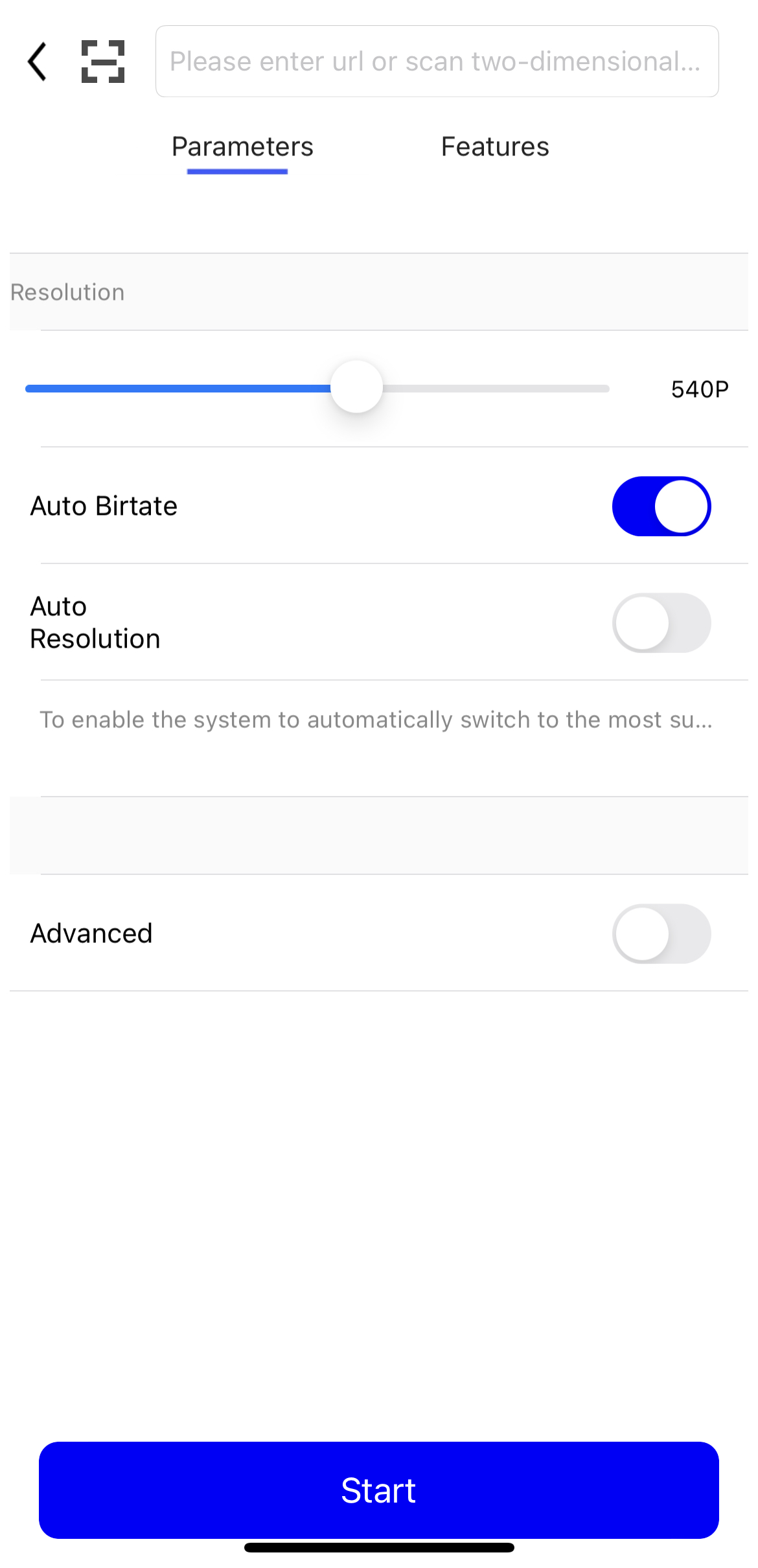
Ketuk Start untuk mulai mengambil aliran.
Anda dapat melihat aliran aktif di halaman Stream Management di Konsol ApsaraVideo Live. Jika aliran tidak ditampilkan, tinjau kembali langkah-langkah sebelumnya untuk mencari kesalahan.

Verifikasi URL streaming:
Pastikan klien ingest tetap berjalan. Jika tidak, pemutaran akan gagal.
Unduh dan instal VLC media player.
Buka VLC media player.
Dari bilah menu, pilih Media > Open Network Stream.
Di tab Network, masukkan URL streaming. Contohnya:
rtmp://pull-singapore.cloud-example.net/testApp/testStream?auth_key=1750150177-0-0-9b7*******31acc543a99c69********
Troubleshooting
Jika Anda mengalami masalah saat ingest atau pemutaran streaming langsung, gunakan troubleshooting tool untuk memvalidasi URL Anda, penandatanganannya, dan pengaturan lainnya.