Untuk memulai streaming langsung, Anda memerlukan URL ingest agar penyiar dapat mengirimkan aliran dan URL streaming agar pemirsa dapat memutarnya. Dokumen ini menjelaskan cara menghasilkan URL ingest dan streaming yang ditandatangani untuk ApsaraVideo Live guna memastikan pengiriman aliran yang aman dan andal.
Prasyarat
Sebelum menghasilkan URL ingest dan streaming, Anda harus menambahkan domain ingest dan domain streaming serta mengaitkannya. Untuk informasi selengkapnya, lihat Tambahkan domain.
Domain ingest mendukung hingga 300 aliran konkuren di Tiongkok (Beijing), Tiongkok (Shanghai), dan Tiongkok (Shenzhen), serta 50 di wilayah lainnya. Untuk informasi selengkapnya, lihat Batasan.
Struktur URL
URL streaming langsung terdiri atas protokol, domain ingest/streaming, AppName, StreamName, dan Token.
Tabel berikut menjelaskan komponen-komponen URL streaming langsung.
|
Parameter |
Deskripsi |
Contoh |
|
Protokol |
Protokol yang digunakan untuk streaming langsung. |
|
|
Domain Ingest/Streaming |
Domain yang telah Anda tambahkan. Gunakan domain ingest untuk menghasilkan URL ingest, dan domain streaming untuk menghasilkan URL streaming. |
|
|
AppName |
Nama kustom untuk aplikasi Anda, digunakan untuk membedakan antara layanan atau skenario yang berbeda. |
|
|
StreamName |
Nama kustom untuk aliran, yang berfungsi sebagai pengenal uniknya. |
|
|
Access token |
String terenkripsi yang dihasilkan menggunakan algoritma MD5 dan kunci autentikasi yang dikonfigurasi untuk domain Anda. Token ini mengamankan streaming langsung Anda. Untuk informasi tentang cara menghasilkan string tersebut, lihat Penandatanganan URL. |
|
Hasilkan URL
Anda dapat menghasilkan URL ingest dan streaming menggunakan salah satu metode berikut:
-
Hasilkan di Konsol: Direkomendasikan untuk uji coba awal dan pengujian. Metode ini secara otomatis menghasilkan URL dengan {Token} terenkripsi.
-
Hasilkan menggunakan kode: Direkomendasikan untuk lingkungan produksi. Metode ini memungkinkan Anda mengotomatiskan pembuatan URL di server untuk manajemen dan distribusi yang fleksibel.
Hasilkan di Konsol
-
Buka halaman Pembuat URL.
-
Konfigurasikan pengaturan dan klik Generate URLs untuk mendapatkan URL ingest dan streaming.
Pengaturan ini mencakup: Streaming domain (wajib; klik Add domains jika belum ada), Associated ingest domain (diisi otomatis dari domain streaming yang dipilih), AppName dan StreamName (wajib; maksimal 256 karakter, termasuk angka, huruf, tanda hubung, garis bawah, dan tanda sama dengan), serta Transcoding template (opsional; memerlukan AppName).
CatatanPembuat URL tidak mendukung pembuatan URL streaming untuk subtitle langsung.
Hasilkan menggunakan kode
1. Buat URI
URI dibuat menggunakan format {Protocol}://{DomainName}/{AppName}/{StreamName}. Untuk contoh penggunaan protokol berbeda, lihat Contoh URL ingest atau Contoh URL streaming.
// Pseudocode
protocol = "rtmp"
domain = "example.aliyundoc.com"
appName = "liveApp"
streamName = "liveStream"
uri = protocol + "://" + domain + "/" + appName + "/" + streamName
// Hasil: rtmp://example.aliyundoc.com/liveApp/liveStream
2. Dapatkan kunci autentikasi
Kunci autentikasi digunakan untuk menghasilkan access token. Anda dapat memperoleh kunci autentikasi dari halaman Penandatanganan URL di Konsol atau dengan memanggil operasi API DescribeLiveDomainConfigs.
Gunakan kunci autentikasi domain ingest untuk URL ingest dan kunci autentikasi domain streaming untuk URL streaming.
3. Susun URL yang ditandatangani
Contoh kode berikut menunjukkan cara menghasilkan {Token} dan menyusun URL lengkap yang ditandatangani untuk protokol RTMP:
Java
import java.math.BigInteger;
import java.nio.charset.StandardCharsets;
import java.security.MessageDigest;
import java.security.NoSuchAlgorithmException;
import java.util.regex.Matcher;
import java.util.regex.Pattern;

public class AuthDemo {
    private static String md5Sum(String src) {
        MessageDigest md5 = null;
        try {
            md5 = MessageDigest.getInstance("MD5");
        } catch (NoSuchAlgorithmException e) {
            e.printStackTrace();
        }
        md5.update(StandardCharsets.UTF_8.encode(src));
        return String.format("%032x", new BigInteger(1, md5.digest()));
    }

private static String aAuth(String uri, String key, long exp) {
    String pattern = "^(rtmp://)?([^/?]+)(/[^?]*)?(\\\\?.*)?$";
    Pattern r = Pattern.compile(pattern);
    Matcher m = r.matcher(uri);
    String scheme = "", host = "", path = "", args = "";
    if (m.find()) {
        scheme = m.group(1) == null ? "rtmp://" : m.group(1);
        host = m.group(2) == null ? "" : m.group(2);
        path = m.group(3) == null ? "/" : m.group(3);
        args = m.group(4) == null ? "" : m.group(4);
    } else {
        System.out.println("NO MATCH");
    }

    String rand = "0";  // "0" secara default, nilai lain juga diperbolehkan
    String uid = "0";   // "0" secara default, nilai lain juga diperbolehkan
    String sString = String.format("%s-%s-%s-%s-%s", path, exp, rand, uid, key);
    String hashValue = md5Sum(sString);
    String authKey = String.format("%s-%s-%s-%s", exp, rand, uid, hashValue);
    if (args.isEmpty()) {
        return String.format("%s%s%s%s?auth_key=%s", scheme, host, path, args, authKey);
    } else {
        return String.format("%s%s%s%s&auth_key=%s", scheme, host, path, args, authKey);
    }
}

public static void main(String[] args) {
    // URL ingest atau streaming yang akan ditandatangani. example.aliyundoc.com adalah nama domain, liveApp adalah AppName, dan liveStream adalah StreamName.
    // Metode penandatanganan yang sama digunakan baik untuk URL ingest maupun streaming.
    // AppName dan StreamName dapat memiliki panjang hingga 256 karakter dan boleh berisi angka, huruf besar dan kecil, tanda hubung (-), garis bawah (_), dan tanda sama dengan (=).
    String uri = "rtmp://example.aliyundoc.com/liveApp/liveStream";
    // Kunci autentikasi. Gunakan kunci dari domain ingest untuk URL ingest dan kunci dari domain streaming untuk URL streaming.
    String key = "<input private key>";
    // Nilai `exp` adalah Stempel waktu UNIX dalam satuan detik. Waktu kedaluwarsa aktual URL adalah stempel waktu ini ditambah periode validitas yang dikonfigurasi di Konsol. Misalnya, jika periode validitas yang dikonfigurasi adalah 30 menit dan Anda mengatur `exp` ke waktu saat ini, URL akan kedaluwarsa dalam 30 menit.
    long exp = System.currentTimeMillis() / 1000 + 1 * 3600;
    String authUri = aAuth(uri, key, exp);
    System.out.printf("URL : %s\nAuth: %s", uri, authUri);
}
}
Python
import re
import time
import hashlib
import datetime
def md5sum(src):
    m = hashlib.md5()
    if isinstance(src, str):
        src = src.encode('utf-8')
    m.update(src)
    return m.hexdigest()

def a_auth(uri, key, exp):
    p = re.compile("^(rtmp://)?([^/?]+)(/[^?]*)?(\\?.*)?$")
    if not p:
        return None
    m = p.match(uri)
    scheme, host, path, args = m.groups()
    if not scheme: scheme = "rtmp://"
    if not path: path = "/"
    if not args: args = ""
    rand = "0"      # "0" secara default, nilai lain boleh
    uid = "0"       # "0" secara default, nilai lain boleh
    sstring = "%s-%s-%s-%s-%s" %(path, exp, rand, uid, key)
    hashvalue = md5sum(sstring.encode('utf-8'))
    auth_key = "%s-%s-%s-%s" %(exp, rand, uid, hashvalue)
    if args:
        return "%s%s%s%s&auth_key=%s" %(scheme, host, path, args, auth_key)
    else:
        return "%s%s%s%s?auth_key=%s" %(scheme, host, path, args, auth_key)
def main():
    # URL ingest atau streaming yang akan ditandatangani. example.aliyundoc.com adalah Nama domain, liveApp adalah AppName, dan liveStream adalah NamaStream.
    # Metode penandatanganan yang sama digunakan untuk URL ingest dan URL streaming.
    # AppName dan NamaStream dapat memiliki panjang hingga 256 karakter dan dapat berisi angka, huruf besar dan kecil, tanda hubung (-), garis bawah (_), dan tanda sama dengan (=).
    uri = "rtmp://example.aliyundoc.com/liveApp/liveStream"
    # Kunci otentikasi. Gunakan kunci dari domain ingest untuk URL ingest dan kunci dari domain streaming untuk URL streaming.
    key = "<masukkan kunci privat>"
    # Nilai `exp` adalah stempel waktu UNIX dalam detik. Waktu kedaluwarsa URL yang sebenarnya adalah stempel waktu ini ditambah periode validitas yang dikonfigurasi di konsol. Misalnya, jika periode validitas yang dikonfigurasi adalah 30 menit dan Anda mengatur `exp` ke waktu saat ini, URL akan kedaluwarsa dalam 30 menit.
    exp = int(time.time()) + 1 * 3600
    authuri = a_auth(uri, key, exp)
    print("URL : %s\nAUTH: %s" %(uri, authuri))
if __name__ == "__main__":
    main()
Go
package main
import (
    "crypto/md5"
    "encoding/hex"
    "fmt"
    "regexp"
    "time"
)

func md5sum(src string) string {
    h := md5.New()
    h.Write([]byte(src))
    return hex.EncodeToString(h.Sum(nil))
}

func a_auth(uri, key string, exp int64) string {
    p, err := regexp.Compile("^(rtmp://)?([^/?]+)(/[^?]*)?(\\?.*)?$")
    if err != nil {
        fmt.Println(err)
        return ""
    }
    m := p.FindStringSubmatch(uri)
    var scheme, host, path, args string
    if len(m) == 5 {
        scheme, host, path, args = m[1], m[2], m[3], m[4]
    } else {
        scheme, host, path, args = "rtmp://", "", "/", ""
    }
    rand := "0" // "0" secara default, nilai lain juga diperbolehkan
    uid := "0"  // "0" secara default, nilai lain juga diperbolehkan
    sstring := fmt.Sprintf("%s-%d-%s-%s-%s", path, exp, rand, uid, key)
    hashvalue := md5sum(sstring)
    auth_key := fmt.Sprintf("%d-%s-%s-%s", exp, rand, uid, hashvalue)
    if len(args) != 0 {
        return fmt.Sprintf("%s%s%s%s&auth_key=%s", scheme, host, path, args, auth_key)
    } else {
        return fmt.Sprintf("%s%s%s%s?auth_key=%s", scheme, host, path, args, auth_key)
    }
}

func main() {
    // URL ingest atau streaming yang akan ditandatangani. example.aliyundoc.com adalah nama domain, liveApp adalah AppName, dan liveStream adalah StreamName.
    // Metode penandatanganan yang sama digunakan baik untuk URL ingest maupun streaming.
    // AppName dan StreamName dapat memiliki panjang hingga 256 karakter dan boleh berisi angka, huruf besar dan kecil, tanda hubung (-), garis bawah (_), dan tanda sama dengan (=).
    uri := "rtmp://example.aliyundoc.com/liveApp/liveStream"
    // Kunci autentikasi. Gunakan kunci dari domain ingest untuk URL ingest dan kunci dari domain streaming untuk URL streaming.
    key := "<input private key>"
    // Nilai `exp` adalah Stempel waktu UNIX dalam satuan detik. Waktu kedaluwarsa aktual URL adalah stempel waktu ini ditambah periode validitas yang dikonfigurasi di Konsol. Misalnya, jika periode validitas yang dikonfigurasi adalah 30 menit dan Anda mengatur `exp` ke waktu saat ini, URL akan kedaluwarsa dalam 30 menit.
    exp := time.Now().Unix() + 3600
    authuri := a_auth(uri, key, exp)
    fmt.Printf("URL : %s\nAUTH: %s", uri, authuri)
}
PHP
<?php
function a_auth($uri, $key, $exp) {
    preg_match("/^(rtmp:\/\/)?([^\/?]+)?(\/[^?]*)?(\?.*)?$/", $uri, $matches);
    $scheme = $matches[1];
    $host = $matches[2];
    $path = $matches[3];
    $args = $matches[4];
    if  (empty($args)) {
        $args ="";
    }
    if  (empty($scheme)) {
        $scheme ="rtmp://";
    }
    if  (empty($path)) {
        $path ="/";
    }
    $rand = "0";
    // "0" secara default, nilai lain juga diperbolehkan
    $uid = "0";
    // "0" secara default, nilai lain juga diperbolehkan
    $sstring = sprintf("%s-%u-%s-%s-%s", $path, $exp, $rand, $uid, $key);
    $hashvalue = md5($sstring);
    $auth_key = sprintf("%u-%s-%s-%s", $exp, $rand, $uid, $hashvalue);
    if ($args) {
        return sprintf("%s%s%s%s&auth_key=%s", $scheme, $host, $path, $args, $auth_key);
    } else {
        return sprintf("%s%s%s%s?auth_key=%s", $scheme, $host, $path, $args, $auth_key);
    }
}
// URL ingest atau streaming yang akan ditandatangani. example.aliyundoc.com adalah nama domain, liveApp adalah AppName, dan liveStream adalah StreamName.
// Metode penandatanganan yang sama digunakan baik untuk URL ingest maupun streaming.
// AppName dan StreamName dapat memiliki panjang hingga 256 karakter dan boleh berisi angka, huruf besar dan kecil, tanda hubung (-), garis bawah (_), dan tanda sama dengan (=).
$uri = "rtmp://example.aliyundoc.com/liveApp/liveStream";
// Kunci autentikasi. Gunakan kunci dari domain ingest untuk URL ingest dan kunci dari domain streaming untuk URL streaming.
$key = "<input private key>";
// Nilai `exp` adalah Stempel waktu UNIX dalam satuan detik. Waktu kedaluwarsa aktual URL adalah stempel waktu ini ditambah periode validitas yang dikonfigurasi di Konsol. Misalnya, jika periode validitas yang dikonfigurasi adalah 30 menit dan Anda mengatur `exp` ke waktu saat ini, URL akan kedaluwarsa dalam 30 menit.
$exp = time() + 3600;
$authuri = a_auth($uri, $key, $exp);
echo "URL :" . $uri;
echo PHP_EOL;
echo "AUTH:" . $authuri;
?>
C#
using System;
using System.Text.RegularExpressions;
using System.Security.Cryptography;
using System.Text;
public class Test
{
    public static void Main()
    {
        // URL ingest atau streaming yang akan ditandatangani. example.aliyundoc.com adalah nama domain, liveApp adalah AppName, dan liveStream adalah StreamName.
        // Metode penandatanganan yang sama digunakan baik untuk URL ingest maupun streaming.
        // AppName dan StreamName dapat memiliki panjang hingga 256 karakter dan boleh berisi angka, huruf besar dan kecil, tanda hubung (-), garis bawah (_), dan tanda sama dengan (=).
        string uri= "rtmp://example.aliyundoc.com/liveApp/liveStream";
        // Kunci autentikasi. Gunakan kunci dari domain ingest untuk URL ingest dan kunci dari domain streaming untuk URL streaming.
        string key= "<input private key>";
        DateTime dateStart = new DateTime(1970, 1, 1, 8, 0, 0);
        // Nilai `exp` adalah Stempel waktu UNIX dalam satuan detik. Waktu kedaluwarsa aktual URL adalah stempel waktu ini ditambah periode validitas yang dikonfigurasi di Konsol. Misalnya, jika periode validitas yang dikonfigurasi adalah 30 menit dan Anda mengatur `exp` ke waktu saat ini, URL akan kedaluwarsa dalam 30 menit.
        string exp  = Convert.ToInt64((DateTime.Now - dateStart).TotalSeconds+3600).ToString();
        string authUri = aAuth(uri, key, exp);
        Console.WriteLine (String.Format("URL :{0}",uri));
        Console.WriteLine (String.Format("AUTH :{0}",authUri));
    }
    public static string aAuth(string uri, string key, string exp)
    {
        Regex regex = new Regex("^(rtmp://)?([^/?]+)(/[^?]*)?(\\\\?.*)?$");
        Match m = regex.Match(uri);
        string scheme = "rtmp://", host = "", path = "/", args = "";
        if (m.Success)
        {
            scheme=m.Groups[1].Value;
            host=m.Groups[2].Value;
            path=m.Groups[3].Value;
            args=m.Groups[4].Value;
        }else{
            Console.WriteLine ("NO MATCH");
        }
        string rand = "0";  // "0" secara default, nilai lain juga diperbolehkan
        string uid = "0";   // "0" secara default, nilai lain juga diperbolehkan
        string u = String.Format("{0}-{1}-{2}-{3}-{4}",  path, exp, rand, uid, key);
        string hashValue  = Md5(u);
        string authKey = String.Format("{0}-{1}-{2}-{3}", exp, rand, uid, hashValue);
        if (args=="")
        {
            return String.Format("{0}{1}{2}{3}?auth_key={4}", scheme, host, path, args, authKey);
        } else
        {
            return String.Format("{0}{1}{2}{3}&auth_key={4}", scheme, host, path, args, authKey);
        }
    }
    public static string Md5(string value)
    {
        MD5CryptoServiceProvider md5 = new MD5CryptoServiceProvider();
        byte[] bytes = Encoding.ASCII.GetBytes(value);
        byte[] encoded = md5.ComputeHash(bytes);
        StringBuilder sb = new StringBuilder();
        for(int i=0; i<encoded.Length; ++i)
        {
            sb.Append(encoded[i].ToString("x2"));
        }
        return sb.ToString();
   }
}
Contoh URL ingest
|
Protokol |
Contoh URL |
Deskripsi |
|
RTMP |
|
Protokol standar untuk ingest streaming langsung. |
|
RTMPS |
|
Protokol standar terenkripsi untuk ingest streaming langsung. |
|
ARTC |
|
URL ingest untuk Streaming Real-Time (RTS). |
|
SRT |
|
Protokol SRT dinonaktifkan secara default. Untuk menggunakan SRT, aktifkan terlebih dahulu pada domain ingest Anda. Lihat Ingest aliran SRT untuk petunjuknya. |
Contoh URL streaming
|
Jenis URL |
Deskripsi |
Protokol |
Contoh URL |
|
URL streaming standar |
Jika Anda menggunakan protokol SRT untuk ingest aliran, Anda dapat memutar aliran tersebut menggunakan RTMP, FLV, HLS, dan ARTC. |
RTMP |
|
|
FLV |
|
||
|
HLS |
|
||
|
ARTC |
|
||
|
URL aliran yang dikodekan ulang (Default Transcoding/Custom Transcoding) |
Tambahkan |
RTMP |
|
|
FLV |
|
||
|
HLS |
|
||
|
ARTC |
|
||
|
URL aliran yang dikodekan ulang (Multi-bitrate Transcoding) |
Untuk aliran transkoding multi-bitrate, tambahkan |
HLS |
|
|
URL aliran dengan penundaan |
Untuk aliran dengan penundaan, tambahkan |
RTMP |
|
|
FLV |
|
||
|
HLS |
|
||
|
ARTC |
|
||
|
URL aliran subtitle langsung |
Tambahkan |
RTMP |
|
|
FLV |
|
||
|
HLS |
|
Verifikasi URL
Kami merekomendasikan menggunakan aplikasi demo seluler untuk mendorong aliran dan pemutar media VLC di PC untuk memutar aliran guna memverifikasi bahwa URL yang dihasilkan valid. Untuk metode dorong dan putar aliran lainnya, lihat Dorong aliran langsung dan Putar aliran langsung.
Verifikasi URL ingest
-
Di perangkat seluler Android atau iOS, pindai kode QR untuk mengunduh dan menginstal aplikasi demo ApsaraVideo Live.
 Catatan
Di iOS, jika Anda melihat prompt "Untrusted Enterprise Developer" saat instalasi, buka Settings > General > VPN & Device Management, temukan profil untuk Taobao, lalu ketuk Trust.
-
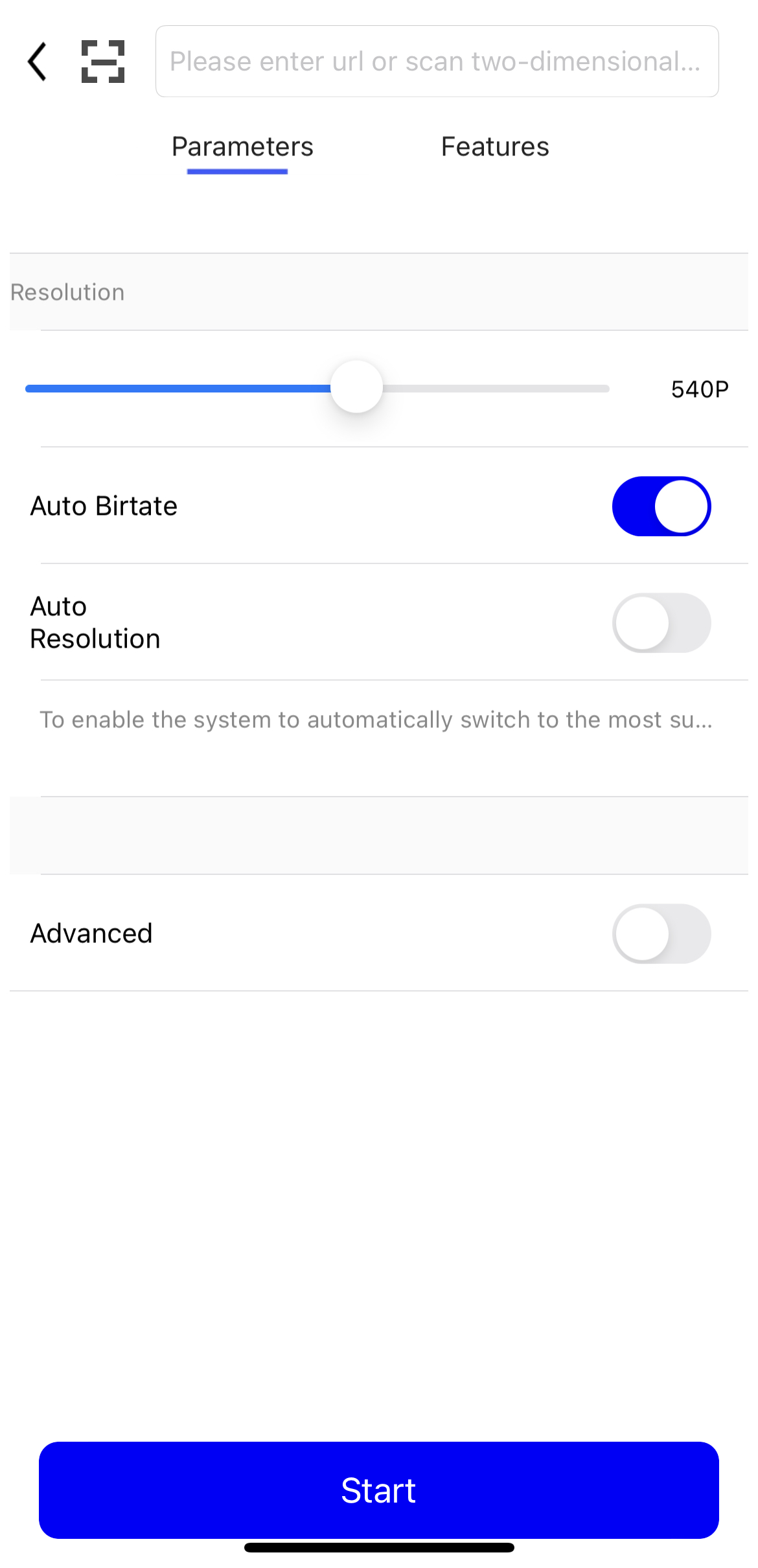
Buka aplikasi demo dan pilih Camera atau Screen Sharing. Di bidang URL ingest, masukkan URL yang telah Anda hasilkan. Anda juga dapat memindai kode QR dari Konsol untuk mengisi URL secara otomatis.

-
Ketuk Start. Anda telah memulai streaming langsung.
Anda dapat membuka halaman Stream Management di Konsol ApsaraVideo Live untuk melihat aliran aktif. Jika aliran tidak ditampilkan, tinjau langkah-langkah sebelumnya untuk memastikan semuanya telah dilakukan dengan benar.
Verifikasi URL streaming
Untuk memutar aliran, pastikan klien ingest sedang aktif mengirimkan aliran. Jika tidak, pemutaran akan gagal.
-
Unduh dan instal VLC media player.
-
Buka VLC media player.
-
Dari bilah menu, pilih Media > Open Network Stream.
-
Di tab Network, masukkan URL streaming yang telah Anda hasilkan. Contoh:
rtmp://pull-singapore.cloud-example.net/testApp/testStream?auth_key=1750150177-0-0-9b7*******31acc543a99c69********Klik Play. Jika VLC media player berhasil mengambil dan memutar aliran, berarti pengaturan ingest dan pemutaran Anda berfungsi dengan benar.
Verifikasi dengan memanggil API
Jika Anda mendorong dan menarik aliran melalui API atau perintah CLI tanpa antarmuka grafis, panggil operasi DescribeLiveStreamsOnlineList untuk mengkueri daftar aliran aktif dan memastikan apakah aliran sedang diingest secara normal.
Contoh CLI:
aliyun live DescribeLiveStreamsOnlineList --RegionId cn-hangzhou --DomainName <your streaming domain> --AppName <your app name> --StreamName <your stream name>Parameter:
-
DomainName: Domain streaming. Parameter ini wajib. -
AppName: Nama aplikasi. -
StreamName: Nama aliran. -
StreamType: Jenis aliran. Nilai yang valid:all(default),raw(aliran mentah), dantrans(aliran yang dikodekan ulang).
Bidang respons:
-
StreamName: Nama aliran. -
AppName: Nama aplikasi. -
PublishTime: Waktu saat aliran mulai diingest.
Operasi ini mengembalikan daftar aliran aktif. Jika aliran yang Anda tentukan termasuk dalam daftar dan aktif, berarti ingest berfungsi dengan benar. Metode ini melengkapi peninjauan aliran aktif di halaman Stream Management di Konsol ApsaraVideo Live.
Troubleshooting
Jika Anda mengalami masalah selama ingest atau pemutaran aliran, gunakan troubleshooting tool untuk memvalidasi URL dan informasi autentikasi.