A 413 error occurs when uploading artifacts to the repository during a Java build
The maximum size for a single artifact is 2 GB. If your code directory or package exceeds this limit before packaging, split it into multiple packages. You can then build and upload them in stages. Alternatively, you can use different directories to build different packages.
Error when pushing a package to the artifact repository: The total artifact storage capacity of the organization is exhausted
Error message: 400 Bad Request. The total artifact storage capacity for your organization is full. You cannot upload new artifacts. To obtain more capacity, enable pay-as-you-go billing.
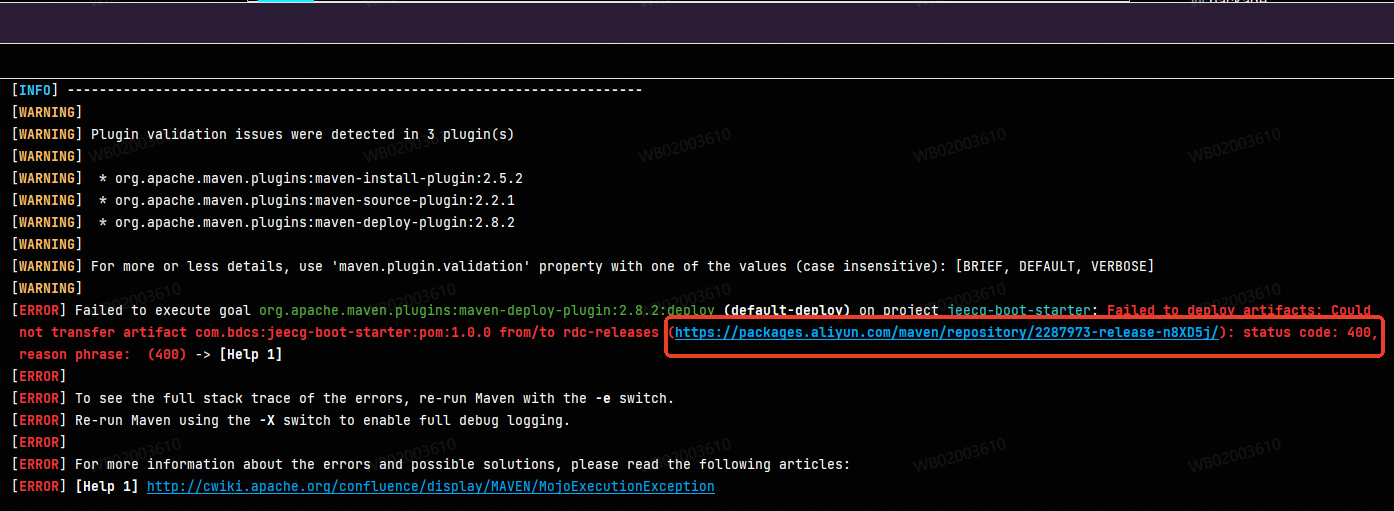
A 400 error occurs when pushing an artifact package to the artifact repository
First, check your artifact storage resource usage to determine if you have sufficient space. If not, enable pay-as-you-go billing or clean up artifacts to free up space.
Can I migrate data from artifact repository A to artifact repository B?
Migration between Apsara Devops artifact repositories is not supported. In addition, proxying to other Apsara Devops artifact repositories is not supported because this can cause circular proxy issues.
For Maven artifact repositories, you can configure multiple sources in the same settings.xml file.
How to pull artifacts from an Apsara Devops artifact repository using npm
In the Apsara Devops Artifact Repository console, follow the instructions in the section of your npm repository.
.npmrc example configuration:
registry=https://packages.aliyun.com/64c1************17/npm/repo-***/
//packages.aliyun.com/64c1************17/npm/repo-***/:_authToken=*************
Notes:
If you still cannot pull after configuration, check whether a
.npmrcfile exists in the following paths:User-level configuration:
~/.npmrcProject-level configuration:
.npmrcin the project's root directory
The project-level configuration overrides the user-level configuration.
Ensure that the
_authTokenvalue is correct and has not expired.
How to pull artifacts from an Apsara Devops artifact repository using the Yarn command
The configuration method for Yarn varies by version. First, confirm your current Yarn version.
yarn -vYarn 1.x versions
Yarn 1.x is compatible with the npm .npmrc configuration file.
Configuration steps:
In the Apsara Devops Artifact Repository console, follow the instructions in the section of your npm repository.
If you run the
npm config set always-auth truecommand and receive analways-auth is not a valid npm optionerror, manually edit the.npmrcfile and addalways-auth=true.
The content of the .npmrc file is as follows:
registry=https://packages.aliyun.com/64c1************17/npm/repo-***/
//packages.aliyun.com/64c1************17/npm/repo-***/:_authToken=*************
always-auth=true
Yarn 2+ versions
Yarn 2+ versions use a .yarnrc.yml file instead of a .npmrc file. The .yarnrc.yml file must contain the following content:
npmRegistries:
  "https://packages.aliyun.com/64c1************17/npm/repo-***/":
    npmAuthToken: *************