WAF 3.0 pay-as-you-go is a postpaid billing method. You pay for what you use each hour, with no upfront commitment. Bills are generated daily based on actual usage and deducted from your account automatically.
Billing covers three categories: instance and traffic fees, access feature fees, and protection feature fees. All charges are measured in Security Capacity Units (SeCUs) at USD 0.01 per SeCU.
Billing model
WAF 3.0 uses the Security Capacity Unit (SeCU) as the unified metering unit. All billable items are measured hourly.
| Parameter | Value |
|---|---|
| Unit price | 1 SeCU = USD 0.01 |
| Measurement interval | One full hour (for example, 10:00:00 to 10:59:59) |
| Rounding rule | SeCU usage is rounded up to the nearest integer. For example, 0.1 SeCU consumed in an hour is billed as 1 SeCU. |
Hourly cost = Total SeCUs consumed by all billable items × USD 0.01
The WAF instance fee is the only item billed at exact SeCU usage without rounding up. All other items follow the rounding-up rule.
Billable items
WAF instance and traffic fees
| Billable item | SeCU | Description |
|---|---|---|
| WAF instance | 0.5 SeCU/hour | Billing starts immediately after activation, regardless of whether access or protection is configured. This item uses exact SeCU usage — no rounding up. |
| Base traffic fee | 1 SeCU per 5,000 requests/hour | Counts client-initiated requests within a full hour, including both normal and attack requests. Server responses are not counted. The whitelist feature fee is included. No fee is charged if no requests occur during a full hour. If the request count is not a multiple of 5,000, SeCUs are rounded up. |
| QPS peak | ≤1,000 QPS: 0 SeCU/hour; >1,000 QPS: 1 SeCU per 5 QPS/hour for the excess | Billed based on the maximum queries per second (QPS) within a full hour. If the excess above 1,000 QPS is less than 5 QPS, it is billed as 5 QPS. |
Resource access feature fees
| Billable item | SeCU | Description |
|---|---|---|
| Number of domains accessed via CNAME | Tiered pricing (progressive segments): 1 domain: 0 SeCU; 2–10 domains: 5 SeCU/domain/hour; 11–100 domains: 3 SeCU/domain/hour; more than 100 domains: 1 SeCU/domain/hour | Based on the number of domains actually connected, regardless of whether they are root domains or wildcard domains. |
| CNAME access: exclusive IP | 15 SeCU/exclusive IP/hour | Based on the number of domains with exclusive IPs enabled. |
| CNAME access: non-standard ports | Disabled: 0 SeCU/hour; Enabled: 25 SeCU/hour | Enabling any port other than 80, 8080, 443, or 8443 counts as enabling this feature. |
| CNAME access: intelligent load balancing | Disabled: 0 SeCU/hour; Enabled: 50 SeCU/hour | Configuring intelligent load balancing for any domain counts as enabling this feature. |
| CNAME access: IPv6 | Disabled: 0 SeCU/hour; Enabled: 50 SeCU/hour | Configuring IPv6 for any domain counts as enabling this feature. |
| Asset center | Disabled: 0 SeCU/hour; Enabled: 1 SeCU/hour | Billed after enabling the asset center feature. |
Web core protection feature fees
| Billable item | SeCU | Description |
|---|---|---|
| Web core protection rules | Default template with no protected objects: 0 SeCU/hour; default template with protected objects: 3 SeCU/hour; non-default templates: 3 SeCU/template/hour | The default template is billed after you connect a protected object, regardless of whether the template is enabled or disabled. Non-default templates are billed by the number of templates created, regardless of their state. Only one default template is allowed. |
| Web core protection rules: intelligent allowlist engine | Disabled: 0 SeCU/template/hour; Enabled: 10 SeCU/template/hour | Billed per Web core protection rule template with the intelligent allowlist feature enabled. |
| IP blacklist | 2 SeCU/rule/hour | Billed by number of rules, regardless of whether they are enabled or disabled. |
| Custom rules | Basic rule: 2 SeCU/basic rule/hour; Advanced rule: 5 SeCU/advanced rule/hour | Billed by number of rules, regardless of whether they are enabled or disabled. A rule is classified as advanced if it meets any of the following conditions — all other rules are basic: rule type is rate limiting; uses match fields Cookie, Content-Type, Content-Length, X-Forwarded-For, Body, Http-Method, File Extension, Filename, Server-Port, Header, Cookie Name, or Body Parameter; uses logical operators Regex Match or Regex Not Match; uses advanced settings rule grayscale or effective time pattern. |
| Custom rules: slider action | 1 SeCU per 10 invocations/hour | Billed by number of invocations. Fewer than 10 invocations in an hour are billed as 10. |
| Scan protection | 10 SeCU/rule/hour | Billed by number of rules, regardless of whether they are enabled or disabled. Each scan protection template includes exactly 3 rules. |
| CC protection | 2 SeCU/rule/hour | Billed by number of rules, regardless of whether they are enabled or disabled. |
| Geo-blocking | 10 SeCU/rule/hour | Billed by number of rules, regardless of whether they are enabled or disabled. |
| Custom response | 10 SeCU/rule/hour | Billed by number of rules, regardless of whether they are enabled or disabled. Each custom response template includes exactly 1 rule. |
| Web tamper proofing | 5 SeCU/rule/hour | Billed by number of rules, regardless of whether they are enabled or disabled. |
| Information leakage prevention | 5 SeCU/rule/hour | Billed by number of rules, regardless of whether they are enabled or disabled. |
| Peak traffic throttling | 150 SeCU/rule/hour | Billed by number of rules, regardless of whether they are enabled or disabled. |
| Threat intelligence | 50 SeCU/template/hour | Billed by number of templates, regardless of whether they are enabled or disabled. |
Advanced protection feature fees
| Billable item | SeCU | Description |
|---|---|---|
| Bot management | Bot-Web template: 50 SeCU/template/hour; Bot-App template: 80 SeCU/template/hour | Billed by number of configured templates, regardless of whether they are enabled or disabled. For details about the new version of Bot management pricing, see [Announcement] Bot management version upgrade and service pricing adjustment. |
| Bot management: request processing fee | 1 SeCU per 7,500 requests/hour | Counts requests that hit a protected object within a full hour. If the request count is not a multiple of 7,500, SeCUs are rounded up. |
| Bot management: Fraud Detection | 1 SeCU per hit/hour | Billed by number of hits. |
| Bot management: advanced custom rules | 15 SeCU/rule/hour | Billed by number of rules, regardless of whether they are enabled or disabled. |
| API security | 20 SeCU/protected object/hour | Billed by number of protected objects with API security enabled. |
| API security: request processing fee | 1 SeCU per 7,500 requests/hour | Counts requests that hit a protected object within a full hour. If the request count is not a multiple of 7,500, SeCUs are rounded up. |
Other fees
| Billable item | Description |
|---|---|
| Simple Log Service | Billed and invoiced directly by Simple Log Service. No fees are charged on the WAF side. |
| Major event support | Uses subscription billing with a minimum purchase period of 30 days. For details, see Major event support. |
Billing examples
Example 1: 5 domains + 2 IP blacklist rules, zero traffic
You added five domain names to WAF using CNAME access and created two IP blacklist rules. During a one-hour period, your business received 0 requests and the QPS peaked at 0.
Total: 27.5 SeCUs = USD 0.2751 SeCU = USD 0.011 SeCU = USD 0.011 SeCU = USD 0.011 SeCU = USD 0.01
| Billable item | Unit priceUSD 0.625USD 7.755USD 0.275USD 0.01USD 0.01 | SeCU (rounded up per hour) | Total cost (1 SeCU = USD 0.01) |
|---|---|---|---|
| WAF instance | 0.5 SeCU/hour | 0.5 SeCU | USD 0.01 × 0.5 = USD 0.005 |
| Base traffic fee | 1 SeCU per 5,000 requests/hour | 0 SeCU | USD 0.01 × 0 = USD 0 |
| QPS peak | ≤1,000 QPS: 0 SeCU/hour | 0 SeCU | USD 0.01 × 0 = USD 0 |
| CNAME access domain count | Tiered pricing: 1 domain: 0 SeCU; 2–10 domains: 5 SeCU/domain/hour | 1×0 + 4×5 = 20 SeCU | USD 0.01 × 20 = USD 0.2 |
| IP blacklist | 2 SeCU/rule/hour | 2 rules × 2 = 4 SeCU | USD 0.01 × 4 = USD 0.04 |
| Web core protection rules | With protected objects: 3 SeCU/hour. After connecting resources to WAF, the system automatically creates protected objects and applies them to the default Web core protection rule template. | 3 SeCU | USD 0.01 × 3 = USD 0.03 |
Example 2: 12 domains + exclusive IPs + intelligent load balancing + scan protection, high traffic
You added 12 domain names to WAF using CNAME access. For two of the domain names, you enabled exclusive IPs and intelligent load balancing. You also created one scan protection template. During a one-hour period, your business received 50,001 requests and the QPS peaked at 4,000.
Total: 775.5 SeCUs = USD 7.755
| Billable item | Unit price | SeCU (rounded up per hour) | Total cost (1 SeCU = USD 0.01) |
|---|---|---|---|
| WAF instance | 0.5 SeCU/hour | 0.5 SeCU | USD 0.01 × 0.5 = USD 0.005 |
| Base traffic fee | 1 SeCU per 5,000 requests/hour | ceil(50,001 ÷ 5,000) = 11 SeCU | USD 0.01 × 11 = USD 0.11 |
| QPS peak | >1,000 QPS: 1 SeCU per 5 QPS/hour for the excess | (4,000 − 1,000) ÷ 5 = 600 SeCU | USD 0.01 × 600 = USD 6 |
| CNAME access domain count | Tiered pricing: 1 domain: 0 SeCU; 2–10 domains: 5 SeCU/domain/hour; 11–100 domains: 3 SeCU/domain/hour | 1×0 + 9×5 + 2×3 = 51 SeCU | USD 0.01 × 51 = USD 0.51 |
| CNAME access: exclusive IP | 15 SeCU/exclusive IP/hour | 2 × 15 = 30 SeCU | USD 0.01 × 30 = USD 0.3 |
| CNAME access: intelligent load balancing | Enabled: 50 SeCU/hour | 50 SeCU | USD 0.01 × 50 = USD 0.5 |
| Scan protection | 10 SeCU/rule/hour. Each scan protection template includes exactly 3 rules. | 1 template × 3 rules × 10 = 30 SeCU | USD 0.01 × 30 = USD 0.3 |
| Web core protection rules | With protected objects: 3 SeCU/hour. After connecting resources to WAF, the system automatically creates protected objects and applies them to the default Web core protection rule template. | 3 SeCU | USD 0.01 × 3 = USD 0.03 |
Example 3: Layer 7 CLB (cloud native mode) + Bot management + CC protection
You enabled WAF protection for a Layer 7 Classic Load Balancer (CLB) instance using the cloud native mode (for example, in the US (Silicon Valley) region). You configured Web core protection rules, Bot management, and CC protection: two CC protection rules (disabled) and one Bot-Web template with Fraud Detection enabled. During a one-hour period, your business received 4,200 requests, the QPS peaked at 537, the Bot management rule was hit 34 times, and the Fraud Detection rule was hit 3 times.for example, in the US (Silicon Valley) regionfor example, in the US (Silicon Valley) region
Total: 62.5 SeCUs = USD 0.625
| Billable item | Unit price | SeCU (rounded up per hour) | Total cost (1 SeCU = USD 0.01) |
|---|---|---|---|
| WAF instance | 0.5 SeCU/hour | 0.5 SeCU | USD 0.01 × 0.5 = USD 0.005 |
| Base traffic fee | 1 SeCU per 5,000 requests/hour | ceil(4,200 ÷ 5,000) = 1 SeCU | USD 0.01 × 1 = USD 0.01 |
| QPS peak | ≤1,000 QPS: 0 SeCU/hour | 0 SeCU | USD 0.01 × 0 = USD 0 |
| Web core protection rules | With protected objects: 3 SeCU/hour. After connecting resources to WAF, the system automatically creates protected objects and applies them to the default Web core protection rule template. | 3 SeCU | USD 0.01 × 3 = USD 0.03 |
| Bot management | Bot-Web template: 50 SeCU/template/hour | 1 template × 50 = 50 SeCU | USD 0.01 × 50 = USD 0.5 |
| Bot management: request processing fee | 1 SeCU per 7,500 requests/hour | ceil(4,200 ÷ 7,500) = 1 SeCU | USD 0.01 × 1 = USD 0.01 |
| Bot management: Fraud Detection | 1 SeCU per hit/hour | 3 hits = 3 SeCU | USD 0.01 × 3 = USD 0.03 |
| CC protection | 2 SeCU/rule/hour | 2 rules × 2 = 4 SeCU | USD 0.01 × 4 = USD 0.04 |
Example 4: ALB (cloud native mode) + custom response templates, high QPS
You enabled WAF protection for an Application Load Balancer (ALB) instance using the cloud native mode (for example, in the US (Silicon Valley) region) and created two custom response templates applied to different protected objects. During a one-hour period, your business received 50,004 requests and the QPS peaked at 5,997.
Total: 1,034.5 SeCUs + WAF-enhanced ALB fee = USD 10.38
| Billable item | Unit price | SeCU (rounded up per hour) | Total cost (1 SeCU = USD 0.01) |
|---|---|---|---|
| WAF instance | 0.5 SeCU/hour | 0.5 SeCU | USD 0.01 × 0.5 = USD 0.005 |
| Base traffic fee | 1 SeCU per 5,000 requests/hour | ceil(50,004 ÷ 5,000) = 11 SeCU | USD 0.01 × 11 = USD 0.11 |
| QPS peak | >1,000 QPS: 1 SeCU per 5 QPS/hour for the excess | ceil((5,997 − 1,000) ÷ 5) × 5 ÷ 5 = 1,000 SeCU | USD 0.01 × 1,000 = USD 10 |
| Web core protection rules | With protected objects: 3 SeCU/hour. After connecting resources to WAF, the system automatically creates protected objects and applies them to the default Web core protection rule template. | 3 SeCU | USD 0.01 × 3 = USD 0.03 |
| Custom response | 10 SeCU/rule/hour. Each custom response template includes exactly 1 rule. | 2 templates × 1 rule × 10 = 20 SeCU | USD 0.01 × 20 = USD 0.2 |
| WAF-enhanced ALB instance fee | USD 0.035/hour. Actual prices are subject to the USD 0.035/hour,purchase page. | / | USD 0.035 × 1 = USD 0.035 |
After you activate pay-as-you-go billing, your actual usage and charges appear on your Alibaba Cloud bill.
Billing cycle
Pay-as-you-go fees are settled daily based on the UTC+8 time zone. A new billing cycle starts after settlement is complete.
Pay-as-you-go billing typically runs overnight. To avoid charges from a configuration change being included in the previous day's bill, make changes after 06:00 (UTC+8) each day.
If your available account balance — including your Alibaba Cloud account balance and vouchers — is insufficient to cover the pending bill, you will receive a text message or email notification.
Overdue payments
Overdue payments may affect your use of WAF. Monitor your Expenses and Costs and resolve overdue payments promptly. For details about how to check your overdue balance and handle overdue payments, see Overdue payments.
If you have an overdue payment, your WAF service may be suspended. Pay any outstanding balance promptly to avoid service disruption.
Bill inquiry
To view the actual usage and detailed charges for your WAF 3.0 pay-as-you-go instance, see View bills.
FAQ
WAF pay-as-you-go costs are high. How can I reduce them?
The most effective way to lower costs is to enable only what your business needs and delete resources you no longer use.
Enable features selectively. Some features generate fees as soon as they are created, even when disabled.
API security: Enable only if your business exposes API endpoints.
Bot management: Disable if your business does not need protection against automated scripts and crawlers.
Web core protection: Modules such as scan protection and geo-blocking are billed as soon as you create rules. Delete protection templates you no longer use.
CNAME access: Advanced options such as non-standard ports, IPv6, and exclusive IPs incur extra fees. For a single domain, an exclusive IP is rarely necessary.
Set a traffic billing protection threshold. If cost control takes priority over absorbing volumetric traffic, configure this threshold to cap the peak QPS that WAF handles.
Switch to subscription billing. If your monthly SeCU consumption is consistently high and you cannot reduce your configuration, purchase a prepaid SeCU resource plan or a subscription WAF instance for a lower unit price.
Why am I charged even though I haven't configured WAF or connected any resources?
Pay-as-you-go WAF includes instance fees and other feature fees in addition to request processing fees. You are charged immediately after you activate the WAF service, even if no traffic is processed.
To stop all billing, remove all protected resources first. After the last resource is removed, the console displays a page prompting you to shut down WAF.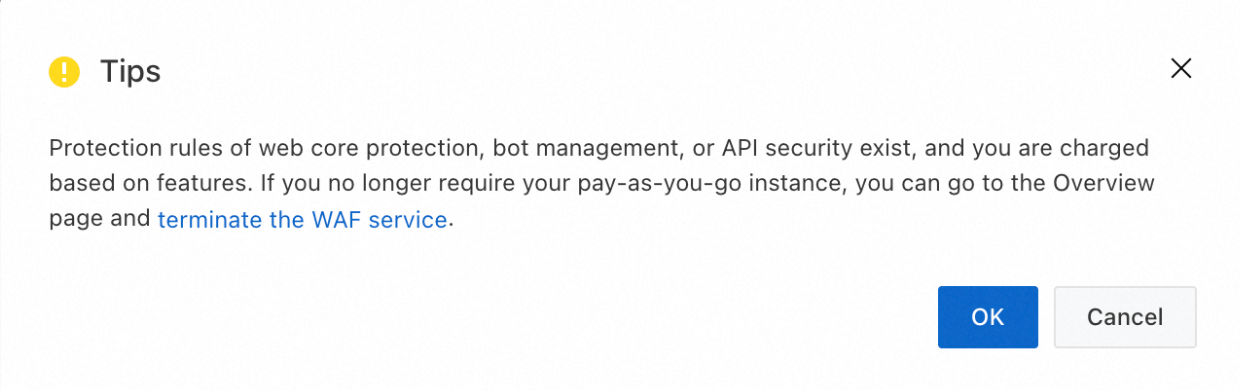
How do I shut down WAF to stop billing?
Before shutting down WAF, change the DNS records of all domain names added to WAF to point directly to their origin servers.
After shutdown, all domain configurations are deleted. Requests sent to the WAF instance are not forwarded, making your websites inaccessible.
Go to the Overview page. In the top menu bar, select the resource group and region (Chinese Mainland or Outside Chinese Mainland) of your WAF instance.
If the following interface appears, click Go to Console in the upper-right corner. Otherwise, skip this step.

On the right side of the page, click Shut Down WAF. In the confirmation dialog box, review the items and click OK.

Why am I still charged after shutting down WAF?
There are three common reasons:
The shutdown was not completed correctly. Removing protected resources or disabling WAF protection is not the same as shutting down the instance. Follow the steps in How do I shut down WAF to stop billing?.
Billing delay. Pay-as-you-go bills are generated the following day. For example, if you shut down WAF on October 2, the bill for October 2 is generated on October 3. No new bills are generated from October 3 onward.
Wrong region selected. If you purchased WAF for Outside Chinese Mainland, switch to that region in the top menu bar on the Overview page before performing the shutdown.
