Monitoring is essential for maintaining the reliability, availability, and performance of IPsec-VPN connections. VPN Gateway lets you monitor the tunnel negotiation status and the inbound and outbound traffic rates of IPsec-VPN connections. This provides a clear view of the operational status and bandwidth usage of your IPsec-VPN connections, which helps you quickly identify network bandwidth bottlenecks, detect network failures or anomalies, and improve network reliability and availability. The monitoring features of VPN Gateway are integrated with Cloud Monitor. This lets you centrally monitor and manage your Alibaba Cloud resources in the Cloud Monitor console.
Monitor the status of IPsec tunnels
VPN Gateway monitors status changes at the tunnel level. You can view the current status of tunnels in the VPN Gateway console. To promptly detect tunnel status changes, you can subscribe to system events or set threshold-based alert rules for metrics.
View the status of an IPsec tunnel
Log on to the VPN Gateway console and select the region where the IPsec-VPN connection is deployed. In the navigation pane on the left, choose :
Dual-tunnel IPsec-VPN connection
On the IPsec-VPN connection page, click the ID of the IPsec-VPN connection to open the details page. On the Tunnel tab, you can view the negotiation status of the active and standby tunnels in the Connection Status column.

Single-tunnel IPsec-VPN connection
On the IPsec-VPN connection page, find the target IPsec-VPN connection and view its negotiation status in the Connection Status column.

NoteIf the status of the IPsec-VPN connection or tunnel is abnormal, you can troubleshoot the issue based on the error code displayed in the console. For more information, see Troubleshoot issues.
VPN Gateway system events
VPN Gateway system events are defined by VPN Gateway to record and send notifications about tunnel negotiation status and health check status. You can view system events generated by VPN Gateway in the Cloud Monitor console. For more information, see View system events. To be promptly notified of resource status changes and take action, you can subscribe to system events.
Status metrics for IPsec tunnels
VPN Gateway provides metrics related to tunnel status. You can set threshold-based alert rules for these metrics to be promptly notified of tunnel status changes.
Monitor the traffic rate of an IPsec-VPN connection
VPN Gateway lets you view inbound and outbound traffic rates, packet rates, and bandwidth usage at the VPN Gateway instance, IPsec-VPN connection, and tunnel levels. This helps you quickly identify network congestion or unusual traffic and optimize bandwidth utilization.
View the traffic rate of an IPsec-VPN connection
This section describes how to view traffic rate information in the VPN Gateway console. You can also view the traffic rate of IPsec-VPN connections in the Cloud Monitor console. For more information, see Cloud service monitoring.
Log on to the VPN Gateway console and select the region where the IPsec-VPN connection is deployed. In the navigation pane on the left, choose . On the IPsec-VPN connection page, click the ID of the IPsec-VPN connection. On the IPsec-VPN connection details page, click the Monitoring tab to view the traffic rate.
For a dual-tunnel IPsec-VPN connection, you can select a Dimension to view the traffic rate of an individual tunnel.
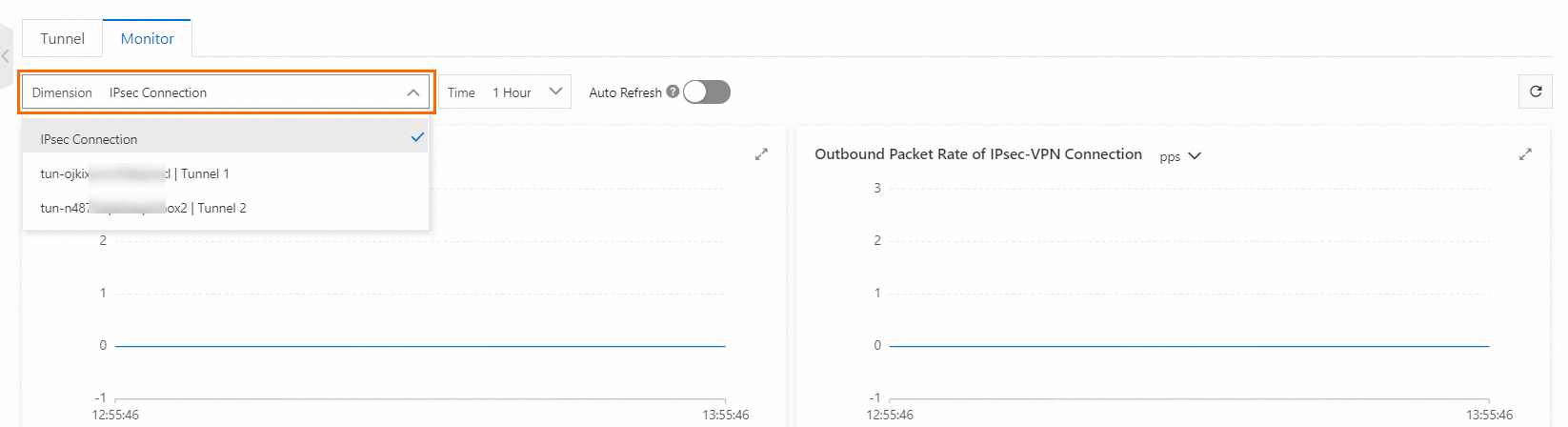
Monitoring Dimension
Metric
Description
IPsec-VPN Connection
Inbound Packet Rate Of IPsec-VPN Connection
The rate at which the IPsec-VPN connection receives data packets. Unit: pps.
Outbound Packet Rate Of IPsec-VPN Connection
The rate at which the IPsec-VPN connection sends data packets. Unit: pps.
Inbound Rate Of IPsec-VPN Connection
The rate at which the IPsec-VPN connection receives traffic. Unit: bps.
Outbound Rate Of IPsec-VPN Connection
The rate at which the IPsec-VPN connection sends traffic. Unit: bps.
Tunnel
Inbound Packet Rate Of Tunnel
The rate at which the tunnel receives data packets. Unit: pps.
Outbound Packet Rate Of Tunnel
The rate at which the tunnel sends data packets. Unit: pps.
Inbound Traffic Rate Of Tunnel
The rate at which the tunnel receives traffic. Unit: bps.
Outbound Traffic Rate Of Tunnel
The rate at which the tunnel sends traffic. Unit: bps.
Create a threshold-based alert rule for a traffic rate metric
In the Cloud Monitor console, you can create a threshold-based alert rule for the traffic rate metrics of your IPsec-VPN connection. If the traffic rate exceeds the threshold that you set, the system immediately sends an alert. This lets you respond to and resolve issues promptly.
Click to view the traffic rate metrics
Query and analyze IPsec-VPN traffic information
While monitoring an IPsec-VPN connection, you may need more details about the traffic, such as source and destination IP addresses, source and destination ports, and protocols. You can use the flow log feature to record inbound and outbound traffic information. Then, you can query and analyze the flow logs to understand the IPsec-VPN traffic:
For scenarios where an IPsec-VPN connection is attached to a VPN Gateway instance, you can use VPC Flowlog to record inbound and outbound traffic information for the VPN Gateway instance. For more information, see the Query and analyze traffic transmitted over a VPN Gateway instance using ENI flow logs tutorial.
For scenarios where an IPsec-VPN connection is attached to a TransitRouter, you can use TransitRouter Flowlog to record inbound and outbound traffic information for the VPN connection. For more information, see the Query top traffic across regions using flow logs tutorial.
References
To query metric data for IPsec-VPN resources by calling an API, you can use the APIs of Cloud Monitor.
For information about the APIs provided by Cloud Monitor, see Cloud service monitoring.
For the Namespace, MetricName, Dimensions, and Period data required when you call the API, see the Appendix 1: Cloud service monitoring metrics document.