This topic uses the example of calling the Certificate Management Service (Original SSL Certificate) ListDeploymentJob API to retrieve a list of deployment jobs to show you how to use Alibaba Cloud CLI to call Certificate Management Service OpenAPI.
Concepts
Alibaba Cloud Command Line Interface (CLI) is a general-purpose command-line tool built on OpenAPI. The CLI helps automate the management and maintenance of Certificate Management Service. For more information, see What is Alibaba Cloud CLI?.
Step 1: Install Alibaba Cloud CLI
Before you use Alibaba Cloud CLI, you must install it. You can install Alibaba Cloud CLI on Windows, Linux, and macOS. Choose the installation method that corresponds to your operating system.
-
Windows: Install the CLI (Windows).
-
Linux: Install the CLI (Linux).
-
macOS: Install the CLI (macOS).
Cloud Shell comes with Alibaba Cloud CLI pre-installed and is regularly updated. You can use Cloud Shell to debug Alibaba Cloud CLI commands. For more information, see What is Cloud Shell?.
Step 2: Configure Alibaba Cloud CLI
Alibaba Cloud accounts have permissions to manage and access all product OpenAPI operations. This poses a high security risk. We recommend that you create a Resource Access Management (RAM) user, grant permissions to the RAM user based on the principle of least privilege, and then use the RAM user to access OpenAPI. For more information about the access policies that Certificate Management Service supports, see System policies for Certificate Management Service.
Before you use the CLI, you must configure your identity credentials and region ID. The CLI supports multiple types of identity credentials. For more information, see Credential types. This example shows how to use the AccessKey pair of a RAM user to configure AK credentials. The procedure is as follows:
-
Create a RAM user and an AccessKey pair to configure identity credentials. For more information, see Create a RAM user and Create an AccessKey pair.
-
Grant permissions to the RAM user. In this example, you grant the RAM user the read-only permission for Certificate Management Service:
AliyunYundunCertReadOnlyAccess. For more information, see Manage RAM user permissions. -
Obtain an available region ID to configure your identity credentials. The CLI uses the region that you specify to make OpenAPI calls. For more information about the available regions for Certificate Management Service, see Endpoints.
NoteWhen you use the CLI, you can use the
--regionoption to specify a region for a command. This option overrides the region information in the default credential configuration and environment variables. For more information, see Command-line options. -
Use the AccessKey pair of the RAM user to configure AK credentials. Name the configuration file
AkProfile. For more information, see Configuration example.
Step 3: Generate a CLI command example
-
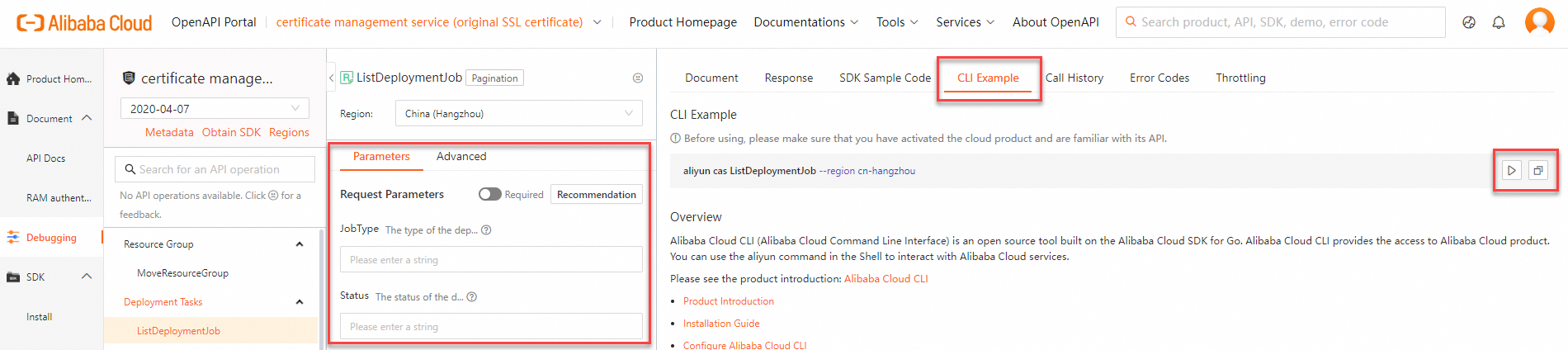
In the OpenAPI Portal, go to the ListDeploymentJob debug page.
-
On the Parameter settings tab, enter the request parameters. Click the CLI Example tab to view the generated CLI example.
-
Copy the CLI example or run it in Cloud Shell:
-
Click the Run Command button
 to open Cloud Shell and quickly debug the command.
 -
Click the Copy button
 to copy the CLI example to the clipboard. You can then paste it into a local shell tool to run the command or write a command-line script.
Note-
When you copy the CLI example to a local shell tool for debugging, note the parameter format. For more information about the parameter format for Alibaba Cloud CLI commands, see Parameter format.
-
The example generated in the OpenAPI Portal includes the
--regionoption by default. When you copy the command to run it locally, the CLI ignores the region information in the default credential configuration and environment variables and uses the specified region to run the command. You can delete or keep this option as needed.
-
Step 4: Call a Certificate Management Service OpenAPI operation
Example 1: Obtain the list of Certificate Management Service OpenAPI operations that can be called using the CLI
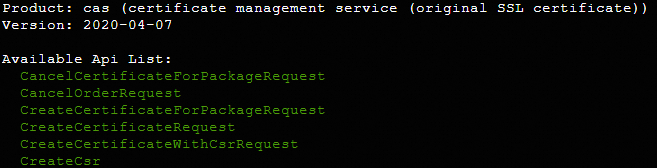
The following example shows how to use the --help option to obtain the list of Certificate Management Service OpenAPI operations that you can call using the CLI. For more information, see API overview.
-
You can use the
--forceand--versionoptions to call the OpenAPI operations for private certificates (Certificate Management Service/2020-06-30). For more information, see Force an API call. -
When the OpenAPI Portal generates a command example for a private certificate (
Certificate Management Service/2020-06-30) OpenAPI operation, the portal automatically adds the--forceand--versionoptions. You do not need to add them manually. -
For more information about the OpenAPI for private certificates (
Certificate Management Service/2020-06-30), see API overview.
-
Run the following command.
aliyun cas --help -
Expected output.
Example 2: Obtain a list of deployment jobs
The following example shows how to use the CLI to call the ListDeploymentJob API operation for Certificate Management Service to obtain a list of deployment jobs based on the job type and job status.
-
Run the following command.
aliyun cas ListDeploymentJob --JobType user --Status pending -
Expected output.
{ "RequestId": "12345678-1234-1234-1234-123456789ABC", "Total": 7, "CurrentPage": 1, "ShowSize": 50, "Data": [ { "Id": 19975, "GmtCreate": "1624343180000", "GmtModified": "1606482979000", "UserId": 0, "InstanceId": "cas-job-user-***", "Name": "job-test", "CertType": "upload", "ScheduleTime": "1606482979000", "StartTime": "1606482979000", "EndTime": "1606482979000", "Status": "scheduling", "Del": 1, "Rollback": 1, "JobType": "user", "CertDomain": "aliyundoc1.com,aliyundoc2.com,aliyundoc3.com", "ProductName": "NLB" } ] }Note-
If an error is returned after you call a Certificate Management Service OpenAPI operation, use the returned error code to verify that the request parameters and their values are correct.
-
You can record the returned RequestID or SDK error message and use the Alibaba Cloud OpenAPI Diagnostic Platform for self-service diagnostics.
-