Alibaba Cloud CLI checks the validity of parameters when you call the APIs of cloud services. Because the APIs are available in multiple versions, the built-in information about cloud services and API operations do not meet all requirements. You can forcibly call an API operation that is not in the metadata list and check the accuracy of specific information about the API operation.
Description of the --force option
In Alibaba Cloud CLI, if you call an API operation or specify a parameter that is not included in the metadata, the unknown api or unknown parameter error is reported. You can forcibly call API operations and use parameters that are not in the metadata by using the --force option. To do so, make sure that the following information is accurate:
Cloud service code: You can use the
--helpoption to obtain the list of supported services.Names and parameters of API operations: You can use the
--helpoption to obtain the list of operations of a service and obtain the parameters of an API operation.API version: When you use the
--forceoption to forcibly call an API operation, you must specify the API version by using the--versionoption.Endpoint: You can use the
--endpointoption to specify the endpoint of a service. If you do not specify this option, the endpoint is obtained from the built-in data of Alibaba Cloud CLI.
Example
Scenario
In this example, the operations of CloudMonitor that are used to query the monitoring data of a metric are used. In the 2019-01-01 version of the CloudMonitor API, the operation is DescribeMetricList. However, in the 2017-03-01 version of the CloudMonitor API, the operation is QueryMetricList. If you directly call the QueryMetricList operation in Alibaba Cloud CLI, an error is reported.

Sample command
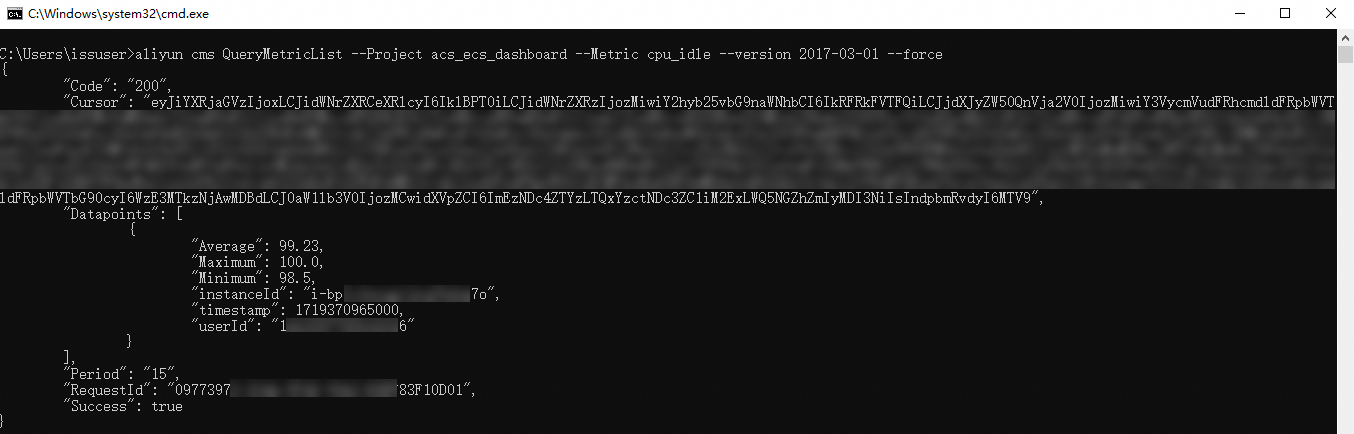
Run the following command to forcibly call the
QueryMetricListoperation of the2017-03-01version:aliyun cms QueryMetricList --Project acs_ecs_dashboard --Metric cpu_idle --version 2017-03-01 --forceThe following figure provides an example of returned results.