Prerequisites
-
The OPTIMIZE TABLE statement is supported only by the InnoDB and MyISAM storage engines.
-
The available disk space of the instance must be greater than or equal to the size of the table that you want to optimize.
Usage notes
-
Delete a large amount of data first: Running OPTIMIZE TABLE is ineffective at reducing tablespace usage unless you first delete a significant amount of data with the DELETE statement.
-
Temporary increase in disk space usage: Running OPTIMIZE TABLE creates a temporary table to store the reorganized data, which temporarily increases disk space usage. After the operation is complete, the temporary table is deleted, and disk space usage returns to normal.
-
Table and index statistics may not change after reclamation: Although the disk space is released, the table statistics may not be updated immediately. For more information, see Why does the storage usage of my ApsaraDB RDS for MySQL instance remain unchanged after I run OPTIMIZE TABLE?.
-
Performance impact and risks during peak hours: On ApsaraDB RDS for MySQL 5.7 and 8.0, the OPTIMIZE TABLE statement uses online DDL, which allows concurrent DML operations. However, running this operation on a large table can cause sudden spikes in I/O and buffer resource consumption. This can cause table locks or resource contention, potentially leading to instance unavailability or monitoring interruptions during peak hours. Therefore, perform this operation during off-peak hours to avoid business impact.
Use the command line
-
Connect to the ApsaraDB RDS for MySQL instance by using a client.
-
Use the DELETE statement to delete unnecessary data based on your business requirements.
-
Run the OPTIMIZE TABLE statement to reclaim the tablespace.
OPTIMIZE TABLE <$Database1>.<Table1>,<$Database2>.<Table2>;
Note
-
<$Database1> and <$Database2> are database names. <Table1> and <Table2> are table names.
-
When you run the OPTIMIZE TABLE statement on the InnoDB storage engine, the following message is returned. This message is expected and can be ignored. The operation is successful if the output contains "ok". For more information, see OPTIMIZE TABLE Statement.
Table does not support optimize, doing recreate + analyze instead
Use DMS
-
Log on to the ApsaraDB RDS for MySQL instance by using DMS.
-
In the left-side navigation pane, select the instance ID of the target instance, double-click the target database, right-click any table name, and then select batch operation table.
-
Select the tables for which you want to reclaim space, and then choose .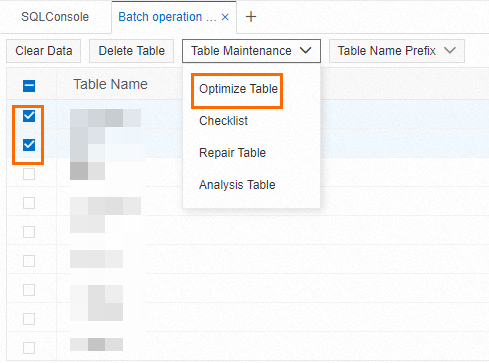
-
In the dialog box that appears, confirm that the information is correct and click OK.
FAQ
Why is storage usage unchanged after OPTIMIZE TABLE?
Problem
After deleting a large amount of data by using the DELETE statement and running OPTIMIZE TABLE to reclaim tablespace as described in the official ApsaraDB RDS for MySQL documentation, you query the DATA_FREE field in information_schema.tables and find that the value is not updated. This might lead you to assume the operation failed and that disk space was not released.
Cause
The actual disk space has been released, but the MySQL table statistics are not updated promptly. This issue is common in ApsaraDB RDS for MySQL 5.6, 5.7, and 8.0 instances with a minor engine version earlier than 20250531. In these versions, running OPTIMIZE TABLE does not automatically update table and index statistics. As a result, the DATA_FREE value in information_schema.tables retains the old value, which does not accurately reflect the actual space usage. For more information, see Bug #117426: optimize table does not update table and index stats.
Solution
-
Recommended solution: Upgrade the minor engine version to 20250531 (for MySQL 8.0)
This issue is fixed in the minor engine version 20250531 for ApsaraDB RDS for MySQL 8.0. After you upgrade, OPTIMIZE TABLE automatically refreshes the statistics, and the DATA_FREE field correctly reflects the actual space usage.
-
Temporary workaround: Force a statistics update
If you cannot upgrade your database version in the short term, you can run the ALTER TABLE table_name ENGINE=InnoDB; statement on the table that you optimized. This statement forces the table to be rebuilt and its statistics to be updated. After the command is executed, the DATA_FREE field in information_schema.tables correctly displays the reclaimed space.
What to do if space is not released after a DELETE statement?
In ApsaraDB RDS for MySQL, when you use the DELETE statement to delete data, the command only marks the record locations or data pages as reusable. The disk file size does not change, meaning the tablespace is not immediately reclaimed. This leads to storage fragmentation, which consumes instance storage space.
You can use native DDL commands or the lock-free schema change feature in DMS. Note that before using either method, ensure that your instance has sufficient disk space to prevent it from being locked.
-
Defragment space by using commands: Run DDL operations such as OPTIMIZE TABLE or ALTER TABLE <table_name> ENGINE=InnoDB; to reorganize table data and index structures, which reclaims fragmented space.
Important
When using native DDL commands, perform them during off-peak hours to avoid metadata locks. For more information, see Usage notes.
-
Use the lock-free schema change feature in DMS: To avoid issues related to metadata locks, use this feature to reclaim space from storage fragmentation.
What to do if space is not released after a TRUNCATE or DROP statement?
In ApsaraDB RDS for MySQL, if you find that disk space is not released after you run a TRUNCATE or DROP operation, follow these steps:
-
Confirm the space reclamation logic
After you run a TRUNCATE or DROP statement, monitor the storage usage of the instance to confirm whether the space has been released. Typically, the decrease in storage usage reflects the size of the dropped table relative to the total instance space.
-
Avoid relying on outdated information
If you check the table size by using information_schema.tables or the ApsaraDB RDS console (), the displayed tablespace may not change due to data update delays. Therefore, rely on the instance's overall storage usage metric as the primary basis for judgment.
-
Impact of asynchronous deletion
If the asynchronous deletion feature (such as Alibaba Cloud's Purge Large File Asynchronously feature) is enabled for your instance, the space occupied by the table file is not released immediately. Instead, it is gradually cleared by a background process. The disk space is released only after this process completes.