ApsaraDB RDS provides a console for visual operations and multiple ways to call API operations, including OpenAPI Explorer, Alibaba Cloud SDKs, and Resource Orchestration Service (ROS). Choose the integration method that fits your workflow.
Overview of OpenAPI Explorer
OpenAPI Explorer is an Alibaba Cloud tool that helps developers discover and use API operations across Alibaba Cloud services. It combines intelligent search, documentation, online debugging, SDK download, sample code, error diagnosis, and call statistics in one place. Use OpenAPI Explorer to call API operations and inspect requests and responses. It also auto-generates SDK sample code for the operations you test. For more information, see What is an API?
Version description
ApsaraDB RDS uses version numbers to manage API versions. The current recommended version is 2014-08-15. Note that 2014-08-15 is a version identifier, not a date.
| Version | Description |
|---|---|
| 2014-08-15 | Recommended |
Online debugging
OpenAPI Explorer supports API debugging for ApsaraDB RDS. Before calling API operations, review the available versions, endpoints, and integration methods.
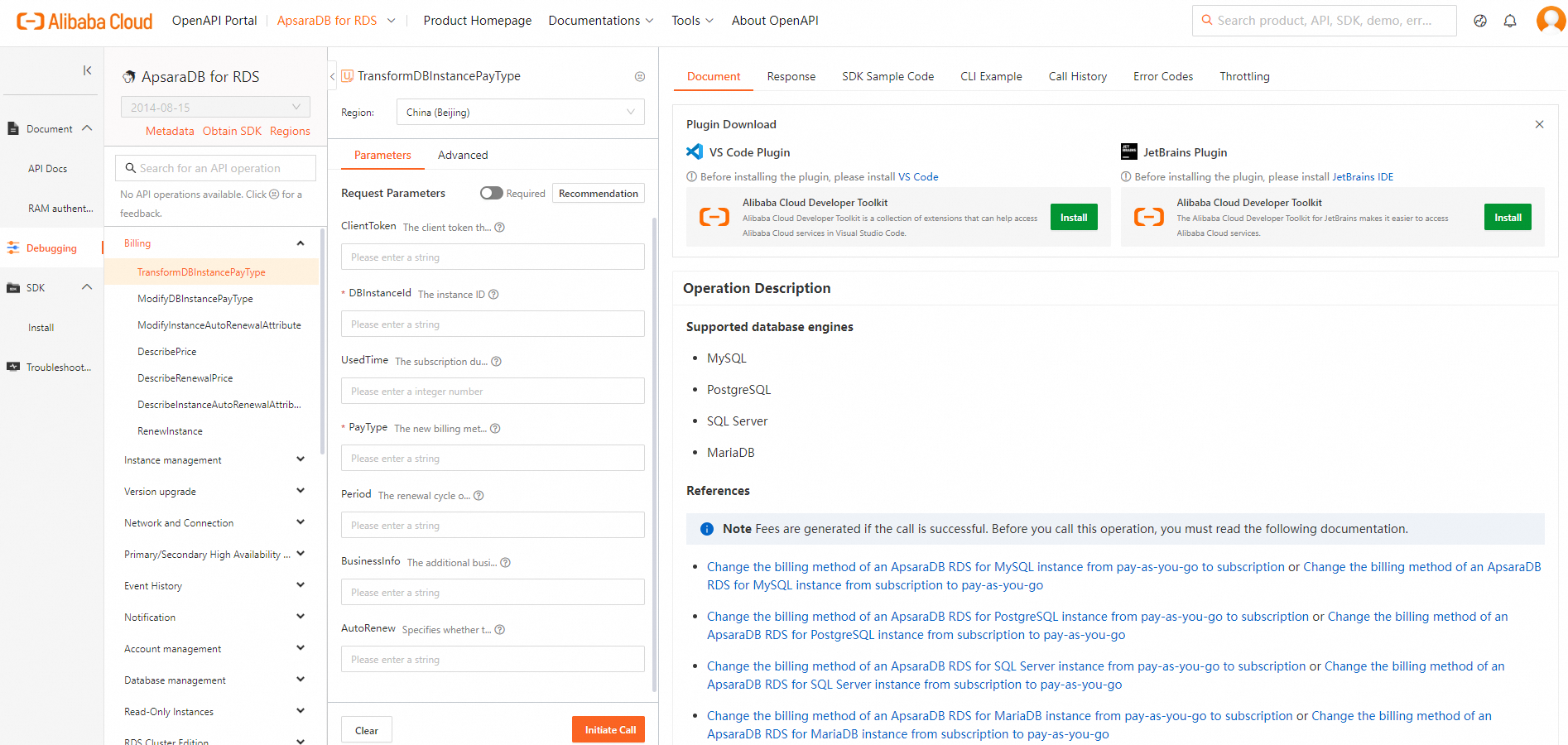
Online debugging page
Access OpenAPI Explorer.
Debugging entrypoint: Debug API
Endpoints
Use the endpoint for the region where your instance resides to reduce latency. For example, for an instance in the China (Zhangjiakou) region, the public endpoint is rds.cn-zhangjiakou.aliyuncs.com and the virtual private cloud (VPC) endpoint is rds-vpc.cn-zhangjiakou.aliyuncs.com.
-
The public endpoint is accessible globally.
-
VPC endpoints offer the following advantages over public endpoints:
-
High security: VPC endpoints are accessible only within a VPC, providing higher security and privacy.
-
Fast response: Data travels over the VPC network, reducing latency and avoiding bandwidth limitations.
-
Low cost: Traffic over VPC endpoints uses the internal network.
-
For more information, see Endpoints.
Supported user identities
By default, OpenAPI Explorer uses your Alibaba Cloud account for online debugging. An Alibaba Cloud account has full permissions across all API operations, which poses security risks. Call API operations and perform routine O&M using a RAM user or RAM role instead. Before using a RAM user, grant the permissions required to manage ApsaraDB RDS resources. For more information, see Authorize a RAM user to manage ApsaraDB RDS instances.
| Identity | Supported |
|---|---|
| Alibaba Cloud account | Yes |
| RAM user (recommended) | Yes |
| RAM role (recommended) | Yes |
References
Integration methods
ApsaraDB RDS supports Alibaba Cloud SDKs, Alibaba Cloud CLI, ROS, Terraform, and custom encapsulation. Select a method based on your workflow.
| Calling method | Supported |
|---|---|
| Alibaba Cloud SDK | Yes |
| Alibaba Cloud CLI | Yes |
| ROS | Yes |
| Terraform | Yes |
| Custom encapsulation | Yes |
SDKs are the recommended method for most use cases because they are easy to integrate.
Alibaba Cloud SDKs
Alibaba Cloud SDKs are available in Java, C#, Go, Python, TypeScript, Node.js, PHP, and C++. SDKs handle request signing, timeouts, and retries, and return structured response objects that simplify development. For more information, see Alibaba Cloud SDKs.
For supported languages and dependencies for ApsaraDB RDS, see OpenAPI Explorer.
Alibaba Cloud CLI
Alibaba Cloud CLI lets you run aliyun commands to interact with Alibaba Cloud services and manage cloud resources. For more information, see What is Alibaba Cloud CLI?
To call ApsaraDB RDS API operations using Alibaba Cloud CLI, see Generate a command.
ROS
Resource Orchestration Service (ROS) automates the creation and configuration of cloud resources. Define your infrastructure—including Elastic Compute Service (ECS) instances and ApsaraDB RDS instances, and the relationship between the resources—in a template, and ROS provisions everything automatically to implement automated deployment and O&M. For more information, see What is ROS?
For supported ApsaraDB RDS resources and data types, see ApsaraDB RDS resources supported by ROS.
Custom encapsulated API calls
To make native HTTP calls, construct requests manually and sign them. For signature details, see List of operations by function and Request syntax and signature method V3.
Usage notes
If an API operation returns an error, check the error code and verify your input parameters. For a list of error codes, see Public error codes.
For self-service diagnostics using a request ID or SDK error details, use Alibaba Cloud OpenAPI Diagnostics.