When SSL encryption is enabled on an ApsaraDB RDS for PostgreSQL instance, the client verifies the server's identity before connecting. This prevents eavesdropping and man-in-the-middle attacks, but does not stop an unauthorized client from impersonating a legitimate user. To have the RDS instance also verify the client's identity, configure a client certificate authority (CA) certificate for mutual TLS (mTLS) authentication.
Prerequisites
Before you begin, ensure that you have:
SSL encryption enabled using a cloud certificate or a custom certificate. For more information, see Configure a cloud certificate to enable the SSL encryption feature or Configure a custom certificate to enable the SSL encryption feature
OpenSSL installed
Linux includes OpenSSL by default. On Windows, download and install OpenSSL from the Win32/Win64 OpenSSL page.
Usage notes
After enabling a client CA certificate, close all existing connections and establish new ones for SSL encryption to take effect.
The following operations trigger an RDS instance restart, which takes approximately 3 minutes. Perform these operations during off-peak hours:
Enabling a client CA certificate
Changing the content of the configured client CA certificate
Modifying the certificate revocation list (CRL)
Step 1: Create a client certificate
The following example uses CentOS. On Windows, use the same openssl commands and configuration.
Create a self-signed CA certificate and its private key.
openssl req -new -x509 -days 3650 -nodes -out client-ca.crt -keyout client-ca.key -subj "/CN=root-client-ca"Create a certificate signing request (CSR) and private key for the client certificate.
openssl req -new -nodes -text -out client.csr -keyout client.key -subj "/CN=<logon-username>"Set the
CNvalue to the username of the account used to connect to the RDS instance from the client.Sign the CSR with the self-signed CA to create the client certificate.
openssl x509 -req -in client.csr -text -days 365 -CA client-ca.crt -CAkey client-ca.key -CAcreateserial -out client.crt
After running all three commands, verify the output with ls:
client-ca.crt client-ca.key client-ca.srl client.crt client.csr client.keyThe following table describes each file and its role in the mTLS handshake:
| File | Contents | Effect |
|---|---|---|
client-ca.crt | Self-signed CA certificate | Uploaded to the RDS instance to verify that client certificates are signed by a trusted CA |
client-ca.key | Private key of the self-signed CA | Signs the client certificate (CSR); keep this file secure |
client.crt | Client certificate | Sent to the RDS instance during connection to prove the client's identity; the CN value must match the database username |
client.key | Private key of the client certificate | Proves that the client certificate was sent by its rightful owner |
Step 2: Configure a client CA certificate
After configuration, the instance status changes from Running to Modifying SSL Settings and returns to Running in approximately 3 minutes.
Go to the Instances page. In the top navigation bar, select the region where the RDS instance resides. Find the instance and click its ID.
In the left-side navigation pane, click Data Security. On the page that appears, click the SSL tab.
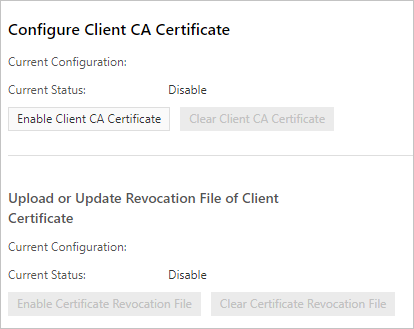
Click Enable Client CA Certificate.
In the dialog box, copy the entire contents of
client-ca.crtinto the Public Key field, then click OK. Copy all content from-----BEGIN CERTIFICATE-----through-----END CERTIFICATE-----.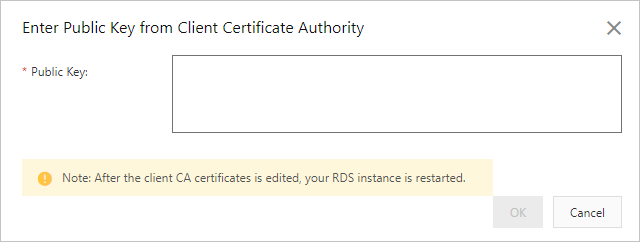
Step 3: Connect to the RDS instance
Connect to the RDS instance over SSL. For instructions, see Connect to an ApsaraDB RDS for PostgreSQL instance over SSL.
Step 4: (Optional) Configure a CRL file
Revoke a client certificate to deny access from a specific client. After revoking, upload a CRL file so the RDS instance enforces the revocation.
After a CRL file is configured, the instance status changes from Running to Modifying SSL Settings and returns to Running in approximately 3 minutes.
Prepare the CRL configuration files. Linux:
touch /etc/pki/CA/index.txt
echo 1000 > /etc/pki/CA/crlnumber
Windows:
Create a
CAfolder in<OpenSSL installation directory>\bin.Create an
index.txtfile in theCAfolder.Run the following command using the PostgreSQL CLI: ``
echo 1000 > <OpenSSL installation directory>\bin\CA\crlnumber``Edit
openssl.cnfinC:\Program Files\Common Files\SSL\. Find the[ CA_default ]section and update thedirvalue: ``dir = "<OpenSSL installation directory>\\bin\\CA"``
Revoke the client certificate (
client.crt).openssl ca -revoke client.crt -cert client-ca.crt -keyfile client-ca.keyThis command requires the self-signed CA certificate (
client-ca.crt) and its private key (client-ca.key) created in Step 1.Generate the CRL file.
openssl ca -gencrl -out client.crl -cert ca.crt -keyfile ca.keyIn the left-side navigation pane, click Data Security. On the page that appears, click the SSL tab.
Click Enable Certificate Revocation File.
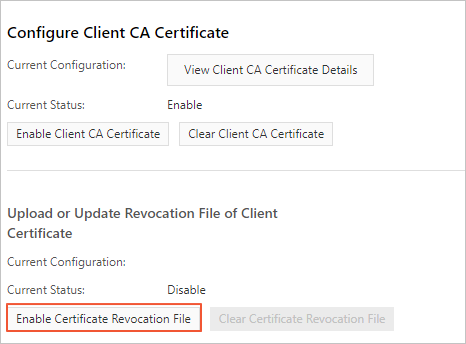
In the dialog box, copy the contents of
client.crlinto the Revocation File field.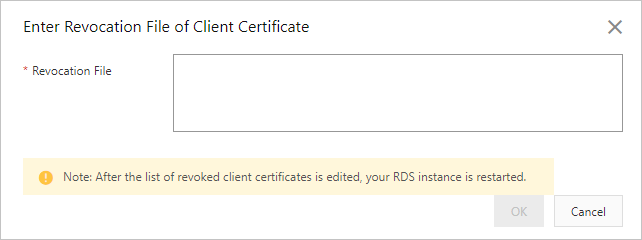
Step 5: (Optional) Update the client certificate
This operation triggers an RDS instance restart. Perform it during off-peak hours.
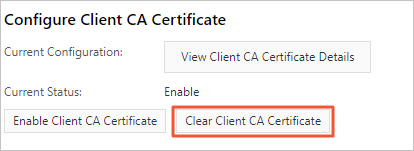
On the SSL tab, click Clear Client CA Certificate, then click Enable Client CA Certificate.