Role-based single sign-on (SSO) with SAML 2.0 lets users from your corporate identity provider (IdP) access Alibaba Cloud by assuming a Resource Access Management (RAM) role — without requiring individual RAM user accounts for each person in your organization. This lets you manage user identities centrally in your IdP.
How role-based SAML SSO works
Federated users can reach Alibaba Cloud resources through the console or by calling APIs directly.
Console access
In the IdP-initiated flow, the IdP drives the entire login sequence — the user never navigates to the Alibaba Cloud console directly.
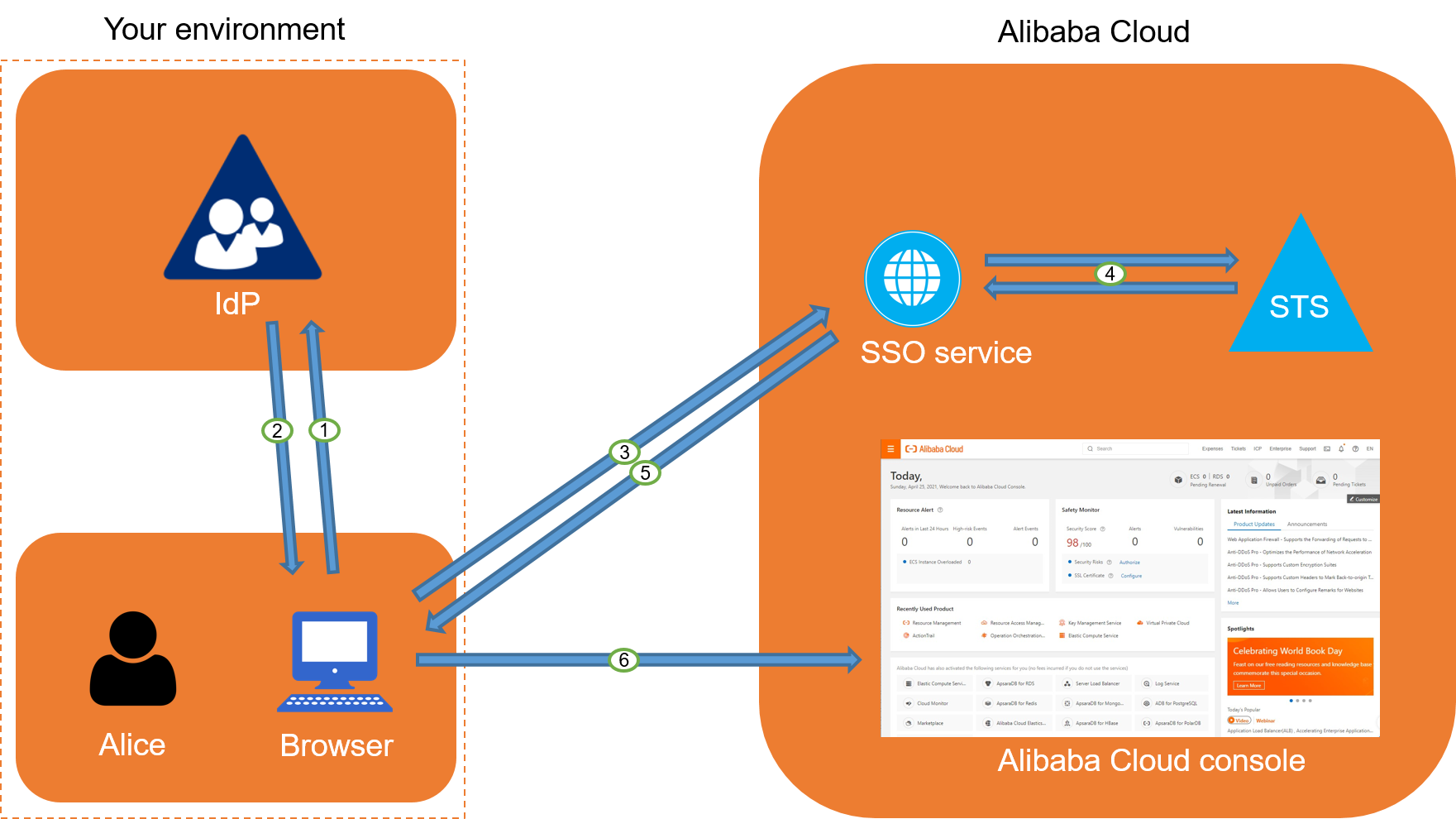
A user logs on to your corporate application portal and selects the Alibaba Cloud application.
The IdP authenticates the user and generates a SAML response containing an assertion about the user's identity and the RAM roles they are permitted to assume. The IdP sends this response to the user's browser.
The browser forwards the SAML response to the Alibaba Cloud SSO endpoint.
The SSO service validates the assertion. If the assertion specifies multiple roles, the user is prompted to select which RAM role to assume.
The SSO service requests temporary credentials from the Security Token Service (STS) for the selected role.
STS returns temporary credentials, which the SSO service uses to generate a pre-signed URL for console access.
The SSO service redirects the user's browser to the Alibaba Cloud Management Console. The user is logged on with the permissions of the assumed RAM role.
Programmatic access (API)
For API access, an application exchanges a SAML assertion for short-lived STS credentials, then uses those credentials to sign Alibaba Cloud API requests.
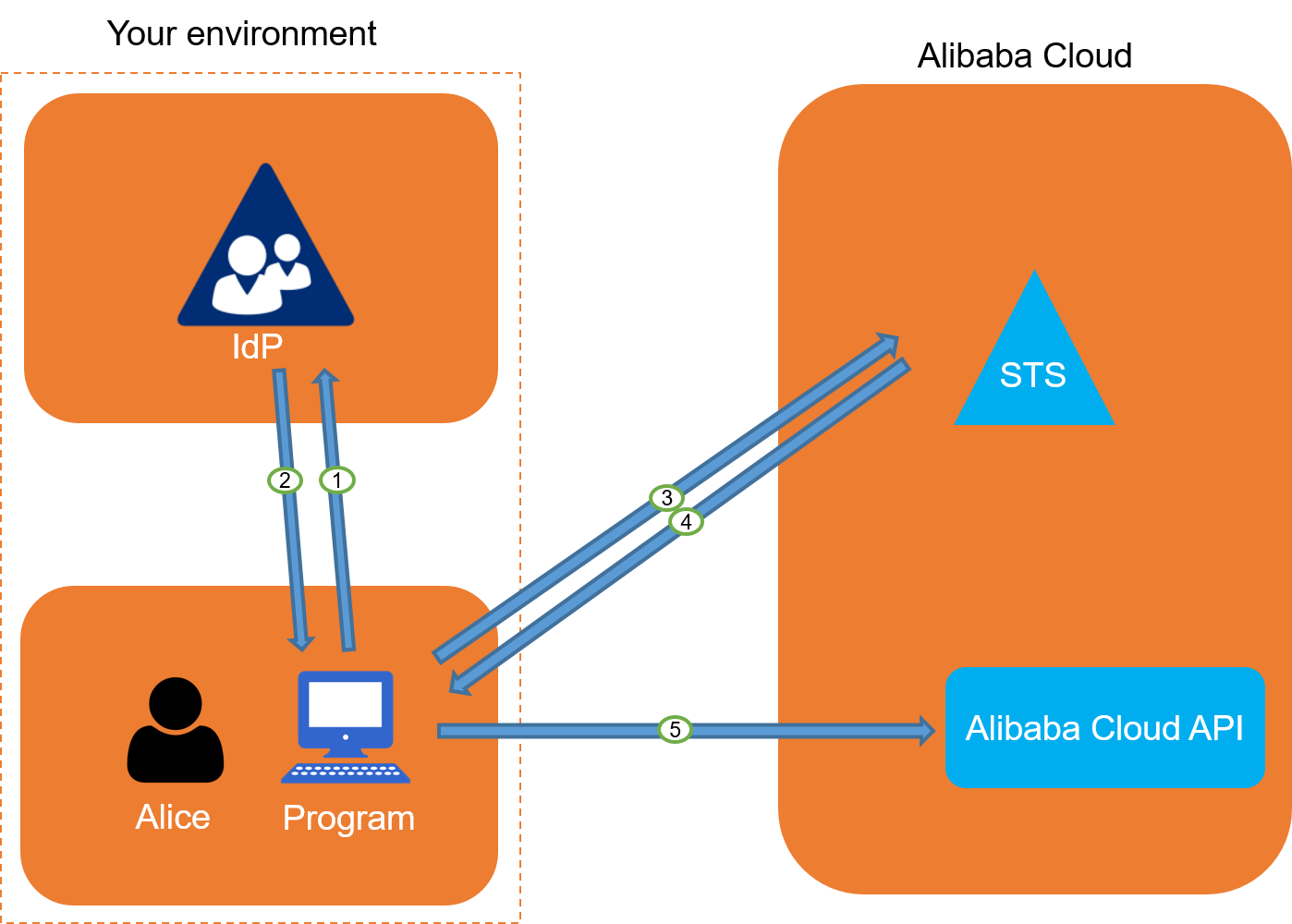
An application or script authenticates a user against your corporate IdP.
The IdP returns a SAML response to the application.
The application calls the AssumeRoleWithSAML API operation of STS, passing the SAML assertion, the ARN of the desired RAM role, and the ARN of the IdP.
STS validates the SAML assertion and confirms that the requested role is included in the assertion's attributes.
If the request is valid, STS returns temporary security credentials (an AccessKey ID, an AccessKey secret, and a security token).
The application uses these temporary credentials to make signed API requests to other Alibaba Cloud services.
Configuration overview
Setting up role-based SSO requires establishing a trust relationship in both Alibaba Cloud and your IdP.
-
Create a SAML IdP in Alibaba Cloud.
Provide the metadata document from your corporate IdP to Alibaba Cloud. This establishes the trust that lets Alibaba Cloud accept assertions from your IdP. For more information, see Configure SAML on Alibaba Cloud (as SP).
-
Create RAM roles for federation.
Create one RAM role for each set of permissions you want to grant to federated users. Each role's trust policy must specify the SAML IdP you created as the trusted principal. For more information, see Create a RAM role for an identity provider.
-
Configure your IdP.
Add Alibaba Cloud as a trusted service provider (SP) in your IdP and configure claim rules to include the required attributes in the SAML assertion — specifically, the RAM roles a user is allowed to assume. For more information, see Configure Alibaba Cloud as the SP in your IdP.
Configuration tutorials
The following topics provide step-by-step tutorials for configuring role-based SAML SSO with common IdPs: