This topic describes how to use Data Transmission Service (DTS) to migrate Amazon Aurora MySQL to Alibaba Cloud PolarDB for MySQL. DTS supports schema migration, full data migration, and incremental data migration. Combining these three migration types ensures a smooth database migration with minimal application downtime.
Prerequisites
-
Ensure that DTS can successfully connect to the source Amazon Aurora MySQL cluster.
We recommend setting Publicly accessible to Yes in the network and security settings of the source Amazon Aurora MySQL cluster. Then, when you configure the task, set the Access Method to Public IP Address to connect the source cluster to DTS.
NoteTo connect your source Amazon Aurora MySQL cluster to DTS using a VPN gateway, see Connect an AWS VPC to an Alibaba Cloud VPC.
-
You have created an Alibaba Cloud PolarDB for MySQL cluster. For details, see Custom purchase.
-
The storage space of the Alibaba Cloud PolarDB for MySQL cluster must be greater than the storage space used by the Amazon Aurora MySQL cluster.
Notes
-
Full data migration consumes I/O resources on both the source and destination databases, increasing their server load. If your databases have poor performance, low specifications, or high workloads (for example, the source database has a large number of slow SQL queries or tables without primary keys, or the destination database has deadlocks), the migration can further strain them and may cause service interruptions. Before you migrate data, evaluate the performance of the source and destination databases. We recommend migrating during off-peak hours, for example, when the CPU utilization of the source and destination databases is below 30%.
-
If a source table has no primary key or unique constraint, duplicate data may occur in the destination database.
-
For FLOAT or DOUBLE columns, DTS reads values using the
ROUND(COLUMN,PRECISION)function. If a precision is not explicitly defined, DTS uses a precision of 38 digits for FLOAT and 308 digits for DOUBLE. Ensure that this default precision meets your business requirements. -
If the name of the source database does not follow the PolarDB for MySQL naming conventions, you must create the database in PolarDB for MySQL before configuring the migration task.
NoteFor more information about the naming conventions for PolarDB for MySQL and how to create a database, see Create a database.
-
If a migration task fails, DTS automatically tries to resume it. Before you switch your services to the destination instance, you must stop or release the task. This prevents a resumed task from overwriting data on the destination instance with data from the source database.
Billing
|
Migration type |
Channel specification fee |
Public network traffic fees |
|
Schema migration and full data migration |
Free of charge. |
DTS charges public network traffic fees when the Access Method for the destination database is set to Public IP Address. For more information, see Billing overview. |
|
Incremental data migration |
This is a paid service. For more information, see Billing overview. |
Migration types
-
Structure migration
DTS migrates the structure of the objects to be migrated to Alibaba Cloud PolarDB for MySQL. Currently, DTS supports structure migration for tables, views, triggers, stored procedures, and stored functions. Structure migration for events is not supported.
Note-
During structure migration, DTS converts DEFINER to INVOKER in views, stored procedures, and stored functions.
-
Since DTS does not migrate user information, you must grant the invoking account read and write permissions on the views, stored procedures, and stored functions on the destination database.
-
-
Full data migration
DTS migrates all existing data in the selected objects from Amazon Aurora for MySQL to Alibaba Cloud PolarDB for MySQL.
NoteFull data migration uses concurrent INSERT operations, which can cause table fragmentation in the destination instance. As a result, the tablespace in the destination instance may be larger than in the source instance.
-
Incremental data migration
After full data migration, DTS reads the binlog from Amazon Aurora for MySQL to synchronize incremental data changes to Alibaba Cloud PolarDB for MySQL. This process ensures a smooth database migration and minimizes application downtime.
Database account permissions
|
Database |
Schema migration |
Full data migration |
Incremental data migration |
|
Amazon Aurora MySQL |
SELECT privilege on the objects to migrate |
SELECT privilege on the objects to migrate |
SELECT, REPLICATION SLAVE, REPLICATION CLIENT, and SHOW VIEW privileges on the objects to migrate |
|
Alibaba Cloud PolarDB for MySQL |
Read and write privileges on the objects to migrate |
Read and write privileges on the objects to migrate |
Read and write privileges on the objects to migrate |
To create a database account and grant the required privileges:
-
For Amazon Aurora MySQL, see Create an account for a self-managed MySQL database and configure binary logging.
-
For Alibaba Cloud PolarDB for MySQL, see Create and manage database accounts.
Preparations
-
Log on to the Amazon Aurora console.
-
In the left navigation pane, click Database.
-
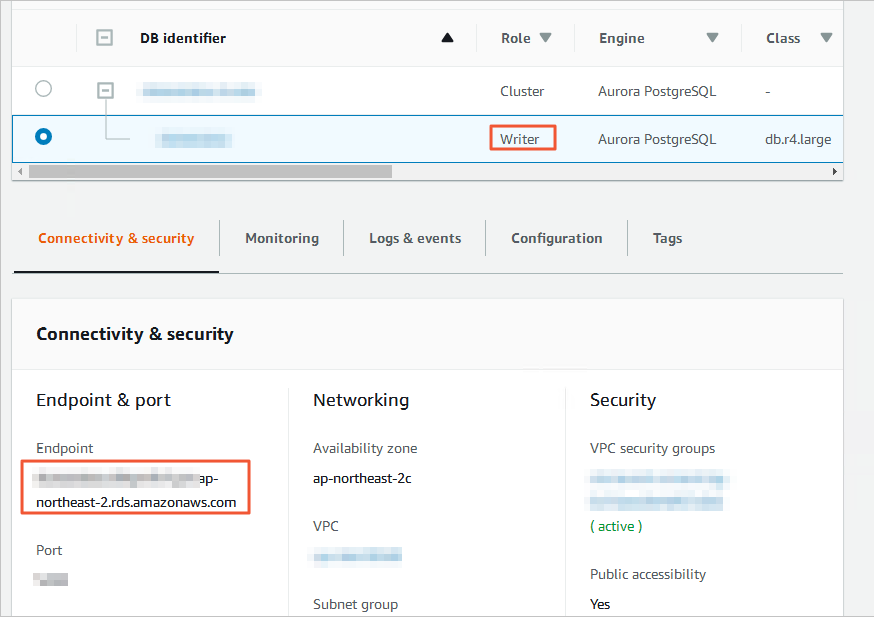
Click the DB identifier for the node where the Role is Writer instance.
-
On the Connectivity & security tab, click the name of the VPC security group.
-
On the Security Groups page, click the target Security Group ID.
-
On the Inbound rules tab, click Edit inbound rules.
-
On the Edit inbound rules page, click Add rule. Add an inbound rule with the CIDR blocks for the DTS servers in the corresponding region, and then click Save rules. For a list of the required CIDR blocks, see DTS server IP addresses.
Note-
Add only the CIDR blocks for DTS servers in the same region as the destination instance. For example, if the source instance is in the Singapore region and the destination instance is in the China (Hangzhou) region, you need to add only the CIDR blocks for the DTS servers in the China (Hangzhou) region.
-
You can add multiple rules for all required CIDR blocks in a single operation.
-
For further questions, refer to the official Amazon documentation or contact Amazon technical support.
-
-
Log in to the Amazon Aurora MySQL database and set the retention period for the binary log. You can skip this step if you do not need incremental data migration.
call mysql.rds_set_configuration('binlog retention hours', 24);Note-
The preceding command sets the binary log retention period to 24 hours. The maximum retention period is 168 hours (7 days).
-
Binary logging must be enabled for the Amazon Aurora MySQL database, and the binlog_format parameter must be set to row. If the MySQL version is 5.6 or later, the binlog_row_image parameter must be set to full. For more information, see the official Amazon documentation or contact Amazon technical support.
-
Procedure (new console)
-
Navigate to the migration task list page for the destination region using one of the following methods.
From the DTS console
-
Log on to the Data Transmission Service (DTS) console.
-
In the navigation pane on the left, click Data Migration.
-
In the upper-left corner of the page, select the region where the migration instance is located.
From the DMS console
NoteThe actual operations may vary based on the mode and layout of the DMS console. For more information, see Simple mode console and Customize the layout and style of the DMS console.
-
Log on to the Data Management (DMS) console.
-
In the top menu bar, choose .
-
To the right of Data Migration Tasks, select the region where the migration instance is located.
-
-
Click Create Task to navigate to the task configuration page.
-
Configure the source and destination databases.
WarningAfter you select the source and destination instances, we recommend that you carefully read the limits displayed at the top of the page. Otherwise, the task may fail or data inconsistency may occur.
Category
Parameter
Description
N/A
Task Name
DTS automatically generates a task name. We recommend that you specify a descriptive name for easy identification. The name does not need to be unique.
Source Database
Select a DMS database instance.
You can choose whether to use an existing instance, as needed.
-
If you use an existing instance, the database information below is automatically filled in. You do not need to enter it again.
-
If you do not use an existing instance, you must configure the database information below.
Note-
In the DMS console, you can click Add DMS Database Instance to register a database with DMS. For more information, see ApsaraDB Data Ingestion and Register a database hosted on a third-party cloud service or a self-managed database.
-
In the DTS console, you can register a database with DTS on the Database Connections page or the new configuration page. For more information, see Manage database connections.
Database Type
Select MySQL.
Connection Type
Select Public IP Address.
Instance Region
Select the region where the Amazon Aurora MySQL database is located.
NoteIf the region where your Amazon Aurora MySQL database is located is not available in the dropdown list, select the nearest region.
Domain Name or IP
Enter the endpoint of the Amazon Aurora MySQL database.
NoteYou can obtain the database endpoint from the Basic Information page of your Amazon Aurora MySQL database.
Port
Enter the service port of the Amazon Aurora MySQL database. The default port is 3306.
Database Account
Enter the database account for the Amazon Aurora MySQL database. For information about required permissions, see Required permissions for database accounts.
Database Password
Enter the password for the database account.
Encryption
Select Non-encrypted or SSL-encrypted based on your requirements.
-
If SSL encryption is disabled for your Amazon Aurora MySQL database, select Non-encrypted.
-
If SSL encryption is enabled for your Amazon Aurora MySQL database, select SSL-encrypted. You must also upload the CA Certificate and enter the CA Key.
Destination Database
Select a DMS database instance.
You can choose whether to use an existing instance, as needed.
-
If you use an existing instance, the database information below is automatically filled in. You do not need to enter it again.
-
If you do not use an existing instance, you must configure the database information below.
Note-
In the DMS console, you can click Add DMS Database Instance to register a database with DMS. For more information, see ApsaraDB Data Ingestion and Register a database hosted on a third-party cloud service or a self-managed database.
-
In the DTS console, you can register a database with DTS on the Database Connections page or the new configuration page. For more information, see Manage database connections.
Database Type
Select PolarDB for MySQL.
Connection Type
Select Alibaba Cloud Instance.
Instance Region
Select the region where the destination PolarDB for MySQL instance is located.
PolarDB Cluster ID
Select the ID of the destination PolarDB for MySQL instance.
Database Account
Enter the database account for the destination PolarDB for MySQL instance. For information about required permissions, see Required permissions for database accounts.
Database Password
Enter the password for the database account.
Encryption
Select an option based on your business requirements. For more information about SSL encryption, see Configure SSL encryption.
-
-
After you complete the configuration, click Test Connectivity and Proceed at the bottom of the page. In the CIDR Blocks of DTS Servers dialog box that appears, click Test Connectivity.
NoteEnsure that the IP address segments of the DTS service are automatically or manually added to the security settings of the source and destination databases to allow access from DTS servers. For more information, see Add DTS server IP addresses to a whitelist.
-
Configure the task objects.
-
On the Configure Objects page, configure the objects that you want to migrate.
Parameter
Description
Migration Types
-
If you only need to perform a full migration, select both Schema Migration and Full Data Migration.
-
To perform a migration with no downtime, select Schema Migration, Full Data Migration, and Incremental Data Migration.
Note-
If you do not select Schema Migration, you must ensure that a database and tables to receive the data exist in the destination database. You can also use the object name mapping feature in the Selected Objects box as needed.
-
If you do not select Incremental Data Migration, do not write new data to the source instance during data migration to ensure data consistency.
Method to Migrate Triggers in Source Database
Select a method to migrate triggers based on your requirements. If the objects to be migrated do not involve triggers, you can skip this step. For more information, see Configure the method to synchronize or migrate triggers.
NoteThis parameter is available only when you select Schema Migration for Migration Types.
Processing Mode of Conflicting Tables
-
Precheck and Report Errors: Checks whether tables with the same names exist in the destination database. If no tables with the same names exist, the precheck is passed. If tables with the same names exist, an error is reported during the precheck, and the data migration task does not start.
NoteIf a table in the destination database has the same name but cannot be easily deleted or renamed, you can change the name of the table in the destination database. For more information, see Object name mapping.
-
Ignore Errors and Proceed: Skips the check for tables with the same names.
WarningSelecting Ignore Errors and Proceed may cause data inconsistency and business risks. For example:
-
If the table schemas are consistent and a record in the destination database has the same primary key value as a record in the source database:
-
During full migration, DTS keeps the record in the destination database. The record from the source database is not migrated.
-
During incremental migration, DTS does not keep the record in the destination database. The record from the source database overwrites the record in the destination database.
-
-
If the table schemas are inconsistent, only some columns of data may be migrated, or the migration may fail. Proceed with caution.
-
Capitalization of Object Names in Destination Instance
You can configure the case sensitivity policy for the names of migrated objects, such as databases, tables, and columns, in the destination instance. By default, DTS default policy is selected. You can also choose to keep the case sensitivity consistent with the default policy of the source or destination database. For more information, see Case sensitivity of object names in the destination database.
Source Objects
Select one or more objects from the Source Objects section. Click the
 icon and add the objects to the Selected Objects section. Note
The granularity for selecting migration objects is schema, table, and column. If you select only tables or columns as migration objects, other objects such as views, triggers, and stored procedures are not migrated to the destination database.
Selected Objects
-
To change the name of a single migration object in the target instance, right-click the object in the Selected Objects box. For more information, see Map individual schema, table, and column names.
-
To change the names of multiple migration objects in the target instance, click Selected Objects in the upper-right corner of the Batch Edit box. For more information, see Map multiple schema, table, and column names.
Note-
If you use the object name mapping feature, the migration of other objects that depend on the mapped object may fail.
-
To filter data by using a WHERE clause, right-click the table to be migrated in the Selected Objects box and set the filter conditions in the dialog box that appears. For instructions, see Configure filter conditions.
-
To select SQL operations to migrate at the database or table level, right-click the object in the Selected Objects box and select the desired SQL operations in the dialog box that appears.
-
-
Click Next: Advanced Settings to configure advanced parameters.
Parameter
Description
Dedicated Cluster for Task Scheduling
By default, DTS schedules tasks on a shared cluster. You do not need to select one. If you want more stable tasks, you can purchase a dedicated cluster to run DTS migration tasks.
Select the engine type of the destination database
Select the engine type for the destination database.
-
InnoDB: The default storage engine.
-
X-Engine: An online transaction processing (OLTP) database storage engine.
Copy the temporary table of the Online DDL tool that is generated in the source table to the destination database.
If you use Data Management (DMS) or gh-ost to perform online DDL changes in the source database, you can choose whether to migrate the data from the temporary tables generated by the online DDL changes.
Important-
DTS tasks do not support using tools such as pt-online-schema-change to perform online DDL changes. Otherwise, the DTS task fails.
-
The processing methods for each phase are as follows: The Schema Migration and Full Data Migration phases do not allow DDL operations that change the database or table structure. Therefore, they are not controlled by the online DDL policy.
-
Schema Migration: Not controlled by the online DDL policy. Related temporary tables are created.
-
Full Data Migration: Not controlled by the online DDL policy. The migration of temporary tables is not included in the full migration objects. All tables whose names match the regular expression (
^_(.+)_(?:gho|new)$or^_(.+)_(?:ghc|del|old)$) are filtered out. -
Incremental Data Migration: Controlled by the online DDL policy.
-
Yes: Migrates data changes from temporary tables (for example,
_table_name_gho) generated by online DDL operations. -
No, Adapt to DMS Online DDL and No, Adapt to gh-ost: Filters out data changes from temporary tables (for example,
_table_name_gho) generated by tools such as gh-ost based on regular expression rules.
-
-
-
Yes: Migrates the data from the temporary tables generated by online DDL changes.
NoteIf online DDL changes generate a large amount of data in temporary tables, it may cause task latency.
-
No, Adapt to DMS Online DDL: Does not migrate the data from the temporary tables generated by online DDL changes. It only migrates the original DDL statements executed using Data Management (DMS).
NoteThis option causes tables in the destination database to be locked.
-
No, Adapt to gh-ost: Does not migrate the data from the temporary tables generated by online DDL changes. It supports custom filtering rules. DTS filters out data changes from temporary tables (for example,
_table_name_gho) generated by tools such as gh-ost based on regular expression rules. You can modify the default regular expressions used to match shadow and useless tables as needed:-
Shadow table:
^_(.+)_(?:gho|new)$ -
Useless table:
^_(.+)_(?:ghc|del|old)$
NoteThis option causes tables in the destination database to be locked.
-
Retry Time for Failed Connections
After the migration task starts, if the connection to the source or destination database fails, DTS reports an error and immediately begins to retry the connection. The default retry duration is 720 minutes. You can customize the retry time to a value from 10 to 1440 minutes. We recommend that you set the duration to more than 30 minutes. If DTS reconnects to the source and destination databases within the specified duration, the migration task automatically resumes. Otherwise, the task fails.
Note-
For multiple DTS instances that share the same source or destination, the network retry time is determined by the setting of the last created task.
-
Because you are charged for the task during the connection retry period, we recommend that you customize the retry time based on your business needs, or release the DTS instance as soon as possible after the source and destination database instances are released.
Retry Time for Other Issues
After the migration task starts, if a non-connectivity issue, such as a DDL or DML execution exception, occurs in the source or destination database, DTS reports an error and immediately begins to retry the operation. The default retry duration is 10 minutes. You can customize the retry time to a value from 1 to 1440 minutes. We recommend that you set the duration to more than 10 minutes. If the related operations succeed within the specified retry duration, the migration task automatically resumes. Otherwise, the task fails.
ImportantThe value of Retry Time for Other Issues must be less than the value of Retry Time for Failed Connections.
Enable Throttling for Full Data Migration
During full migration, DTS consumes read and write resources on the source and destination databases, which may increase the database load. If required, you can enable throttling for the full migration task. You can set Queries per second (QPS) to the source database, RPS of Full Data Migration, and Data migration speed for full migration (MB/s) to reduce the load on the destination database.
Note-
This configuration item is available only if you select Full Data Migration for Migration Types.
-
You can also adjust the full migration speed after the migration instance is running.
Enable Throttling for Incremental Data Migration
If required, you can also choose to set speed limits for the incremental migration task. You can set RPS of Incremental Data Migration and Data migration speed for incremental migration (MB/s) to reduce the load on the destination database.
Note-
This configuration item is available only if you select Incremental Data Migration for Migration Types.
-
You can also adjust the incremental migration speed after the migration instance is running.
Environment Tag
You can select an environment tag to identify the instance. This is not required for this example.
Whether to delete SQL operations on heartbeat tables of forward and reverse tasks
Choose whether DTS writes heartbeat SQL information to the source database while the instance is running.
Yes: Does not write heartbeat SQL information to the source database. The DTS instance may display latency.
No: Writes heartbeat SQL information to the source database. This may interfere with source database operations like physical backups and cloning.
Configure ETL
Based on your business needs, select whether to configure the ETL feature to process data.
-
Yes: Configures the ETL feature. You must also enter data processing statements in the text box.
-
No: Does not configure the ETL feature.
Monitoring and Alerting
Select whether to set alerts and receive alert notifications based on your business needs.
-
No: Does not set an alert.
-
Yes: Configure alerts by setting an alert threshold and an alert notifications. If a migration fails or the latency exceeds the threshold, the system sends an alert notification.
-
-
Click Next: Data Validation to configure a data validation task.
For more information about the data validation feature, see Configure data validation.
-
-
Save the task and run a precheck.
-
To view the parameters for configuring this instance when you call the API operation, move the pointer over the Next: Save Task Settings and Precheck button and click Preview OpenAPI parameters in the bubble that appears.
-
If you do not need to view or have finished viewing the API parameters, click Next: Save Task Settings and Precheck at the bottom of the page.
Note-
Before the migration task starts, DTS performs a precheck. The task starts only after it passes the precheck.
-
If the precheck fails, click View Details next to the failed check item, fix the issue based on the prompt, and then run the precheck again.
-
If a warning is reported during the precheck:
-
For check items that cannot be ignored, click View Details next to the failed item, fix the issue based on the prompt, and then run the precheck again.
-
For check items that can be ignored, you can click Confirm Alert Details, Ignore, OK, and Precheck Again to skip the alert item and run the precheck again. If you choose to ignore a warning, it may cause issues such as data inconsistency and pose risks to your business.
-
-
-
Purchase the instance.
-
When the Success Rate is 100%, click Next: Purchase Instance.
-
On the Purchase page, select the link specification for the data migration instance. For more information, see the following table.
Category
Parameter
Description
New Instance Class
Resource Group Settings
Select the resource group to which the instance belongs. The default value is default resource group. For more information, see What is Resource Management?
Instance Class
DTS provides migration specifications with different performance levels. The link specification affects the migration speed. You can select a specification based on your business scenario. For more information, see Data migration link specifications.
-
After the configuration is complete, read and select Data Transmission Service (Pay-as-you-go) Service Terms.
-
Click Buy and Start. In the OK dialog box that appears, click OK.
You can view the progress of the migration task on the Data Migration Tasks list page.
Note-
If the migration task does not include incremental migration, it stops automatically after the full migration is complete. After the task stops, its Status changes to Completed.
-
If the migration task includes incremental migration, it does not stop automatically. The incremental migration task continues to run. While the incremental migration task is running, the Status of the task is Running.
-
-
Procedure (previous console)
-
Log on to the DTS console.
NoteIf you are redirected to the Data Management (DMS) console, click the
 icon in the lower-right corner and then click
  Return to old version to return to the classic DTS console.
 -
In the left-side navigation pane, click Data Migration.
-
At the top of the Migration Tasks page, select the region of the destination cluster.
-
In the upper-right corner of the page, click Create Data Migration Task.
-
Configure the source and target databases.
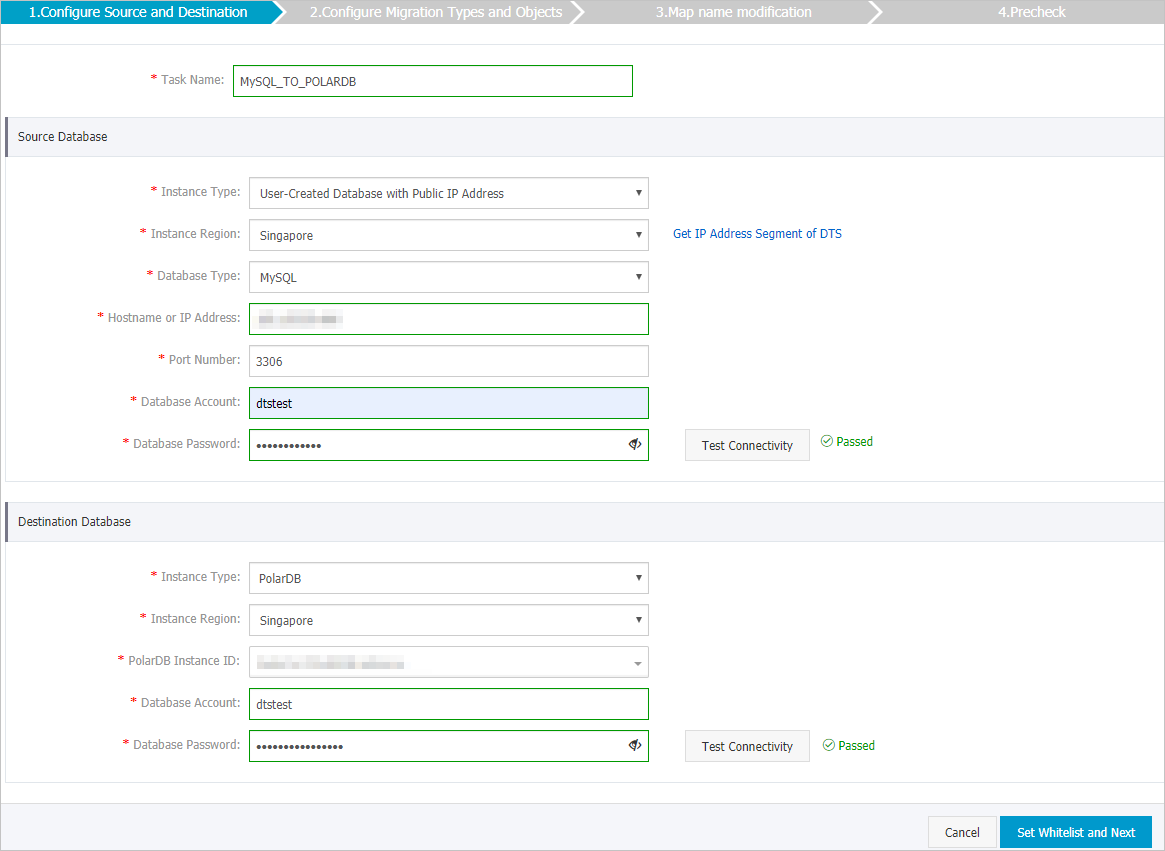
Category
Parameter
Description
N/A
Task name
DTS automatically generates a task name. Specify a descriptive name for easy identification. The name does not have to be unique.
Source database information
Instance type
Select Self-managed database with a public IP address.
Region
If you set Instance Type to Self-managed database with a public IP address, this parameter is not required.
Database type
Select MySQL.
Hostname or IP address
Enter the endpoint of the Amazon Aurora MySQL database.
NoteYou can obtain the database endpoint on the Basic Information page of your Amazon Aurora MySQL database.
Port
Enter the service port of the Amazon Aurora MySQL database. The default value is 3306.
Database account
Enter the account for the Amazon Aurora MySQL database. For the required permissions, see Required permissions for database accounts.
Database password
Enter the password for the database account.
NoteAfter you configure the source database, click Test Connectivity next to Database Password to validate the settings. If the settings are valid, a Passed message is displayed. If a Failed message is displayed, click Diagnose next to Failed and modify the source database information as prompted.
Target database information
Instance type
Select Apsara PolarDB.
Region
Select the region where your PolarDB for MySQL instance is located.
PolarDB instance ID
Select your PolarDB for MySQL instance ID.
Database account
Enter the account for your PolarDB for MySQL instance. For the required permissions, see Required permissions for database accounts.
Database password
Enter the password for the database account.
NoteAfter you configure the destination database, click Test Connectivity next to Database Password to verify that the entered information is valid. If the information is valid, a Passed message is displayed. If a Failed message is displayed, click Diagnose next to Failed and modify the destination database information as prompted.
-
After you complete the configuration, click Authorize Whitelist and Go to Next Step in the lower-right corner of the page.
If the source or target database is an Alibaba Cloud database instance, such as an RDS for MySQL or ApsaraDB for MongoDB instance, DTS automatically adds the IP address CIDR blocks of the DTS service for the corresponding region to the IP address whitelist of the instance. If the source or target database is a self-managed database on an ECS instance, DTS automatically adds the IP address CIDR blocks of the DTS service for the corresponding region to the security rules of the ECS instance. You must also ensure that the self-managed database allows access from the ECS instance. If the database is deployed as a cluster on multiple ECS instances, you must manually add the IP address CIDR blocks of the DTS service for the corresponding region to the security rules of each ECS instance. If the source or target database is a self-managed database in a data center or another cloud database, you must manually add the IP address CIDR blocks of the DTS service for the corresponding region to allow access from DTS servers. For the IP address CIDR blocks, see CIDR blocks of DTS servers.
WarningAdding the public CIDR blocks of DTS servers, whether automatically or manually, may pose security risks. By proceeding, you acknowledge these risks and are responsible for implementing security measures. These include, but are not limited to, strengthening account and password security, restricting open ports for each CIDR block, using authentication for internal API communication, regularly checking and restricting unnecessary CIDR blocks, and using a private network connection such as Express Connect, VPN Gateway, or Smart Access Gateway.
-
Select the migration types and objects.
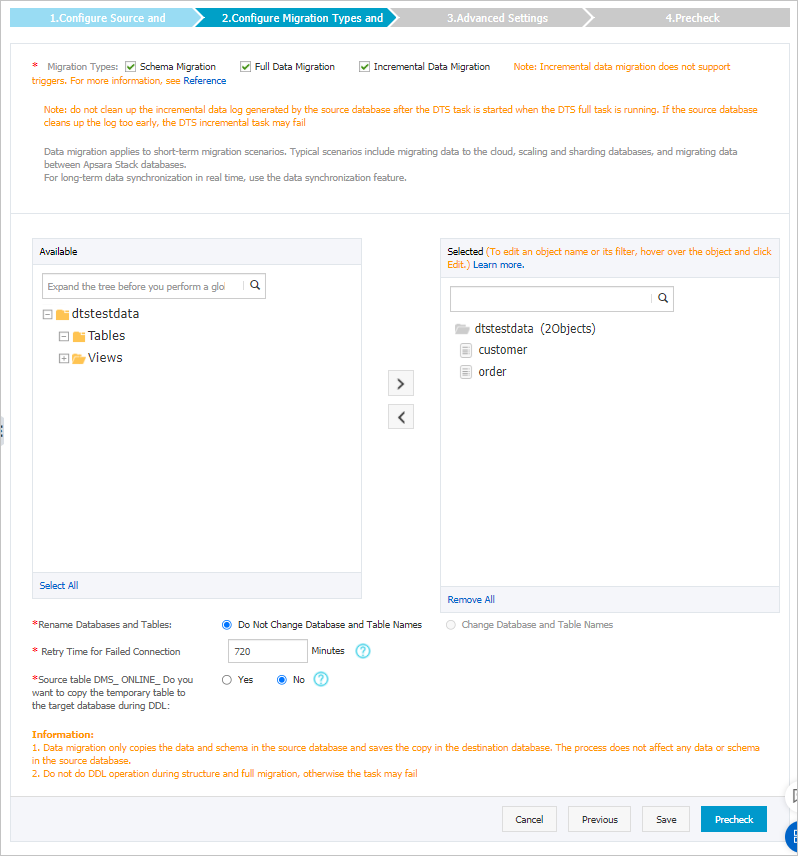
Parameter
Description
Migration type
-
To perform only a full migration, select both Schema Migration and Full Data Migration.
-
To perform a migration with minimal downtime, select Schema Migration, Full Data Migration, and Incremental Data Migration.
NoteTo ensure data consistency, do not write new data to the Amazon Aurora MySQL database during migration if you do not select Incremental Data Migration.
Migration objects
In the Migration Objects box, select the objects to migrate, and then click
to move them to the Selected Objects box.Note-
You can select objects at the database, table, and column level.
-
By default, object names are the same in the source and target databases. To rename an object in the target database, use the object name mapping feature. For more information, see Object name mapping.
-
Object name mapping may cause the migration of dependent objects to fail.
Map object name
Allows you to rename a migrated object in the target instance. For more information, see Object name mapping.
Retry duration on connection failure
The default duration is 12 hours, which you can customize. If DTS reconnects to the databases within the specified time, the task resumes automatically. Otherwise, the task fails.
NoteCharges are incurred for the task runtime during connection retries. We recommend that you customize the retry duration based on your business needs or stop the DTS instance after the source and target database instances are released.
Replicate temporary tables generated by DMS online DDL
If the source database uses Data Management (DMS) to perform online DDL changes, you can choose whether to migrate data from the temporary tables created by the online DDL changes.
-
Yes: Migrates data from temporary tables generated by online DDL changes.
NoteIf the temporary tables generated by online DDL changes contain a large amount of data, this may increase migration latency.
-
No: Does not migrate data from temporary tables generated by online DDL changes. Only the original DDL data from the source database is migrated.
NoteThis option causes table locks on the target database.
-
-
After completing the configuration, click Precheck and Start.
Note-
Before the migration task starts, DTS runs a precheck. The task starts only after all precheck items pass.
-
If the precheck fails, click the
 icon next to a failed item to view its details.
-
Fix the issues as prompted and run the precheck again.
-
If a warning can be ignored, click Ignore or Ignore and Recheck to run the precheck again.
-
-
-
After the precheck passes, click Next.
-
In the Confirm Settings dialog box, select the Instance Class and select the Data Transmission Service (Pay-As-You-Go) Service Terms checkbox.
-
Click Buy and Start to begin the migration task.
-
Schema migration + full data migration
Do not stop the task manually, as this may cause incomplete data. Wait for the task to stop automatically on completion.
-
Schema migration + full data migration + incremental data migration
The migration task does not stop automatically. You must stop it manually.
ImportantChoose an appropriate time to stop the task, such as during off-peak hours or when you are ready to switch business traffic to the destination cluster.
-
Wait until the task status changes to Incremental Data Migration and shows Undelayed. Then, stop writing data to the source database for a few minutes. The Incremental Data Migration status might now show a latency.
-
Wait until the Incremental Data Migration status changes back to Undelayed. Then, stop the task manually.

-
-
-
Switch your workloads to the PolarDB for MySQL instance.