ChatBI uses natural language to SQL (NL2SQL) technology to help businesses generate reports by querying data with natural language. This topic uses the "Alixiang" restaurant management system as an example to walk you through the key features of ChatBI, helping you get started quickly and use the service efficiently.
Enable the PolarDB for AI feature
-
Add an AI node and set the database account to connect to the AI node. For more information, see Enable the PolarDB for AI feature.
Note-
If you have already added an AI node when you purchased the cluster, you can directly set the database account for the AI node. For more information, see Create a standard account.
-
This account must have read and write permissions for the target data tables. This ensures that all database operations in the ChatBI conversion process can be executed.
-
-
Use the Cluster Endpoint to connect to the PolarDB cluster. For more information, see Log on to PolarDB for AI.
Note-
When you connect to the cluster from the command line, add the
-coption. -
DMS connects to the cluster using the Primary address by default. You must manually change it to the Cluster Endpoint. After the change, close the original SQL window and open a new one to execute SQL statements.
-
Data preparation
"Alixiang" is a fictional restaurant company. Its bill management system contains the following three tables. You can click to download them.
You can enter comments for your tables and columns based on your table schema. This helps the Large Language Model (LLM) better recognize and understand the data, which improves the model's accuracy and efficiency during data processing and analysis.
CREATE TABLE restaurant_info (
  id INT COMMENT 'Outlet ID',
  position VARCHAR(128) COMMENT 'Outlet location',
  PRIMARY KEY (id)
) COMMENT='Outlet table';

CREATE TABLE menu_info (
  id INT COMMENT 'Menu item ID',
  name VARCHAR(64) COMMENT 'Menu item name',
  type INT COMMENT 'Menu item type',
  unit_price INT COMMENT 'Unit price',
  PRIMARY KEY (id)
) COMMENT='Menu table';

CREATE TABLE bill_info (
  id INT COMMENT 'Bill ID',
  items VARCHAR(512) COMMENT 'Ordered items',
  actural_amount INT COMMENT 'Actual amount paid',
  restaurant_id INT COMMENT 'Outlet ID',
  waiter VARCHAR(16) COMMENT 'Waiter',
  diner_count INT COMMENT 'Number of diners',
  pay_time DATE COMMENT 'Order time',
  PRIMARY KEY (id)
) COMMENT='Bill table';
Use ChatBI
Next, you can use the NL2SQL model of PolarDB for AI to generate SQL statements that correspond to user questions.
Create a table schema index
You can use the following SQL statement to create a table schema index named schema_index to provide table schema information to the Large Language Model (LLM).
/*polar4ai*/CREATE TABLE schema_index(id integer, table_name varchar, table_comment text_ik_max_word, table_ddl text_ik_max_word, column_names text_ik_max_word, column_comments text_ik_max_word, sample_values text_ik_max_word, vecs vector_768,ext text_ik_max_word, PRIMARY key (id));This table is not directly visible in the database. You can run the following SQL statement to view the information.
/*polar4ai*/SHOW TABLES;Next, you can use the following SQL statement to import the data table schema into the index table schema_index.
/*polar4ai*/SELECT * FROM PREDICT (MODEL _polar4ai_text2vec, SELECT '') WITH (mode='async', resource='schema') INTO schema_index;When you execute the statement, PolarDB for AI vectorizes all tables in the current database and samples the column values by default.
After you execute the statement, the system returns the task_id of the background task, such as bce632ea-97e9-11ee-bdd2-492f4dfe0918. You can use the following SQL to query the status of the current task. When the returned taskStatus is finish, the index building is complete.
/*polar4ai*/SHOW TASK `bce632ea-97e9-11ee-bdd2-492f4dfe0918`;Use the NL2SQL model to answer questions
You can execute the following SQL statement to use the LLM-based NL2SQL online. In the following example, the user's query is What is the total revenue for this week?, and the table schema index used is schema_index.
/*polar4ai*/SELECT * FROM PREDICT (MODEL _polar4ai_nl2sql, select 'What is the total revenue for this week') WITH (basic_index_name='schema_index');The database needs to wait for a while to receive a response from the LLM. The expected result is as follows:
The returned result is SELECT SUM(actural_amount) AS total_income FROM bill_info WHERE pay_time >= '2024-10-14' AND pay_time <= '2024-10-20';
Based on the example above, you can also ask some typical questions. These questions cover various scenarios, such as GROUP BY, multi-table JOIN, ORDER BY, and formulas.
|
No. |
User question |
NL2SQL return value |
|
1 |
Sort outlets by revenue |
|
|
2 |
Which outlet in Shanghai has the highest revenue? |
|
|
3 |
What is the average spending per person in Shanghai? |
|
|
4 |
What are the top 10 most ordered menu items this month? |
|
|
5 |
What is the month-over-month percentage growth in revenue for this month compared to last month? |
|
|
6 |
Which outlet in Shanghai has the highest customer traffic? |
|
As you can see, the LLM-based NL2SQL model can answer user questions effectively, but some responses are not as expected. For example, in the second question, the user wants the outlet name to be returned. If the question is rephrased as Which outlet in Shanghai has the highest revenue? Please return the outlet name, the model returns the following SQL statement: SELECT r.name FROM bill_info b JOIN restaurant_info r ON b.restaurant_id = r.id WHERE r.position = 'Shanghai' ORDER BY b.actural_amount DESC LIMIT 1;. You can also improve the accuracy by fine-tuning the model. The following sections address these issues.
Fine-tune the model
Configure question templates
You can use general question templates to guide the model by introducing specific knowledge. This enables the model to generate SQL statements based on that knowledge.
-
Execute the following SQL to create the question template table
polar4ai_nl2sql_pattern.CREATE TABLE `polar4ai_nl2sql_pattern` ( `id` int(11) NOT NULL AUTO_INCREMENT COMMENT 'Primary key', `pattern_question` text COMMENT 'Template question', `pattern_description` text COMMENT 'Template description', `pattern_sql` text COMMENT 'Template SQL', `pattern_params` text COMMENT 'Template parameters', PRIMARY KEY (`id`) ) ENGINE=InnoDB AUTO_INCREMENT=2 DEFAULT CHARSET=utf8mb4 COLLATE=utf8mb4_0900_ai_ci;The table name must start with
polar4ai_nl2sql_pattern, and the table schema must include the five columns in theCREATE TABLEstatement above. -
Next, create the index table
pattern_indexfor the question template./*polar4ai*/CREATE TABLE pattern_index(id integer, pattern_question text_ik_max_word, pattern_description text_ik_max_word, pattern_sql text_ik_max_word, pattern_params text_ik_max_word, pattern_tables text_ik_max_word, vecs vector_768, PRIMARY key (id));We configure a template for the second question, which is used for fine-tuning to return the storefront's address.
Execute the following SQL statement to add a new pattern:
INSERT INTO polar4ai_nl2sql_pattern (id, pattern_question, pattern_description, pattern_sql, pattern_params) VALUES (
  1,
  "Which outlet in #{position} has the highest revenue?",
  "Which outlet in [location] has the highest revenue?",
  "SELECT r.position FROM bill_info b JOIN restaurant_info r ON b.restaurant_id = r.id WHERE r.position LIKE '%#{position}%' GROUP BY r.position ORDER BY SUM(b.actural_amount) DESC LIMIT 1;",
  '[{"table_name":"bill_info","param_info":[{"param_name":"#{position}","value":["Shanghai"]}], "explanation": "Location of consumption"}]'
);
The pattern uses slots to match multiple locations. Enter the correct SQL statement in the
pattern_sqlcolumn and mark the slot with#{}. Thepattern_paramscolumn is used for additional post-processing of table information but can be ignored here. -
Next, import the question template information into the index table.
/*polar4ai*/SELECT * FROM PREDICT (MODEL _polar4ai_text2vec, SELECT '') WITH (mode='async', resource='pattern') INTO pattern_index;Similar to the index building process for
schema_index, a task ID is also returned. You can execute/*polar4ai*/show task 'xxx-xxx-xxx'to view the status of the current task.NoteIf the data in the
polar4ai_nl2sql_patterntable is updated, you need to recreate thepattern_indexand import the data again. You can use the following SQL statement to delete the old index:/*polar4ai*/DROP TABLE pattern_index;Re-execute the SQL statement that caused the problem and add the
pattern_indexhint./*polar4ai*/SELECT * FROM PREDICT (MODEL _polar4ai_nl2sql, select 'Which outlet in Shanghai has the highest revenue?') WITH (basic_index_name='schema_index',pattern_index_name='pattern_index');The execution result returns one row of data. The value of the result column is
SELECT r.position FROM bill_info b JOIN restaurant_info r ON b.restaurant_id = r.id WHERE r.position LIKE '%Shanghai%' ORDER BY SUM(b.actural_amount) DESC LIMIT 1;
Build a configuration table
If you want to pre-process questions or post-process the final generated SQL, you can use a configuration table.
Vocabulary meaning hints
For the sixth question, because the Large Language Model (LLM) cannot accurately understand the term 'foot traffic', you can perform pre-processing by configuring the polar4ai_nl2sql_llm_config table.
CREATE TABLE `polar4ai_nl2sql_llm_config` (
  `id` int(11) NOT NULL AUTO_INCREMENT COMMENT 'Primary key',
  `is_functional` int(11) NOT NULL DEFAULT '1' COMMENT 'Is active',
  `text_condition` text COMMENT 'Text condition',
  `query_function` text COMMENT 'Query processing',
  `formula_function` text COMMENT 'Formula information',
  `sql_condition` text COMMENT 'SQL condition',
  `sql_function` text COMMENT 'SQL processing',
  PRIMARY KEY (`id`)
);
Insert the relevant configuration item to configure the LLM to count "customer traffic" or "customer flow" as "number of diners".
INSERT INTO polar4ai_nl2sql_llm_config (id, is_functional, text_condition, query_function, formula_function, sql_condition, sql_function) VALUES (
  1,
  1,
  "customer traffic||customer flow",
  "",
  "Customer traffic or customer flow is calculated as the sum of the number of diners",
  "",
  ""
);
In this case, a value of 1 for is_functional indicates that the configuration item is valid. The value of the text_condition field is 'people traffic||customer traffic', which matches questions that contain 'people traffic' or 'customer traffic'. The formula_function field explains specialized terms to the Large Language Model (LLM) using text or formulas.
In this case, you can directly execute SQL generation without building an index table or performing vectorization. The result is as follows.
Execute the NL2SQL prediction command: /*polar4ai*/SELECT * FROM PREDICT (MODEL _polar4ai_nl2sql, select 'Which outlet in Shanghai has the highest customer traffic') WITH (basic_index_name='schema_index',pattern_index_name='pattern_index');. The generated SQL is: SELECT r.position, SUM(b.diner_count) AS total_customer_flow FROM restaurant_info r JOIN bill_info b ON r.id = b.restaurant_id WHERE r.position LIKE '%Shanghai%' GROUP BY r.id ORDER BY total_customer_flow DESC LIMIT 1;. The model has correctly interpreted "customer traffic" as the number of diners (diner_count) for statistics.
Fuzzy match hints
In question 3, using the = operator to retrieve place names will fail if the name is not an exact match. Therefore, you should use a fuzzy search for place name matching. You can add the following configuration item.
INSERT INTO polar4ai_nl2sql_llm_config (id, is_functional, text_condition, query_function, formula_function, sql_condition, sql_function) VALUES (
  2,
  1,
  "",
  "",
  "Matching for the outlet location 'position' requires a fuzzy search",
  "",
  ""
);
If text_condition is empty, the configuration item applies globally. (Use with caution.)
The result is as follows. As you can see, the location matching successfully uses a fuzzy search.
The generated SQL is SELECT AVG(bi.actural_amount / bi.diner_count) AS avg_per_person FROM bill_info bi JOIN restaurant_info ri ON bi.restaurant_id = ri.id WHERE ri.position LIKE '%Shanghai%';. The location matching condition uses LIKE '%Shanghai%' for fuzzy search.
Similarly, for question 5, you can add the calculation formulas for month-over-month and year-over-year to the polar4ai_nl2sql_llm_config configuration table to improve the precision of the generated SQL. You can try this on your own.
Chart output
After generating an SQL statement with NL2SQL, you can retrieve the query result and display it visually with charts, such as column charts, line charts, and pie charts. The NL2Chart solution in PolarDB can execute your SQL statement based on your question and return a corresponding report. It supports column charts, pie charts, and line charts.
-
Assume your statement in NL2SQL is as follows:
/*polar4ai*/SELECT * FROM PREDICT (MODEL _polar4ai_nl2sql, select 'Merchant type statistics') WITH (basic_index_name='schema_index',pattern_index_name='pattern_index');After the corresponding SQL statement is generated, check that it runs and returns a meaningful, non-empty result.
SELECT merchtype AS merchant_type, COUNT(*) AS product_count FROM hkrt_merchant_info GROUP BY merchtype; -
Use NL2Chart:
Syntax
/*polar4ai*/SELECT * FROM PREDICT (MODEL _polar4ai_nl2chart, <SQL_statement>) WITH (usr_query = <usr_query>, result_type = <result_type>);Parameters
Parameter name
Description
Sample value
usr_query
The user's input question, used to clarify the requirements for generating the chart.
"Sales statistics for each quarter of 2023"
result_type
Specifies the type of the returned result. Currently, only
'IMAGE'is supported.'IMAGE'SQL statement
The SQL query statement generated by the NL2SQL module, used to retrieve data.
SELECT quarter, sales FROM sales_data WHERE year = 2023Example: Convert the query result of the generated SQL statement into a chart
/*polar4ai*/SELECT * FROM PREDICT (MODEL _polar4ai_nl2chart, SELECT merchtype AS merchant_type, COUNT(*) AS number_of_merchants FROM hkrt_merchant_info GROUP BY merchtype) WITH (usr_query = 'Merchant type statistics', result_type='IMAGE');The result is as follows:
NoteThe returned link is an image URL that is valid for 90 minutes.
http://db4ai-xxx-xx-xxxx-xxx-xxxx.aliyuncs.com/pc-bpze47ma2c515087l6/OSSAccessKeyId=xxxxxxx&Expires=1716130199&Signature=KvPFzfMebIEmqxPIXURurwwbsXM%3D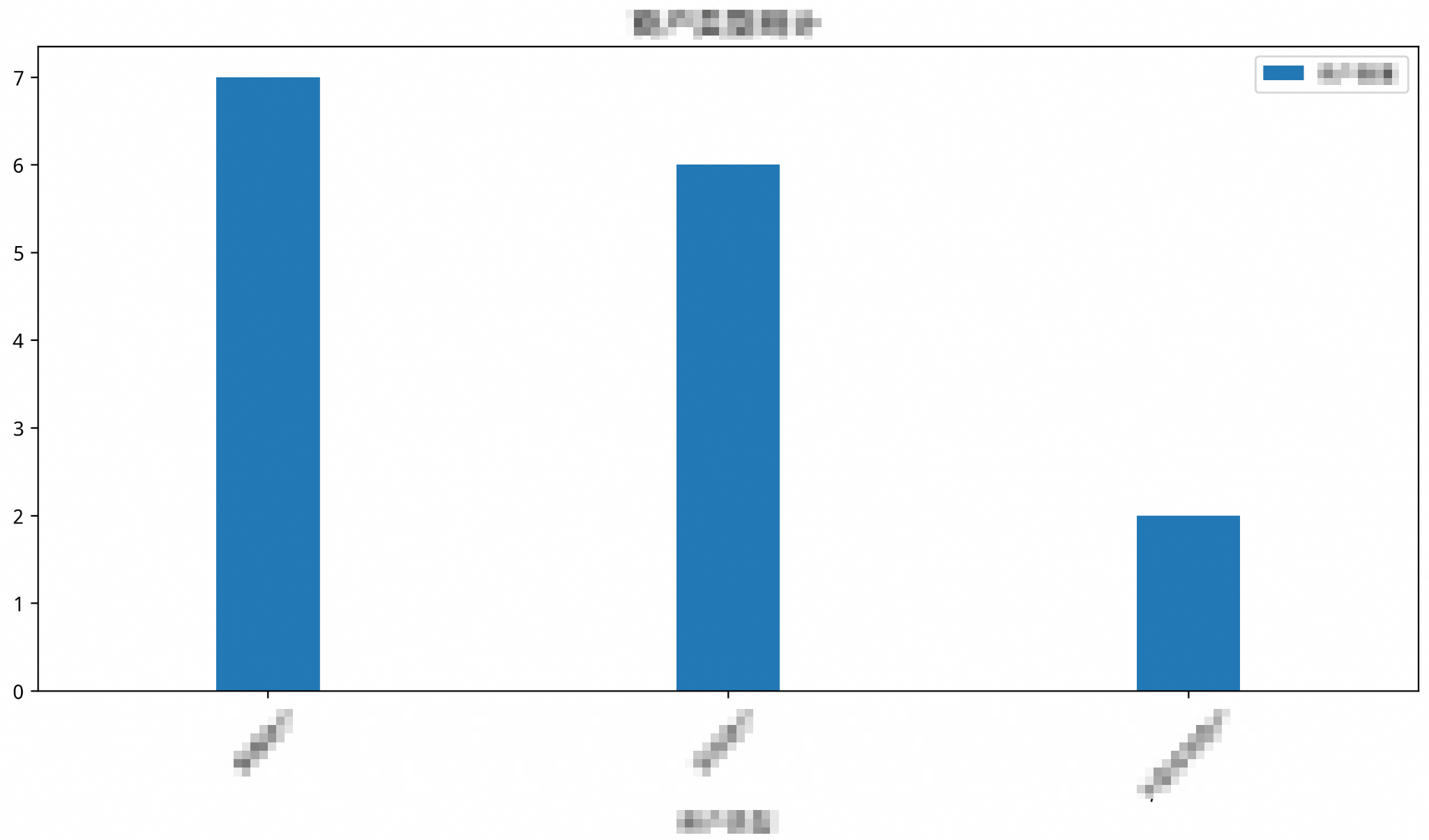
-
(Optional) Chart type selection and forced selection
The model selects an appropriate chart based on its understanding of the user's question and the data. We recommend using the user's question to guide the model in generating the chart.
The following table shows the mapping between question types and chart types:
Question type
Chart type
Example user question
Description
Quantity statistics
Column chart
"Please provide statistics on sales by city"
Shows numerical comparisons between different categories, such as quantity, total amount, or frequency.
Trend change
Line chart
"Please show the user growth trend over the past year"
Shows the trend of data over time or across ordered categories, emphasizing continuity.
Proportion distribution
Pie chart
"Please show the sales proportion of each product line"
Suitable for showing the proportional relationship of parts to a whole. The data must be categorical and have a clear total.
Force a specific chart type by modifying the
usr_queryparameter. Add a supplementary command to the end of theusr_queryparameter:-- Enter the output SQL into nl2chart to draw a line chart /*polar4ai*/SELECT * FROM PREDICT (MODEL _polar4ai_nl2chart, SELECT merchtype AS merchant_type, COUNT(*) AS number_of_merchants FROM hkrt_merchant_info GROUP BY merchtype ) WITH (usr_query = 'Merchant type statistics, draw a line chart', result_type='IMAGE');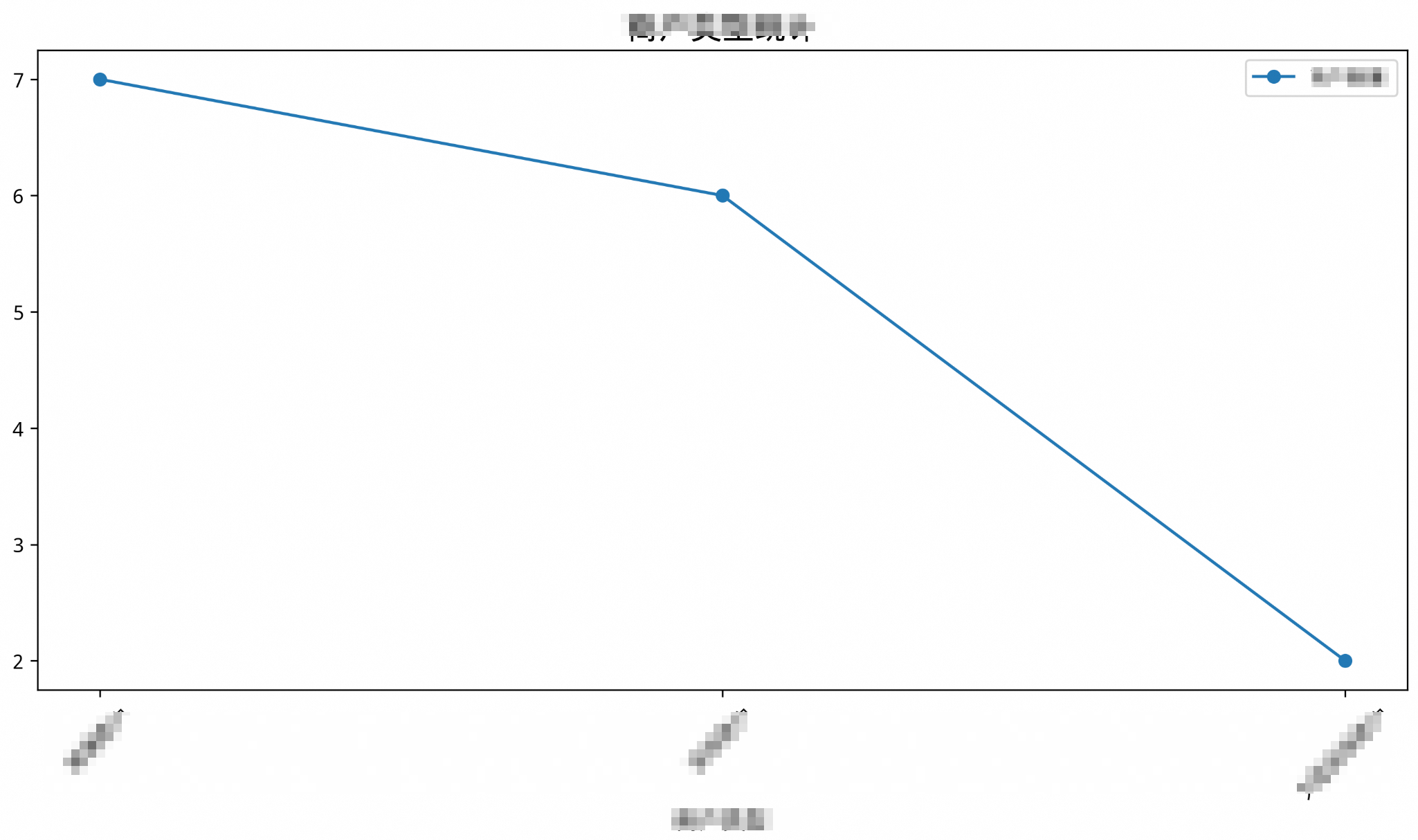
-- Enter the output SQL into nl2chart to draw a pie chart
/*polar4ai*/SELECT * FROM PREDICT (MODEL _polar4ai_nl2chart,
SELECT merchtype AS merchant_type, COUNT(*) AS number_of_merchants FROM hkrt_merchant_info GROUP BY merchtype
) WITH (usr_query = 'Merchant type statistics, draw a pie chart', result_type='IMAGE');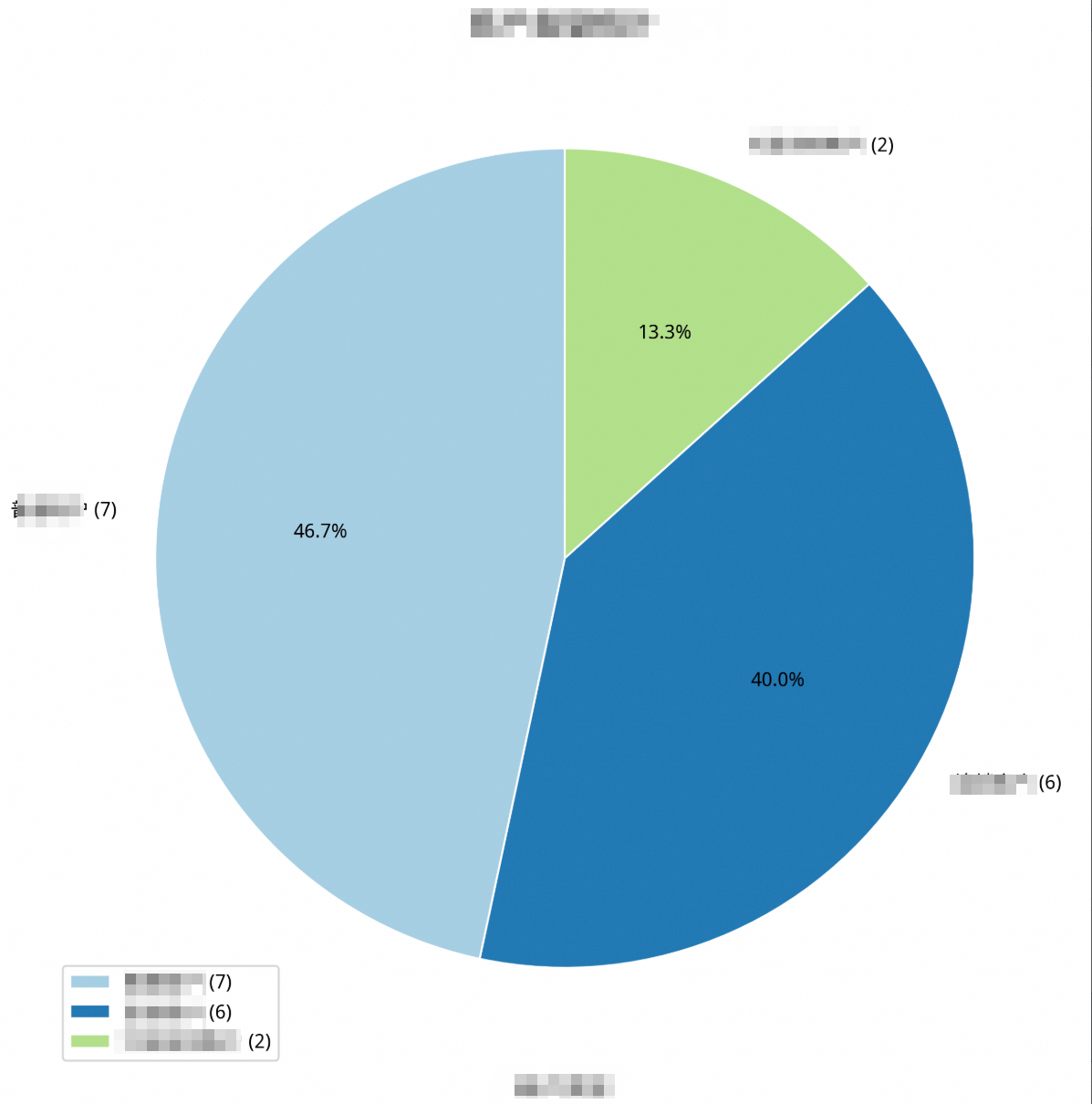
For more information, see NL2Chart: Generate smart charts from natural language.
Retrain and fine-tune the model
If the model does not meet your business needs, you can retrain the model and fine-tune its internal parameters to achieve better results.
Conditions
-
This feature is only available for clusters with AI nodes of the polar.mysql.x8.2xlarge.gpu specification (16 cores, 125 GB, and one GU100).
-
Only one model can be trained at a time.
-
Only one model can be deployed at a time.
Instructions
Train the model
/*polar4ai*/CREATE MODEL udf_qwen14b WITH (model_class='qwen-turbo', model_parameter=(basic_index_name='schema_index', pattern_index_name='pattern_index',training_type='efficient_sft')) as (SELECT '')Parameters
|
Parameter name |
Description |
Default |
Valid values/Range |
|
model_class |
The model type. Currently supports {'qwen-14b-chat', 'qwen-turbo'}. |
None |
{'qwen-14b-chat', 'qwen-turbo'} |
|
model_parameter |
Model parameter settings, including required and optional parameters. |
None |
None |
|
basic_index_name |
The name of the index table from which the database information in the training data is sourced. This must be a database index table. |
None |
None |
|
pattern_index_name |
The name of the index table from which the question template information in the training data is sourced. This must be a question template index table. |
None |
None |
|
training_type |
The training type. Valid values are {'efficient_sft', 'sft'}. 'efficient_sft' indicates efficient training, typically using the LoRa method. 'sft' indicates full-parameter training. |
None |
{'efficient_sft', 'sft'} |
|
n_epochs |
The number of epochs. The number of times the model learns from the dataset during training. The recommended range is 1 to 3, which can be adjusted as needed. |
3 |
[1, 200] |
|
learning_rate |
The learning rate. It represents the incremental parameter weight for each data update. A larger learning rate results in larger parameter changes and has a greater impact on the model. |
'3e-4' |
None |
|
batch_size |
The batch size. It represents the data step size for model parameter updates. The recommended batch size is 16 or 32. |
16 |
{8, 16, 32} |
|
lr_scheduler_type |
The learning rate policy. It dynamically changes the learning rate used when updating weights during training. |
'linear' |
{'linear', 'cosine', 'cosine_with_restarts', 'polynomial', 'constant', 'constant_with_warmup', 'inverse_sqrt', 'reduce_lr_on_plateau'} |
|
eval_steps |
The interval step size for model validation, used for periodic evaluation of training accuracy and loss. |
50 |
[1, 2147483647] |
|
sequence_length |
The sequence length of the training data. The maximum length of a single sample. Data exceeding this length will be automatically truncated. |
2048 |
[500, 2048] |
|
lr_warmup_ratio |
The proportion of total training steps used for warmup. |
0.05 |
(0, 1) |
|
weight_decay |
L2 regularization, which helps reduce overfitting. |
0.01 |
(0, 0.2) |
|
gradient_checkpointing |
Enables or disables gradient checkpointing to save GPU memory. |
'True' |
{'True', 'False'} |
|
use_flash_attn |
Specifies whether to use Flash Attention. |
'True' |
{'True', 'False'} |
|
lora_rank |
The rank size in LoRa training, which affects the degree to which training data influences the model. |
8 |
{2, 4, 8, 16, 32, 64} |
|
lora_alpha |
The scaling coefficient in LoRa training, used to adjust the initial training weights. |
32 |
{8, 16, 32, 64} |
|
lora_dropout |
The ratio of neurons randomly dropped during training. This prevents overfitting and improves the model's generalization ability. |
0.1 |
(0, 0.2) |
|
lora_target_modules |
Selects specific modules of the model for fine-tuning and optimization. |
'ALL' |
{'ALL', 'AUTO'} |
View a model
/*polar4ai*/SHOW model udf_qwen14bDelete a model
/*polar4ai*/DROP model udf_qwen14bView all models
/*polar4ai*/SHOW modelsDeploy a model
A trained model can be used in NL2SQL only after it has been deployed.
/*polar4ai*/deploy model udf_qwen14bView a deployment
/*polar4ai*/SHOW deployment udf_qwen14bDelete a deployment
/*polar4ai*/DROP deployment udf_qwen14bView all deployments
/*polar4ai*/SHOW deploymentsUse a deployed model for natural language to SQL
/*polar4ai*/SELECT * FROM PREDICT (MODEL _polar4ai_nl2sql, SELECT 'What is the content for id=1?') WITH (basic_index_name='schema_index', llm_model='udf_qwen14b')Parameters
|
Parameter |
Description |
|
basic_index_name |
Cannot be empty. You must specify the index table for the database information related to the current question. |
|
llm_model |
Optional. If you leave this empty, the model that has not been fine-tuned will be used for natural language to SQL. If you specify a value, make sure it is the name of a deployment that is in the "serving" state. Models that are not fully deployed cannot be used here. |