A PolarDB for MySQL cluster of Cluster Edition deploys multiple compute nodes in the primary zone: one primary node and one to fifteen read-only nodes. Read-only nodes serve two purposes — they distribute read traffic to reduce load on the primary node, and they provide automatic failover if the primary node fails.
Supported editions
Only PolarDB for MySQL clusters of Cluster Edition support multi-node deployment. For more information, see Editions.
How multi-node deployment works
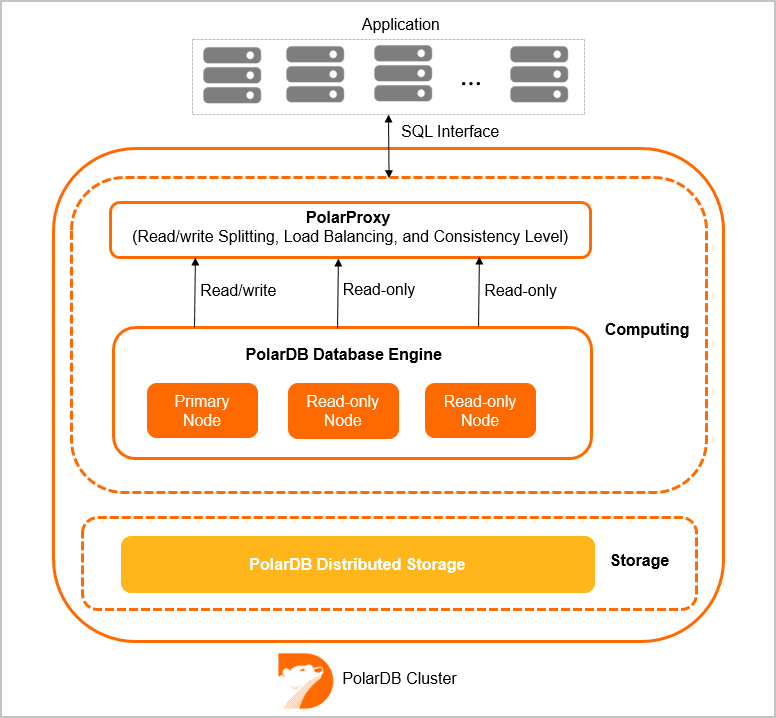
Each cluster contains one primary node and one to fifteen read-only nodes.
Read scaling: PolarProxy distributes read queries across all read-only nodes, reducing load on the primary node. For more information, see PolarProxy.
High availability: If the primary node fails, a read-only node automatically takes over as the new primary node. You can designate one or more hot standby nodes with the same specifications as the primary node.
Connection stability: Connect your application to the cluster endpoint rather than to individual nodes. When you add or remove read-only nodes, the system automatically re-creates connections and balances traffic among the read-only nodes, so no application reconfiguration is required. For more information, see PolarProxy.
Node specification requirements
Limits
The following hard limits apply to all read-only nodes:
Node count: Enterprise Edition supports up to 15 read-only nodes; Standard Edition supports up to 8. Each cluster must have at least one read-only node.
Memory: A read-only node must have at least half the memory of the primary node.
CPU cores: The minimum CPU core count for a read-only node depends on the primary node:
Primary node CPU cores Minimum CPU cores for a read-only node 2 2 4 4 8 4 16 8 32 16 64 32 88 32 Specification parity: At least one read-only node must have the same specifications as the primary node.
Recommendations
Hot standby nodes: Configure hot standby nodes with the same specifications as the primary node. See Configure hot standby nodes.
Column store nodes: Use higher specifications for read-only column store nodes than the primary node. See Add a read-only column store node.
Add or remove read-only nodes
A cluster of Cluster Edition supports up to 15 read-only nodes and must always have at least one.
Add or remove read-only nodes to match your workload. For step-by-step instructions, see Add or remove read-only nodes.
When adding nodes: Adding a node takes about five minutes. The time varies based on the number of nodes being added, the number of databases and tables, and current database load. Existing databases remain available during this process.
When removing nodes: Connections to the removed node are closed. Connections to other nodes are not affected.
Remove nodes during off-peak hours and verify that your application can automatically reconnect to the cluster.
What's next
PolarProxy — configure read/write splitting and load balancing
Configure hot standby nodes — control failover priority
Add or remove read-only nodes — scale your cluster