PolarDB PolarProxy is a highly available and high-performance network proxy service that sits between your database and your applications. It is easy to manage and forwards all application requests to the database. PolarProxy supports advanced features such as automatic read/write splitting, load balancing, multiple consistency levels, connection pools, and overload protection. You can use the features of the database proxy by connecting to a PolarDB cluster endpoint.
Introduction to PolarDB PolarProxy
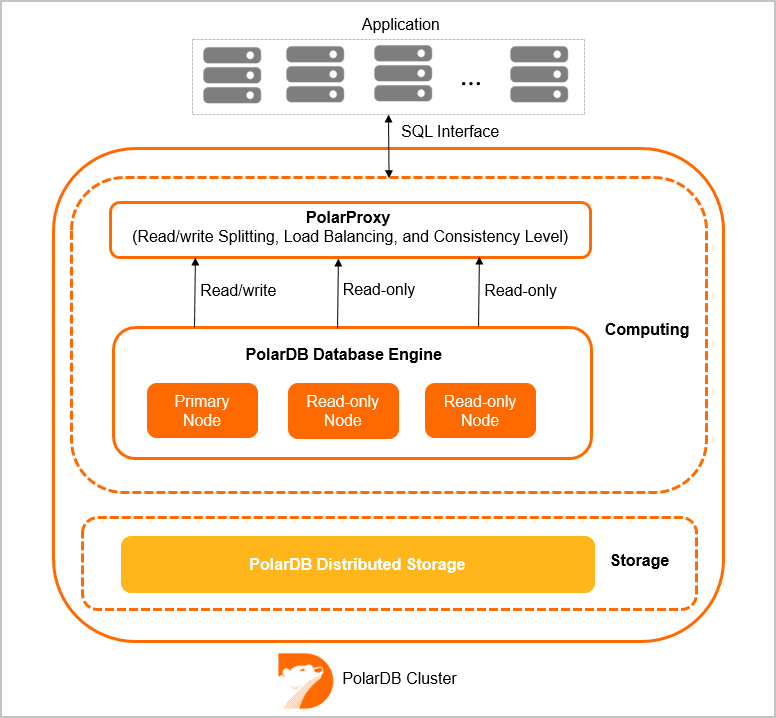
A PolarDB Cluster Edition cluster consists of multiple nodes, including one primary node and multiple read-only nodes. By default, the cluster provides two endpoints: a primary endpoint and a cluster endpoint. The cluster endpoint is provided by PolarDB PolarProxy and supports two modes: read/write (automatic read/write splitting) and read-only.
Support for Two Database Proxy Versions
PolarProxy Enterprise Edition is available in two versions: Standard Enterprise Edition and Dedicated Enterprise Edition.
Standard Enterprise Edition: This version is for General-purpose clusters and shares physical CPU resources. The CPU resources for the database proxy are independent of the cluster's CPU resources. By default, the proxy is allocated CPU resources equivalent to 1/6 of the total CPU cores of the database nodes in the cluster.
Dedicated Enterprise Edition: This version is for Dedicated clusters and uses dedicated physical CPU resources to provide better performance stability. The CPU resources for the database proxy are independent of the cluster's CPU resources. By default, the proxy is allocated CPU resources equivalent to 1/4 of the total CPU cores of the database nodes in the cluster.
The following table compares the two versions.
Item | Standard Enterprise Edition | Dedicated Enterprise Edition |
Billing type | Free | |
Resource type | Shares physical CPU resources. Provides intelligent, second-level elastic scaling based on service payload. | Uses dedicated physical resources for better performance stability. |
Deployment architecture | High availability (HA) redundant architecture | |
Instance type | Minimum configuration: 2 cores | |
Connections | Unlimited | |
IOPS | The maximum IOPS of cluster storage is increased by up to 50% compared with previous versions. For more information about the maximum IOPS of different cluster specifications, see Enterprise Edition compute node specifications. | |
Read-only node configuration | The configurations of read-only nodes do not need to be the same as the primary node. You can downgrade read-only nodes based on your service payload to save costs. | |
Number of read-only nodes | 1 to 15 read-only nodes | |
Endpoint | 1 primary endpoint and 7 cluster endpoints | |
Failover with hot standby | Connections and transactions are not interrupted. A brief block of 5 to 10 seconds occurs. | |
Consistency |
| |
Connection pool | Support | |
Transaction splitting | Support | |
Interruption protection (persistent connections) | Support | |
Data masking (security) | Support | |
Seamless upgrade/downgrade | Supported | |
Multi-master Cluster (Database/Table) | Supported | |
Second-level elastic scaling for compute nodes | Supported | Dedicated resources do not require support. |
Proxy throttling protection (coming soon) | Supported | |
Billing
PolarProxy Enterprise Edition is free of charge.
The switching policies for PolarProxy Enterprise Edition are as follows:
Series | Purchase type | Switchover policy |
Cluster Edition | New clusters | After December 9, 2021, only PolarProxy Enterprise Edition is available for new clusters. |
Existing pay-as-you-go clusters | For existing pay-as-you-go clusters, the database proxy was automatically switched to PolarProxy Enterprise Edition on December 9, 2021. | |
Existing subscription clusters | For existing subscription clusters, the database proxy was automatically switched to PolarProxy Enterprise Edition on December 9, 2021. |
Limits
Cluster endpoints and their related database proxy features are supported only by PolarDB Cluster Edition.
Notes
The default cluster endpoint and custom cluster endpoints do not support the compression protocol.
If you use a cluster endpoint without enabling transaction splitting, all requests within a transaction are routed to the primary node.
When you run the
SHOW PROCESSLISTcommand, the system merges and returns the results from all nodes.If you run a multi-statement or call a stored procedure, subsequent requests on the current connection are routed to the primary node. To restore read/write splitting, you must disconnect and then reconnect.
The maximum number of connections for a PolarDB cluster endpoint is not limited by the endpoint itself. Instead, it is determined by the specifications of the backend compute nodes. For a read/write cluster endpoint, each application connection establishes a connection to every compute node in the backend database. Therefore, the maximum number of application connections is limited by the maximum number of connections supported by a single compute node. For a read-only cluster endpoint, each application connection establishes a connection to only one compute node in the backend database. Therefore, the maximum number of application connections is the sum of the maximum connections supported by all read-only nodes associated with that endpoint. For read/write cluster endpoints, you can use the transaction-level connection pooling feature to increase the maximum number of available connections for your application.
After you add or restart a read-only node, new read/write splitting connections can forward requests to that node. However, existing connections cannot. To route requests from existing connections to the new or restarted node, you must disconnect and then reconnect. For example, you can restart your application.
Do not modify environment variables, such as in
set names utf8mb4;select * from t1;, while running multi-statements or calling stored procedures. Otherwise, data read from read-only nodes and the primary node may be inconsistent.When you use an application connection pool to establish a URL connection, add the
connectTimeoutandsocketTimeoutparameters to the URL. This helps prevent the application connection pool from hanging if packets are lost due to network issues or other unexpected events. For more information about the parameters, see Parameters. Example:Java URL: jdbc:mysql://ip:port/db?connectTimeout=60000&socketTimeout=300000
Upgrade database proxy specifications
The default specifications of PolarProxy Enterprise Edition are sufficient for most application scenarios. If you perform stress tests or if your service throughput is high, the latest version of the database proxy automatically scales its specifications in real time based on the proxy's load. This scaling prevents the database proxy from becoming a performance bottleneck. For older versions of the database proxy, you can also manually upgrade the specifications.
The database proxy does not consume the CPU core resources of the cluster. Therefore, upgrading its specifications does not reduce the number of available CPU cores in the cluster.
PolarProxy Enterprise Edition is free of charge. No fees are charged for quota increases.
For more information, see Upgrade database proxy specifications.
Related API operations
API | Description |
Creates a public endpoint for a PolarDB cluster. | |
Creates a custom cluster endpoint for a PolarDB cluster. | |
Queries the endpoint information of a PolarDB cluster. | |
Modifies the attributes of a PolarDB cluster endpoint. | |
Modifies an endpoint (such as a custom cluster endpoint) of a PolarDB cluster. | |
Releases a PolarDB cluster endpoint (except for the private endpoint of a custom cluster endpoint). | |
Releases a custom cluster endpoint of a PolarDB cluster. |