This comprehensive reference guide details the artificial intelligence capability nodes available for constructing Application Flows within LangStudio. It delivers detailed configuration guidelines and operational instructions for pre-built components, encompassing flow control mechanisms, Large Language Model (LLM) integrations, Python development environments, intelligent agents, knowledge base retrieval systems, document parsing utilities, speech recognition services, and web search functionalities.
Flow Control
Start
Each Application Flow must incorporate exactly one Start Node.
The Start Node establishes the entry point of an Application Flow and specifies its input parameter configuration.
-
For conversational Application Flows, there are two default fields:
Conversation HistoryandUser Input. You can add custom variables as needed. The node supportsFiletype input variables for user-uploaded files. For more information, see File type input/output.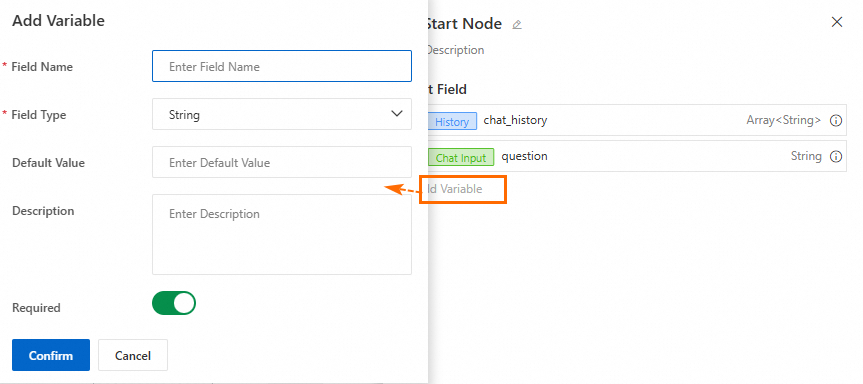
-
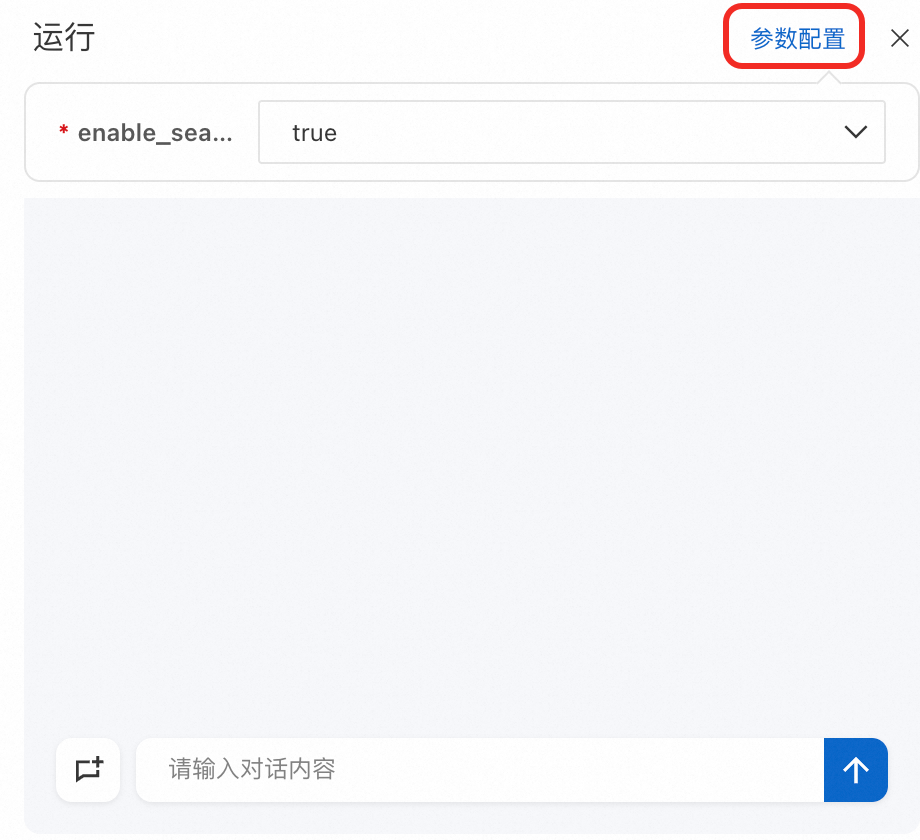
When you run the Application Flow, configure the input parameters for the current session in the conversation panel.
Conditional Branch
This node implements IF/ELSE logical operations for flow control. When specified conditions are satisfied, only the corresponding branch executes. If no conditions are met, the else branch activates. This node requires integration with the Variable Aggregate node.
-
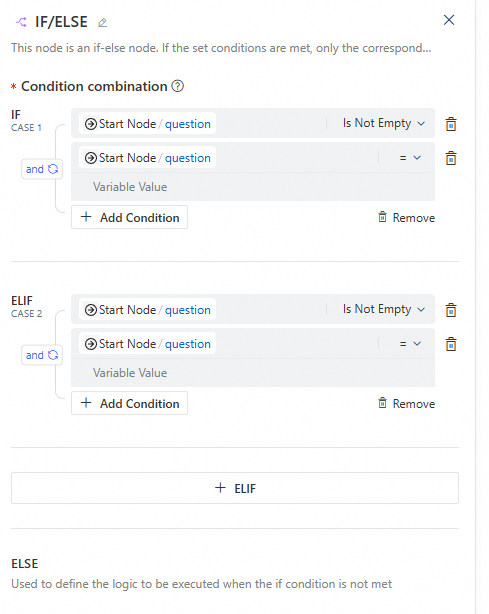
Configuration interface
-
Input
When configuring branch conditions, keep the following in mind:
-
Each branch represents an execution path. The last branch is the else branch, which runs if no other conditions are met and cannot be edited.
-
Each branch can have multiple conditions that support
and/orlogic. -
To ensure your conditions are accurate and valid, carefully check the outputs of upstream nodes, matching operators (such as
=,≠,is empty,does not include), and matching values.
-
-
Output
This node has no output.
-
Usage example
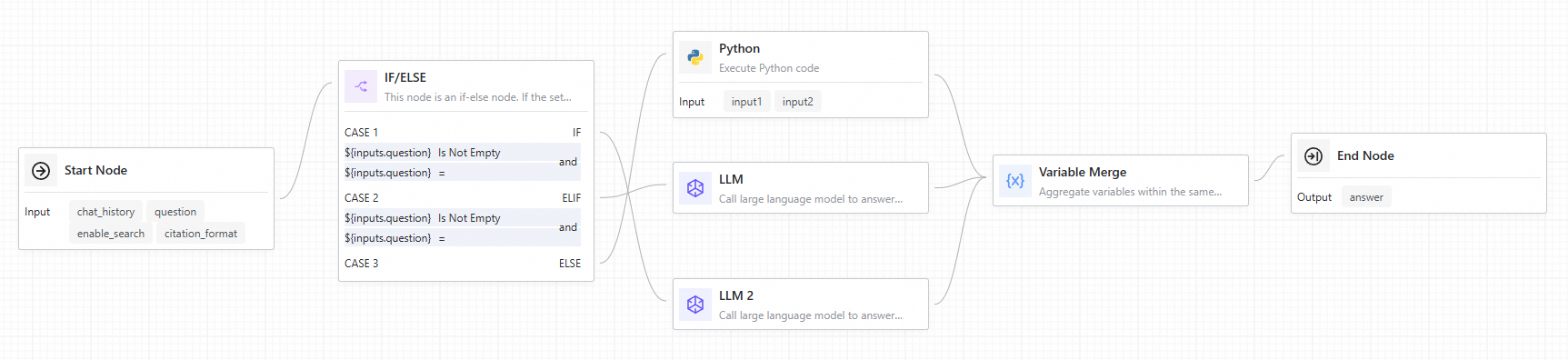
When connecting a Conditional Branch node to downstream components, each branch features a corresponding port on the node. When a branch condition triggers, the downstream nodes connected to that branch execute, while nodes in alternative branches are bypassed. Subsequently, utilize a Variable Aggregate node to consolidate outputs from all conditional branches.
Variable Aggregate
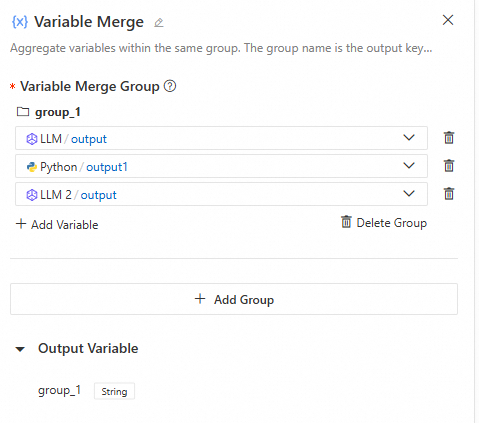
This node consolidates outputs from multiple branches into a unified variable structure. In multi-branch scenarios, this functionality enables mapping variables with identical purposes from various branches to a single output variable, eliminating redundant definitions in downstream components.
-
Configuration interface
-
Input
When you configure variable groups, keep the following in mind:
-
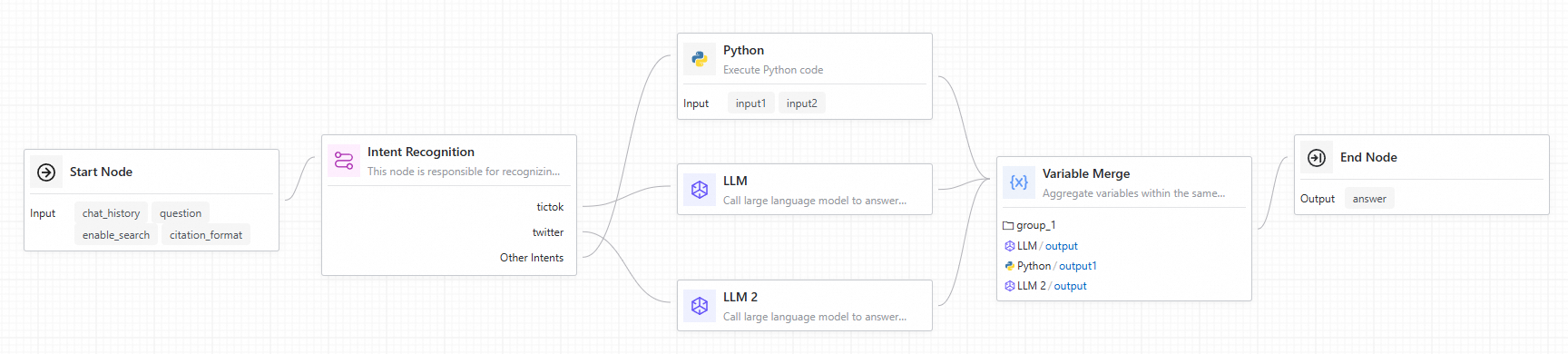
The upstream nodes are typically multiple execution branches from a Conditional Branch or Intent Recognition nodes.
-
Variables within the same group must be of the same type. The first non-empty output value becomes the output for that group.
-
Since a Conditional Branch or Intent Recognition node triggers only one branch, each group will have only one non-empty value. The Variable aggregate node extracts this value for use by downstream nodes.
-
If each branch has multiple required outputs, you can add multiple groups to extract each corresponding output value.
-
-
Output
The output variables dynamically adjust to the groups you add. If there are multiple groups, the node outputs multiple key-value pairs. The key is the group name, and the value is the first non-empty variable value within that group.
-
Usage example
For a usage example, see the Conditional Branch component.
Loop
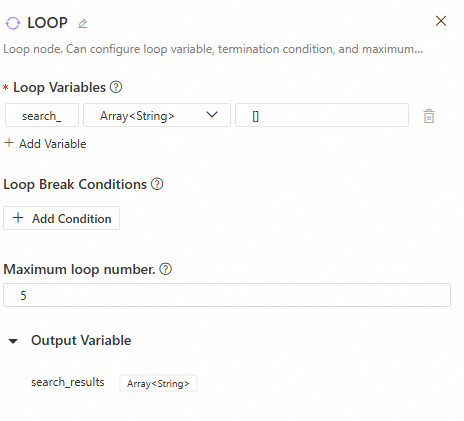
The Loop node repeatedly executes a sub-flow for tasks where each iteration depends on the result of the previous one. The loop terminates when an exit condition is met or the maximum loop count is reached.
-
Configuration interface
-
Input
-
Loop variables: These variables pass data between loop iterations and remain available to downstream nodes after the loop finishes. You can configure multiple loop variables and set their values manually or from the outputs of upstream nodes.
-
Loop exit condition: Configure this based on the loop variables. The loop terminates when a specified loop variable meets the condition.
-
Maximum loop count: This limits the maximum number of loop executions to prevent infinite loops.
-
-
Output
The node's output is the value of the loop variables after the current loop execution. Loop variables can only be updated by a Variable Assigner node. Without this node, the
Loopnode's output will always be the same as its initial input, regardless of the number of iterations. -
Related nodes
Loop-related nodes can only be used inside a loop. Add the following related nodes by clicking the "+" icon to the right of a node within the loop:
-
Break Loop
Exits the loop. This node is typically preceded by a Conditional Branch node.
-
Variable Assigner
Assigns the outputs of sub-nodes within the loop to the loop variables.

-
Direct Output
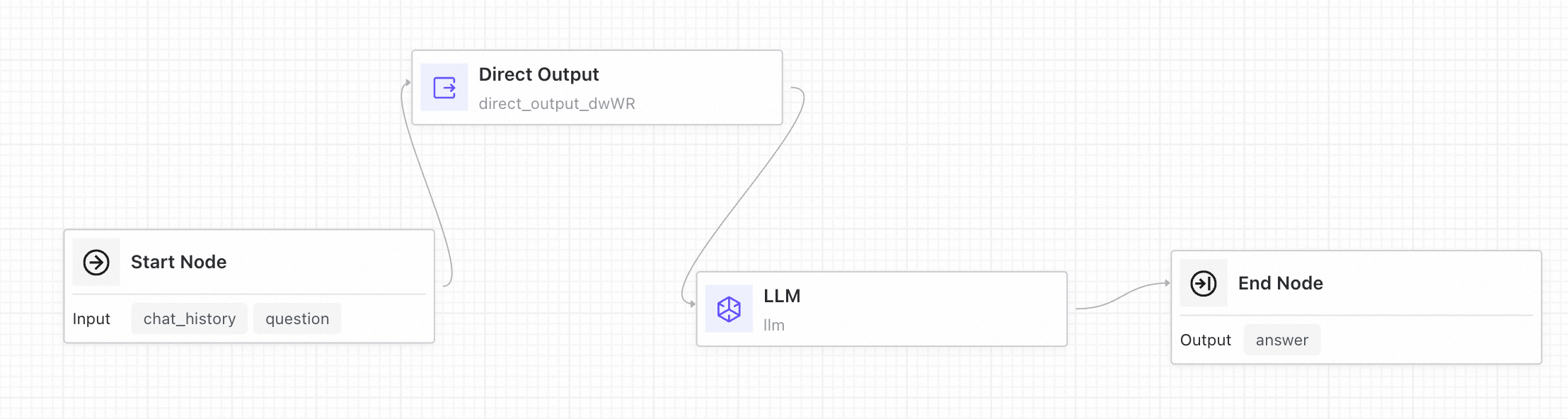
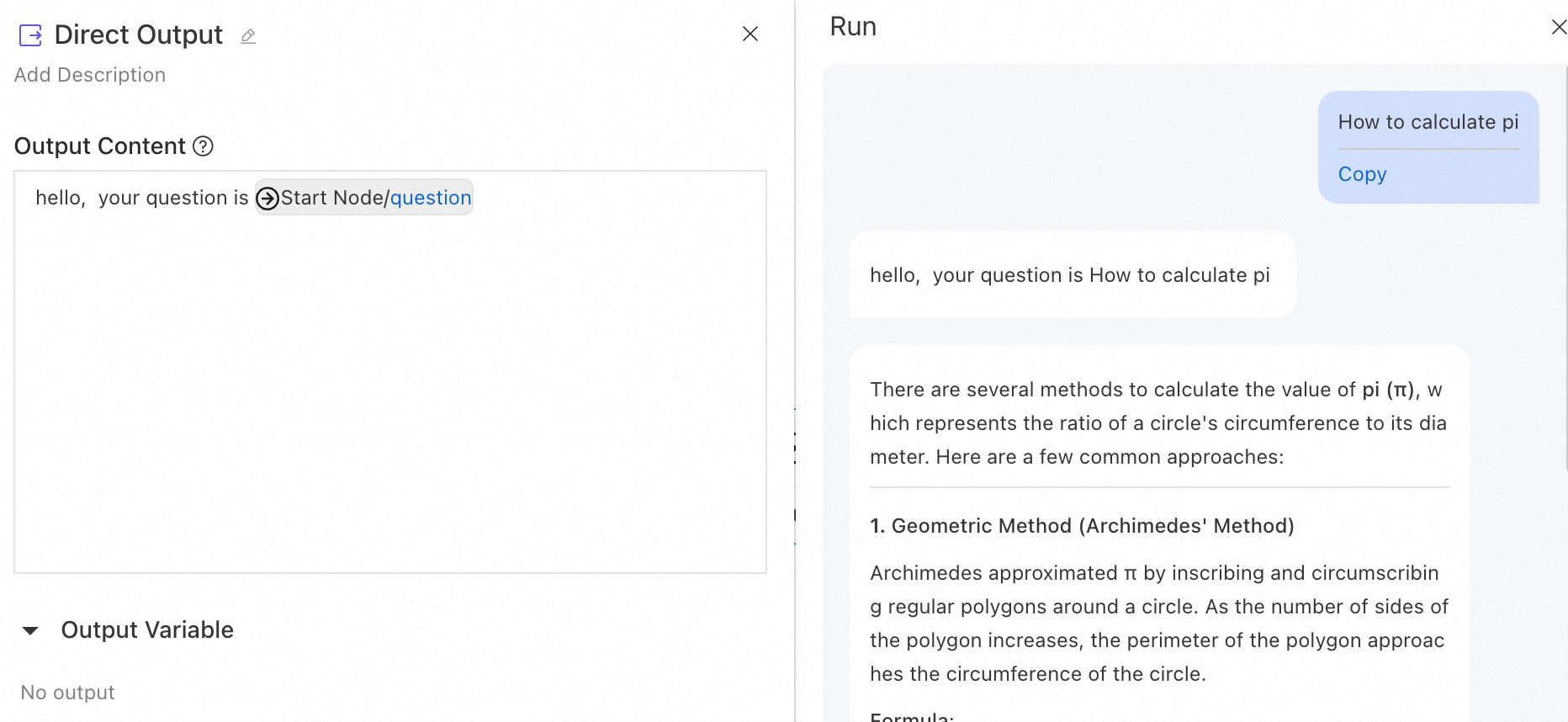
The Direct Output node sends a direct reply based on an output template. You can reference the outputs of upstream nodes using the {{node.variable}} syntax. The node also supports streaming output.
Example: Add a Direct Output node before an LLM node to first send a message to the user.
Batch Processing
The Batch Processing node processes list data in parallel. It runs each list element through the same sub-flow, and parallel execution significantly improves processing efficiency.
Input
-
Input list: The list of data to be processed. Each element in the list is treated as an independent item and distributed to the sub-flow within the batch process for execution.
-
Output field: Select an output variable from a node within the batch sub-flow to serve as the output result of the batch task.
-
Parallel count: Optional. Controls the number of tasks that run simultaneously. The default value is 4, and the value range is 1 to 10.
Output
-
result: A list containing the output results of all batch tasks. It aggregates the actual output values of the Output field specified in the Batch Processing node's input.
Related nodes
Batch Start
The Batch Start node is the entry point for the batch body. It provides the following output variables for downstream nodes:
-
item: The data item currently being processed, corresponding to an element in the input list.
-
index: The index of the current data item in the input list (starting from 0).
Batch Break
The Batch Break node terminates the processing of the current data item when a specific condition is met.
Note: The Batch Break node only terminates the execution of the current iteration and does not affect the normal processing of other data items.
Usage example
Batch file parsing and intelligent processing
Scenario: An enterprise needs to parse multiple document files in batches. For successfully parsed documents, an LLM is called to process the content. Documents that fail to parse are automatically skipped.
Batch Processing node configuration:
|
Parameter |
Value |
Description |
|
Input list |
|
References the file list output by the upstream Start node. |
|
Output field |
|
Selects the |
|
Parallel count |
|
Processes 4 files simultaneously. |
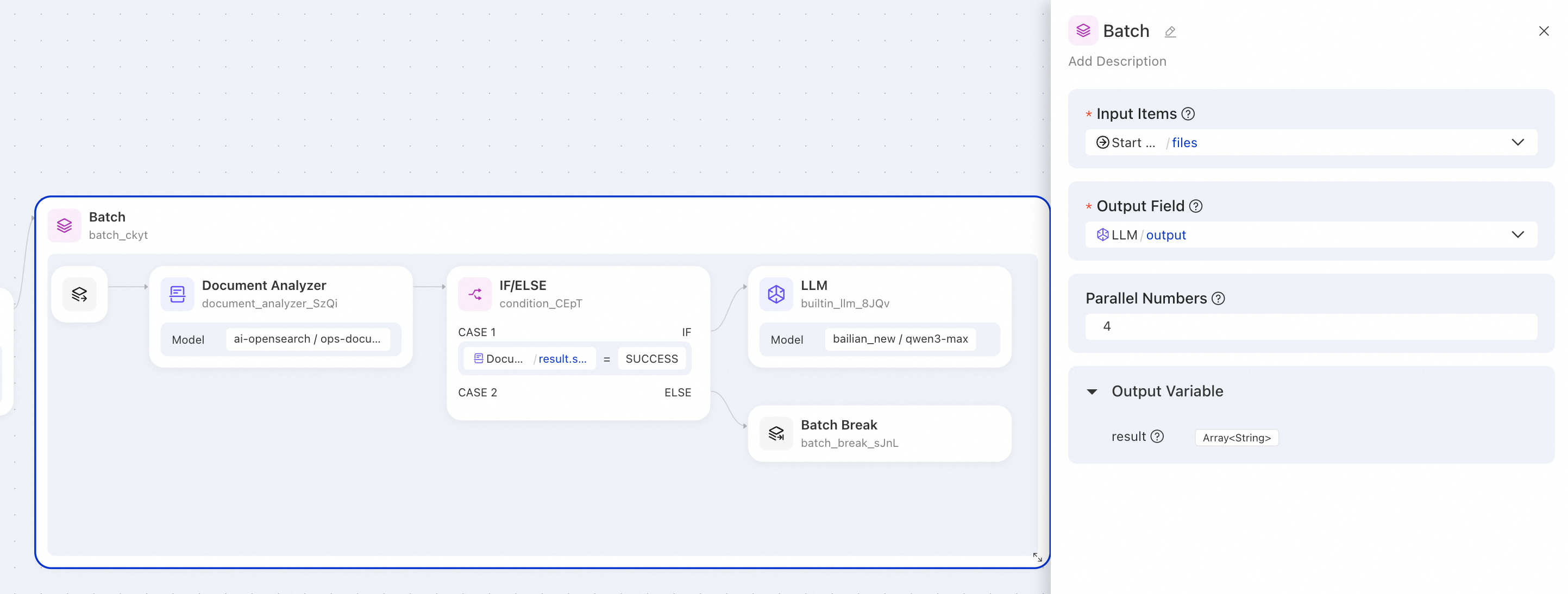
Sample output:
{
  "result": [
    "This document is the XX product user manual, covering product features and installation steps...",
    "This contract is for software service procurement with a 12-month term...",
    null,
    "Standard VAT invoice, issued on January 15, 2026..."
  ]
}Description: A null value in the output indicates that the corresponding file failed to parse, causing the Batch Break node to skip subsequent processing.
Notes
-
Result order guarantee: The output list maintains the same order as the input list.
-
Sub-flow flexibility: Inside the sub-flow, data items may trigger different execution paths.
-
Null value handling: If an execution flow exits prematurely or the actual output is empty, the corresponding position in the batch processing output result will be
null.
End
The End node marks the completion of an Application Flow and defines its output parameters. An Application Flow can only have one End node.
-
Output parameter configuration
The Application Flow's output can reference the outputs from any upstream node. For example, in the following illustration, the
answeroutput of the Application Flow uses the output from the LLM node, whilesearch_resultsuses the output from a search node.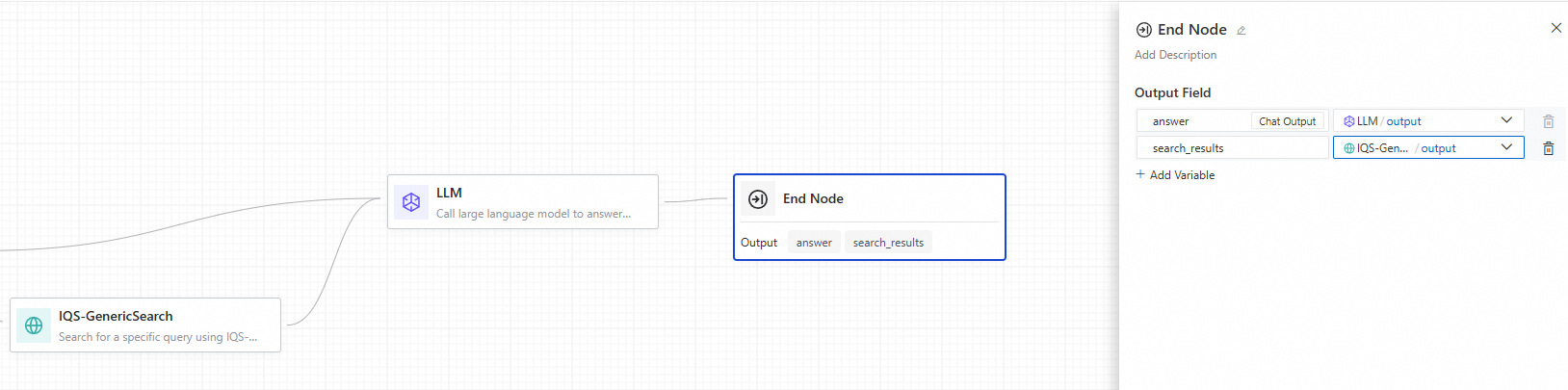 Note
Note-
Conversational Application Flows have a default
Chatoutput field, which serves as the conversational output of the flow. -
An Application Flow must include a Start node and an End node. Only nodes connected between these two nodes are executed. Standalone nodes are not executed.
-
AI Capabilities
LLM
The LLM node is the core component for calling a LLM to perform natural language tasks, such as answering questions or processing complex inputs. You can configure model parameters, manage multi-turn conversation history, and customize prompts to optimize the model's response quality and accuracy.
-
Use cases
-
Text generation: Generate text content based on a topic or keywords.
-
Classification: Automatically classify email types (e.g., inquiry, complaint, spam).
-
Text translation: Translate text into a specified language.
-
Retrieval-Augmented Generation (RAG): Answer user questions by combining retrieved knowledge.
-
-
Configuration interface
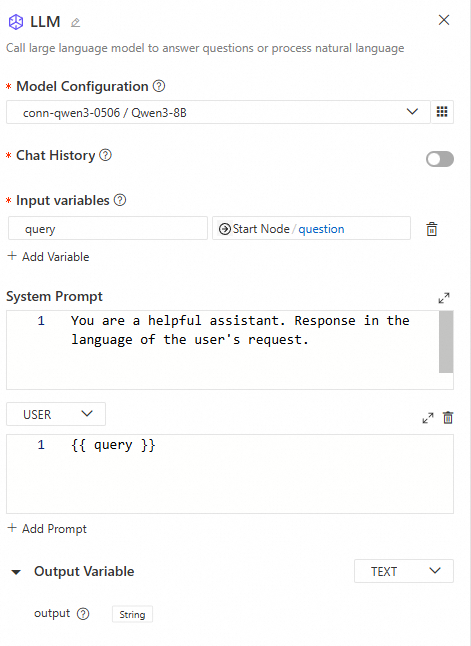
-
Input
-
Model settings: Supports model services deployed from ModelGallery or other custom deployments, and models from providers like Dashscope and DeepSeek. For better performance, we recommend choosing a more powerful model. You can configure the following model parameters:
-
Temperature: A value between 0 and 1 that controls the randomness of the model's output. A value closer to 0 produces more deterministic and consistent results, while a value closer to 1 yields more random and diverse outcomes.
-
Top P: Controls the diversity of the results. The model samples from the smallest possible set of tokens whose cumulative probability exceeds the threshold P.
-
Top K: Controls the model's output by limiting the number of candidate tokens it can choose from when generating a result. The model will only select from the top K most probable tokens. This method reduces randomness and focuses the output on more likely words. Compared to Top P, Top K more directly limits the number of candidate tokens rather than relying on cumulative probability.
-
Presence penalty: Reduces the model's tendency to repeat the same entities or information. By penalizing content that has already been generated, the model is encouraged to produce new or different information. Higher values apply a greater penalty, reducing the likelihood of repetition.
-
Frequency penalty: Reduces the generation probability of overly frequent words or phrases. As the parameter value increases, a greater penalty is applied to common terms, reducing their frequency and helping to increase lexical diversity.
-
Max tokens: Sets the maximum length of the output that the model can generate in a single call. A lower value may result in shorter or truncated text, while a higher value allows for longer outputs. This helps control the scale and complexity of the generated content.
-
Seed: When a seed value is specified, the model attempts to perform deterministic sampling. Repeated requests with the same seed and parameters should return the same result. However, complete determinism is not guaranteed. Refer to the
system_fingerprintresponse parameter to monitor for potential changes. You may need a proxy to access system_fingerprint. -
Stop sequences: A list of up to four sequences. When the model encounters one of these sequences, it stops generating tokens. The output does not include the stop sequence.
-
-
Conversation history: When enabled, the chat history of the Application Flow is automatically inserted into the prompt.
-
Input variables: Variables can reference the outputs of all preceding nodes.
-
Prompt: Customize the content of the
SYSTEM,USER, orASSISTANTprompts. The prompt is a Jinja2 template, and you can reference input variables within the template using double curly braces{{ }}.
-
-
Output
The node defaults to outputting
Stringdata but can be configured to output in JSON format. The JSON type supports adding custom output variables, and the LLM will generate output based on the meaning of the variable names. Future versions plan to add a description field for each variable, allowing the LLM to generate output based on the description's meaning. -
Use cases
Intent recognition
This node is primarily used for flow control. It uses an LLM to recognize the user's intent from their input, then executes the corresponding branch. It supports multi-intent configuration and conversation history.
-
Configuration interface
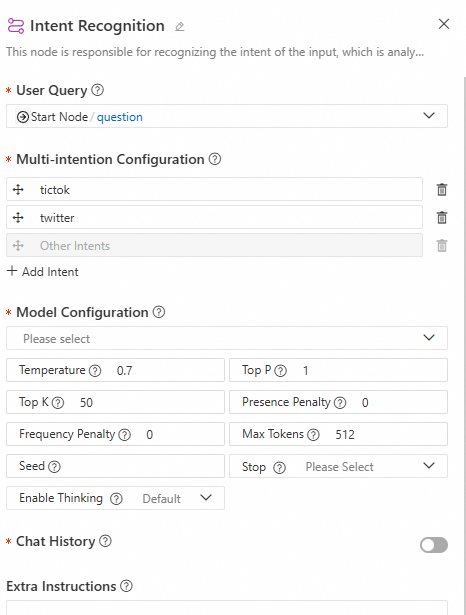
-
Input
-
User input: Select the user input for intent recognition.
-
Multi-intent configuration: Set up intents as needed. Ensure each intent description is clear and distinct from others. The last intent defaults to "Other," representing cases where no other intent is matched, and cannot be edited.
-
Model settings: Configure the LLM for intent recognition. For better performance, select a powerful model such as
qwen-max. -
Conversation history: When enabled, the model automatically includes the Application Flow's chat history in the prompt during inference.
-
Additional prompt: The content entered here is appended to the system prompt to help the model better perform intent recognition.
-
-
Output
This node has no output.
-
Use case
When connecting the Intent Recognition node to downstream nodes, each intent branch has a corresponding port on the node. When an intent is recognized, the downstream nodes connected to that branch are executed, while other branch nodes are skipped. You can then use a variable aggregate node to collect the outputs from all branches.
Agent
The Agent node is an autonomous agent component developed within the LangStudio Application Flow. This node supports capabilities such as reasoning strategies and tool use. By integrating reasoning strategies (currently supporting FunctionCalling and ReAct), it enables the autonomous calling of Model Context Protocol (MCP) tools. This enables the LLM to dynamically select and execute tools at runtime to perform autonomous, multi-step reasoning.
Configure node parameters
-
Agent strategy: Select the desired agent reasoning strategy. Currently, FunctionCalling and ReAct strategies are supported.
FunctionCalling
This strategy is based on the structured
tool calldefinition (JSON format) from the OpenAI Chat API, enabling interaction between the LLM and external tools. The LLM automatically identifies intent, selects the appropriate tool, and extracts parameters based on the user's natural language instructions. The system then calls the corresponding tool and returns the result to the model for further reasoning to generate the final answer.Use cases and advantages:
-
Structured calls, high compatibility: Uses structured data to specify tool names and call parameters, making it compatible with all models that support tool calling.
-
Stable performance: Ideal for tasks with clear objectives and straightforward steps, such as checking the weather, searching for information, or querying data.
ReAct
The ReAct (Reasoning + Acting) strategy is a more flexible approach to reasoning. It uses a prompt to guide the model to explicitly generate a "Thought" and an "Action," creating a closed loop of multi-step reasoning and tool calls. This strategy typically describes the calling process in natural language, triggering backend tool execution by outputting text like "Action: xxx, Action Input: xxx." The result is then fed back into the model's reasoning chain. It does not require API-level
tool_calls, making it suitable for more general-purpose models and frameworks.Use cases and advantages:
-
Stronger reasoning capabilities: Guides the model to think step-by-step, with each step explicitly expressing the reasoning logic.
-
Transparent strategy: Well-suited for Agent applications that require easy debugging and high explainability.
-
No tool calling support required: Can be used with models that do not support structured output.
-
-
Model settings: The FunctionCalling strategy uses the OpenAI API's Tool Calling method to pass tool information, so the model must natively support the Tool Calling feature. The ReAct strategy has no such restriction, but it is recommended to choose a model with strong reasoning capabilities.
-
Conversation history: Enabling conversation history provides the Agent with contextual memory. The system automatically populates the prompt with past conversation messages, allowing the Agent to understand and reference previous parts of the dialogue for coherent, context-aware responses. For example, if a user uses pronouns (like "he," "there," or "that day") in a new message, an Agent with conversation history enabled can understand what these pronouns refer to from the preceding text without requiring the user to repeat the information.
-
Task planning: When enabled, the system automatically adds the built-in
write_todostool to the Agent's available tools. For complex user questions, the Agent will automatically call thewrite_todostool to plan and execute the task step-by-step, dynamically updating the plan based on the latest information. -
MCP tools: Two configuration methods are supported: selecting an MCP connection or filling out a form manually. Currently, MCP Servers using SSE and Streamable HTTP communication methods are supported. An MCP service typically provides multiple tools.
-
The tool scope option allows you to control which tools are visible to the LLM.
-
For tools that perform sensitive operations (such as modifying user data), you can enable the approval tool feature. When the workflow executes these tools, the node automatically pauses and waits for manual confirmation. The workflow pauses until a user grants approval.
-
-
Tools: Configure non-MCP tools that the Agent can use. Currently, custom tools (OpenAPI tools) and Python tools are supported. For selected tools, you can edit the tool's description, output parameters (for example, making a parameter invisible to the model and setting a default value), and specify whether it "requires approval" for manual intervention.
-
Prompt configuration
-
Input variables: If you want to reference variables from upstream nodes in your prompt, you must define corresponding input variables in this node and set their values to reference the upstream variables. Then, in the Prompt section below, you can use Jinja2 template syntax (with double curly braces
{{ }}) to reference these defined input variables. -
System prompt: Used to clearly specify the Agent's task objectives and contextual information, providing the model with the necessary background to guide it in generating the expected response. This is optional for the ReAct strategy.
-
User prompt: Receives the user's input or query, which serves as the basis for the model's response.
-
-
Loop count: Sets the maximum number of loops for the Agent's execution, ranging from 1 to 99. The Agent will repeat the task based on the loop count to generate a response until one of the following conditions is met:
-
The LLM determines that it has gathered enough information by calling tools to generate a complete result.
-
The set maximum loop count is reached.
Note that setting a reasonable loop count helps balance response completeness with execution efficiency. If Task planning is enabled, it is recommended to use the default maximum loop count to ensure the model can fully execute all steps and solve the problem as planned.
-
-
Output variables:
-
intermediate_steps: The intermediate steps of the Agent's execution, in String format.
-
text: The final output of the Agent, in String format.
-
View trace/log
After clicking Run in the upper-right corner of the Application Flow page, you can view the trace or log below the run result in the pop-up dialog.
-
View intermediate output: Click the run status icon in the upper-right corner of the Agent node in the workflow. In the drawer that appears below, find
intermediate_stepsunder Output to view the agent's reasoning process. -
View trace: View the trace information for the current run to understand the Agent's input for each model request, the model's output (including tool calls and request parameters), token costs, time consumed, and more.
-
View log: When an Application Flow error occurs, you can view the current run log to get more details about the node execution process.
View trace/logs
After clicking Run in the top-right corner of the application flow page, view traces or logs below the run results in the dialog box.
-
View intermediate output: Click the run status icon in the top-right corner of the Agent node, then find intermediate_steps under Output in the drawer to see the Agent's reasoning process.
-
View trace: Inspect the current run's Trace information, including model inputs, outputs (including tool calls and parameters), token usage, and timing.
-
View log: When the application flow fails, view operational logs for detailed execution information.
You can also click More > Run History in the top-right corner, select a specific run record, and view traces or logs.
Document parsing
This node supports using the system's built-in intelligent document parsing tool and the document parsing service from the AI Search Open Platform.
-
-
Built-in parser: Extracts structured content and metadata from documents. It supports various mainstream document formats, including PDF, DOCX, PPTX, TXT, HTML, CSV, XLSX, XLS, JSONL, and MD.
-
AI Search Open Platform: Provides high-precision structured document parsing, supporting the extraction of logical-level information such as titles and paragraphs, and content like text, tables, and images. This improves the effectiveness and accuracy of document extraction. You must first configure an AI Search Open Platform model service connection. Supported file formats include PDF, DOCX, PPTX, TXT, and HTML.
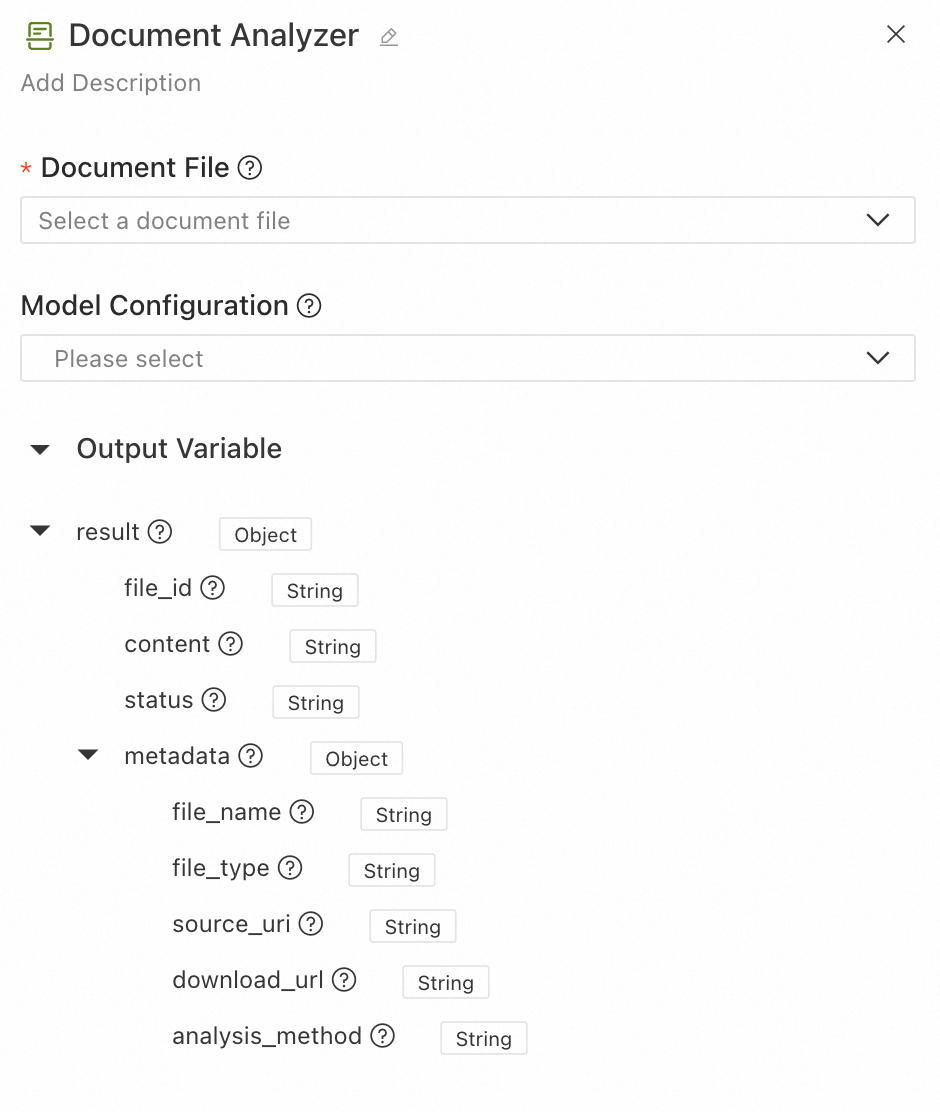
The parsed content can be used in downstream nodes for RAG, summarization, and question answering. The configuration interface is as follows:
-
-
Document file: Input a single document file for intelligent parsing and extraction of structured content. Select a file-type field from an upstream node.
-
Model settings: (Optional) Select an AI Search Open Platform model service connection that has been created in LangStudio. If not configured, the system uses the built-in basic parsing method to process the uploaded file.
-
Output results:
-
file_id: The unique identifier of the input file.
-
content: The parsed structured text content, including hierarchical information like titles and paragraphs.
-
status: The parsing status, which can be
SUCCESSorFAIL. -
metadata: The document's metadata and parsing details.
-
file_name: The name of the file.
-
file_type: The type of the file.
-
source_uri: The original URI of the file.
-
download_url: The downloadable URL of the file.
-
analysis_method: The parsing method used.
opensearchindicates structured parsing by the AI Search Open Platform, whilebuiltinindicates the use of the built-in basic parsing method.
-
-
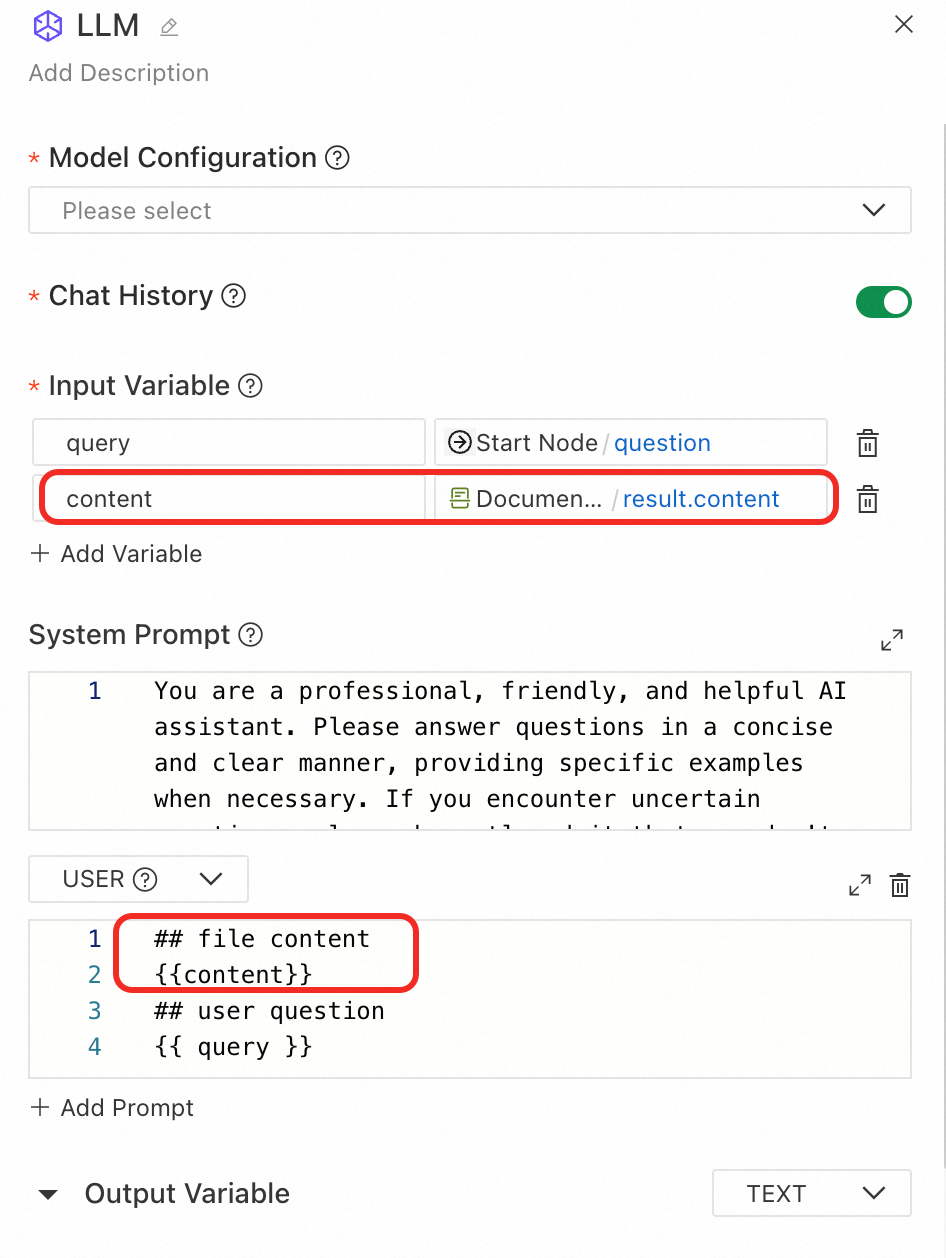
Downstream usage example: Reference the result fields of the Document parsing node in downstream nodes as needed. To use the document parsing result in an LLM node, you can introduce the parsed content in the user prompt as follows:
Speech recognition
Use the Speech Recognition tool to convert audio or video files into text. It supports multiple audio formats and language recognition.
Input
-
Model settings: Configure the speech recognition model. This node uses the speech recognition service from Alibaba Cloud Bailian. For best results and multi-language support, use the
paraformer-v2model. -
Audio/video file: Select the audio or video file to be recognized. For supported formats, see File type input/output.
-
Recognition language: Specify the language for audio recognition. Supported languages include Chinese, English, Japanese, Cantonese, Korean, German, French, Russian, or auto-detection. Note: This feature is only supported by the
paraformer-v2model. Other models default to automatic language detection.
Output
-
file_id: Unique identifier for the input file.
-
status: Recognition status (
SUCCESSorFAIL). -
content: Transcribed text content.
-
segments: List of sentence segments with timestamps and text details.
-
metadata: File metadata including the following:
-
file_name: Filename
-
file_type: File type
-
source_uri: File URI
-
download_url: Download URL
-
Data retrieval
Knowledge base retrieval
Retrieves relevant text content from a Knowledge Base to be used as context for a downstream LLM node.
-
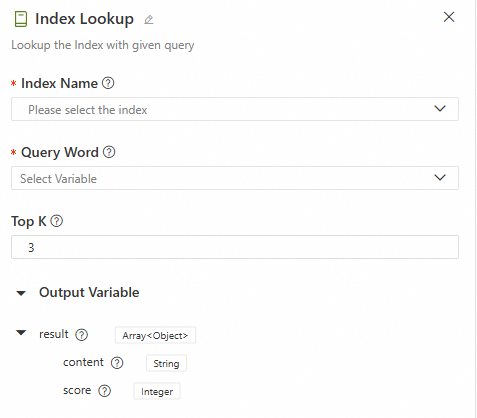
Configuration interface
-
Input
-
Knowledge base index name: Select a knowledge base that is registered and available in LangStudio. For more details, see Manage knowledge bases.
-
Search keywords: Select the key information you want to retrieve from the knowledge base. This must reference an output parameter from an upstream node in
Stringformat. -
Top K: When the knowledge base index is retrieved, the system returns the top K results that are most relevant to the search keywords.
-
-
Output
The retrieval output is a variable
resultof typeList[Dict]. The keys in the dictionary include the following fields:Key
Description
content
The content of the retrieved document chunk. This is a text fragment extracted from the knowledge base, typically related to the input query.
score
The similarity score between the document chunk and the input query. A higher score means stronger relevance.
The following is an example output, which shows the top K records with the highest scores:
[ { "score": 0.8057173490524292, "content": "Due to pandemic-related uncertainties, XX Bank proactively\nincreased provisions for loan losses and non-credit asset impairments\nbased on economic trends and conditions in the Chinese mainland,\naccelerated disposal of non-performing assets, and enhanced provisioning coverage.\nIn 2020, it achieved a net profit of CNY 28.928 billion, up 2.6% year-on-year,\nwith gradually improving profitability.\n(CNY million) 2020 2019 Change (%)\nOperating Results and Profitability\nOperating Revenue 153,542 137,958 11.3\nPre-Impairment Operating Profit 107,327 95,816 12.0\nNet Profit 28,928 28,195 2.6\nCost-to-Income Ratio(1)(%) 29.11 29.61 Down 0.50\npercentage points\nAverage Total Assets Return (%) 0.69 0.77 Down 0.08\npercentage points\nWeighted Average ROE (%) 9.58 11.30 Down 1.72\npercentage points\nNet Interest Margin(2)(%) 2.53 2.62 Down 0.09\npercentage points\nNote: (1) Cost-to-Income Ratio = Operating and Administrative Expenses / Operating Revenue.", "id": "49f04c4cb1d48cbad130647bd0d75f***1cf07c4aeb7a5d9a1f3bda950a6b86e", "metadata": { "page_label": "40", "file_name": "2021-02-04_China XX Insurance Group Co., Ltd._XX_China XX_2020_Annual Report.pdf", "file_path": "oss://my-bucket-name/datasets/chatglm-fintech/2021-02-04__China_XX_Insurance_Group_Co.__Ltd.__601318__China_XX__2020__Annual_Report.pdf", "file_type": "application/pdf", "file_size": 7982999, "creation_date": "2024-10-10", "last_modified_date": "2024-10-10" } }, { "score": 0.7708036303520203, "content": "7.2 billion, up 5.2% year-on-year.\n2020\n(CNY million) Life &\nHealth Insurance Property\nInsurance Banking Trust Securities Other Asset\nManagement Technology Other\nBusinesses & Consolidation Eliminations Group Total\nNet Profit Attributable to Shareholders 95,018 16,083 16,766 2,476 2,959 5,737 7,936 (3,876) 143,099\nMinority Interest 1,054 76 12,162 3 143 974 1,567 281 16,260\nNet Profit (A) 96,072 16,159 28,928 2,479 3,102 6,711 9,503 (3,595) 159,359\nAdjustments:\n Short-term Investment Fluctuations(1)(B) 10,308 – – – – – – – 10,308\n Discount Rate Impact (C) (7,902) – – – – – – – (7,902)\n One-time Items Excluded by Management\n from Core Operations (D) – – – – – – 1,282 – 1,282\nCore Profit (E=A-B-C-D) 93,666 16,159 28,928 2,479 3,102 6,711 8,221 (3,595) 155,670\nCore Profit Attributable to Shareholders 92,672 16,", "id": "8066c16048bd722d030a85ee8b1***36d5f31624b28f1c0c15943855c5ae5c9f", "metadata": { "page_label": "19", "file_name": "2021-02-04_China XX Insurance Group Co., Ltd._XXX_China XX_2020_Annual Report.pdf", "file_path": "oss://my-bucket-name/datasets/chatglm-fintech/2021-02-04__China_XX_Insurance_Group_Co.__Ltd.__601318__China_XX__2020__Annual_Report.pdf", "file_type": "application/pdf", "file_size": 7982999, "creation_date": "2024-10-10", "last_modified_date": "2024-10-10" } } ] -
Use case
Alibaba Cloud IQS - Web Search (IQS-GenericSearch)
Performs a standard search using the Alibaba Cloud Information Query Service (IQS), with support for time range filtering.
-
Configuration interface
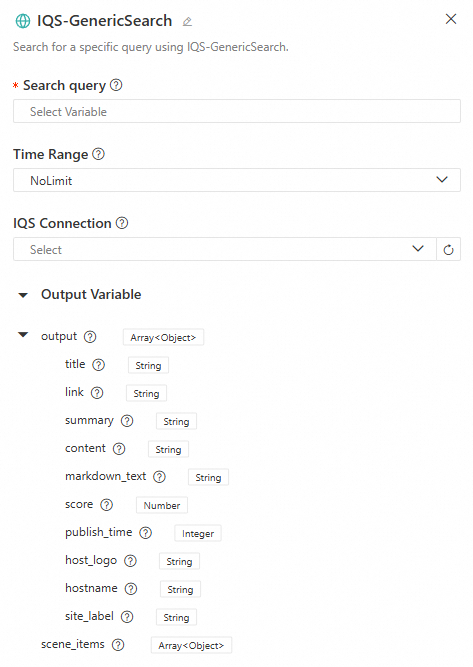
-
Input
-
Search keywords: The key information you want to search online. The length must be between 2 and 100 characters. If it exceeds 100 characters, it is truncated. If it is less than 2 characters, an error occurs.
-
Time range: The time range for the search data. Options include
NoLimit,OneDay,OneWeek,OneMonth, andOneYear. -
IQS connection: If a role with the required permissions was not configured at startup, you can select a pre-configured IQS connection. To learn how to configure an IQS connection, see Service connection configuration - Custom connection. Set the key to
api_keyand its value, which can be found in the Information Query Service - Credential Management. For more details on using an IQS connection, see Build a DeepSeek web search application flow using LangStudio & Alibaba Cloud Information Query Service.
-
-
Output
-
output: The web search output variable, of type
List[Dict]. The keys in the dictionary include the following fields:Key
Description
titleThe title of the search result, which briefly summarizes the content's topic.
linkThe URL of the search result.
summaryA summary of the search result, helping users quickly grasp the core information.
contentThe full content of the search result.
markdown_textThe search content in Markdown format, which may be empty.
scoreA numerical score indicating the relevance or quality of the result.
publish_timeThe publication time of the content.
host_logoThe logo or icon of the content's source website (image URL).
hostnameThe hostname or domain name of the content's source website.
site_labelA label or category for the content's source website.
-
scene_items: Supplementary information to enhance search results. In most general searches,
scene_itemsis usually empty. However, in specific scenarios (such as time, weather, or calendar queries), the system may returnscene_itemsto provide more precise and useful information.
-
-
Use case
SerpAPI - generic search
Performs a web search using SerpApi. It supports multiple search engines (such as Bing, Google, Baidu, and Yahoo, and custom engines) and allows you to configure the search location and number of results.
-
Configuration interface
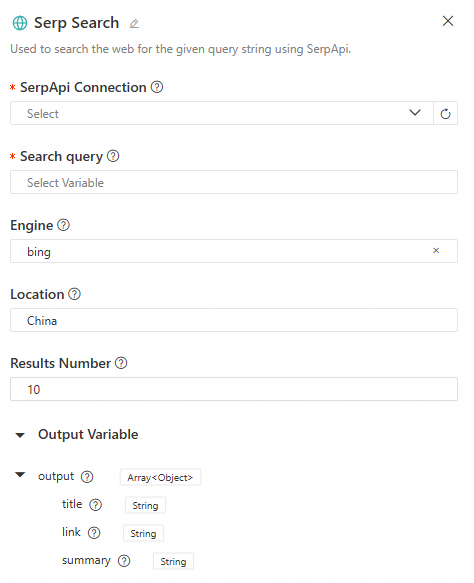
-
Input
-
SerpApi connection: Select a SerpApi connection that has been created in LangStudio. For details, see Create SerpApi connection.
-
Search keywords: The key information for the web search. This must reference an output parameter from an upstream node in
Stringformat. -
Search engine: Supports
Bing,Google,Baidu, andYahoosearch engines, and custom inputs. -
Location: The location for the search. If used, it is recommended to be specific (e.g.,
Shanghai, China). -
Result count: The number of query results to return.
-
-
Output
The web search output variable
output, of typeList[Dict]. The keys in the dictionary include the following fields:Key
Description
titleThe title of the search result, which briefly summarizes the content's topic.
linkThe URL of the search result.
summaryA summary of the search result, helping users quickly grasp the core information.
-
Use case
LangStudio & DeepSeek chatbot solution with RAG and web search
HTTP Request
The HTTP Request node calls external APIs. It supports various HTTP methods, authentication types, and request body formats.
Input
-
Request method: The HTTP request method. Supported methods include
GET,POST,PUT,PATCH,DELETE,HEAD, andOPTIONS. -
URL: The target address of the request.
-
Request headers: Custom HTTP request headers. Enter one key-value pair per line.
-
Request parameters: Query string parameters. Enter one parameter per line with its corresponding key and value.
-
Authentication: Disabled by default. When enabled, you can choose a standard authentication method (
BearerorBasic).-
Bearer: Authenticate using a Bearer Token. Do not add theBearerprefix when entering the token. -
Basic: Use basic authentication. Enter the username and password, and the system automatically converts them into a Base64-encoded credential. -
For custom authentication methods, configure the request headers manually.
-
-
Request body: The following request body formats are supported.
-
none: No request body. -
JSON: Send data in JSON format. -
form-data: Send data inmultipart/form-dataformat, which supports file uploads. -
x-www-form-urlencoded: Send URL-encoded form data. -
raw-text: Send plain text data. -
binary: Send binary file data, which supports file uploads.
-
-
SSL verification: Enabled by default. Choose whether to verify the server's SSL certificate. It is recommended to keep this enabled in production environments.
-
Timeout: The request timeout, ranging from 1 to 600 seconds. The default is 10 seconds.
-
Retry configuration: Disabled by default. Choose whether to automatically retry the request upon failure.
-
Maximum retries: The maximum number of retries, ranging from 0 to 10.
-
Retry interval: The time interval between two retries, ranging from 100 to 10,000 milliseconds.
-
Output
-
body: The response text content. When the response is a file, this field is an empty string.
-
status_code: The HTTP Response Status Code, such as
200,404, or500. -
headers: The HTTP Response Headers, returned as key-value pairs.
-
file: A file object (when the response is a file).
Data processing
Python development
Application Flows support nodes with custom Python code, enabling complex data processing logic with support for streaming input and output. The configuration interface is as follows:
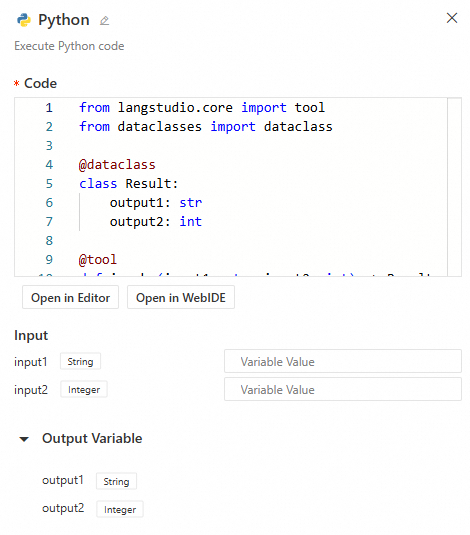
Simply enter your Python code, and the system automatically parses the inputs and outputs. Note the following:
-
The entry point function must be decorated with
@toolto be loaded as a node.
-
Note
When a Python node needs to support input streams, it must be configured with
@tool(properties={"streaming_pass_through": True}). Otherwise, all inputs to the Python node, such as from an LLM, will be complete text outputs rather than streams. -
Supported input/output types for the function:
int,float,bool,str,dict,TypedDict,dataclass(output only),list, andFile. -
The system dynamically parses the entry function's input parameters to create the node's inputs. It places the function's return values into an
outputdictionary, which can be referenced by other nodes. -
Important
The automatic parsing of a Python node's input and output parameters depends on the runtime. You cannot configure the node's input/output information without a running runtime.
-
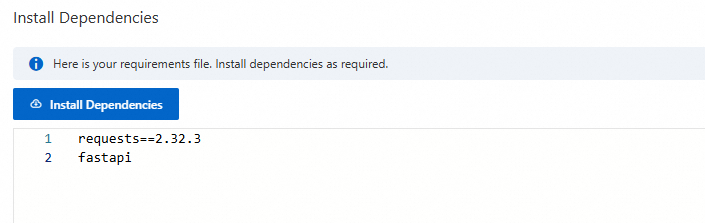
If your Python code requires dependencies, click Install Dependencies in the upper-right corner of the canvas and enter the package names. The
requirements.txtfile is saved with the Application Flow, and the system installs the dependencies into the environment when you start the runtime or deploy the service.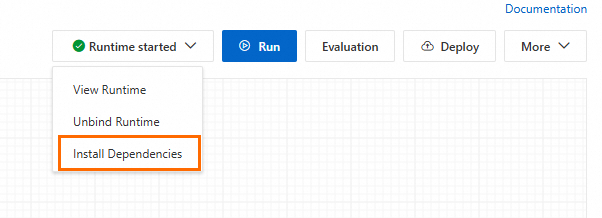
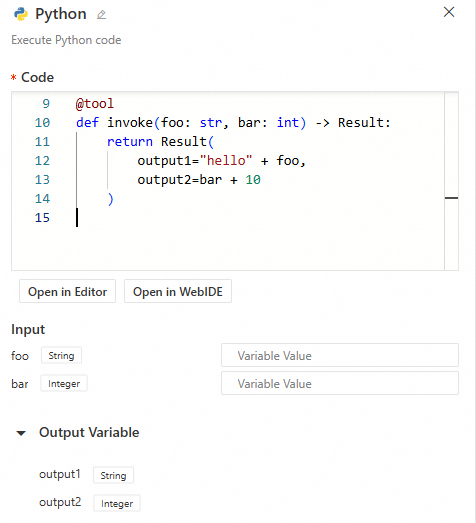
Use case 1: Enter the following code in the code area. The code is mapped to the node's inputs and outputs:
from langstudio.core import tool
from dataclasses import dataclass

@dataclass
class Result:
    output1: str
    output2: int

@tool
def invoke(foo: str, bar: int) -> Result:
    return Result(
        output1="hello" + foo,
        output2=bar + 10
    )
Use case 2: Streaming input and output. Use a Python node to process the text stream output from an LLM or Agent node, which may contain thought processes. By trimming the <think>\n\n</think> part, you can obtain a clean text output stream of the final result. Example code is as follows:
import re
from typing import Iterator
from langstudio.core import tool

@tool(properties={"streaming_pass_through": True})
def strip_think(
    stream: Iterator[str],
) -> Iterator[str]:  # Input: streaming string iterator; Output: filtered streaming string iterator
    # Match <think>\n...\n</think> structure and capture text after closing tag
    pattern = re.compile(r"<think>\n[\s\S]*\n</think>(.*)")
    in_thinking = True  # Flag indicating if currently inside <think> block
    think_buf = ""      # Buffer for storing unprocessed content

    for chunk in stream:
        if in_thinking:
            think_buf += chunk
            m = pattern.search(think_buf)  # Check if buffer contains complete thinking block
            if m:
                in_thinking = False
                result_part = m.groups()[0]
                if result_part:
                    yield result_part  # Immediately output result text if exists
        else:
            yield chunk  # Directly output all subsequent chunks after exiting thinking block
Template transformation
The Template Transformer tool enables flexible text formatting and data transformation using Jinja2 template syntax.
Input
Transformation mode supports Jinja2 mode and node reference mode.
-
Jinja2 mode: Use full Jinja2 syntax for custom output formatting. Suitable for complex structured output, conditional logic, and loop rendering.
-
Template variables: Define variables used in the template.
ImportantDo not use Python built-in method names (e.g.,
items,keys,values). Use descriptive names likeitem_listorproduct_list. -
Template content: Jinja2 template string supporting variable substitution
{{ variable }}, loops{% for %}, conditionals{% if %}, and filters{{ value | filter }}.ImportantAll variables referenced in the template must be defined in the variable list; otherwise, an error occurs.
-
-
Node reference mode: Directly reference upstream node outputs, automatically concatenated into a string. Suitable for simple text combination.
-
Template content: Select upstream node output fields. The system automatically concatenates them in order.
-
Output
output: Rendered template text result. Note: Both input and output template content are limited to 100,000 characters; excess content is truncated.
Usage examples
Example 1: Order confirmation email generation
Variable configuration:
|
Variable name |
Variable value |
|
customer_name |
|
|
order_id |
|
|
products |
|
|
total |
|
Template content:
Dear {{ customer_name }}:

Your order {{ order_id }} has been confirmed. Details:

{% for product in products %}
- {{ product.name }}: ¥{{ product.price }}
{% endfor %}

Total: ¥{{ total }}

Thank you for your purchase!
Output result:
Dear Zhang San:

Your order ORD-2025-001 has been confirmed. Details:

- Laptop: ¥8999
- Wireless Mouse: ¥199

Total: ¥9198

Thank you for your purchase!
Example 2: Knowledge base retrieval result formatting
Variable configuration:
|
Variable name |
Variable value |
|
chunks |
|
Template content:
{% for chunk in chunks %}
### Relevance: {{ "%.2f" % chunk.score }}
#### {{ chunk.title }}
{{ chunk.content }}
---
{% endfor %}
Output result:
### Relevance: 0.95
#### Product Introduction
This is a detailed product description...
---
List Operations
The List Operations tool performs flexible filtering and sorting on list data for fine-grained processing and selection.
Input
-
List input: List data to process. Supports any subtype (string, number, Boolean, file object, dictionary).
-
Operations: Chain of sequential operations. Supports filter and sort operation types.
-
Filter operation: Filtering methods vary by list type. Note: All filters are case-sensitive.
Filter key
Description
Scope
Index
Filter by element position in list
All list types
Element value
Filter by element value
All list types
Custom attribute
Filter by custom attribute
Dictionary-type lists only
File attribute
Filter by file attribute
File-type lists only
-
Sort operation: Sorting methods vary by list type.
Sort key
Description
Applicable Scope
Element value
Sort by element value
String, number, or Boolean lists only
Custom attribute
Sort by custom attribute
Dictionary-type lists only
File attribute
Sort by file attribute
File-type lists only (same attributes as filter operation)
-
Output
-
result: Processed list result.
-
first_item: First element of the result list (None if empty).
-
last_item: Last element of the result list (None if empty).
Use case
Example 1: File classification - Retrieve the top three image files by filtering and sorting by size
Scenario: User uploads a mixed file list. Filter image files, sort by filename length, and keep top 3 for image recognition.
Operation configuration:
Operation 1 - Filter (by file category):
  Filter key: item.category
  Filter operator: equals
  Filter value: image

Operation 2 - Sort (by filename length):
  Sort key: item.file_name
  Sort direction: asc

Operation 3 - Filter (keep top 3):
  Filter key: index
  Filter operator: less than
  Filter value: 3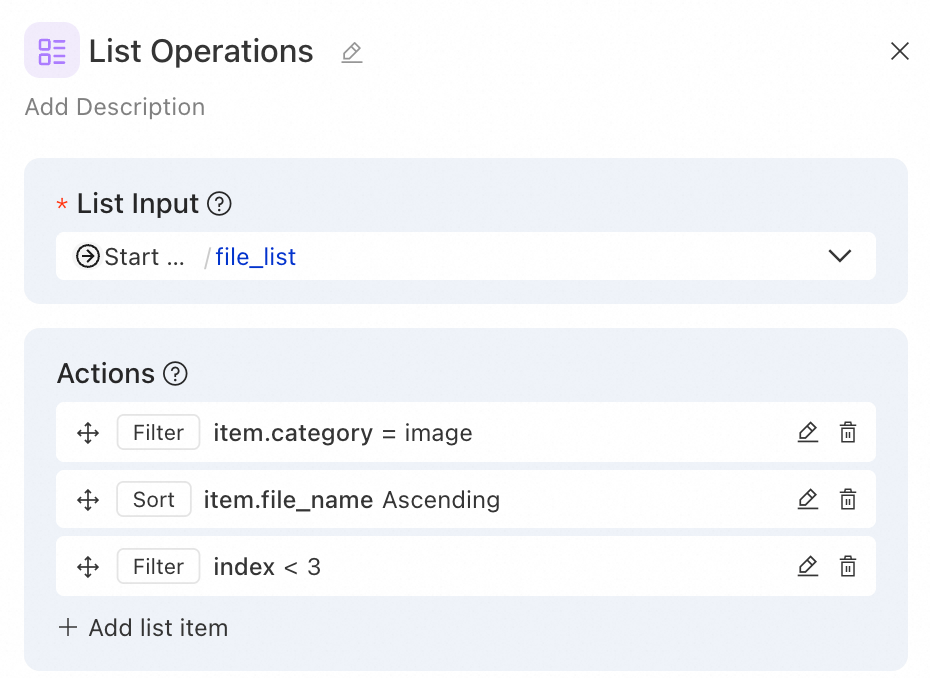
Example 2: Data analysis—filter high-scoring users and get Top 5
Scenario: From a user rating list, filter users with scores ≥80, sort by score descending, and get top 5.
Input list:
[
  {"name": "Zhang San", "score": 95, "department": "Technology"},
  {"name": "Li Si", "score": 72, "department": "Marketing"},
  {"name": "Wang Wu", "score": 88, "department": "Technology"},
  {"name": "Zhao Liu", "score": 91, "department": "Product"},
  {"name": "Qian Qi", "score": 65, "department": "Marketing"},
  {"name": "Sun Ba", "score": 98, "department": "Technology"}
]
Operation configuration:
Operation 1 - Filter (high-scoring users):
  Filter key: item.score
  Filter operator: greater than or equal
  Filter value: 80

Operation 2 - Sort (by score descending):
  Sort key: item.score
  Sort direction: desc

Operation 3 - Filter (top 5):
  Filter key: index
  Filter operator: less than
  Filter value: 5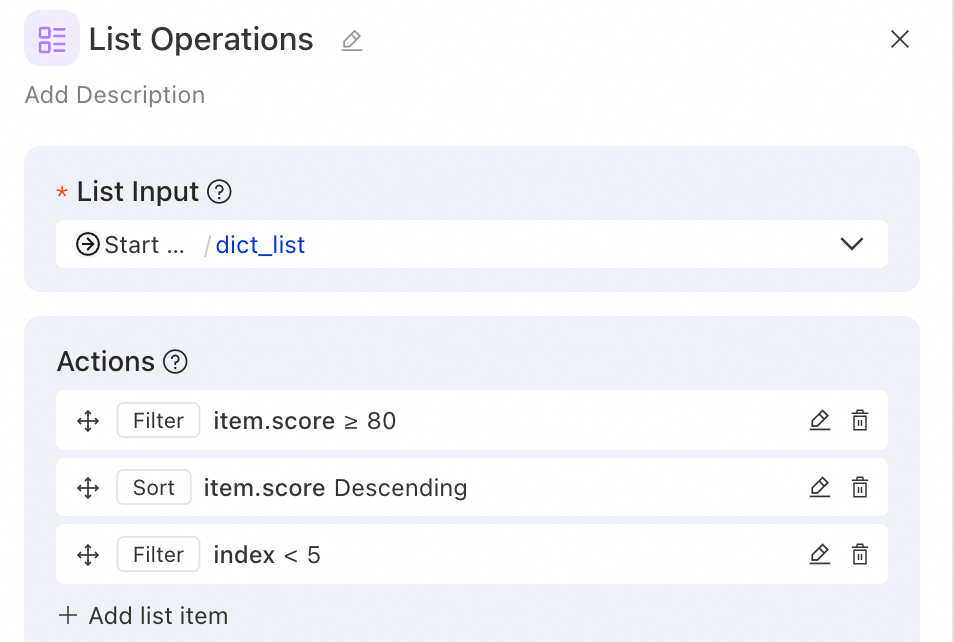
Output result:
[
  {"name": "Sun Ba", "score": 98, "department": "Technology"},
  {"name": "Zhang San", "score": 95, "department": "Technology"},
  {"name": "Zhao Liu", "score": 91, "department": "Product"},
  {"name": "Wang Wu", "score": 88, "department": "Technology"}
]
Notes:
-
If the tool input references a Python node's custom
listoutput variable, define explicit element types in the Python node (e.g.,list[str]) to ensure accurate operator matching in the List Operations node.