After you activate Lingjun AI Computing Service, the networks of compute nodes that you purchase are isolated from the Alibaba Cloud public cloud environment. You must use other Alibaba Cloud products together with Lingjun AI Computing Service to implement network connectivity and status monitoring. The products include virtual private cloud (VPC), CEN, and Application Real-Time Monitoring Service (ARMS).
Background information
In some regions and instance types, you need to connect Lingjun nodes to the user's CEN or virtual private cloud (VPC) through Lingjun connection instances. In other regions and instance types, this connection is not required. Therefore, the network structure can be divided into the following two types:
Network structure without Lingjun connection instances

Network structure requiring Lingjun connection instances
The compute nodes are in an isolated network environment after they are purchased. You can connect the compute nodes to CEN by using Lingjun connection instances to achieve network connectivity with the Alibaba Cloud public cloud. 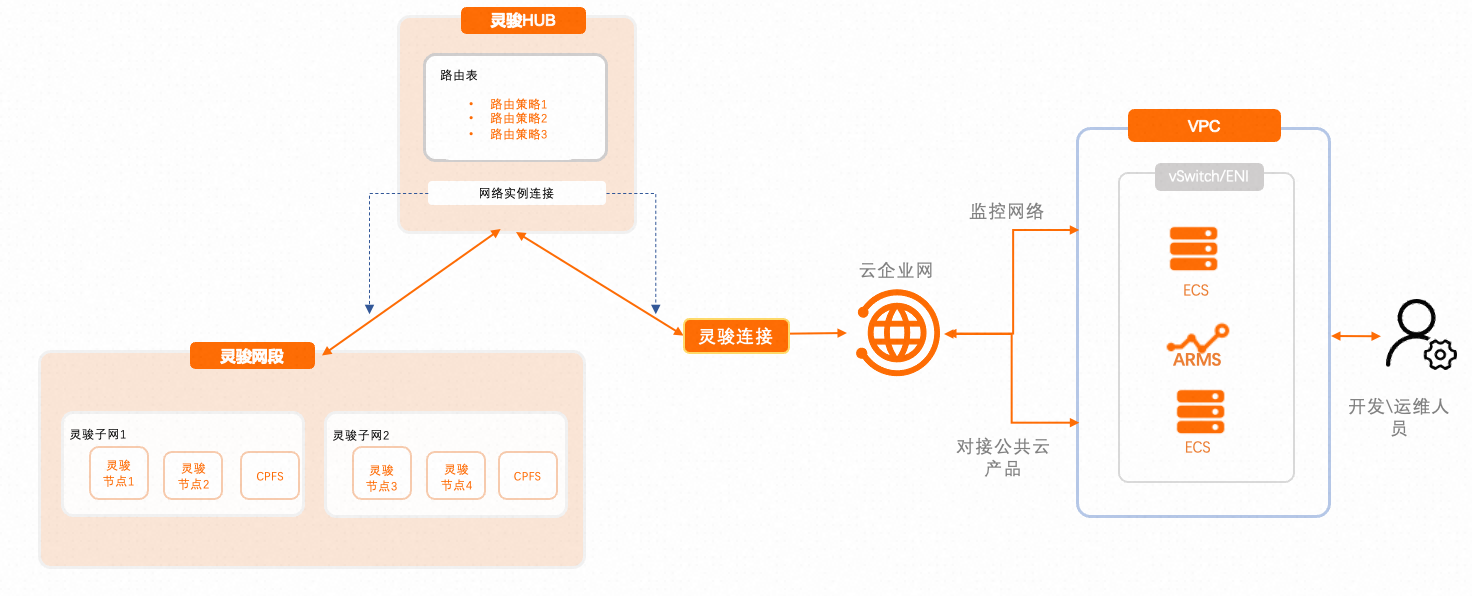 As shown in the preceding figure, in addition to Lingjun products (compute nodes, Lingjun connection instances, and CPFS), the following cloud products are also required:
CEN: Use CEN to connect the isolated Lingjun network to the Alibaba Cloud public cloud network. For information about how to configure CEN, see the Create and configure CEN section of this topic.
VPC: After connecting to the Alibaba Cloud public cloud network through CEN, each cloud product resides in its corresponding VPC network environment. You must create and configure a VPC to connect to other cloud products on the public cloud. For more information, see the Create and configure VPC section of this topic.
ARMS: ARMS performs real-time monitoring of cluster instances, enabling the display of cluster instance status and usage details on the console dashboard. Lingjun automatically activates and configures ARMS for you.
Create and Configure CEN
When connecting to the Alibaba Cloud public cloud network through CEN, pay attention to the following configuration points. For detailed product introductions and operation guides, see CEN official documentation.
Create a CEN instance. For more information, see CEN instances.
Create a transit router in CEN. For more information, see transit router instances.
Configure the transit router.
Add the CIDR blocks of other cloud products to be connected to the transit router in CEN.
Intra-region connection: Add the VPC where the target Alibaba Cloud service resides to CEN by using an intra-region connection to enable connectivity across the entire VPC network. For more information, see Create a VPC connection.
Inter-region connection management: If you need to access other Alibaba Cloud services across regions, you can set cross-region bandwidth to achieve this. For more information, see Inter-region connection.
Create and configure a VPC
As shown in the network topology above, Lingjun AI Computing Service and the connected Alibaba Cloud services are in VPC network environments. You must create a VPC and vSwitches to ensure network connectivity. For more information, see Create a VPC with an IPv4 CIDR block.
If you have already created a VPC, you can use it directly with Lingjun services. Make sure that the VPC has available idle IP addresses.
Monitoring network: Network information for monitoring the actual network connectivity of Lingjun AI Computing Service. One IP address in your VPC is required.
ARMS and other cloud products: Deployed in your VPC network environment, Lingjun can connect to other cloud products by adding forwarding routes via CEN.
After creation, you can directly select the prepared VPC and vSwitches when creating a cluster.
Activate and Configure an ACK Lingjun Managed Cluster
To process large-scale data computing, high-performance data processing, and similar workloads more efficiently and reliably, activate Container Service for Kubernetes (ACK).
When using ACK for the first time, you must authorize the default roles for the container service and activate the related cloud products. For the activation steps and the complete list of related cloud products, see What is ACK Lingjun?.
For the list of cloud products you need to activate before using an ACK Lingjun managed cluster service, see Billing of ACK Lingjun clusters.
Create and configure RDS
Create an RDS instance. For more information, see Create an ApsaraDB RDS for MySQL instance.
Make sure that the RDS instance and the ACK Lingjun cluster are in the same VPC.
Create a database account and six databases. For more information, see Create accounts and databases.
The databases include dlc, notebook, eas, paiflow, pai_user, and pai_console.
Create a MySQL secret object in the cluster based on the RDS endpoint and account information. For more information, see Deploy a stateful, high-availability MySQL cluster on ACK Serverless.
Create and configure NAS
Create a NAS file system. For more information, see Create a file system.
Make sure that the NAS file system and the Lingjun cluster are in the same VPC.
Create a mount target. For more information, see CreateMountTarget.
Create and Configure ACR
Create a Container Registry instance in the same VPC as the ACK cluster.
Run the
docker pushcommand to upload a base image to the ACR repository. For more information, see Deploy Applications in Other Cloud Products Using ACR Runtime Images.Create a docker-registry-secret object in the cluster.
Create and Configure OAuth
Create an application and obtain the application ID. For more information, see Create an Application.
Add OAuth scopes to the application. For more information, see Manage OAuth Scopes.
Create an application key. For more information, see Create Application Key.