OpenSearch LLM-Based Conversational Search Edition provides an end-to-end, out-of-the-box Retrieval-Augmented Generation (RAG) solution. It supports the quick import of data in various formats and lets you build multimodal conversational search services that include conversations, links, and images, so you can easily build an intelligent Q&A chatbot in just three steps.
Integration process
-
Create an instance: Before you use OpenSearch LLM-Based Conversational Search Edition, you must purchase and create an instance.
-
Import knowledge base data: After you import your enterprise knowledge base data, you can view the imported documents in the console. At this point, you have successfully built a dedicated enterprise knowledge base.
-
Run a Q&A test: Enter an enterprise-related question in the dialog box to quickly test the Q&A performance of the knowledge base. The model matches relevant information in the knowledge base and generates a corresponding answer based on that information. At this point, you have implemented enterprise knowledge base Q&A through the console. To support enterprise knowledge base Q&A in your business, you only need to integrate the corresponding OpenSearch API. By building different types of knowledge bases, you can also support a variety of scenarios, such as intelligent documents, e-commerce shopping guides, and educational Q&A.
Step 1: Create an LLM-Based Conversational Search Edition instance
-
Log on to the OpenSearch LLM-Based Conversational Search Edition console.
-
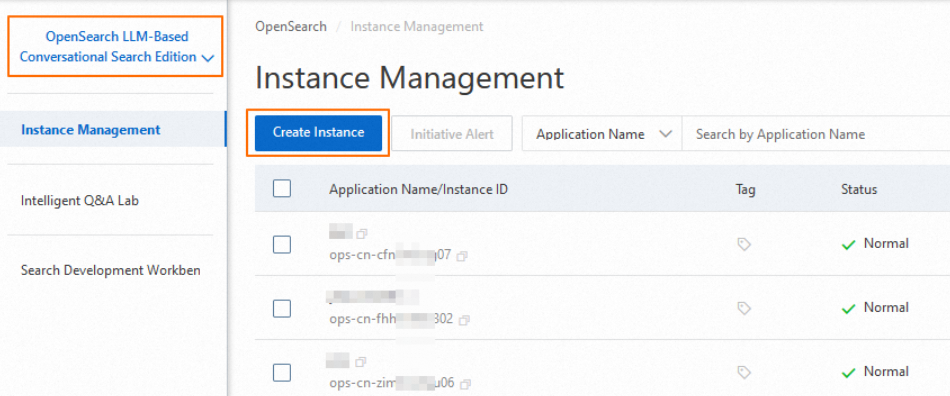
In the product edition drop-down list in the upper-left corner of the page, switch to OpenSearch LLM-Based Conversational Search Edition.
-
On the Instances page, click Create Instance.
-
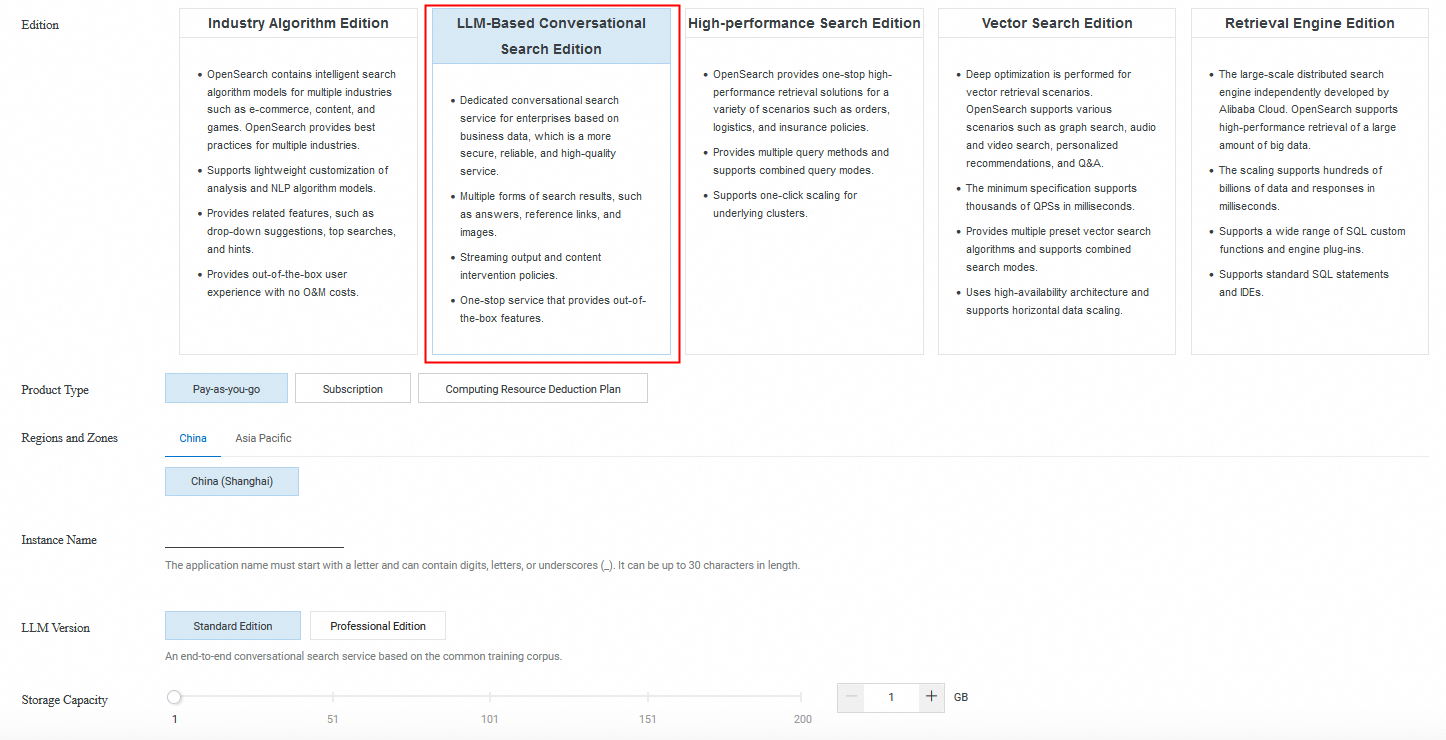
On the purchase page, set Service Edition to LLM-Based Conversational Search Edition, configure the remaining parameters based on your requirements, and follow the on-screen instructions to complete the purchase.
 Note
NoteFor details about billing, see Billing overview.
-
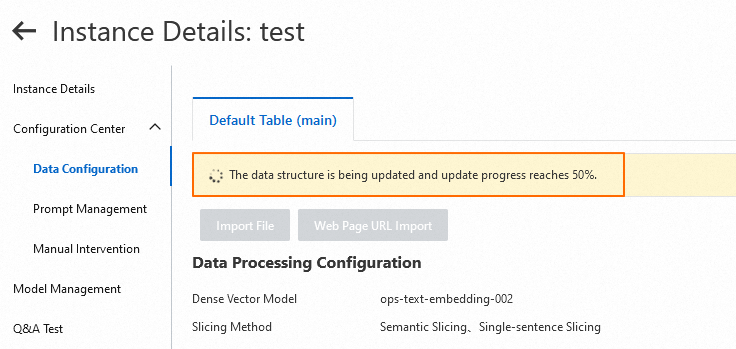
After the purchase completes, return to the console. On the instance list page, find the target instance and click Manage in the Actions column, and then choose . The data structure update progress is displayed at the top of the page. You can use the instance only after the data structure update is complete.
Step 2: Import knowledge base data
-
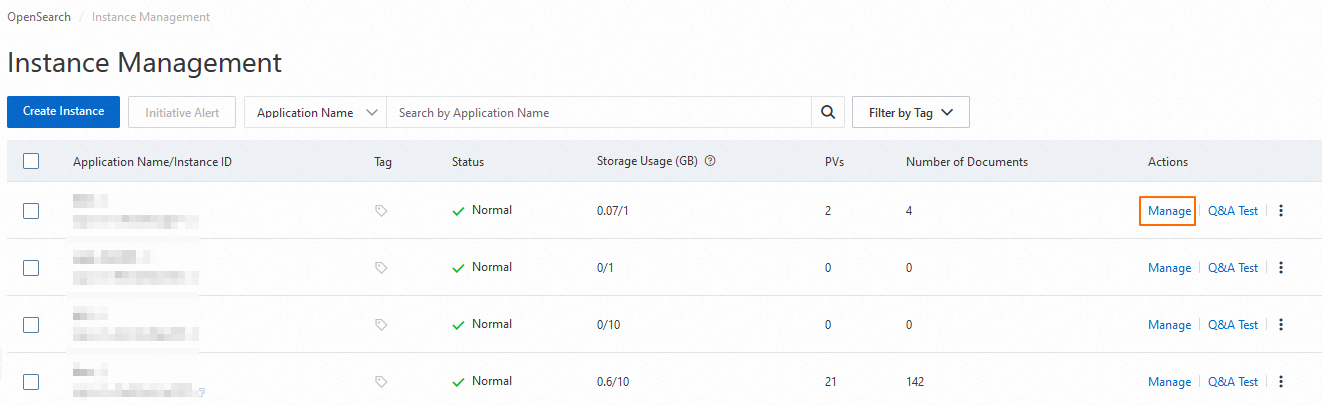
On the instance list page, find the target instance and click Manage in the Actions column.
-
On the instance details page, choose in the left-side navigation pane. LLM-Based Conversational Search Edition supports uploading local knowledge base files, as well as importing websites and web page content. This example uses web page link import. For more data types, see Import knowledge base data.
-
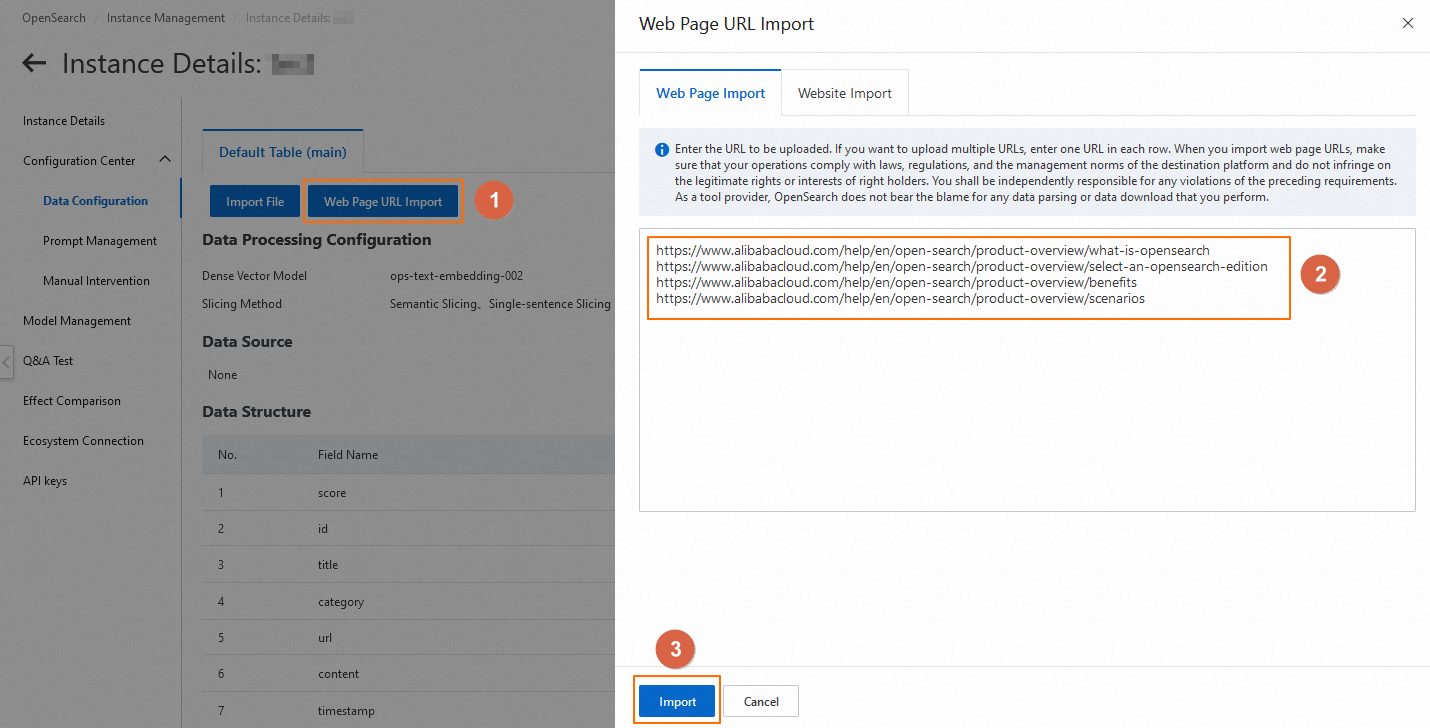
Click Web Page URL Import. In the panel that appears on the right, select the Web Page Import tab, enter the URL you want to upload in the address box, and click Import.
 Note
NoteExample links:
https://www.alibabacloud.com/help/open-search/product-overview/what-is-opensearchhttps://www.alibabacloud.com/help/open-search/product-overview/select-an-opensearch-editionhttps://www.alibabacloud.com/help/open-search/product-overview/benefitshttps://www.alibabacloud.com/help/open-search/product-overview/scenarios -
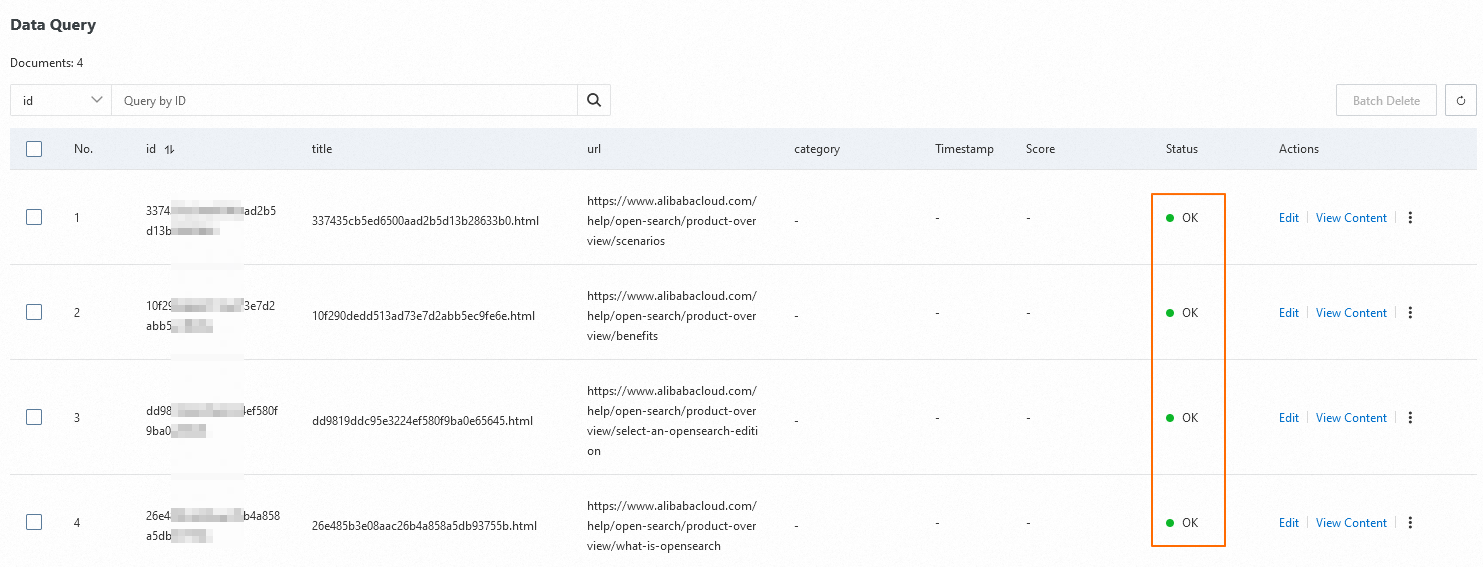
After the import, you can check the data status in the Data Query area at the bottom of the page. When the Status column shows Completed, the data import is complete.
Step 3: Run a Q&A test
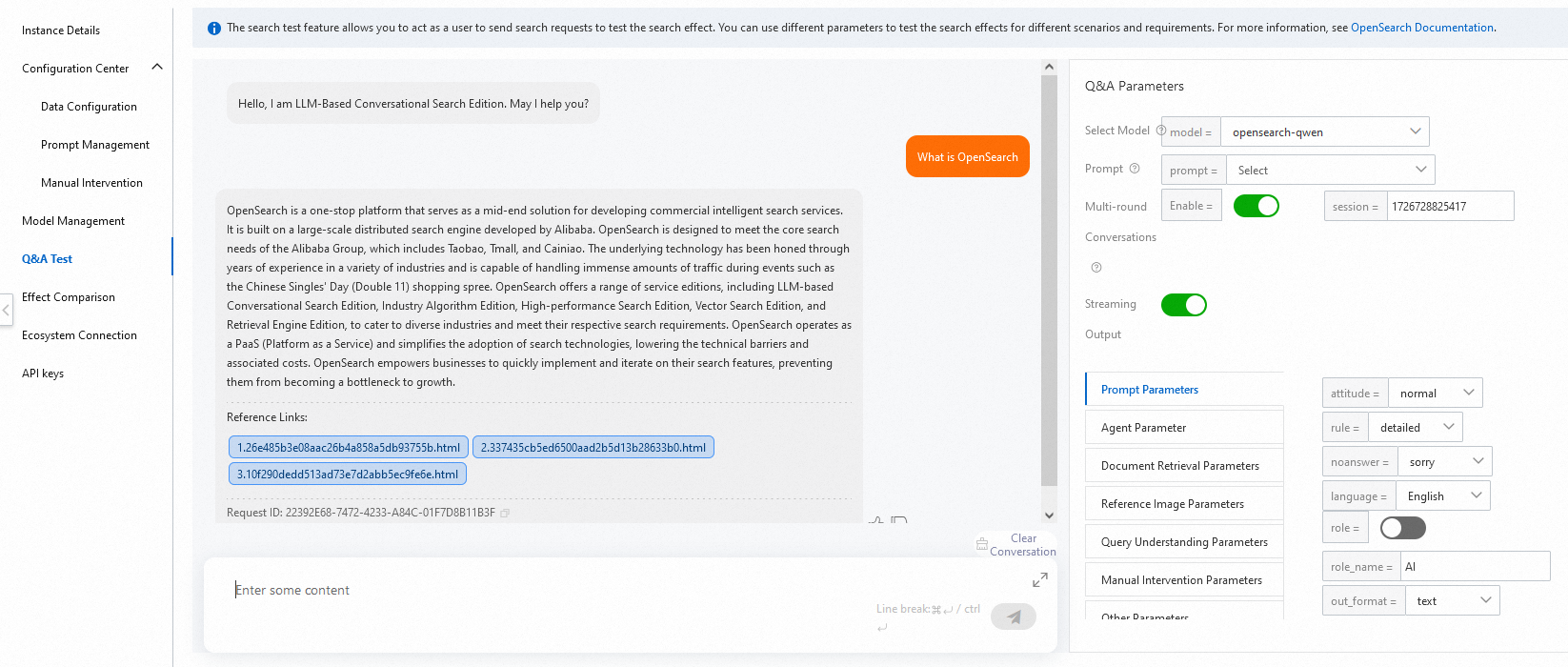
In the left-side navigation pane, click Q&A Test to quickly test the Q&A performance of the knowledge base. On the right side of the page, you can adjust the Q&A parameters based on your requirements, or keep the default settings. Enter an enterprise-related question in the dialog box, and the model matches relevant information in the knowledge base and generates a corresponding answer based on that information. For details about parameter configuration, see Configure Q&A parameters.
Next steps
At this point, you have implemented enterprise knowledge base Q&A through the console. To support enterprise knowledge base Q&A in your business, you only need to integrate the corresponding OpenSearch API. By building different types of knowledge bases, you can also support a variety of scenarios, such as intelligent documents, e-commerce shopping guides, and educational Q&A.