The Q&A Test page lets you interact with your knowledge base before deploying to production. Enter a question, and the model retrieves relevant content from your uploaded documents and generates an answer. Adjust parameters to tune retrieval accuracy and response quality, then carry the validated configuration into your application.
Prerequisites
Before you begin, ensure that you have:
Created an OpenSearch LLM-Based Conversational Search Edition instance. See Create an instance.
Completed data configuration. See Data configuration.
Run a Q&A test
The following steps use a video file as an example.
Log in to the OpenSearch console and select LLM-Based Conversational Search Edition. In the left-side navigation pane, click Instance Management, find your instance, and click Manage in the Actions column.
On the Instance Details page, click Configuration Center, then click Data Configuration. Click File Import, select the file to upload, and click Upload File.
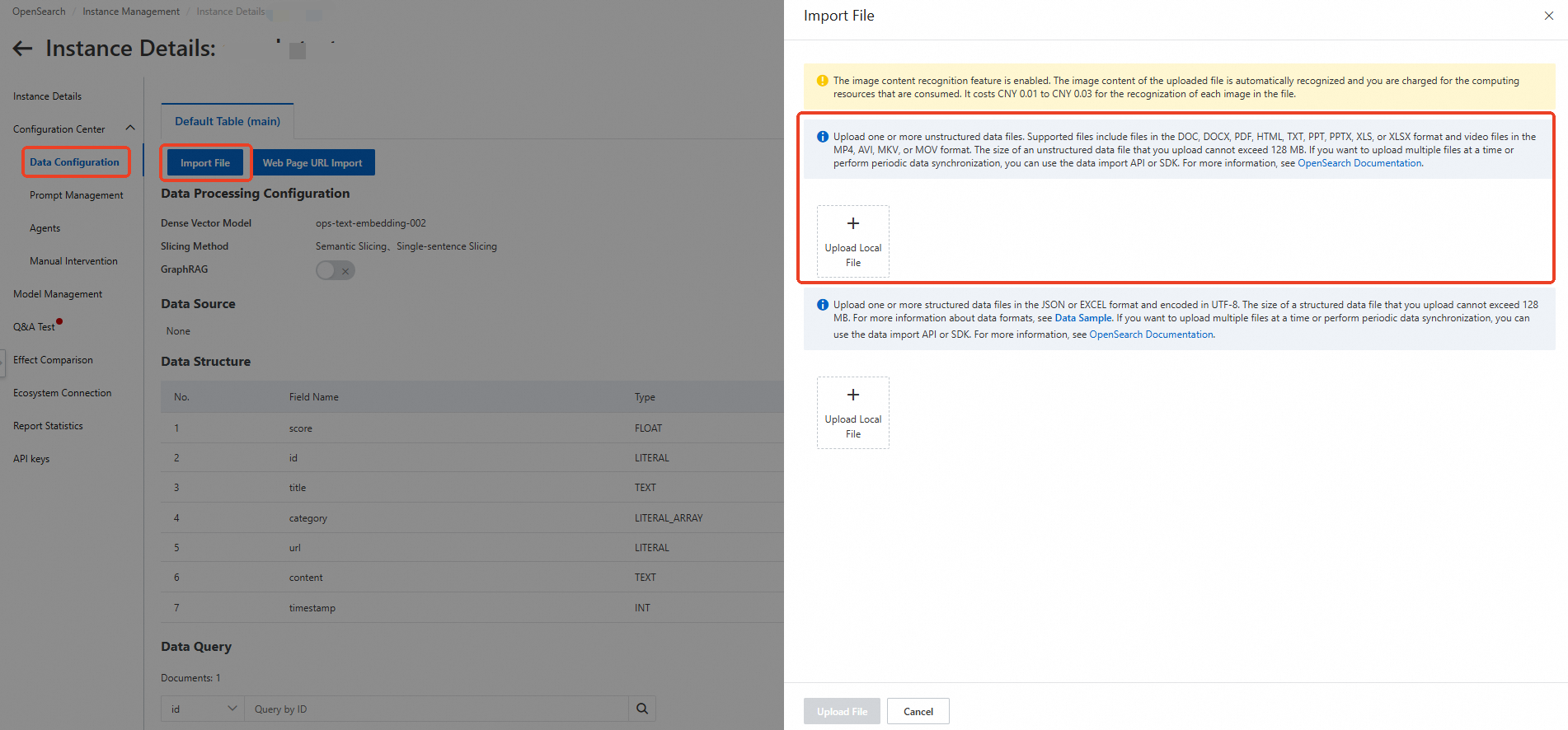
Wait for the upload to finish. When the data query status shows Completed, click Q&A Test in the left-side navigation pane.

In the upper-right corner, click Model Configuration and set the parameters for your use case. For a description of each parameter, see Parameters.
Enter a question in the dialog box and click Send
Interpret results
The response draws from documents in your knowledge base. To see which documents contributed to an answer, set options.chat.link to true. The response then includes inline citation markers ([^1^], [^2^], etc.) that correspond to retrieved documents listed in the reference section.
To also return the raw retrieved document chunks, set options.retrieve.return_hits to true. The response then includes a search_hits field containing the retrieved chunks.
Parameters
Configure parameters from the Model Configuration panel. Parameters are grouped by function.
You can also run Q&A tests via API or SDK. The parameter names in the tables below map directly to the API request fields. See API operations and OpenSearch SDKs.
Q&A parameters
| Parameter | Type | Required | Default | Description |
|---|---|---|---|---|
options.chat.model | String | Yes | opensearch-qwen | The large language model (LLM) used to generate answers. The supported context length and the maximum input and output tokens vary by model. |
Prompt | String | No | Default prompt template | The prompt template used for the test. See Manage prompts for supported templates. |
question.session | Boolean | No | true | Controls multi-turn conversation behavior. false disables multi-turn conversations. true returns results based on the most recent conversation rounds. session scopes the conversation to a specific source, returning results based on context from conversations with the same source. |
options.chat.enable_deep_search | Boolean | No | false | Enables deep search. When enabled, the model performs multi-round inference to return more comprehensive results — at the cost of higher latency and resource usage. |
options.retrieve.web_search.enable | Boolean | No | false | Enables web search. When enabled, answers draw from live web results in addition to your knowledge base, which increases response time and resource consumption. |
options.chat.stream | Boolean | No | true | Enables streaming output. When true, the response is delivered via HTTP chunked transfer encoding. |
Prompt parameters
These parameters customize the behavior of the built-in prompt template.
| Parameter | Type | Default | Valid values | Description |
|---|---|---|---|---|
options.chat.prompt_config.attitude | String | normal | normal, polite, patience | The tone of the model's responses. |
options.chat.prompt_config.rule | String | detailed | detailed, stepbystep | The level of detail in responses. |
options.chat.prompt_config.noanswer | String | sorry | sorry, uncertain | The fallback message when the model cannot find an answer. sorry returns "Sorry, I cannot answer your question based on known information." uncertain returns "I don't know." |
options.chat.prompt_config.language | String | Chinese | Chinese, English, Thai, Korean | The language of the generated answer. |
options.chat.prompt_config.role | Boolean | — | — | Enables a custom role to answer questions. |
options.chat.prompt_config.role_name | String | — | — | The name of the custom role. Example: AI Assistant. |
options.chat.prompt_config.out_format | String | text | text, table, list, markdown | The format of the generated answer. |
Document retrieval parameters
These parameters control how the system searches your knowledge base. Two retrieval strategies are available depending on whether the sparse vector model is enabled:
Semantic (dense-only): Uses dense vector embeddings for retrieval. Set
options.retrieve.doc.operatorto control term matching.Hybrid (dense + sparse): Combines dense and sparse vector matching. Use
options.retrieve.doc.dense_weightto balance the two signals. Hybrid mode applies when the sparse vector model is enabled in your data configuration.
| Parameter | Type | Default | Description |
|---|---|---|---|
options.retrieve.doc.top_n | Integer | 5 | The number of document chunks to retrieve. Valid values: (0, 50]. Increasing this value gives the model more context but may introduce noise from less relevant chunks. |
options.retrieve.doc.sf | Float | 1.3 (sparse vector disabled) / 0.35 (sparse vector enabled) | The vector score threshold for document retrieval. With sparse vector disabled: lower values increase recall but reduce precision; range is 0–2.0. With sparse vector enabled: higher values increase precision but reduce recall. |
options.retrieve.doc.dense_weight | Float | 0.7 | The weight of the dense vector when the sparse vector model is enabled. Valid values: (0.0, 1.0). Higher values favor semantic similarity; lower values give more weight to sparse (keyword-based) matching. |
options.retrieve.doc.operator | String | AND | The operator applied between terms after text segmentation. Only applies when the sparse vector model is disabled. AND retrieves documents matching all terms (higher precision). OR retrieves documents matching at least one term (higher recall). |
options.retrieve.doc.formula | String | — | A custom formula for ranking retrieved documents. For syntax, see Fine sort functions. Algorithm relevance and geographical location relevance are not supported. |
options.retrieve.doc.filter | String | — | Filters documents before retrieval based on a specific field. Supported fields: table, raw_pk, category, score, timestamp. Examples: "filter": "raw_pk=\"123\"", "filter": "category=\"value1\"", "filter": "category=\"value1\" OR category=\"value2\"", "filter": "score>1.0", "filter": "timestamp>1356969600" (timestamp greater than January 1, 2013). |
Reference image parameters
| Parameter | Type | Default | Description |
|---|---|---|---|
options.retrieve.image.sf | Float | 1.0 (sparse vector disabled) / 0.5 (sparse vector enabled) | The vector score threshold for image retrieval. Behaves the same as options.retrieve.doc.sf but applies to image chunks. |
options.retrieve.image.dense_weight | Float | 0.7 | The weight of the dense vector during image retrieval when the sparse vector model is enabled. Valid values: (0.0, 1.0). |
Query understanding parameters
| Parameter | Type | Default | Valid range | Description |
|---|---|---|---|---|
options.retrieve.qp.query_extend | Boolean | false | — | Enables query expansion. When enabled, the system generates additional query variants and uses them to retrieve document chunks — improving recall at the cost of an extra LLM call and higher latency. Disable for latency-sensitive applications. |
options.retrieve.qp.query_extend_num | Integer | 5 | (0, +∞) | The maximum number of expanded queries to generate when query expansion is enabled. |
Manual intervention parameters
| Parameter | Type | Default | Description |
|---|---|---|---|
options.retrieve.entry.sf | Float | 0.3 | The vector score threshold for manual intervention entries. Valid values: [0, 2.0]. Lower values increase matching range; higher values restrict matches to high-confidence entries. |
Deep search parameters
These parameters apply when options.chat.enable_deep_search is true.
| Parameter | Type | Description |
|---|---|---|
options.chat.agent.think_process | Boolean | Whether to display the model's thinking process in the response. |
options.chat.agent.max_think_round | Integer | The maximum number of reasoning rounds. Maximum value: 20. |
options.chat.agent.language | String | The language for both the thinking process and the final answer. AUTO selects Chinese or English based on the query. CN forces Chinese. EN forces English. |
Other parameters
| Parameter | Type | Default | Description |
|---|---|---|---|
options.retrieve.return_hits | Boolean | — | Returns raw document retrieval results. When true, the response includes a search_hits field containing the retrieved chunks. |
options.chat.history_max | Integer | 1 | The number of previous conversation rounds the model uses as context. Maximum value: 20. Increase this for richer multi-turn conversations; keep it low to reduce token usage and latency. |
options.chat.link | Boolean | false | Includes citation markers in the response. When true, the model embeds inline references ([^1^], [^2^], etc.) linking to retrieved source documents. |
options.chat.rich_text_strategy | String | — | Controls how rich text elements in the answer are returned. inside_response restores rich text tags inline in Markdown (tables are inserted as HTML). extend_response returns rich text content separately via rich_text_ref (images as URLs, tables as HTML, code as plain text). See Rich text. |
options.retrieve.graph | Boolean | — | Enables retrieval based on graph relationships. Only applies if GraphRAG is enabled in data configurations. |
options.chat.enable_llm_knowledge | Boolean | — | Falls back to the LLM's pretrained knowledge when no search results are found. true allows the model to answer from its own knowledge. false restricts answers to the knowledge base. |