Configure an RDS data source
ApsaraDB Relational Database Service (RDS) is a stable, reliable, and scalable on-demand database service from Alibaba Cloud.
Before you purchase an RDS instance
-
OpenSearch supports ApsaraDB RDS for MySQL 5.5, 5.6, 5.7, and 8.0.
-
When you purchase an RDS instance, it must be a standard, dual-machine High-availability Edition instance. The RDS MySQL Basic Edition and the three-node Enterprise Edition are not supported because they are not high-availability editions.
-
The RDS instance must belong to your current Alibaba Cloud account and reside in the same region as your OpenSearch application.
-
Cloned RDS instances (RDS clone) are supported if the RDS instance is of High-availability Edition.
-
Reindexing fails for unsupported RDS instances or instances that do not meet the specified limits.
-
RDS data sources support only VPC networks.
-
DRDS is not a supported data source.
-
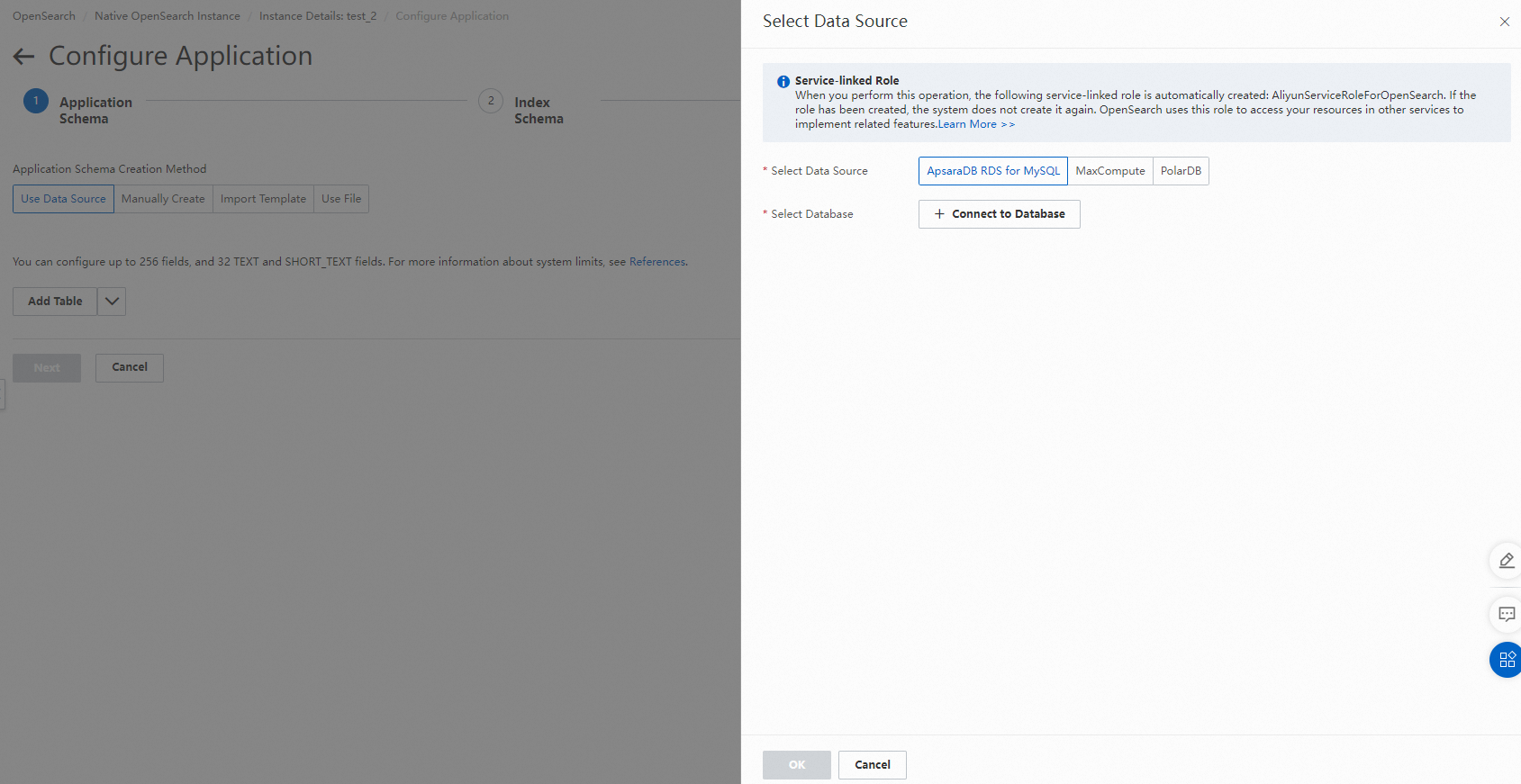
Authorization: You must grant OpenSearch access to your RDS data. If you configure an IP address allowlist for the RDS instance, OpenSearch adds its IP addresses to the allowlist. If you do not grant this authorization, the Connect to Database button is not highlighted.
Supported features
-
You can pull full data from specified database tables (manual or scheduled reindexing).
-
You can merge data horizontally from one or more data source tables. These source tables must have identical table schemas and data source plug-in configurations, and their primary key values must be unique (duplicate primary key values cause data to be overwritten). The following two scenarios are supported:
-
An application table has one data source that contains multiple source tables.
-
An application table has multiple data sources, and each data source contains one or more source tables.
-
-
Transform plugins for data source fields are supported.
-
Supported data synchronization methods:
-
Automatic synchronization
-
Real-time synchronization using a self-purchased DTS instance
-
No automatic synchronization
-
-
Filter conditions for full data are supported.
-
You can use the wildcard character
*to match database table names.
-
If you select automatic synchronization as the data synchronization method, OpenSearch uses an internal service to subscribe to the database binlogs and synchronize incremental data. Note that if you perform operations such as deleting a database table, changing access permissions, clearing binlog files, or changing the database password, OpenSearch may fail to subscribe to and synchronize the binlogs for the configured table. In this case, OpenSearch is not responsible for any incremental data synchronization failures. Before you perform these operations, ensure that you fully understand the potential impact and take the necessary precautions.
-
If you select automatic synchronization, OpenSearch makes a best effort to ensure the stability of the synchronization service but does not guarantee synchronization latency. If your service is sensitive to synchronization latency, we recommend that you use a DTS change tracking instance (DTS real-time synchronization).
Related limits
-
Only the full mode is supported for RDS binlogs.
-
Only the RDS High-availability series and Cluster series are supported.
-
Supported RDS database versions are 5.5, 5.6, 5.7, and 8.0.
-
For RDS 5.6, we recommend that you appropriately increase the thresholds of the loose_max_execution_time and loose_max_statement_time parameters to avoid errors during reindexing, such as: Query execution was interrupted, max_statement_time exceeded.
-
The RDS instance must belong to your current Alibaba Cloud account and reside in the same region as your OpenSearch application.
-
After you configure an RDS data source for a Standard Edition application, pushing incremental data (SDK/API) is not supported.
-
For RDS data sources of Standard Edition applications (in Internet-facing regions), data source filter conditions are not supported.
-
The replace into syntax is not supported.
-
The truncate and drop commands are not supported. Use the delete command to delete data.
-
Cloned RDS instances (RDS clone) are supported if the RDS instance is of High-availability Edition.
-
The RDS access password cannot contain the
%symbol, which causes reindexing tasks to fail. -
Access using an RDS privileged account is not supported. (Otherwise, the connection to RDS fails.)
-
Merging field columns across source tables of different databases is not supported.
-
Replica clients and replica slaves without binlogs are not supported. To learn how to check and enable binlogs, see the documentation.
Precautions
-
You can access RDS over an internal network or the Internet. OpenSearch does not charge any traffic fees for retrieving RDS data.
-
OpenSearch pulls full data only from the primary database. Based on your service load, we recommend that you perform reindexing to import full data during off-peak hours.
-
For time types such as datetime and timestamp in RDS tables, the system automatically converts them to milliseconds. Set the corresponding application table field type to TIMESTAMP.
-
The RDS internal address is enabled by default. You must manually apply for an Internet-facing address. You can access RDS over the Internet only after the Internet-facing address application is approved.
-
Full documents that do not match the data source filter conditions are filtered out, and if documents with the same primary key values exist in the corresponding application table, they are also deleted.
-
If the data source has no incremental data for an extended period (15 days or longer), data synchronization may become abnormal. In this case, manually perform reindexing or an offline change to resolve the issue.
-
When you synchronize RDS data source data using OpenSearch, you must add the IP address ranges of the OpenSearch servers to the RDS allowlist. The IP address allowlists for each region are listed as follows:
Region
IP address range
China (Hangzhou)
100.104.190.128/26,100.104.241.128/26
China (Beijing)
100.104.16.192/26,100.104.179.0/26
China (Shanghai)
100.104.37.0/26,100.104.46.0/26
China (Shenzhen)
100.104.87.192/26,100.104.132.192/26
China (Qingdao)
100.104.240.128/26,100.104.111.128/26
China (Zhangjiakou)
100.104.155.192/26,100.104.238.64/26
Germany (Frankfurt)
100.104.127.0/26,100.104.35.192/26
US (Silicon Valley)
100.104.193.128/26,100.104.119.128/26
Singapore
100.104.58.192/26,100.104.74.192/26
Account authorization issues
Recommendations for connecting and using MySQL 5.7/8.0:
-
When you connect MySQL 5.7 or later, you must grant access to the RDS instance and provide the account and password. For the initial connection, choose the account and password carefully.
-
[Ensure account permissions] The account must have permission to view all tables in the database (a limit of the upstream DTS service) to correctly run show create table
*. *. Without the required permissions, real-time synchronization may fail. -
[Minimize account permission changes] The OpenSearch real-time task also acts as a MySQL client. Account changes prevent the current real-time task from consuming data properly and also affect the creation of new versions. If you change the account or password, you must delete the instance and reconnect to the database.
-
The minimum permissions that OpenSearch requires for your RDS instance are:
-
The show create table permission.
-
The REPLICATION SLAVE or REPLICATION CLIENT permission.
-
binlog_row_image set to full.
-
binlog_format set to ROW.
-
FAQ
-
To configure an RDS data source for an application in the console using a RAM user, you must grant the required permissions to the RAM user. Otherwise, the message Failed to connect to the RDS service. Try again later. is displayed. For more information, see RAM authorization (ensure that the primary account is authorized to create a service-linked role).
-
The RDS access password cannot contain the
%symbol. Otherwise, reindexing tasks fail. (Error message: Illegal hex characters in escape (%) pattern.) -
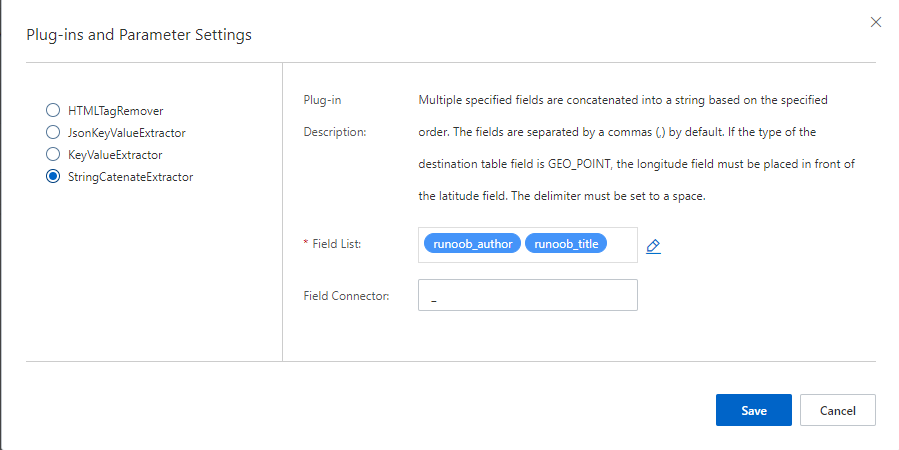
The system requires that primary key values in the application table be unique. In a sharded scenario, duplicate primary key values are overwritten. You can use the StringCatenateExtractor data source plugin to merge multiple field values. Set the source fields to
pk,$table(replace pk with the primary key field of the RDS table; $table is a default system variable that represents the corresponding database table name, and it is available only when sharding is configured with a wildcard), and set the concatenation character to-(customizable). For example, if the RDS table ismy_table_0and the primary key field value is123456, the new primary key value after concatenation is123456-my_table_0. -
To filter data based on the date or datetime field type in a database table, for example, if the database table field name is createtime, the time format in the data source filter condition must be
createtime>'2018-03-01 00:00:00'. Using the formatcreatetime>'2018-3-1 00:00:00'causes an error.
Procedure for configuring an RDS data source
-
Configure the RDS data source during application creation.
-
For an application that has been created, you can modify it on the application details page by choosing "Edit Structure".
Console configuration steps and precautions
-
Select the RDS data source and click Create Database.
-
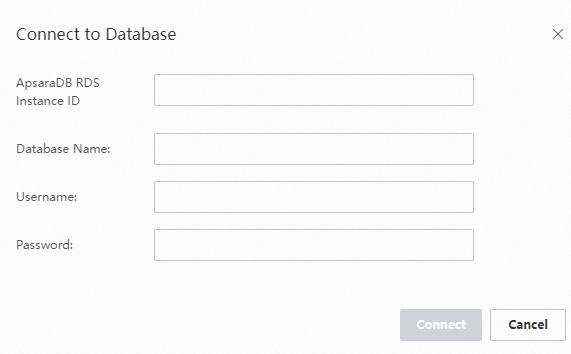
After you complete the RDS information, click the Connect button.
Parameter
Description
Instance ID
The instance ID (not the name) of the RDS database. You can obtain it from the RDS console (case-sensitive). Read-only instances are not supported. The instance ID format is, for example: rm-bp19b4g5n11111111
Database name
The name of the database to connect to under the instance (case-insensitive).
Username
The read-only username of the database, used to retrieve the database table schema and full data (case-sensitive and with read-only permissions).
Password
The password for the read-only username.
OpenSearch attempts to connect and provides a result message based on the specific situation:
Message
Solution
This RDS instance does not exist in the current region for the current user
Check whether the instance ID is correct and ensure that the RDS instance resides in the same region as your OpenSearch application. If the error persists when these conditions are met, submit a ticket for feedback.
Failed to connect to the RDS service
Check whether the RDS connection string is correct, including the instance ID, database name, username, and password.
This table does not exist in the current RDS database
Check whether the table name is correct and whether the table actually exists in the RDS database.
-
The interface after the data source connection is established is shown below. Select the corresponding table, click the right arrow, and save it to the Selected section on the right.
-
Select or enter the name of the table to access under the database (case-sensitive).
-
The sharding rule table_* is supported, for example, table_a and table_b.
-
-
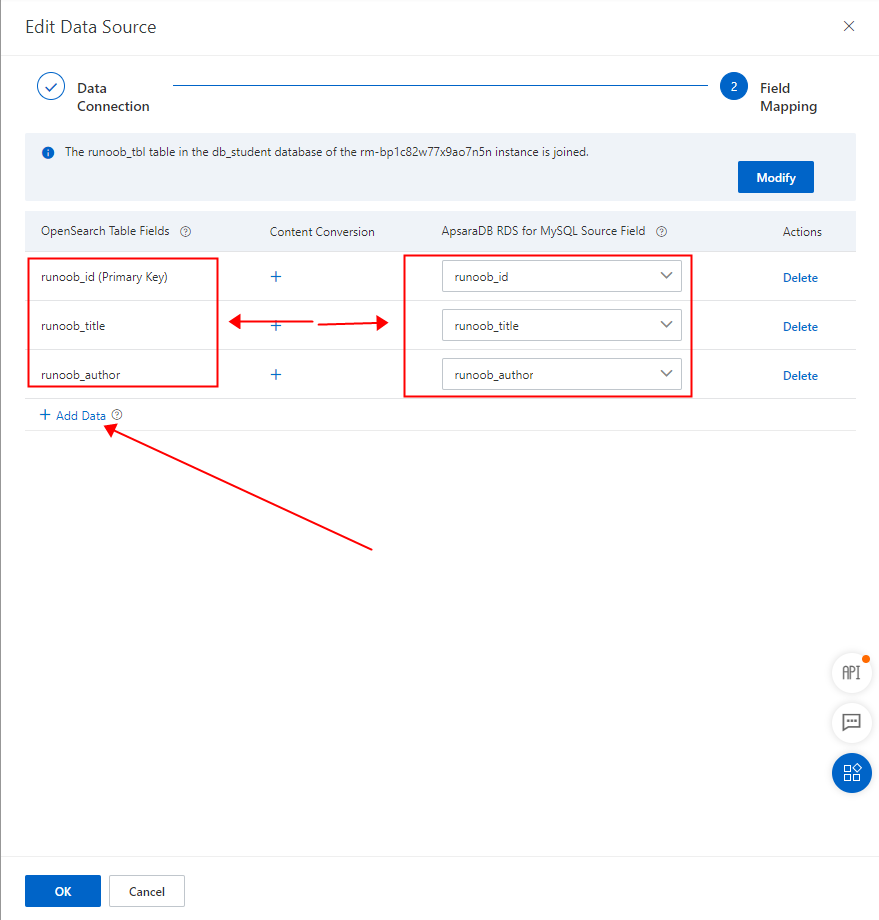
For field mapping, select the database fields to pull. Click OK to complete the application creation.
-
On this interface, you can add the database fields to map and synchronize.
-
In the content transformation section on this interface, you can add data source plugins. For information about how to use the plugins and their documentation, see the data source plugins documentation.
-
-
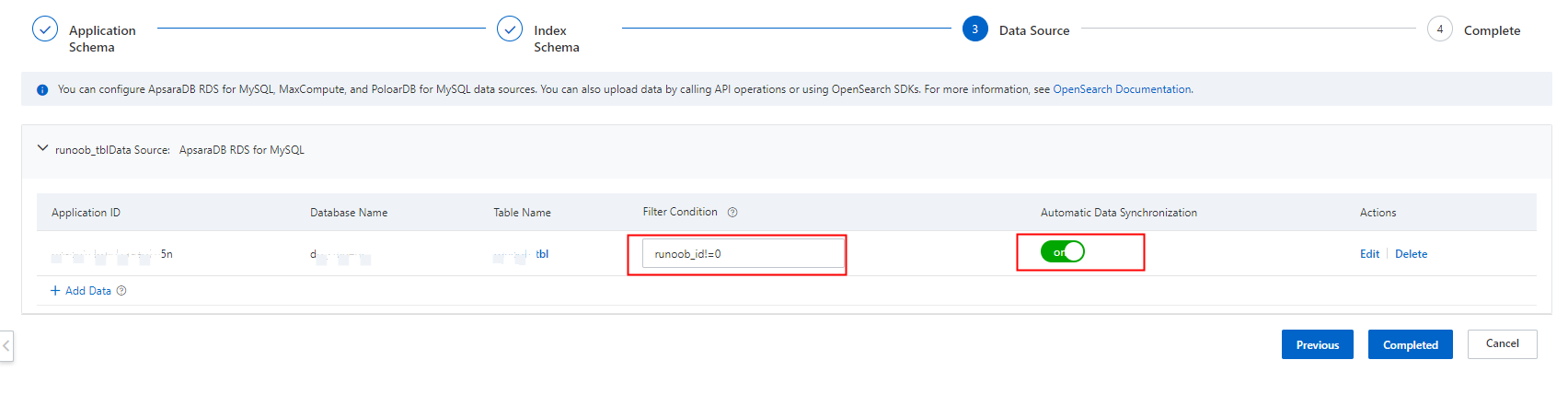
Configure the RDS data source filter conditions.
-
You can also configure multiple data sources in an OpenSearch application table, but the schemas and configurations of these tables must be identical.
-
The filter conditions configured for the RDS data source pull only records that match the conditions. For detailed configuration, see Data source filter conditions.
-