The Intra-zone Provider First feature of Microservices Engine (MSE) is a load balancing policy that dynamically identifies the zones in which service consumers and providers reside and preferentially routes requests to the service nodes in the same zone. Compared with the traditional round-robin algorithm, this policy reduces cross-zone traffic transfer, which lowers network latency, improves service response speed, and enhances the disaster recovery capability of the system. This topic describes how to configure the Intra-zone Provider First feature in MSE.
How it works
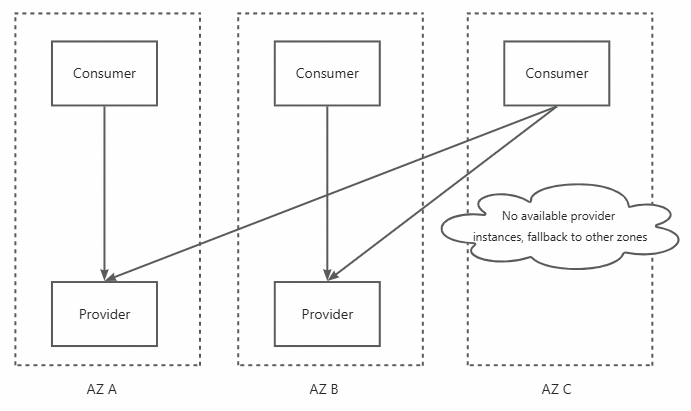
When you enable the Intra-zone Provider First feature for an application, the consumer applications of the application preferentially call the instances in their own zone. For example, if you enable the feature for Application P, Applications C1, C2, and C3 preferentially call the instances of Application P in their own zone.
The Intra-zone Provider First feature that MSE currently provides takes effect only for a single provider application. That is, after you enable the feature for an application, all consumers of the application preferentially call the instances in their own zone when they call the application.
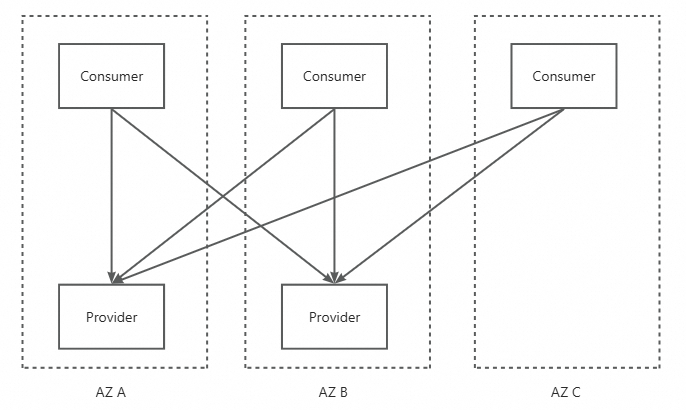
The following figure shows the application call model when Intra-zone Provider First calls are not enabled in MSE.
The following figure shows the application call model when Intra-zone Provider First calls are enabled in MSE.
Benefits
The Intra-zone Provider First feature is a traffic scheduling policy for microservices architectures. In a multi-zone architecture, intra-zone calls provide the following benefits:
Lower system latency — Cross-zone calls become intra-zone calls, which reduces the RT of the entire system.
Smaller failure domain — Microservice calls are confined to the same zone. If a single zone fails, the impact is limited to that zone.
Terms
Zone — A zone is a physical area within a region that has independent power supplies and networks. A region contains multiple zones. The network latency between instances in the same zone is lower than the network latency across zones.
Consumers and providers — In microservices scenarios, the party that initiates a call is the service consumer, and the party that provides the service is the service provider. In most cases, an application is both a provider and a consumer.
RT — The round-trip time of a request. RT is the total time from when the client sends a request to when the client receives the response from the server.
Instance — An instance is the same concept as a node in colloquial usage. In Kubernetes scenarios, a pod under an application workload is an application instance. In Elastic Compute Service (ECS) scenarios, a single application process on an ECS instance is an application instance.
Security threshold
After you enable the Intra-zone Provider First feature for an application, all consumers call the providers in their own zone. Not every application is strictly and evenly deployed across zones. An application may have very few provider nodes in a zone, and those nodes cannot carry the traffic that consumers in the zone send.
For example, the numbers of instances of your application deployed in Zones A, B, and C are 3, 3, and 1. If the Intra-zone Provider First feature is enabled and the number of consumers in each zone is balanced, each zone receives one-third of the traffic. However, Zone C has only one instance. That instance must handle three times the traffic that each instance in the other zones handles, which may pose stability risks.

To keep consumers in a zone such as Zone C from preferentially calling the application in their own zone, the Intra-zone Provider First feature of MSE provides a security threshold setting. When Intra-zone Provider First calls are enabled for an application and the percentage of instances that the application deploys in a zone is less than the security threshold, consumers in that zone do not use the Intra-zone Provider First policy when they call the application. Instead, the calls fall back to the default random or round-robin policy of the microservices framework.
For example, the numbers of instances of your application deployed in Zones A, B, and C are 2, 2, and 1, which account for 40%, 40%, and 20% of all instances. If you enable the Intra-zone Provider First feature for the application and set the security threshold to 30%, consumers in Zone C do not make intra-zone-first calls, whereas consumers in Zones A and B make intra-zone-first calls as expected.
When to use this feature
The Intra-zone Provider First feature mainly targets calls between applications that are deployed across zones. The feature supports Dubbo services and Spring Cloud services. Kubernetes Services are not supported yet.
The Intra-zone Provider First feature is optional. Enable it when you want to reduce the overall request latency of your system and further improve its overall availability.
Applications deployed evenly across zones — Use the Intra-zone Provider First feature.
Applications not deployed strictly evenly across zones — Use the Intra-zone Provider First feature, but assess and configure a security threshold that keeps consumer traffic away from the zones that have too few instances. For instructions, see Configure a security threshold.
Prerequisites
MSE Microservices Governance is activated. For instructions, see Activate Microservices Governance.
The target application and its consumer applications are connected to MSE Microservices Governance. For instructions, see Enable Microservices Governance for Java microservice applications in an ACK or ACS cluster and Connect an ECS microservice to Microservices Governance.
The environment in which you deploy resources contains multiple zones, and your applications are deployed across these zones.
If you use the Professional Edition or if your namespace is a Professional Edition namespace, you cannot view the instance and traffic distribution across zones. For the upgrade paths, see Node and traffic distribution across zones.
Deploy your applications across zones
If you use Alibaba Cloud Container Service for Kubernetes (ACK) to manage and deploy your applications, make sure that the network configuration of your node pool contains vSwitches in multiple zones. This configuration lets your workloads run on nodes in different zones. Deploy your applications across multiple zones by adding a topology spread constraint to your workload under
spec > template > spec, as shown in the following example. For information about how to configure a workload for cross-zone deployment, see Recommended high availability architecture configurations for clusters.topologySpreadConstraints: - maxSkew: 1 topologyKey: "topology.kubernetes.io/zone" whenUnsatisfiable: ScheduleAnywayIf your application is deployed on Alibaba Cloud ECS instances, select vSwitches in different zones for the ECS instances when you create the instances. Then, when you deploy the application, manually distribute the instances of the application across these ECS instances.
Configure a security threshold
The security threshold determines whether consumers in a zone make intra-zone-first calls to an application. For more information about how the threshold is evaluated, see Security threshold.
Before you set a value, view the instance percentage of each zone in the Overall Data view on the Intra-zone Provider First tab. This data is available even when the Intra-zone Provider First feature is not enabled for the application. Then configure the security threshold based on the current deployment of your business applications. The key objective is to protect the instances in zones that have few instances from being overwhelmed by traffic. Use the following two scenarios as a reference.
Scenario 1 (common): the application is evenly deployed across zones. No zone has significantly fewer instances. Set the security threshold to a value that is lower than the average instance percentage of a single zone, which is the reciprocal of the number of zones. For example, an application has 2, 2, and 2 instances deployed in Zones A, B, and C. The instances in each zone account for 33.33% of all instances, so you can set the security threshold to 33%.
Scenario 2: the application is not evenly deployed across zones. Consider the actual number of instances in the zone that has fewer instances. For example, an application has 2, 2, and 1 instances deployed in Zones A, B, and C. Because Zone C has fewer instances, you want consumers in Zone C not to make intra-zone-first calls. In this case, set the security threshold to 30%. The instances in Zones A and B each account for 40% of all instances, so intra-zone-first calls apply. The instances in Zone C account for 20%, so calls fall back to the default random or round-robin call policy.
The default security threshold is 20%. This value is very small and is intended mainly for verification and trial use in test environments. Set an appropriate value based on how your application is currently deployed across zones.
Procedure
Before you enable the Intra-zone Provider First feature for an application, set a proper security threshold for the application.
Log on to the MSE console, and select a region in the top navigation bar.
In the left-side navigation pane, choose . On the page that appears, click the resource card of the application that you want to manage.
In the left-side navigation pane, click Traffic management.
At the top of the page, click the Intra-zone Provider First tab.
Click {key, select, RAM {RAM} Overview {Overview} Identities {Identities} Users {Users} Groups {Groups} Roles {Roles} Settings {Settings} Permissions {Permissions} Grants {Grants} Troubleshoot {Troubleshooting} Policies {Policies} Integrations {Integrations} Providers {SSO} Applications {OAuth (Preview)} CloudSSO {CloudSSO} AccessAnalyzing {Access Analysis} Analyzers {Analyzers} Findings {Findings} Beta {Beta} Governance {Cloud Governance} AgentControl {Agent Management} other {{key}} } next to Configuration Information.
Change Enable Status to Enabled, enter the Security Threshold, and then click OK.
After you click OK, the configuration takes effect without requiring you to restart any application. When a consumer of the application initiates a call to the application, the consumer automatically and preferentially selects an instance in the same zone.
To confirm the result, perform the following checks:
Verify that the Configuration Information section shows the Enable Status and Security Threshold values that you configured.
In the Overall Data view on the Intra-zone Provider First tab, compare the traffic percentage of each zone with the instance percentage of that zone. For details about the available views and metrics, see Node and traffic distribution across zones.
To stop using the Intra-zone Provider First feature for the application, change Enable Status in the same Configuration Information section.
Usage notes
Deployment balance — Ideally, provider and consumer applications are evenly deployed. No application should have a very high number of instances in specific zones. Otherwise, traffic loads may become severely unbalanced after you enable the Intra-zone Provider First feature.
Service releases — When you release a service, especially during a rolling update in Kubernetes, the number of instances in each zone may change within a short period of time. Some zones may then have an instance percentage that does not meet the security threshold, which may result in cross-zone calls within a short period of time.
Isolation scope — Use the Intra-zone Provider First feature only for isolation at the traffic level, not for isolation at the business level. When you use this feature, make sure that cross-zone calls are tolerable.
End-to-end canary release — When the security threshold takes effect, the system calculates whether the available instances in a zone account for a percentage of the total number of nodes that meets the security threshold. The number of available instances and the total number of instances are counted from the instances that remain after end-to-end canary release filtering. In most cases, a business system uses end-to-end canary release only when a business version is released, so you can ignore this item. If your system uses end-to-end canary release for routine route filtering, that is, outside release windows, take note of this item.
For example, an application has 2, 2, and 1 nodes deployed in Zones A, B, and C, and one of the two nodes in Zone A and one of the two nodes in Zone B are canary nodes. For a consumer application that uses the official version in Zone A, the effective numbers of nodes in Zones A, B, and C are 1, 1, and 1, so each zone accounts for 33.33% of the effective nodes. If the security threshold is set to 35%, the Intra-zone Provider First feature does not take effect in Zones A and B for consumers that use the official version. For a consumer that uses the canary version in Zone A, the effective numbers of nodes in Zones A, B, and C are 1, 1, and 0, and the Intra-zone Provider First feature takes effect for canary consumers.
Zone-level traffic observability
Node and traffic distribution across zones
The Intra-zone Provider First feature provides a degree of observability. After you connect your application to MSE Microservices Governance, you can view the instance deployment distribution of the application and the traffic that each zone carries on the Intra-zone Provider First tab. This data is available whether or not the Intra-zone Provider First feature is enabled for the application.
The Intra-zone Provider First tab contains the following sections:
Configuration Information — Displays Enable Status and Security Threshold.
Overall Data view — Shows the instance percentage, the traffic percentage, the total number of requests, the RT, the success rate, and the corresponding trend charts for each zone.
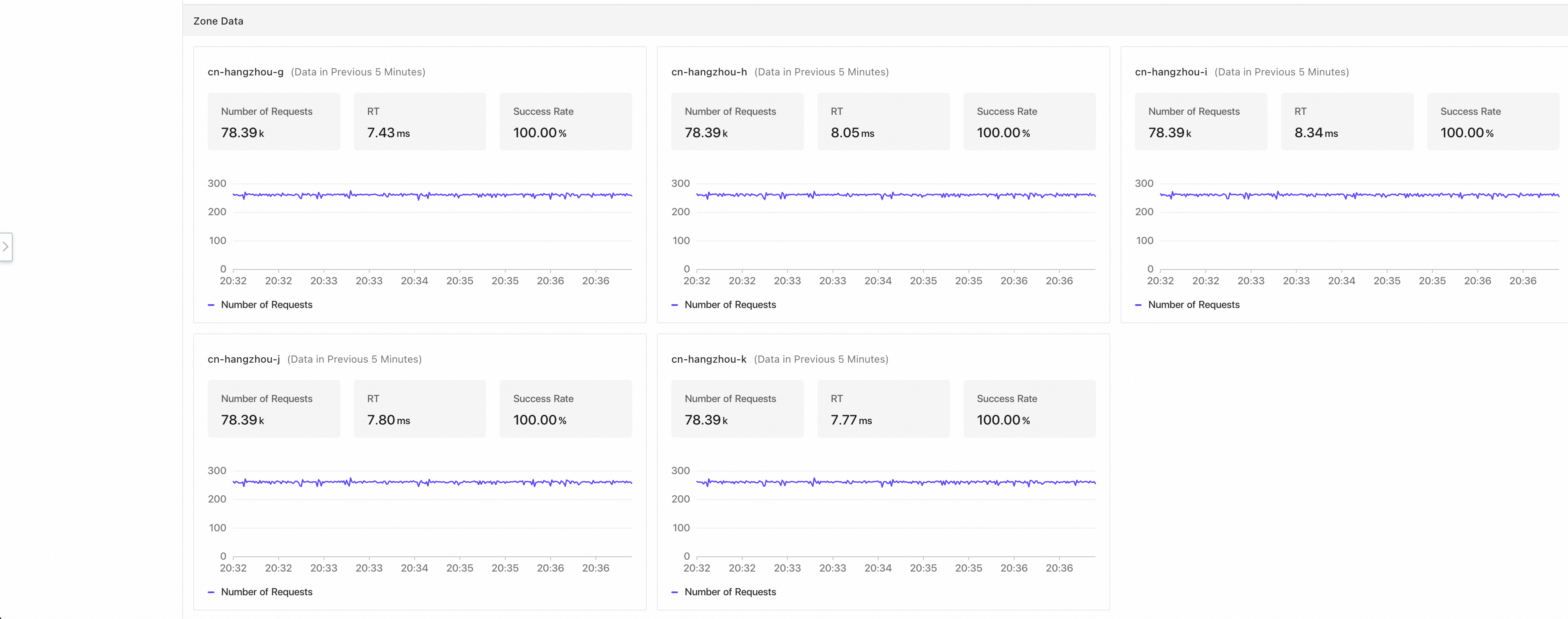
Availability Zone view — Shows the number of requests, the RT, and the success rate for each zone.
When the Intra-zone Provider First feature is not enabled, traffic is evenly distributed across zones.
If you use the Professional Edition or if your namespace is a Professional Edition namespace, you cannot view this data.
To upgrade a Professional Edition namespace to an Enterprise Edition namespace, see Microservice namespace management.
Deployment and traffic checks
On the observation page of the Intra-zone Provider First feature, the Overall Data section shows the number of instances that the application deploys in each zone. If an application is severely unevenly deployed across zones, the chart reflects this. Deploy your applications across zones to improve the overall availability of your system.
In addition, after you enable the Intra-zone Provider First feature for your application, check whether the traffic in any zone is too high or too low and whether the traffic that each zone carries matches the number of nodes deployed in that zone. For example, a zone may have many nodes but carry little traffic, or have few nodes but carry a large amount of traffic. In these cases, adjust the security threshold to avoid stability risks caused by unbalanced traffic distribution.
RT comparison example
If the Intra-zone Provider First feature is not enabled, microservice calls use the default random or round-robin policy, which results in many cross-zone service invocations. In the example described in this section, the feature is not enabled for the application, and the overall average RT over the last 5 minutes is 7.88 ms.
After you enable the Intra-zone Provider First feature for all applications along the entire call chain, the overall average RT of the application changes to 6.85 ms.
After the feature is enabled, traffic is evenly distributed across five zones (cn-hangzhou-k, cn-hangzhou-j, cn-hangzhou-i, cn-hangzhou-h, and cn-hangzhou-g), and each zone carries approximately 20% of the traffic. The overall request success rate is 100.00%, and the security threshold is set to 10.00%.