Container Service for Kubernetes offers HA for control planes, nodes, workloads, and load balancing.
Guidance for This Document
For Container Service for Kubernetes cluster developers and administrators. This document provides general recommendations for planning and building HA clusters. Actual configurations vary based on your cluster environment and business requirements. This document covers HA configurations for both the cluster control plane and data plane.
|
Document Architecture |
Maintenance Role |
Applicable Cluster Types |
|
Managed by ACK. |
Applies only to certain managed ACK clusters, including ACK managed clusters (Pro Edition, Basic Edition), ACK Serverless clusters (Pro Edition, Basic Edition), ACK Edge clusters, and LINGJUN Clusters. Other cluster types such as ACK dedicated clusters and registered clusters are excluded (you maintain their control planes), but can use these configurations as a reference. |
|
|
Maintained by you. |
General. |
|
Cluster Example Architecture
An ACK cluster consists of two main parts: the control plane, and regular or virtual nodes.
-
The control plane manages the cluster, including scheduling workloads and maintaining status. Take an ACK managed cluster as an example. An ACK managed cluster uses Kubernetes-on-Kubernetes architecture to host control plane components such as Kube API Server, etcd, and Kube Scheduler.
-
Regular or virtual nodes: ACK clusters support regular nodes (ECS instances) and virtual nodes. Nodes run workloads and provide resources for containers.
ACK clusters provide multi-availability zone (multi-AZ) HA deployment by default. The following figure shows the architecture of an ACK managed cluster.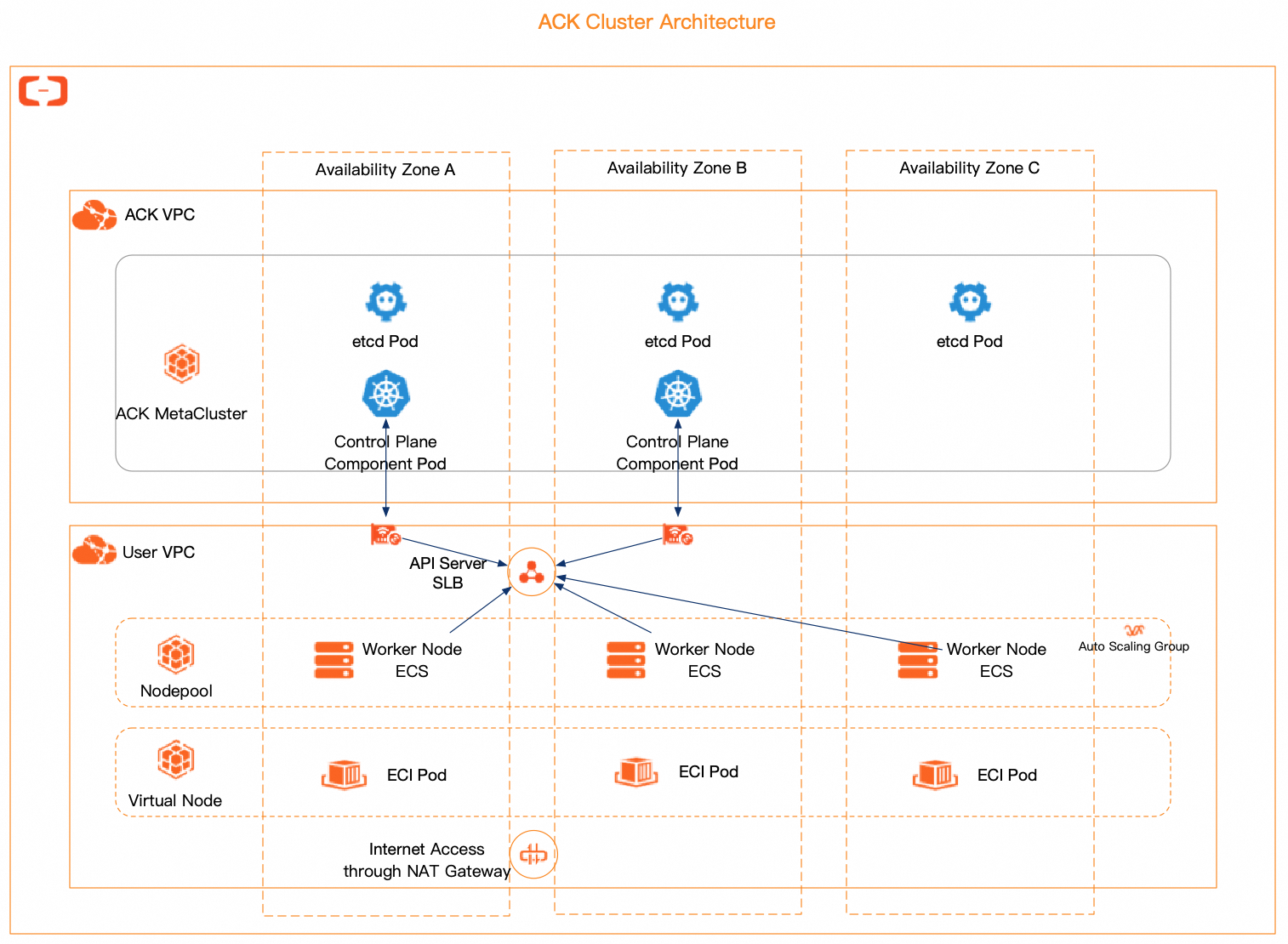
Control Plane Architecture High Availability
For managed ACK clusters, such as ACK managed clusters (Pro Edition and Basic Edition), ACK Serverless clusters (Pro Edition and Basic Edition), ACK Edge clusters, and LINGJUN Clusters, ACK manages their control planes and components such as kube-apiserver, etcd, and kube-scheduler.
-
Multi-zone regions: All managed components use multi-replica, multi-AZ balanced deployment, ensuring service continuity during single-zone or node failures.
-
Single-zone regions: All managed components use multi-replica, multi-node deployment, ensuring service continuity during single-node failures.
Specifically, etcd has at least three replicas and kube-apiserver at least two. All kube-apiserver replicas connect to the cluster VPC through Elastic Network Interfaces (ENIs). The kubelet and Kube Proxy connect to kube-apiserver through the API Server Classic Load Balancer (CLB) or an ENI.
All core managed components scale elastically based on resource usage such as CPU and memory, dynamically meeting API Server requirements with stable Service-Level Agreement (SLA) guarantees.
Beyond the control plane's default multi-zone HA, configure data plane HA: High-Availability Configurations for Node Pools and Virtual Nodes, High-Availability Configurations for Workloads, High-Availability Configurations for Load Balancing, and Recommended Component Configurations.
Node Pool and Virtual Node High Availability Configurations
ACK clusters support regular nodes (ECS instances) and virtual nodes, managed through node pools for operations such as upgrades, scaling, and O&M. Use ECS instances for stable or predictable traffic, and virtual nodes for burst traffic to reduce costs. See Overview of managed node pools.
Node Pool High Availability Configurations
Combine node autoscaling, deployment sets, multi-zone deployments, and Kubernetes topology spread constraints to isolate services across failure domains and reduce single points of failure.
Configure Node Autoscaling
Each node pool is backed by an Auto Scaling group (ESS), supporting manual and automatic scaling at the load scheduling or cluster resource layer. See Auto scaling and Enable node autoscaling.
Enable Deployment Sets
A deployment set disperses ECS instances across physical servers to prevent co-located failures. Specify a deployment set for a node pool so that scaled-out instances are placed on separate physical machines, improving disaster recovery and availability. See Best practices for node pool deployment sets.
Configure Multi-AZ Distribution
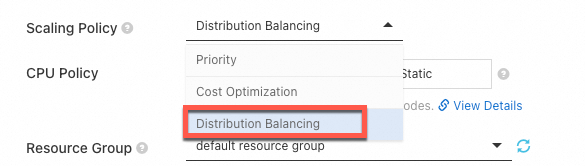
ACK supports multi-zone node pools. Select multiple vSwitches from different zones when creating a node pool, and set the Scaling Policy to Distribution Balancing to evenly distribute ECS instances across zones. If a resource imbalance occurs due to an out-of-stock event, perform a rebalance operation. See Enable node autoscaling.
Enable Topology Spread Constraints
Node autoscaling, deployment sets, and multi-zone distribution, combined with Kubernetes topology spread constraints, achieve different levels of fault domain isolation. ACK node pool nodes automatically receive topology labels such as kubernetes.io/hostname, topology.kubernetes.io/zone, and topology.kubernetes.io/region. Use these constraints to control pod distribution across fault domains and improve tolerance to infrastructure failures.

ACK clusters support topology-aware scheduling, such as retrying pods across topology domains or scheduling pods to ECS instances in the same low-latency deployment set.
Virtual Node High Availability Configurations
ACK virtual nodes schedule pods on Elastic Container Instance (ECI) without managing underlying ECS servers. ECI instances are created on demand with pay-as-you-go billing per second.
Rapid horizontal scaling or batch Job launches may exhaust instance inventory or vSwitch IP addresses in a zone, causing ECI creation failures. The multi-zone feature of ACK Serverless clusters improves ECI creation success rates.
Configure the ECI Profile for virtual nodes and specify vSwitches across different zones for multi-zone deployment.
-
ECI distributes pod creation requests across all vSwitches.
-
If a vSwitch has insufficient inventory, ECI automatically tries the next vSwitch.
Modify the vSwitchIds field in the kube-system/eci-profile ConfigMap. Append vSwitch IDs, separated by commas (,). Changes take effect immediately. See Create multi-zone ECI pods.
kubectl -n kube-system edit cm eci-profileapiVersion: v1
data:
kube-proxy: "true"
privatezone: "true"
quota-cpu: "192000"
quota-memory: 640Ti
quota-pods: "4000"
regionId: cn-hangzhou
resourcegroup: ""
securitygroupId: sg-xxx
vpcId: vpc-xxx
vSwitchIds: vsw-xxx,vsw-yyy,vsw-zzz
kind: ConfigMapWorkload High Availability Configurations
Ensure pods stay running or recover quickly from failures by configuring topology spread constraints, pod anti-affinity, Pod Disruption Budgets (PDBs), and health checks with self-healing.
Configure Topology Spread Constraints
Topology spread constraints evenly distribute pods across nodes and zones to improve application availability. This applies to workload types such as Deployment, StatefulSet, DaemonSet, Job, and CronJob.
Set maxSkew.topologyKey to control pod distribution across topology domains, such as distributing workloads evenly across zones. The following is an example.
apiVersion: apps/v1
kind: Deployment
metadata:
  name: app-run-per-zone
spec:
  replicas: 3
  selector:
    matchLabels:
      app: app-run-per-zone
  template:
    metadata:
      labels:
        app: app-run-per-zone
    spec:
      containers:
        - name: app-container
          image: app-image
      topologySpreadConstraints:
        - maxSkew: 1
          topologyKey: "topology.kubernetes.io/zone"
          whenUnsatisfiable: DoNotSchedule
          labelSelector:
            matchLabels:
              app: app-run-per-zone
Configure Pod Anti-Affinity
Pod anti-affinity prevents pods from being scheduled onto the same node, improving fault isolation. The following is an example.
apiVersion: apps/v1
kind: Deployment
metadata:
  name: app-run-per-node
spec:
  replicas: 3
  selector:
    matchLabels:
      app: app-run-per-node
  template:
    metadata:
      labels:
        app: app-run-per-node
    spec:
      containers:
        - name: app-container
          image: app-image
      affinity:
        podAntiAffinity:
          requiredDuringSchedulingIgnoredDuringExecution:
            - labelSelector:
                matchExpressions:
                  - key: app
                    operator: In
                    values:
                      - app-run-per-node
              topologyKey: "kubernetes.io/hostname"
Topology spread constraints can also limit pods to one per node. With topologyKey: "kubernetes.io/hostname", each node acts as a topology domain.
The following example sets maxSkew to 1, topologyKey to "kubernetes.io/hostname", and whenUnsatisfiable to DoNotSchedule, limiting the pod count difference between nodes to at most one for even distribution.
apiVersion: apps/v1
kind: Deployment
metadata:
  name: my-app
spec:
  replicas: 3
  selector:
    matchLabels:
      app: my-app
  template:
    metadata:
      labels:
        app: my-app
    spec:
      containers:
        - name: my-app-container
          image: my-app-image
      topologySpreadConstraints:
        - maxSkew: 1
          topologyKey: "kubernetes.io/hostname"
          whenUnsatisfiable: DoNotSchedule
          labelSelector:
            matchLabels:
              app: my-app
Configure Pod Disruption Budget
A Pod Disruption Budget (PDB) defines the minimum number of available replicas during node maintenance or failure, preventing too many replicas from being terminated simultaneously. The following is an example.
apiVersion: apps/v1
kind: Deployment
metadata:
  name: app-with-pdb
spec:
  replicas: 3
  selector:
    matchLabels:
      app: app-with-pdb
  template:
    metadata:
      labels:
        app: app-with-pdb
    spec:
      containers:
        - name: app-container
          image: app-container-image
          ports:
            - containerPort: 80
---
apiVersion: policy/v1
kind: PodDisruptionBudget
metadata:
  name: pdb-for-app
spec:
  minAvailable: 2
  selector:
    matchLabels:
      app: app-with-pdb
Configure Pod Health Checks and Self-Healing
Configure liveness, readiness, and startup probes with restart policies to monitor container health and enable self-healing. The following is an example.
apiVersion: v1
kind: Pod
metadata:
  name: app-with-probe
spec:
  containers:
    - name: app-container
      image: app-image
      livenessProbe:
        httpGet:
          path: /health
          port: 80
        initialDelaySeconds: 10
        periodSeconds: 5
      readinessProbe:
        tcpSocket:
          port: 8080
        initialDelaySeconds: 15
        periodSeconds: 10
      startupProbe:
        exec:
          command:
            - cat
            - /tmp/ready
        initialDelaySeconds: 20
        periodSeconds: 15
  restartPolicy: Always
Load Balancing High Availability Configurations
Improve service stability and fault isolation by specifying primary and secondary zones for Server Load Balancer (SLB) instances and enabling topology-aware hints.
Specify Primary and Secondary Zones for CLB Instances
CLB deploys across multiple zones in most regions for cross-data center disaster recovery. Specify primary and secondary zones for CLB instances using Service annotations to match the zones of node pool ECS instances, reducing cross-zone data forwarding. See Regions and zones that support CLB and Specify primary and secondary zones when you create a CLB instance.
The following is an example.
apiVersion: v1
kind: Service
metadata:
  annotations:
    service.beta.kubernetes.io/alibaba-cloud-loadbalancer-master-zoneid: "cn-hangzhou-b"
    service.beta.kubernetes.io/alibaba-cloud-loadbalancer-slave-zoneid: "cn-hangzhou-i"
  name: nginx
  namespace: default
spec:
  ports:
  - port: 80
    protocol: TCP
    targetPort: 80
  selector:
    run: nginx
  type: LoadBalancer
Enable topology aware hints
Kubernetes 1.23 introduced topology-aware routing (topology-aware hints) to reduce cross-zone traffic and improve network performance.
Enable this in the Service. When sufficient endpoints are available in the zone, the EndpointSlice controller prioritizes routing traffic to endpoints closer to the request origin based on topology hints, keeping traffic within the same zone to reduce costs. See Topology Aware Routing.
Add-on recommended configurations
ACK provides various components to extend cluster functionality. See Component overview and release notes and Manage components.
Properly Deploy Nginx Ingress Controller
Distribute Nginx Ingress Controller across different nodes to prevent resource contention and single points of failure. Use dedicated nodes for better performance and stability.
Avoid resource limits for Nginx Ingress Controller to prevent OOM-related traffic interruptions. If limits are necessary, set CPU to at least 1000m and memory to at least 2 GiB. See Usage recommendations for Nginx Ingress Controller.
For ALB Ingress or MSE Ingress controllers, configure multiple zones during creation. See Create a cloud-native gateway, Create and use an ALB Ingress to expose Services, and Comparison of Nginx Ingress, ALB Ingress, and MSE Ingress.
Properly Deploy CoreDNS
Distribute CoreDNS replicas across different zones and nodes to avoid single-point failures. CoreDNS uses weak anti-affinity per node by default; insufficient resources may concentrate replicas on one node. Delete the pod to re-trigger scheduling if this occurs.
Ensure CoreDNS nodes have sufficient CPU and memory to maintain DNS QPS and latency. See DNS best practices.
References
-
Use larger ECS instance types for worker nodes. See Recommended ECS instance type configurations.
-
For large ACK managed cluster Pro Edition deployments (typically more than 500 nodes or 10,000 pods), see Usage recommendations for large-scale clusters.