Qwen-Image is a general-purpose image generation model that supports multiple artistic styles and excels at complex text rendering . It handles multi-line layouts, paragraph-level text generation, and fine-grained detail rendering.
Quick access: User guide | Try it online (Singapore | Beijing) | Technical blog (more examples) |
Examples
Prompt | Generated image |
|---|---|
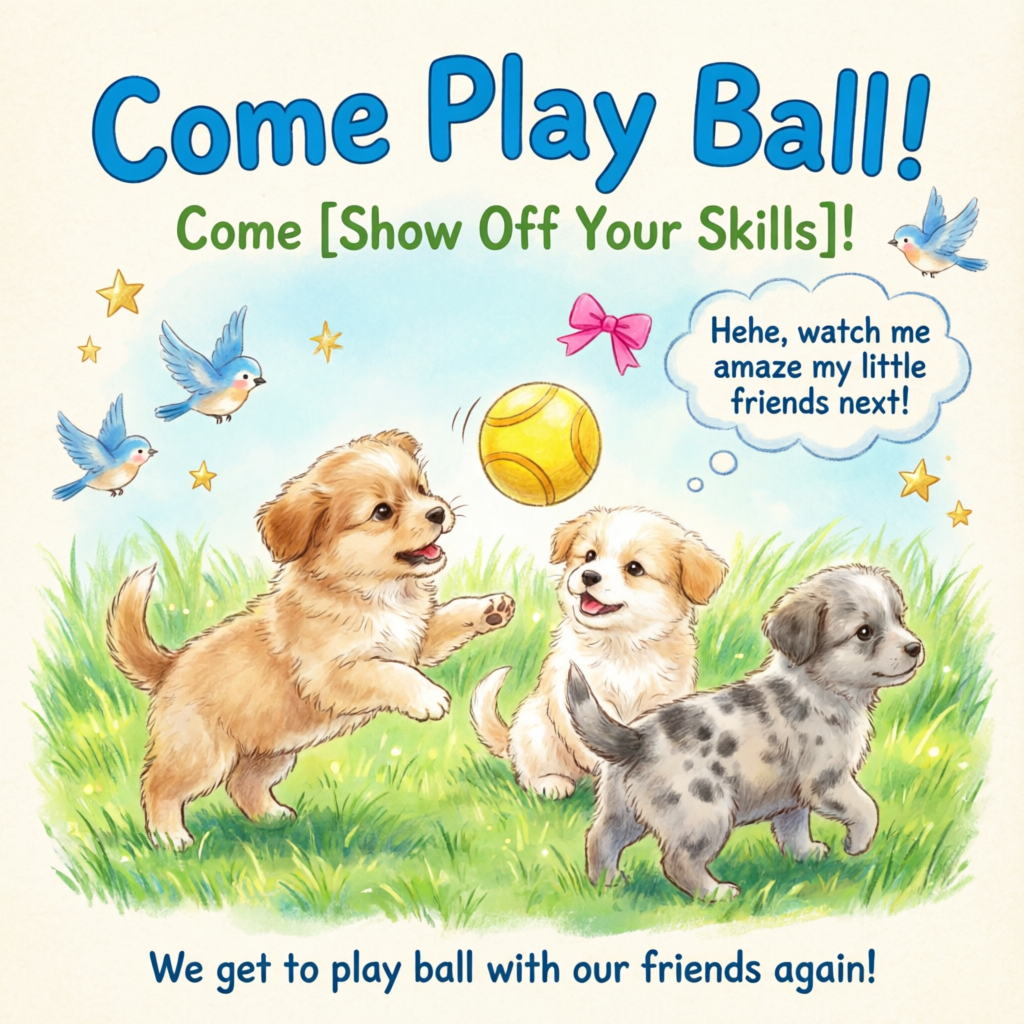
A healing-style hand-drawn poster featuring three puppies playing with a ball on lush green grass, adorned with decorative elements such as birds and stars. The main title “Come Play Ball!” appears prominently at the top in bold, blue cartoon font. Below it, the subtitle “Come [Show Off Your Skills]!” appears in green font. A speech bubble adds playful charm with the text: “Hehe, watch me amaze my little friends next!” At the bottom, supplementary text reads: “We get to play ball with our friends again!” The color palette centers on fresh greens and blues, accented with bright pink and yellow tones to highlight a cheerful, childlike atmosphere. |
|
Model overview
Model | Description | Output image specifications |
|---|---|---|
qwen-image-3.0-pro | The Qwen image generation and editing 3.0 series supports both text-to-image (T2I) and image-to-image/image editing (I2I). For 3.0 series API calls, see Qwen Image Generation and Editing 3.0. | Resolution: Total pixels must be between 512×512 and 2048×2048. Format: PNG |
qwen-image-3.0 Balances quality and speed. | ||
qwen-image-2.0-pro Same capabilities as qwen-image-2.0-pro-2026-04-22 | Qwen Pro series for image generation and editing. Offers stronger text rendering, realistic texture, and semantic adherence. For image editing, see Qwen-Image Editing. | Resolution: Set width and height freely. Total pixels must be between 512×512 and 2048×2048. Default resolution is 2048×2048. Format: PNG Number of images: 1–6 |
qwen-image-2.0-pro-2026-06-22 | ||
qwen-image-2.0-pro-2026-04-22 | ||
qwen-image-2.0-pro-2026-03-03 | ||
qwen-image-2.0 Same capabilities as qwen-image-2.0-2026-03-03 | Qwen accelerated series for image generation and editing. Balances quality and response speed. For image editing, see Qwen-Image Editing. | |
qwen-image-2.0-2026-03-03 | ||
qwen-image-max Same capabilities as qwen-image-max-2025-12-30 | Qwen Max series for image generation. Delivers higher realism and naturalness, with fewer AI-generation artifacts. | Resolution: See size parameter settings for supported resolutions and aspect ratios. Format: PNG Number of images: Fixed at 1 |
qwen-image-max-2025-12-30 | ||
qwen-image-plus Same capabilities as qwen-image | Qwen Plus series for image generation. Excels at diverse artistic styles and text rendering. | |
qwen-image-plus-2026-01-09 | ||
qwen-image |
Only qwen-image-plus and qwen-image support asynchronous calls .
NoteBefore calling the API, check the supported models list for your region.
Prerequisites
Before making a call, get an API key and export the API key as an environment variable. To make calls using the SDK, install the DashScope SDK.
ImportantThe China (Beijing) and Singapore regions have separate API keys and request endpoints. They cannot be used interchangeably. Cross-region calls lead to authentication failures or service errors.
Synchronous API (recommended)
HTTP
Synchronous calls return results in a single request.
Singapore:POST https://{WorkspaceId}.ap-southeast-1.maas.aliyuncs.com/api/v1/services/aigc/multimodal-generation/generation
Beijing:POST https://{WorkspaceId}.cn-beijing.maas.aliyuncs.com/api/v1/services/aigc/multimodal-generation/generation
Replace {WorkspaceId} with your actual workspace ID.
Request parameters | Text-to-image |
Request headers | |
Content-Type The content type of the request. Must be | |
Authorization Authenticates the request with a Model Studio API key. Example: Bearer sk-xxxx. | |
Request body | |
model Model name. Example: | |
input Input information. | |
parameters Image processing parameters. Properties negative_prompt A negative prompt describing what you do not want in the image. Supports Chinese and English. Maximum length is 500 characters. Excess characters are truncated automatically. Example: Low resolution, low quality, distorted limbs, malformed fingers, oversaturated colors, wax-like appearance, no facial details, overly smooth surfaces, AI-generated look. Chaotic composition. Blurry or distorted text. size Output image resolution, formatted as qwen-image-2.0 series models: Total pixels must be between
qwen-image-max and qwen-image-plus series models: Default resolution is
n Number of output images. Default is 1. For qwen-image-2.0 series models, you can choose 1–6 images. For qwen-image-max and qwen-image-plus series models, this value is fixed at 1. Setting any other value returns an error. prompt_extend Enable smart prompt rewriting. The model optimizes the positive prompt. Does not affect the negative prompt.
View rewriting examples
Original prompt (orig_prompt): A sitting ginger cat with a joyful expression, looking lively, adorable, and incredibly lifelike. Actual prompt (actual_prompt): Photorealistic wildlife portrait: A sitting ginger cat with lush, sun-kissed fur and a vibrant, joyful expression, eyes sparkling with curiosity and warmth. The cat's head is slightly tilted, ears perked forward, mouth gently open in a contented, lively pose—exuding adorable charm and incredible lifelike detail. Soft natural lighting enhances the texture of each individual whisker and fur strand, with subtle highlights on the muzzle and inner ears. Background: a softly blurred autumn garden at golden hour—warm tones of amber leaves, dappled sunlight filtering through trees, and faint hints of mossy stone steps. Composition emphasizes the cat as the central focal point, captured in sharp focus with shallow depth of field. Style: ultra-realistic photography, National Geographic-level detail, 8K resolution, Canon EOS R5, f/1.2 aperture, cinematic lighting, true-to-life color grading, minimal post-processing. No text or overlays. watermark Adds a “Qwen-Image” watermark to the bottom-right corner of the image. Default: seed Random number seed. Valid range: Using the same Note: Image generation is probabilistic. Even with the same |

Response parameters | Task succeededImage URLs are valid for only 24 hours and then automatically purged. Save generated images promptly. Task failedIf the task fails, the response includes error details in the code and message fields. See Error codes. |
output Task output information. | |
usage NoteThis field is only returned in async calls. Synchronous ImageSynthesis SDK calls do not return this field. Output statistics. Counts only successful results. | |
request_id Unique request identifier for tracing and troubleshooting. | |
code Error code. Returned only for failed requests. See Error codes. | |
message Detailed error message. Returned only for failed requests. See Error codes. |
DashScope SDK call
The DashScope SDK supports Python and Java.
The parameter names in the SDK closely match the HTTP parameters, and the parameter structures follow language-specific conventions. For synchronous call parameters, see HTTP.
Python
NoteInstall the latest DashScope Python SDK to avoid runtime errors: Install SDK.
Request example
import json
import os
import dashscope
from dashscope import MultiModalConversation

# Singapore region. Replace {WorkspaceId} with your actual workspace ID. URLs vary by region.
dashscope.base_http_api_url = 'https://{WorkspaceId}.ap-southeast-1.maas.aliyuncs.com/api/v1'

messages = [
    {
        "role": "user",
        "content": [
            {"text": "Healing-style hand-drawn poster featuring three puppies playing with a ball on lush green grass, adorned with decorative elements such as birds and stars. The main title “Come Play Ball!” is prominently displayed at the top in bold, blue cartoon font. Below it, the subtitle “Come [Show Off Your Skills]!” appears in green font. A speech bubble adds playful charm with the text: “Hehe, watch me amaze my little friends next!” At the bottom, supplementary text reads: “We get to play ball with our friends again!” The color palette centers on fresh greens and blues, accented with bright pink and yellow tones to highlight a cheerful, childlike atmosphere."}
        ]
    }
]

# API keys differ between Beijing and Singapore regions. Get your API key: https://www.alibabacloud.com/help/model-studio/get-api-key
# If you haven't set the environment variable, replace the line below with: api_key="sk-xxx"
api_key = os.getenv("DASHSCOPE_API_KEY")

response = MultiModalConversation.call(
    api_key=api_key,
    model="qwen-image-2.0-pro",
    messages=messages,
    result_format='message',
    stream=False,
    watermark=False,
    prompt_extend=True,
    negative_prompt="Low resolution, low quality, distorted limbs, malformed fingers, oversaturated colors, wax-figure appearance, lack of facial detail, excessive smoothness, AI-looking artifacts, chaotic composition, blurry or warped text.",
    size='2048*2048'
)

if response.status_code == 200:
    print(json.dumps(response, ensure_ascii=False))
else:
    print(f"HTTP status code: {response.status_code}")
    print(f"Error code: {response.code}")
    print(f"Error message: {response.message}")
    print("See documentation: https://www.alibabacloud.com/help/model-studio/error-code")
Response example
Image URLs expire after 24 hours. Download the images promptly.
{
    "status_code": 200,
    "request_id": "d2d1a8c0-325f-9b9d-8b90-xxxxxx",
    "code": "",
    "message": "",
    "output": {
        "text": null,
        "finish_reason": null,
        "choices": [
            {
                "finish_reason": "stop",
                "message": {
                    "role": "assistant",
                    "content": [
                        {
                            "image": "https://dashscope-result-wlcb.oss-cn-wulanchabu.aliyuncs.com/xxx.png?Expires=xxx"
                        }
                    ]
                }
            }
        ]
    }
}
Java
NoteYou must install the latest DashScope Java SDK. Otherwise, runtime errors may occur: Install SDK.
Request example
import com.alibaba.dashscope.aigc.multimodalconversation.MultiModalConversation;
import com.alibaba.dashscope.aigc.multimodalconversation.MultiModalConversationParam;
import com.alibaba.dashscope.aigc.multimodalconversation.MultiModalConversationResult;
import com.alibaba.dashscope.common.MultiModalMessage;
import com.alibaba.dashscope.common.Role;
import com.alibaba.dashscope.exception.ApiException;
import com.alibaba.dashscope.exception.NoApiKeyException;
import com.alibaba.dashscope.exception.UploadFileException;
import com.alibaba.dashscope.utils.JsonUtils;
import com.alibaba.dashscope.utils.Constants;

import java.io.IOException;
import java.util.Arrays;
import java.util.Collections;
import java.util.HashMap;
import java.util.Map;

public class QwenImage {

    static {
        // Singapore region. Replace {WorkspaceId} with your actual workspace ID. URLs vary by region.
        Constants.baseHttpApiUrl = "https://{WorkspaceId}.ap-southeast-1.maas.aliyuncs.com/api/v1";
    }

    // API keys differ between Beijing and Singapore regions. Get your API key: https://www.alibabacloud.com/help/model-studio/get-api-key
    // If you haven't set the environment variable, replace the line below with: static String apiKey="sk-xxx"
    static String apiKey = System.getenv("DASHSCOPE_API_KEY");

    public static void call() throws ApiException, NoApiKeyException, UploadFileException, IOException {

        MultiModalConversation conv = new MultiModalConversation();

        MultiModalMessage userMessage = MultiModalMessage.builder().role(Role.USER.getValue())
                .content(Arrays.asList(
                        Collections.singletonMap("text", "Healing-style hand-drawn poster featuring three puppies playing with a ball on lush green grass, adorned with decorative elements such as birds and stars. The main title “Come Play Ball!” is prominently displayed at the top in bold, blue cartoon font. Below it, the subtitle “Come [Show Off Your Skills]!” appears in green font. A speech bubble adds playful charm with the text: “Hehe, watch me amaze my little friends next!” At the bottom, supplementary text reads: “We get to play ball with our friends again!” The color palette centers on fresh greens and blues, accented with bright pink and yellow tones to highlight a cheerful, childlike atmosphere.")
                )).build();

        Map<String, Object> parameters = new HashMap<>();
        parameters.put("watermark", false);
        parameters.put("prompt_extend", true);
        parameters.put("negative_prompt", "Low resolution, low quality, distorted limbs, malformed fingers, oversaturated colors, wax-figure appearance, lack of facial detail, excessive smoothness, AI-looking artifacts, chaotic composition, blurry or warped text.");
        parameters.put("size", "2048*2048");

        MultiModalConversationParam param = MultiModalConversationParam.builder()
                .apiKey(apiKey)
                .model("qwen-image-2.0-pro")
                .messages(Collections.singletonList(userMessage))
                .parameters(parameters)
                .build();

        MultiModalConversationResult result = conv.call(param);
        System.out.println(JsonUtils.toJson(result));
    }

    public static void main(String[] args) {
        try {
            call();
        } catch (ApiException | NoApiKeyException | UploadFileException | IOException e) {
            System.out.println(e.getMessage());
        }
        System.exit(0);
    }
}
Response example
Image URLs expire after 24 hours. Download the images promptly.
{
    "requestId": "5b6f2d04-b019-40db-a5cc-xxxxxx",
    "output": {
        "choices": [
            {
                "finish_reason": "stop",
                "message": {
                    "role": "assistant",
                    "content": [
                        {
                            "image": "https://dashscope-result-wlcb.oss-cn-wulanchabu.aliyuncs.com/xxx.png?Expires=xxx"
                        }
                    ]
                }
            }
        ]
    }
}
Asynchronous API
ImportantOnly qwen-image-plus and qwen-image support asynchronous calls.
HTTP
Asynchronous calls use a two-step HTTP workflow:
- Create a task to get a task ID: Send a request to create a task. The response returns a task ID (task_id).
- Poll for results using the task ID: Poll the task status with the task_id until it completes and returns an image URL.
Step 1: Create a task to get a task ID
Singapore:POST https://{WorkspaceId}.ap-southeast-1.maas.aliyuncs.com/api/v1/services/aigc/text2image/image-synthesis
Beijing:POST https://{WorkspaceId}.cn-beijing.maas.aliyuncs.com/api/v1/services/aigc/text2image/image-synthesis
Note
- After the task is created, use the returned
task_idto query the result. Thetask_idis valid for 24 hours. Do not create duplicate tasks. Instead, use polling to retrieve the result. - For guidance for beginners, see Call APIs with Postman or cURL.
Request parameters | Text-to-imageOnly |
Request headers | |
Content-Type The content type of the request. Must be | |
Authorization Authenticates the request with a Model Studio API key. Example: Bearer sk-xxxx. | |
X-DashScope-Async Enables asynchronous processing. HTTP requests support only asynchronous calls. Must be ImportantIf this request header is missing, the error "current user api does not support synchronous calls" is returned. | |
Request body | |
model Model name. Only Example: | |
input Input information. | |
parameters Image processing parameters. Properties size Output image resolution, formatted as qwen-image-2.0 series models: Total pixels must be between
qwen-image-max and qwen-image-plus series models: Default resolution is
n Number of generated images. This value is fixed at 1. Setting any other value returns an error. prompt_extend Enable smart prompt rewriting. The model optimizes the positive prompt. Does not affect the negative prompt.
View rewriting examples
Original prompt (orig_prompt): A sitting ginger cat with a joyful expression, looking lively, adorable, and incredibly lifelike. Actual prompt (actual_prompt): Photorealistic wildlife portrait: A sitting ginger cat with lush, sun-kissed fur and a vibrant, joyful expression, eyes sparkling with curiosity and warmth. The cat's head is slightly tilted, ears perked forward, mouth gently open in a contented, lively pose—exuding adorable charm and incredible lifelike detail. Soft natural lighting enhances the texture of each individual whisker and fur strand, with subtle highlights on the muzzle and inner ears. Background: a softly blurred autumn garden at golden hour—warm tones of amber leaves, dappled sunlight filtering through trees, and faint hints of mossy stone steps. Composition emphasizes the cat as the central focal point, captured in sharp focus with shallow depth of field. Style: ultra-realistic photography, National Geographic-level detail, 8K resolution, Canon EOS R5, f/1.2 aperture, cinematic lighting, true-to-life color grading, minimal post-processing. No text or overlays. watermark Adds a “Qwen-Image” watermark to the bottom-right corner of the image. Default: seed Random number seed. Valid range: Using the same Note: Image generation is probabilistic. Even with the same |
Response parameters | Successful responseSave the Error responseTask creation failed. See Error codes. |
output Task output information. | |
request_id Unique request identifier for tracing and troubleshooting. | |
code Error code. Returned only for failed requests. See Error codes. | |
message Detailed error message. Returned only for failed requests. See Error codes. |
Step 2: Poll for results using the task ID
Singapore
GET https://{WorkspaceId}.ap-southeast-1.maas.aliyuncs.com/api/v1/tasks/{task_id}
When calling, replace {WorkspaceId} with your actual workspace ID.
China (Beijing)
GET https://{WorkspaceId}.cn-beijing.maas.aliyuncs.com/api/v1/tasks/{task_id}
When calling, replace {WorkspaceId} with your actual workspace ID.
Note
- Polling recommendation: Image generation is time-consuming. Use a polling mechanism with a reasonable interval, such as 10 seconds.
- Task state transition: PENDING → RUNNING → SUCCEEDED or FAILED.
- Result link: After a task succeeds, an image URL valid for 24 hours is returned. Download and save the image to permanent storage, such as OSS.
Request parameters | Poll for task resultsReplace |
Request headers | |
Authorization Authenticates the request with a Model Studio API key. Example: Bearer sk-xxxx. | |
URL path parameters | |
task_id The ID of the task. |
Response parameters | Task succeededTask data (task status and image URLs) is retained for only 24 hours and then automatically purged. Save generated images promptly. Task failedWhen a task fails, |
output Task output information. | |
usage Output statistics. Counts only successful results. | |
request_id Unique request identifier for tracing and troubleshooting. |
DashScope SDK
The DashScope SDK supports Python and Java.
SDK parameter names closely match their HTTP counterparts. Parameter structures follow language-specific conventions. For asynchronous call parameters, see HTTP.
Image models require longer processing times, so the underlying service uses asynchronous execution. The SDK provides two modes:
- Synchronous call (blocking mode): The SDK waits for the task to complete and returns the final result. This matches standard synchronous call behavior.
- Asynchronous call (non-blocking mode): The call returns immediately with a task ID. Poll for the task status and final result using that ID.
Python SDK
NoteInstall the latest DashScope Python SDK to avoid runtime errors: Install SDK.
Synchronous
Request example
from http import HTTPStatus
from urllib.parse import urlparse, unquote
from pathlib import PurePosixPath
import requests
from dashscope import ImageSynthesis
import os
import dashscope

# Singapore region. Replace {WorkspaceId} with your actual workspace ID. URLs vary by region.
dashscope.base_http_api_url = 'https://{WorkspaceId}.ap-southeast-1.maas.aliyuncs.com/api/v1'

prompt = "Healing-style hand-drawn poster featuring three puppies playing with a ball on lush green grass, adorned with decorative elements such as birds and stars. The main title “Come Play Ball!” is prominently displayed at the top in bold, blue cartoon font. Below it, the subtitle “Come [Show Off Your Skills]!” appears in green font. A speech bubble adds playful charm with the text: “Hehe, watch me amaze my little friends next!” At the bottom, supplementary text reads: “We get to play ball with our friends again!” The color palette centers on fresh greens and blues, accented with bright pink and yellow tones to highlight a cheerful, childlike atmosphere."

# API keys differ between Beijing and Singapore regions. Get your API key: https://www.alibabacloud.com/help/model-studio/get-api-key
# If you haven't set the environment variable, replace the line below with: api_key="sk-xxx"
api_key = os.getenv("DASHSCOPE_API_KEY")

print('----Sync call, please wait a moment----')
rsp = ImageSynthesis.call(api_key=api_key,
                          model="qwen-image-plus", # Only qwen-image-plus and qwen-image support asynchronous calls
                          prompt=prompt,
                          negative_prompt=" ",
                          n=1,
                          size='1664*928',
                          prompt_extend=True,
                          watermark=False)
print(f'response: {rsp}')
if rsp.status_code == HTTPStatus.OK:
    # Save image in current directory
    for result in rsp.output.results:
        file_name = PurePosixPath(unquote(urlparse(result.url).path)).parts[-1]
        with open('./%s' % file_name, 'wb+') as f:
            f.write(requests.get(result.url).content)
else:
    print(f'Sync call failed, status_code: {rsp.status_code}, code: {rsp.code}, message: {rsp.message}')
Response example
URLs expire after 24 hours. Download images promptly.
{
    "status_code": 200,
    "request_id": "a47b1a65-7041-4565-9068-xxxxxx",
    "code": null,
    "message": "",
    "output": {
        "task_id": "91093132-475e-43cf-b94e-xxxxxx",
        "task_status": "SUCCEEDED",
        "results": [
            {
                "url": "https://dashscope-result-sz.oss-cn-shenzhen.aliyuncs.com/xxx.png?Expires=xxxxxx",
                "orig_prompt": "Healing-style hand-drawn poster featuring three puppies playing with a ball on lush green grass, adorned with decorative elements such as birds and stars. The main title “Come Play Ball!” is prominently displayed at the top in bold, blue cartoon font. Below it, the subtitle “Come [Show Off Your Skills]!” appears in green font. A speech bubble adds playful charm with the text: “Hehe, watch me amaze my little friends next!” At the bottom, supplementary text reads: “We get to play ball with our friends again!” The color palette centers on fresh greens and blues, accented with bright pink and yellow tones to highlight a cheerful, childlike atmosphere.",
                "actual_prompt": "Childhood-inspired hand-drawn poster design: Three playful puppies joyfully interact with a colorful ball on a vibrant patch of lush green grass. Delicate decorative elements including fluttering birds and twinkling stars are scattered throughout. At the top center, the bold, blue cartoon-style title “Come Play Ball!” stands out prominently. Directly beneath, the subtitle “Come [Show Off Your Skills]!” is rendered in cheerful green lettering. A whimsical speech bubble near one of the puppies contains the playful text: “Hehe, watch me amaze my little friends next!” At the bottom edge, smaller supplementary text reads: “We get to play ball with our friends again!” The color palette is centered on fresh greens and sky blues, accented with pops of bright pink and sunny yellow, enhancing the cheerful, childlike atmosphere. Style evokes nostalgic, hand-inked illustrations with soft textures, gentle linework, and a whimsical, storybook-like composition."
            }
        ],
        "submit_time": "2025-09-09 13:39:20.659",
        "scheduled_time": "2025-09-09 13:39:20.717",
        "end_time": "2025-09-09 13:39:45.233"
    },
    "usage": {
        "image_count": 1
    }
}
Asynchronous
Request example
from http import HTTPStatus
from urllib.parse import urlparse, unquote
from pathlib import PurePosixPath
import requests
from dashscope import ImageSynthesis
import os
import dashscope
import time

# Singapore region. Replace {WorkspaceId} with your actual workspace ID. URLs vary by region.
dashscope.base_http_api_url = 'https://{WorkspaceId}.ap-southeast-1.maas.aliyuncs.com/api/v1'

prompt = "Healing-style hand-drawn poster featuring three puppies playing with a ball on lush green grass, adorned with decorative elements such as birds and stars. The main title “Come Play Ball!” is prominently displayed at the top in bold, blue cartoon font. Below it, the subtitle “Come [Show Off Your Skills]!” appears in green font. A speech bubble adds playful charm with the text: “Hehe, watch me amaze my little friends next!” At the bottom, supplementary text reads: “We get to play ball with our friends again!” The color palette centers on fresh greens and blues, accented with bright pink and yellow tones to highlight a cheerful, childlike atmosphere."

# API keys differ between Beijing and Singapore regions. Get your API key: https://www.alibabacloud.com/help/model-studio/get-api-key
# If you haven't set the environment variable, replace the line below with: api_key="sk-xxx"
api_key = os.getenv("DASHSCOPE_API_KEY")

def async_call():
    print('----Creating Task----')
    task_info = create_async_task()
    print('----Polling Task Status----')
    poll_task_status(task_info)

# Create asynchronous task
def create_async_task():
    rsp = ImageSynthesis.async_call(api_key=api_key,
                                    model="qwen-image-plus", # Only qwen-image-plus and qwen-image support asynchronous calls
                                    prompt=prompt,
                                    negative_prompt=" ",
                                    n=1,
                                    size='1664*928',
                                    prompt_extend=True,
                                    watermark=False)
    print(rsp)
    if rsp.status_code == HTTPStatus.OK:
        print(rsp.output)
    else:
        print(f'Failed to create task, status_code: {rsp.status_code}, code: {rsp.code}, message: {rsp.message}')
    return rsp

# Poll asynchronous task status, query every 5 seconds, maximum polling for 1 minute
def poll_task_status(task):
    start_time = time.time()
    timeout = 60  # 1 minute timeout

    while True:
        # Check if timeout
        if time.time() - start_time > timeout:
            print('Polling timeout (1 minute), task not completed')
            return

        # Get task status
        status_rsp = ImageSynthesis.fetch(task)
        print(f'Task status query result: {status_rsp}')

        if status_rsp.status_code != HTTPStatus.OK:
            print(f'Failed to get task status, status_code: {status_rsp.status_code}, code: {status_rsp.code}, message: {status_rsp.message}')
            return
        task_status = status_rsp.output.task_status
        print(f'Current task status: {task_status}')

        if task_status == 'SUCCEEDED':
            print('Task completed, downloading image...')
            for result in status_rsp.output.results:
                file_name = PurePosixPath(unquote(urlparse(result.url).path)).parts[-1]
                with open(f'./{file_name}', 'wb+') as f:
                    f.write(requests.get(result.url).content)
                print(f'Image saved as: {file_name}')
            break
        elif task_status == 'FAILED':
            print(f'Task execution failed, status: {task_status}, code: {status_rsp.code}, message: {status_rsp.message}')
            break
        elif task_status == 'PENDING' or task_status == 'RUNNING':
            print('Task in progress, continue querying after 5 seconds...')
            time.sleep(5)
        else:
            print(f'Unknown task status: {task_status}, continue querying after 5 seconds...')
            time.sleep(5)

# Cancel asynchronous task, only tasks in PENDING status can be canceled
def cancel_task(task):
    rsp = ImageSynthesis.cancel(task)
    print(rsp)
    if rsp.status_code == HTTPStatus.OK:
        print(rsp.output.task_status)
    else:
        print(f'Failed to cancel task, status_code: {rsp.status_code}, code: {rsp.code}, message: {rsp.message}')

if __name__ == '__main__':
    async_call()
Response example
- Response for task creation
{
	"status_code": 200,
	"request_id": "31b04171-011c-96bd-ac00-xxxxxx",
	"code": "",
	"message": "",
	"output": {
		"task_id": "4f90cf14-a34e-4eae-xxxxxxxx",
		"task_status": "PENDING",
		"results": []
	},
	"usage": null
}
-
Response for polling task results
URLs expire after 24 hours. Download images promptly.
{
    "status_code": 200,
    "request_id": "a47b1a65-7041-4565-9068-xxxxxx",
    "code": null,
    "message": "",
    "output": {
        "task_id": "91093132-475e-43cf-b94e-xxxxxx",
        "task_status": "SUCCEEDED",
        "results": [
            {
                "url": "https://dashscope-result-sz.oss-cn-shenzhen.aliyuncs.com/xxx.png?Expires=xxxxxx",
                "orig_prompt": "Healing-style hand-drawn poster featuring three puppies playing with a ball on lush green grass, adorned with decorative elements such as birds and stars. The main title “Come Play Ball!” is prominently displayed at the top in bold, blue cartoon font. Below it, the subtitle “Come [Show Off Your Skills]!” appears in green font. A speech bubble adds playful charm with the text: “Hehe, watch me amaze my little friends next!” At the bottom, supplementary text reads: “We get to play ball with our friends again!” The color palette centers on fresh greens and blues, accented with bright pink and yellow tones to highlight a cheerful, childlike atmosphere.",
                "actual_prompt": "Childhood-inspired hand-drawn poster design: Three playful puppies joyfully interact with a colorful ball on a vibrant patch of lush green grass. Delicate decorative elements including fluttering birds and twinkling stars are scattered throughout. At the top center, the bold, blue cartoon-style title “Come Play Ball!” stands out prominently. Directly beneath, the subtitle “Come [Show Off Your Skills]!” is rendered in cheerful green lettering. A whimsical speech bubble near one of the puppies contains the playful text: “Hehe, watch me amaze my little friends next!” At the bottom edge, smaller supplementary text reads: “We get to play ball with our friends again!” The color palette is centered on fresh greens and sky blues, accented with pops of bright pink and sunny yellow, enhancing the cheerful, childlike atmosphere. Style evokes nostalgic, hand-inked illustrations with soft textures, gentle linework, and a whimsical, storybook-like composition."
            }
        ],
        "submit_time": "2025-09-09 13:39:20.659",
        "scheduled_time": "2025-09-09 13:39:20.717",
        "end_time": "2025-09-09 13:39:45.233"
    },
    "usage": {
        "image_count": 1
    }
}
Java SDK
NoteYou must install the latest DashScope Java SDK. Otherwise, runtime errors may occur: Install SDK.
Synchronous
Request example
// Copyright (c) Alibaba, Inc. and its affiliates.

import com.alibaba.dashscope.aigc.imagesynthesis.ImageSynthesis;
import com.alibaba.dashscope.aigc.imagesynthesis.ImageSynthesisListResult;
import com.alibaba.dashscope.aigc.imagesynthesis.ImageSynthesisParam;
import com.alibaba.dashscope.aigc.imagesynthesis.ImageSynthesisResult;
import com.alibaba.dashscope.exception.ApiException;
import com.alibaba.dashscope.exception.NoApiKeyException;
import com.alibaba.dashscope.task.AsyncTaskListParam;
import com.alibaba.dashscope.utils.Constants;
import com.alibaba.dashscope.utils.JsonUtils;
import java.util.HashMap;
import java.util.Map;

public class Text2Image {
    static {
        // Singapore region. Replace {WorkspaceId} with your actual workspace ID. URLs vary by region.
        Constants.baseHttpApiUrl = "https://{WorkspaceId}.ap-southeast-1.maas.aliyuncs.com/api/v1";
    }

    // API keys differ between Beijing and Singapore regions. Get your API key: https://www.alibabacloud.com/help/model-studio/get-api-key
    // If you haven't set the environment variable, replace the line below with: static String apiKey = "sk-xxx"
    static String apiKey = System.getenv("DASHSCOPE_API_KEY");

    public static void basicCall() throws ApiException, NoApiKeyException {
        String prompt = "Healing-style hand-drawn poster featuring three puppies playing with a ball on lush green grass, adorned with decorative elements such as birds and stars. The main title “Come Play Ball!” is prominently displayed at the top in bold, blue cartoon font. Below it, the subtitle “Come [Show Off Your Skills]!” appears in green font. A speech bubble adds playful charm with the text: “Hehe, watch me amaze my little friends next!” At the bottom, supplementary text reads: “We get to play ball with our friends again!” The color palette centers on fresh greens and blues, accented with bright pink and yellow tones to highlight a cheerful, childlike atmosphere.";
        Map<String, Object> parameters = new HashMap<>();
        parameters.put("prompt_extend", true);
        parameters.put("watermark", false);
        parameters.put("negative_prompt", " ");
        ImageSynthesisParam param =
                ImageSynthesisParam.builder()
                        .apiKey(apiKey)
                        // Only qwen-image-plus and qwen-image support asynchronous calls
                        .model("qwen-image-plus")
                        .prompt(prompt)
                        .n(1)
                        .size("1664*928")
                        .parameters(parameters)
                        .build();

        ImageSynthesis imageSynthesis = new ImageSynthesis();
        ImageSynthesisResult result = null;
        try {
            System.out.println("---Sync call, please wait a moment----");
            result = imageSynthesis.call(param);
        } catch (ApiException | NoApiKeyException e){
            throw new RuntimeException(e.getMessage());
        }
        System.out.println(JsonUtils.toJson(result));
    }

    public static void main(String[] args){
        try{
            basicCall();
        }catch(ApiException|NoApiKeyException e){
            System.out.println(e.getMessage());
        }
    }
}
Response example
URLs expire after 24 hours. Download images promptly.
{
    "request_id": "9f3044ba-528f-4606-8830-xxxxxx",
    "output": {
        "task_id": "fecf4c7f-3508-45f4-8454-xxxxxx",
        "task_status": "SUCCEEDED",
        "results": [
            {
                "orig_prompt": "Healing-style hand-drawn poster featuring three puppies playing with a ball on lush green grass, adorned with decorative elements such as birds and stars. The main title “Come Play Ball!” is prominently displayed at the top in bold, blue cartoon font. Below it, the subtitle “Come [Show Off Your Skills]!” appears in green font. A speech bubble adds playful charm with the text: “Hehe, watch me amaze my little friends next!” At the bottom, supplementary text reads: “We get to play ball with our friends again!” The color palette centers on fresh greens and blues, accented with bright pink and yellow tones to highlight a cheerful, childlike atmosphere.",
                "actual_prompt": "Childhood-inspired hand-drawn poster design: Three playful puppies joyfully interact with a colorful ball on a vibrant patch of lush green grass. Delicate decorative elements including fluttering birds and twinkling stars are scattered throughout. At the top center, the bold, blue cartoon-style title “Come Play Ball!” stands out prominently. Directly beneath, the subtitle “Come [Show Off Your Skills]!” is rendered in cheerful green lettering. A whimsical speech bubble near one of the puppies contains the playful text: “Hehe, watch me amaze my little friends next!” At the bottom edge, smaller supplementary text reads: “We get to play ball with our friends again!” The color palette is centered on fresh greens and sky blues, accented with pops of bright pink and sunny yellow, enhancing the cheerful, childlike atmosphere. Style evokes nostalgic, hand-inked illustrations with soft textures, gentle linework, and a whimsical, storybook-like composition.",
                "url": "https://dashscope-result-sz.oss-cn-shenzhen.aliyuncs.com/xxx.png?Expires=xxxx"
            }
        ]
    },
    "usage": {
        "image_count": 1
    }
}
Asynchronous
Request example
// Copyright (c) Alibaba, Inc. and its affiliates.

import com.alibaba.dashscope.aigc.imagesynthesis.ImageSynthesis;
import com.alibaba.dashscope.aigc.imagesynthesis.ImageSynthesisParam;
import com.alibaba.dashscope.aigc.imagesynthesis.ImageSynthesisResult;
import com.alibaba.dashscope.exception.ApiException;
import com.alibaba.dashscope.exception.NoApiKeyException;
import com.alibaba.dashscope.utils.Constants;
import com.alibaba.dashscope.utils.JsonUtils;
import java.util.HashMap;
import java.util.Map;

public class Text2Image {

    static {
        // Singapore region. Replace {WorkspaceId} with your actual workspace ID. URLs vary by region.
        Constants.baseHttpApiUrl = "https://{WorkspaceId}.ap-southeast-1.maas.aliyuncs.com/api/v1";
    }

    // API keys differ between Beijing and Singapore regions. Get your API key: https://www.alibabacloud.com/help/model-studio/get-api-key
    // If you haven't set the environment variable, replace the line below with: static String apiKey = "sk-xxx"
    static String apiKey = System.getenv("DASHSCOPE_API_KEY");

    public void asyncCall() {
        System.out.println("---Creating task----");
        String taskId = this.createAsyncTask();
        System.out.println("--Waiting for task to complete and return image url----");
        this.waitAsyncTask(taskId);
    }

    public String createAsyncTask() {
        String prompt = "Healing-style hand-drawn poster featuring three puppies playing with a ball on lush green grass, adorned with decorative elements such as birds and stars. The main title “Come Play Ball!” is prominently displayed at the top in bold, blue cartoon font. Below it, the subtitle “Come [Show Off Your Skills]!” appears in green font. A speech bubble adds playful charm with the text: “Hehe, watch me amaze my little friends next!” At the bottom, supplementary text reads: “We get to play ball with our friends again!” The color palette centers on fresh greens and blues, accented with bright pink and yellow tones to highlight a cheerful, childlike atmosphere.";
        Map<String, Object> parameters = new HashMap<>();
        parameters.put("prompt_extend", true);
        parameters.put("watermark", false);
        parameters.put("negative_prompt", " ");
        ImageSynthesisParam param =
                ImageSynthesisParam.builder()
                        .apiKey(apiKey)
                        // Only qwen-image-plus and qwen-image support asynchronous calls
                        .model("qwen-image-plus")
                        .prompt(prompt)
                        .n(1)
                        .size("1664*928")
                        .parameters(parameters)
                        .build();

        try {
            ImageSynthesisResult result = new ImageSynthesis().asyncCall(param);
            System.out.println(JsonUtils.toJson(result));
            String taskId = result.getOutput().getTaskId();
            System.out.println("task_id=" + taskId);
            return taskId;
        } catch (Exception e) {
            throw new RuntimeException(e.getMessage());
        }
    }

    public void waitAsyncTask(String taskId) {
        ImageSynthesis imageSynthesis = new ImageSynthesis();
        long startTime = System.currentTimeMillis();
        int timeout = 60 * 1000; // 1 minute timeout
        int interval = 5 * 1000;  // 5 second polling interval

        while (true) {
            if (System.currentTimeMillis() - startTime > timeout) {
                System.out.println("Polling timed out (1 minute), task not completed");
                return;
            }

            try {
                ImageSynthesisResult result = imageSynthesis.fetch(taskId, apiKey);
                System.out.println("Task status query result: " + JsonUtils.toJson(result));
                if (result.getOutput() == null) {
                    System.out.println("Failed to get task status, output is empty");
                    return;
                }
                String taskStatus = result.getOutput().getTaskStatus();
                System.out.println("Current task status: " + taskStatus);
                switch (taskStatus) {
                    case "SUCCEEDED":
                        System.out.println("Task completed");
                        System.out.println(JsonUtils.toJson(result));
                        return;
                    case "FAILED":
                        System.out.println("Task execution failed, status: " + taskStatus);
                        return;
                    case "PENDING":
                    case "RUNNING":
                        System.out.println("Task in progress, querying again in 5 seconds...");
                        Thread.sleep(interval);
                        break;
                    default:
                        System.out.println("Unknown task status: " + taskStatus + ", querying again in 5 seconds...");
                        Thread.sleep(interval);
                        break;
                }
            } catch (ApiException | NoApiKeyException e) {
                System.err.println("API call exception: " + e.getMessage());
                return;
            } catch (InterruptedException e) {
                System.err.println("Thread interruption exception: " + e.getMessage());
                Thread.currentThread().interrupt();
                return;
            }
        }
    }

    public static void main(String[] args){
        Text2Image text2Image = new Text2Image();
        text2Image.asyncCall();
    }
}
Response example
- Response for task creation
{
	"request_id": "5dbf9dc5-4f4c-9605-85ea-542f97709ba8",
	"output": {
		"task_id": "7277e20e-aa01-4709-xxxxxxxx",
		"task_status": "PENDING"
	}
}
-
Response for polling task results
URLs expire after 24 hours. Download images promptly.
{
    "request_id": "9f3044ba-528f-4606-8830-xxxxxx",
    "output": {
        "task_id": "fecf4c7f-3508-45f4-8454-xxxxxx",
        "task_status": "SUCCEEDED",
        "results": [
            {
                "orig_prompt": "Healing-style hand-drawn poster featuring three puppies playing with a ball on lush green grass, adorned with decorative elements such as birds and stars. The main title “Come Play Ball!” is prominently displayed at the top in bold, blue cartoon font. Below it, the subtitle “Come [Show Off Your Skills]!” appears in green font. A speech bubble adds playful charm with the text: “Hehe, watch me amaze my little friends next!” At the bottom, supplementary text reads: “We get to play ball with our friends again!” The color palette centers on fresh greens and blues, accented with bright pink and yellow tones to highlight a cheerful, childlike atmosphere.",
                "actual_prompt": "Childhood-inspired hand-drawn poster design: Three playful puppies joyfully interact with a colorful ball on a vibrant patch of lush green grass. Delicate decorative elements including fluttering birds and twinkling stars are scattered throughout. At the top center, the bold, blue cartoon-style title “Come Play Ball!” stands out prominently. Directly beneath, the subtitle “Come [Show Off Your Skills]!” is rendered in cheerful green lettering. A whimsical speech bubble near one of the puppies contains the playful text: “Hehe, watch me amaze my little friends next!” At the bottom edge, smaller supplementary text reads: “We get to play ball with our friends again!” The color palette is centered on fresh greens and sky blues, accented with pops of bright pink and sunny yellow, enhancing the cheerful, childlike atmosphere. Style evokes nostalgic, hand-inked illustrations with soft textures, gentle linework, and a whimsical, storybook-like composition.",
                "url": "https://dashscope-result-sz.oss-cn-shenzhen.aliyuncs.com/xxx.png?Expires=xxxx"
            }
        ]
    },
    "usage": {
        "image_count": 1
    }
}
Use with the OpenAI Agents SDK
Image generation models such as Qwen-Image are called through the DashScope native API and do not support OpenAI-compatible (compatible-mode) mode, so they cannot be used directly as the reasoning model of an Agent in the OpenAI Agents SDK.
In agent frameworks such as the OpenAI Agents SDK, you can wrap image generation as a tool (function tool) and let a text chat model that supports OpenAI-compatible mode (such as qwen-plus) act as the Agent's reasoning core to orchestrate it. For example:
Before running, install the dependencies: pip install openai-agents dashscope.
import os
import asyncio
import dashscope
from openai import AsyncOpenAI
from dashscope import MultiModalConversation
from agents import Agent, Runner, function_tool, OpenAIChatCompletionsModel

# Read the Model Studio API Key from an environment variable
# (or replace with api_key="sk-xxx")
API_KEY = os.getenv("DASHSCOPE_API_KEY")

# Singapore region. Replace {WorkspaceId} with your actual workspace ID. URLs vary by region.
dashscope.base_http_api_url = "https://{WorkspaceId}.ap-southeast-1.maas.aliyuncs.com/api/v1"
# The text chat model (the Agent's reasoning core) is accessed via OpenAI-compatible mode
client = AsyncOpenAI(api_key=API_KEY, base_url="https://{WorkspaceId}.ap-southeast-1.maas.aliyuncs.com/compatible-mode/v1")

# Wrap image generation as a function tool for the Agent to call
@function_tool
def generate_image(prompt: str) -> str:
    """Generate an image from a text description and return its URL. prompt: the text description of the image."""
    rsp = MultiModalConversation.call(
        api_key=API_KEY,
        model="qwen-image",
        messages=[{"role": "user", "content": [{"text": prompt}]}],
        result_format="message",
    )
    if rsp.status_code != 200:
        return f"Generation failed: {rsp.code} {rsp.message}"
    return rsp.output.choices[0].message.content[0]["image"]

agent = Agent(
    name="Image Assistant",
    instructions="You are an image generation assistant. When the user wants an image, call the generate_image tool and return the image URL to the user.",
    model=OpenAIChatCompletionsModel(model="qwen-plus", openai_client=client),
    tools=[generate_image],
)

async def main():
    result = await Runner.run(agent, "Draw a corgi running on the grass")
    print(result.final_output)

if __name__ == "__main__":
    asyncio.run(main())
Billing and rate limiting
- For free quotas and pricing, see Model pricing.
- For rate limits, see Qwen-Image.
- Billing details: Each successfully generated image is billed. Failed calls or processing errors do not incur charges or consume your new user free quota.
Error codes
If the model call fails and returns an error message, see Error codes for resolution.
FAQ
Q: Should I enable or disable the prompt_extend parameter?
A: Enable this option (default) if you want more diverse image content and for the model to add details. Disable it if you need tighter control over image details, and optimize your prompts using the Text-to-Image Prompt Guide.
Q: What are the differences between qwen-image, qwen-image-plus, qwen-image-max, qwen-image-2.0, and qwen-image-edit?
A:
-
Combined image generation and editing models: Support both text-to-image and image editing.
qwen-image-2.0-proandqwen-image-2.0-pro-2026-03-03: Same capabilities. The Pro series delivers more professional text rendering, finer realistic textures, detailed realistic scenes, and stronger semantic adherence. Supports synchronous calls only.qwen-image-2.0andqwen-image-2.0-2026-03-03: Same capabilities. The accelerated version balances model performance and quality. Supports synchronous calls only.
-
Text-to-image models: Generate images from text descriptions.
qwen-image-maxandqwen-image-max-2025-12-30: Same capabilities. Compared withqwen-image-plus, they deliver improved realism and naturalness, with better results for character textures, details, and text rendering.qwen-imageandqwen-image-plus: Same capabilities, butqwen-image-plusis more cost-effective.qwen-image-plus-2026-01-09: A new snapshot version of Qwen-Image. It is a distilled and accelerated version ofqwen-image-maxthat supports fast generation of high-quality images.
-
Image editing model:
qwen-image-edit: Performs image-to-image transformations, inpainting, and other operations based on an input image and text instructions. For more information, see Qwen - image editing.
Q: How do I get the domain name whitelist for image storage?
A: Images generated by models are stored in OSS. The API returns a temporary public URL. To configure a firewall whitelist for this download URL, note the following: The underlying storage may change dynamically. This topic does not provide a fixed OSS domain name whitelist to prevent access issues caused by outdated information. If you have security control requirements, contact your account manager to obtain the latest OSS domain name list.