You can use model fine-tuning in Alibaba Cloud Model Studio if a model's performance does not meet your expectations after you have tried optimization methods such as prompt engineering and plugin calls. As a core strategy for improving model performance, model fine-tuning can significantly enhance a model's capabilities in specific industries or business scenarios, align its outputs with human preferences, and reduce output latency. Model fine-tuning includes three training methods: supervised fine-tuning (SFT), continual pre-training (CPT), and direct preference optimization (DPO).
Introduction to model fine-tuning
Model fine-tuning is an important method for optimizing model performance. It can:
- Improve model performance in specific industries or for specific business needs
- Reduce model output latency
- Suppress model hallucination
- Align the model with human values or preferences
- Replace larger models with fine-tuned lightweight models
During the fine-tuning process, the model learns business-specific or scenario-specific features from the training data, such as knowledge, tone, expression styles, and self-awareness. Because the model has already learned many examples for specific industries or scenarios during training, its one-shot or zero-shot prompt performance after training is better than its few-shot performance before training. This saves input tokens and reduces model output latency.
Model fine-tuning process

For more information, see:
Supported models
Supported models
Singapore
Text generation
Model | Model code | SFT Full Parameter Training | SFT Efficient Training |
|---|---|---|---|
Qwen3.8-27B | qwen3.8-27b | ✓ | ✓ |
Qwen3.6-27B | qwen3.6-27b | ✓ | ✓ |
Qwen3.5-27B | qwen3.5-27b | ✓ | ✓ |
Qwen3.5-9B | qwen3.5-9b | ✓ | ✓ |
Qwen3-14B | qwen3-14b | × | ✓ |
Visual understanding (Qwen-VL)
Model name | Model code | SFTFull-parameter training | SFTEfficient training |
|---|---|---|---|
- | - | - | - |
North China 2 (Beijing)
Text generation
Model service | Model code | CPTFull-parameter training | SFTFull-parameter training | SFTEfficient training | DPOFull-parameter training | DPOEfficient training |
|---|---|---|---|---|---|---|
Qwen3.8-27B | qwen3.8-27b | × | ✓ | ✓ | × | × |
Qwen3.7-Plus-2026-05-26 | qwen3.7-plus-2026-05-26 | × | ✓ | × | × | × |
Qwen3.6-27B | qwen3.6-27b | × | ✓ | ✓ | × | × |
Qwen3.6-Flash-2026-04-16 | qwen3.6-flash-2026-04-16 | × | ✓ | × | × | × |
Qwen3.6-Plus-2026-04-02 | qwen3.6-plus-2026-04-02 | ✓ | ✓ | × | × | × |
Qwen3.5-27B | qwen3.5-27b | × | ✓ | ✓ | × | × |
Qwen3.5-9B | qwen3.5-9b | × | ✓ | ✓ | × | × |
Qwen3.5-4B | qwen3.5-4b | × | ✓ | ✓ | × | × |
Qwen3.5-Flash-2026-02-23 | qwen3.5-flash-2026-02-23 | × | ✓ | × | × | × |
Qwen3.5-Plus-2026-02-15 | qwen3.5-plus-2026-02-15 | × | ✓ | × | × | × |
Qwen3-32B | qwen3-32b | ✓ | ✓ | ✓ | ✓ | ✓ |
Qwen3-30B-A3B-Instruct-2507 | qwen3-30b-a3b-instruct-2507 | ✓ | ✓ | ✓ | × | × |
Qwen3-14B | qwen3-14b | × | ✓ | ✓ | ✓ | ✓ |
Qwen3-8B | qwen3-8b | × | ✓ | ✓ | ✓ | ✓ |
Qwen3-4B-Instruct-2507 | qwen3-4b-instruct-2507 | ✓ | ✓ | ✓ | ✓ | ✓ |
Qwen3-1.7B | qwen3-1.7b | ✓ | ✓ | ✓ | ✓ | ✓ |
Qwen3-0.6B | qwen3-0.6b | ✓ | ✓ | ✓ | ✓ | ✓ |
Qwen2.5-72B-Instruct | qwen2.5-72b-instruct | ✓ | ✓ | ✓ | ✓ | ✓ |
Qwen2.5-32B-Instruct | qwen2.5-32b-instruct | ✓ | ✓ | ✓ | ✓ | ✓ |
Qwen2.5-14B-Instruct | qwen2.5-14b-instruct | ✓ | ✓ | ✓ | ✓ | ✓ |
Qwen2.5-7B-Instruct | qwen2.5-7b-instruct | ✓ | ✓ | ✓ | ✓ | ✓ |
Qwen-Plus-Character-2025-11-06 | qwen-plus-character-2025-11-06 | × | ✓ | ✓ | ✓ | ✓ |
NoteThe decision model (decision-model-preview-2026-09-24) does not participate in the standard CPT/SFT/DPO training above, but supports a dedicated fine-tuning workflow.
Visual understanding (Qwen-VL)
Model service | Model code | CPTFull-parameter training | SFTFull-parameter training | SFTEfficient training | DPOFull-parameter training | DPOEfficient training |
|---|---|---|---|---|---|---|
Qwen3-VL-8B-Instruct | qwen3-vl-8b-instruct | × | ✓ | ✓ | × | × |
Qwen3-VL-8B-Thinking | qwen3-vl-8b-thinking | × | ✓ | ✓ | × | × |
Qwen3-VL-4B-Instruct | qwen3-vl-4b-instruct | × | ✓ | ✓ | × | × |
Qwen2.5-VL-72B-Instruct | qwen2.5-vl-72b-instruct | × | ✓ | ✓ | × | × |
Qwen2.5-VL-32B-Instruct | qwen2.5-vl-32b-instruct | × | ✓ | ✓ | × | × |
Qwen2.5-VL-7B-Instruct | qwen2.5-vl-7b-instruct | × | ✓ | ✓ | × | × |
Comparison of tuning methods
Feature | CPT (Continual Pre-training) | SFT (Supervised Fine-tuning) | DPO (Direct Preference Optimization) |
|---|---|---|---|
Summary | Supplements knowledge (Injects domain knowledge) | Learns to perform tasks (Follows instructions) | Performs tasks better (Aligns with human preferences) |
Input data | 10 million+ tokens Unlabeled domain text | Over 1,000 entries High-quality "question-answer" pairs | 100+ sets "Better-worse" response pairs for the same instruction |
Core objective | Domain adaptation. Learns specialized vocabulary and facts. | Teaches the model conversation formats and task execution capabilities. | Makes model outputs better align with human values and preferences. |
Learning method | Self-supervised learning (Predicts the next word) | Supervised learning (Imitates the ground truth) | Direct preference learning (Increases the probability of good responses and decreases the probability of bad responses) |
Model stage | Typically before SFT | After CPT and before DPO | Typically after SFT, as the final step for alignment. |
Comparison of training patterns
Full-parameter training | Efficient training (LoRA, recommended) | |
|---|---|---|
Scenarios | • The model needs to acquire new capabilities • Achieving optimal global performance. | • Optimizing model performance for specific scenarios. • For cost-sensitive and time-sensitive scenarios. |
Training time | Longer, with slower convergence. | Shorter, with faster convergence. |
Billing
| Billing method | Pay-as-you-go based on the amount of training data |
| Billing formula | Model training fee = (Total tokens in training data + Total tokens in mixed training data) × Number of epochs × Training unit price (Minimum billing unit: 1 token)
|
Before you fine-tune a model
-
Although text generation model fine-tuning can achieve excellent results in specific business scenarios, it has the following limitations:
- Time-consuming: This includes creating a large-scale CPT dataset (at least 50 million tokens), building an effective SFT dataset (1,000+ entries), collecting enough bad cases (100+) to build an effective DPO dataset, and the slow speed of model optimization iterations.
- High cost: A fine-tuned model can only be used after deployment, and the model deployment billing is high.
-
Alibaba Cloud Model Studio recommends that you first try using Prompt Engineering or Function Calling to customize your application. Model fine-tuning is usually the "last resort" for improving model performance. This is because:
- In many tasks, a model may initially perform poorly, but applying the correct prompt techniques can improve the results without requiring model fine-tuning.
- Iteratively optimizing prompts and plugins is more agile and cost-effective than model fine-tuning iterations, because fine-tuning may require re-collecting, cleaning, and optimizing data, collecting bad cases, and conducting customer surveys.
- Even if you ultimately decide to perform model fine-tuning, the initial work on prompt engineering and plugin optimization will not be wasted. This preliminary work can be fully reused when building the fine-tuning dataset.
Getting started
Fine-tune a model using the console
-
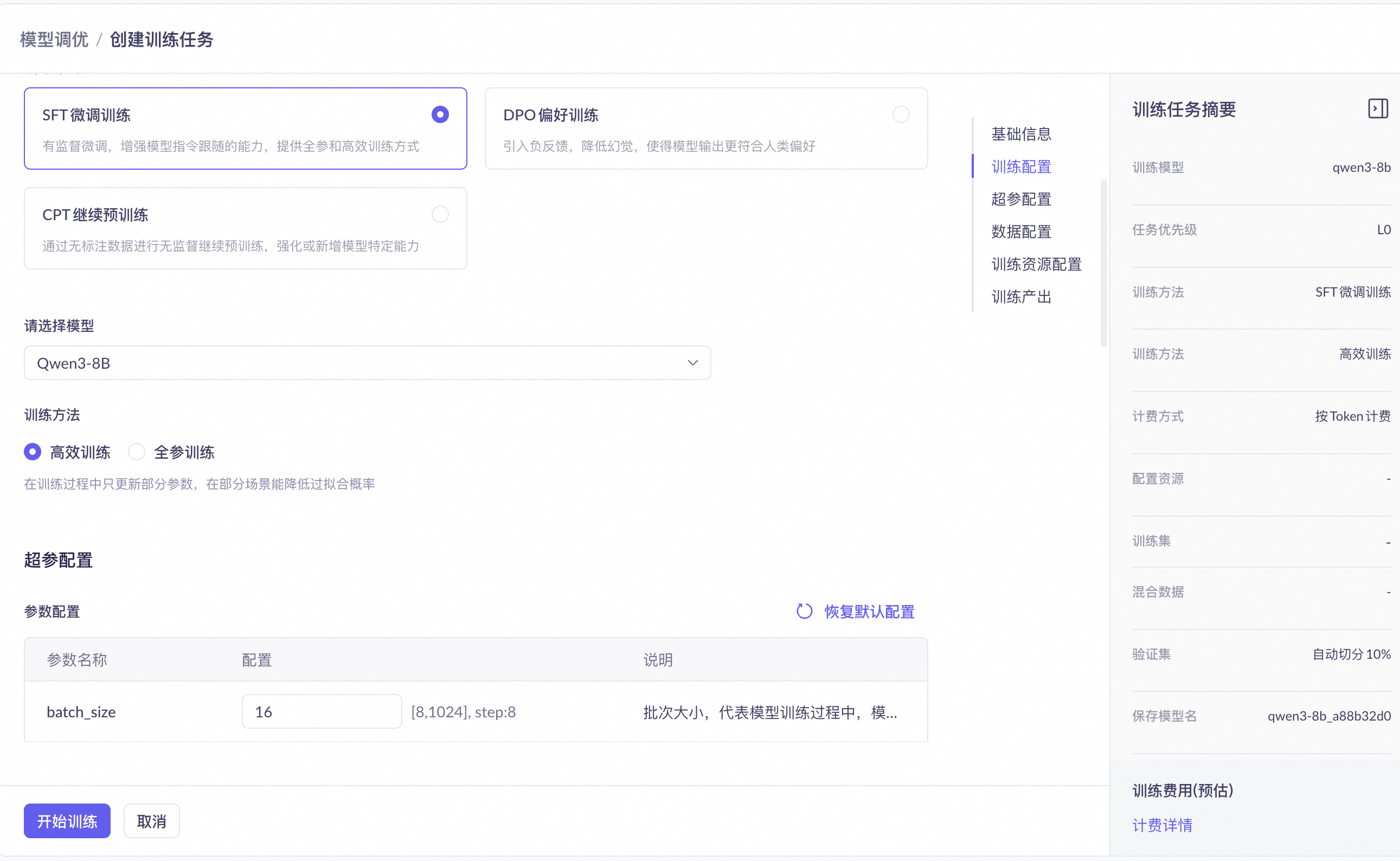
Log on to the Model Studio console. In the left-side navigation pane, choose Model Training > Model Fine-tuning, and then click Create Training Task.
-
In the Training Configuration section, complete the following settings:
- Training Method: Select Supervised Fine-tuning (SFT).
- Select a Model: Select Qwen3-8B.
- Training Method (displayed after you select a model): Select Efficient Training.
This combination requires a short training time and few data records.
-
In the Hyperparameter Settings section, keep the default Parameter Configurations. Model Studio provides recommended configurations for fine-tuning hyperparameters.
-
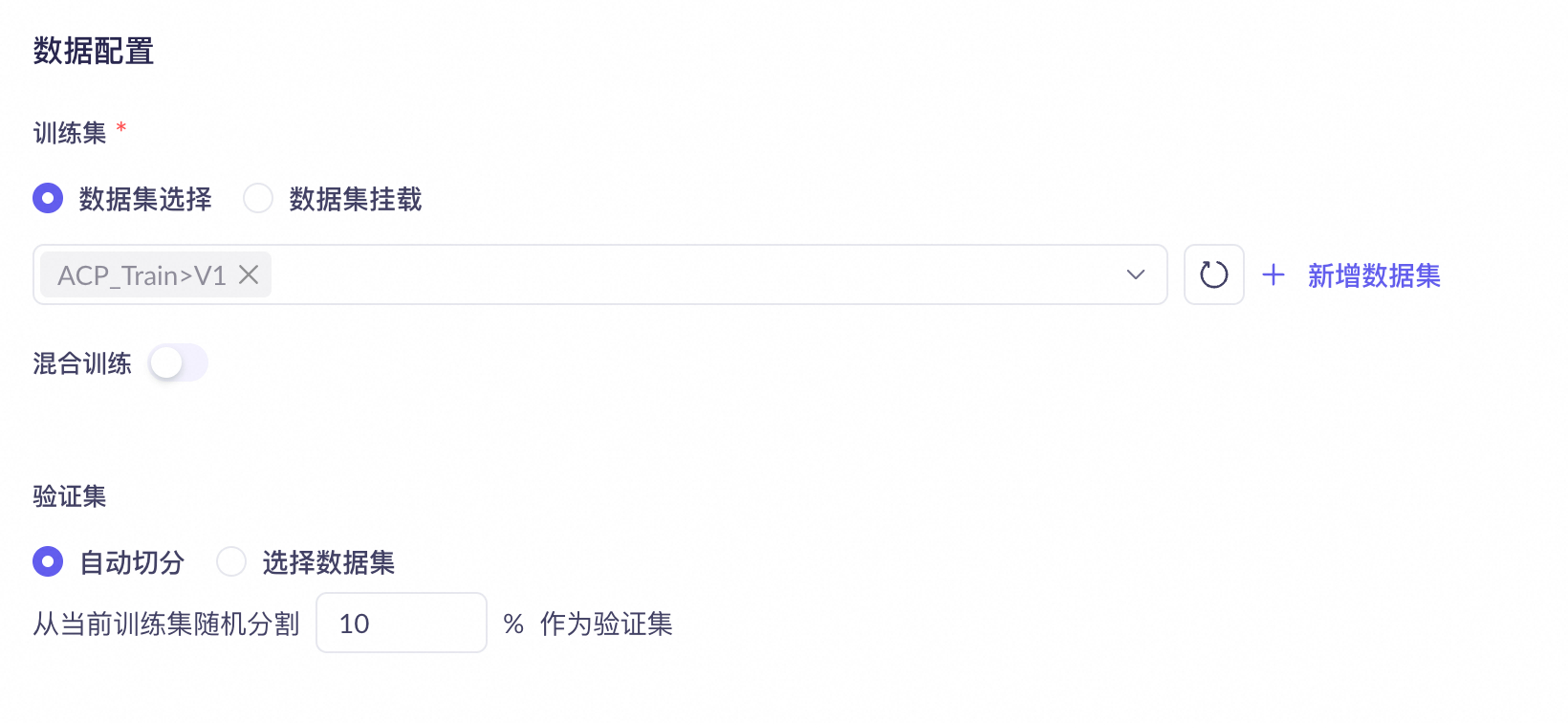
In the Data Configuration section, complete the following settings:
- Training Set: Select an uploaded fine-tuning dataset. Data sample: SFT-ChatML_format_example.jsonl.
- Mixed Training: Keep it disabled.
- Validation Set: Select Automatic Split to split 10% of the training set as the validation set.
-
In the Training Output section, configure how model parameter snapshots (checkpoints) are saved. Keep the default values for the following settings:
- Model Name: After the training is complete, the last checkpoint is automatically published to My Models under this name.
- Up to: Sets the number of models that the training task finally exports.
- Checkpoint save interval: You can select Calculated by epoch or Calculated by step.

NoteAfter fine-tuning is complete, you must export a parameter snapshot before you can deploy the model on Model Studio based on that snapshot. Exported parameter snapshots are saved in cloud storage and cannot be accessed or downloaded.
-
Click Start Training and wait for the model training to complete.
-
Choose Model Inference > Dedicated Deployment to deploy the trained custom model. After the deployment is complete, you can evaluate the fine-tuned model. For more information, see Dedicated Deployment Overview.
Typical fine-tuning process
The three fine-tuning methods provided by Model Studio are not mutually exclusive but are progressive and complementary.
CPT (optional) → SFT → DPO (optional)
-
CPT (continual pre-training) - Supplements knowledge (General models have broad but shallow knowledge, which may not meet the depth and precision requirements of professional fields)
- Finance model:
Learns financial terms - Medical model:
Memorizes drug pathology - Legal model:
Understands legal articles and precedents
- Finance model:
-
SFT (supervised fine-tuning) - Learns how to perform tasks
- Customer service bot:
Learns customer service procedures - Code assistant:
Learns programming paradigms - Tool calling (Agent):
Learns to use MCP
- Customer service bot:
-
DPO (direct preference optimization) - Performs tasks better
- Safety and responsibility:
Rejects harmful suggestions - Conciseness and effectiveness:
Provides concise answers - Objectivity and neutrality:
Evaluates fairly and objectively
- Safety and responsibility:
Fine-tuning data format
SFT training set
SFT ChatML (Chat Markup Language) format training data supports multi-turn conversations and various role settings.
The OpenAI
nameandweightparameters are not supported. All assistant outputs will be trained.
# A single line of training data (in JSON format) has the following typical structure when expanded:
{"messages": [
  {"role": "system", "content": "System input 1"},
  {"role": "user", "content": "User input 1"},
  {"role": "assistant", "content": "Expected model output 1"},
  {"role": "user", "content": "User input 2"},
  {"role": "assistant", "content": "Expected model output 2"}
  ...
]}
For information about the differences between system, user, and assistant, see Overview. Sample training datasets: SFT-ChatML_format_example.jsonl, SFT-ChatML_format_example.xlsx. XLS and XLSX formats support only single-turn conversations.
All assistant lines in a single training data entry support the "loss_weight" parameter, which sets the relative importance of that line during training. (Range: 0.0 to 1.0. A larger value indicates higher importance.)
This parameter is available for invitational preview. To use it, contact your account manager.
 {"role": "assistant", "content": "Expected model output 1", "loss_weight": 1.0},
 {"role": "assistant", "content": "Expected model output 2", "loss_weight": 0.5}
Dataset building tips
Dataset size requirements
For CPT, the dataset requires at least 50 million tokens of high-quality pre-training data. For SFT, the dataset requires at least 1,000 high-quality fine-tuning data entries. For DPO, the dataset generally requires hundreds of human preference data entries. If the model evaluation results after data fine-tuning are not satisfactory, the simplest way to improve is to collect more data for training.
If you lack data, we recommend building an agent application and using a knowledge base index to enhance the model's capabilities. In many complex business scenarios, you can also use a combination of model fine-tuning and knowledge base retrieval.
For example, in a customer service scenario, you can use model fine-tuning to address issues with the customer service agent's tone, expression styles, and self-awareness. Professional knowledge related to the scenario can be dynamically introduced into the model's context using a knowledge base.
Alibaba Cloud Model Studio recommends that you first build and test a retrieval-augmented generation (RAG) application. After collecting enough application data, you can then use model fine-tuning to further improve the model's performance.
You can also use the following strategies to expand your dataset:
- Use a large language model (LLM) to simulate the generation of content for specific business scenarios to help you generate more data for fine-tuning. (We recommend selecting a larger, high-performing model for generation.)
- Acquire more data through various methods, such as collecting from application scenarios, web scraping, social media and online forums, public datasets, partners and industry resources, and user contributions.
Data diversity and balance
The requirements for model fine-tuning vary by scenario. For example, professionalism is critical for specific business scenarios, whereas versatility is more important for Q&A scenarios. You need to design data use cases based on the business modules or usage scenarios the model is responsible for. Therefore, the training effectiveness depends not only on the data volume but also on the professionalism and diversity of the data for the specific scenario.
For example, in an intelligent AI conversation scenario, a professional and diverse dataset should include the following business scenarios:
Specific business | Diverse scenarios/businesses |
|---|---|
E-commerce customer service | Promotion pushes, pre-sales consultation, in-sales guidance, after-sales service, after-sales follow-up, complaint handling, etc. |
Financial services | Loan consultation, investment and wealth management advice, credit card services, bank account management, etc. |
Online healthcare | Symptom consultation, appointment registration, visit instructions, drug information inquiry, health tips, etc. |
AI secretary | IT information, administrative information, HR information, employee benefit inquiries, company calendar queries, etc. |
Travel assistant | Travel planning, entry and exit guides, travel insurance consultation, destination customs and culture introductions, etc. |
Corporate legal counsel | Contract review, intellectual property protection, compliance checks, labor law Q&A, cross-border transaction consultation, individual case legal analysis, etc. |
It is also important to note that the amount of data for each scenario/business should be relatively balanced, and the data proportion should match the actual scenario proportion. This avoids having too much data of one type, which could cause the model to be biased towards learning those features and affect its generalization ability.
Splitting the training and validation sets
You can perform model fine-tuning in the console.
- Automatically split a complete training dataset and randomly sample a small amount of data to form a validation set.
- Choose to upload a separate dataset.
The console displays the validation set loss and token accuracy in real time during training.
The Data Configuration page also includes a Mixed Training toggle (disabled by default). When Auto Split is selected, 10% of the training set is randomly split as the validation set by default.
FAQ
Can I fine-tune my own model?
Model Studio does not support fine-tuning, uploading your own models, or exporting downloaded models.