Before you use models or applications in Alibaba Cloud Model Studio, you must obtain an API key for authentication.
This topic describes the pay-as-you-go API key for Model Studio. If you are using a Token Plan or Coding Plan, use the corresponding dedicated API key (starts with sk-sp-). For more information, see Token Plan API Key and Coding Plan API Key.
Create an API key
This procedure must be performed by an Alibaba Cloud account or a RAM user with administrator or API-Key page permissions.
China (Beijing), Singapore, and other regions
-
Go to the Alibaba Cloud Model Studio console. In the upper-right corner, select a region, such as China (Beijing), Singapore, Japan (Tokyo), China (Hong Kong), or Germany (Frankfurt). Go to the API Key page and click Create API Key.
-
In the dialog box, configure the following settings and click OK:
-
Workspace: We recommend that you select the default workspace.
-
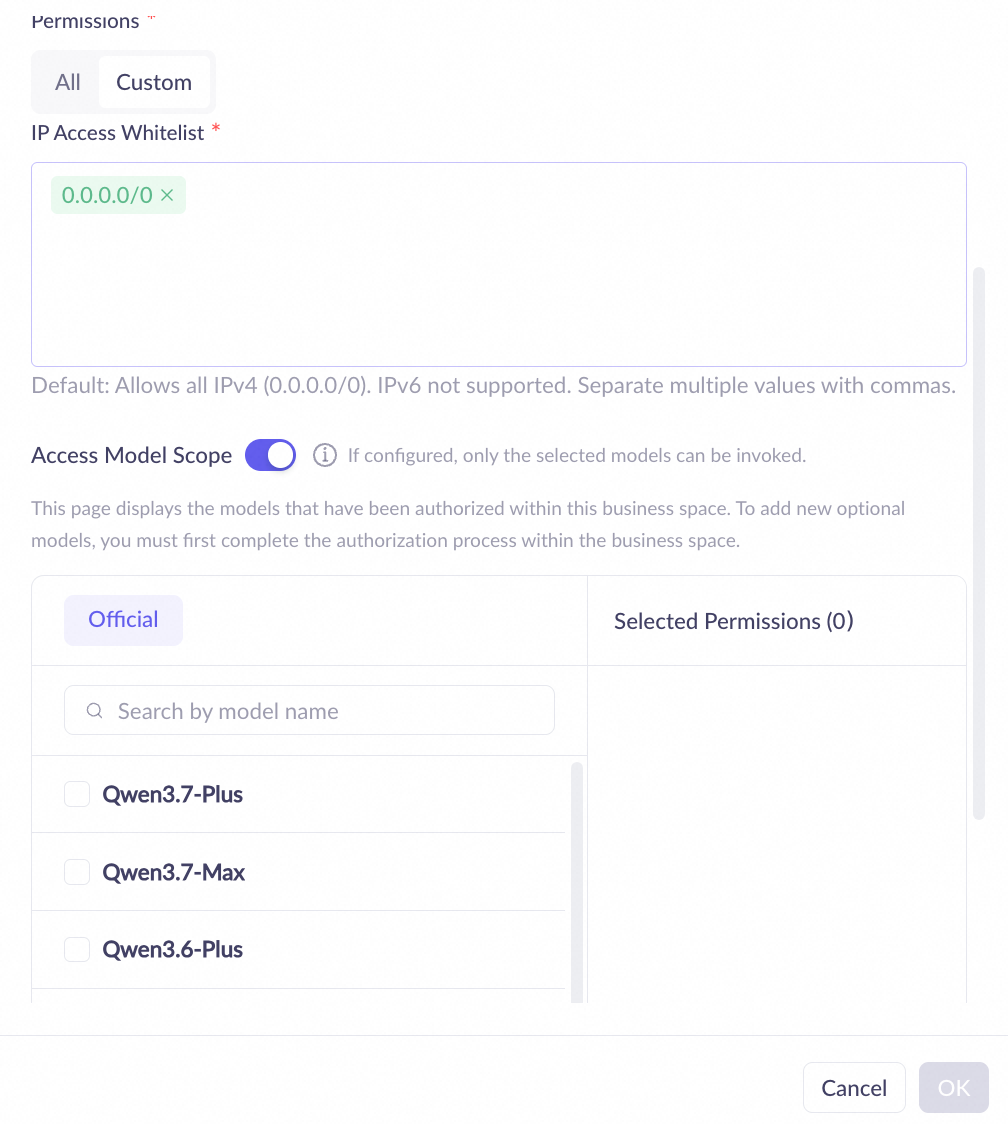
Permission: We recommend that you select All. For more granular control, select Custom to configure accessible IP addresses and models.
Alibaba Cloud Model Studio provides two types of permission settings. Select one based on your business requirements:
-
All: Grants the API key permission to call all models and applications.
-
Custom: Allows you to configure an IP address whitelist and an accessible model scope.
By default, all IPv4 (
0.0.0.0/0) traffic is allowed. Support for IPv6 is available only in the China (Beijing) region.You can add up to 20 IPv4 or IPv6 addresses or CIDR blocks to the IP address whitelist.
-
-
After the key is created, the complete API key is displayed in a dialog box. You must copy or download and save it immediately. Keep it confidential. Anyone with your API key can make service requests on your behalf, which may incur charges. After you close the dialog box, you cannot view or copy the plaintext API key again. If the key is lost, reset it or create a new one.
An Alibaba Cloud account can view the API keys in all workspaces. A RAM user can view only the API keys in the workspaces that they have joined.
On the API key management page, click + Create API key in the upper-right corner to create another key. For an existing API key, you can Disable, Edit, or Delete it in the Actions column.
US (Virginia) region
-
Go to the Alibaba Cloud Model Studio console. In the upper-right corner, switch the region to US (Virginia). On the Dashboard tab, choose API Key from the left-side navigation pane. On the API key management page, click Create API Key.
-
In the dialog box, configure the following information and click OK:
-
Workspace: We recommend that you select the default workspace.
-
Description: Enter a description to help you identify the purpose of the API key.
-
-
After the key is created, the complete API key is displayed in a dialog box. Copy it immediately and store it securely. You cannot view the complete API key again after you close the dialog box.
-
In the API key list, click the
 icon next to an API key to copy the masked key.
An Alibaba Cloud account can view the API keys in all workspaces. A RAM user can view only the API keys in the workspaces that they have joined.
Click the + Create API key button in the upper-right corner to create a new API key.
Configure API key as an environment variable
We recommend setting your API key as an environment variable. This helps you avoid hard-coding the key in your source code, reducing the risk of accidental exposure.
Linux
Permanent
To make the API key available in all new sessions for the current user, set it as a permanent environment variable.
-
Run the following command to append the environment variable setting to the
~/.bashrcfile.# Replace YOUR_DASHSCOPE_API_KEY with your DashScope API key echo "export DASHSCOPE_API_KEY='YOUR_DASHSCOPE_API_KEY'" >> ~/.bashrcAlternatively, you can manually edit the
~/.bashrcfile. -
Run the following command to apply the changes.
source ~/.bashrc -
Open a new terminal window and run the following command to verify that the environment variable is set.
echo $DASHSCOPE_API_KEY
Temporary
To use the environment variable only for the current session, set it as a temporary environment variable.
-
Run the following command.
# Replace YOUR_DASHSCOPE_API_KEY with your DashScope API key export DASHSCOPE_API_KEY="YOUR_DASHSCOPE_API_KEY" -
Run the following command to verify that the environment variable is set.
echo $DASHSCOPE_API_KEY
macOS
Permanent
To make the API key available in all new sessions for the current user, set it as a permanent environment variable.
-
Run the following command in your terminal to check your default shell type.
echo $SHELL -
Proceed based on your default shell type.
Zsh
-
Run the following command to append the environment variable setting to the
~/.zshrcfile.# Replace YOUR_DASHSCOPE_API_KEY with your DashScope API key echo "export DASHSCOPE_API_KEY='YOUR_DASHSCOPE_API_KEY'" >> ~/.zshrcAlternatively, you can manually edit the
~/.zshrcfile. -
Run the following command to apply the changes.
source ~/.zshrc -
Open a new terminal window and run the following command to verify that the environment variable is set.
echo $DASHSCOPE_API_KEY
Bash
-
Run the following command to append the environment variable setting to the
~/.bash_profilefile.# Replace YOUR_DASHSCOPE_API_KEY with your DashScope API key echo "export DASHSCOPE_API_KEY='YOUR_DASHSCOPE_API_KEY'" >> ~/.bash_profileAlternatively, you can manually edit the
~/.bash_profilefile. -
Run the following command to apply the changes.
source ~/.bash_profile -
Open a new terminal window and run the following command to verify that the environment variable is set.
echo $DASHSCOPE_API_KEY
-
Temporary
To use the environment variable only for the current session, set it as a temporary environment variable.
The following command applies to both Zsh and Bash.
-
Run the following command.
# Replace YOUR_DASHSCOPE_API_KEY with your DashScope API key export DASHSCOPE_API_KEY="YOUR_DASHSCOPE_API_KEY" -
Run the following command to verify that the environment variable is set.
echo $DASHSCOPE_API_KEY
Windows
In Windows, you can configure an environment variable by using System Properties, Command Prompt, or Windows PowerShell.
System Properties
-
Environment variables configured this way are permanent.
-
You need administrator permissions to modify system environment variables.
-
Changes to environment variables do not affect running applications, including Command Prompt windows and IDEs. You must restart these applications or open a new command-line session to apply the changes.
-
On the Windows desktop, press
Win+Q, search for Edit the system environment variables in the search box, and click the search result to open the System Properties window. -
In the System Properties window, click Environment Variable, and then in the System variables section, click Create. For Variable Name, enter
DASHSCOPE_API_KEY, and for Variable value, enter your DashScope API Key. -
Click OK on all three open windows to save the changes and close them.
-
Open a new Command Prompt or Windows PowerShell window and run the appropriate command to verify that the environment variable is set.
-
In Command Prompt:
echo %DASHSCOPE_API_KEY%Microsoft Windows [Version 10.0.19045.5371] (c) Microsoft Corporation. All rights reserved. C:\Windows\system32>echo %DASHSCOPE_API_KEY% sk-ee16697?fe4 C:\Windows\system32> -
In Windows PowerShell:
echo $env:DASHSCOPE_API_KEYWindows PowerShell Copyright (C) Microsoft Corporation. All rights reserved. Try the new cross-platform PowerShell https://aka.ms/pscore6 PS C:\Windows\system32> echo $env:DASHSCOPE_API_KEY sk-ee166797fe40xxx PS C:\Windows\system32>
-
Command Prompt
Permanent
To make the API key environment variable available in all new sessions for the current user, follow these steps.
-
Run the following command in Command Prompt.
REM Replace YOUR_DASHSCOPE_API_KEY with your DashScope API key setx DASHSCOPE_API_KEY "YOUR_DASHSCOPE_API_KEY" -
Open a new Command Prompt window for the change to take effect.
-
In the new Command Prompt window, run the following command to verify that the environment variable is set.
echo %DASHSCOPE_API_KEY%
Temporary
To use the environment variable only in the current session, run the following command in Command Prompt.
REM Replace YOUR_DASHSCOPE_API_KEY with your DashScope API key
set DASHSCOPE_API_KEY=YOUR_DASHSCOPE_API_KEY
You can run the following command in the same session to verify that the environment variable is set.
echo %DASHSCOPE_API_KEY%Windows PowerShell
Permanent
To make the API key environment variable available in all new sessions for the current user, follow these steps.
-
Run the following command in Windows PowerShell.
# Replace YOUR_DASHSCOPE_API_KEY with your DashScope API key [Environment]::SetEnvironmentVariable("DASHSCOPE_API_KEY", "YOUR_DASHSCOPE_API_KEY", [EnvironmentVariableTarget]::User) -
Open a new Windows PowerShell window for the change to take effect.
-
In the new Windows PowerShell window, run the following command to verify that the environment variable is set.
echo $env:DASHSCOPE_API_KEY
Temporary
If you want to use the environment variable only in the current session, you can run the following command in PowerShell.
# Replace YOUR_DASHSCOPE_API_KEY with your DashScope API key
$env:DASHSCOPE_API_KEY = "YOUR_DASHSCOPE_API_KEY"
You can run the following command in the same session to verify that the environment variable is set.
echo $env:DASHSCOPE_API_KEYUse an API key
-
Method 1: Call models from third-party tools
Configuration guides for common tools: Chatbox, Cline, Claude Code, Dify, OpenClaw, Postman, and Qwen Code.
-
Method 2: Call models by using code
When you call the Qwen API for the first time by using code, we recommend that you configure the API key as an environment variable to avoid hard-coding it in your code, which reduces the risk of leaks.
When you call a model from code or a third-party tool, in addition to the API key you must specify a service endpoint (the API Host shown in the creation success dialog, which corresponds to the base_url in your SDK or HTTP request). Model Studio provides both OpenAI-compatible and Anthropic-compatible protocol interfaces. The base_url differs between the two protocols and varies by region. Refer to the documentation for the protocol you use:
-
OpenAI-compatible protocol: OpenAI-compatible - Chat
-
Anthropic-compatible protocol: Anthropic-compatible Messages
Do not expose your API key.
API key security upgrade
Model Studio has upgraded the pay-as-you-go API key generation and storage mechanism for enhanced security (except for the US (Virginia) region). API keys created before the upgrade that start with sk- remain fully functional and are not affected. All API keys created after the upgrade start with sk-ws.
The following table describes the main differences between API keys created before and after the upgrade.
|
Comparison item |
Pre-upgrade keys |
Post-upgrade keys |
|
Key format |
Starts with |
Starts with |
|
Plaintext viewing |
You can copy the complete plaintext key from the console at any time. |
The plaintext key is displayed only once upon creation. It cannot be viewed again after the dialog box is closed. If lost, reset or create a new key. |
|
Calling capability |
Can be used to call models normally; functionality is unaffected. |
Can be used to call models normally; functionality is identical to pre-upgrade keys. |
|
Recommended action |
We recommend that you create a new key to replace the old one for improved security. |
Copy and save the key immediately after creation, and store it securely. |
Manage API keys through the API
In addition to console operations, Alibaba Cloud Model Studio provides OpenAPI operations that let you create, query, edit, delete, enable, disable, and reset API keys programmatically, so that you can integrate API key management into automated workflows.
Calling the following operations requires signature authentication with your Alibaba Cloud account AccessKey (not the API key itself) and the corresponding RAM permissions. You can debug each operation online in the OpenAPI developer portal, or call it through an Alibaba Cloud SDK.
|
Operation |
Description |
|
Creates an API key. |
|
|
Queries the information of a specified API key. |
|
|
Queries the list of API keys. |
|
|
Edits an API key, such as its description and permission configuration. |
|
|
Deletes an API key. This operation cannot be undone. |
|
|
Enables an API key (not supported in the US (Virginia) region). |
|
|
Disables an API key. The key is retained and can be re-enabled at any time (not supported in the US (Virginia) region). |
|
|
Resets an API key. A new key value is generated and the old key immediately becomes invalid (not supported in the US (Virginia) region). |
API key permissions
An API key's permissions are determined entirely by its workspace. All API keys within the same workspace have identical permissions. You do not need to create different API keys for different models, such as text-to-text, text-to-image, or speech synthesis models.
-
API key in the default workspace: Can call all standard models and any application within the default workspace.
-
API key in a sub-workspace: Can call standard models authorized for the sub-workspace and any application within that sub-workspace.
When you Create API Key or click Edit for an existing API key, you can switch the Permissions to Custom to configure the following:
The following configurations are not supported in the US (Virginia) region.
-
IP address whitelist: Allows only IP addresses on the whitelist to use the API key to make calls (supports IPv4, IPv6, and CIDR blocks).
-
Access Scope: Select the specific models or applications that this API key can access. The key cannot call unselected resources.
API key validity
API keys do not expire. They remain valid until you manually delete them.
To grant temporary access to third-party applications or users, or to strictly control high-risk operations such as accessing or deleting sensitive data, you can generate a temporary API key (valid for 60 seconds). This avoids exposing a long-term API key and reduces the risk of leaks.
Error codes
If a model call fails and returns an error message, see Error codes for troubleshooting.
FAQ
Q: How many API keys can I create under a single Alibaba Cloud account?
A: For the Singapore, China (Beijing), China (Hong Kong), Japan (Tokyo), and Germany (Frankfurt) regions, each Alibaba Cloud account can create up to 50 API keys per region.
For the US (Virginia) region, each owner account, including the Alibaba Cloud account, can create up to 20 API keys.
Q: Are API keys created by a RAM user still valid after the user is deleted?
A: No. After you disable or delete a RAM user in the RAM console, all API keys created by that user become invalid and can no longer be used for model calls.
Q: I used the echo command and confirmed the environment variable was set correctly. Why does my code still report that the API key cannot be found?
A: This can occur for the following reasons:
-
Scenario 1: A temporary environment variable was set. A temporary variable is valid only within the current terminal session and does not affect running IDEs or other applications. Refer to the instructions in this topic to set a permanent environment variable.
-
Scenario 2: The IDE, command-line tool, or application was not restarted.
-
You must restart your IDE (such as VS Code) or terminal to load the new environment variables.
-
If you set the environment variable after deploying an application, you must restart the application service to reload the environment variables.
-
-
Scenario 3: The variable is missing from a service configuration file. If your application is started by a service manager, such as systemd or supervisord, you may need to add the environment variable to the service manager's configuration file.
-
Scenario 4: Using the
sudocommand. If you usesudo python xx.pyto run the script, the environment variables of the current user may not be inherited. This is becausesudodoes not inherit all environment variables by default. You can use thesudo -E python xx.pycommand, where the-Eparameter ensures that the environment variables are passed. If you have permission to run the script, you can runpython xx.pydirectly.