Create events to track and analyze user behavior.
Procedure
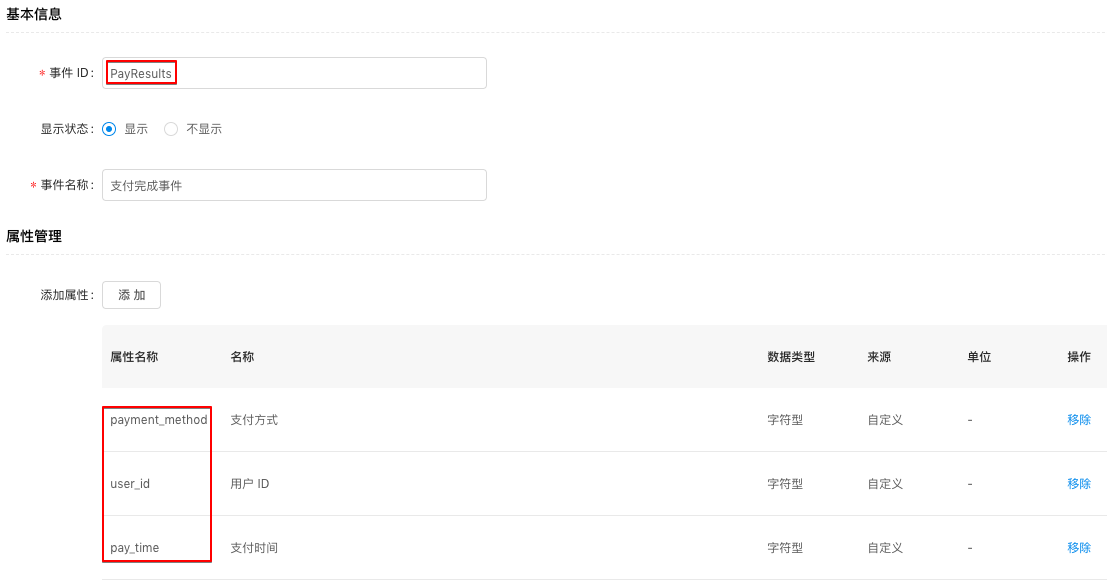
After you create event properties in the console, in the left-side navigation pane, choose Mobile Analysis > Custom Analysis > Custom Configuration. On the Event tab, create a Payment Complete event.
-
Event ID: A unique identifier for the event, such as
PayResults, as described in Tutorial scenarios. -
Display Status: Controls whether the event appears in the Event Analysis list. For this tutorial, set to Display.
-
Event Name: A readable name for the event, such as Payment Complete Event.
-
Add Property: Select the event properties you created. All preset platform properties are added automatically.