To ensure data security in a MaxCompute project, the Project Owner or authorized users must manage member permissions following the principle of least privilege. This topic provides an overview of the MaxCompute permission system.
Permission system
|
Category |
Description |
|
Principal |
MaxCompute supports the following types of principals:
|
|
Object |
MaxCompute provides fine-grained access control over objects such as projects, tables, models, resources, functions, and instances. For a detailed list of permissions for each object, see MaxCompute permissions. |
|
Access control |
MaxCompute provides the following authorization methods:
|
|
Role-based authorization |
To grant the same permissions to multiple users, you can use roles to simplify authorization. For more information, see Project-level role authorization. |
|
User authorization |
You can grant permissions to users in the following ways:
For more information about user authorization operations, see Manage user permissions by using commands. |
|
Query permission information |
View the permissions of project members to verify that they have taken effect. For more information, see Query permission information. |
DataWorks has its own permission system. If you use DataWorks to manage a MaxCompute project, you can use the user and role management features of DataWorks to assign roles and manage permissions. For more information about the permission relationship between DataWorks and MaxCompute, see Permission relationship between MaxCompute and DataWorks.
Authentication flow
When a user performs an operation on a MaxCompute object, MaxCompute authenticates the request and checks for the required permissions. The resource owner (the primary Alibaba Cloud account) has full permissions and can grant management permissions to RAM users or RAM roles. The primary account and users with management permissions can then grant permissions to other users, determining who can access which objects and perform which operations.
Depending on the object and operation, the MaxCompute authentication process involves RAM authentication and MaxCompute service authentication. The following figure shows the authentication flow.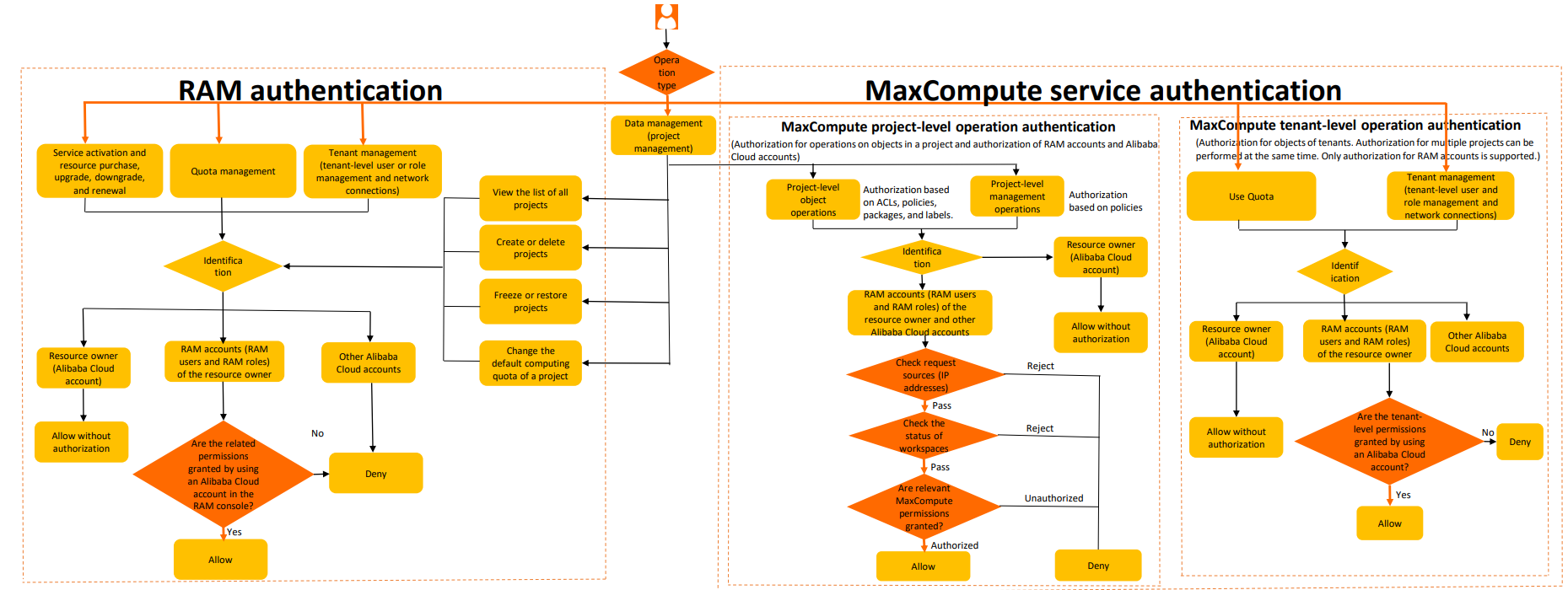
RAM authentication
When a user activates a service, purchases resources, or manages quotas, projects, or tenants in the MaxCompute console, Alibaba Cloud uses RAM to authenticate the request and verify permissions. If authentication fails, the operation is blocked.
-
For a list of operations that require RAM authentication, see RAM permissions.
-
To grant system permission policies to RAM users or RAM roles, see Manage the permissions of a RAM user.
MaxCompute service authentication
-
Project-level operation authentication
MaxCompute project-level operations include project-level object operations and project-level management operations.
-
Project-level object operation permissions: Permissions for operations on objects within a project, such as projects, tables, models, functions, resources, and instances. Examples include CreateTable, CreateModel, CreateInstance, and SelectTable. For more information, see List of permissions on projects and objects within projects.
-
Project-level management permissions: Permissions for configuring project security, managing permissions for project users and roles, managing packages, controlling label-based access, and clearing expired permissions. For more information, see List of project management permissions.
The authentication flow for MaxCompute project-level operations is as follows:
-
User authentication. For more information, see User authentication.
-
You can log on to the MaxCompute console by using an Alibaba Cloud account, which can be a primary account or a RAM user.
-
When you connect to MaxCompute by using a tool such as odpscmd or JDBC, you must provide an AccessKey ID and an AccessKey Secret.
-
When a user connects to MaxCompute, the system checks whether the user is a member of the current project. A user can perform operations in a project only after an administrator runs the
add user "xxx"command to add the user to the project.
-
-
Request source check (IP address check): The system checks the IP address whitelist. For more information, see Manage IP address whitelists.
-
Project status check: The system checks whether the project is in a normal state.
-
MaxCompute permission check: After a user is added to a project, they must be granted the necessary permissions to perform operations. These permissions can be granted through various authorization methods, including ACL-based access control, policy-based access control, Download permission control, label-based access control, and cross-project resource access using packages. For information about how to manage project-level users, see Manage user permissions by using commands.
-
-
Tenant-level operation authentication
MaxCompute tenant-level operation permissions include tenant-level object operation permissions and tenant-level management permissions.
-
Tenant-level object operation permissions include operations on tenant-level objects such as quotas and NetworkLink. Examples include
use quotaandCreateNetworkLink. For a list of operations, see List of permissions on objects within a tenant.Tenant-level object operations also allow a single account to manage multiple project objects, which simplifies permission management.
-
Tenant-level management permissions are used to manage users and roles at the tenant level. These permissions include adding or deleting tenant-level users; creating or deleting tenant-level roles; viewing tenant-level user and role lists and their permissions; granting tenant-level roles to users; revoking tenant-level roles from users; adding tenant-level roles to a project; and removing tenant-level roles from a project.
When a user attempts to perform these operations, MaxCompute authenticates the user and verifies whether the user has the required permissions. If not, the operation is blocked.
-
Authorization flows
The following are common authorization flows in MaxCompute:
-
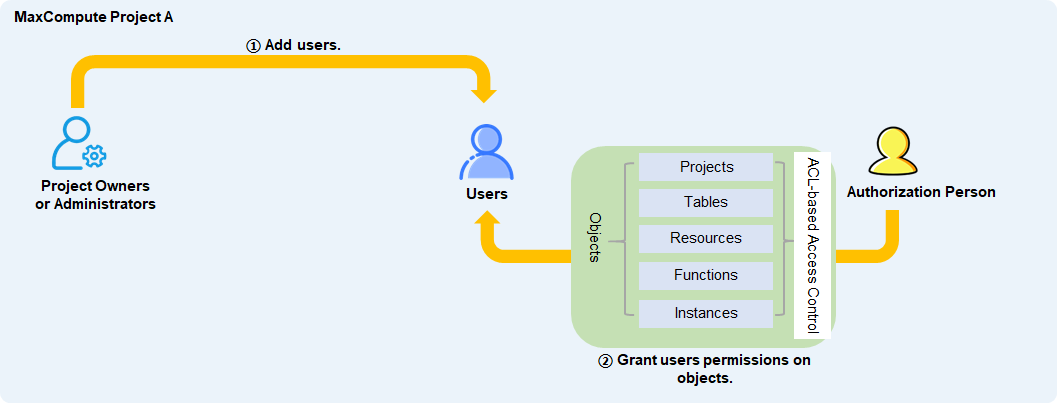
Flow 1: Directly grant a user operation permissions on an object
After a Project Owner or a user with a built-in management role adds the target user to the MaxCompute project, an authorized user grants the target user operation permissions on the object by using ACL-based access control.
-
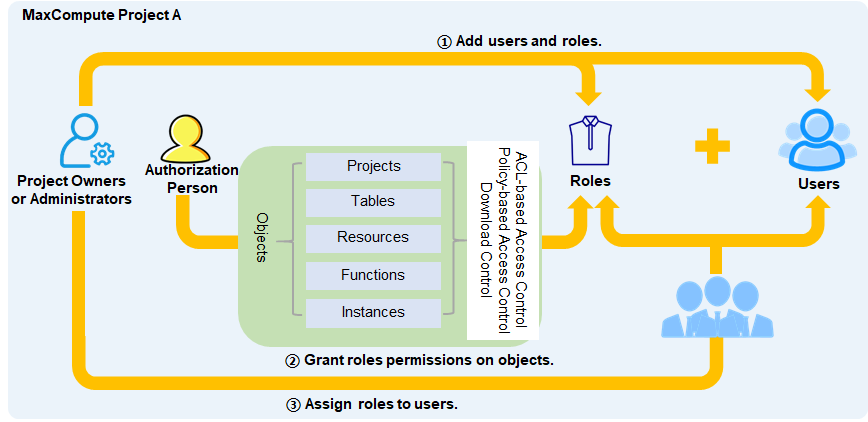
Flow 2: Grant multiple users operation permissions on an object by using a role
After a Project Owner or a user with a built-in management role adds the target users and a role to the MaxCompute project, an authorized user grants the target role operation permissions on the object by using ACL-based access control, policy-based access control, or Download permission control. Then, the user assigns the role to the target users.
-
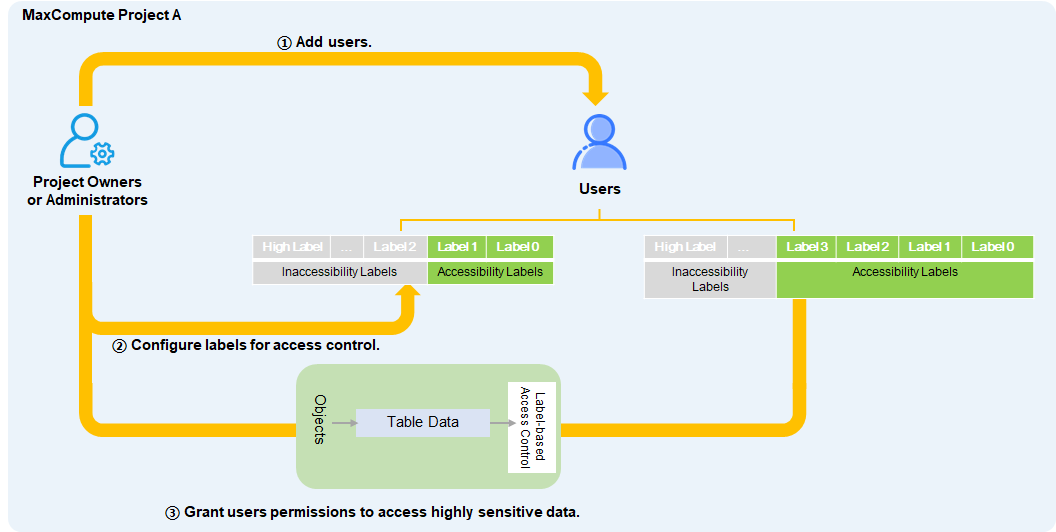
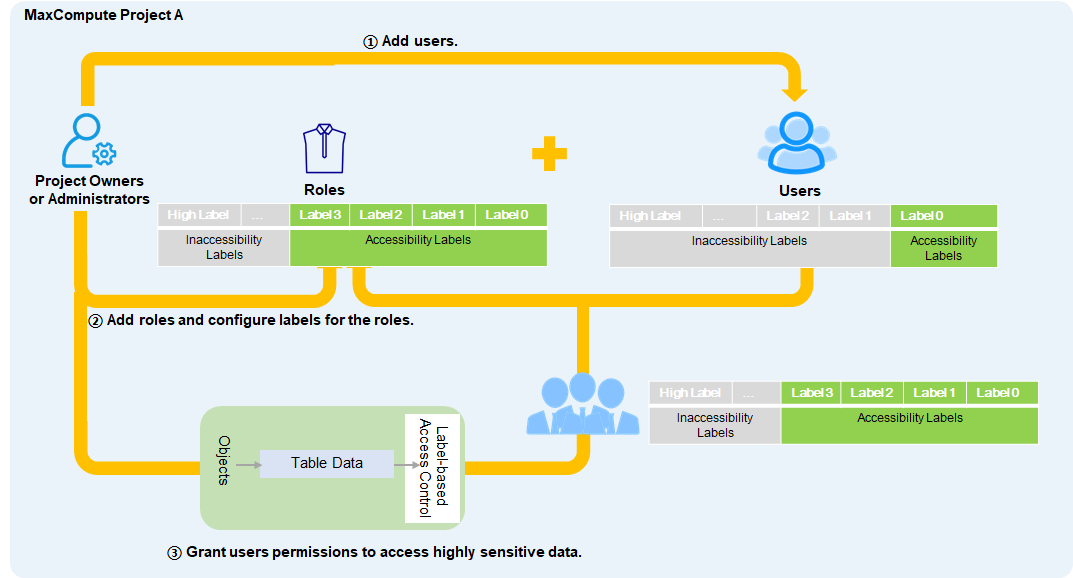
Flow 3: Directly grant a user permissions to access highly sensitive data
After a Project Owner or a user with a built-in management role adds the target user to the MaxCompute project, the Project Owner or a user with the Admin role can set a permitted access level for the target user. If the user needs to access specific highly sensitive data, you can grant them access by using label-based access control.
-
Flow 4: Grant multiple users permissions to access highly sensitive data by using a role
After a Project Owner or a user with a built-in management role adds the target users to the MaxCompute project, the Project Owner or a user with the Admin role can set a permitted access level for the target users. To allow multiple users to access the same highly sensitive data, you can create a role, grant the role access to the highly sensitive data by using label-based access control, and then assign the role to the users.
-
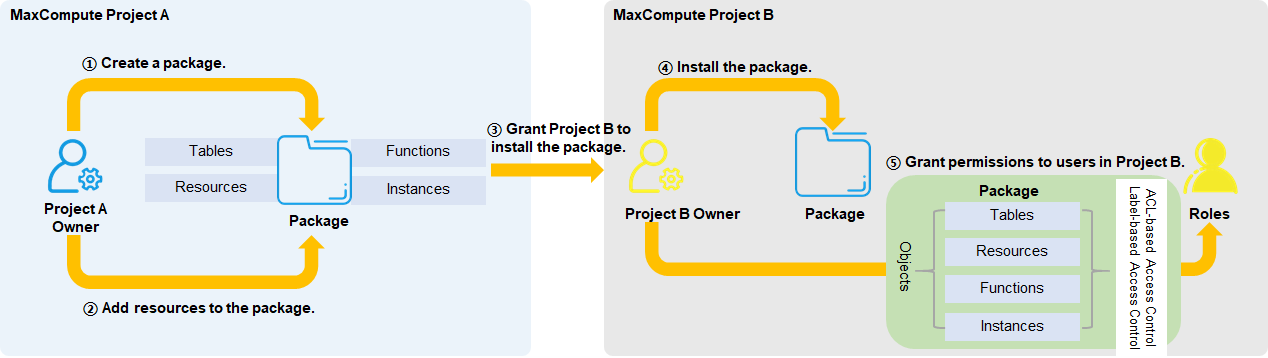
Flow 5: Access resources across projects and directly grant a user in the target project access to resources in a package
The Project Owner of the source project creates a package, adds resources to it, and then grants the target project permission to install the package. The Project Owner of the target project installs the package and grants permissions to the user by using ACL-based access control or label-based access control.
-
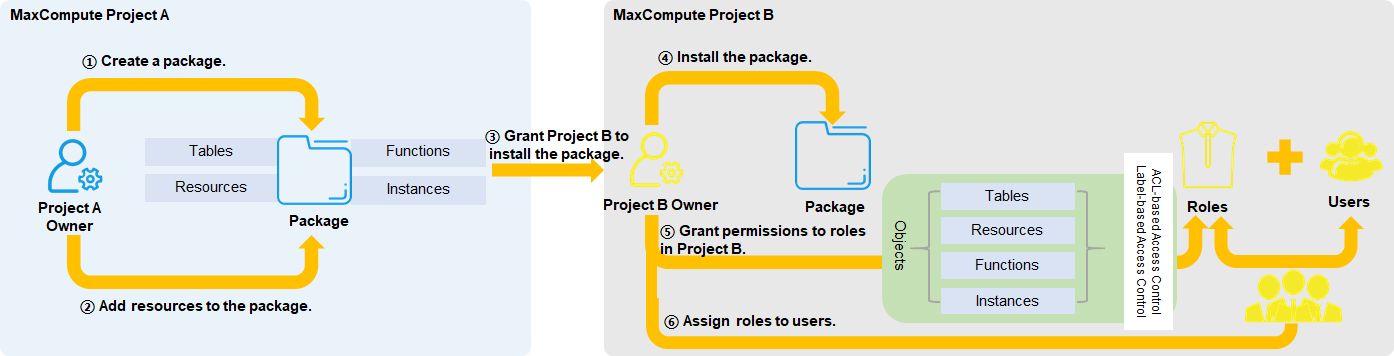
Flow 6: Access resources across projects and grant users access to resources in a package by using a role
The Project Owner of the source project creates a package, adds resources to it, and then grants the target project permission to install the package. The Project Owner of the target project installs the package, grants permissions to a role by using ACL-based access control or label-based access control, and then assigns the role to the users.
Permission relationship between MaxCompute and DataWorks
To understand the permission relationship between the two services, you need to understand the relationship between MaxCompute projects and DataWorks workspaces:
-
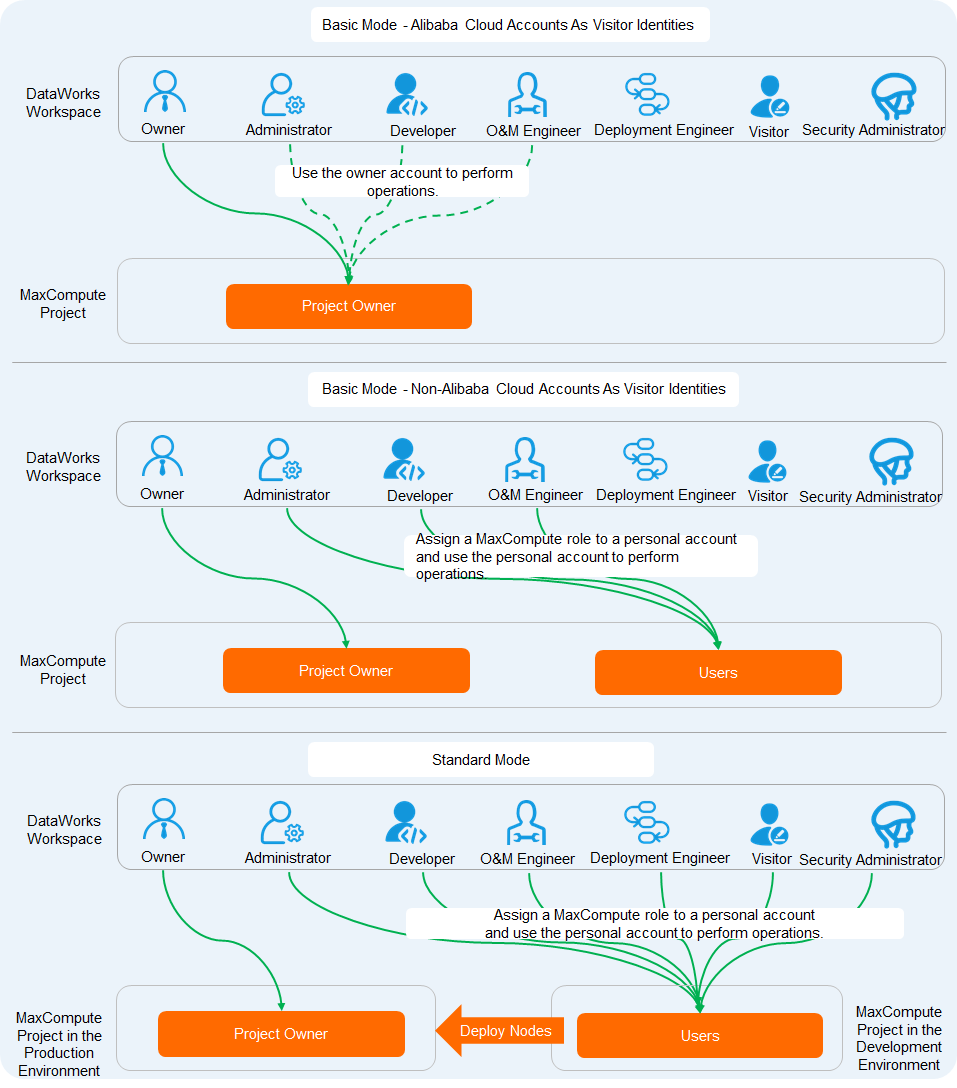
When you create a MaxCompute project, if the DataWorks workspace is in Basic Mode, it is bound to a single MaxCompute project.
-
If the DataWorks workspace is in Standard Mode, it is bound to both a MaxCompute development project (_dev) and a MaxCompute production project (Prod).
You also need to set the MaxCompute Visitor Identity, which determines the account-level permission policy for the MaxCompute project.
MaxCompute permission settings do not affect user operations in the DataWorks UI. DataWorks provides a visual way to manage MaxCompute project permissions. However, assigning roles to users in DataWorks can affect their permissions on MaxCompute resources.
Both DataWorks and MaxCompute use users and roles. Their permission relationship is as follows:
-
Roles and role permissions
To provide project members with the MaxCompute resource permissions they need during data development, DataWorks predefines several MaxCompute roles. The following table describes the mapping between MaxCompute roles and DataWorks predefined roles.
Mapping
Permission details
DataWorks role or identity
MaxCompute role
Development environment permissions
Production environment permissions
Description
Workspace Administrator
Role_Project_Admin
-
MaxCompute engine level: All permissions for project/table/function/resource/instance/job in the current project, and the
readpermission onpackages. -
DataWorks level: Can perform data development and deploy tasks to the production environment.
By default, this role has no permissions. Permissions require approval in Security Center.
Users with this role can manage the workspace's basic properties, data sources, compute engine configurations, and members. They can also assign the Workspace Administrator, Development, O&M, Deploy, and Visitor roles to other members.
Development
Role_Project_Dev
-
At the MaxCompute engine level: all permissions on projects, tables, functions, resources, instances, and jobs in the current project, and
package'sreadpermission. -
DataWorks level: Can perform data development but cannot deploy tasks to the production environment.
By default, this role has no permissions. Permissions require approval in Security Center.
Users with this role can create workflows, script files, resources, UDFs, and deployment packages. They can also create and delete tables but cannot perform deployment.
O&M
Role_Project_Pe
Has all permissions on project, function, resource, instance, and job objects in the current project, plus Read permission on packages and Read/Describe permissions on tables.
NoteAlthough this role has permissions at the MaxCompute engine level, users with the O&M role cannot directly run nodes from the DataWorks UI.
By default, this role has no permissions. Permissions require approval in Security Center.
A Workspace Administrator grants the O&M role. Users with this role can perform deployment and online O&M, but not data development.
Deploy
Role_Project_Deploy
No permissions by default.
By default, this role has no permissions. Permissions require approval in Security Center.
This role is similar to the O&M role but does not include permissions for online O&M.
Visitor
Role_Project_Guest
No permissions by default.
By default, this role has no permissions. Permissions require approval in Security Center.
Users with this role have view-only access. They cannot edit workflows, code, or other items.
Security Manager
Role_Project_Security
No permissions by default.
By default, this role has no permissions. Permissions require approval in Security Center.
The Security Manager is used only in the Data Security Guard module for tasks such as sensitive rule configuration and data risk auditing.
Data Analyst
Role_Project_Data_Analyst
-
MaxCompute engine level: Has
CreateInstanceandCreateTablepermissions in the current project. -
DataWorks level: Can view models in Data Modeling and use features in Data Analysis.
By default, this role has no permissions. Permissions require approval in Security Center.
Grants permissions only for operations in the Data Analysis module.
Model Designer
Role_Project_Erd
No permissions by default.
By default, this role has no permissions. Permissions require approval in Security Center.
Users with this role can view models in Data Modeling and manage data warehouse planning, data standards, dimensional modeling, and data metrics. This role does not grant permission to publish models.
Data Governance Administrator
Role_Project_Data_Governance
No permissions by default.
By default, this role has no permissions. Permissions require approval in Security Center.
This role applies only to Data Governance Center. It allows users to view governance issues, define governance plans, and enable check items in the workspaces they manage. It does not grant permissions for data development or O&M.
workspace owner (Alibaba Cloud account)
Project Owner
As the MaxCompute project owner, this role has all permissions on the project.
Has all permissions.
N/A
N/A
Super_Administrator
As the super administrator of the MaxCompute project, this role holds administrative permissions and all permissions on all resource types within it.
Has all permissions.
N/A
N/A
Admin
When a project is created, an Admin role is automatically created with a fixed set of permissions. This role can access all objects in the project and manage and authorize users and roles. Unlike the project owner, the Admin role cannot assign Admin permissions to other users, configure security settings for the project, or modify the project's authentication model. The project owner can assign the Admin role to a user to delegate security management.
Has all permissions.
N/A
N/A
Role_Project_Scheduler
No permissions by default.
-
MaxCompute engine level: Has all permissions on project, table, function, resource, instance, and job objects in the current project, plus the read permission on packages.
-
DataWorks level: Used as the execution identity in the production scheduling environment.
NoteWhen a RAM user or RAM role is set as the scheduling access identity for the production environment of a MaxCompute project (that is, configured as the Default Access Identity when you create a production data source), DataWorks maps the user or role to the Role_Project_Scheduler role of the MaxCompute project. For more information about how to configure the default access identity, see Bind a MaxCompute compute engine.
Acts as the unified identity to schedule and run MaxCompute tasks in the production environment.
-
-
Users and user permissions
-
In a DataWorks workspace, the Project Owner must be an Alibaba Cloud account, and project members can only be RAM users under the Alibaba Cloud account that owns the project. You can use Workspace Management in DataWorks to add users and assign roles.
-
In a MaxCompute project, an Alibaba Cloud account can be a Project Owner or a project member. Project members can also be RAM users under an Alibaba Cloud account. You can add a user by running the
add user xxx;command. You can add a role and assign it to a user by running theadd role xxx;andgrant role xxx to user xxx;commands.
The following figure illustrates the relationship between users and permissions for different workspace modes and supported visitor identities.
 Note
NoteThe MaxCompute permissions that correspond to DataWorks roles are fixed. If a user obtains permissions through a DataWorks role and is then granted additional MaxCompute permissions by using commands, the user's actual permissions in MaxCompute may differ from those displayed in DataWorks.
-