Proxima CE optimizes inner product calculations for vector search, making it suitable for all supported index algorithms: Hierarchical Navigable Small World Graph (HNSW), Satellite System Graph (SSG), Hierarchical Clustering (HC), Graph Clustering (GC), Quantized Clustering (QC), and Linear Search. This topic explains how to compute inner products and cosine distances in Proxima CE.
Prerequisites
Before you begin, ensure that you have:
Installed the Proxima CE package and created a doc table and a query table. See Install the Proxima CE package
Choose a method
Proxima CE provides two methods for inner product calculation: MipsSquaredEuclidean and NormalizeConverter.
| Condition | Recommended method |
|---|---|
| Vectors cannot be normalized | MipsSquaredEuclidean |
| Vectors can be normalized | MipsSquaredEuclidean (recommended) or NormalizeConverter |
Both methods produce an inner product result. If your vectors can be normalized, prefer MipsSquaredEuclidean for consistency across normalizable and non-normalizable vector workflows.
MipsSquaredEuclidean
MipsSquaredEuclidean converts vector dimensions so that the Euclidean distance between converted vectors equals the inner product of the original vectors. This lets you use standard distance-based index and search operations to compute inner products without requiring normalized input.
Set -distance_method to MipsSquaredEuclidean. Optionally, pass -measure_params as a single-line JSON string to configure additional options. Double quotes in the JSON do not need escaping, but spaces are not allowed.
Example `-measure_params` value:
{"proxima.mips_euclidean.measure.injection_type":0}For the full list of supported parameters, see IndexMeasure parameters.
Sample command
For details about the parameter configuration in this example, see Reference: Proxima CE parameters.
--@resource_reference{"proxima-ce-aliyun-1.0.2.jar"}
jar -resources proxima-ce-aliyun-1.0.2.jar
-classpath proxima-ce-aliyun-1.0.2.jar com.alibaba.proxima2.ce.ProximaCERunner
-doc_table doc_table_xx
-doc_table_partition 20221111
-query_table query_table_xx
-query_table_partition 20221111
-output_table output_table_xx
-output_table_partition 20221111
-data_type float
-dimension 8
-external_volume_name xxx_volume_name
-owner_id 123456
-distance_method MipsSquaredEuclidean
-measure_params {"proxima.mips_euclidean.measure.injection_type":0};
Parameters:
| Parameter | Required | Description |
|---|---|---|
-doc_table | Yes | Name of the input doc table |
-doc_table_partition | Yes | Partition of the input doc table |
-query_table | Yes | Name of the input query table |
-query_table_partition | Yes | Partition of the input query table |
-output_table | Yes | Name of the output table |
-output_table_partition | Yes | Partition of the output table |
-data_type | Yes | Data type of the vectors (for example, float) |
-dimension | Yes | Number of dimensions in the vectors |
-external_volume_name | Yes | Name of the OSS volume. The underlying OSS directory must exist before running the command. |
-owner_id | Yes | ID of the user |
-distance_method | Yes | Must be set to MipsSquaredEuclidean |
-measure_params | No | Additional configuration as a single-line JSON string |
NormalizeConverter
NormalizeConverter applies L2 normalization to vectors in the doc or query table. After normalization, the inner product and the Euclidean distance have the following relationship:
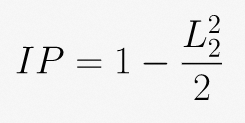
This means the inner product can serve as the distance metric directly. The search result is the inner product of the normalized vectors, returned as the score field in the output table.
Set -converter to NormalizeConverter and -distance_method to inner_product. L2 normalization is applied by default.
Sample command
--@resource_reference{"proxima-ce-aliyun-1.0.2.jar"}
jar -resources proxima-ce-aliyun-1.0.2.jar
-classpath proxima-ce-aliyun-1.0.2.jar com.alibaba.proxima2.ce.ProximaCERunner
-doc_table doc_table_xx
-doc_table_partition 20221111
-query_table query_table_xx
-query_table_partition 20221111
-output_table output_table_xx
-output_table_partition 20221111
-data_type float
-dimension 8
-external_volume_name xxx_volume_name
-owner_id 123456
-converter NormalizeConverter
-distance_method inner_product;
Parameters specific to NormalizeConverter (all other parameters are the same as in MipsSquaredEuclidean):
| Parameter | Required | Description |
|---|---|---|
-converter | Yes | Must be set to NormalizeConverter |
-distance_method | Yes | Must be set to inner_product |
Cosine distance
The Proxima SDK does not support cosine distance directly because the computation is costly. Cosine similarity is mathematically equivalent to the inner product after L2 normalization, so the recommended approach is:
Use NormalizeConverter to get the normalized inner product. The result is stored in the
scorefield of the output table.scoreis a field in the output table, not a parameter you pass to the command.Compute the cosine distance using the formula:
cosine distance = 1 - score
The following table shows the relationship between the two metrics:
| Metric | Definition | Range |
|---|---|---|
| Cosine similarity | Inner product of the L2-normalized vectors, returned as score | (-1, 1) |
| Cosine distance | 1 - score | (0, 2) |
The formula 1 - score shifts the similarity range from (-1, 1) to (0, 2), ensuring cosine distance is always a positive value.