Proxima CE supports offline vector search on MaxCompute, including basic vector search and million-level top-K search. This topic covers basic vector search: how to prepare data, configure the job, run it in DataWorks or odpscmd, and interpret the results.
Prerequisites
Before you begin, confirm the following:
-
Proxima CE package installed. See Install the Proxima CE package.
-
Input tables prepared. You need a doc table (the vectors to search) and a query table (the query vectors).
-
Tenant-level schema syntax switch disabled. Vector search tasks are not supported in projects where this switch is enabled. If the switch is on, jobs fail with
Schema xxx does not exist. -
OSS access configured. Choose one of the following methods:
-
External Volume (recommended): Activate the Volume permission and create an External Volume. See External volume operations.
-
RAM role ARN: If you don't have an External Volume, provide your RAM role ARN (
-oss_role_arn), OSS endpoint (-oss_endpoint), and OSS bucket (-oss_bucket) as startup parameters. Proxima CE creates and manages the underlying OSS resources automatically.
-
When running Proxima CE tasks in DataWorks, use Shared Resource Groups for Scheduling for Smoke Testing. See Perform smoke testing.
Import data into input tables
The following SQL generates sample test data — 10 eight-dimensional float vectors in the doc table and 3 query vectors in the query table. Run it on a SQL node in DataWorks.
ALTER TABLE doc_table_float_smoke ADD PARTITION(pt='20221111');
INSERT OVERWRITE TABLE doc_table_float_smoke PARTITION (pt='20221111') VALUES
('1.nid','1~1~1~1~1~1~1~1'),
('2.nid','2~2~2~2~2~2~2~2'),
('3.nid','3~3~3~3~3~3~3~3'),
('4.nid','4~4~4~4~4~4~4~4'),
('5.nid','5~5~5~5~5~5~5~5'),
('6.nid','6~6~6~6~6~6~6~6'),
('7.nid','7~7~7~7~7~7~7~7'),
('8.nid','8~8~8~8~8~8~8~8'),
('9.nid','9~9~9~9~9~9~9~9'),
('10.nid','10~10~10~10~10~10~10~10');

ALTER TABLE query_table_float_smoke ADD PARTITION(pt='20221111');
INSERT OVERWRITE TABLE query_table_float_smoke PARTITION (pt='20221111') VALUES
('q1.nid','1~1~1~1~2~2~2~2'),
('q2.nid','4~4~4~4~3~3~3~3'),
('q3.nid','9~9~9~9~5~5~5~5');
Import your actual vector data into the doc and query tables before running the search job.
Run a basic vector search task
Run the job in DataWorks or odpscmd. All examples use the same core parameters — the only difference is how OSS access is configured (External Volume vs. RAM role ARN).
For a full parameter reference, see Proxima CE parameters.
Run in DataWorks
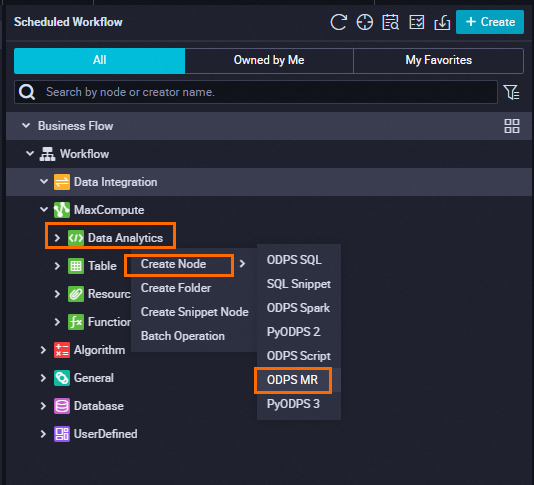
Create a MaxCompute ODPS MR node in DataWorks, then run one of the following scripts in the Data Development page.
Using an External Volume
In the Data Development page, right-click the uploaded JAR package and select Reference Resource to generate the resource reference comment. Then run:
--@resource_reference{"<proxima_ce_jar>"}
jar -resources <proxima_ce_jar>
-classpath <proxima_ce_jar> com.alibaba.proxima2.ce.ProximaCERunner
-doc_table doc_table_float_smoke
-doc_table_partition 20221111
-query_table query_table_float_smoke
-query_table_partition 20221111
-output_table output_table_float_smoke
-output_table_partition 20221111
-data_type float
-dimension 8
-topk 1
-job_mode train:build:seek:recall
-external_volume_name <ext_volume>
-owner_id <oid>
;
Replace the following placeholders:
| Placeholder | Description |
|---|---|
<proxima_ce_jar> |
Name of the uploaded Proxima CE JAR package, such as proxima-ce-aliyun-1.0.2.jar. See Install the Proxima CE package. |
<ext_volume> |
Name of the External Volume. The underlying OSS directory must exist before running the job. See External volume operations. |
<oid> |
A unique numeric user identifier, maximum 32 digits. Use your Alibaba Cloud account ID. |
Run the basic vector search task by using an AccessKey pair.
--@resource_reference{"<proxima_ce_jar>"}  -- Reference the uploaded proxima-ce jar package. In the "Data Development" page, right-click the uploaded JAR package and select "Reference Resource" to generate this comment line
jar -resources <proxima_ce_jar>  -- The uploaded proxima-ce jar package
-classpath <proxima_ce_jar> com.alibaba.proxima2.ce.ProximaCERunner  -- The classpath specifies the main function entry class
-doc_table doc_table_float_smoke  -- The input doc table
-doc_table_partition 20221111  -- The partition of the input doc table
-query_table query_table_float_smoke  -- The input query table
-query_table_partition 20221111  -- The partition of the input query table
-output_table output_table_float_smoke  -- The output table
-output_table_partition 20221111  -- The partition of the output table
-data_type float  -- The data type of the vector
-dimension 8  -- The vector dimension
-topk 1  -- The topk for vector search
-job_mode train:build:seek:recall  -- Specify the search task mode. The default is train:build:seek. Adding recall calculates the recall rate of this search
-oss_access_id <ak> -- The AccessKey ID of the logged-in Alibaba Cloud account or RAM user
-oss_access_key <sk> -- The AccessKey secret that corresponds to the AccessKey ID.
-oss_endpoint <endpoint> -- The endpoint of the destination region
-oss_bucket <bucket> -- The created OSS bucket
-owner_id <oid>  -- The unique ID provided by the user to identify themselves
; -- Do not forget the semicolon, which is the end mark of the ODPS SQL
When executing the above code, you need to replace the following parameters according to your actual situation:
|
Parameter |
Description |
|
proxima_ce_jar |
The name of the uploaded Proxima CE installation package, such as proxima-ce-aliyun-1.0.1.jar. For more information, see Install the Proxima CE package. |
|
ak |
The AccessKey ID of the logged-in Alibaba Cloud account or RAM user. |
|
sk |
The AccessKey secret that corresponds to the AccessKey ID. |
|
endpoint |
The internal OSS endpoint of the region where the MaxCompute project is located. For more information, see OSS regions and endpoints. |
|
bucket |
The name of the OSS bucket in the same region as the MaxCompute project. For information about how to view the bucket name, see List buckets. |
|
oid |
A unique user identifier consisting of numbers, with a recommended length not exceeding 32 digits, such as 123456. We recommend that you use your Alibaba Cloud account ID. |
Run the basic vector search task by using an AccessKey pair.
--@resource_reference{"<proxima_ce_jar>"}  -- Reference the uploaded proxima-ce jar package. In the "Data Development" page, right-click the uploaded JAR package and select "Reference Resource" to generate this comment line
jar -resources <proxima_ce_jar>  -- The uploaded proxima-ce jar package
-classpath <proxima_ce_jar> com.alibaba.proxima2.ce.ProximaCERunner  -- The classpath specifies the main function entry class
-doc_table doc_table_float_smoke  -- The input doc table
-doc_table_partition 20221111  -- The partition of the input doc table
-query_table query_table_float_smoke  -- The input query table
-query_table_partition 20221111  -- The partition of the input query table
-output_table output_table_float_smoke  -- The output table
-output_table_partition 20221111  -- The partition of the output table
-data_type float  -- The data type of the vector
-dimension 8  -- The vector dimension
-topk 1  -- The topk for vector search
-job_mode train:build:seek:recall  -- Specify the search task mode. The default is train:build:seek. Adding recall calculates the recall rate of this search
-oss_access_id <ak> -- The AccessKey ID of the logged-in Alibaba Cloud account or RAM user
-oss_access_key <sk> -- The AccessKey secret that corresponds to the AccessKey ID.
-oss_endpoint <endpoint> -- The endpoint of the destination region
-oss_bucket <bucket> -- The created OSS bucket
-owner_id <oid>  -- The unique ID provided by the user to identify themselves
; -- Do not forget the semicolon, which is the end mark of the ODPS SQL
When executing the above code, you need to replace the following parameters according to your actual situation:
|
Parameter |
Description |
|
proxima_ce_jar |
The name of the uploaded Proxima CE installation package, such as proxima-ce-aliyun-1.0.1.jar. For more information, see Install the Proxima CE package. |
|
ak |
The AccessKey ID of the logged-in Alibaba Cloud account or RAM user. |
|
sk |
The AccessKey secret that corresponds to the AccessKey ID. |
|
endpoint |
The internal OSS endpoint of the region where the MaxCompute project is located. For more information, see OSS regions and endpoints. |
|
bucket |
The name of the OSS bucket in the same region as the MaxCompute project. For information about how to view the bucket name, see List buckets. |
|
oid |
A unique user identifier consisting of numbers, with a recommended length not exceeding 32 digits, such as 123456. We recommend that you use your Alibaba Cloud account ID. |
Using a RAM role ARN
--@resource_reference{"<proxima_ce_jar>"}
jar -resources <proxima_ce_jar>
-classpath <proxima_ce_jar> com.alibaba.proxima2.ce.ProximaCERunner
-doc_table doc_table_float_smoke
-doc_table_partition 20221111
-query_table query_table_float_smoke
-query_table_partition 20221111
-output_table output_table_float_smoke
-output_table_partition 20221111
-data_type float
-dimension 8
-topk 1
-job_mode train:build:seek:recall
-oss_role_arn <rolearn>
-oss_endpoint <endpoint>
-oss_bucket <bucket>
-owner_id <oid>
;
Replace the following placeholders:
| Placeholder | Description |
|---|---|
<proxima_ce_jar> |
Name of the uploaded Proxima CE JAR package, such as proxima-ce-aliyun-1.0.1.jar. See Install the Proxima CE package. |
<rolearn> |
ARN of the RAM role that can access OSS, in the format acs:ram::1234xxx5678:role/xxx-role. Find it in the RAM console under Identities > Roles. |
<endpoint> |
Internal OSS endpoint of the region where the MaxCompute project is located. See Regions and endpoints. |
<bucket> |
Name of the OSS bucket in the same region as the MaxCompute project. See List buckets. |
<oid> |
A unique numeric user identifier, maximum 32 digits. Use your Alibaba Cloud account ID. |
Run in odpscmd
Run the following script in the MaxCompute client (odpscmd).
Using an External Volume
jar -resources <proxima_ce_jar>
-classpath <proxima_ce_jar_path> com.alibaba.proxima2.ce.ProximaCERunner
-doc_table doc_table_float_smoke
-doc_table_partition 20221111
-query_table query_table_float_smoke
-query_table_partition 20221111
-output_table output_table_float_smoke
-output_table_partition 20221111
-data_type float
-dimension 8
-topk 1
-job_mode train:build:seek:recall
-external_volume_name <ext_volume>
-owner_id <oid>
;
Replace the following placeholders:
| Placeholder | Description |
|---|---|
<proxima_ce_jar> |
Name of the Proxima CE JAR package, such as proxima-ce-aliyun-1.0.1.jar. See Install the Proxima CE package. |
<proxima_ce_jar_path> |
Local path to the JAR package. If the JAR is in the same directory as the execution script, you can use the JAR name directly. |
<ext_volume> |
Name of the External Volume. See External volume operations. |
<oid> |
A unique numeric user identifier, maximum 32 digits. Use your Alibaba Cloud account ID. |
Run the basic vector search task by using an AccessKey pair.
jar -resources <proxima_ce_jar>
-classpath <proxima_ce_jar_path> com.alibaba.proxima2.ce.ProximaCERunner
-doc_table doc_table_float_smoke
-doc_table_partition 20221111
-query_table query_table_float_smoke
-query_table_partition 20221111
-output_table output_table_float_smoke
-output_table_partition 20221111
-data_type float
-dimension 8
-topk 1
-job_mode train:build:seek:recall
-oss_access_id <ak>
-oss_access_key <sk>
-oss_endpoint <endpoint>
-oss_bucket <bucket>
-owner_id <oid>
;
When executing the above code, you must replace the following parameters according to your actual situation:
|
Parameter |
Description |
|
proxima_ce_jar |
The name of the uploaded Proxima CE installation package, such as proxima-ce-aliyun-1.0.1.jar. For more information, see Install the Proxima CE package. |
|
proxima_ce_jar_path |
The local path of the Proxima CE JAR package. Here, using just the JAR package name indicates that the JAR is in the same directory as the execution script. |
|
ak |
The AccessKey ID of the logged-in Alibaba Cloud account or RAM user. |
|
sk |
The AccessKey secret that corresponds to the AccessKey ID. |
|
endpoint |
The internal OSS endpoint of the region where the MaxCompute project is located. For more information, see OSS regions and endpoints. |
|
bucket |
The name of the OSS bucket in the same region as the MaxCompute project. For information about how to view the bucket name, see List buckets. |
|
oid |
A unique user identifier consisting of numbers, with a recommended length not exceeding 32 digits, such as 123456. We recommend that you use your Alibaba Cloud account ID. |
Run the basic vector search task by using an AccessKey pair.
jar -resources <proxima_ce_jar>
-classpath <proxima_ce_jar_path> com.alibaba.proxima2.ce.ProximaCERunner
-doc_table doc_table_float_smoke
-doc_table_partition 20221111
-query_table query_table_float_smoke
-query_table_partition 20221111
-output_table output_table_float_smoke
-output_table_partition 20221111
-data_type float
-dimension 8
-topk 1
-job_mode train:build:seek:recall
-oss_access_id <ak>
-oss_access_key <sk>
-oss_endpoint <endpoint>
-oss_bucket <bucket>
-owner_id <oid>
;
When executing the above code, you must replace the following parameters according to your actual situation:
|
Parameter |
Description |
|
proxima_ce_jar |
The name of the uploaded Proxima CE installation package, such as proxima-ce-aliyun-1.0.1.jar. For more information, see Install the Proxima CE package. |
|
proxima_ce_jar_path |
The local path of the Proxima CE JAR package. Here, using just the JAR package name indicates that the JAR is in the same directory as the execution script. |
|
ak |
The AccessKey ID of the logged-in Alibaba Cloud account or RAM user. |
|
sk |
The AccessKey secret that corresponds to the AccessKey ID. |
|
endpoint |
The internal OSS endpoint of the region where the MaxCompute project is located. For more information, see OSS regions and endpoints. |
|
bucket |
The name of the OSS bucket in the same region as the MaxCompute project. For information about how to view the bucket name, see List buckets. |
|
oid |
A unique user identifier consisting of numbers, with a recommended length not exceeding 32 digits, such as 123456. We recommend that you use your Alibaba Cloud account ID. |
Using a RAM role ARN
jar -resources <proxima_ce_jar>
-classpath <proxima_ce_jar_path> com.alibaba.proxima2.ce.ProximaCERunner
-doc_table doc_table_float_smoke
-doc_table_partition 20221111
-query_table query_table_float_smoke
-query_table_partition 20221111
-output_table output_table_float_smoke
-output_table_partition 20221111
-data_type float
-dimension 8
-topk 1
-job_mode train:build:seek:recall
-oss_role_arn <rolearn>
-oss_endpoint <endpoint>
-oss_bucket <bucket>
-owner_id <oid>
;
Replace the following placeholders:
| Placeholder | Description |
|---|---|
<proxima_ce_jar> |
Name of the Proxima CE JAR package, such as proxima-ce-aliyun-1.0.1.jar. See Install the Proxima CE package. |
<proxima_ce_jar_path> |
Local path to the JAR package. If the JAR is in the same directory as the execution script, you can use the JAR name directly. |
<rolearn> |
ARN of the RAM role that can access OSS, in the format acs:ram::1234xxx5678:role/xxx-role. Find it in the RAM console under Identities > Roles. |
<endpoint> |
Internal OSS endpoint of the region where the MaxCompute project is located. See OSS regions and endpoints. |
<bucket> |
Name of the OSS bucket in the same region as the MaxCompute project. See List buckets. |
<oid> |
A unique numeric user identifier, maximum 32 digits. Use your Alibaba Cloud account ID. |
Key parameters
The following table describes the core parameters shared across all run methods.
| Parameter | Example value | Description |
|---|---|---|
-doc_table |
doc_table_float_smoke |
Name of the input doc table containing the vectors to index. |
-doc_table_partition |
20221111 |
Partition of the input doc table. |
-query_table |
query_table_float_smoke |
Name of the input query table containing the query vectors. |
-query_table_partition |
20221111 |
Partition of the input query table. |
-output_table |
output_table_float_smoke |
Name of the output table where search results are written. |
-output_table_partition |
20221111 |
Partition of the output table. |
-data_type |
float |
Data type of the vectors. |
-dimension |
8 |
Number of dimensions in each vector. |
-topk |
1 |
Number of nearest neighbors to return per query vector. |
-job_mode |
train:build:seek:recall |
Pipeline stages to run. Default is train:build:seek. Adding recall computes the recall rate against ground truth. |
-owner_id |
123456 |
Unique numeric user identifier (max 32 digits). Use your Alibaba Cloud account ID. |
Results
Console output
A successful job prints a summary similar to the following:
Vector retrieval - Data type: 4, Vector dimension: 8, Retrieval method: HNSW, Calculation method: Squared Euclidean, Construction mode: train:build:seek:recall
Doc table information - Table name: doc_table_float_smoke, Partition: 20221111, Doc count: 10, Vector delimiter: ~
Query table information - Table name: query_table_float_smoke, Partition: 20221111, Query count: 3, Vector delimiter: ~
Output table information - Table name: output_table_float_smoke, Partition: 20221111
Row and column information - Row count: 1, Column count: 1, Doc count per column index: 1000000
Clear Volume index: false

Time consumption of each worker (unit: seconds):
   SegmentationWorker:      1
   TmpTableWorker:          0
   KmeansGraphWorker:       0
   BuildJobWorker:          120
   SeekJobWorker:           60
   TmpResultJoinWorker:     0
   RecallWorker:            60
   CleanUpWorker:           1
Total time consumption (unit: minutes):

Actual recall rate:
    Recall@1:   1.0
Key fields to check:
-
Retrieval method: HNSW (Hierarchical Navigable Small World), the index algorithm used by Proxima CE.
-
Calculation method: Squared Euclidean — the
scorein the output table is the squared L2 distance between the query vector and the matched doc vector. A lower score means higher similarity. -
Recall@1: 1.0 — the search returned the true nearest neighbor for every query vector (perfect recall). Values closer to 1.0 indicate better search quality.
Output table
The output table has the following columns:
| Column | Description |
|---|---|
pk |
Primary key of the query vector. |
knn_result |
Primary key of the nearest doc vector. |
score |
Squared Euclidean distance between the query and result vectors. Lower is more similar. |
pt |
Partition value. |
Sample rows for the test data:
+------------+------------+------------+------------+
| pk         | knn_result | score      | pt         |
+------------+------------+------------+------------+
| q1.nid     | 1.nid      | 4.0        | 20221111   |
| q2.nid     | 3.nid      | 4.0        | 20221111   |
| q3.nid     | 7.nid      | 32.0       | 20221111   |
Million-level top-K search
To scale beyond the basic example, set -topk to the number of nearest neighbors you need. Proxima CE, powered by the Proxima 2.x kernel, supports top-K search across millions of vectors by simply setting the startup parameter -topk.