The Proxima kernel comprises four modules: IndexBuilder, IndexConverter, IndexMeasure, and IndexSearcher. This topic describes how each module works and how to configure its parameters.
IndexBuilder
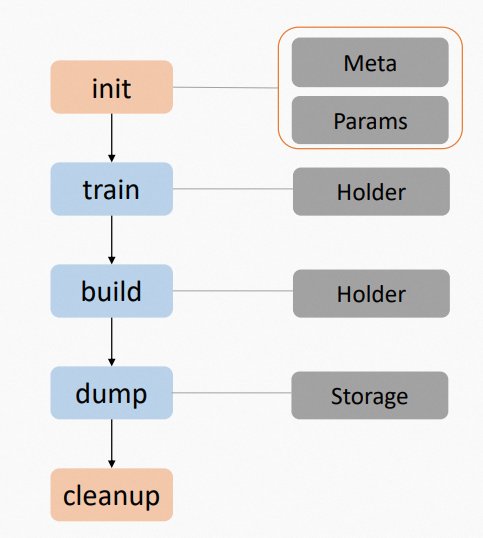
IndexBuilder builds vector indexes. It follows a five-step lifecycle:
-
Initialize IndexBuilder.
-
Train data.
-
Build indexes.
-
Dump indexes.
-
Clean up resources.
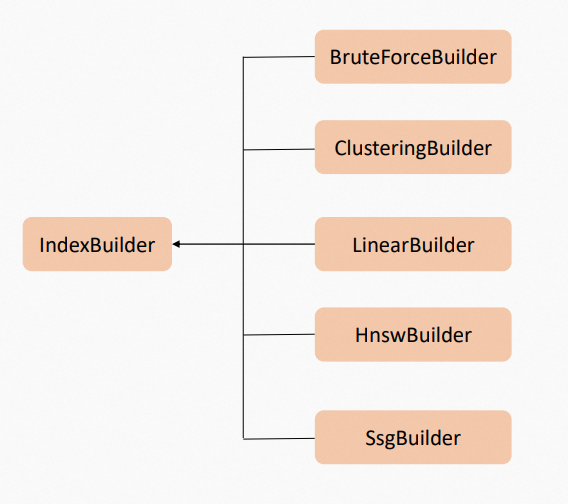
The Proxima kernel includes four built-in Builder plugins: ClusteringBuilder, LinearBuilder, HnswBuilder, and SsgBuilder.
IndexConverter
IndexConverter transforms feature vectors before index building. Supported transformations include dimensionality reduction, half-float conversion, and INT8 quantization. Use it standalone or as part of the index building pipeline.
In most pipelines, IndexConverter pairs with IndexReformer:
-
Offline (index building): IndexConverter transforms feature vectors → IndexBuilder builds indexes.
-
Online (search): IndexReformer transforms query vectors → IndexSearcher runs the search.
This relationship mirrors that of IndexBuilder and IndexSearcher: IndexConverter is the offline counterpart to the online IndexReformer.
IndexMeasure
IndexMeasure computes similarity between vectors using distance metrics. A smaller distance indicates higher similarity. For available plugins and their parameters, see IndexMeasure parameters.
Distance calculation formulas
Numeric distance
<table> <thead> <tr> <td><p><b>Distance parameter</b></p></td> <td><p><b>Formula</b></p></td> </tr> </thead> <colgroup></colgroup> <colgroup></colgroup> <tbody> <tr> <td><p>Squared Euclidean</p></td> <td><p><span><code>$$\\sum_{i=0}\^n (u_i - v_i)\^2$$</code></span></p></td> </tr> <tr> <td><p>Euclidean</p></td> <td><p><span><code>$$\\sqrt{\\sum_{i=0}\^n (u_i - v_i)\^2}$$</code></span></p></td> </tr> <tr> <td><p>Normalized Euclidean</p></td> <td><p><span><code>$$\\sqrt{\\frac{1}{2}\\frac{\\sum_{i=0}\^n \[(u_i-\\bar{u}) - (v_i-\\bar{v})\]\^2}{\\sum_{i=0}\^n \[(u_i-\\bar{u})\^2 + (v_i-\\bar{v})\^2\]}}$$</code></span></p></td> </tr> <tr> <td><p>Normalized Squared Euclidean</p></td> <td><p><span><code>$$\\frac{1}{2}\\frac{\\sum_{i=0}\^n \[(u_i-\\bar{u}) - (v_i-\\bar{v})\]\^2}{\\sum_{i=0}\^n \[(u_i-\\bar{u})\^2 + (v_i-\\bar{v})\^2\]}$$</code></span></p></td> </tr> <tr> <td><p>Manhattan</p></td> <td><p><span><code>$$\\sum_{i=0}\^n \|u_i - v_i\|$$</code></span></p></td> </tr> <tr> <td><p>Chebyshev (Chessboard)</p></td> <td><p><span><code>$$\\max_{i=0} \|u_i - v_i\|$$</code></span></p></td> </tr> <tr> <td><p>Cosine</p></td> <td><p><span><code>$$1.0 - \\frac{\\sum_{i=0}\^n u_iv_i}{\\sqrt{\\sum_{i=0}\^n u_i\^2}\\sqrt{\\sum_{i=0}\^n v_i\^2}}$$</code></span></p></td> </tr> <tr> <td><p>Minus Inner Product</p></td> <td><p><span><code>$$-\\sum_{i=0}\^n u_iv_i$$</code></span></p></td> </tr> <tr> <td><p>Canberra</p></td> <td><p><span><code>$$\\sum_{i=0}\^n\\frac{\|u_i-v_i\|}{\|u_i\|+\|v_i\|}$$</code></span></p></td> </tr> <tr> <td><p>Bray Curtis</p></td> <td><p><span><code>$$\\frac{\\sum_{i=0}\^n\|u_i-v_i\|}{\\sum_{i=0}\^n\|u_i+v_i\|}$$</code></span></p></td> </tr> <tr> <td><p>Correlation</p></td> <td><p><span><code>$$1.0 - \\frac{\\sum_{i=0}\^n(u_i-\\bar{u})(v_i-\\bar{v})}{\\sqrt{\\sum_{i=0}\^n(u_i-\\bar{u})\^2} \\sqrt{\\sum_{i=0}\^n(v_i-\\bar{v})\^2}}$$</code></span></p></td> </tr> <tr> <td><p>Binary</p></td> <td><p><span><code>$$\[!u == v\]$$</code></span></p></td> </tr> </tbody> </table>
Binary image distance
<table> <thead> <tr> <td><p><b>Distance parameter</b></p></td> <td><p><b>Formula</b></p></td> </tr> </thead> <colgroup></colgroup> <colgroup></colgroup> <tbody> <tr> <td><p>Hamming</p></td> <td><p><span><code>$$M_{10}+M_{01}$$</code></span></p></td> </tr> <tr> <td><p>Jaccard</p></td> <td><p><span><code>$$\\frac{M_{10}+M_{01}}{M_{11}+M_{10}+M_{01}}$$</code></span></p></td> </tr> <tr> <td><p>Matching</p></td> <td><p><span><code>$$\\frac{M_{10}+M_{01}}{M_{11}+M_{10}+M_{01}+M_{00}}=\\frac{M_{10}+M_{01}}{N}$$</code></span></p></td> </tr> <tr> <td><p>Dice</p></td> <td><p><span><code>$$\\frac{M_{10}+M_{01}}{2M_{11}+M_{10}+M_{01}}$$</code></span></p></td> </tr> <tr> <td><p>Rogers Tanimoto</p></td> <td><p><span><code>$$\\frac{2(M_{10}+M_{01})}{M_{11}+2(M_{10}+M_{01})+M_{00}}$$</code></span></p></td> </tr> <tr> <td><p>Russell Rao</p></td> <td><p><span><code>$$\\frac{M_{10}+M_{01}+M_{00}}{N}$$</code></span></p></td> </tr> <tr> <td><p>Sokal Michener</p></td> <td><p><span><code>$$\\frac{M_{10}+M_{01}}{M_{11}+M_{10}+M_{01}+M_{00}}=\\frac{M_{10}+M_{01}}{N}$$</code></span></p></td> </tr> <tr> <td><p>Sokal Sneath I</p></td> <td><p><span><code>$$1.0 - \\frac{M_{11}}{M_{11} + 2(M_{10}+M_{01})}=\\frac{2(M_{10}+M_{01})}{M_{11}+2(M_{10}+M_{01})}$$</code></span></p></td> </tr> <tr> <td><p>Sokal Sneath II</p></td> <td><p><span><code>$$1.0 - \\frac{2(M_{11} + M_{00})}{2(M_{11} + M_{00}) + M_{10} + M_{01}} = \\frac{M_{10} + M_{01}}{2N - (M_{10} + M_{01})}$$</code></span></p></td> </tr> <tr> <td><p>Sokal Sneath III</p></td> <td><p><span><code>$$1.0 - \\frac{M_{11} + M_{00}}{M_{10} + M_{01}} = \\frac{2(M_{10} + M_{01}) - N}{M_{10} + M_{01}}$$</code></span></p></td> </tr> <tr> <td><p>Sokal Sneath IV</p></td> <td><p><span><code>$$1.0 - \\frac{1}{4}(\\frac{M_{11}}{M_{11} + M_{10}} + \\frac{M_{11}}{M_{11} + M_{01}} + \\frac{M_{00}}{M_{10} + M_{00}} + \\frac{M_{00}}{M_{01} + M_{00}})$$</code></span></p></td> </tr> <tr> <td><p>Sokal Sneath V</p></td> <td><p><span><code>$$1.0 - \\frac{M_{11}M_{00}}{\\sqrt{(M_{11} + M_{10}) (M_{11} + M_{01}) (M_{10} + M_{00}) (M_{01} + M_{00})}}$$</code></span></p></td> </tr> <tr> <td><p>Kulczynski I</p></td> <td><p><span><code>$$1.0-\\frac{S_{AB}}{S_A+S_B-2S_{AB}} = 1.0-\\frac{M_{11}}{M_{10}+M_{01}} = \\frac{M_{10}+M_{01}-M_{11}}{M_{10}+M_{01}}$$</code></span></p></td> </tr> <tr> <td><p>Kulczynski II</p></td> <td><p><span><code>$$1.0-\\frac{1}{2}\\left(\\frac{S_{AB}}{S_{A}}+\\frac{S_{AB}}{S_{B}}\\right)$$</code></span></p></td> </tr> <tr> <td><p>Yule</p></td> <td><p><span><code>$$\\frac{2M_{10}M_{01}}{M_{11}M_{00}+M_{10}M_{01}}$$</code></span></p></td> </tr> </tbody> </table>
IndexSearcher
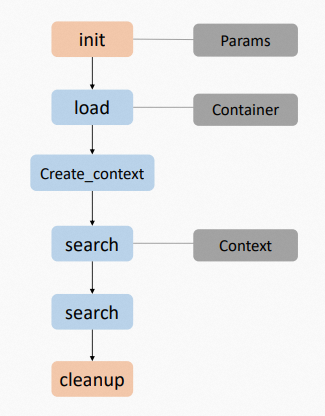
IndexSearcher runs k-nearest neighbor (kNN) search. It loads indexes built offline in read-only mode and performs online search.
-
Initialize IndexSearcher.
-
Load index data.
-
Create a data context for the search.
-
Run the search.
-
Unload index data.
-
Clean up resources.
Parallel search: IndexSearcher supports parallel search, but the engine user controls the concurrency because use cases and environments vary. Each Searcher Context object stores search results and intermediate data and can be reused — but only by one thread at a time. To run parallel searches, create multiple Searcher Context objects.
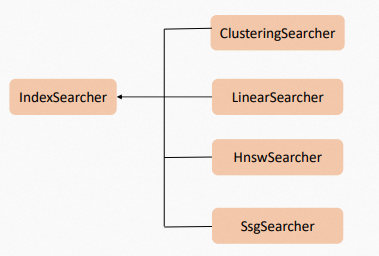
The Proxima kernel includes six built-in Searcher plugins: ClusteringSearcher, LinearSearcher, HnswSearcher, SsgSearcher, GcSearcher, and QcSearcher.
IndexBuilder parameters
ClusteringBuilder
Configure at least one of proxima.hc.builder.max_document_count or proxima.hc.builder.centroid_count.
| Parameter | Data type | Default value | Description |
|---|---|---|---|
proxima.hc.builder.max_document_count |
UINT32 | No default value | Used to calculate the number of cluster centroids when proxima.hc.builder.centroid_count is not set. |
proxima.hc.builder.centroid_count |
STRING | No default value | Number of cluster centroids. Hierarchical clusters are supported — separate centroid counts per layer with an asterisk (*). Example for one layer: 1000. Example for two layers: 100*100. For two-layer hierarchical clusters, set more centroids at layer 1 than layer 2. Based on empirical values, layer 1 should have 10 times more centroids than layer 2 to achieve a high recall rate. If this parameter is not set, the centroid count is derived from proxima.hc.builder.max_document_count. |
proxima.hc.builder.thread_count |
UINT32 | 0 |
Number of threads used during index building. 0 uses the default CPU core count. |
HnswBuilder
| Parameter | Data type | Default value | Description |
|---|---|---|---|
proxima.hnsw.builder.thread_count |
UINT32 | 0 |
Number of threads used during index building. 0 uses the default CPU core count. |
proxima.hnsw.builder.efconstruction |
UINT32 | 500 |
Controls graph quality during index building. A higher value produces a more accurate graph but increases build time. |
proxima.hnsw.builder.max_neighbor_count |
UINT32 | 100 |
Number of neighbors per node in the graph. A higher value increases graph quality but raises both compute and storage overhead. Do not set this value higher than the number of feature dimensions. Maximum: 65535. |
SsgBuilder
| Parameter | Data type | Default value | Description |
|---|---|---|---|
proxima.ssg.builder.thread_count |
UINT32 | 0 |
Number of threads used during index building. |
proxima.ssg.builder.efconstruction |
UINT32 | 500 |
Controls graph quality during index building. A higher value produces a more accurate graph but increases build time. |
proxima.ssg.builder.max_neighbor_count |
UINT32 | 100 |
Number of neighbors per node in the graph. A higher value increases graph quality but raises both compute and storage overhead. Do not set this value higher than the number of feature dimensions. Maximum: 65535. |
proxima.ssg.builder.centroid_count |
UINT32 | 0 |
Number of cluster centroids generated from training samples. A higher value increases graph quality but also raises build cost. Configure based on the number of records in the doc table: fewer than 2 million → 2000; 2 million to 10 million → 5000; more than 10 million → 8000. |
proxima.ssg.builder.scan_ratio |
FLOAT | 0.01 |
Cluster scan rate (default: 1%). Controls graph quality — a higher value improves quality but increases build cost linearly. Configure based on the number of records in the doc table: fewer than 2 million → 10000/doc_count; 2 million to 10 million → 20000/doc_count; more than 10 million → 50000/doc_count. |
GcBuilder
proxima.gc.builder.centroid_count must be configured.
| Parameter | Data type | Default value | Description |
|---|---|---|---|
proxima.gc.builder.thread_count |
UINT32 | 0 |
Number of threads used during index building. 0 uses the default CPU core count. |
proxima.gc.builder.centroid_count |
STRING | No default value | Number of cluster centroids. Hierarchical clusters are supported — separate centroid counts per layer with an asterisk (*). Example for one layer: 1000. Example for two layers: 100*100. For two-layer hierarchical clusters, set more centroids at layer 1 than layer 2. Based on empirical values, layer 1 should have 10 times more centroids than layer 2 to achieve a high recall rate. |
LinearBuilder
| Parameter | Data type | Default value | Description |
|---|---|---|---|
proxima.linear.builder.column_major_order |
STRING | false |
Feature ordering during index building. false orders features by row; true orders features by column. |
QcBuilder
proxima.qc.builder.centroid_count must be configured.| Parameter | Data type | Default value | Description |
|---|---|---|---|
proxima.qc.builder.thread_count |
UINT32 | 0 |
Number of threads used during index building. 0 uses the default CPU core count. |
proxima.qc.builder.centroid_count |
STRING | No default value | Number of cluster centroids. Hierarchical clusters are supported — separate centroid counts per layer with an asterisk (*). Example for one layer: 1000. Example for two layers: 100*100. For two-layer hierarchical clusters, set more centroids at layer 1 than layer 2. Based on empirical values, layer 1 should have 10 times more centroids than layer 2 to achieve a high recall rate. |
proxima.qc.builder.quantizer_class |
STRING | No default value | Quantizer to apply. No quantizer is used by default. Valid values: Int8QuantizerConverter, HalfFloatConverter, DoubleBitConverter. A quantizer typically improves query performance and reduces index size, but lowers recall rate. |
proxima.qc.builder.quantizer_params |
IndexParams | No default value | Parameters for the quantizer specified in proxima.qc.builder.quantizer_class. |
IndexSearcher parameters
ClusteringSearcher
| Parameter | Data type | Default value | Description |
|---|---|---|---|
proxima.hc.searcher.max_scan_count |
UINT32 | No default value | Maximum number of doc table records scanned per search. A higher value widens the search range and increases recall rate, but cannot exceed the number of records under the cluster centroids specified by proxima.hc.searcher.scan_count_in_level. |
proxima.hc.searcher.scan_ratio |
FLOAT | 0.01 |
Used to derive max_scan_count. Formula: total doc table records × scan_ratio. |
HnswSearcher
| Parameter | Data type | Default value | Description |
|---|---|---|---|
proxima.hnsw.searcher.ef |
UINT32 | 500 |
Size of the dynamic candidate list during search. A higher value increases recall rate but slows down the search. This parameter controls search-time quality and does not affect index build time. |
proxima.hnsw.searcher.max_scan_ratio |
FLOAT | 0.1 |
Used to derive max_scan_count. Formula: total doc table records × scan_ratio. |
proxima.hnsw.searcher.brute_force_threshold |
INT | 1000 |
If the total number of doc table records is below this threshold, brute-force search is used instead. |
SsgSearcher
| Parameter | Data type | Default value | Description |
|---|---|---|---|
proxima.ssg.searcher.ef |
UINT32 | 500 |
Search precision. A higher value scans more doc table records and increases recall rate. |
proxima.ssg.searcher.max_scan_ratio |
UINT32 | 0 |
Maximum scan rate for doc table records. Controls the truncation policy. 0 disables this parameter. |
GcSearcher
| Parameter | Data type | Default value | Description |
|---|---|---|---|
proxima.gc.searcher.scan_ratio |
FLOAT | 0.01 |
Used to derive max_scan_count. Formula: total doc table records × scan_ratio. |
LinearSearcher
| Parameter | Data type | Default value | Description |
|---|---|---|---|
proxima.linear.searcher.read_block_size |
UINT32 | 1024*1024 |
Amount of memory read per operation during search (approximately 1 MB). A small value significantly reduces queries per second (QPS). A large value increases memory usage. Retain the default value 1024*1024 unless you have a specific reason to change it. |
QcSearcher
| Parameter | Data type | Default value | Description |
|---|---|---|---|
proxima.qc.searcher.scan_ratio |
FLOAT | 0.01 |
Used to derive max_scan_count. Formula: total doc table records × scan_ratio. |
proxima.qc.searcher.brute_force_threshold |
INT | 1000 |
If the total number of doc table records is below this threshold, brute-force search is used instead. |
IndexConverter parameters
MipsConverter
| Parameter | Data type | Default value | Description |
|---|---|---|---|
proxima.mips.converter.m_value |
UINT32 | No default value | Value of M — the number of dimensions to add. In most cases, add a maximum of four dimensions. |
proxima.mips.converter.u_value |
FLOAT | 0.38196601 |
Value of U. Valid range: 0 to 1.0. |
proxima.mips.converter.forced_half_float |
BOOLEAN | false |
Specifies whether to force-convert data from FP32 to FP16. |
proxima.mips.converter.spherical_injection |
BOOLEAN | false |
Specifies whether to use spherical injection for data conversion. Spherical injection adds one dimension to the data. |
HalfFloatConverter
No parameters required.
DoubleBitConverter
| Parameter | Data type | Default value | Description |
|---|---|---|---|
proxima.double_bit.converter.train_sample_count |
INT | 0 |
Amount of data used for training. 0 uses all data in the holder. |
Int8QuantizerConverter
No parameters required.
Int4QuantizerConverter
No parameters required.
NormalizeConverter
| Parameter | Data type | Default value | Description |
|---|---|---|---|
proxima.normalize.reformer.forced_half_float |
BOOLEAN | false |
Specifies whether to force-convert data from FP32 to FP16. |
proxima.normalize.reformer.p_value |
UINT32 | 2 |
Value of P in the P-norm. |
IndexReformer parameters
MipsReformer
| Parameter | Data type | Default value | Description |
|---|---|---|---|
proxima.mips.reformer.m_value |
UINT32 | 4 |
Value of M — the number of dimensions to add. In most cases, add a maximum of four dimensions. |
proxima.mips.reformer.u_value |
FLOAT | 0.38196601 |
Value of U. Valid range: greater than 0 and less than 1.0. |
proxima.mips.reformer.l2_norm |
FLOAT | 0.0 |
L2 norm value obtained from training. |
proxima.mips.reformer.normalize |
BOOLEAN | false |
Specifies whether to normalize the results. |
proxima.mips.reformer.forced_half_float |
BOOLEAN | false |
Specifies whether to force-convert data from FP32 to FP16. |
HalfFloatReformer
No parameters required.
IndexMeasure parameters
MipsSquaredEuclidean
| Parameter | Data type | Default value | Description |
|---|---|---|---|
proxima.mips_euclidean.measure.injection_type |
INT | 0 |
Injection type for inner product feature transformation. Valid values: 0 LocalizedSpherical, 1 Spherical, 2 RepeatedQuadratic, 3 Identity. |
Other plugins
The following IndexMeasure plugins require no parameter configuration: Canberra, Chebyshev, SquaredEuclidean, Euclidean, GeographicalDistance, Hamming, InnerProduct, Manhattan, Matching, RogersTanimoto, RussellRao.