If your applications need to access secrets like account passwords or access keys, you can use Key Management Service (KMS) to store them as secrets. Your applications can then dynamically retrieve the secrets from KMS by using an Alibaba Cloud SDK, a KMS Instance SDK, or a secrets SDK. This prevents information leaks and malicious operations caused by storing secrets in plaintext.
Why use secret management
Leaked secrets, such as database account passwords, server account passwords, SSH keys, and access keys, are a major threat to data security. To reduce the risk of data leaks, it is crucial to effectively protect and periodically rotate your secrets. Using the secret management feature of KMS provides the following security advantages:
-
KMS encrypts and stores secret values by using high-strength encryption algorithms. This prevents leaks of secrets and high-value assets caused by hardcoding and improves data security.
-
Enables secure and convenient client access, allowing your applications to dynamically use secrets with minimal to no code.
-
Immediate rotation allows you to update secrets without affecting your applications and services.
NoteThis feature is available only for RAM secrets, database secrets (in managed dual-account mode), and ECS secrets when you integrate them by using a secrets SDK.
-
Supports high-frequency rotation for fully dynamic secrets, which shortens a secret's validity period and reduces its risk of compromise.
-
Supports centralized and large-scale security management through APIs and infrastructure-as-code (IaC) tools such as Resource Orchestration Service (ROS) or Terraform.
Use cases
This section uses an example of managing the username and password for a self-managed database to illustrate a basic use case for storing and retrieving a secret.
If you use an ApsaraDB RDS database, we recommend that you use a database secret. For more information, see Manage and use database secrets.
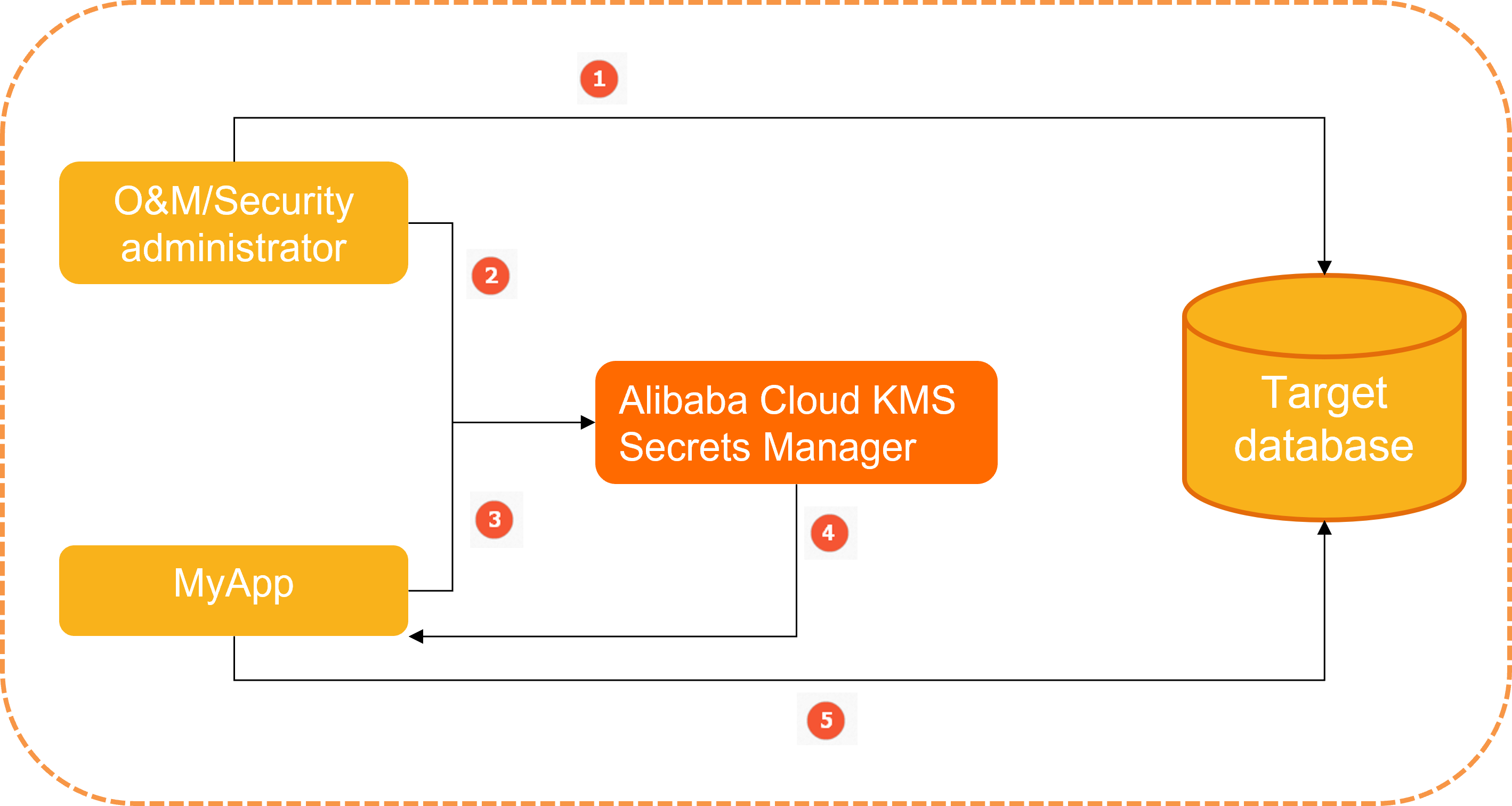
-
A security administrator configures the username and password that the MyApp application needs to access the target database.
-
The security administrator creates a generic secret named 'MyDbCreds' in KMS to store the username and password.
-
When MyApp needs to access the database, it uses a secrets client SDK to request the 'MyDbCreds' secret from KMS.
-
KMS retrieves the encrypted secret, decrypts it, and returns the plaintext value to MyApp over HTTPS.
-
MyApp parses the returned plaintext secret to get the username and password, and then uses these credentials to access the database.
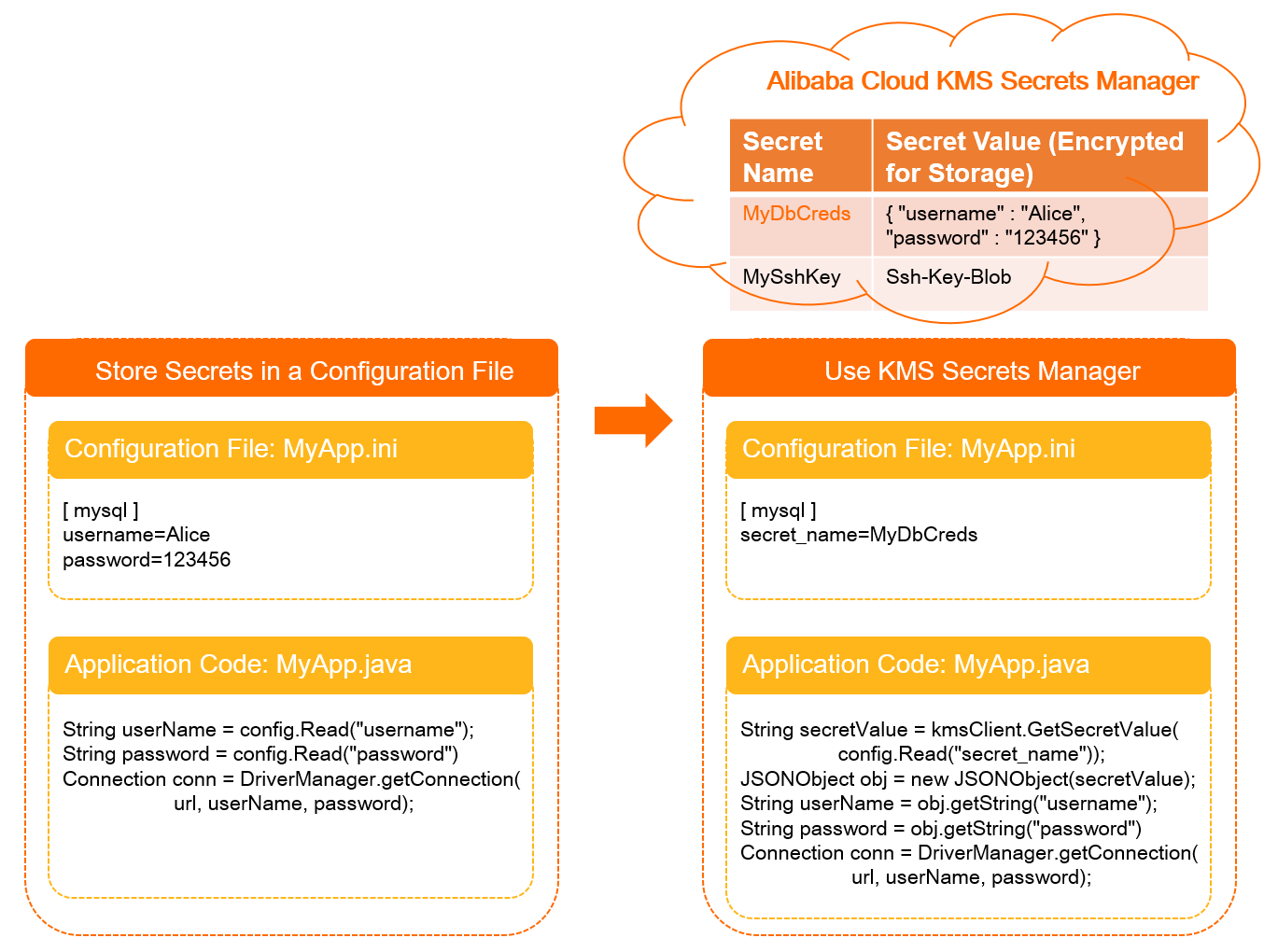
For the MyApp application, calling a KMS API to retrieve the database username and password avoids the security risks associated with hardcoding secrets. The following figure shows the difference between using hardcoded secrets and using secrets that are managed by KMS.
Components of a secret
A secret consists of metadata and one or more secret versions. You can log on to the KMS console and view the details of a secret on the Secrets page.
-
Metadata
Includes information such as the secret name, Alibaba Cloud Resource Name (ARN), creation time, secret type, encryption key, and tags.
ImportantThe encryption key encrypts only the secret value, not the secret's metadata. The key and the secret must belong to the same KMS instance, and the key must be a symmetric key.
-
Secret versions
A secret can have multiple versions. Each version includes a version number, stage labels, and a secret value.
-
A secret version can have multiple stage labels, but each stage label can point to only one version.
-
Stage label: A unique label within a secret. Stage labels include built-in stage labels and custom stage labels.
-
Built-in stage labels:
-
ACSCurrent: The current version of the secret. This label always points to the latest secret value.
-
ACSPrevious: The previous version of the secret.
-
ACSPending: A temporary label used during secret rotation. KMS removes this label after the rotation is complete.
Note-
When you retrieve a secret value by calling an API operation, KMS returns the secret value that is associated with the ACSCurrent stage label.
-
Built-in stage labels act like pointers. For example, when you first store a secret version (v1), it is labeled ACSCurrent. If you then store a new version (v2), the ACSCurrent label moves to v2, and v1 is automatically relabeled as ACSPrevious.
-
-
-
Custom stage labels: You can define multiple custom stage labels for each secret version.
ImportantOnly generic secrets support custom stage labels. The total number of custom and built-in stage labels for a secret cannot exceed eight.
-
-
Secret value: The sensitive information that you store in the secret. It can be a string or binary data.
NoteWhen the number of versions for a secret exceeds the limit, the oldest version that is not associated with any stage label is automatically deleted.
-
Secret rotation
Secret rotation is the process of updating a secret by creating a new version. This practice enhances security by limiting the lifetime of a secret. The new version is automatically labeled as ACSCurrent, and applications then dynamically retrieve the secret value by requesting the ACSCurrent version.
Rotation process

Rotation methods
-
Automatic rotation: You can configure a rotation schedule, and KMS automatically rotates the secret when the specified period ends. You can configure automatic rotation for RAM secrets, database secrets, and ECS secrets directly in KMS. For a generic secret, you can implement periodic rotation by using Function Compute.
-
As an emergency response, you can immediately rotate a compromised secret. This is supported for RAM secrets, database secrets, and ECS secrets. To immediately rotate a generic secret, you must manually store a new secret value.
Supported secret types
KMS supports four types of secrets: generic secrets, RAM secrets, database secrets, and ECS secrets. The following table provides details about each type.
-
RAM secrets, database secrets, and ECS secrets are fully managed. After you start to manage these secrets in KMS, you must perform all rotations within KMS. Do not change their status or delete them in their respective source services. Doing so disrupts the secret rotation process in KMS and may cause your applications to fail when retrieving secrets.
-
If you want to manage the rotation of a secret, including its versions and stage labels, use a generic secret.
|
Type |
Description |
Rotation method |
Reference |
|
Generic secret |
A generic secret is a basic type of secret that is supported by KMS. You can use a generic secret to store any sensitive data, such as account passwords, access keys, OAuth keys and tokens, or API keys. |
|
|
|
RAM secret |
A RAM secret is a fully managed type of secret that is supported by KMS. You can use a RAM secret to store the access key of a RAM user. |
|
|
|
Database secret |
A database secret is a fully managed type of secret that is supported by KMS. You can use it to store the account credentials for databases, such asApsaraDB RDS instances andPolarDB instances. |
|
|
|
ECS secret |
An ECS secret is a fully managed type of secret that is supported by KMS. You can use it to store the username and password or the SSH key pair that is used to log on to an ECS instance. |
|
Billing
Before you can use secrets, you must purchase a KMS instance and configure a secret quota. For more information about the pricing of KMS instances, see Billing. For instructions on how to purchase a KMS instance, see Purchase and enable a KMS instance.
Access control and auditing
You can use Resource Access Management (RAM) to control permissions for accessing and operating on secrets. For more information about how to configure permission policies, see Custom RAM policies for KMS.
You can use ActionTrail to record operations such as creating, rotating, and retrieving secrets. For more information, see Query the usage records of keys and secrets.