In Hologres, the shard count you set when creating a table group is permanent — you cannot change it afterward. Getting this wrong leads to resource skew, long-tail latency, or excessive memory consumption that is difficult to diagnose. This topic explains table groups, shards, and shard count so that you can configure your instance correctly from the start.
Key concepts
Shard
A shard is a data partition. In Hologres, data is stored on the Apsara Distributed File System. Each shard has a unique ID at the instance level. When data is written, the storage engine distributes it across shards based on a distribution key. If no distribution key is set, data is distributed randomly.
Table group
A table group is a logical storage concept specific to Hologres — it does not exist in PostgreSQL. A table group manages a fixed set of shards. When you create a table, it is assigned to a table group and its data is stored on that group's shards.
Table groups differ from related concepts:
| Concept | What it is |
|---|---|
| Table group | A Hologres-specific grouping of underlying logical shards |
| Schema | A standard database concept for organizing objects (not tied to shards) |
| Tablespace (PostgreSQL) | Identifies the storage location of a database object, similar to a directory |
Tables in different schemas can belong to the same table group. A table can belong to only one table group. To move a table to a different table group, either recreate it in the new table group or use a migration function.
Shard count
The shard count is the number of shards in a table group. Set the shard count when you create the table group — it cannot be changed afterward. To use a different shard count, create a new table group with the desired value.
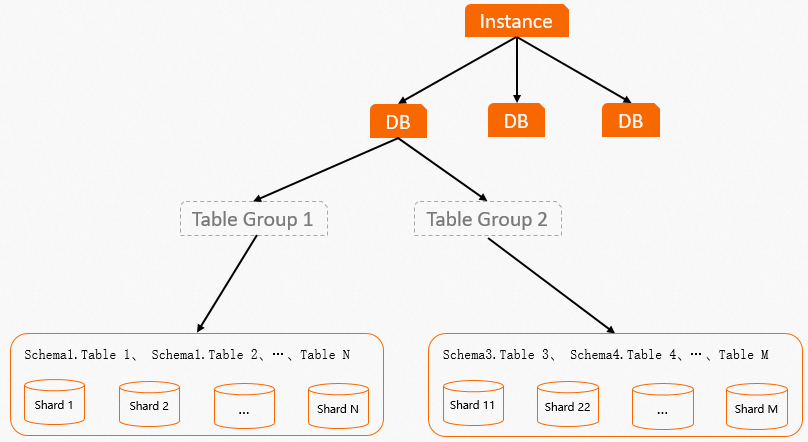
Database and table groups
A database (DB) can contain one or more table groups, but only one is the default. If you do not explicitly set a table group and shard count, Hologres automatically creates a default table group with a default shard count when the database is created. You can add more table groups or change the default as needed. Shards in different table groups never overlap.
If a table group contains no tables, the system automatically deletes it.
The following figure shows the layout of a table group.
How it works
Hologres uses two core components to handle data:
-
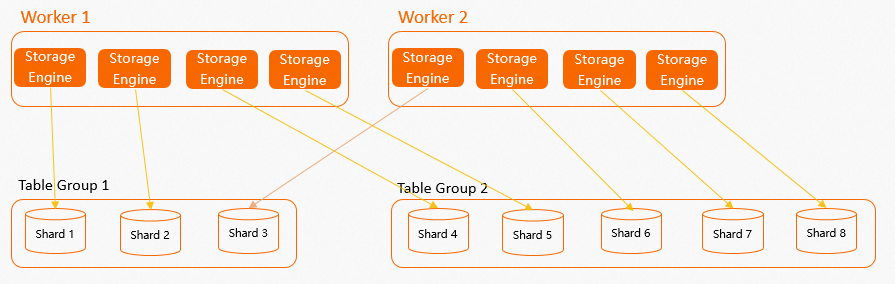
Storage engine (SE): Manages and processes data on shards. For Data Manipulation Language (DML) operations, each SE provides interfaces for single or batch create, read, update, and delete (CRUD) access. Each SE handles exactly one shard.
-
Query engine (QE): Uses SE interfaces to read and write data at high performance.
Here is what happens when you write data or run a query:
-
When you create a table group with a given shard count, each worker node creates multiple internal SEs — one per assigned shard.
-
Hologres distributes SEs evenly across all workers so that compute resources are balanced.
-
When data is written, the SE routes it to the appropriate shard based on the distribution key.
-
When a query runs, the QE calls the relevant SEs, which read data from their shards in parallel and return results.
The following figure shows the layout of worker nodes, SEs, and shards.
What Hologres manages automatically:
-
Distributing SEs evenly across workers
-
Keeping shards within a table group spread across multiple workers (no single worker holds all shards of a table group)
-
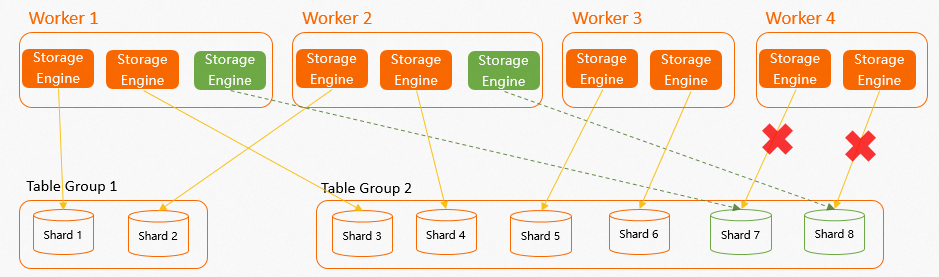
Reassigning shards to healthy workers if a worker fails (for example, due to an out-of-memory (OOM) error)
What you decide:
-
The shard count when creating a table group (cannot be changed later)
Failover example: In an instance with 4 workers and 8 shards (2 table groups, each worker holding 2 SEs), if Worker 4 fails and was responsible for Shard 7 and Shard 8, those two shards are automatically reassigned to the remaining three workers to restore balance.
Set the shard count
The shard count directly affects query parallelism, memory usage, and I/O overhead. The minimum shard count is 1. Use the following table to choose the right value.
| Scenario | Recommended shard count |
|---|---|
| Very small data (hundreds to thousands of rows) | 1 |
| General workloads | A multiple of the number of workers |
| Recommended maximum | Total number of compute cores in the instance |
Why shard count should be a multiple of the number of workers: If the shard count is not a multiple of the worker count, some workers hold more SEs than others. This causes resource skew and long-tail latency. For example, if a table group has 3 shards but the instance has 2 workers, one worker always handles more load. Setting the shard count to a multiple of the worker count ensures even distribution.
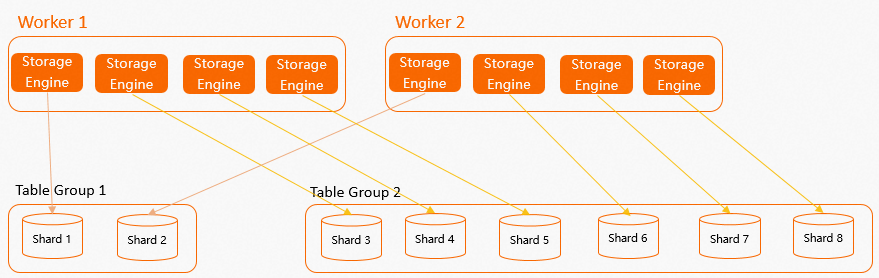
Why not to exceed the compute core count: Each shard needs at least one CPU core during a query. If the shard count exceeds the number of compute cores, some shards are not consistently allocated CPU resources, which leads to long-tail latency and context-switching overhead.
For default shard count values by instance size, see Instance management.
Performance trade-offs
Keep these trade-offs in mind when configuring table groups and shard count.
More shards
Higher parallelism for writes, queries, and analysis — but more internode communication, memory, and compute overhead. If resources are limited or queries are small, a high shard count can hurt rather than help.
More table groups
Each shard — whether actively used or not — occupies memory to store metadata, schema information, and other data. A shard consumes even more memory when data is written to tables it contains. More table groups means more total shards, which increases overall memory consumption.
Additionally, tables that require a local join must be in the same table group. Spreading related tables across multiple table groups prevents the query engine from performing local joins efficiently.
More shards per table
More shards scatter a table's data into more files. With many tables and many shards, the total file count grows large, which increases I/O during queries and extends recovery times during failover.