Before connecting a virtual border router (VBR) from one Alibaba Cloud account to a Cloud Enterprise Network (CEN) instance in another, the VBR owner must first authorize the CEN instance.
Use cases
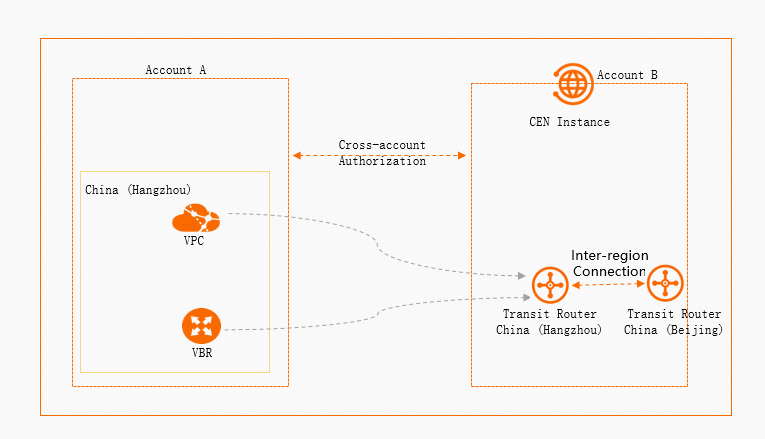
You can create cross-account intra-region or inter-region connections between a VBR and a CEN instance.
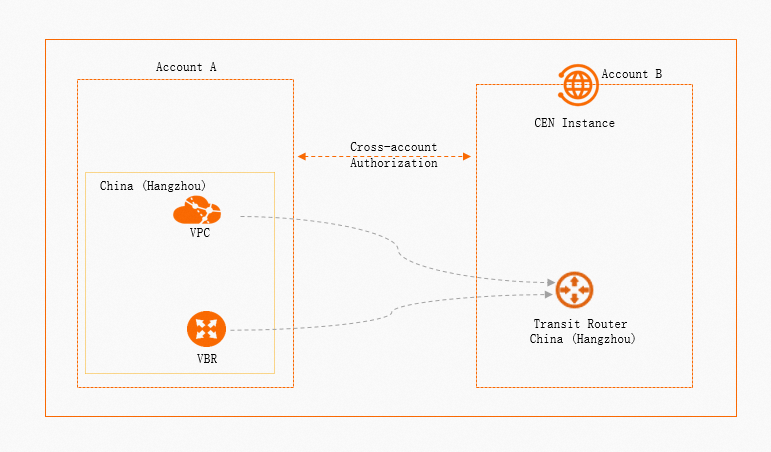
Intra-region VBR connection
Inter-region VBR connection
An enterprise uses Alibaba Cloud Account A to create a VBR in the China (Hangzhou) region. The enterprise uses Alibaba Cloud Account B to create a CEN instance and a transit router in the same China (Hangzhou) region. This topic shows how to use the VBR's cross-account authorization feature to connect the VBR from Account A to the CEN instance in Account B.
Limitations
For security and compliance reasons, cross-account VBR connectivity is not enabled by default. If you want to connect your VBR to a Cloud Enterprise Network (CEN) instance or a VPC that belongs to a different Alibaba Cloud account, you must provide a document to prove that the main accounts of these Alibaba Cloud accounts belong to the same entity. Then, contact your account manager to request this feature.
The following figure shows a sample proof of affiliation:

VBR instances on the Alibaba Cloud China site (aliyun.com) can connect only to VPC instances on the China site. VBR instances on the Alibaba Cloud International site (alibabacloud.com) can connect only to VPC instances on the International site.
VBR instances on the Alibaba Cloud China site (aliyun.com) can connect only to VPC instances on the China site. VBR instances on the Alibaba Cloud International site (alibabacloud.com) can connect only to VPC instances on the International site.
Prerequisites
A VBR instance is created in the China (Hangzhou) region under Account A. For more information, see Create and manage VBRs.
A CEN instance is created under Account B, and a transit router is created for the CEN instance in the China (Hangzhou) region. For more information, see Create a transit router.
You have the account IDs of both the VBR owner (Account A) and the CEN instance owner (Account B).
Procedure
Apply for the cross-account connection privilege
You can apply for the privilege in Quota Center or the Express Connect console. This topic describes how to apply in Quota Center. For information about how to apply in the Express Connect console, see Increase quotas.
Before applying for the privilege, contact your account manager and provide the required documentation. Then, submit an application in Quota Center. Your account manager reviews the application based on the documentation that you provide. For more information about the required documentation, see Limitations.
Log on to the Quota Center console.
In the left-side navigation pane, choose .
On the Products with Privileges page, click Express Connect in the Network section.
On the Privileges page, find the target privilege (Privilege name: Allow VBR to load CEN or VPC across accounts, Quota ID: vbr_cross_account_conn/allow), and then click Request in the Actions column.
In the Apply for Privileges dialog box, configure the following parameters and click Confirm.
Parameter
Description
Quota ID
The system automatically displays the quota ID.
Description
The system automatically displays the description of the quota ID.
Requested Value
Select a value for the quota.
Effective
Invalid
This example uses Effective.
Time
Set the effective and expiration times for the privilege.
NoteThis parameter is required only when Requested Value is set to Effective.
The privilege is valid for one day and takes effect on the day of application.
Application Reason
Enter the reason for the application. The following is a sample reason:
Customer XX: YYYY (customer name + Alibaba Cloud primary account UID) needs to apply for the privilege to connect a VBR to a cross-account CEN or VPC.
NoteThe Alibaba Cloud primary account UIDs you provide for the cross-account scenario must belong to the same enterprise or entity.
Notify Result
Select whether to receive a notification about the result.
Yes
No
Grant cross-account authorization
You must use the VBR in Account A to grant cross-account authorization to the CEN instance in Account B. After you grant the authorization, a connection can be established between the VBR in Account A and the CEN instance in Account B.
If your VBR uses Border Gateway Protocol (BGP) to communicate with your data center and the console warns you of a potential route loop, you must read the warning and inform the administrator of the CEN instance in Account B about the risk.
Use Alibaba Cloud Account ALog on to the Express Connect console.
In the top navigation bar, select the region where the target VBR instance is deployed. This example uses China (Hangzhou).
In the left-side navigation pane, click Virtual Border Routers (VBRs).
On the Virtual Border Routers (VBRs) page, find the target VBR instance and click its ID.
On the details page of the VBR instance, click the CEN Authorization tab.
Click Authorize CEN of Another Account to Load Instance. In the Authorize CEN of Another Account to Load Instance panel, configure the parameters and click OK.
Parameter
Description
Peer CEN Instance ID
Enter the ID of the target CEN instance in Account B.
Peer Account UID
Enter the account ID of Account B.
Payer
Select the party that pays the fees.
CEN Owner (default): The transit router owner's account pays the connection and data transfer fees for the VBR instance.
VBR Owner: The VBR owner's account pays the connection and data transfer fees for the VBR instance.
Supports Change the fee bearer later.
After you configure the settings, the system creates the authorization. You can view information about the authorization on the CEN Authorization tab.
NoteTake note of the account ID of Account B and the CEN instance ID for the following steps.
Create the cross-account VBR connection
You can connect the VBR instance to a transit router in the same region. After you establish the connection, the transit router enables private communication between your networks.
Log on to the Cloud Enterprise Network console by using Account B.
On the CEN Instance page, find the target CEN instance and click its ID.
On the instance details page, click the Transit Router tab. Find the target transit router and click Create Connection in the Actions column.
On the Connection with Peer Network Instance page, set the following parameters to create the VBR connection and click OK.
Parameter
Description
Network Type
Select the type of network instance to connect.
In this example, Virtual Border Router (VBR) is selected.
Region
Select the region where the network instance is deployed.
This example uses China (Hangzhou).
Transit Router
The system automatically displays the transit router that is deployed in the current region.
Account
Select the account type of the network instance owner.
In this example, Another Account is selected. After you select this option, enter the account ID of Account A.
Connection Name
Enter the VBR connection name.
Networks
Select the ID of the VBR instance to connect.
In this example, the ID of the VBR instance in Account A is selected.
Advanced Settings
By default, the system enables several advanced features, Configure automatic route table association and route propagation..
In this example, the default settings are used.
After the network instance connection is created, you can view information about the transit router and the VBR connection on the Intra-Region Connections tab. For more information, see View network instance connections.
(Optional) Revoke the CEN instance authorization
If you no longer need the cross-account VBR connection, you can revoke the authorization that you granted to the CEN instance. Revoking the authorization does not interrupt established network services.
Use Alibaba Cloud Account ALog on to the Express Connect console.
In the top navigation bar, select the region where the target VBR instance is deployed. This example uses China (Hangzhou).
In the left-side navigation pane, click Virtual Border Routers (VBRs).
On the Virtual Border Routers (VBRs) page, find the target VBR instance and click its ID.
On the details page of the VBR instance, click the CEN Authorization tab. Find the target CEN instance and click Delete in the Actions column.
In the Revoke Authorization dialog box, confirm the account ID and CEN instance ID, and then click OK.
Related topics
CEN
CreateTransitRouterVbrAttachment: Create a VBR connection for an Enterprise Edition transit router.
Express Connect
GrantInstanceToCen: Grant permissions to a CEN instance.
RevokeInstanceFromCen: Revoke the permissions granted to a CEN instance.
DescribeVirtualBorderRouters: Query created VBR instances.