The Alibaba Cloud Elasticsearch team developed the aliyun-knn plug-in, a vector search engine plug-in based on the Proxima vector library from Alibaba DAMO Academy. This plug-in lets you quickly implement vector search for use cases such as image search, video fingerprinting, facial recognition, speech recognition, and product recommendation. This topic describes how to use the aliyun-knn plug-in.
-
This guide is for customers using the knn plugin on legacy Elasticsearch instances.
-
For new vector search use cases, we recommend purchasing an Elasticsearch instance (version 8.15 or later) and using the engine's native vector search capabilities.
Background
-
Use cases
The Alibaba Cloud Elasticsearch vector search engine has a proven track record in large-scale production applications, including Pailitao, Image Search, video fingerprint sampling for Qutoutiao, "Guess You Like" recommendations, personalized search, and cross-media search.
-
How it works
The vector search feature in Alibaba Cloud Elasticsearch is a plugin built on the Elasticsearch extension mechanism. The plugin is fully compatible with native Elasticsearch versions, ensuring a gentle learning curve. Vector indexes support real-time incremental writes and near real-time (NRT) queries. They also provide all the native distributed capabilities of Elasticsearch, including support for multiple replicas and error recovery.
NoteThe Alibaba Cloud Elasticsearch vector search plugin does not support data migration using an OSS snapshot or DataWorks. We recommend that you use Logstash.
-
Algorithms
The vector search engine supports the Hierarchical Navigable Small World (HNSW) and linear algorithms. These algorithms are suitable for use cases with small, in-memory datasets on a single machine. The following table compares the performance of these two algorithms.
Table 1. Performance comparison of HNSW and linear algorithms
The data in this table was measured in an Alibaba Cloud Elasticsearch V6.7.0 environment. The test environment was configured as follows:
-
Instance configuration: Two data nodes, each with 16 cores, 64 GB of memory, and a 100 GB SSD cloud disk.
-
Dataset: SIFT 128-dimensional float vectors.
-
Total data: 20 million records.
-
Index configuration: Default parameters.
Performance metric
HNSW
Linear
Top-10 recall
98.6%
100%
Top-50 recall
97.9%
100%
Top-100 recall
97.4%
100%
Latency (p99)
0.093s
0.934s
Latency (p90)
0.018s
0.305s
NoteIn this table, p stands for percentile. For example, Latency (p99) is the time within which 99% of queries are returned.
-
Prerequisites
-
The installation method for the aliyun-knn plug-in varies based on the version of your Alibaba Cloud Elasticsearch cluster and its kernel version. For details, see the following table.
Elasticsearch version
Kernel version
Description
6.7.0
Earlier than 1.2.0
-
You must manually install the aliyun-knn plug-in on the Plug-ins page. For more information, see Install or uninstall default plug-ins.
-
Features such as script-based search and index warm-up are not supported. If you need these features, use a cluster that has an Alibaba Cloud Elasticsearch kernel version. For more information, see Kernel version release notes.
-
When you create a vector index, only the default
SquaredEuclideandistance metric is supported. You cannot specify a distance metric by using thedistance_methodparameter.
6.8
N/A
7.4
N/A
7.7
N/A
6.7.0
1.2.0 or later
-
The aliyun-knn plug-in is integrated into the apack plug-in, which is installed by default. To install or uninstall the aliyun-knn plug-in, you must manage the apack plug-in. For more information, see Use the physical replication feature of the apack plug-in.
-
To use advanced features such as script-based search, index warm-up, and extended functions, you must upgrade the kernel version to 1.3.0 or later. For instructions, see Upgrade versions.
-
If a mapping parsing error occurs when you create a vector index, upgrade the kernel version to 1.3.0 or later and try again.
7.10.0
1.4.0 or later
-
The aliyun-knn plug-in is integrated into the apack plug-in, which is installed by default. To install or uninstall the aliyun-knn plug-in, you must manage the apack plug-in. For more information, see Use the physical replication feature of the apack plug-in.
-
If the minor kernel version is 1.4.0 or later, the apack plug-in is the latest version and requires no update. To check the plug-in version, run the GET _cat/plugins?v command.
Other versions
N/A
Vector search is not supported.
NoteThe kernel version is different from the apack plug-in version. To check the apack plug-in version, run the GET _cat/plugins?v command.
-
-
Plan your index.
Algorithm
Use cases
In-memory
Other
hnsw
-
Small single-machine datasets.
-
Low-latency requirements.
-
High recall requirements.
Yes
-
The hnsw algorithm is based on the idea that "a neighbor's neighbor is likely also a neighbor." This algorithm's distance metric must satisfy the triangle inequality (the sum of two sides of a triangle is greater than the third side). For example, inner product vector spaces do not satisfy the triangle inequality and must be converted to Euclidean or spherical spaces to use the hnsw search method.
-
After writing data, run forceMerge periodically during off-peak hours to reduce query latency.
linear
-
Brute-force search.
-
100% recall.
-
Latency increases with the data volume.
-
Use for baseline comparisons.
Yes
None.
-
-
Plan your cluster.
Parameter
Description
Data node specification (Required)
16-core 64 GB or higher.
NoteBuilding an index with the aliyun-knn plug-in is resource-intensive. Low-specification clusters can become bottlenecks and affect stability. Use a cluster with 16-core 64 GB or higher specifications.
Node type
The cluster must have dedicated master nodes.
Cluster off-heap memory
More than double the total size of vector data in the cluster.
Example: An index contains one 960-dimensional float field and 400 documents. Because a float occupies 4 bytes, the memory used for vector data is calculated as follows: 960 × 400 × 4 = 1.5 MB. Therefore, the off-heap memory must exceed 3 MB (1.5 MB × 2).
Note-
If you perform a force merge operation, both the old and new data are loaded into memory simultaneously. In this case, you must double the value calculated by using the preceding formula.
-
For clusters with 64 GB of memory or more, the off-heap memory size is approximately equal to the total memory minus 32 GB (off-heap memory ≈ total memory - 32 GB).
Write throughput
Building a vector index is a CPU-intensive task. For a 16-core 64 GB data node, limit the peak write throughput to 5,000 tps per node.
In addition, during a vector query, all index files are loaded into system memory. Therefore, avoid large-volume writes while serving business queries. This helps prevent shard restarts caused by memory pressure.
NoteThese values are estimates. Base your plan on your actual workload, run load tests in advance, and provision sufficient memory.
-
Limitations
-
The aliyun-knn plug-in is not supported on version 6.7 instances with the shared elastic storage feature enabled.
-
To install the aliyun-knn plug-in, the data nodes of your Alibaba Cloud Elasticsearch instance must be 16-core 64 GB or larger. If your nodes do not meet this requirement, you must upgrade their specifications. For more information, see Upgrade the configuration of a cluster.
-
The aliyun-knn plug-in is incompatible with some enhanced AliES kernel features, such as the physical replication feature. If this feature is enabled, you must disable it before using the plug-in. For instructions, see Use the physical replication feature of the apack plug-in.
-
You cannot use OSS snapshots or DataWorks for data migration on instances that use the aliyun-knn plug-in. We recommend using Logstash instead.
Create a vector index
-
Log on to the Kibana console of your Elasticsearch cluster.
For instructions, see Log on to the Kibana console.
NoteExamples here use Elasticsearch V6.7.0. Operations may vary slightly for other versions.
-
In the left navigation menu, choose .
-
On the Console tab, run the following command to create a vector index.
PUT test { "settings": { "index.codec": "proxima", "index.vector.algorithm": "hnsw" }, "mappings": { "_doc": { "properties": { "feature": { "type": "proxima_vector", "dim": 2, "vector_type": "float", "distance_method": "SquaredEuclidean" } } } } }Note-
You can add other Elasticsearch-supported field types to the vector index.
-
If a mapping parsing error occurs when you create the vector index:
"type": "mapper_parsing_exception",
 "reason": "Mapping definition for [feature] has unsupported parameters: [distance_method : SquaredEuclidean]"
, upgrade the kernel to the latest version and try again.
Type
Parameter
Default
Description
setting
index.codec
proxima
Specifies whether to build a proxima kNN index at the underlying layer. Valid values:
-
proxima (Recommended): A proxima kNN index is built at the underlying layer to support vector search.
-
null: Does not build a proxima kNN index. Instead, it only builds a forward index. In this case, fields of the proxima_vector type support only script-based search and do not support hnsw or linear search.
NoteFor large datasets where query latency is not a primary concern, you can remove this parameter or set it to null. This allows you to perform kNN vector queries by using script-based search. Script-based search is supported if your instance is V6.7.0 with apack plug-in version 1.2.1 or later, or if your instance is V7.10.0 with apack plug-in version 1.4.0 or later.
index.vector.algorithm
hnsw
The vector search algorithm. Valid values:
-
hnsw: The HNSW algorithm.
-
linear: The linear algorithm.
index.vector.general.builder.offline_mode
false
Specifies whether to use the offline optimization mode to build the kNN index. Valid values:
-
false: Disables the offline optimization mode.
-
true: Enables the offline optimization mode. This mode reduces segment fragmentation during writes and improves write throughput.
Note-
To enable offline optimization mode, your instance must be V6.7.0 with apack plug-in version 1.2.1 or later, or V7.10.0 with apack plug-in version 1.4.0 or later. Indexes built in offline optimization mode do not support script-based data search.
-
We recommend enabling offline optimization mode for one-time bulk imports of a full dataset.
mapping
type
proxima_vector
The vector field type. For example, setting the feature field to proxima_vector specifies that feature is a vector field.
dim
2
The vector dimension. This parameter is required. The value must be an integer from 1 to 2048.
vector_type
float
The data type of the vector. Valid values:
-
float: Floating-point.
-
short: Short integer.
-
binary: Binary.
For the binary type, the vector data must be represented as an array of unsigned 32-bit integers (uint32), and the dim value must be a multiple of 32.
For example, if your business data is the 64-bit binary value 1000100100100101111000001001111101000011010010011010011010000100, the written vector is [-1994006369, 1128900228].
NoteAll three vector data types are supported on instances that are V6.7.0 with apack plug-in version 1.2.1 or later, or V7.10.0 with apack plug-in version 1.4.0 or later. Earlier versions only support the float type.
distance_method
SquaredEuclidean
The distance function. Valid values:
-
SquaredEuclidean: Euclidean distance (not square-rooted).
-
InnerProduct: Inner product.
-
Cosine: Cosine similarity.
-
Hamming: Hamming distance (for the binary type only).
Note-
All four distance functions are supported on instances that are V6.7.0 with apack plug-in version 1.2.1 or later, or V7.10.0 with apack plug-in version 1.4.0 or later. Earlier versions only support the default SquaredEuclidean function. You cannot specify other distance functions by using the
distance_methodparameter. -
For more information about distance functions, see Distance functions.
-
Because the
Hammingfunction has a special implementation, standardknnqueries are not supported when you usehnsworlinearindexes. Only script-based queries that are compatible with script_score are supported. You need to test the query statements in different scenarios to ensure that they are suitable for your specific business requirements.
Note-
You can run the GET /_cat/plugins?v command to check the apack plug-in version. If the version does not meet the requirements, you can submit a ticket to request an upgrade.
-
kNN vector search also provides advanced query parameters. For more information, see Advanced parameters.
-
-
Run the following command to add a document.
POST test/_doc { "feature": [1.0, 2.0] }NoteFor all array types except binary, the array length must match dim. For the binary type, vector data must be converted to an array of unsigned 32-bit integers (uint32), and dim must be an integer multiple of 32.
Vector search
-
Standard search
Run the following command to perform a standard search.
GET test/_search
{
  "query": {
    "hnsw": {
      "feature": {
        "vector": [1.5, 2.5],
        "size": 10
      }
    }
  }
}
The following table describes the common parameters.
Parameter
Description
hnsw
The vector search algorithm. This must match the algorithm specified when you created the index.
vector
The query vector. The length of the array must be the same as the dim specified in the mapping when you created the index.
size
Specifies the number of documents to return.
Note-
The size parameter in a vector search is different from the built-in Elasticsearch size parameter. The former controls the number of documents returned by the kNN plugin, while the latter controls the total number of documents returned by the entire query. When you run a query, the system first uses the vector search size parameter to retrieve the specified number of top documents. Then, it applies the built-in Elasticsearch size parameter to the results before returning the final set of documents.
-
We recommend that you set the vector search size parameter to the same value as the built-in Elasticsearch size parameter, which defaults to 10.
NoteThe kNN vector search also provides advanced query parameters. For more information, see Advanced parameters.
-
-
Script query
Vector script queries can only be used with script_score. For example, you can use script_score to score each returned document based on the formula
1/(1+l2Squared(params.queryVector, doc['feature'])). The following command shows an example.GET test/_search { "query": { "match_all": {} }, "rescore": { "query": { "rescore_query": { "function_score": { "functions": [{ "script_score": { "script": { "source": "1/(1+l2Squared(params.queryVector, doc['feature'])) ", "params": { "queryVector": [2.0, 2.0] } } } }] } } } } }The kNN vector script query does not support functions provided by X-Pack. Only the following functions are supported:
Function
Description
l2Squared(float[] queryVector, DocValues docValues)Euclidean distance function.
hamming(float[] queryVector, DocValues docValues)Hamming distance function.
-
cosineSimilarity(float[] queryVector, DocValues docValues) -
cosine(float[] queryVector, DocValues docValues)
Cosine similarity function.
NoteFor Alibaba Cloud Elasticsearch V6.7, use the
cosineSimilarity(float[] queryVector, DocValues docValues)function. For V7.10, use thecosine(float[] queryVector, DocValues docValues)function.Note-
To use the script query feature, your setup must meet one of the following requirements: cluster version 6.7.0 with apack plugin V1.2.1 or later, or cluster version 7.10.0 with apack plugin V1.4.0 or later. You can run the GET /_cat/plugins?v command to check the apack plugin version. If the version does not meet the requirements, you can submit a ticket to request an upgrade.
-
Function parameters:
-
float[] queryVector: The query vector.
-
DocValues docValues: The document vector.
-
-
Vector script queries are not supported for indexes built with the offline optimization mode (
index.vector.builder.offlineMode = true).
-
-
Index warm-up
A kNN index performs a full in-memory search, which can cause high query latency from a cold start when the index is first loaded. The kNN plugin's index warm-up feature prevents this by pre-loading an index into local memory before it serves search requests, significantly reducing cold start latency.
-
Warm up all vector indexes.
POST _vector/warmup -
Warm up a specific vector index.
POST _vector/{indexName}/warmup
Note-
To use the index warm-up feature, your setup must meet one of the following requirements: cluster version 6.7.0 with apack plugin V1.2.1 or later, or cluster version 7.10.0 with apack plugin V1.4.0 or later. You can run the GET _cat/plugins?v command to check the apack plugin version. If the version does not meet the requirements, you can submit a ticket to request an upgrade.
-
If your cluster contains many large vector indexes but your application only performs vector searches on a subset of them, warm up only those specific indexes to improve in-memory search performance.
-
Vector scoring
Vector search uses a unified scoring formula based on a distance metric function, which directly affects search ranking.
Scoring formula:
score = 1 / (vector distance function + 1)
-
By default, the vector scoring mechanism uses squared Euclidean distance.
-
In practice, you can optimize your vector data and improve scoring by working backward from the query score to determine the distance between vectors.
Distance measurement functions
Different distance measurement functions use different scoring mechanisms. The following table details the distance measurement functions supported by the aliyun-knn plugin.
|
Distance function |
Description |
Scoring formula |
Best for |
Example |
|
SquaredEuclidean (Squared Euclidean distance) |
The Euclidean distance is the straight-line distance between two points in a multi-dimensional space. In 2D and 3D space, it corresponds to the physical distance. |
For two n-dimensional vectors, A = [A1, A2, ..., An] and B = [B1, B2, ..., Bn]:
Note
By default, vector scoring uses the squared Euclidean distance. |
Euclidean distance reflects the absolute difference in the values of vector components. It is best used for analyses where the magnitude of differences is significant, such as analyzing the similarity or variance in user value based on behavior metrics. |
For the 2D vectors [0,0] and [1,2], the squared Euclidean distance is (1-0)² + (2-0)² = 5. |
|
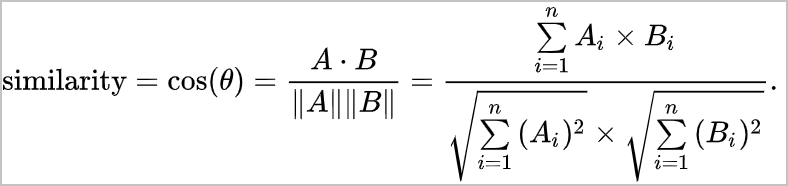
Cosine (cosine similarity) |
Cosine similarity evaluates the similarity between two vectors by calculating the cosine of the angle between them. |
For two n-dimensional vectors, A = [A1, A2, ..., An] and B = [B1, B2, ..., Bn]:
|
Cosine similarity focuses on the orientation of vectors rather than their magnitude, making it insensitive to absolute values. It is ideal for comparing user interest based on content ratings, as it can correct for inconsistencies in rating scales among different users. |
For the 2D vectors [1,1] and [1,0], the cosine similarity is 0.707. |
|
InnerProduct (inner product) |
The inner product, also known as the dot product, is an operation that combines two real-number vectors to produce a single scalar value. |
For two n-dimensional vectors, A = [A1, A2, ..., An] and B = [B1, B2, ..., Bn]:
|
The inner product considers both the angle and magnitude of two vectors. When vectors are normalized, the inner product is equivalent to cosine similarity. |
For the 2D vectors [1,1] and [1,5], the inner product is (1*1) + (1*5) = 6. |
|
Hamming (for binary vectors only) |
In information theory, the Hamming distance between two strings of equal length is the number of positions at which the corresponding characters differ. |
For two n-bit binary strings, x and y:
|
It is typically used for error detection and correction in data transmissions, where it counts the number of differing bits between two binary words to estimate the transmission error. |
For example, the Hamming distance between 1011101 and 1001001 is 2. Note
When using the aliyun-knn plugin, binary vector data must be represented as an array of unsigned 32-bit integers (uint32), and the |
-
To use multiple distance measurement functions, ensure that your cluster meets one of the following requirements: cluster version 6.7.0 with apack plugin V1.2.1 or later, or cluster version 7.10.0 with apack plugin V1.4.0 or later. You can run the GET _cat/plugins?v command to check your apack plugin version. If the version does not meet the requirements, the only supported kNN distance measurement function is SquaredEuclidean. If you need to use other distance functions, you can submit a ticket to request a plugin upgrade.
-
You can specify the distance measurement function using the distance_method parameter in the index mapping.
Circuit breaker parameters
|
Parameter |
Description |
Default |
|
indices.breaker.vector.native.indexing.limit |
If off-heap memory usage exceeds this threshold, the circuit breaker trips and blocks write operations. Writes resume after the background build process completes and releases memory. A tripped circuit breaker indicates that system memory consumption is too high. We recommend reducing write throughput. |
70% |
|
indices.breaker.vector.native.total.limit |
Defines the maximum percentage of off-heap memory that background vector index builds can use. If off-heap memory usage exceeds this limit, shards may restart. |
80% |
The vector circuit breaker parameters are part of the cluster configuration. To view the settings, run the GET _cluster/settings command. Do not change the circuit breaker thresholds.
Advanced parameters
Table 2. Creation parameters (hnsw)
|
Parameter |
Description |
Default |
|
index.vector.hnsw.builder.max_scan_num |
Controls the scope of the nearest neighbor search during graph construction to ensure worst-case performance. |
100000 |
|
index.vector.hnsw.builder.neighbor_cnt |
The number of neighbors for each node in the layer 0 graph. We recommend a value of 100. A higher value improves graph construction quality but increases the offline index size. |
100 |
|
index.vector.hnsw.builder.upper_neighbor_cnt |
The maximum number of neighbors for each node in the upper layers of the HNSW graph (all layers except layer 0). We recommend setting this to half the value of neighbor_cnt. The maximum value is 255. |
50 |
|
index.vector.hnsw.builder.efconstruction |
Controls the size of the dynamic candidate list for nearest neighbors during graph construction. A higher value improves the quality of the offline graph but slows down index creation. We recommend an initial value of 400. |
400 |
|
index.vector.hnsw.builder.max_level |
The total number of layers in the HNSW graph, including layer 0 and the upper layers. For example, for 10 million documents with a scaling_factor of 30, the number of layers is ceil(log₃₀(10,000,000)), which is 5. This parameter has a minor impact on effectiveness. We recommend an initial value of 6. |
6 |
|
index.vector.hnsw.builder.scaling_factor |
The exponential scaling factor between layers. This value is typically between 10 and 100. A higher scaling_factor results in fewer layers. We recommend an initial value of 50. |
50 |
The preceding parameters must be configured in the index settings and are only supported by the hnsw algorithm.
Table 3. Search parameters (hnsw)
|
Parameter |
Description |
Default |
|
ef |
Controls the size of the dynamic candidate list to explore during online search. A higher value improves recall but degrades performance. We recommend a value between 100 and 1000. |
100 |
Example query:
GET test/_search
{
  "query": {
    "hnsw": {
      "feature": {
        "vector": [1.5, 2.5],
        "size": 10,
        "ef": 100
      }
    }
  }
}
FAQ
-
Q: How do I evaluate the recall ratio of a query?
A: Create two indexes with identical configurations, one using the HNSW algorithm and the other using the linear search algorithm. From a client, push the same vector data to both indexes. After the indexes are refreshed, use the same query vector to retrieve document IDs from both. The recall ratio is the number of intersecting document IDs from both indexes divided by the total number of IDs from the linear search index.
-
Q: What should I do if a
circuitBreakingExceptionerror occurs during cluster writes?A: This error indicates that off-heap memory usage has exceeded the threshold specified by indices.breaker.vector.native.indexing.limit (70% by default), triggering circuit breaking on write operations. The circuit breaker usually resets automatically after background index building completes and memory is freed. We recommend adding a retry mechanism to your client.
-
Q: Why does CPU usage remain high after write operations have stopped?
A: Vector index building occurs during the refresh or flush phases. Even after write traffic stops, background tasks for building the vector index may continue to run. These tasks release compute resources after the final refresh cycle is complete.
-
Q: When querying with the aliyun-knn plug-in, I receive the following error:
class_cast_exception: class org.apache.lucene.index.SoftDeletesDirectoryReaderWrapper$SoftDeletesFilterCodecReader cannot be cast to class org.apache.lucene.index.SegmentReader (org.apache.lucene.index.SoftDeletesDirectoryReaderWrapper$SoftDeletesFilterCodecReader and org.apache.lucene.index.SegmentReader are in unnamed module of loader 'app'). What should I do?A: Disable the physical replication feature for the index. For more information, see Use the physical replication feature of the apack plug-in.
-
Q: What can I do if vector search with the aliyun-knn plug-in is slow or memory-related circuit breaking occurs?
A: The aliyun-knn plug-in performs vector search using in-memory vectors, which is a memory-intensive process. Large indexes can cause slow performance or trigger circuit breaking when loaded into memory. As a best practice, limit your index data size to half of the available machine memory. If you cannot reduce the data volume and memory remains insufficient, upgrade the cluster configuration.
-
Q: In kNN scenarios, a
must_not existsquery fails to filter documents with an empty 'feature' field. How can I write a query to filter for this data?A: The storage mechanism for kNN data is unique and may be incompatible with certain DSL queries. You can use the following script to filter the data instead.
GET jx-similar-product-v1/_search
{
   "query": {
     "bool": {
       "must": {
         "script": {
           "script": {
             "source": "doc['feature'].empty",
             "lang": "painless"
             }
         }
       }
     }
   }
}