Physical replication reduces CPU overhead and improves write performance by more than 45% for write-intensive workloads with replica shards. It works best for use cases that can tolerate millisecond-range data visibility delays, such as logging and time-series analysis.
The feature is provided by the apack plug-in, which is developed by Alibaba Cloud and is installed by default on Alibaba Cloud Elasticsearch instances running version 6.7.0 (kernel version 1.2.0 or later) or 7.10.0 and cannot be uninstalled. To verify the installation status, go to the Plug-ins page. Run all commands in this topic in the Kibana console. For more information, see Connect to a cluster by using Kibana.
How it works
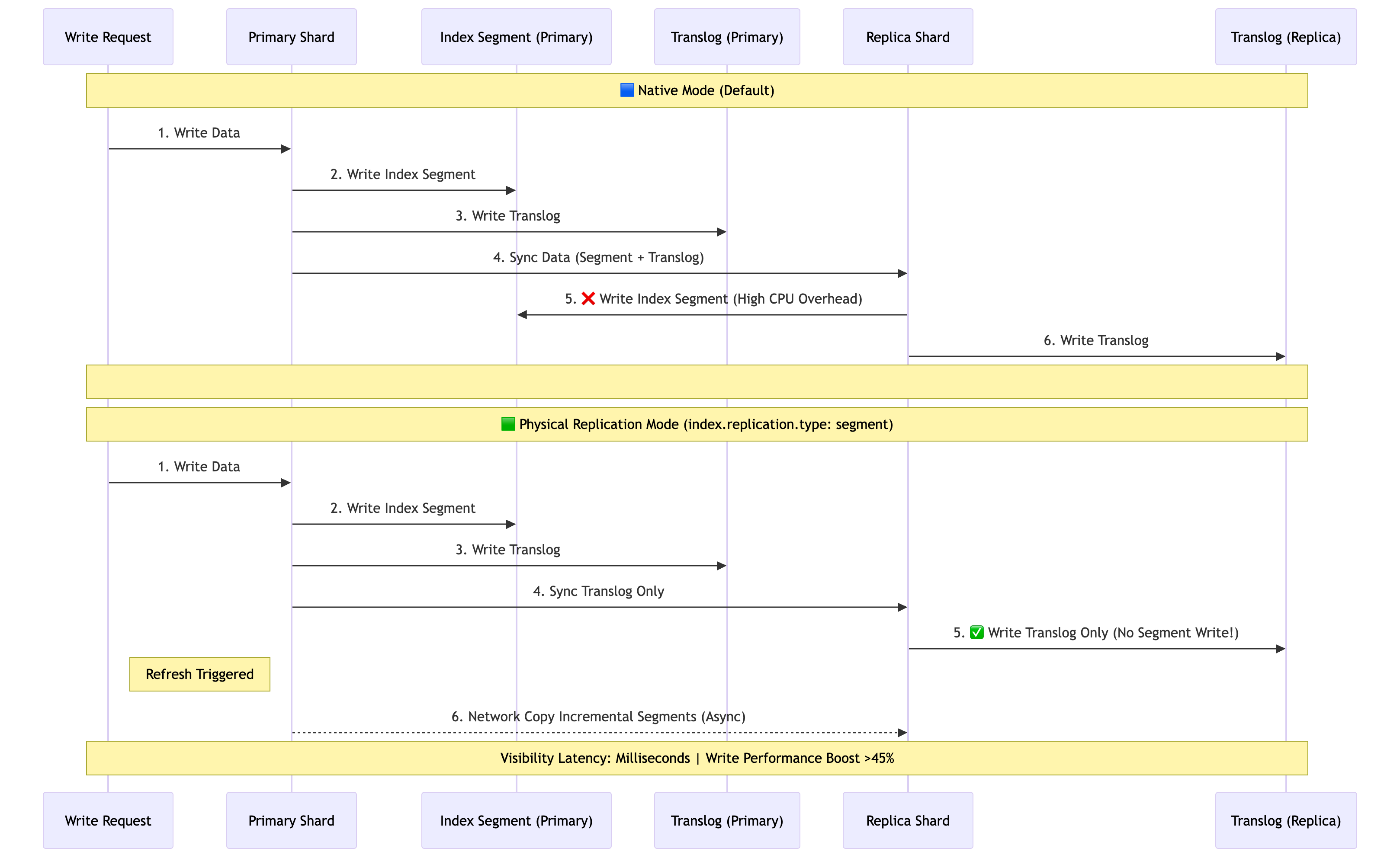
In native replication, both the primary shard and replica shards write to the index file and the translog.
With physical replication enabled:
-
The primary shard writes to both the index file and the translog (unchanged).
-
The replica shard writes only to the translog.
-
During each refresh, the primary shard copies incremental index files to the replica shard over the network.
This offloads indexing work from replica shards at the cost of increased network utilization on the primary shard. The data visibility delay between primary and replica shards stays within the millisecond range.
Considerations
Before enabling physical replication, note the following:
-
Network utilization: Physical replication increases network load on primary shards because the primary shard must copy index files to all replica shards during each refresh.
-
Cross-Cluster Replication (CCR) incompatibility: If you plan to use Cross-Cluster Replication (CCR) for disaster recovery, disable physical replication first. The two features cannot be used together.
-
Data visibility delay: Replica shard data is visible within milliseconds of the primary shard's refresh, not immediately after indexing. This is acceptable for logging and time-series analysis but may not suit use cases that require read-after-write consistency.
Enable physical replication for a new index
Physical replication is enabled by default for indexes created after the apack plug-in is installed — no manual configuration is required.
To explicitly enable it when creating an index, set index.replication.type to segment:
PUT index-1
{
  "settings": {
    "index.replication.type" : "segment"
  }
}
To enable physical replication for an existing index that is currently in native replication mode, see Enable physical replication for an existing index.
Disable physical replication
After you disable physical replication, the index reverts to native replication mode, where both the primary and replica shards write to the index file and the translog.
Disable physical replication before using Cross-Cluster Replication (CCR) for disaster recovery. For more information, see Use Cross-Cluster Replication (CCR) for disaster recovery.
-
Close the index.
POST index-1/_close -
Update the index settings to disable physical replication.
PUT index-1/_settings { "index.replication.type" : null } -
Open the index.
POST index-1/_open
Enable physical replication for an existing index
To enable physical replication for an existing index in native replication mode, first set the replica count to 0 and close the index.
-
Set the number of replicas to 0.
PUT index-1/_settings { "index.number_of_replicas": 0 } -
Close the index.
POST index-1/_close -
Update the index settings to enable physical replication.
PUT index-1/_settings { "index.replication.type" : "segment" } -
Open the index.
POST index-1/_open -
Restore the replica count.
PUT index-1/_settings
{
  "index.number_of_replicas": 1
}