Applications deployed to Kubernetes clusters in Enterprise Distributed Application Service (EDAS) are network-isolated by default. To let other services or external users reach an application, create a Kubernetes Service or Ingress that routes traffic to the application's pods.
The following diagram shows how each access method routes traffic to backend pods.
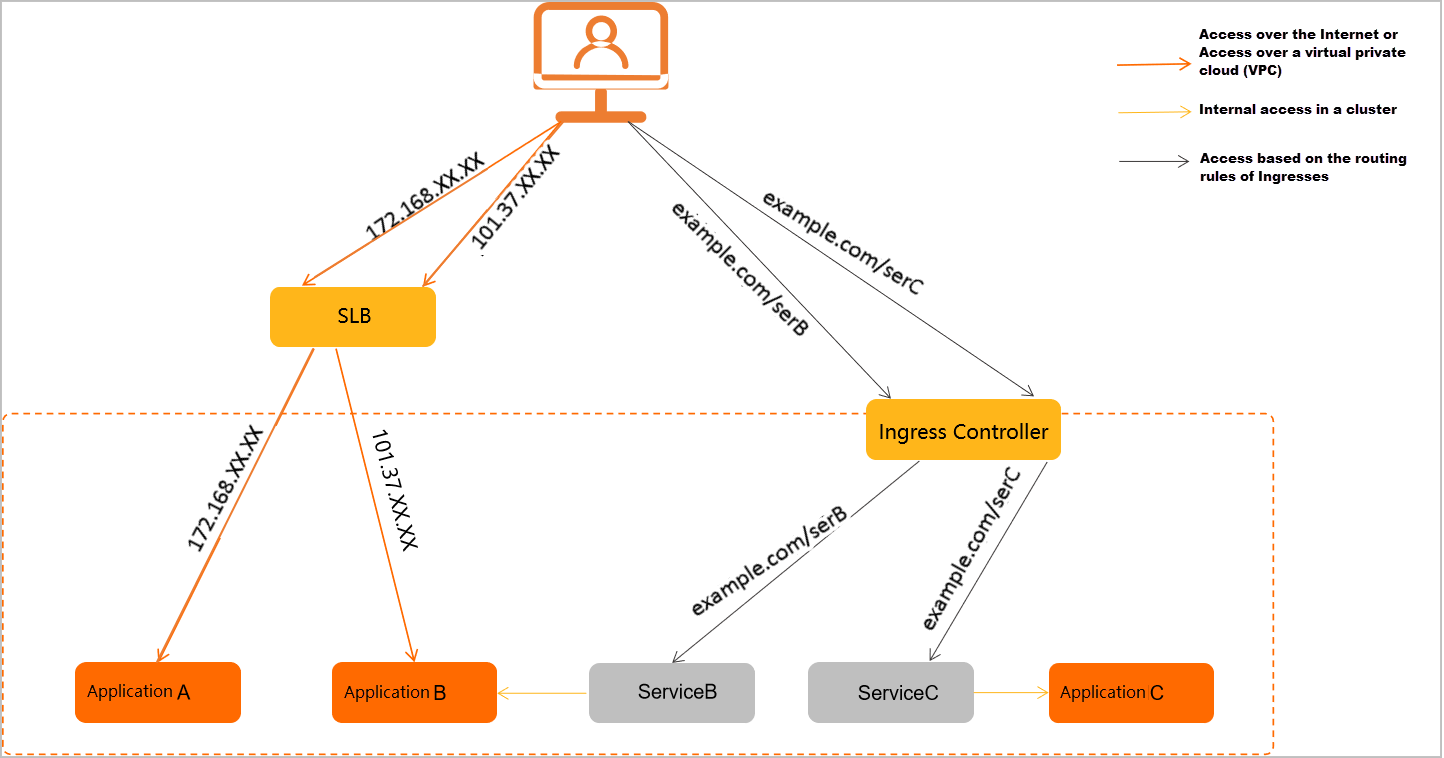
EDAS supports four access methods, each mapped to a standard Kubernetes networking mechanism:
LoadBalancer Service (internet-facing) -- Expose an application to the public internet through a Server Load Balancer (SLB) instance with a public IP address. Operates at L4 (TCP/UDP).
LoadBalancer Service (VPC) -- Expose an application within a virtual private cloud (VPC) through an SLB instance with a private IP address. Operates at L4 (TCP/UDP).
ClusterIP Service -- Expose an application to other workloads in the same Kubernetes cluster. Operates at L4 (TCP/UDP).
Ingress -- Route external HTTP/HTTPS traffic to one or more Services based on URL path or hostname rules. Operates at L7 (HTTP/HTTPS).
Choose an access method
| Use case | Access method | Service type | OSI layer | How it works |
|---|---|---|---|---|
| Serve public traffic from the internet | Internet-facing LoadBalancer | LoadBalancer | L4 (TCP/UDP) | Binds an internet-facing SLB instance to the Service. Traffic reaches pods through the public IP address of the SLB instance. |
| Connect services within the same VPC | VPC-internal LoadBalancer | LoadBalancer | L4 (TCP/UDP) | Binds an internal-facing SLB instance to the Service. Traffic reaches pods through the private IP address of the SLB instance. |
| Connect workloads within the same cluster | ClusterIP | ClusterIP | L4 (TCP/UDP) | The cluster assigns a stable virtual IP address (ClusterIP) to the Service. The Service distributes traffic across backend pods. |
| Route HTTP/HTTPS requests by URL path or hostname | Ingress | ClusterIP (backend) | L7 (HTTP/HTTPS) | An Ingress controller receives inbound HTTP requests, evaluates routing rules defined in Ingress resources, and forwards traffic to the matching backend Service. |
L4 vs. L7
Choose a LoadBalancer Service (L4) when your application uses raw TCP or UDP, or when you need straightforward IP-based access without HTTP routing.
Choose an Ingress (L7) when you need path-based or host-based HTTP routing, TLS termination, or when multiple Services share a single external endpoint.
Internet-facing access
Bind an internet-facing Classic Load Balancer (CLB) instance to a Service of type LoadBalancer. The SLB instance receives traffic on its public IP address and forwards it to the application's backend pods.
For step-by-step instructions, see:
VPC-internal access
Bind an internal-facing SLB instance within a VPC to a Service of type LoadBalancer. The SLB instance receives traffic on its private IP address and forwards it to backend pods. Access is restricted to services within the same VPC.
For configuration details, see Bind CLB instances.
Cluster-internal access
Create a Service of type ClusterIP to assign a stable virtual IP address reachable only from within the cluster. The Service load-balances traffic across the application's pods automatically.
For configuration details, see Add a Service.
Ingress-based routing
Create a Kubernetes Ingress to route external HTTP/HTTPS requests to backend Services based on URL paths and hostnames. An Ingress controller parses these rules and directs traffic to the correct Service.
EDAS supports two Ingress options:
| Ingress type | Backed by | Best for |
|---|---|---|
| NGINX Ingress | In-cluster NGINX Ingress controller | General-purpose HTTP routing with customizable NGINX configuration |
| ALB Ingress | Alibaba Cloud Application Load Balancer (ALB) | Cloud-native L7 load balancing with managed infrastructure |
For step-by-step instructions, see: