When your Kubernetes applications need to receive external HTTP and HTTPS traffic, you can create an Application Load Balancer (ALB) Ingress in Enterprise Distributed Application Service (EDAS) to route requests to your Services. ALB Ingress is compatible with NGINX Ingress and supports complex routing rules and automatic certificate discovery.
How ALB Ingress works
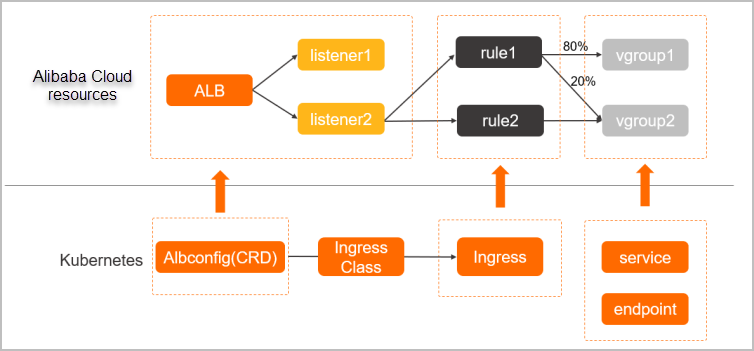
When you create or update an Ingress resource, the ALB Ingress controller detects the change through the Kubernetes API server and dynamically generates an AlbConfig object. The controller then performs the following operations in sequence:
Creates an ALB instance.
Configures listeners on the ALB instance.
Creates Ingress routing rules.
Configures backend server groups.
Three Kubernetes objects work together to route traffic:
| Object | Role |
|---|---|
| Service | An abstraction of an application deployed across a group of replicated pods. |
| Ingress | A set of reverse proxy rules that route HTTP or HTTPS requests to specific Services based on hostnames and URL paths. |
| AlbConfig | A custom resource definition (CRD) that maps one-to-one with an ALB instance. The ALB Ingress controller uses AlbConfig to manage ALB instances and listeners. |
Prerequisites
Before you begin, make sure that you have:
A Service added to your application. For more information, see Add a Service
The ALB Ingress controller installed in your cluster, through one of the following methods:
New cluster: Set the Ingress parameter to ALB Ingress on the Component Configurations wizard page during cluster creation.
Existing cluster: Install the ALB Ingress controller through component management. For more information, see Manage system components.
A standard ALB instance in the same Virtual Private Cloud (VPC) as your Kubernetes cluster. If no ALB instance exists, create one. For more information, see Create an ALB instance
Create an ALB Ingress
Log on to the EDAS console.
In the left-side navigation pane, click Application Routing.
On the Application Routing (Kubernetes Ingress) page, select a region in the top menu bar, then select a microservice namespace.
Click Create ALB Ingress.
In the Create ALB Ingress panel, configure the following parameters:
Note Only standard ALB instances are supported. An ALB instance bound to an Ingress in one cluster cannot be bound to Ingresses in other clusters. However, a single ALB instance can serve multiple Ingresses within the same cluster.Parameter Description K8s Cluster The Kubernetes cluster for the Ingress. Select a cluster from the drop-down list. K8s namespace The namespace in which to create the Ingress. Valid values: default(used when no namespace is specified),kube-system(system-created objects), andkube-public(readable by all users, including unauthenticated users).Redirect to HTTPS When turned on, HTTP requests are automatically redirected to HTTPS. Application route name A unique name within the selected namespace. Use lowercase letters, digits, and hyphens (-). The name must start with a letter and end with a letter or digit. ALB Instance The standard ALB instance to bind to the Ingress. The drop-down list shows only ALB instances in the same VPC as the selected cluster. If no ALB instance exists, see Create an ALB instance. Click Add forwarding rule and configure the routing rules: The following figure shows an example configuration.
Note A combination of a specific domain name and path can map to only one Service. A single Service can be reached through multiple domain name and path combinations. The same routing rules can exist across different Ingresses.Parameter Description domain name The domain name to route traffic for. Path The URL path to match. Must start with a forward slash ( /).Application The target application in the selected cluster. Select from the drop-down list. Service name The Service that handles requests for this route. Select from the drop-down list. Service port The port on which the Service listens. Open The TLS Enables HTTPS routing to internal Services. When turned on, specify a TLS certificate by navigating to Configuration Management > Kubernetes Configurations > Secrets tab in the EDAS console. Select the Secret that stores the TLS certificate. If no Secret exists, click Create Secrets to create one. For more information, see Create a Secret. 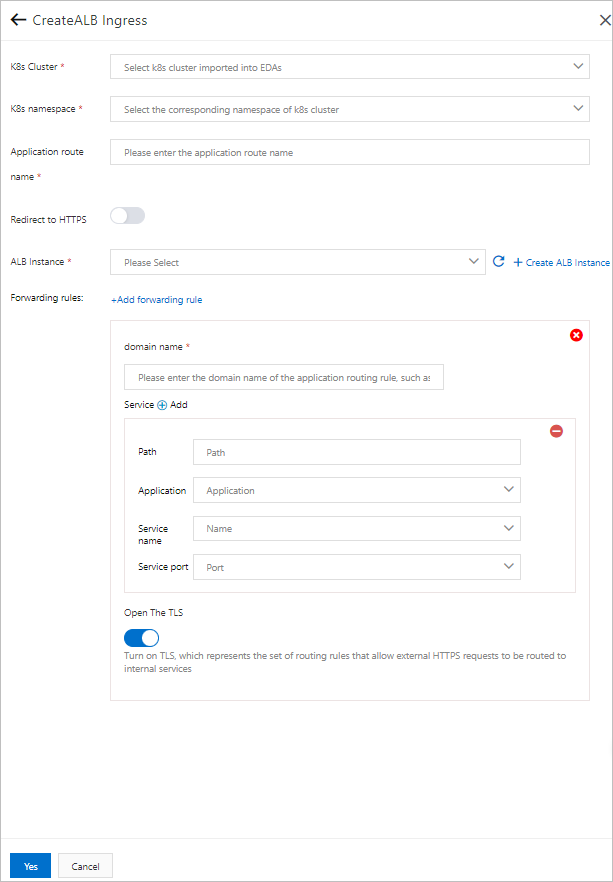
Click Yes to create the Ingress.
Limits and considerations
ALB instances that serve Ingresses are fully managed by EDAS. Modifying these instances in the ALB console may cause service interruptions.
Ingress resources created by EDAS carry the labels
edas-domain: edas-adminandedas-domain. Do not modify or delete these resources. IngressClass and AlbConfig objects associated with these Ingresses are named in theedas-{alb_id}format and cannot be modified or deleted.Clusters that use the Flannel network plug-in support only NodePort and LoadBalancer Service types.
To configure HTTPS routing for an ALB Ingress, turn on Open The TLS for all routing rules of the Ingress.
ALB Ingress supports automatic certificate discovery. After you turn on Open The TLS, you do not need to configure a Secret. However, you must purchase a unique certificate for the corresponding domain name in SSL Certificates Service. The certificate can be a wildcard certificate or a single-domain certificate.
After you bind a standard ALB instance to an Ingress in a cluster, that ALB instance cannot be used by other clusters.
Manage the Ingress
After you create the Ingress, it appears in the Ingress list on the Application Routing (Kubernetes Ingress) page. From this list, you can:
View the Ingress details, including the bound ALB instance and routing rules
Modify the forwarding rules
Delete the Ingress