When your containerized application needs to accept external HTTP or HTTPS traffic, an NGINX Ingress maps incoming requests to the right backend Service based on domain name and URL path. In Enterprise Distributed Application Service (EDAS), you create and manage Ingress resources directly from the console.
Prerequisites
Before you begin, make sure you have:
At least one Service added to the target application
Limits
Do not modify Ingress resources that EDAS manages automatically. These resources are labeled with
edas-domain: edas-adminoredas-domain.EDAS Standard Edition allows a maximum of five routing rules with a sampling rate greater than 10%.
EDAS Professional Edition and Platinum Edition have no sampling rate limits.
Create an NGINX Ingress
Log on to the EDAS console.
In the left-side navigation pane, choose Traffic Management > Application Routing.
On the Application Routing (Kubernetes Ingress) page, select a region and a microservice namespace.
Click CreateNginx Ingress.
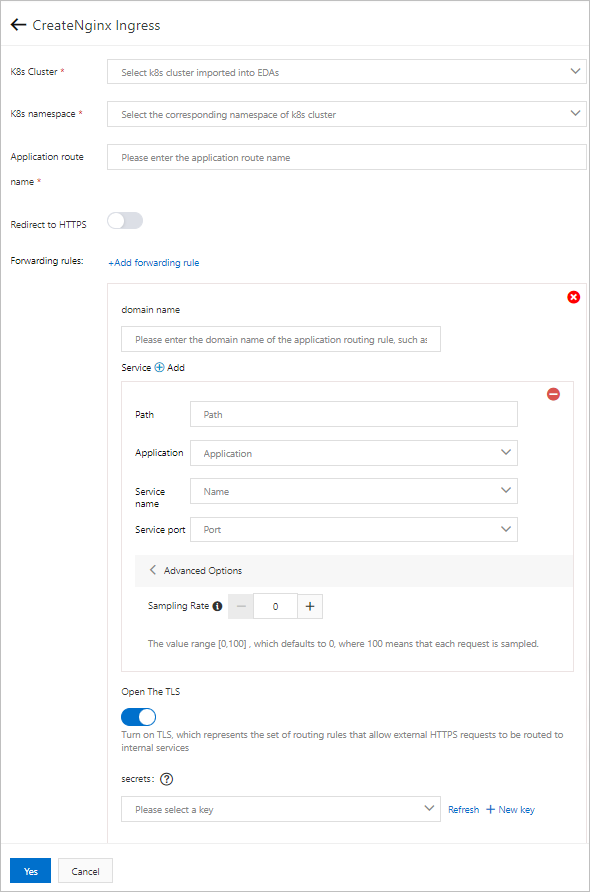
In the CreateNginx Ingress panel, configure the following parameters:
Parameter Description K8s Cluster The Kubernetes cluster in which to create the Ingress. K8s namespace The Kubernetes namespace. Common values: default (used when no namespace is specified), kube-system (system-created objects), and kube-public (readable by all users, including unauthenticated users). Redirect to HTTPS Turn on to redirect all HTTP requests to HTTPS. Application route name A unique name within the namespace. Use lowercase letters, digits, and hyphens (-). The name must start with a letter and end with a letter or digit. Click Add forwarding rule and configure routing rules:
Note Note: Each domain-path combination maps to exactly one Service, but a single Service can serve multiple domain-path combinations. You can add multiple forwarding rules to an Ingress, and different Ingresses can share the same rules.Parameter Description domain name The domain name that external clients use to reach the Service. Path The URL path to match. Must start with a forward slash ( /).Application The target application in the cluster. Service name The backend Service to receive matched traffic. Service port The port on which the Service listens. (Optional) Click Advanced Options to set the Sampling Rate for request tracing. The sampling rate controls the percentage of requests that Application Real-Time Monitoring Service (ARMS) traces. Valid values: 0 to 100. Default: 0 (no tracing). A value of 100 traces all requests. To view trace IDs, go to the Log Analysis tab on the Ingress monitoring page.
(Optional) To enable TLS termination for HTTPS traffic, turn on Open The TLS and select a Secret that contains the TLS certificate from the secrets drop-down list. If no Secret exists, click New key to create one. For details, see Create a Secret.
Click Yes.
After the Ingress is created, it appears in the Ingress list. From the list, you can view details, modify routing rules, monitor traffic, or delete the Ingress.
Verify the Ingress
In a browser address bar, enter the domain name and path from the routing rule (for example, example.com/api). A successful response from the backend application confirms that the Ingress is routing traffic correctly.
How Ingress routing works
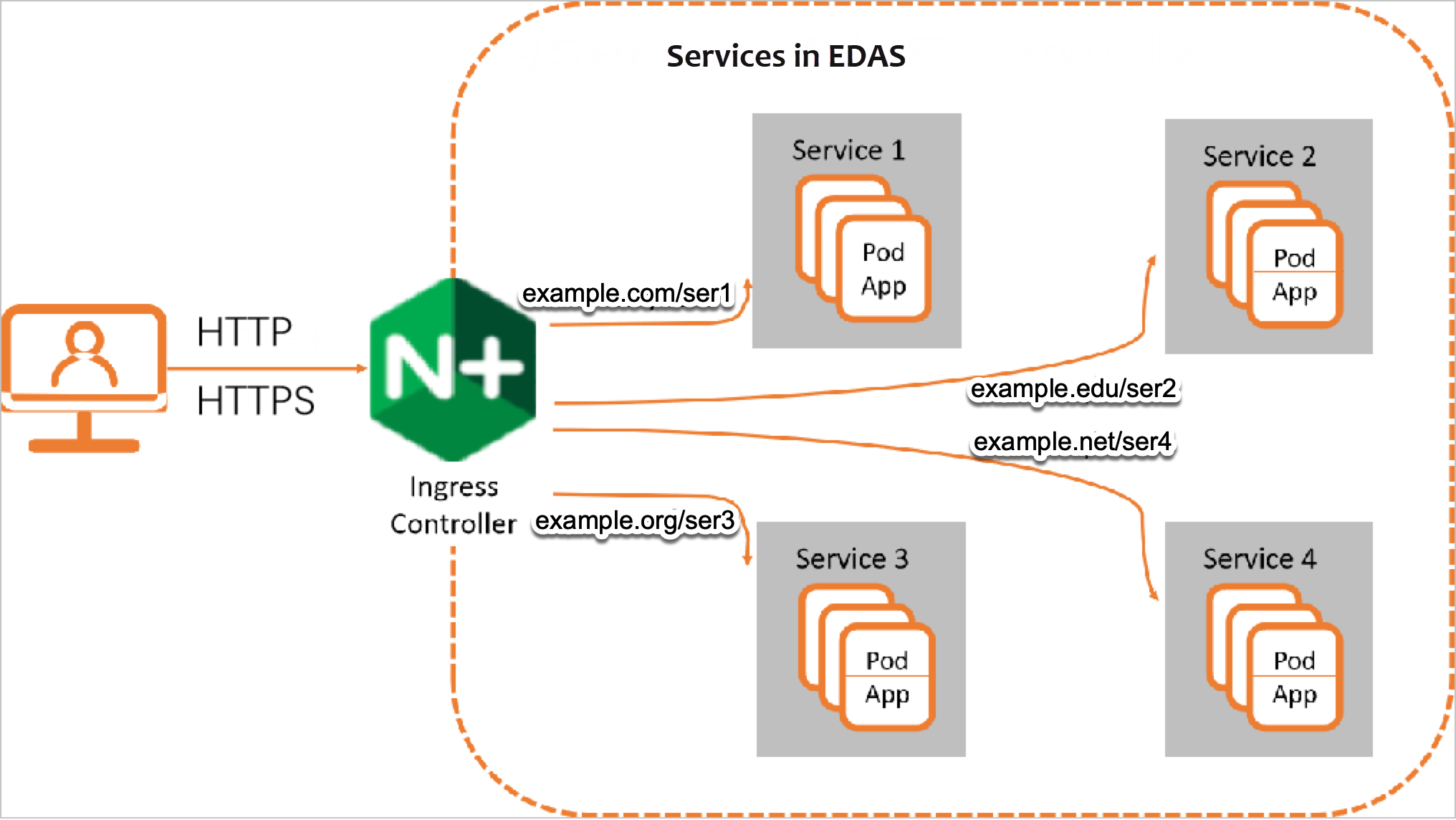
When you create a Kubernetes cluster in EDAS, an Ingress controller is automatically deployed. This controller acts as a reverse proxy that continuously watches for Ingress resources and enforces their routing rules.
Three components handle traffic routing in a Kubernetes cluster:
Service -- Represents an application running across a set of Pods.
Ingress -- Defines rules that map incoming HTTP or HTTPS requests to backend Services based on domain name and path.
Ingress controller -- A reverse proxy that reads Ingress rules and forwards traffic to the matching Service. The Service then distributes requests to its Pods.
What to do next
Add a Service -- Expose additional applications through Ingress routing.
Create a Secret -- Store TLS certificates for HTTPS traffic.