When multiple applications in a Container Service for Kubernetes (ACK) cluster need external access, each one typically requires its own Classic Load Balancer (CLB) instance. With CLB reuse in Enterprise Distributed Application Service (EDAS), you can bind a single CLB instance to multiple applications. Each application uses a separate listener port on the shared CLB. This reduces the number of CLB instances to manage and provides stable IP addresses across applications.
CLB reuse is available only for ACK clusters. In self-managed Kubernetes clusters, each application requires its own dedicated CLB instance.
How CLB reuse works
When you bind a CLB instance to an application, EDAS creates a listener and routes traffic through a dedicated port. With CLB reuse, multiple applications share the same CLB instance. Each application gets its own listener on a distinct port.
ACK clusters vs. self-managed Kubernetes clusters
| Cluster type | CLB behavior |
|---|---|
| ACK cluster | You can create a new CLB instance per application, or reuse an existing CLB instance across multiple applications |
| Self-managed Kubernetes cluster | Each application requires a dedicated CLB instance. Reuse is not supported |
Listener management
All listener configurations for a reused CLB instance must be managed in the EDAS console, not in the Server Load Balancer (SLB) console.
Do not modify listener configurations or certificates in the SLB console. Changes made in the SLB console may fail to apply and can make your application inaccessible.
Overwrite Listener toggle
When you configure a listener for a reused CLB instance, the Overwrite Listener toggle determines how EDAS handles existing listener configurations:
| Setting | Behavior |
|---|---|
| On | Listener configurations set in the EDAS console override any configurations previously set in the SLB console |
| Off | EDAS console changes do not take effect. Modify the listener directly in the SLB console instead |
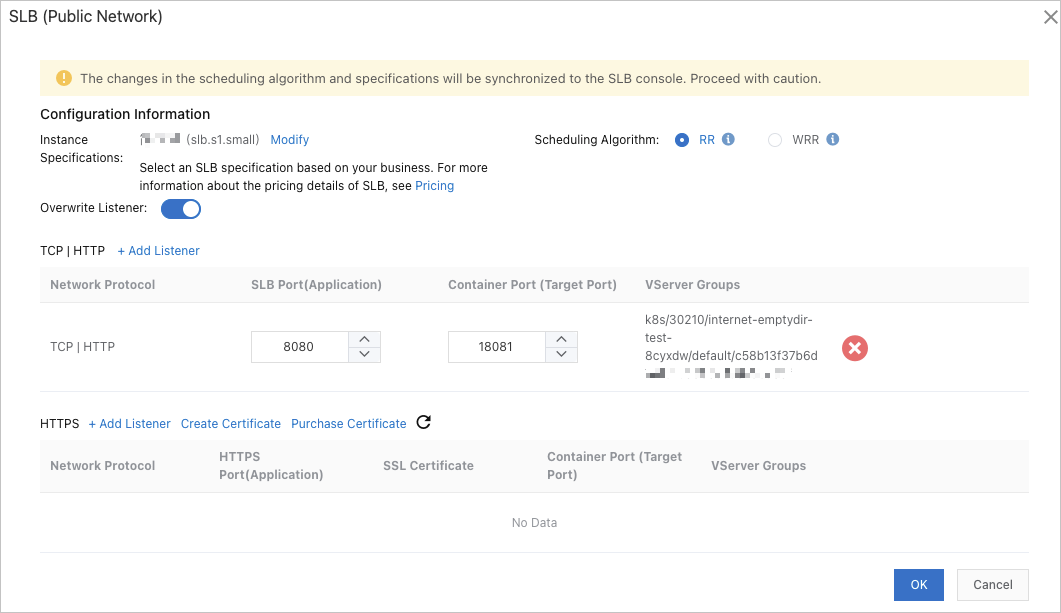
After you configure a listener in the EDAS console, the associated vServer group appears in the console.
Prerequisites
Before you begin, make sure that you have:
An ACK cluster with the Cloud Controller Manager (CCM) component upgraded to the required version: For upgrade instructions, see Manage system components.
ImportantIf the CCM component is not upgraded, CLB reuse fails, existing listeners on the CLB instance are deleted, and application traffic drops to zero.
Cluster template Minimum CCM version Managed Kubernetes V1.9.3.112-g93c7140-aliyun Dedicated Kubernetes v1.9.3.106-g3f39653-aliyun A CLB instance created in the SLB console
ImportantCLB instances purchased through the EDAS console (auto-created when you bind a CLB on the Application Overview page) cannot be reused. Only CLB instances created directly in the SLB console support reuse.
The CLB instance must be in the same virtual private cloud (VPC) as the target application.
An understanding of CLB usage limits
Bind an existing CLB instance to an application
The procedure for binding a reused CLB instance is the same as binding a new one. The only difference is that you select an existing CLB instance instead of creating one. For the full procedure, see Bind CLB instances.
When you bind the CLB instance, keep the following in mind:
Select a CLB instance created in the SLB console. CLB instances auto-created by EDAS cannot be reused.
Choose a container port that is not already occupied by another listener on the same CLB instance.
Set the Overwrite Listener toggle based on whether EDAS should override existing listener configurations.
Limitations
| Limitation | Details |
|---|---|
| CLB source | Only CLB instances created in the SLB console can be reused. CLB instances auto-created by EDAS are exclusive to one application |
| Port conflicts | Each listener on a reused CLB must use a unique container port. Select an unoccupied port when you configure a new listener |
| Cluster type | CLB reuse is supported only in ACK clusters, not in self-managed Kubernetes clusters |
| VPC requirement | The CLB instance must be in the same VPC as the target application |
| Specification limits | CLB specification metrics include maximum connections, new connections per second, and queries per second. If traffic exceeds any of these limits, bind additional CLB instances to distribute the load |