The platform security diagnostics feature of DataWorks provides security capabilities for features, such as identity authentication, permission management, and development mode, during the interactions between the current DataWorks workspace and data sources that are added to the workspace, such as data transmission, storage, and computing. In addition, best practices are provided for security diagnostics. The platform security diagnostics feature helps you identify the security risks of your platform at the earliest opportunity and build a basic security system before you perform related transactions.
Background information
The Platform Security Diagnosis page displays the security risks that are detected during business interactions between the current workspace and data sources that are added to the workspace based on the best practices for security diagnostics. You can identify risk categories and levels based on the diagnosis, view risk details, and process the items to be optimized to ensure secure and reliable business interactions. Diagnostic items are classified into the following categories:
-
Data computing and storage
Diagnostic items that belong to this category are used to check security issues of features such as data permission management, data storage encryption, and data storage backups and identify potential risks at the earliest opportunity. This ensures the security of data storage and data access.
-
Data transmission security diagnostics
Diagnostic items that belong to this category are used to check security issues of features such as permission management of data sources and isolation of data sources in the production and development environments and identify potential risks during data transmission so that you can manage these risks at the earliest opportunity. This ensures a secure and reliable environment for data transmission.
-
Standardized diagnostics of data production
Diagnostic items that belong to this category are used to check security issues related to production processes, such as whether the roles, number of administrators, and deployment engineers within the current workspace are assigned properly. These diagnostic items allow you to identify and handle security risks at the earliest opportunity. This helps improve the reliability and security of the data output system.
-
Platform security configuration diagnostics
Diagnostic items that belong to this category are used to check security issues of features, such as the auditing of DataWorks operations, to improve the overall data security.
Diagnostic items to be optimized are classified into low-risk, medium-risk, and high-risk items. A diagnostic result and a suggestion are provided for each item to be optimized to ensure secure and reliable business interactions. For more information about the diagnostic rules for all diagnostic items from different dimensions, see the Appendix: Details of diagnostic items section in this topic.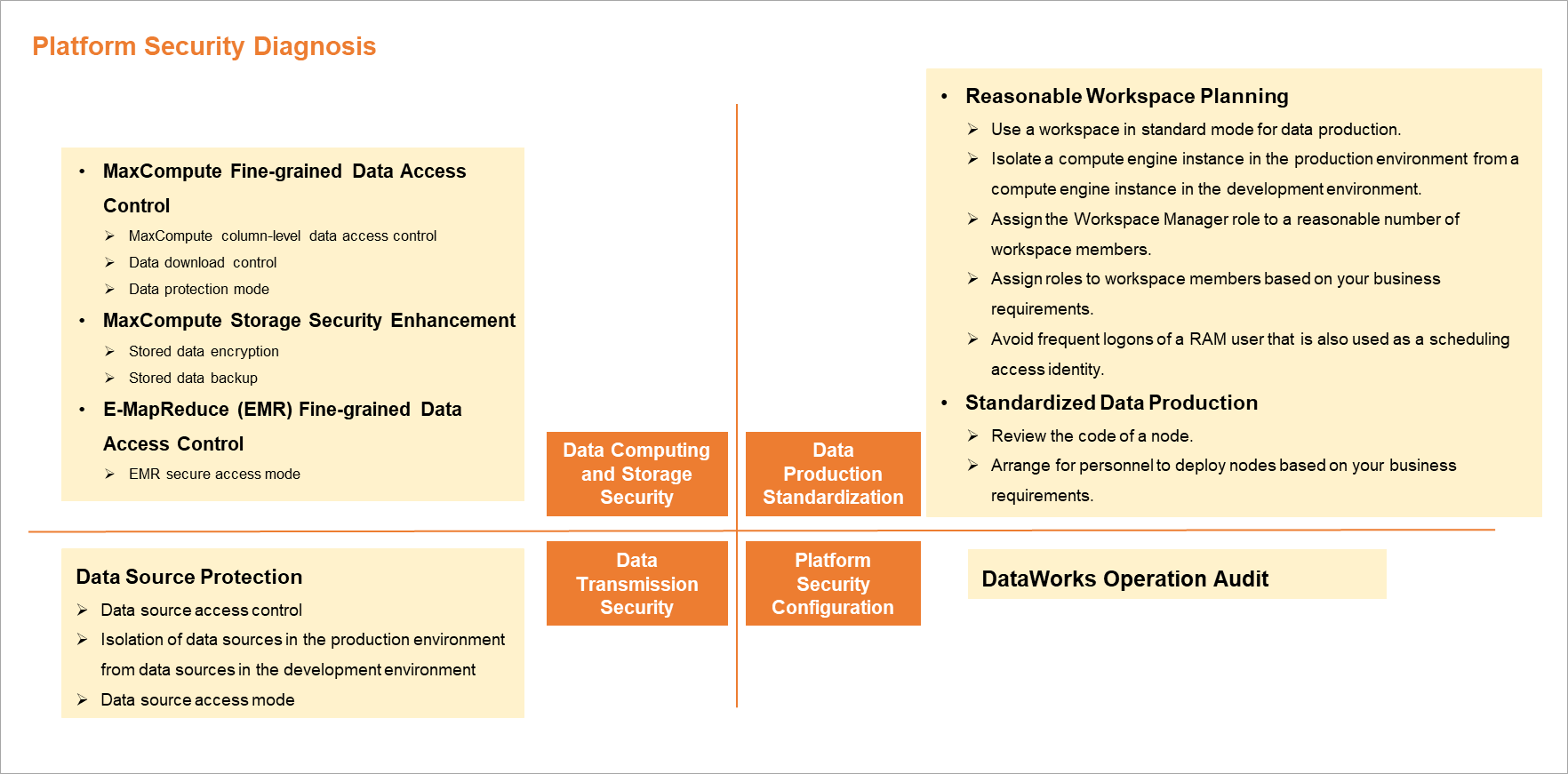
Go to the Platform Security Diagnosis page
-
Log on to the DataWorks console. In the target region, click in the left-side navigation pane. On the page that appears, click Go to Security Center.
-
In the left-side navigation pane, click Platform Security Diagnosis to go to the Platform Security Diagnosis page.
By default, the platform security diagnostics page scans the current region for items to be optimized. It quantifies the items that require optimization and classifies them by risk level: Low, Medium, or High. The Platform Security Diagnostics page includes the following key concepts: The left panel displays the security domains, such as Data Computing and Storage Security Diagnostics, Data Transmission Security Diagnostics, Data Production Standardization Diagnostics, and Platform Security Configuration Diagnostics. Each security domain contains several diagnostic dimensions, such as Reasonable Workspace Planning and Standardized Data Production. Each diagnostic dimension includes specific diagnostic items, and each item is labeled with a corresponding risk level (High-risk, Medium-risk, or Low-risk). The top of the page shows the total number of items to be optimized.
View diagnostic results
On the Platform Security Diagnosis page, security risks are summarized for each security domain, highlighting Medium- and High-risk items that need optimization. You can click a specific risk to view its details and follow the suggestions to resolve it. This section explains how to view items to be optimized, using the Data Transmission Security Diagnostics domain as an example. The top of the page displays the total number of items to be optimized. The left column lists the four security domains: Data Computing and Storage Security Diagnostics, Data Transmission Security Diagnostics, Data Production Standardization Diagnostics, and Platform Security Configuration Diagnostics, with the number of items to be optimized shown next to each. When you click a domain, such as Data Transmission Security Diagnostics, the right side expands to show detailed diagnostic items. For example, the Data Source Protection panel might contain two items: Production and development data source isolation (Medium-risk) and Data source access mode (High-risk). You can click each item to view its details.
To view the diagnostic result and suggestion, click the Data Transmission Security Diagnostics domain on the left. The right side displays an item to be addressed: Data source access control (Medium-risk). The diagnostic result indicates that 497 data sources do not have access control configured. You can click the Manage permissions on data sources link to resolve the issue or click Rescan to refresh the diagnostic result.
-
Security risks
Permissions on the data sources are not managed. As a result, users with lower security levels can access data with higher security levels. This leads to insecure access to the data sources.
-
Suggestion
You can improve access security for the data sources by managing permissions on the data sources based on the provided suggestion.
Appendix: Details of diagnostic items
The following tables describe the diagnostic items supported by the platform security diagnostics feature.
The diagnostic items displayed on the page vary based on the data sources added to your workspace and the existing diagnostic items to be optimized.
-
Data computing and storage
This category of diagnostic item improves security during data storage and access.
Diagnostic dimension
Diagnostic item
Diagnostic object
Diagnostic method
MaxCompute fine-grained data permission management
MaxCompute column-level permission management
NoteThe security model of MaxCompute V2.0 provides finer-grained data permission management capabilities, more scientific mechanisms of decentralized project management, and more powerful end-to-end identification capabilities. The security model allows you to implement security configurations that are more suitable for actual scenarios.
MaxCompute project
Column-level permission management relies on the MaxCompute V2.0 permission model. This diagnostic item detects the MaxCompute projects in which the MaxCompute V2.0 permission model is disabled.
Data download control
NoteTo avoid unexpected data leaks, we recommend that irrelevant users be strictly restricted from downloading data directly to an on-premises machine by using MaxCompute Tunnel.
MaxCompute project
Download permission management relies on the MaxCompute V2.0 permission model and the download permissions. This diagnostic item detects the MaxCompute projects in which the MaxCompute V2.0 permission model is disabled. In addition, this diagnostic item detects the MaxCompute projects in which the MaxCompute V2.0 permission model is enabled and download permission management is disabled. For information about whether and how to enable download permission management, see Download control.
Data protection mode
NoteThe data protection mechanism of MaxCompute projects allows you to manage the data outflow method.
MaxCompute project
This diagnostic item checks whether you specify the protection mode for specific or all of the MaxCompute projects. For information about the project data protection feature of MaxCompute, see Project data protection.
MaxCompute storage security enhancement
Data storage encryption
NoteMaxCompute supports data storage encryption based on Key Management Service (KMS), and provides static data protection for enterprises to meet the regulation and security compliance requirements. For more information, see Storage encryption.
MaxCompute project
This diagnostic item scans for and lists workspaces where data storage encryption is not enabled. If required, you can submit a ticket to enable storage encryption for existing workspaces.
Data storage backup
NoteThe system automatically backs up the historical versions of MaxCompute data and retains them for a certain period of time. During the retention period, you can quickly restore the data to prevent data loss due to accidental operations. For more information, see Backup and restoration.
MaxCompute project
By default, this feature is enabled for MaxCompute projects. You can adjust the retention period or restore data based on the actual situation. For more information, see Backup and restoration.
EMR fine-grained data permission management
E-MapReduce (EMR) secure access mode
NoteIf an EMR cluster is registered to a DataWorks workspace by using the Security mode, data permissions are isolated among Alibaba Cloud accounts and RAM users. For more information about the Security mode, see Security mode.
DataWorks workspace
This diagnostic item detects the workspaces to which EMR clusters are registered by using a mode other than the Security mode.
-
Data transmission security diagnostics
This category of diagnostic item improves security prior to data transmission.
Diagnostic dimension
Diagnostic item
Diagnostic object
Diagnostic method
Data source protection
Data source access control
NoteDataWorks allows you to manage the access permissions on the configured data sources to prevent users with lower security levels from accessing data with higher security levels.
DataWorks workspace data source
This diagnostic item detects the workspaces in which the access permissions on the configured data sources are not managed. For more information about how to manage the access permissions on data sources, see Manage permissions on data sources.
Production and development data source isolation
NoteIn a workspace in standard mode, the configurations of a data source vary based on whether the data source is used in the production or development environment. This prevents data leaks from the development environment. You can evaluate and modify data sources. For more information, see Isolate a data source in the development and production environments.
DataWorks workspace data source
This diagnostic item detects the workspaces in standard mode in which a data source has the same configurations in the production and development environments.
Data source access mode
NoteDataWorks supports role-based access to Object Storage Service (OSS) data sources. This mode is more secure than the traditional AccessKey mode and can effectively prevent leaks of AccessKey pairs.
DataWorks workspace data source
This diagnostic item detects the workspaces in which OSS data sources can be accessed in AccessKey mode. You can modify the data sources. For more information, see Use the RAM role-based authorization mode to add a data source.
-
Standardized diagnostics of data production
This category of diagnostic item improves the stability and security of the data output system.
Diagnostic dimension
Diagnostic item
Diagnostic object
Diagnostic method
Reasonable workspace planning
Use workspaces in standard mode for data production
NoteA workspace in standard mode is more secure than a workspace in basic mode. For more information, see Differences between workspaces in basic mode and workspaces in standard mode.
DataWorks workspace mode
This diagnostic item detects the workspaces in basic mode in the current region. You can upgrade a workspace from the basic mode to the standard mode based on the actual situation. Proceed with caution when you perform this operation. For more information, see Scenario: Upgrade a workspace from the basic mode to the standard mode.
Isolate a compute engine in the production environment from a compute engine in the development environment
NoteIn a workspace in standard mode, the configurations of a compute engine vary based on whether the compute engine is used in the production or development environment. This prevents data leaks from the development environment.
DataWorks workspace data source
This diagnostic item detects the workspaces in which an added data source has the same configurations in the development and production environments in the current region.
Reasonably specify the number of workspace administrators
NoteIn a single workspace, an excessive number of administrators may cause disordered management. We recommend that you specify no more than three administrators for each workspace.
DataWorks workspace member management
This diagnostic item detects the workspaces in which more than three workspace administrators are specified.
Reasonable allocation of workspace member roles
NoteIn a single workspace, we recommend that each member play a dedicated role to prevent unauthorized operations caused by one member playing multiple roles.
DataWorks workspace member management
This diagnostic item scans for workspaces in the current region where a single member is assigned multiple roles. We recommend that you understand the purpose of each role and configure them appropriately. For more information, see Appendix: Permissions of preset roles at the workspace level.
Avoid frequent logons of a RAM user that is also used as a scheduling access identity
NoteTo prevent irrelevant users from viewing key compute engine data, we recommend that you prohibit logons as RAM users that are used as scheduling access identities of compute engines.
DataWorks workspace management
This diagnostic item detects the workspaces that allow logons to DataWorks as RAM users that are used as scheduling access identities in the past three months in the current region.
Standardized data production
Code review
NoteDataWorks provides the code review feature. If you enable forcible code review in a workspace in standard mode, you must commit each node for the specified reviewer to review the code of the node. You can deploy the node only after the reviewer approves the code.
DataWorks workspace management
This diagnostic item detects the workspaces in which the code review feature is disabled or the code review scope is not configured in the current region. For information about how to configure the code review feature of a workspace, see Code review.
Arrange for personnel to deploy tasks based on your business requirements
NoteIn a workspace in standard mode, the person who deploys a task must be distinguished from the task developer.
DataWorks workspace management
This diagnostic item detects the tasks that were developed and deployed by the same person in the past 30 days.
-
Platform security configuration diagnostics
This category of diagnostic item improves the overall data security.
Diagnostic dimension
Diagnostic item
Diagnostic object
Diagnostic method
DataWorks operation audit
DataWorks operation audit
NoteDataWorks supports the operation audit feature. You can audit user operations in DataWorks by using ActionTrail with a delay of about 5 to 10 minutes. For more information, see Use ActionTrail to query behavior events.
DataWorks workspace management
By default, this feature is enabled for DataWorks workspaces. After you activate ActionTrail, you can record DataWorks operation logs.