Troubleshooting reference for offline sync tasks in DataWorks Data Integration. Use Ctrl+F to search by error message or keyword.
If your error is not listed here, check the relevant connector documentation or open a support ticket.
Navigation
By data source
| Data source | Keywords |
|---|---|
| Network communication | Connectivity test passes but task fails; intermittent success/failure; whitelist |
| Resource settings | TASK_MAX_SLOT_EXCEED; OutOfMemoryError: Java heap space; slots |
| Task instance conflict | Duplicate entry; concurrent instances; self-dependency |
| Timeout and slow tasks | Communications link failure; full table scan; preSql; shard key; WAIT status |
| Switch resource groups | Change execution resource group; DataStudio; Operation Center |
| Dirty data | Encoding; garbled text; emojis; utf8mb4; dirty data threshold |
| SSRF | Task have SSRF attacks; internal IP; VPC |
| Date and time | Milliseconds; dateFormat; datetimeFormatInNanos |
| MaxCompute | Partition sync; tunnel session expired; column filtering; truncate |
| MySQL | net_write_timeout; net_read_timeout; wait_timeout; sharded tables; utf8mb4 |
| PostgreSQL | PSQLException; max_standby_archive_delay |
| RDS | Host is blocked; Amazon RDS |
| MongoDB | cursorTimeoutInMs; time zone shift; no master; splitVector; _id conflict |
| Redis | RedisWriter-04; hash mode; column count |
| OSS | File count limit; random suffix; AccessDenied; CSV multi-delimiter |
| Hive | Could not get block locations; mapred.task.timeout |
| DataHub | Single-write limit; maxCommitSize; batchSize |
| LogHub | Empty fields; missing data; field mapping |
| Lindorm | Bulk write; historical data replacement |
| Elasticsearch | Dense vector; date format; version conflict; nested; array; settings |
| Kafka | endDateTime; excess data; stopWhenPollEmpty; small data set; long-running |
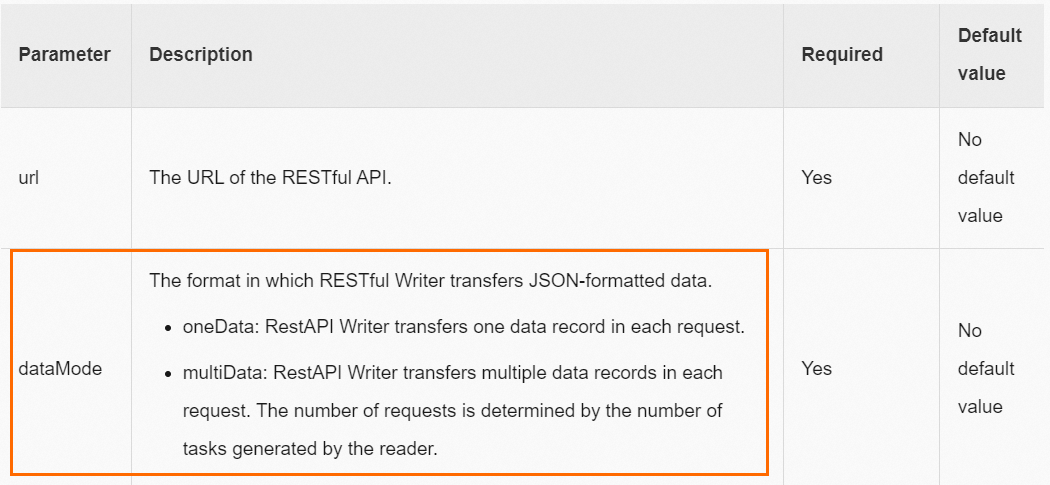
| RestAPI | JSON not an array; dataMode; multiData |
| OTS Writer | Auto-increment primary key; enableAutoIncrement |
| Time series model | _tags; is_timeseries_tag; OTS Reader; OTS Writer |
| Field mapping | plugin does not specify column; data preview; unstructured source |
| Table and column name keywords | Reserved words; keyword escape; backtick |
| Task configuration | Cannot view all tables; 25-table limit |
| Table modifications | Add column; modify column; source table changes |
| Custom table names | Dynamic table names; scheduling parameters |
| Shard key | Composite primary key; splitPk |
| Source table defaults | Default values; NOT NULL constraint |
| Missing data | Data inconsistency after sync |
| TTL modification | Time-to-live; ALTER |
| Function aggregation | Source-side functions; API sync |
By problem type
| Problem type | Issues |
|---|---|
| Connection errors | Connectivity test passes but task fails; intermittent success/failure; whitelist; SSRF attacks |
| Performance | Full table scan; shard key not configured; preSql/postSql slow; waiting for resources; MongoDB timeout |
| Data quality | Dirty data; encoding/garbled text; missing data; data inconsistency; field mismatch |
| Configuration | Field mapping errors; reserved word conflicts; dynamic table names; partition configuration; OTS auto-increment |
| Compatibility | MaxCompute column errors; Redis hash mode; Elasticsearch dense_vector; Kafka excess data |
Network communication
The data source connectivity test passes but the task fails to connect
The resource group used for the connectivity test differs from the one running the task, or the database configuration changed after the test.
Run the connectivity test again using the same resource group the task uses.
Find the resource group in the task log:
Default resource group:
running in Pipeline[basecommon_group_xxxxxxxxx]Exclusive resource group for Data Integration:
running in Pipeline[basecommon_S_res_group_xxx]Serverless resource group:
running in Pipeline[basecommon_Serverless_res_group_xxx]
Make sure the same resource group handles both the connectivity test and task execution.
If the task fails intermittently in the early morning but succeeds on rerun, check the database load at the time of failure.
An offline sync task sometimes succeeds and sometimes fails
The whitelist is incomplete. When using an exclusive resource group for Data Integration, adding only the current elastic network interface (ENI) IP addresses is not enough — scaling out the resource group adds new ENI IPs that are not yet whitelisted.
Recommended (exclusive resource groups): Add the vSwitch CIDR block of the resource group to the database whitelist instead of individual ENI IP addresses. This keeps the whitelist valid after scaling. See Add a whitelist for details.
For serverless resource groups: Check the whitelist configuration as described in Add a whitelist.
If the whitelist is correct, check whether the database load is too high. A high load can cause connections to drop.
Resource settings
Error: [TASK_MAX_SLOT_EXCEED]: Unable to find a gateway that meets resource requirements. 20 slots are requested, but the maximum is 16 slots.
The concurrency setting exceeds the available slot capacity. Reduce task concurrency:
Codeless UI: In channel control settings, lower Maximum Concurrency. See Configure a sync node in the codeless UI.
Code editor: Lower the
concurrentparameter in channel control settings. See Configure a sync node in the code editor.
Error: OutOfMemoryError: Java heap space
Try these steps in order:
If the plugin supports
batchSizeormaxFileSize, reduce their values. Check supported parameters in Supported data sources and reader and writer plugins.Reduce concurrency:
Codeless UI: Lower Maximum Concurrency in channel control settings.
Code editor: Lower the
concurrentparameter.
For file-based sources (such as OSS), reduce the number of files read per run.
In Running Resources, increase Resource Consumption (CU) to give the task more memory without affecting other running tasks.
Task instance conflict
Error: Duplicate entry 'xxx' for key 'uk_uk_op'
Full error: Error updating database. Cause: com.mysql.jdbc.exceptions.jdbc4.MySQLIntegrityConstraintViolationException: Duplicate entry 'cfc68cd0048101467588e97e83ffd7a8-0' for key 'uk_uk_op'
Data Integration does not allow multiple instances of the same sync task (same JSON configuration) to run simultaneously. This conflict occurs when:
A task scheduled to run every 5 minutes is delayed, causing two consecutive instances to trigger at the same time.
A backfill or rerun is triggered while a task instance is already running.
Configure a self-dependency so each instance starts only after the previous cycle completes:
Previous version of Data Development: See Self-dependency.
New version of Data Development: See Select a dependency type (cross-cycle dependency).
Timeout and slow tasks
Error: Communications link failure (MySQL read timeout)
Symptom: Communications link failure The last packet successfully received from the server was 7,200,100 milliseconds ago.
The database is executing the SQL query slowly, causing a MySQL read timeout.
Check whether a
WHEREfilter is set and whether the filtered column is indexed.If the source table is large, split the task into smaller tasks.
Identify the blocking SQL statement in the logs and consult your DBA.
Error: Communications link failure (MySQL write timeout)
Symptom: ERR-CODE: [TDDL-4614][ERR_EXECUTE_ON_MYSQL] ... Communications link failure The last packet successfully received from the server was 12,672 milliseconds ago.
A slow query causes a socket timeout. The default TDDL socket timeout is 12 seconds. If an SQL statement takes more than 12 seconds to execute, this error occurs.
Rerun the sync task after the database stabilizes.
Contact your DBA to adjust the timeout.
Error: MongoDBReader$Task - operation exceeded time limit (MongoDB)
Symptom: MongoDBReader$Task - operation exceeded time limitcom.mongodb.MongoExecutionTimeoutException: operation exceeded time limit
The volume of data being pulled is too large.
Increase task concurrency.
Decrease
batchSize.Add
cursorTimeoutInMsto the Reader parameters and set a large value, such as3600000(1 hour).
Long-running offline sync tasks
Possible cause 1: Pre-execution or post-execution SQL
preSql or postSql statements take too long. Use indexed columns in WHERE conditions inside preSql and postSql.
Possible cause 2: Shard key not configured
Offline synchronization uses a shard key (splitPk) to split data for concurrent processing. Without one, the task runs on a single channel.
Configure splitPk correctly:
Use the table's primary key. Primary keys are typically distributed evenly, which prevents data hot spots.
splitPksupports only integer data. Strings, floating-point numbers, and dates are not supported — an unsupported type causes the task to fall back to a single channel.If
splitPkis not specified or is empty, the task uses a single channel.
Possible cause 3: Waiting for Data Integration execution resources
If the log shows a prolonged WAIT status, the exclusive resource group does not have enough concurrent resources.
See Why does a Data Integration task always show the "wait" status?
An offline sync task holds one scheduling resource for its entire duration. A long-running task blocks not only other offline sync tasks but also other scheduled tasks.
A sync task slows down due to a full table scan
Example: SELECT bid,inviter,uid,createTime FROM relatives WHERE createTime>='2016-10-23 00:00:00' AND createTime<'2016-10-24 00:00:00' takes nearly 10 minutes because createTime has no index.
The WHERE clause filters on an unindexed column, triggering a full table scan. Use indexed columns in the WHERE clause, or add an index to the filtered column.
Switch resource groups
How to switch the execution resource group for an offline sync task
Previous version of Data Development:
To change the resource group for debugging, go to the sync task details page in DataStudio.
To change the execution resource group for scheduled tasks, go to Operation Center. See Switch a Data Integration resource group.
New version of Data Development:
To change the resource group for debugging Data Integration tasks, go to DataStudio.
To change the execution resource group for scheduled tasks, go to Operation Center. See Resource group O\&M.
Dirty data
How dirty data works
A single data record that causes an exception when written to the target data source is classified as dirty data. Dirty records are not written to the destination.
By default, Data Integration allows dirty data. Set the dirty data threshold when configuring the sync task. See Configure a sync node in the codeless UI.
Threshold behavior:
| Threshold | Behavior |
|---|---|
0 | The task fails immediately on the first dirty record. |
x (positive integer) | The task continues if the dirty record count stays below x; fails when it exceeds x. Dirty records are discarded. |
How to troubleshoot dirty data
Scenario 1: Field size mismatch
Error: Dirty data was encountered when writing to the ODPS destination table: An error occurred in the data of the [3rd] field.
The error identifies the affected field by position. To get the exact field details, find the full dirty data record in the log:
{"byteSize":28,"index":25,"rawData":"ohOM71vdGKqXOqtmtriUs5QqJsf4","type":"STRING"}byteSize: number of bytesindex: 25: the 26th field (zero-indexed)rawData: the actual valuetype: the data type
Compare the field's data type and size against the destination table definition to find the mismatch. For example, if the MaxCompute field is smaller than the corresponding MySQL field, this error occurs.
Scenario 2: Null value with type mismatch
DataX reports dirty data when reading a null value that is incompatible with the destination field type. For example, writing a null string to an integer field causes an error. Check whether the source field's null value is compatible with the destination field type.
How to view dirty data
Go to the log details page and click Detail log url to view dirty data details.

If the dirty data limit is exceeded, is already-synchronized data retained?
Yes. Data written before the task was aborted is retained. No rollback is performed.
Error: dirty data caused by encoding or garbled text
Symptom: [13350975-0-0-writer] ERROR StdoutPluginCollector - Dirty data {"exception":"Incorrect string value: '\\xF0\\x9F\\x98\\x82...' for column 'introduction' at row 1"}
This typically occurs when the source data contains emojis and the database encoding is not utf8mb4. Other causes:
The source data itself is garbled.
The database and client use different character sets.
The browser uses a different character set from the database.
Fix steps:
If the raw data is garbled, fix it before running the sync task.
If the database and client use inconsistent character sets, unify them first.
For a data source added using a JDBC connection string, switch to
utf8mb4:jdbc:mysql://xxx.x.x.x:3306/database?com.mysql.jdbc.faultInjection.serverCharsetIndex=45For a data source added using an instance ID, append the parameter after the database name:
database?com.mysql.jdbc.faultInjection.serverCharsetIndex=45In the RDS console, change the database encoding to
utf8mb4.
To set the encoding: set names utf8mb4. To check the current encoding: show variables like 'char%'.
SSRF attacks
Error: Task have SSRF attacks
DataWorks blocks tasks from directly accessing internal network addresses (such as 10.x.x.x or 192.168.x.x) using public IP addresses. This is triggered when a plugin configuration (such as HTTP Reader) points to an internal IP or VPC domain name.
Remove internal IP addresses from the plugin configuration.
To access internal data sources, use a serverless resource group (recommended) or an exclusive resource group for Data Integration with VPC connectivity configured.
Stop using public resource groups for tasks that access internal data sources.
Date and time writing
How to retain milliseconds or specify a custom date format when writing to a text file
Switch to the code editor and add the following to the setting section:
"common": {
"column": {
"dateFormat": "yyyyMMdd",
"datetimeFormatInNanos": "yyyyMMdd HH:mm:ss.SSS"
}
}
dateFormat: the format used when converting a sourceDATEtype (date only, no time) to text.datetimeFormatInNanos: the format used when converting a sourceDATETIMEorTIMESTAMPtype (with time) to text, with millisecond precision.
MaxCompute
Notes on "Add Row" or "Add Field" for source table fields
When reading from a MaxCompute table and adding rows or fields manually:
Constants must be enclosed in single quotation marks — for example,
'abc'or'123'.Scheduling parameters are supported — for example,
'${bizdate}'. See Supported formats of scheduling parameters.Partition column names can be entered directly — for example,
pt.If the value cannot be parsed, the type is displayed as
Custom.MaxCompute functions cannot be configured here.
A manually added column displayed as
Custom(such as a MaxCompute partition column or a LogHub column not shown in preview) does not affect task execution.
How to synchronize partition fields from a MaxCompute table
In the field mapping list, under Source table fields, click Add Row or Add Field. Enter the partition column name (for example, pt) and map it to the target table field.

How to synchronize data from multiple partitions
Specify partitions in the ODPS Reader configuration using Linux shell wildcard syntax: * matches zero or more characters, and ? matches a single character.
Examples for a table test with partitions pt=1,ds=hangzhou, pt=1,ds=shanghai, pt=2,ds=hangzhou, and pt=2,ds=beijing:
| Goal | Configuration |
|---|---|
Read pt=1,ds=hangzhou only | "partition":"pt=1,ds=hangzhou" |
Read all partitions where pt=1 | "partition":"pt=1,ds=*" |
| Read all partitions | "partition":"pt=*,ds=*" |
By default, the task fails if a specified partition does not exist. To allow the task to succeed when a partition is missing, set When Partition Does Not Exist to Ignore non-existent partitions in the codeless UI, or add "successOnNoPartition": true in the code editor.
To filter partitions with conditions (code editor only):
Maximum partition:
/*query*/ ds=(select MAX(ds) from DataXODPSReaderPPR)Date range:
/*query*/ pt>=20170101 and pt<20170110
/*query*/ marks the following content as a WHERE condition.
How to perform column filtering, reordering, and null padding in MaxCompute
Configure the MaxCompute Writer column list to control which columns are written and in what order.
For example, if a MaxCompute table has columns a, b, and c and you want to sync only c and b:
"column": ["c","b"]The first column from the Reader is imported into c, the second into b, and a is set to null in the newly inserted row.
To import all columns: "column": ["*"]
Handling MaxCompute column configuration errors
MaxCompute Writer reports an error if you write more columns than the table has. For example, if the table has columns a, b, and c, writing four or more columns causes an error. This prevents silent data loss from extra columns being discarded.
Notes on MaxCompute partition configuration
MaxCompute Writer writes only to the last-level partition. It does not support partition routing based on a field value.
For a three-level partition table, the configuration must target a third-level partition:
Valid:
pt=20150101, type=1, biz=2Invalid:
pt=20150101, type=1orpt=20150101
MaxCompute task reruns and idempotence
MaxCompute Writer guarantees write idempotence when "truncate": true is set. On each rerun, the Writer clears the previous data and imports new data, ensuring consistency.
If the task is interrupted by an exception, data atomicity cannot be guaranteed and is not rolled back automatically. Rerun the task to restore data integrity.
Whentruncateistrue, all data in the specified partition or table is deleted. Use this parameter with caution.
Error: The download session is expired.
Full error: Code:DATAX_R_ODPS_005:Failed to read ODPS data... ErrorCode=StatusConflict, ErrorMessage=The download session is expired.
Offline synchronization uses the MaxCompute Tunnel to transfer data. A Tunnel session expires after 24 hours. If a sync task runs longer than 24 hours, the session expires and the task fails.
Increase task concurrency and plan the sync volume so the task completes within 24 hours.
Error: Error writing request body to server (MaxCompute write)
Full error: Code:[OdpsWriter-09], Description:[Failed to write data to the ODPS destination table.]. - ... java.io.IOException: Error writing request body to server.
Possible causes:
Data type mismatch: The source data does not match the MaxCompute data type. For example, writing
4.2223to adecimal(18,10)field.ODPS block or communication exception.
Convert the source data to a compatible data type before syncing.
MySQL
How to synchronize sharded MySQL tables into a single MaxCompute table
Garbled Chinese characters after syncing to a MySQL destination with utf8mb4
When adding the data source using a connection string, set the JDBC format to:
jdbc:mysql://xxx.x.x.x:3306/database?com.mysql.jdbc.faultInjection.serverCharsetIndex=45See Configure a MySQL data source for details.
Error: Application was streaming results when the connection failed. Consider raising value of 'net_write_timeout/net_read_timeout' on the server.
net_read_timeout: DataX splits source data into multiple SQLSELECTstatements based onsplitPk. If a statement exceeds the RDS maximum running time, this error occurs.net_write_timeout: The timeout for sending a data block to the client is too short.
Add net_write_timeout or net_read_timeout to the data source URL connection string and set a larger value. Alternatively, adjust the parameter in the RDS console.

Example:
jdbc:mysql://192.168.1.1:3306/lizi?useUnicode=true&characterEncoding=UTF8&net_write_timeout=72000If the task supports automatic rerun on error, enable that option to handle transient failures.
Error: [DBUtilErrorCode-05] ... MySQLNonTransientConnectionException: No operations allowed after connection closed
The MySQL wait_timeout parameter defaults to 8 hours. If the timeout is reached while data is still being fetched, the connection closes and the task fails.
In the MySQL configuration file my.cnf (or my.ini on Windows), add the following under the [mysqld] section:
wait_timeout=2592000
interactive_timeout=2592000Restart MySQL and verify the setting:
show variables like '%wait_time%'Error: The last packet successfully received from the server was 902,138 milliseconds ago
High memory usage (even with normal CPU usage) can cause the connection to drop. If the task supports automatic rerun, set it to Rerun upon Error. See Time property configuration.
PostgreSQL
Error: org.postgresql.util.PSQLException: FATAL: terminating connection due to conflict with recovery
Pulling data from the database takes too long, causing a standby recovery conflict. Increase the values of max_standby_archive_delay and max_standby_streaming_delay in PostgreSQL. See Standby server events.
RDS
Error: Host is blocked (Amazon RDS)
Amazon RDS returns Host is blocked due to load balancer health check activity. Disable the Amazon load balancer health check to resolve this.
MongoDB
Error when adding a MongoDB data source with the root user
Use a username created in the specific database that contains the table you want to sync. The root user is not allowed.
For example, to sync the name table from the test database, set the database name to test and use a username created in the test database.
How to use a timestamp in the query parameter for incremental synchronization
Use an assignment node to convert the date type to a timestamp first, then pass it as an input parameter to the MongoDB sync task. See How to perform incremental synchronization on a timestamp type field in MongoDB.
Time zone shifted by +8 hours after syncing from MongoDB
Set the time zone in the MongoDB Reader configuration. See MongoDB Reader.
Records updated in MongoDB are not synchronized to the destination
Restart the task after a delay without changing the query condition. This extends the sync window without altering the configuration.
Is MongoDB Reader case-sensitive?
Yes. The column.name field is case-sensitive. A mismatch between the configured name and the actual field name in MongoDB results in null values being read.
Example:
Source document:
{"MY_NAME": "zhangsan"}Incorrect configuration (lowercase my_name does not match MY_NAME):
{
"column": [{"name": "my_name"}]
}Use "name": "MY_NAME" to match the source field exactly.
How to configure the timeout for MongoDB Reader
The cursorTimeoutInMs parameter sets the total time the MongoDB server allows for executing a query (excluding data transmission time). The default is 600000 ms (10 minutes).
For large full-pull reads, increase this value to avoid the MongoExecutionTimeoutException: operation exceeded time limit error.
Error: no master (MongoDB)
DataWorks sync tasks do not support reading from a MongoDB secondary node. Configuring a secondary node as the source triggers this error. Use the primary node.
Error: MongoExecutionTimeoutException: operation exceeded time limit
A cursor timeout occurred. Increase the cursorTimeoutInMs parameter value.
Error: DataXException: operation exceeded time limit (MongoDB)
Increase task concurrency and the batchSize for reading.
Error: no such cmd splitVector (MongoDB)
Some MongoDB versions do not support the splitVector command used for task sharding.
On the sync task configuration page, click the Convert to script button to switch to the code editor.
In the MongoDB parameter configuration, add:
"useSplitVector": false
Error: After applying the update, the (immutable) field '_id' was found to have been altered
Symptom: This occurs in the codeless UI when Write Mode (Overwrite) is set to Yes and a field other than _id is configured as the Business Primary Key.

The data contains records where _id does not match the configured Business Primary Key. Set Business Primary Key to match _id, or use _id as the Business Primary Key.
Redis
Error: Code:[RedisWriter-04], Description:[Dirty data]. - source column number is in valid!
Redis hash mode requires attribute-value pairs. If the source has only two columns, hash mode cannot be used because one column becomes the key and the other becomes the attribute, leaving no column for the value.
Example: Source columns id, name, age, address — using id and name as the key, age as the attribute, and address as the value works. But with only two source columns, hash mode fails.
If using only two columns, switch Redis to String mode.
If hash mode is required, configure at least three columns in the source.
OSS
Is there a limit on the number of files read from OSS?
OSS Reader has no built-in file count limit. The practical limit is the task's resource consumption (CU). Reading too many files at once can cause an OutOfMemoryError: Java heap space error. Avoid setting the object parameter to * for large file sets.
How to remove the random string appended to OSS filenames
OSS Writer appends a random string to filenames by default to simulate directory structures and support multiple shards. To write to a single file without the random suffix, set:
"writeSingleObject": "true"See the writeSingleObject description in the OSS data source documentation.
Error: AccessDenied The bucket you access does not belong to you.
The AccessKey account configured for the data source does not have the required permissions on the bucket. Grant read permission on the bucket to the AccessKey account used for the OSS data source.
Dirty data when reading a CSV file with multiple delimiters
Symptom: An offline sync task reading from OSS or FTP in CSV format with a multi-character delimiter (such as |,, ##, or ;;) fails with a dirty data error and an IndexOutOfBoundsException in the log.
The built-in CSV reader ("fileFormat": "csv") does not handle multi-character delimiters accurately.
Codeless UI: Switch the text type to text and specify the multi-character delimiter explicitly.
Code editor: Change
"fileFormat": "csv"to"fileFormat": "text"and set the delimiter:"fieldDelimiter": "<multi-delimiter>", "fieldDelimiterOrigin": "<multi-delimiter>"
Hive
Error: Could not get block locations. (local Hive)
The mapred.task.timeout parameter is too short, causing Hadoop to terminate the task and clean up the temporary directory before processing completes.
In the data source settings, if Read Hive Method is set to Read Data Based On Hive JDBC (supports Conditional Filtering), add the following to the Session Configuration field:
mapred.task.timeout=600000DataHub
Error: Record count 12498 exceed max limit 10000 (DataHub write failure)
Full error: Code:[DatahubWriter-04], Description:[Write data failed.]. - com.aliyun.datahub.exception.DatahubServiceException: Record count 12498 exceed max limit 10000 (Status Code: 413; Error Code: TooLargePayload)
A single DataX batch submission exceeds DataHub's 10,000-record limit. The relevant parameters:
maxCommitSize: the maximum buffer size in MB before data is submitted. Default: 1 MB.batchSize: the number of records accumulated in the DataX buffer before submission.
Reduce maxCommitSize and batchSize.
LogHub
A field with data is synchronized as empty
LogHub Reader is case-sensitive for field names. Check the column configuration and make sure field names match the source exactly.
Data is missing when reading from LogHub
Data Integration uses receive_time (the time data entered LogHub) for time-based reading. In the LogHub console, verify that receive_time falls within the time range configured for the task.
Mapped fields are not as expected when reading from LogHub
Manually edit the column configuration in the interface to correct the field mapping.
Lindorm
When using the Lindorm bulk write method, is historical data replaced every time?
No. The bulk write method follows the same logic as the API write method: data in the same row and column is overwritten, while other rows and columns remain unchanged.
Elasticsearch
How to query all fields under an Elasticsearch index
Use a curl command to retrieve the index mapping, then extract field names from the properties section.
# ES 7
curl -u username:password --request GET 'http://esxxx.elasticsearch.aliyuncs.com:9200/indexname/_mapping'
# ES 6
curl -u username:password --request GET 'http://esxxx.elasticsearch.aliyuncs.com:9200/indexname/typename/_mapping'In the response, the properties section lists all fields and their types:
{
"indexname": {
"mappings": {
"properties": {
"field1": {"type": "text"},
"field2": {"type": "long"},
"field3": {"type": "double"}
}
}
}
}How to configure a dynamic Elasticsearch index name that changes daily
Add date scheduling variables to the index configuration so the index name updates for each task run.
Define date variables: In the sync task's scheduling configuration, click Add Parameter and define variables. For example, configure
var1for the current day andvar2for the previous day.
Configure the index variable: Switch to the code editor and set the Elasticsearch Reader's index using
${variable_name}syntax.
Validate: Click Run With Parameters to test. Enter the parameter values directly when prompted.
After successful validation, click Save and Submit to publish. For standard projects, click Publish to open the publishing center.
Result: Index "index": "esstress_1_${var1}_${var2}" resolves to esstress_1_20230106_20230105 at runtime.

How Elasticsearch Reader synchronizes Object or Nested field properties
Use the code editor. Enable multi and reference sub-properties using dot notation:
"multi": {
"multi": true
}Example:
Data in ES:
{
"level1": {
"level2": [
{"level3": "testlevel3_1"},
{"level3": "testlevel3_2"}
]
}
}Reader configuration:
"parameter": {
"column": [
"level1",
"level1.level2",
"level1.level2[0]"
],
"multi": {
"multi": true
}
}Writer result (1 row, 3 columns):
| Column | Value |
|---|---|
level1 | {"level2":[{"level3":"testlevel3_1"},{"level3":"testlevel3_2"}]} |
level1.level2 | [{"level3":"testlevel3_1"},{"level3":"testlevel3_2"}] |
level1.level2[0] | {"level3":"testlevel3_1"} |
After syncing a string from MaxCompute to ES, surrounding quotes appear in the data
The extra quotes are a Kibana display artifact. The actual data does not contain them. Use curl or Postman to view the raw data.
To sync a JSON-type string from MaxCompute to ES as a nested object, configure the ES write field type as nested:


How to synchronize source data as an array in Elasticsearch
Two approaches are available depending on the source data format.
Option 1: Parse JSON array — Use when source data is a JSON array string like "[1,2,3,4,5]".
Set json_array=true in ColumnList.
Codeless UI:

Code editor:
"column": [ { "name": "docs", "type": "keyword", "json_array": true } ]
Option 2: Parse with a delimiter — Use when source data is delimited, like "1,2,3,4,5".
Set splitter to the delimiter character.
Limitations:
Only one delimiter type is supported per task. Different Array fields cannot use different delimiters.
The splitter supports regular expressions.
Codeless UI: The default splitter is
-,-.Code editor:
"parameter": { "column": [ { "name": "col1", "array": true, "type": "long" } ], "splitter": "," }
Excessive audit logs when writing to ES without credentials on the first request
HttpClient makes an initial request without credentials to determine the authentication method. Each data write to ES establishes a new connection, resulting in one unauthenticated request per write. Add "preemptiveAuth": true in the code editor to send credentials on the first request.
How to synchronize data to ES as a Date type
Option 1: Write source content directly
"parameter": {
"column": [
{
"name": "col_date",
"type": "date",
"format": "yyyy-MM-dd HH:mm:ss",
"origin": true
}
]
}Option 2: With time zone conversion
"parameter": {
"column": [
{
"name": "col_date",
"type": "date",
"format": "yyyy-MM-dd HH:mm:ss",
"Timezone": "UTC"
}
]
}Error: Elasticsearch Writer fails due to an external version (type:version)
Elasticsearch Writer does not support specifying an external version. Remove the "type": "version" configuration from the column definition.
Error: ERROR ESReaderUtil - ES_MISSING_DATE_FORMAT, Unknown date value. please add "dataFormat".
The ES date field's mapping does not have a format configured, so Elasticsearch Reader cannot parse the date.
Add a
dateFormatparameter that includes all date formats used in the index, separated by||:"parameter": { "column": ["dateCol1", "dateCol2", "otherCol"], "dateFormat": "yyyy-MM-dd||yyyy-MM-dd HH:mm:ss" }Alternatively, set a
formaton all date fields in the ES mapping.
Error: com.alibaba.datax.common.exception.DataXException: Code: [Common-00]
The index or column name contains the keyword $ref, which conflicts with fastjson keyword restrictions. Elasticsearch Reader does not support indexes with $ref in their field names. See Elasticsearch Reader.
Error: version_conflict_engine_exception (Elasticsearch write)
ES's optimistic locking was triggered. While data was being updated, another process deleted index data, causing a version conflict.
Check whether a concurrent deletion occurred.
Change the sync method from Update to Index.
Error: illegal_argument_exception (Elasticsearch write)
Advanced column properties such as similarity or properties require the other_params field for the plugin to recognize them.

Add other_params to the column configuration:
{"name": "dim2_name", ..., "other_params": {"similarity": "len_similarity"}}Error: dense_vector (MaxCompute Array field to Elasticsearch)
Offline synchronization to Elasticsearch does not support the dense_vector type. Supported types are:
ID, PARENT, ROUTING, VERSION, STRING, TEXT, KEYWORD, LONG, INTEGER, SHORT, BYTE,
DOUBLE, FLOAT, DATE, BOOLEAN, BINARY, INTEGER_RANGE, FLOAT_RANGE, LONG_RANGE,
DOUBLE_RANGE, DATE_RANGE, GEO_POINT, GEO_SHAPE, IP, IP_RANGE, COMPLETION,
TOKEN_COUNT, OBJECT, NESTEDCreate the index mapping manually instead of letting Elasticsearch Writer auto-create it.
Change the
dense_vectorfield type toNESTED.Set
dynamic = trueandcleanup = falsein the sync task configuration.
Elasticsearch Writer settings do not take effect when creating an index
The settings configuration incorrectly wraps properties under an "index" key.
Incorrect:
"settings": {
"index": {
"number_of_shards": 1,
"number_of_replicas": 0
}
}Correct:
"settings": {
"number_of_shards": 1,
"number_of_replicas": 0
}Settings take effect only when an index is created — either when the index does not exist or when cleanup=true.
A nested property changes to keyword type after a cleanup=true rebuild
For nested types, Elasticsearch Writer uses only top-level mappings and allows ES to determine composite types. ES adapts the property type to text with a fields.keyword subfield. This is ES's adaptive behavior and does not affect functionality.
To preserve the expected mapping, create the ES index mapping before running the sync task, then set cleanup=false.
Kafka
Data beyond endDateTime appears in the destination
Kafka Reader reads data in batches. If a batch contains records beyond endDateTime, the sync stops — but the excess records in that batch are also written to the destination.
Recommended: Configure Kafka's
max.poll.recordsto control the number of records pulled per batch. The amount of excess data is bounded bymax.poll.records× concurrency.Not recommended: Set
skipExceedRecordto skip excess data. Skipping may cause data loss. See Kafka Reader.
A Kafka task with small data runs for a long time without finishing
Uneven data distribution leaves some Kafka partitions with no new data or data that has not reached the configured end offset. The task's exit condition requires all partitions to reach the end offset, so idle partitions block completion.
Set the Synchronization End Policy to stop if no new data is read for 1 minute. In the code editor:
"stopWhenPollEmpty": true,
"stopWhenReachEndOffset": trueThis allows the task to exit after reading the latest offset from all partitions.
Records written to a partition after the task finishes with timestamps earlier than the configured end offset will not be consumed.
RestAPI
Error: The JSON string found through path:[] is not an array type
When syncing multiple records, dataMode must be set to multiData. Without this, RestAPI Writer does not handle the data as an array.
Set
dataModetomultiData. See RestAPI Writer.Add
"dataPath": "data.list"in the RestAPI Writer script.
Do not add the "data.list" prefix when configuring the Column field.
OTS Writer
How to configure OTS Writer for a table with an auto-increment primary key
Add the following two lines to the OTS Writer configuration:
"newVersion": "true", "enableAutoIncrement": "true"Do not include the auto-increment primary key column name in the OTS Writer column configuration.
The total of
primaryKeyentries +columnentries in OTS Writer must equal the number of columns in the upstream OTS Reader data.
Time series model
What do _tags and is_timeseries_tag mean in time series model configuration?
These fields control how tag data is read and written in the OTS time series model.
Example tags: [phone=Xiaomi, memory=8G, camera=Leica]

Reading tags (OTS Reader):
To export all tags as a single column:
"column": [{"name": "_tags"}]Output: ["phone=xiaomi","camera=LEICA","RAM=8G"]
To export individual tags, each as a separate column:
"column": [
{"name": "phone", "is_timeseries_tag": "true"},
{"name": "camera", "is_timeseries_tag": "true"}
]Output: xiaomi, LEICA
Writing tags (OTS Writer):
Given upstream data with two columns — ["phone=xiaomi","camera=LEICA","RAM=8G"] and 6499:
"column": [
{"name": "_tags"},
{"name": "price", "is_timeseries_tag": "true"}
]The first column imports the array as a whole into the tag field.
The second column imports
price=6499as a separate tag.
Expected result:

Field mapping
Error: plugin xx does not specify column
The field mapping in the sync task is missing or incorrectly configured.
Verify that field mapping is configured.
Verify that the plugin's column configuration is correct.
Fields cannot be mapped when clicking Data Preview (unstructured data source)
Symptom: A message appears indicating a field exceeds the maximum byte size.

The data source service limits field length in preview requests to avoid out-of-memory (OOM) errors. If a single column exceeds 1,000 bytes, this message appears. It does not affect the actual sync task — run the task directly.
Other reasons data preview may fail (when the file exists and connectivity is normal):
A single row in the file exceeds 10 MB: no data is displayed.
A single row has more than 1,000 columns: only the first 1,000 columns are displayed, and a message appears at column 1,001.
Table and column name keywords
How to handle sync task failures caused by reserved words in table or column names
A column name is a reserved word, or a field name starts with a number. Switch the sync task to the code editor and escape the reserved keywords in the column configuration. See Configure a sync node in the code editor.
| Database | Escape character | Example |
|---|---|---|
| MySQL | Backtick ` `` | `table` |
| Oracle, PostgreSQL | Double quote " | "keyword" |
| SQL Server | Square brackets [] | [keyword] |
MySQL example:

Create the table:
create table aliyun (\table\int, msg varchar(10));Create a view with an alias for the reserved column:
create view v_aliyun as select \table\as col1, msg as col2 from aliyun;Configure the sync task to use the
v_aliyunview instead of thealiyuntable.
table is a MySQL reserved word. Avoid using reserved words as column names.Task configuration
Cannot view all tables when configuring an offline sync node
The Select Source area displays only the first 25 tables in the selected data source by default. To access additional tables, search by table name or switch to the code editor.
Table modifications
How to handle adding or modifying columns in the source table of an offline sync task
Go to the sync task configuration page and update the field mapping to reflect the changed columns. Resubmit and execute the task for the changes to take effect.
Custom table names
How to use dynamic table names for offline sync tasks
If table names follow a date-based pattern (for example, orders_20170310, orders_20170311), combine scheduling parameters with the code editor to generate table names automatically.
In the code editor, replace the source table name with a variable:
orders_${tablename}In the task's parameter configuration, assign the variable:
tablename=${yyyymmdd}This reads the previous day's table automatically each morning. For example, on March 15, 2017, the task reads from orders_20170314.

See Supported formats of scheduling parameters for more parameter formats.
Shard key
Can a composite primary key be used as a shard key?
No. Offline sync tasks do not support composite primary keys as shard keys.
Source table defaults
Are default values and NOT NULL constraints retained when Data Integration creates the target table?
No. DataWorks retains only column names, data types, and comments from the source table. Default values, NOT NULL constraints, and indexes are not carried over.
Missing data
Data in the target table is inconsistent with the source table after synchronization
See Troubleshoot data quality issues in offline synchronization for detailed troubleshooting steps.
TTL modification
Can the TTL (time-to-live) of a synchronized data table be modified only with ALTER?
Yes. TTL is a table-level property and is not configurable in sync task settings. Use the ALTER command to modify it.
Function aggregation
When syncing via API, can source-side functions (such as MaxCompute aggregation functions) be used?
No. API synchronization does not support source-side functions. Process the data on the source side first, then import the processed result.