A cross-cycle dependency links a node's current-cycle instance to the successful completion of an instance from a previous cycle.
DataWorks supports the following three types of cross-cycle dependencies:
-
Instances of Child Nodes
-
With this dependency, a node relies on its direct downstream nodes. For example, if node A has three downstream nodes (B, C, and D), its current instance runs only after the previous-cycle instances of nodes B, C, and D have all succeeded.
-
This dependency is commonly used when a node's current run depends on its downstream nodes successfully cleansing the data in its output table from the previous cycle. To verify that the downstream nodes cleansed the data as expected, you can configure data quality rules for their output tables.
-
-
Instances of Current Node
-
This is a cross-cycle self-dependency. The current instance of a node depends on the successful completion of its own instance from the previous cycle.
-
This dependency is commonly used when a node's current run depends on the business data produced by its previous run. To verify that the data cleansing results are as expected, you can configure data quality monitoring rules for the output table of the node.
-
-
Instances of Custom Nodes: Specify dependencies on other nodes by manually entering their IDs. If you specify multiple nodes, separate their IDs with commas (,), for example,
12345,23456.-
With this dependency, the current node's instance runs only after the previous-cycle instances of all specified custom nodes have succeeded.
-
A common use case is when business logic requires a dependency on data produced by another process, but the current node's code does not directly operate on that data.
-
When you view node dependencies in Operation Center, cross-cycle dependencies appear as dashed lines to distinguish them from same-cycle dependencies.
When you deactivate a node, you must remove its scheduling dependencies. This includes both cross-cycle dependencies and same-cycle dependencies.
Choose the dependency cycle for upstream nodes based on your business requirements. Typically, you should configure either a same-cycle dependency or a cross-cycle dependency, but not both. The automatic parsing feature creates a same-cycle dependency by default. To change this, you must first delete the same-cycle dependency and then add the new one. For more information, see Logic of scheduling dependencies.
The following figure shows the dependencies between nodes in a workflow.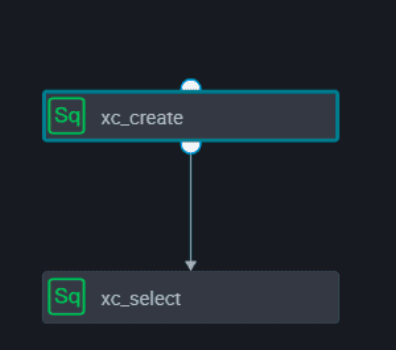
The Operation Center page displays the dependencies in the workflow.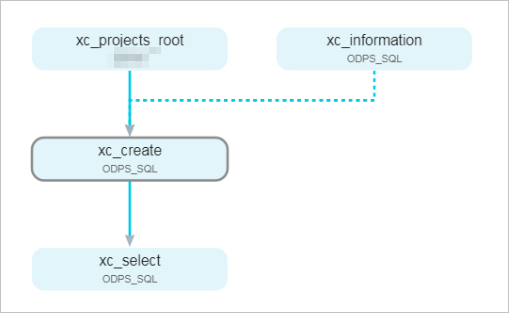
Using the xc_create node as an example, after writing the DDL statements CREATE TABLE xc_1 and CREATE TABLE xc_2 in the code editor, click Parse Input and Output from Code in the scheduling configuration panel. The system automatically generates two output records (test.xc_1 and test.xc_2) in the Node Output Name section, with the method listed as Code Parsing. In the Cross-Cycle Dependencies section, you can select Instances of Current Node, Instances of Child Nodes, or Instances of Custom Nodes.
The code editor of the xc_select node contains two SQL statements: SELECT * FROM xc_1; and SELECT * FROM xc_2;. Through the Parse Input and Output from Code feature, the system automatically identifies test.xc_1 and test.xc_2 as upstream dependencies for this node, meaning xc_select depends on the two tables produced by the xc_create node.
Cross-cycle dependency: Child nodes
You can make a node depend on the successful completion of its downstream nodes from the previous cycle. For example, if node A has downstream nodes B, C, and D, its current-cycle instance will run only after the previous-cycle instances of B, C, and D have all completed successfully.
Use this dependency when a node's current execution depends on data cleansing performed by its downstream nodes in the previous cycle. These downstream nodes cleanse the output data that the parent node generated in its previous run. The parent node's current-cycle instance starts only if its downstream nodes' previous-cycle instances have run successfully.
The xc_create node is configured to depend on its child nodes from the previous cycle. In the Cross-Cycle Dependencies (formerly Previous Cycle) section at the bottom of the Scheduling Configuration panel, select the Instances of Child Nodes check box.
The Operation Center page displays the dependencies between the nodes.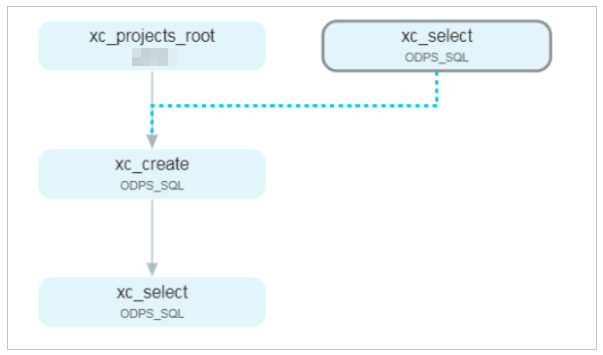
Cross-cycle dependency: Current node
A node's current-cycle execution can depend on the successful completion of its own previous-cycle instance. A failed or incomplete previous-cycle instance blocks the current-cycle instance from running.
Use this dependency when a data cleansing task in the current cycle depends on the result of the same task from the previous cycle. In this example, the node is scheduled as an hourly task to make the dependency easier to observe.
View the node's dependencies on the page.
If an hourly node is configured with a self-dependency (Cross-Cycle Dependencies: Current Node), the next hourly instance of this node will not run if the instance from the previous cycle did not run successfully.
For example, if the first instance of an hourly task fails or does not run on a given day, all subsequent hourly instances of that task for that day will also not run.
Cross-cycle dependency: Custom nodes
In this scenario, the xc_create node depends on the previous-cycle instance of node 1000374815 due to business logic, even though its code does not use the output table produced by node 1000374815.
Use this dependency when your business logic requires data produced by another node (in this case, node 1000374815), but the current node (xc_create) does not directly operate on that data, such as by selecting from the result table of node 1000374815.
The xc_create node is configured to have an upstream dependency on the custom node 1000374815. In the Cross-Cycle Dependencies section of the Scheduling Configuration panel, select Instances of Custom Nodes, enter node ID 1000374815 in the input field, and click Add.
View the node's dependencies on the page.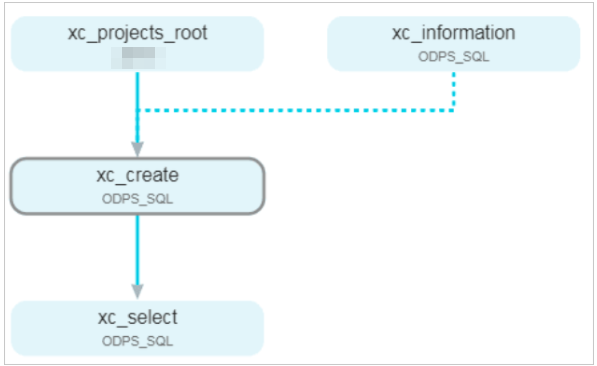
Advanced settings for cross-cycle dependencies
In workflows with a branch node that has two downstream paths, typically only one path is executed while the other is set to dry run. This dry-run status propagates to all subsequent downstream nodes. To manage this behavior, DataWorks provides the option Upstream node air running attribute does not conduct cross-cycle.
However, if a node in a branch path has a self-dependency, and its previous-cycle instance was set to dry run because its branch was not taken, the node can become permanently stuck in a dry-run state.
For example, if the node on the left is set to dry run, its downstream node will also be set to dry run.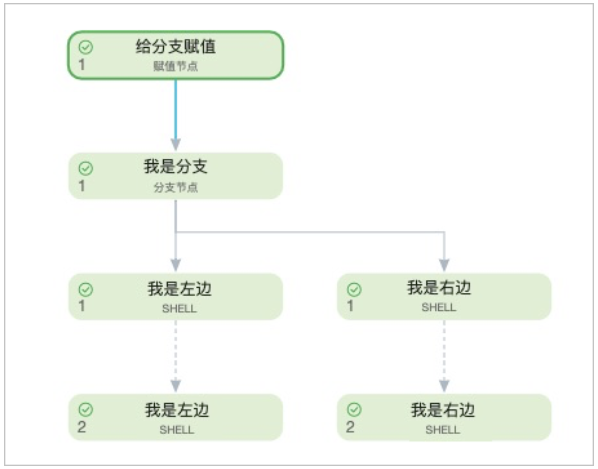
To ensure that a node's execution in the next cycle is determined by the branch logic of that same cycle, rather than being affected by a dry-run status from a previous cycle, follow these steps:
-
On the node configuration page, click Scheduling in the right-side panel.
-
In the Schedule section, select Dependency on Last Cycle.
-
Click Advanced Settings.
-
Select Upstream node air running attribute does not conduct cross-cycle. The task will no longer be affected by the dry-run status of a branch node from the previous cycle. In the Cross-Cycle Dependencies (formerly Previous Cycle) section, select Instances of Current Node. Set Skip Upstream Dry-Run Status to Yes.
This option applies only to the dry-run status propagated from an unselected branch node. It does not affect the dry-run status inherited from a regular node's previous-cycle instance.
Typical use cases for cross-cycle dependencies
-
Use case 1:
-
Scenario: A daily task depends on an hourly task. You want the daily task to run at its scheduled time of 12:00 without waiting for all 24 hourly instances to complete.
-
Solution: Configure the upstream hourly task to depend on its own previous instance by selecting . Set the downstream daily task to run at 12:00 and do not configure any cross-cycle dependency for it.
After the 12:00 instance of the upstream hourly task runs successfully, the downstream daily task will start.
-
-
Use case 2:
-
Scenario: A daily task depends on the data generated by an hourly task from the previous day.
-
Solution: Configure the downstream daily task by selecting . Then, enter the node ID of the upstream hourly task.
-
-
Use case 3:
-
Scenario: An hourly task depends on a daily task. After the daily task completes, multiple scheduled run times for the hourly task may have already passed, causing multiple instances to start concurrently. How can you prevent this?
-
Solution: Configure the downstream hourly task to depend on its own previous instance by selecting . This ensures that the hourly instances run sequentially.
-
-
Use case 4:
-
Scenario: A node depends on the data it produced in its own previous cycle. How can you ensure the data from the previous cycle is ready?
-
Solution: Configure the node to depend on its own previous instance by selecting .
-