Dataphin individual profile services let you query entity profiles by ID and build 360-degree views by selecting tags.
Prerequisites
-
An application is created for the profile service. Create and manage applications.
-
The corresponding entity is created. Create entity.
Overview of individual profile service
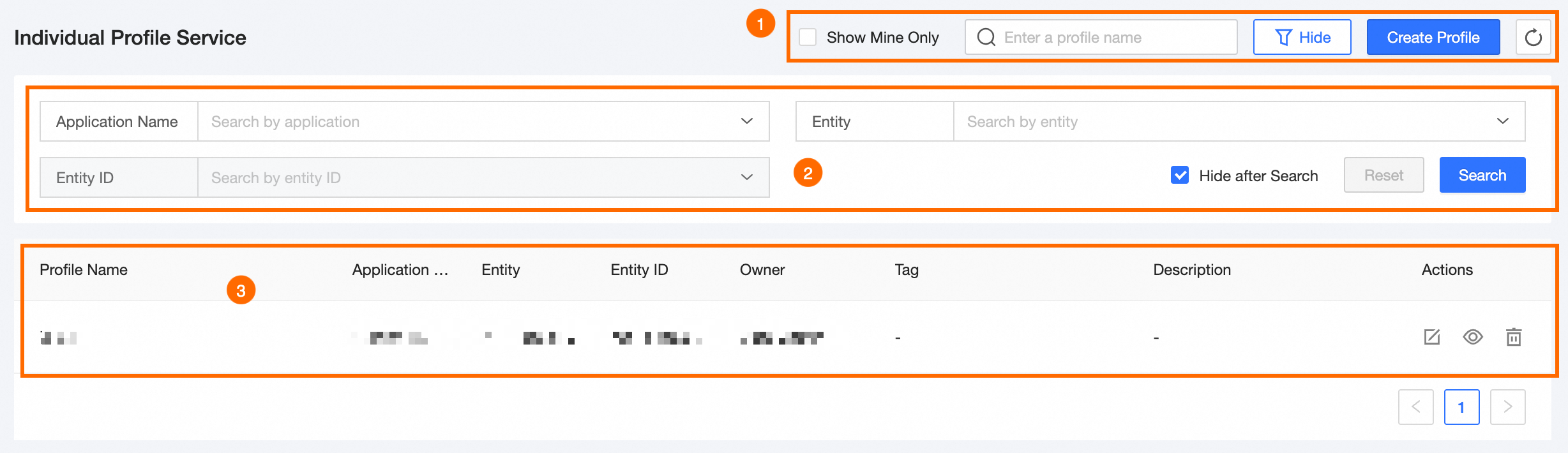
The individual profile service page contains a feature area, a filter area, and the profile service list.
|
Block |
Description |
|
①Feature area |
|
|
②Filter area |
|
|
③Individual profile service list |
Lists all profile services with columns: Profile Name, Application Name, Entity, Entity Identity, Owner, Tag, Description, and Actions. Supported actions:
|
 to edit.
 to view the profile page and generate a profile by entity ID.
 to delete the profile service.
Create individual profile service
-
On the Dataphin home page, select Tag > Tag Application.
-
In the left-side navigation pane, select Service Management > Individual Profile Service.
-
On the Individual Profile Service page, click Create Profile.
-
On the New Offline Service page, configure the following parameters.
Parameter
Description
Basic information
Profile name
Allows Chinese characters, letters, digits, and underscores (_). Maximum: 64 characters.
Profile code
Unique identifier. Allows letters and underscores (_). Maximum: 64 characters.
Application selection
Select an application.
Entity selection
Select an entity from the application.
Entity ID selection
Select the entity ID for the chosen entity.
Owner
Select the profile owner. Supports keyword search.
Profile description
Enter a description. Maximum: 1,000 characters.
Tag selection
Optional tags
Select tags from the list under the entity-entity ID and click
 to add them.
Added tags
Displays the selected tags.
-
Click Save.
You must select at least one tag before saving.