MSE Ingress gateways are Higress Enterprise Edition gateways compatible with NGINX Ingress gateways. Compared with open-source self-managed Ingress gateways, MSE Ingress gateways deliver doubled performance and are certified as industry-leading by the China Academy of Information and Communications Technology (CAICT) based on security maturity. They provide security protection, high integration, and high availability at lower cost. This topic walks you through the end-to-end setup: installing MSE Ingress Controller, deploying a backend service, configuring an Ingress rule, and verifying access.
MSE Ingress gateways cannot expose services in the kube-system namespace.
How it works
When you create a Kubernetes Ingress resource with ingressClassName: mse, MSE Ingress Controller detects it and translates it into a route on the MSE cloud-native gateway. Incoming traffic flows through a load balancer instance attached to the gateway and is forwarded to the target service in your cluster.
Client → CLB/NLB → MSE cloud-native gateway → Kubernetes Service → PodPrerequisites
Before you begin, make sure you have:
Conditions to check:
-
An ACK managed cluster, ACK Serverless cluster, or Container Compute Service (ACS) cluster running version V1.18 or later. To upgrade an older cluster, see Manually update ACK clusters.
Actions to complete:
-
Permissions granted to MSE Ingress Controller:
-
For ACK managed clusters and ACK Serverless clusters: Grant permissions
-
For ACS clusters: Grant permissions
-
Steps overview
This tutorial covers four steps:
Step 1: Install MSE Ingress Controller
ACK managed clusters or ACK Serverless clusters
-
Log on to the ACK console. In the left-side navigation pane, click Clusters.
-
On the Clusters page, click the cluster name. In the left-side navigation pane, choose Operations > Add-ons.
ACS
-
Log on to the ACS console. In the left-side navigation pane, click Clusters.
-
On the Clusters page, click the cluster ID. In the left-side navigation pane of the cluster details page, choose Operations > Add-ons.
-
On the Add-ons page, enter
msein the search box and click Install in the MSE Ingress Controller card.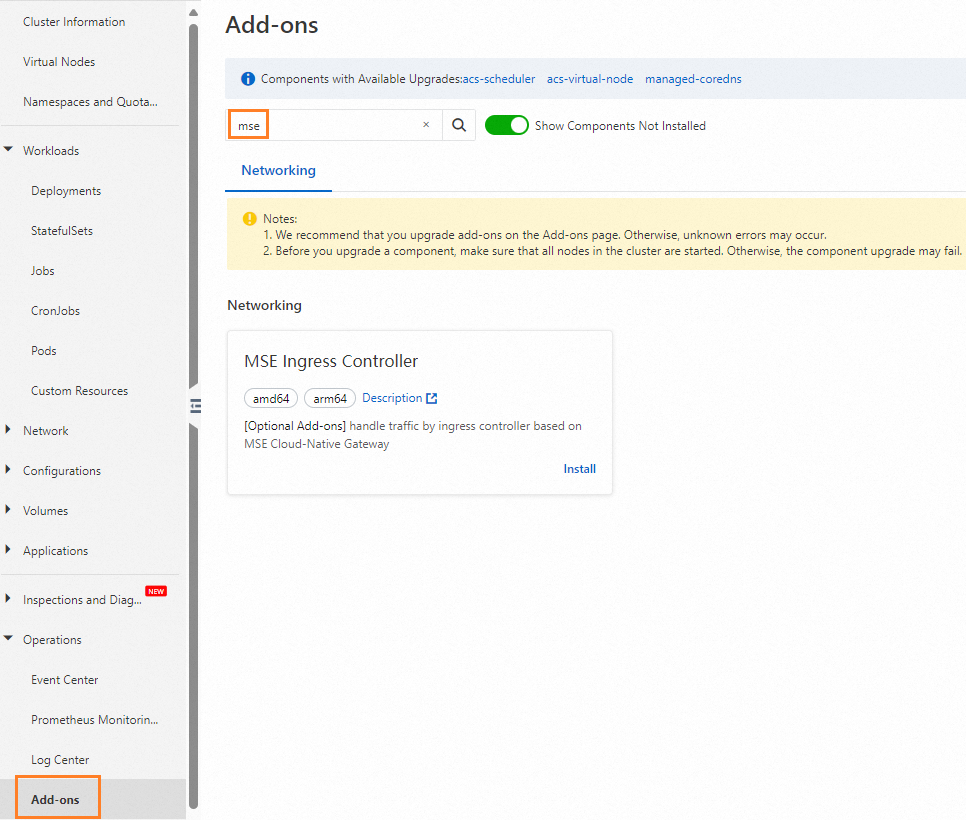
-
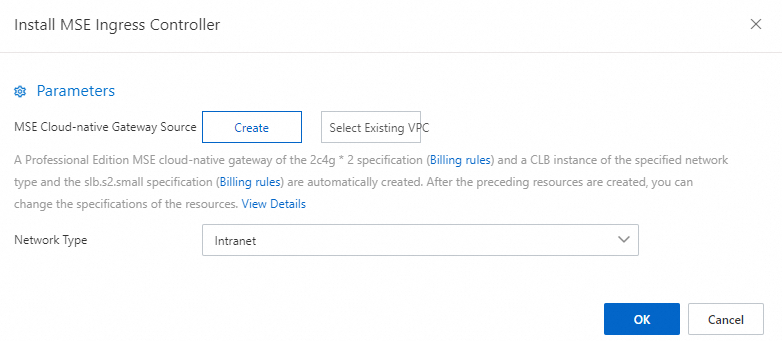
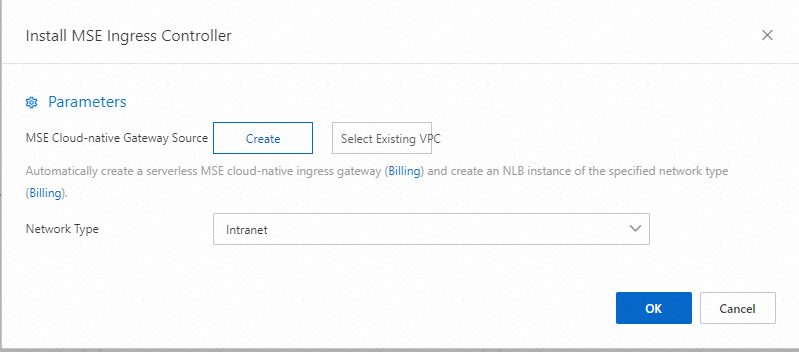
In the Install MSE Ingress Controller dialog box, configure the parameters and click OK.
ACK managed clusters or ACK Serverless clusters
ACK managed clusters and ACK Serverless clusters: A pay-as-you-go Professional Edition cloud-native gateway is automatically created with two nodes (2 CPU cores, 4 GB memory each) and a Standard I (slb.s2.small) Classic Load Balancer (CLB) instance based on the specified network type. You can change these specifications after creation.
ACS
ACS clusters: A serverless cloud-native gateway is automatically created with a Network Load Balancer (NLB) instance based on the specified network type.
 Important
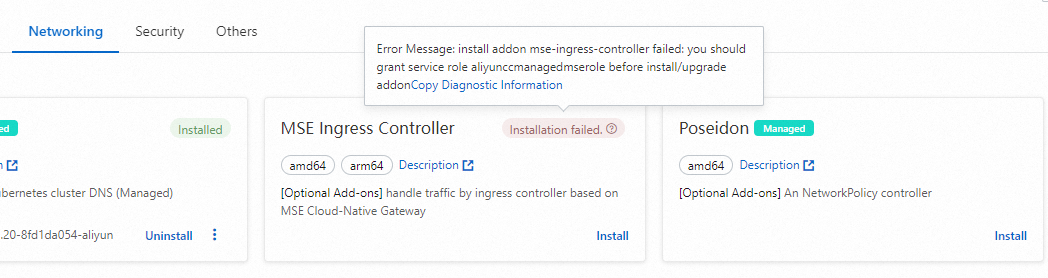
If the error Failed to pass the precheck. appears, grant permissions to MSE Ingress Controller and retry: - For ACK managed clusters and ACK Serverless clusters: Grant permissions - For ACS clusters: Grant permissions
-
Wait for the gateway to reach Listening status (typically 3–5 minutes). After installation, the system creates an
MseIngressConfigresource namedmse-ingress-pro/serverless-{clusterid}and an IngressClass resource namedmse. The gateway automatically listens to Ingress resources withingressClassName: msein your cluster. To check the gateway status in the ACK console: click the cluster name, then choose Workloads > Deployments > Custom Resources. On the Resource Objects tab, search formsein the API Group section to view theMseIngressConfigresource. Gateway status transitions in order: To verify with kubectl, run:Important- The lifecycle of
MseIngressConfigis tied to the MSE cloud-native gateway instance. Deleting anMseIngressConfigresource also deletes the associated gateway. Do not deleteMseIngressConfigresources unless instructed. - If an IngressClass namedmsealready exists in your cluster before installation, the system does not automatically create a new gateway orMseIngressConfigresource.Status Meaning Pending Gateway is being created. Wait about 3 minutes. Running Gateway is created and running. Listening Gateway is running and listening to Ingress resources. Failed Gateway is in an invalid state. Check Messagein theStatusfield for the cause.kubectl get mseingressconfig kubectl get ingressclass mse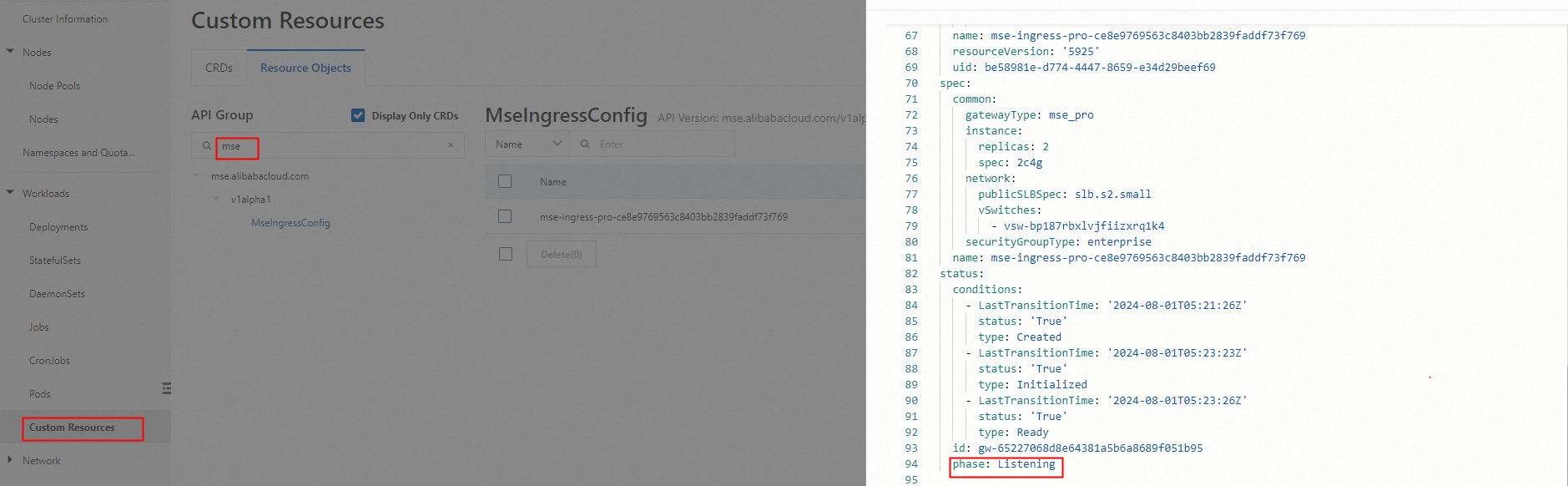
-
Log on to the MSE console and confirm that a cloud-native gateway named
mse-ingress-pro/serverless-{clusterid}appears in your region.
Step 2: Deploy a backend service
ACK managed clusters or ACK Serverless clusters
-
Log on to the ACK console. In the left-side navigation pane, click Clusters.
-
On the Clusters page, click the cluster name. In the left-side navigation pane, choose Workloads > Deployments.
ACS
-
Log on to the ACS console. In the left-side navigation pane, click Clusters.
-
On the Clusters page, click the cluster ID. In the left-side navigation pane, choose Workloads > Deployments.
-
On the Deployments page, click Create from YAML and apply the following manifest to deploy an
httpbinDeployment and Service in thedefaultnamespace.apiVersion: apps/v1 kind: Deployment metadata: name: httpbin namespace: default spec: replicas: 1 selector: matchLabels: app: httpbin template: metadata: labels: app: httpbin version: v1 spec: containers: - image: registry.cn-hangzhou.aliyuncs.com/mse-ingress/go-httpbin args: - "--version=v1" imagePullPolicy: Always name: httpbin --- apiVersion: v1 kind: Service metadata: name: httpbin namespace: default spec: ports: - port: 8080 protocol: TCP selector: app: httpbin -
Verify that the Deployment is running:
kubectl get deployment httpbinThe output should show
READY 1/1andAVAILABLE 1:NAME READY UP-TO-DATE AVAILABLE AGE httpbin 1/1 1 1 30s
Step 3: Configure an MSE Ingress rule
ACK managed clusters or ACK Serverless clusters
-
Log on to the ACK console and click the cluster name. In the left-side navigation pane, choose Network > Ingresses.
ACS
-
Log on to the ACS console and click the cluster ID. In the left-side navigation pane, choose Network > Ingresses.
-
On the Ingresses page, click Create Ingress.
-
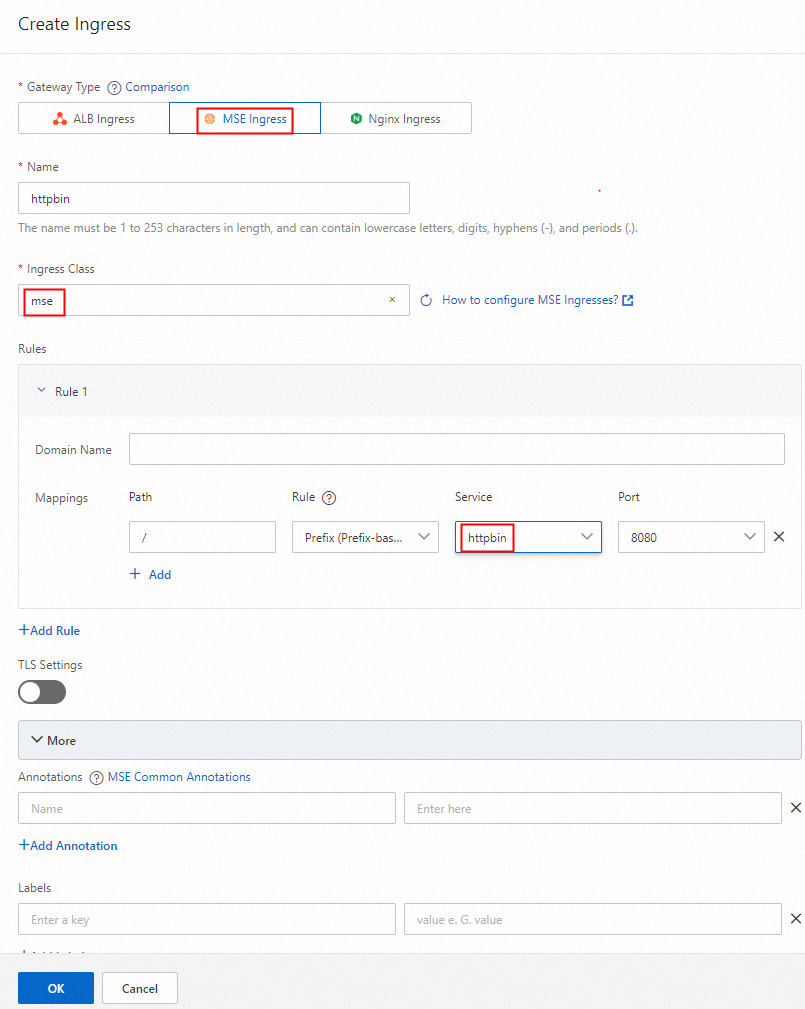
In the Create Ingress dialog box:
-
Set Gateway Type to MSE Ingress.
-
Set Ingress Class to
mse. -
Configure a route: select Prefix (Prefix-based Match) from the Rule drop-down list, enter
/in the Path field, and selecthttpbinfrom the Service drop-down list. -
Click OK.
-
-
Log on to the MSE console and confirm that the cloud-native gateway has a route whose name contains
httpbin.
Step 4: Access the service
-
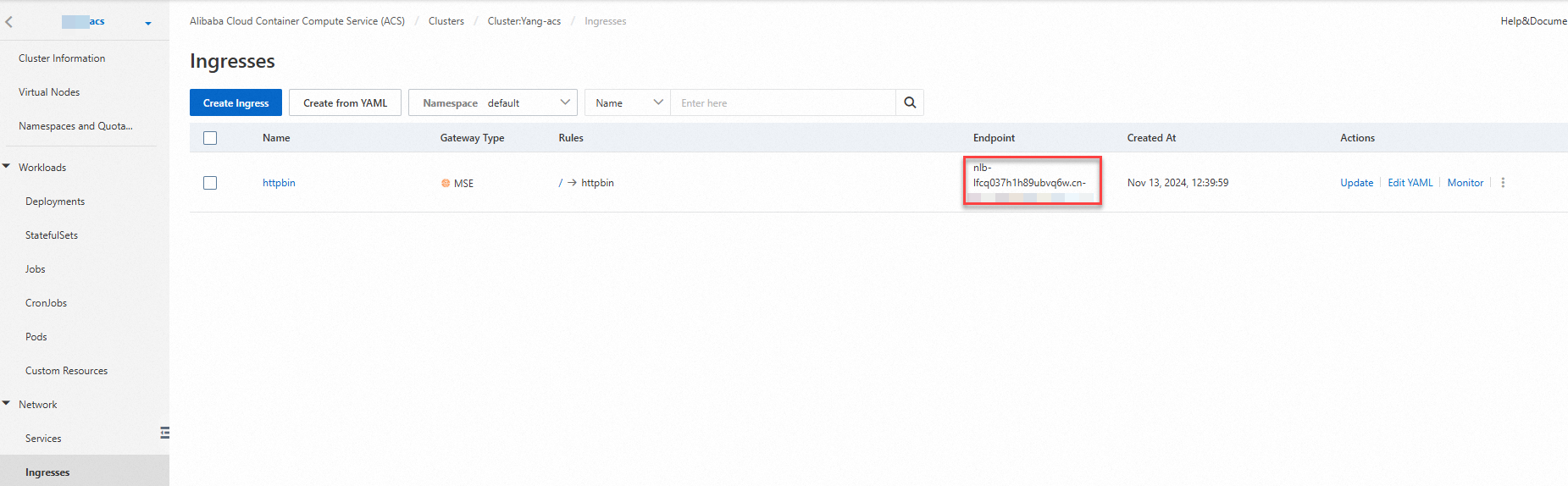
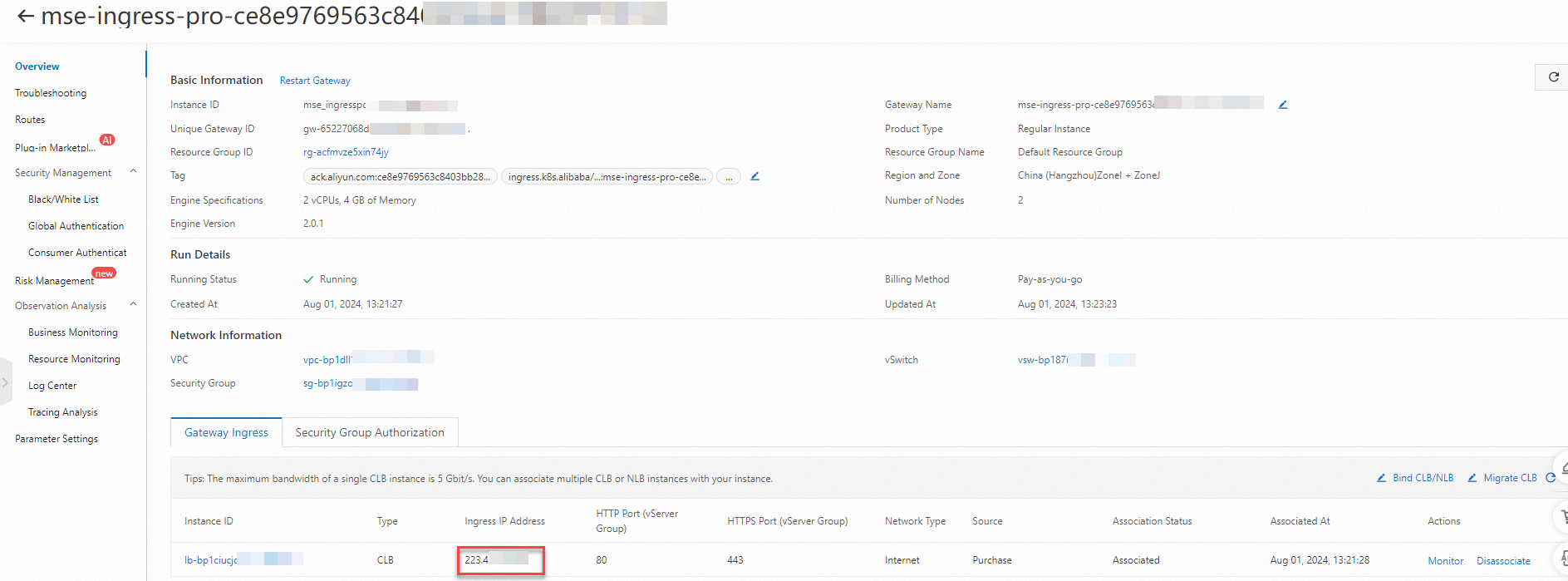
Get the gateway IP address using either method: From the ACK or ACS console: Navigate to Network > Ingresses and view the Ingress endpoint. From the MSE console: Go to Cloud-native Gateway > Gateways, click the gateway name, and view the load balancer IP address on the Overview page.
ACK managed clusters or ACK Serverless clusters
ACK/Serverless clusters:

ACS
ACS clusters:
-
Use a web browser, cmd, or other command-line tool to send a request to
<gateway-IP>/versionand verify the service is reachable.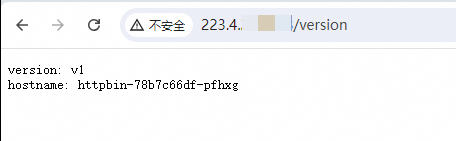
What's next
-
MSE Ingress management — Learn how MSE Ingress gateways work and explore advanced configuration options such as HTTPS, canary releases, and observability.