Compute Nest supports multiple service types, each suited to a different deployment scenario. This topic describes the definition and typical scenario of each service type, the configuration that makes up a service, and the process for publishing a service to customers.
Service types
The following table describes the service definition and the scenarios of each service type that Compute Nest supports.
| Service type | Service definition | Description | References |
| private service | A service that deploys resources and software in the customer's account. | Applies to Platform as a Service (PaaS) and Software as a Service (SaaS) software whose applications are deployed in a virtual private cloud (VPC) in the customer's account. | Create a private service |
| fully managed service | A service that deploys resources and software in the service provider's account. | Applies to PaaS and SaaS services whose applications are deployed in a VPC in the service provider's account. The service provider fully manages the customer's cloud resources and applications. Resources can be dedicated to a single customer in two modes: single-tenant fully managed, where resources are fully dedicated; and multi-tenant fully managed on Container Service for Kubernetes (ACK), where resources are dedicated per ACK pod. | Create a fully managed service |
| hosted O&M service | A service in which the customer authorizes the service provider to perform operations and maintenance (O&M) on the O&M objects in the customer's account for a specified period. | After a service provider publishes a hosted O&M service, a customer that creates a service instance is essentially granting authorization to the service provider. No cloud resources or applications are created. | Create a hosted O&M service |
Scenarios
The following sections describe the deployment scenarios of private services and fully managed services in Compute Nest. A hosted O&M service creates no cloud resources or applications, because a customer that creates a service instance grants O&M authorization to the service provider instead. Therefore, a hosted O&M service has no deployment scenario.
Private deployment scenario
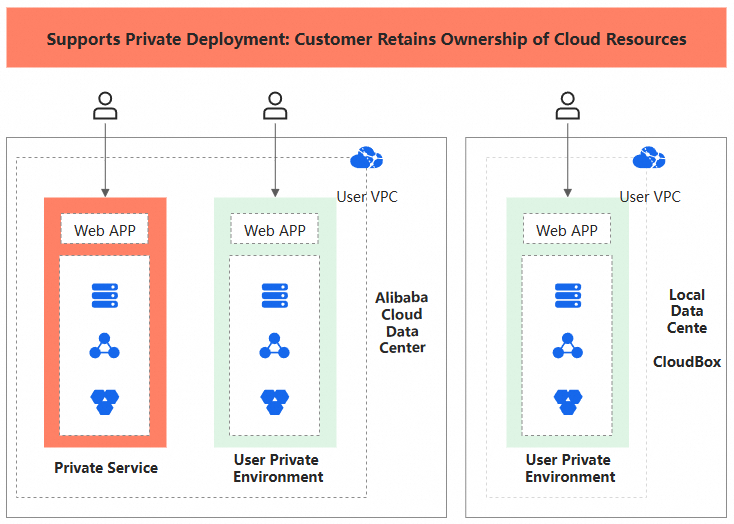
Features:
Resources are deployed to the customer's VPC.
Each customer has dedicated resources.
Compute Nest supports deployment in central data centers and CloudBox.
Capabilities of private services
Compute Nest provides the following capabilities for private services.
Integrated with Alibaba Cloud Marketplace for sales
Supports pay-as-you-go and subscription billing
Supports upgrade or downgrade
Provides a deployment page that supports custom orchestration
Checks inventory before provisioning, so that the required resources are available
Provides a price inquiry feature
Deploys resources and software to the customer's VPC with one click
Provides version management for services and centralized management of customer clusters
Provides a hosted O&M channel for maintaining customer clusters, and an auditing feature
Single-tenant fully managed scenario
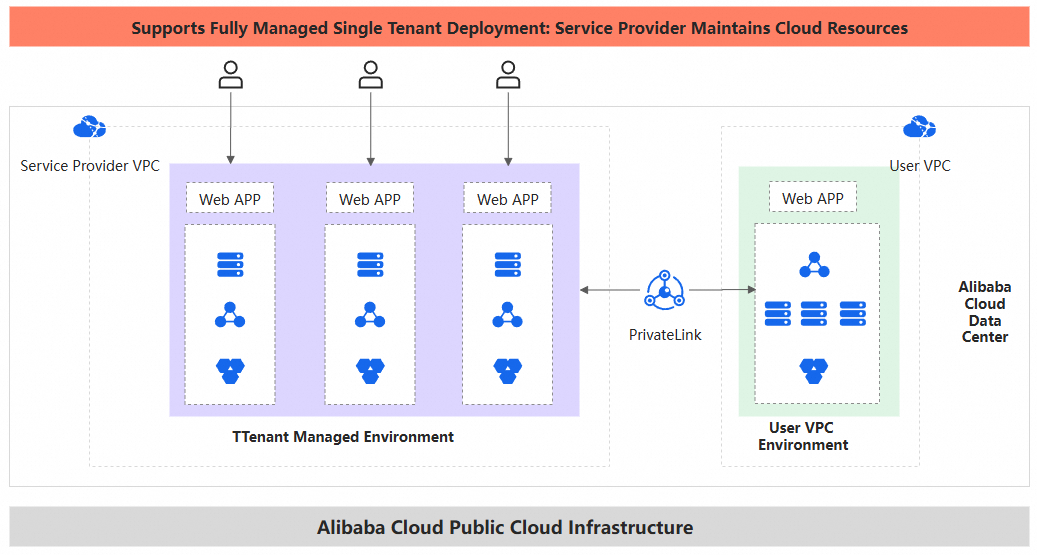
Features:
Resources are deployed to the service provider's VPC.
Resources are dedicated to each customer.
The service provider delivers the service, and the customer is not aware of the underlying resources.
Customers access the service over the Internet or through a VPC connection.
Multi-tenant fully managed ACK scenario
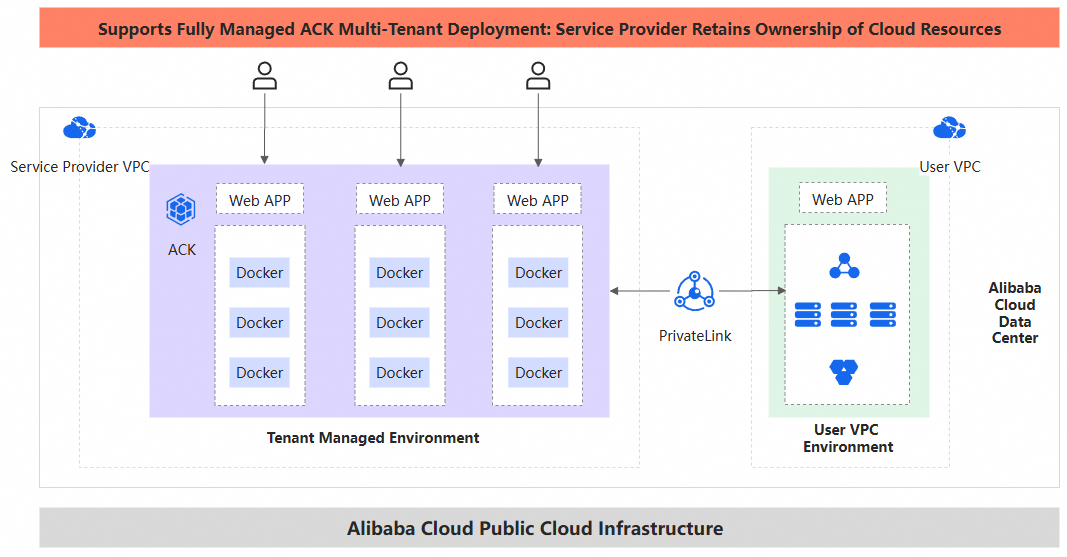
Features:
Resources are deployed to the customer's VPC.
Customer resources are deployed in ACK. Pod resources are dedicated to the customer, and the ACK cluster is shared.
Other resources that are not deployed in ACK can be either dedicated or shared.
Customers access the service through an ACK Ingress over the Internet or through a VPC connection.
Capabilities of fully managed services
Compute Nest provides the following capabilities for fully managed services. Capabilities that apply to only one fully managed mode state that mode explicitly.
Integrated with Alibaba Cloud Marketplace for sales
Supports pay-as-you-go and subscription billing
Supports upgrade or downgrade
Provides a deployment page that supports custom orchestration
Provides orchestration capabilities for custom components
Checks inventory before provisioning, so that the required resources are available
Deploys resources and software to the service provider's account with one click
Connects the network to the customer's VPC
PrivateLink
VPC peering connection
Provides version management for services and centralized management of customer clusters
Provides monitoring for fully managed services, and customers can view the monitoring data
Supports multi-account management through Resource Directory in single-tenant fully managed scenarios
Service creation process
Creating a service in Compute Nest consists of three ordered activities: architecture planning, deployment package creation, and service configuration.
Determine the deployment architecture.
Before you create a service, plan the deployment architecture of the service, such as the types and configurations of the cloud resources that you need and the network architecture.
Create a deployment package.
Create a deployment package that fits your deployment scenario, such as an ECS image, a Helm chart, an OSS object, or a container image. For more information about deployment packages, see Overview.
Configure the service content.
After you determine the deployment architecture, configure the service parameters during service creation. The parameters cover the basic information of the service, deployment service, service O&M, and advanced configuration.
Service configuration items
The configuration items vary based on the service type. The following table uses the configuration items of a private service as an example. For the configuration items of a fully managed service or a hosted O&M service, see the creation documentation of the corresponding service type, listed in the References column of the Service types section.
| Configuration area | Configuration item | Required | Description |
| Basic Information | Service Type | Yes | Select the service type. Compute Nest supports multiple service types. |
| Basic Information | Service Information | Yes | The Service Information area contains the service icon, service name, service description, and version description of the service that you create. |
| Basic Information | Default Prefix for Service Instance Name | No | After you set a default prefix, the prefix is automatically filled in the service instance name field when a customer deploys a service instance. |
| Basic Information | Tag Configuration | No | Select or enter a complete tag key and tag value to attach tags to the service resources. If your account contains multiple types of resources that are associated in different ways, create and attach custom tags to the resources to classify and manage them centrally. For more information, see Add a custom tag. |
| Basic Information | Resource Group | No | Select the resource group that you want the service resources to join. A resource group groups the cloud resources that you own by dimensions such as usage, permissions, and ownership. This enables hierarchical resource management for multiple users and projects within an enterprise and provides more fine-grained authentication than an Alibaba Cloud account. For more information, see Resource groups. |
| Deployment Service | Deployment Settings | Yes | In the Deployment Settings area, use a template to define the resources that your service requires and the dependencies between the resources. The Deployment Settings area contains the deployment regions, template entry, and service plans of the service. Template entry supports two methods: select a classic scenario, or select a custom template. |
| Deployment Service | Deployment Time | No | Set the estimated deployment duration and the deployment timeout period of the service instance. For more information, see Deployment time configuration. |
| Deployment Service | Deployment Package Association | No | Select the deployment package that you want to associate with the service. If you have not created one yet, create a deployment package first. |
| Deployment Service | Application Group | No | Group the resources in the template so that customers can view and manage the resources more easily. |
| Service O&M | O&M | No | Specify whether the service supports hosted O&M for service instances after customers grant authorization. |
| Service O&M | Monitoring | No | Set a CloudMonitor alert template. Compute Nest then sends alert notifications to customers based on the trigger rules of the template. |
| Service O&M | Upgrade | No | Provide the service instance upgrade feature for customers. For more information, see Configure service upgrades. |
| Service O&M | Upgrade/Downgrade | No | After you configure this item, the service provider can allow customers to upgrade or downgrade the plans and parameters of service instances. |
| Advanced Configuration | Permission Settings | No | Set the access permissions for the deployment link that customers use. |
| Advanced Configuration | Trial Settings | No | Configure the trial feature for the templates or plans of the service so that customers can start a free trial of the service. |
| Advanced Configuration | Network Settings | No | After you configure this item, customers can access the service over PrivateLink instead of the public Internet. |
| Advanced Configuration | License Settings | No | Configure the license management feature for the service. For more information, see Authenticate the validity period of a service instance. |
Service publishing process
The following table describes the steps for publishing a service, from testing the service to optionally listing the service on Alibaba Cloud Marketplace.
| Step | Description |
| Test the service | After the service is saved, test the service to make sure that it works as expected. For more information, see Test a service. |
| Pre-publish | Pre-publishing locks the version, which you can share with specific customers. |
| Submit for review | After testing is complete, click Submit for Review to start the service review process. Alibaba Cloud completes the review within three business days. |
| Publish the service | After the service is approved, click Publish Service to publish the service. After the service is published, you can provide the deployment link of the service to customers. A customer can open the link to create a service instance. |
| (Optional) List the service on Alibaba Cloud Marketplace | To let customers purchase the service online, list the service on Alibaba Cloud Marketplace. For more information, see Overview of selling Compute Nest services in Alibaba Cloud Marketplace. |