Local throttling caps the number of requests each pod accepts, protecting services from overload during traffic spikes, resource exhaustion, or denial-of-service attacks. Each Envoy sidecar proxy enforces limits independently using the token bucket algorithm: tokens refill at a fixed interval, and each incoming request consumes one token. When no tokens remain, the proxy rejects the request with HTTP 429 (Too Many Requests).
Because throttling is enforced per pod, the effective cluster-wide limit scales with the number of replicas. For example, a service with 3 replicas and a limit of 10 requests per 60 seconds accepts up to 30 total requests across all instances.
| Approach | Scope | Use when |
|---|---|---|
| Local throttling (this document) | Per pod -- each instance enforces its own limit independently | You want simple, low-latency protection without external dependencies |
| Global throttling | Shared across all instances -- a central counter tracks the total | You need a precise cluster-wide limit regardless of replica count |
Prerequisites
Before you begin, make sure that you have:
A Service Mesh (ASM) instance that meets one of these version requirements:
Enterprise Edition or Ultimate Edition: version 1.14.3 or later. To upgrade, see Update an ASM instance
Standard Edition: version 1.9 or later. Standard Edition supports only the native Istio rate limiting approach. See Enabling Rate Limits using Envoy in the Istio documentation
A Kubernetes cluster added to the ASM instance
Automatic sidecar proxy injection enabled for the
defaultnamespace. See "Enable automatic sidecar proxy injection" in Manage global namespaces
Deploy sample services
Deploy HTTPBin and sleep as sample services, then verify connectivity.
Create an
httpbin.yamlfile with the following content:Deploy the HTTPBin service:
kubectl apply -f httpbin.yaml -n defaultCreate a
sleep.yamlfile with the following content:Deploy the sleep service:
kubectl apply -f sleep.yaml -n defaultOpen a shell in the sleep pod and send a test request:
kubectl exec -it deploy/sleep -- sh
curl -I http://httpbin:8000/headers
Expected output:
HTTP/1.1 200 OK
server: envoy
date: Tue, 26 Dec 2023 07:23:49 GMT
content-type: application/json
content-length: 353
access-control-allow-origin: *
access-control-allow-credentials: true
x-envoy-upstream-service-time: 1
A
200 OKresponse confirms connectivity between the two services.
Throttle all requests to a specific port
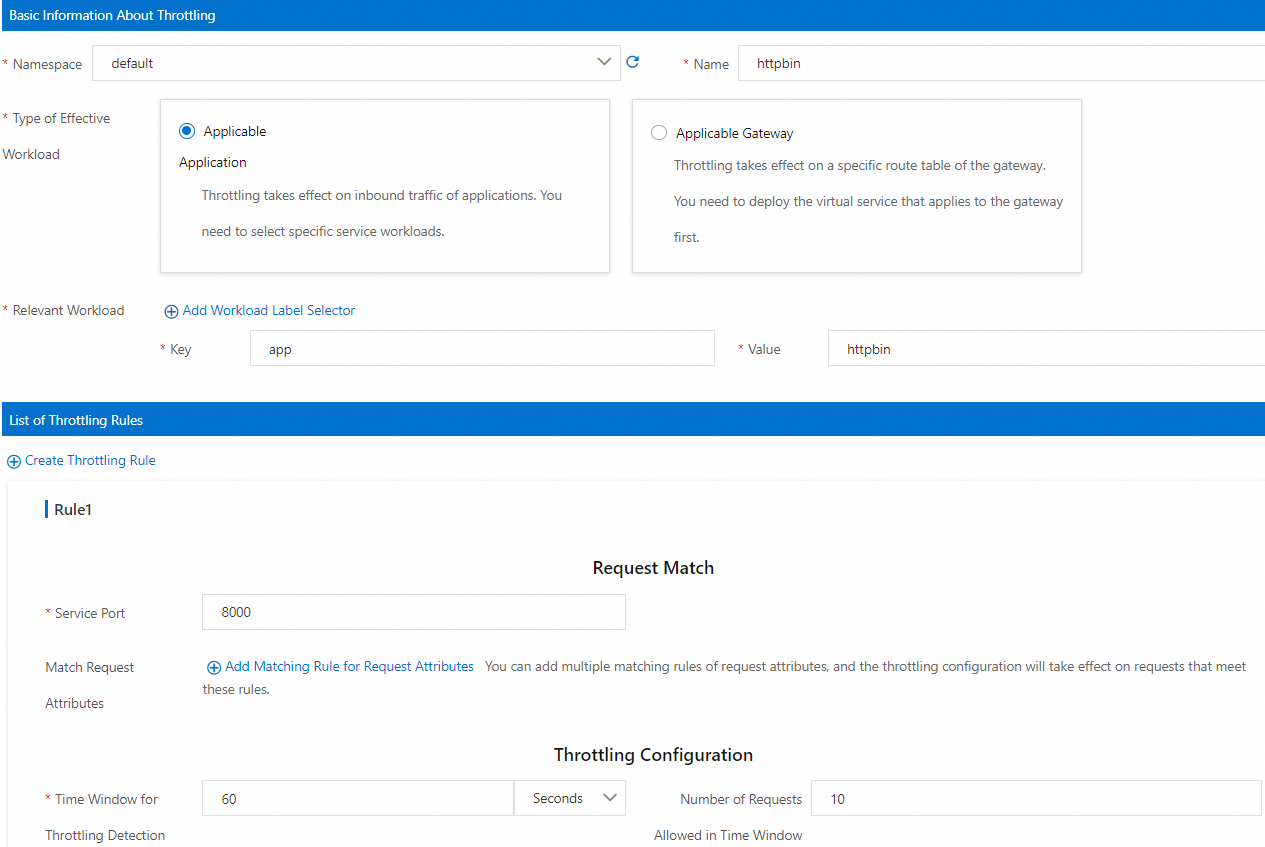
This scenario limits all requests to port 8000 of the HTTPBin service to 10 requests per 60 seconds per pod.
Create the throttling rule
Log on to the ASM console. In the left-side navigation pane, choose Service Mesh > Mesh Management.
On the Mesh Management page, click the name of the ASM instance. In the left-side navigation pane, choose Traffic Management Center > Rate Limiting. Click Create.
On the Create page, configure the following parameters, then click OK.
Section Parameter Value Basic Information About Throttling Namespace defaultName httpbinType of Effective Workload Applicable Application Relevant Workload Key: app, Value:httpbinList of Throttling Rules Service Port 8000(the HTTP port declared in the HTTPBin Kubernetes Service)Throttling Configuration Time Window for Throttling Detection 60secondsNumber of Requests Allowed in Time Window 10Click OK.
Verify the throttling rule
Open a shell in the sleep pod:
kubectl exec -it deploy/sleep -- shSend 11 requests -- the first 10 consume all available tokens, and the 11th is rejected:
for i in $(seq 1 11); do curl -s -o /dev/null -w "Request $i: %{http_code}\n" http://httpbin:8000/headers; doneExpected output (the first 10 return 200, the 11th returns 429):
Request 1: 200
...
Request 10: 200
Request 11: 429
You can also inspect the full response headers of a rejected request:
curl -v http://httpbin:8000/headers< HTTP/1.1 429 Too Many Requests < x-local-rate-limit: true < content-length: 18 < content-type: text/plainThe
429 Too Many Requestsstatus code andx-local-rate-limit: trueheader confirm that local throttling is active.
Throttle requests to a specific path on a port
This scenario limits only requests to the /headers path on port 8000 of the HTTPBin service. Requests to other paths, such as /get, remain unthrottled.
Create the throttling rule
Log on to the ASM console. In the left-side navigation pane, choose Service Mesh > Mesh Management.
On the Mesh Management page, click the name of the ASM instance. In the left-side navigation pane, choose Traffic Management Center > Rate Limiting. Click Create.
On the Create page, configure the following parameters, then click OK.
Section Parameter Value Basic Information About Throttling Namespace defaultName httpbinType of Effective Workload Applicable Application Relevant Workload Key: app, Value:httpbinList of Throttling Rules Service Port 8000Match Request Attributes Matched Attributes Request Path Matching Method Prefix Match Matched Content /headersThrottling Configuration Time Window for Throttling Detection 60secondsNumber of Requests Allowed in Time Window 10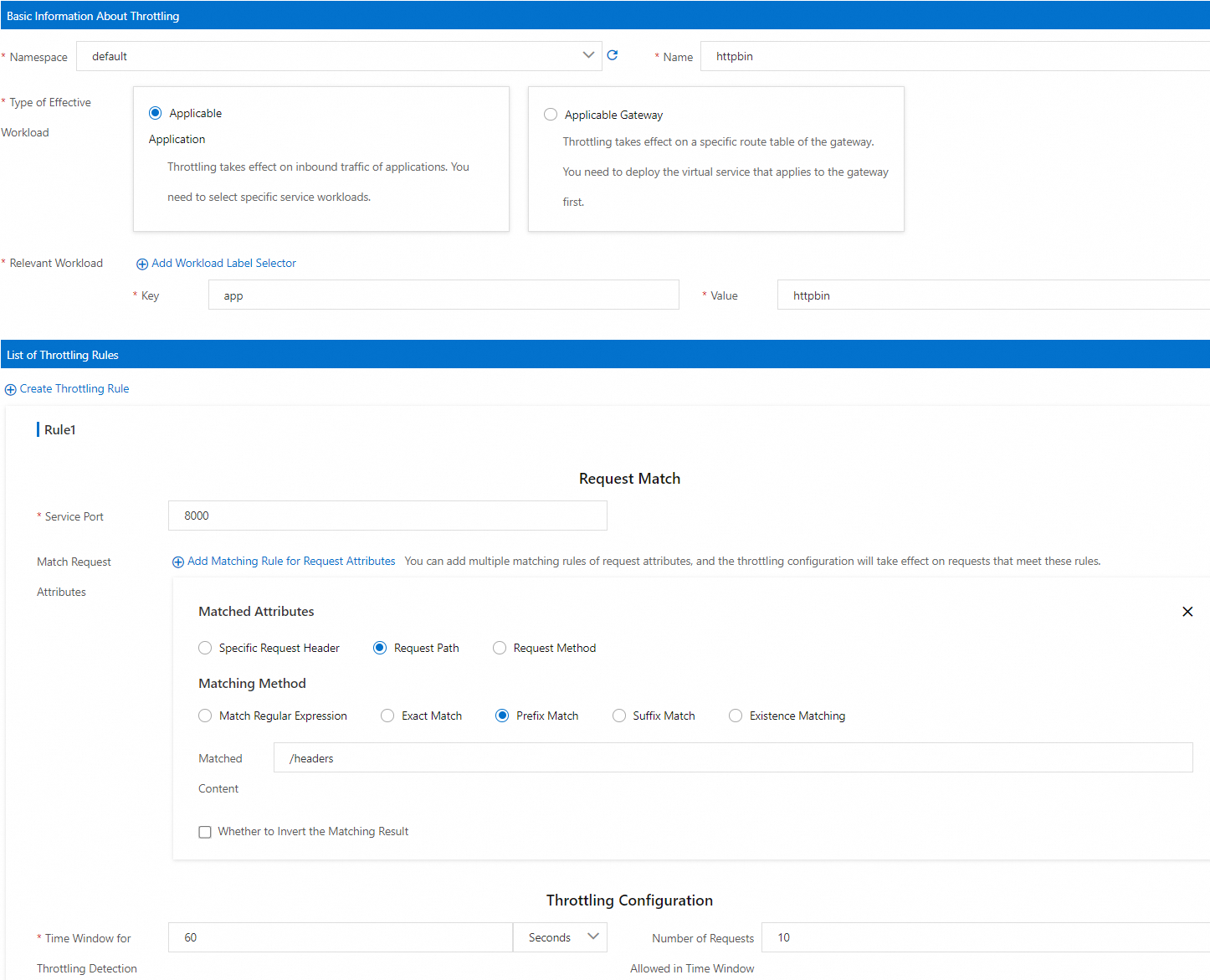
Verify the throttling rule
Open a shell in the sleep pod:
kubectl exec -it deploy/sleep -- shSend 11 requests to
/headers-- the first 10 succeed, the 11th is rejected:for i in $(seq 1 11); do curl -s -o /dev/null -w "Request $i: %{http_code}\n" http://httpbin:8000/headers; doneExpected output:
Request 1: 200
...
Request 10: 200
Request 11: 429
Confirm that requests to other paths are not throttled:
curl -s -o /dev/null -w "%{http_code}\n" http://httpbin:8000/getExpected output:
200The
200response confirms that throttling applies only to the/headerspath.
View local throttling metrics
Local throttling exposes four Envoy counter metrics. Use these to monitor throttling behavior in production.
| Metric | Type | Description |
|---|---|---|
envoy_http_local_rate_limiter_http_local_rate_limit_enabled | Counter | Total requests evaluated by the throttling filter |
envoy_http_local_rate_limiter_http_local_rate_limit_ok | Counter | Requests allowed (tokens available in the bucket) |
envoy_http_local_rate_limiter_http_local_rate_limit_rate_limited | Counter | Requests with no tokens available (not necessarily rejected -- see enforced) |
envoy_http_local_rate_limiter_http_local_rate_limit_enforced | Counter | Requests rejected with HTTP 429 |
The rate_limited count may differ from enforced when the enforcement percentage (filter_enforced) is set below 100%. In that case, some token-exhausted requests are tracked but not rejected.
To collect these metrics with Prometheus:
Configure
proxyStatsMatcheron the sidecar proxy. Select Regular Expression Match and set the value to.*http_local_rate_limit.*. Alternatively, click Add Local Throttling Metrics. For details, see proxyStatsMatcher.Redeploy the HTTPBin Deployment for the updated sidecar configuration to take effect. See "(Optional) Redeploy workloads" in Configure sidecar proxies.
Configure a throttling rule and run request tests as described in Throttle all requests to a specific port or Throttle requests to a specific path on a port.
Query throttling metrics from the HTTPBin sidecar:
kubectl exec -it deploy/httpbin -c istio-proxy -- curl localhost:15020/stats/prometheus | grep http_local_rate_limitExample output:
envoy_http_local_rate_limiter_http_local_rate_limit_enabled{} 37
envoy_http_local_rate_limiter_http_local_rate_limit_enforced{} 17
envoy_http_local_rate_limiter_http_local_rate_limit_ok{} 20
envoy_http_local_rate_limiter_http_local_rate_limit_rate_limited{} 17
What's next
Query parameter matching: In ASM 1.19.0 and later, use the
limit_overridesfield to match requests by query parameters. See ASMLocalRateLimiter field reference.Global throttling: Enforce a shared limit across all pod instances with ASMGlobalRateLimiter.
Ingress gateway throttling: Apply local or global throttling at the ingress gateway.
Traffic warm-up: Gradually ramp up traffic to new pods to avoid timeouts during scaling. See Use the warm-up feature.
Circuit breaking: Protect services from cascading failures with the
connectionPoolfield. See Configure circuit breaking.